herdr-lcars
Health Pass
- License — License: MIT
- Description — Repository has a description
- Active repo — Last push 0 days ago
- Community trust — 10 GitHub stars
Code Warn
- process.env — Environment variable access in bin/lcars-bridge.mjs
Permissions Pass
- Permissions — No dangerous permissions requested
No AI report is available for this listing yet.
Command up to 2,000 Herdr AI agents from one LCARS bridge, track Claude/Codex quota per account, and hand off verified context without losing work.
LCARS for Herdr — AI Agent Fleet Command Center
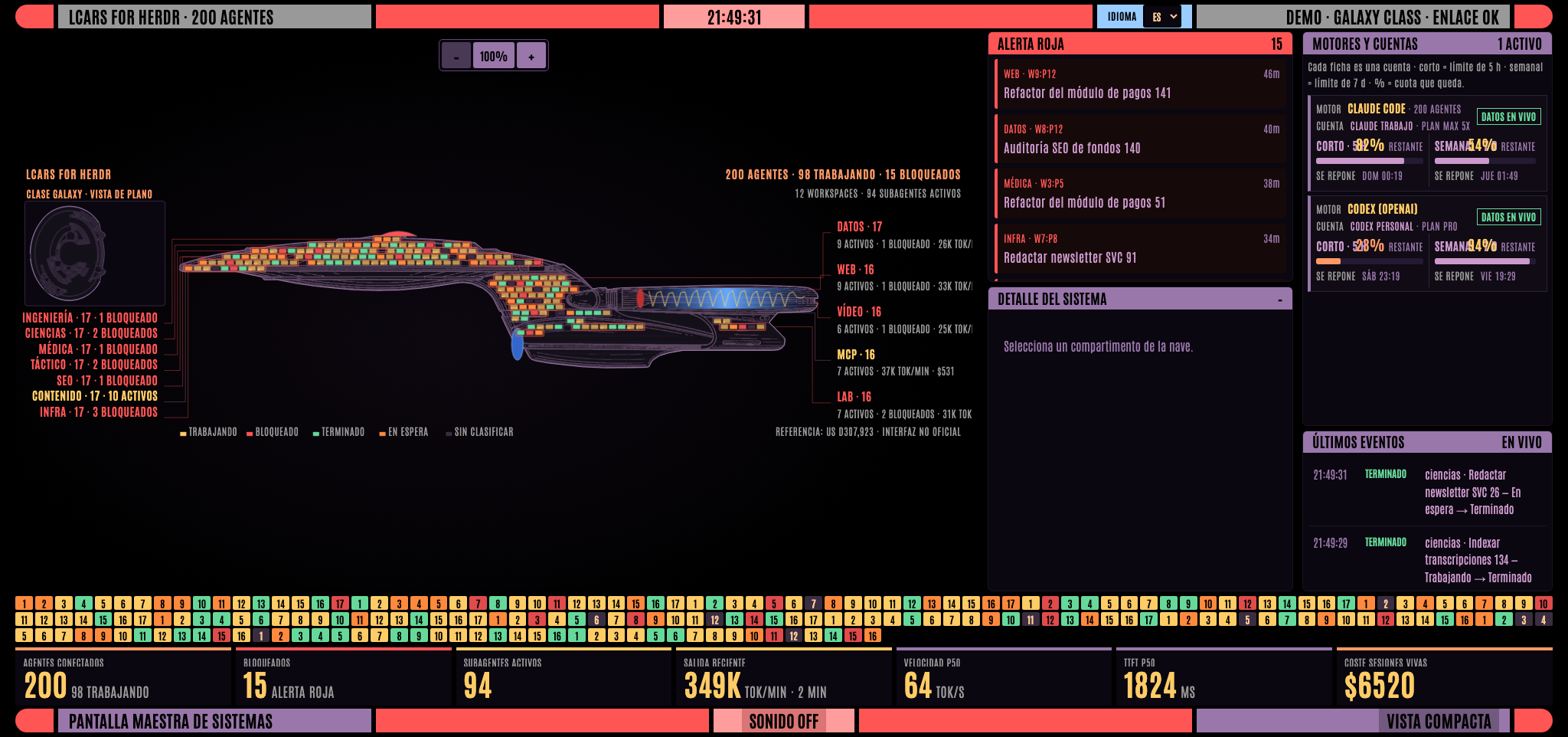
Command up to 2,000 AI agents from one LCARS bridge.
Release v0.1.0 · English · Español
LCARS for Herdr is the live command center for Herdr: see who is working or
blocked, track Claude Code and Codex quota per account, and hand off verified context between
engines without losing or duplicating work.
Runtime requirements: Herdr 0.9.1+ and Node 22+. Plugin v0.1.0 supports macOS and Linux; Windows is
available as a preview (see Windows).
When an engine runs out of quota or is no longer the right choice, LCARS opens another one in the
same checkout, delivers the saved context, and keeps the source agent open until the operator
verifies the handoff.
[!IMPORTANT]
LCARS for Herdr is an unofficial, fan-made interface and is not affiliated with or endorsed by
Herdr, CBS Studios, Paramount, or the owners of the referenced marks and designs. See
NOTICE.md.
1. Install Herdr first
LCARS for Herdr is a plugin, not a standalone replacement for Herdr. If herdr is not already
installed, follow the official Herdr installation guide. The
shortest supported routes are:
# macOS with Homebrew
brew install herdr

# or the official direct installer on macOS / Linux
curl -fsSL https://herdr.dev/install.sh | sh
Confirm both prerequisites before continuing:
herdr --version  # must be 0.9.1 or newer
node --version   # must be v22 or newer
Start Herdr at least once with herdr; LCARS talks only to its local socket and cannot operate
without it.
2. Install LCARS for Herdr v0.1.0
Install the stable release from GitHub:
herdr plugin install jlcases/herdr-lcars --ref v0.1.0 --yes
herdr plugin action invoke dev.jlcases.herdr-lcars.ping     # verify the installation
herdr plugin action invoke dev.jlcases.herdr-lcars.open     # open the dashboard
During development, link the directory instead of installing it:
herdr plugin link /path/to/herdr-lcars
herdr plugin unlink dev.jlcases.herdr-lcars
Herdr starts the bridge once when the session begins ([[startup]]). Available actions:
| Action | What it does |
|---|---|
open |
Starts the bridge if necessary and opens the ship plan (MSD). |
open-deck |
Opens the compact deck. |
restart |
Restarts the process. Open tabs reload automatically. |
stop |
Stops the bridge. |
fuel |
Opens the per-account fuel view in a modal window. |
accounts |
Opens the local catalog of Claude/Codex profiles. |
ping |
Reports Node, bridge, socket, and detected-account health through a notification. |
The fuel view can also be opened directly as a pane:
herdr plugin pane open --plugin dev.jlcases.herdr-lcars --entrypoint fuel
Keyboard shortcuts in ~/.config/herdr/config.toml:
[[keys.command]]
key = "prefix+shift+f"
type = "plugin_action"
command = "dev.jlcases.herdr-lcars.open"
description = "LCARS dashboard"

[[keys.command]]
key = "prefix+shift+g"
type = "plugin_action"
command = "dev.jlcases.herdr-lcars.fuel"
description = "fuel by account"
Configuration
herdr plugin config-dir dev.jlcases.herdr-lcars prints the directory containing config.env,
which is created automatically on first use:
LCARS_PORT=4700        # dashboard and OTLP receiver
LCARS_LOW_QUOTA=10     # alert below this remaining percentage, per account
# NODE_BIN=/opt/homebrew/bin/node   # only if Node detection fails
The Herdr server runs under launchd with PATH=/usr/bin:/bin:/usr/sbin:/sbin, so node is not
directly available to it. That is why every manifest command starts with sh: bin/plugin
locates Node (nvm, fnm, volta, asdf, Homebrew) and requires version 22 or newer. If startup fails,
run herdr plugin log list --plugin dev.jlcases.herdr-lcars. The bridge's own log isbridge.log inside the plugin state directory.
Platform compatibility
| System | Actual status | Limitation |
|---|---|---|
| macOS | Supported and tested with a real fleet. | Claude is read from Keychain; the launcher handles launchd's minimal PATH. |
| Linux | Declared in the manifest and validated in CI (Node, shell, and tests). | A complete install against a real Herdr instance on Linux has not yet been tested. Claude uses the profile's official private file. |
| Windows | Preview. Verified by hand against a real Herdr 0.9.1 on Windows 11 (Node 26, Claude Code); the automated suite also runs there. | Native launcher in Node (bin/plugin.mjs); action ids carry a -win suffix. Codex was only exercised with synthetic rollouts (path matching); OpenCode reads its database with node:sqlite (falls back to a sqlite3 binary on Node < 22.13) and was checked against a real database. See Windows. |
The manifest declares platforms = ["macos", "linux", "windows"]. Every macOS/Linux entry keeps its
original sh command; each Windows entry is a twin that runs node bin/plugin.mjs instead.
Windows (preview)
Herdr requires action and pane ids to be unique inside a plugin, even when their platforms do not
overlap, so the Windows twins are named with a -win suffix: open-win, open-deck-win,restart-win, stop-win, fuel-win, accounts-win and ping-win. Use them instead of the ids in
the table above, including in key bindings:
[[keys.command]]
key = "prefix+shift+f"
type = "plugin_action"
command = "dev.jlcases.herdr-lcars.open-win"
description = "LCARS dashboard"
nodemust be on thePATHof the Herdr server.NODE_BINinconfig.envselects the interpreter
that runs the bridge, not the launcher itself.The bridge is a detached process: it survives the launcher exiting.
stop-winends it withTerminateProcess, which is not a graceful shutdown; an interrupted context write leaves a stale
lock that expires by itself.Before killing a PID from
bridge.pid, the launcher reads that process's command line through
PowerShell (WMI) and only proceeds if it is this installation'sbin/lcars-bridge.mjs.Files are private by virtue of the user-profile ACLs, not POSIX modes (Windows ignores
0700/0600).Claude Code runs the
statusLinecommand through Git Bash, so the existingbin/lcars-statusline
works unchanged.bin/lcars-statusline.mjsis a Node equivalent with nosed/mktempdependency;
in~/.claude/settings.jsonuse forward slashes so bash does not eat the backslashes:"statusLine": { "type": "command", "command": "node \"C:/path/to/herdr-lcars/bin/lcars-statusline.mjs\" <your original statusline command>" }If the original command is a compound shell snippet rather than a single program, pass it through
bash -cwith single quotes:node "…/lcars-statusline.mjs" bash -c '<original command>'.Run
herdr integration install claudeso Herdr reports each Claude session id; without it the
bridge cannot match a pane to its session-scoped data (context, cost, subagents).
Multiple Claude or Codex accounts
Yes: each account lives in its own official isolated directory, and a handoff can target both an
engine and an account. An open session never swaps credentials mid-turn; LCARS for Herdr opens another
pane with the selected profile, delivers the memory, and keeps the source visible. Claude → Claude
and Codex → Codex handoffs also work.
The accounts action opens accounts.json, next to config.env. The file accepts no tokens or
commands—only identifiers, labels, and paths:
{
  "version": 1,
  "profiles": [
    { "id": "claude-work", "provider": "claude", "label": "Claude work", "home": "~/.claude-work" },
    { "id": "claude-personal", "provider": "claude", "label": "Claude personal", "home": "~/.claude-personal" },
    { "id": "codex-work", "provider": "codex", "label": "Codex work", "home": "~/.codex-work" }
  ]
}
Authenticate each directory locally through the CLI's official flow, then restart the bridge (or
wait up to one minute for the catalog to be reloaded):
CLAUDE_CONFIG_DIR="$HOME/.claude-work" claude       # then run /login
CODEX_HOME="$HOME/.codex-work" CODEX_SQLITE_HOME="$HOME/.codex-work" codex login
Do not copy auth.json, keychains, or OAuth tokens between machines. On another machine—including
a remote machine stored in Herdr—authenticate its profiles there and configure this plugin there.
LCARS for Herdr passes only CLAUDE_CONFIG_DIR or CODEX_HOME/CODEX_SQLITE_HOME to the new pane,
plus a non-secret alias used to attribute quota.
Account switching is deliberately manual and confirmed: when a tank is exhausted, you select the
other account in the detail panel. There is no silent subscription rotation, and a live session is
never modified.
Standalone use, without the plugin
node bin/lcars-bridge.mjs --open          # http://127.0.0.1:4700
node bin/lcars-bridge.mjs --port 4700 --host 127.0.0.1 --socket ~/.config/herdr/herdr.sock
open "http://127.0.0.1:4700/?demo=200"    # synthetic fleet to see the dashboard at scale
Two views
- MSD (
/msd.html): a Master Systems Display inspired by the Enterprise-D plan sheet and
designed for 32:9 displays (Samsung G9, 5120×1440). The silhouette is traced from the published
side-elevation and plan-view drawings in US design patent D307,923 (Andrew Probert, 1990).
OpenCV (tools/trace-ship.py) regeneratespublic/ship.jsonand the ink textures. See
NOTICE.md for the distinction between the expired design patent and third-party
copyright and trademark rights.
The fleet becomes a cutaway ship: saucer, neck, and engineering hull are filled by scanning lines
within each polygon, one compartment per agent. Agents are grouped by workspace, with a callout
line and margin label showing agent count, working, blocked, tok/min, and cost. The deflector
reports the Herdr connection, the nacelle glows with fleet output and contains the last-hour
sparkline, the bridge flashes on red alert, and the frame rails turn red whenever an agent is
blocked. Directly beneath the ship comes the strip of numbered tiles—one light per agent, retained
as part of the product's visual identity—followed by the numeric readouts. The operations area
gives the full-height primary column to system detail: selecting a workspace keeps all of its
agents visible as named cards, and selecting a card opens its telemetry and output underneath.
Engines and account quota occupy the other column; only a compact, scrollable window of recent
events sits below them. Double-click a compartment to jump to its terminal. On displays wider
than 2.3:1, the root route redirects here automatically
(?classic=1prevents the redirect). - Compact (
/index.html): the cell deck for 16:9 monitors and laptops.
Both views share the same handoff control, loading/error states, visible focus, and keyboard
navigation. The ES / EN selector changes dynamic text as well and preserves the choice between
sessions and views. The original LCARS/MSD color range is preserved; secondary text reuses colors
from the same palette with AA contrast. Antonio is served by the plugin itself (OFL), with no
request to Google Fonts.
What the compact view shows
| Area | Content |
|---|---|
| Left rail | Status filters with counts (blocked, working, completed, waiting). |
| Readouts | Connected agents, current work, average output over the last 2 minutes (last-hour sparkline), median speed, median TTFT, cost of live sessions, and remaining 5 h / 7 d quota. |
| Deck | One cell per agent, grouped by workspace. Color and pulse follow status; each cell shows tok/s for the latest request, cost, output tokens, used-context bar, and mini sparkline. Workspaces with blocked agents rise to the top. |
| Red alert | Blocked agents ordered by age. Click to select; double-click to jump to the terminal. |
| Detail | Speed, TTFT p50/p95, latency, requests, tokens, cache, cost, context, tools, turns, time series, and the last 40 terminal lines. “Go to terminal” focuses the pane in Herdr. |
| Recent events | A compact, scrollable window of state changes, prompts, completed turns, API errors, failed tools, and rejections. |
Buttons: SOUND (a brief completion chime and a stronger blocked-agent alarm), ROOM
(room-display mode without the right column).Esc clears the selection. Above 60 agents, cells switch to compact mode; above 140, to dense mode.
Where the data comes from
Herdr (
~/.config/herdr/herdr.sock):session.snapshotonce per second (topology, status,
title, cwd, Claude session id) plusevents.subscribeper pane for immediate state-change
reactions.Claude Code OpenTelemetry: the server is also an OTLP HTTP/JSON receiver
(/v1/logs,/v1/metrics). Eachapi_requestevent providesttft_ms,duration_ms,
tokens (input, output, cache read/write),cost_usd, model,stop_reason, andquery_source. Configure it in~/.claude/settings.jsonunderenv:"CLAUDE_CODE_ENABLE_TELEMETRY": "1", "OTEL_LOGS_EXPORTER": "otlp", "OTEL_METRICS_EXPORTER": "otlp", "OTEL_EXPORTER_OTLP_PROTOCOL": "http/json", "OTEL_EXPORTER_OTLP_ENDPOINT": "http://127.0.0.1:4700", "OTEL_LOGS_EXPORT_INTERVAL": "2000"Only sessions started after this change export telemetry.
Direct Claude usage: a bounded request once per minute to the fixed endpoint used by Claude
Code provides the 5 h / 7 d windows even with no active session. On macOS, it reads the token from
the Keychain service used by Claude Code; on Linux, from.credentials.jsoninside the
profile's isolated home, which must be private. The token exists only in memory during the
request: it is never logged, persisted, or sent to the browser. Anthropic does not document that
endpoint as a stable public API, so any failure degrades to statusline and cache data instead of
taking down the bridge.Claude Code statusline:
bin/lcars-statusline(.mjson Windows) wraps the existing statusline command and
writes each session's JSON to~/.cache/lcars-bridge/status/<session>.json. This provides used
context (%), accumulated cost as reported by Claude Code, and prompt-cache status. Its quota is a
per-session fallback, not the primary authority.Transcript JSONL (
~/.claude/projects/*/<session>.jsonl): fallback for sessions without
OTEL. It provides tokens, estimated cost, model, turns, and tools, but not TTFT (the UI shows–, never a fake zero). This is an undocumented Claude Code internal format; the parser is
defensive and disables itself as soon as the session exports OTEL.
Other CLIs (adapters)
Herdr reports the agent type for each pane and, for CLIs with an installed integration, the session
id. The server uses that information to enable one adapter per type (server/adapters/):
| CLI | Source | What it provides |
|---|---|---|
| Codex | Rollout JSONL files in ~/.codex/sessions/YYYY/MM/DD/rollout-*-<session>.jsonl (when Herdr does not report the session, it is matched by working directory) |
Per-response tokens (input, cache, output, reasoning), model and effort, real duration and TTFT per turn (task_complete), context-window usage, quota limits, tools, and errors |
| OpenCode | ~/.local/share/opencode/opencode.db SQLite database read with sqlite3 |
Actual cost, tokens (input, output, reasoning, cache), model and provider, duration per response, child sessions as subagents, tools, and API errors |
Prices for non-Anthropic models live in server/pricing-extra.json (a table derived from CASIA).
Pending: Kimi, pi, Gemini/Qwen, Grok, and Hermes.
Definitions
- tok/s =
output_tokens / (duration_ms − ttft_ms): decoding speed, excluding time to first
token. Without TTFT (transcript), the full duration is used, producing a lower value. Auxiliary
requests (session title, compaction) are excluded from speed and TTFT calculations. - Cost: OTEL
cost_usdwhen available; otherwise, the per-model API rate
(server/pricing.mjs), with cache reads priced at 10% of input and 5 min / 1 h writes at
125% / 200% (Fable 5.1: $0.25/M). The detail panel prefers the accumulated cost reported by the
Claude Code statusline. - Quotas: one per ACCOUNT, not one global value. Each credential has its own 5 h and 7 d windows
when the provider exposes them. Identity comes from~/.claude.json(oauthAccount) and~/.codex/auth.json; Claude's value comes first from the Claude Code usage endpoint, and Codex's
from its rollouts. The statusline remains a fallback.cachedUsageUtilizationfrom~/.claude.jsonis only a cold fallback and is labeled accordingly; it has been measured more
than 48 hours stale. Both rows keep their place: a missing or already-reset window says
no signal, never “full tank.” A window omitted for one tick is retained only if it belongs to
the same account and has not expired. Within the same window, consumption may only rise; after
the reset instant changes, it may fall. This prevents a late snapshot from turning 43% remaining
into a false 54%. The UI always shows percentage remaining, both in the number and in the bar. - Real time: every Claude usage reading, statusline update, or rollout update emits an immediate
accountsevent over the dashboard's existing SSE connection. It does not wait for the general
tick or open an unnecessary WebSocket. Claude's direct source is polled once per minute; “real
time” describes delivery to the dashboard, not a permanent connection to Anthropic. - Pace: how many percentage points spending differs from the window's clock.
↑30means usage
is running ahead of time. It is hidden during the first 5% of a window, where the ratio is noise,
and for deviations below five points. - Low-quota alert: a native Herdr notification when remaining quota falls below the threshold
(LCARS_LOW_QUOTA, 10% by default), once per account and rearmed after it rises above the
threshold.
Context memory and engine handoff
An agent is not a CLI: it is a directory with work in progress on a branch. The CLI is the engine,
and it can be replaced. What persists across engines is the context record, identified by(repository, branch, checkout) and stored outside the repository.
The record is written in two layers, deliberately kept separate:
- Mechanical, written by the bridge. Touched files come from
git, not from an engine's tool
calls. This is the fundamental decision: git sees what all eight engines change, including the
six whose transcripts LCARS for Herdr cannot read. Memory no longer depends on each CLI's format. - Narrative, written by the engine when possible. Goal, decisions, and next step are written
throughPOST /api/remember. This is intentionally optional: the engine you switch to when
quota runs out may be the least capable one, so memory cannot depend on disciplined journaling.
The record is not edited directly: every change is expressed as a validated event and folded into
a versioned snapshot. It is not presented as an event store and does not promise historical
reconstruction that the disk does not retain. When the source engine has a native reader (currently
Claude and Codex), its recent thread enriches the record rather than replacing it, and rereading it
does not duplicate turns.
The git snapshot uses status --porcelain=v2 -z: it preserves paths containing spaces, renames,
and the first character of each filename; an identical poll does not create a fake “change.” Each
context is identified by the full repository, branch, and checkout, and its disk key is SHA-256.
Snapshots are written under a per-context lock through a unique temporary file, fsync, atomic
replacement, and 0700/0600 permissions. Migrating from the old version preserves narrative and
discards unreliable mechanical data; an ambiguous legacy key is never shared between worktrees.
The handoff then:
- Builds the summary from the context record, not from the transcript. If no memory exists for
that context, nothing is opened. - Validates that the engine is installed, records the attempt, and opens a new pane in the same
directory. It starts the incoming engine there, waiting both for the shell to exist and for the
agent to become ready for input: registered is not the same as available. - Delivers the goal, next step, real files, decisions, failed attempts, recent thread, and what does
NOT transfer (permissions, MCP servers, in-flight tools, subagents), instructing the new engine
to reply only with its status and stop. - Marks the handoff as delivered or failed. Lineage advances only after confirmed delivery;
observing two engines polling the same checkout does not invent a handoff.
The source pane is never closed or modified. If the incoming engine fails to start, its pane is
closed and nothing is left behind. If transport fails during delivery, the new pane stays visible
because the outcome is ambiguous. The UI requires explicit confirmation and uses a request_id,
so a double-click or network retry cannot open two engines.
Architecture
Hexagonal, under server/context/. The domain and use cases import neither node:fs, git, nor
the Herdr socket: they receive already-constructed ports. That lets the entire handoff be exercised
with in-memory doubles and no real waits.
domain/          pure: identity, event vocabulary, the folded record, the summary
ports.mjs        contracts; an incomplete adapter fails at composition, not in production
usecases/        mechanical ingestion, narrative memory, reading, and handoff
adapters/        git, snapshot repository, engine catalog, Herdr, thread readers, clock
registry.mjs     readers by engine; adding one does not touch the domain
scheduler.mjs    decides when to observe (the use case decides what)
composition.mjs  the only module that knows concrete adapters
Performance and limits
- Each hot context runs one
git statusper observation;git logis queried only when HEAD
changes. The normal interval is 30 seconds, and the scheduler uses a pool of six workers instead
of aPromise.allthat could launch up to 200 processes. - Claude/Codex handoff readers process at most the last 8 MiB of JSONL. The live reader consumes
batches up to 16 MiB, rejects rows over 8 MiB, and keeps bounded queues. Records, files, decisions,
failures, turns, agents, and handoffs have separate limits. - SSE serializes each update once for all clients, caps connections, and stops writing to a client
while applying backpressure. Browser repaints are grouped withrequestAnimationFrame. - Unchanged polls do not rewrite a snapshot. Writes for different contexts can proceed in parallel;
writes for the same context are serialized across processes too.
Security
The server exposes terminal content, so it is confined to the local machine:
- It binds only to
127.0.0.1,localhost, or::1. In addition, every request must carry
a loopbackHost; when anOriginis present, it must also be an HTTP loopback origin on the
same port. This blocks both CORS attacks and DNS rebinding. NoAccess-Control-Allow-Origin
header is emitted. - All controls require
application/json, are limited to 64 KiB, and may operate only on panes or
directories that Herdr reports as active. Handoff targets come from the installed-engine catalog,
not from the HTTP request body. - The browser sends only a profile id. Paths and the only permitted environment variables are
resolved in the validated local catalog;accounts.jsonuses mode0600and accepts no
secrets or commands. An anonymous reading is not attributed when two accounts could match. - The Claude quota reader uses a constant HTTPS URL, rejects redirects, caps timeout and response
size, and never includes a remote body, stderr, or token in logs. On POSIX it rejects a credential
file readable by group or others. - Both front ends escape all external data before inserting it into the DOM: terminal titles (which
any process can set through an escape sequence), paths, workspace labels, tool names, subagent
descriptions, and error messages. - The
linesparameter of/api/readis clamped between 1 and 2000. OTLP has separate limits of
16 MB compressed and 64 MB decompressed; unknown encodings are rejected. - CSP,
frame-ancestors 'none', COOP/CORP,nosniff, a permissions policy, and the absence of
inline JavaScript reduce the browser attack surface. The typeface is self-hosted. - Memory and status drops are private (
0700/0600). The launcher does not executeconfig.env,
verifies that a PID still belongs to the bridge before killing it, and rotates the log at 5 MiB. - Transcripts and narrative are bounded, deduplicated with stable keys, and redacted for common
credential formats before being stored or transferred. The summary encloses memory in an
untrusted block and neutralizes its delimiters. - Telemetry sent to the browser excludes raw OTLP attributes, which contain account identifiers
and email addresses.
Tests
npm run check
npm run check:shell
npm test
tests/http.test.mjs starts the server on a free port without Herdr and verifies cross-origin
rejection, the 415 response from /api/focus, lines clamping, the gzip bomb defense, and
continued OTLP ingestion.
tests/context/ exercises the domain and use cases with doubles as well as real adapters against
temporary git repositories and directories: porcelain v2 accuracy, migration, permissions,
corruption, and 20 concurrent writes. Dedicated tests cover HTTP security, launcher, statusline,
contrast, and markup. CI repeats checks, tests, and npm pack --dry-run on Node 22, 24, and 26.
Acceptance cases include:
- handoff works from an engine whose thread LCARS for Herdr cannot read, which is the reason this
exists; - if the incoming engine does not start, its pane closes and nothing is left behind;
- if delivery fails, the failure is reported and the new pane remains open for inspection, but
lineage does not advance until delivery is confirmed; - a double-click is idempotent, and 30 contexts never exceed configured concurrency.
Structure
herdr-plugin.toml         Herdr plugin manifest (startup, actions, popup pane)
bin/plugin                plugin entry point: locates Node, starts/stops the bridge, diagnostics
bin/lcars-bridge.mjs      CLI and startup
bin/lcars-statusline      statusline wrapper (writes one JSON file per session)
bin/plugin.mjs            Windows launcher (Node); same behavior as bin/plugin
bin/lcars-statusline.mjs  Windows statusline wrapper (Node)
server/launcher.mjs       launcher logic: config, start/stop, PID ownership, ping
server/paths.mjs          cross-platform path identity (Windows: slashes, case, \\?\ prefixes)
server/index.mjs          static HTTP + SSE (/events) + OTLP + /api/focus, /api/read, /api/session
server/telemetry.mjs      per-session store: source ranges, totals, percentiles, per-minute series
server/herdr.mjs          Herdr socket client (snapshot, subscriptions, focus, read)
server/claude.mjs         Claude Code on-disk format: paths, project index, transcript rows
server/jsonl.mjs          incremental JSONL following (one home for partial final lines)
server/transcripts.mjs    transcript fallback when a session does not export OTLP
server/subagents.mjs      subagents for each session
server/statusdrop.mjs     statusline-drop reader
server/adapters/          CLIs (Codex, OpenCode) and official Claude quota; composed in server/index.mjs
server/pricing.mjs        per-model rates (+ pricing-extra.json for non-Anthropic models)
server/limits.mjs         quotas from tmux-agent-indicator
server/accounts.mjs       one tank per account: identity, windows, pace, and low-quota alert
server/account-profiles.mjs non-secret catalog and launch environment per profile
server/context/           context memory and engine handoff (hexagonal; see above)
public/shared.js          formatting, detail panel, activity feed, and data layer shared by both views
public/context.css        shared handoff control, focus, and states; palette injected by each view
public/app.js             compact view (cell deck)
public/msd.js             ship view (geometry and rendering)
tools/trace-ship.py       regenerates the silhouette from the patent drawings
tools/fuel.mjs            per-account fuel view for the Herdr popup pane
tests/                    node --test
Adding a new CLI takes two steps: add one file under server/adapters/ with a static kind and async(agents) method returning paneId → sessionId, then add it to the ADAPTERS list inserver/index.mjs. If its fidelity differs from OTLP, declare that in the SOURCES table inserver/telemetry.mjs.
API
GET /api/statefull state ·GET /eventsSSE (state,tick,accounts,event)GET /api/session?id=<session>details with the latest 60 requestsGET /api/read?pane_id=w1:p1&lines=40recent terminal outputPOST /api/focus {"pane_id":"w1:p1"}focuses the pane in HerdrGET /api/context?pane_id=w1:p1context, memory, coverage, and engine lineagePOST /api/remember {"pane_id":"w1:p1","goal":"…","nextStep":"…","decision":"…","requires":[{"kind":"mcp","name":"…"}]}narrative memoryPOST /api/handoff {"pane_id":"w1:p1","to_kind":"codex","account_profile":"codex-work","request_id":"<uuid>"}idempotent handoff that preserves context memoryPOST /v1/logs,/v1/metrics,/v1/tracesOTLP HTTP/JSON receiver
Design references
The integration is original and does not depend on these projects, but its invariants were checked
against herdr-agent-quota (windows and
freshness),claude-code-account-switcher
(isolation through CLAUDE_CONFIG_DIR), andcodex-account-switcher
(isolated execution homes). LCARS for Herdr does not copy their token-handling model: secrets remain under
each CLI's own authentication mechanisms.
Reviews (0)
Sign in to leave a review.
Leave a reviewNo results found