herdr-kanso
Health Uyari
- License — License: Apache-2.0
- Description — Repository has a description
- Active repo — Last push 0 days ago
- Low visibility — Only 5 GitHub stars
Code Basarisiz
- process.env — Environment variable access in benchmarks/macos.mjs
- exec() — Shell command execution in kanso/mods/kanso-panel/changes.js
- exec() — Shell command execution in kanso/mods/kanso-panel/files.js
- exec() — Shell command execution in kanso/mods/kanso-panel/lib.js
Permissions Gecti
- Permissions — No dangerous permissions requested
Bu listing icin henuz AI raporu yok.
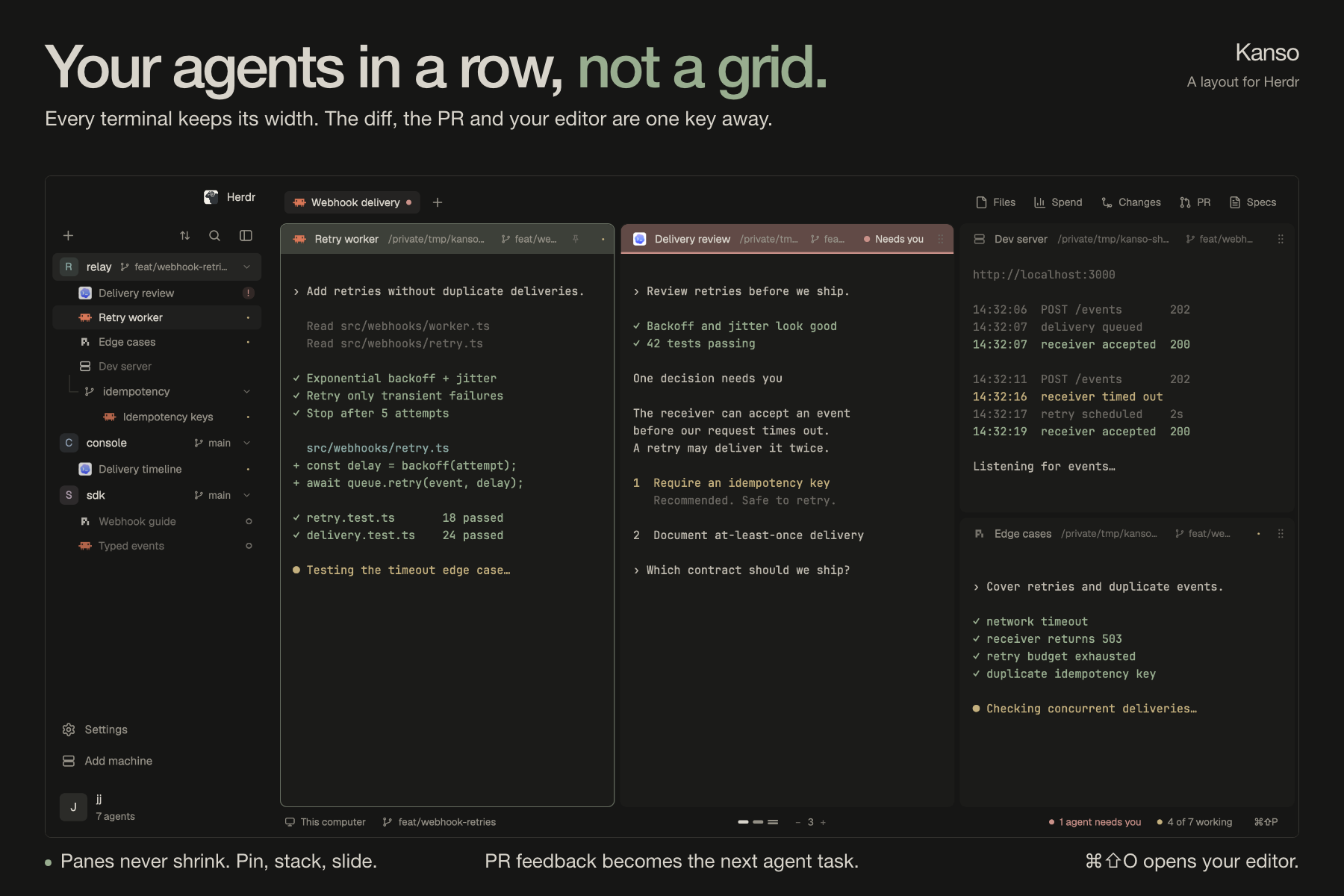
Your agents in a row, not a grid. A Herdr layout: terminals keep their width, a PR's feedback starts an agent, your editor is one key away.
Kanso
Your agents in a row, not a grid.
Kanso is a layout for Herdr made for running many coding
agents and still reading everything they write. Every terminal keeps its width
on a strip you slide along. The diff, the pull request and your editor sit
beside them.
Install: tell your agent
add herdr.dev/layouts/jlopezlira/kanso
Why Kanso
- Read every agent. Terminals sit on a horizontal strip and keep their
width. A new pane opens beside the one you are in and the view glides to it.
Nothing gets squeezed into a grid. - Review without leaving. Files, Changes and pull requests open beside your
agents: diffs, CI, unresolved threads, merge. One click starts an agent on a
pull request's feedback. - Take over in one key. Cmd+Shift+O opens the agent's folder, its worktree
included, in Cursor, VS Code, Zed, or Neovim in a split. - Light on your machine. Panels exist only while open, and the Files tree
draws only the rows you can see. Measured: 78% less
CPU on a 500-row tree.
What you need: the Herdr app, and the GitHub CLI (gh) for the pull request
panel. Spend and Specs are optional integrations, not part of Kanso.
The tour
Every terminal keeps its width
Panes live on an endless horizontal canvas. Pick 1 to 8 columns per view,
resize them, and move through the work without squeezing every terminal onto one
screen. Pin a column to keep it in view while the rest slides. Stack
panes to keep a server, tests or a second agent beside the task. A rail at
the edge shows what is off screen, and a minimap keeps your place.
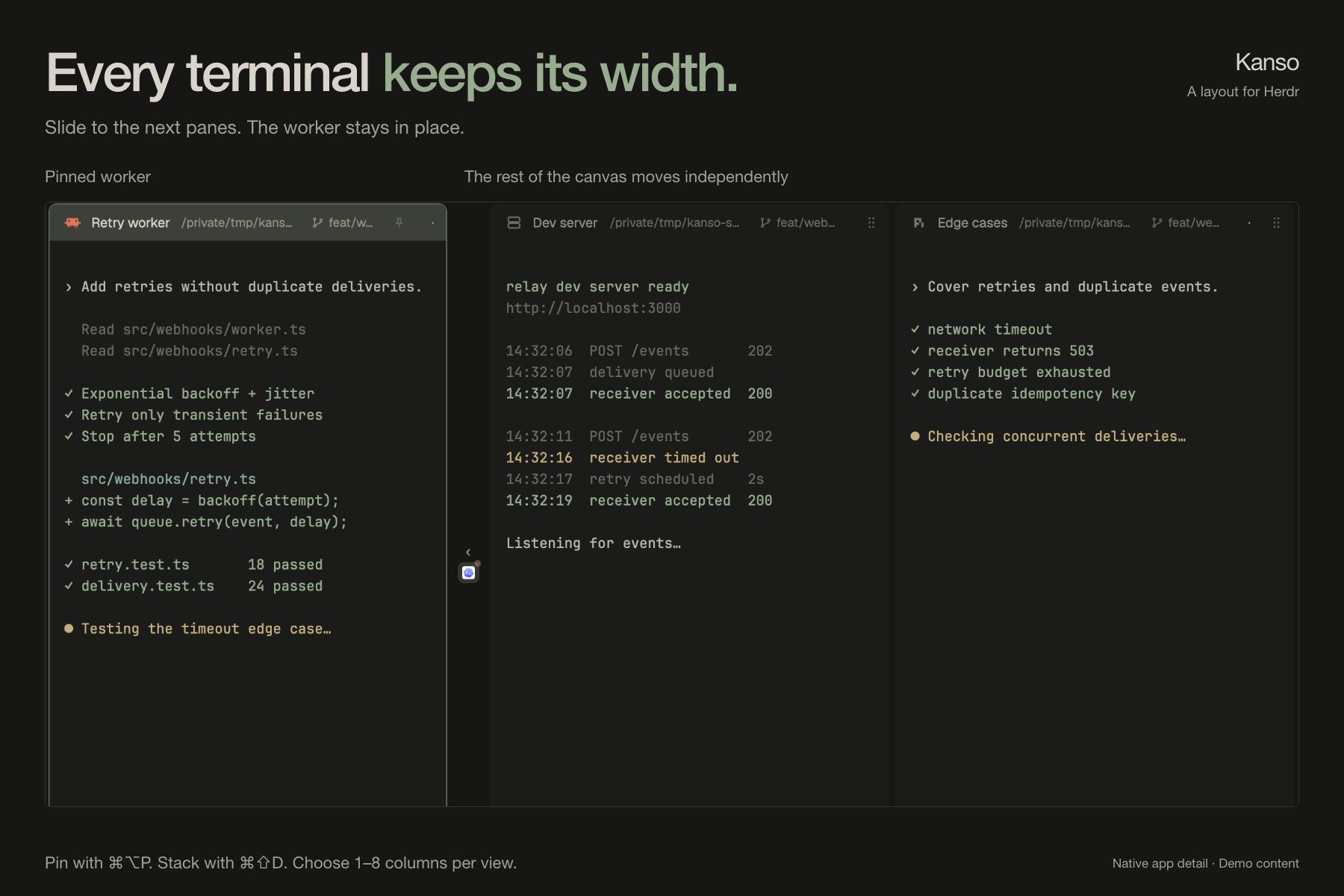
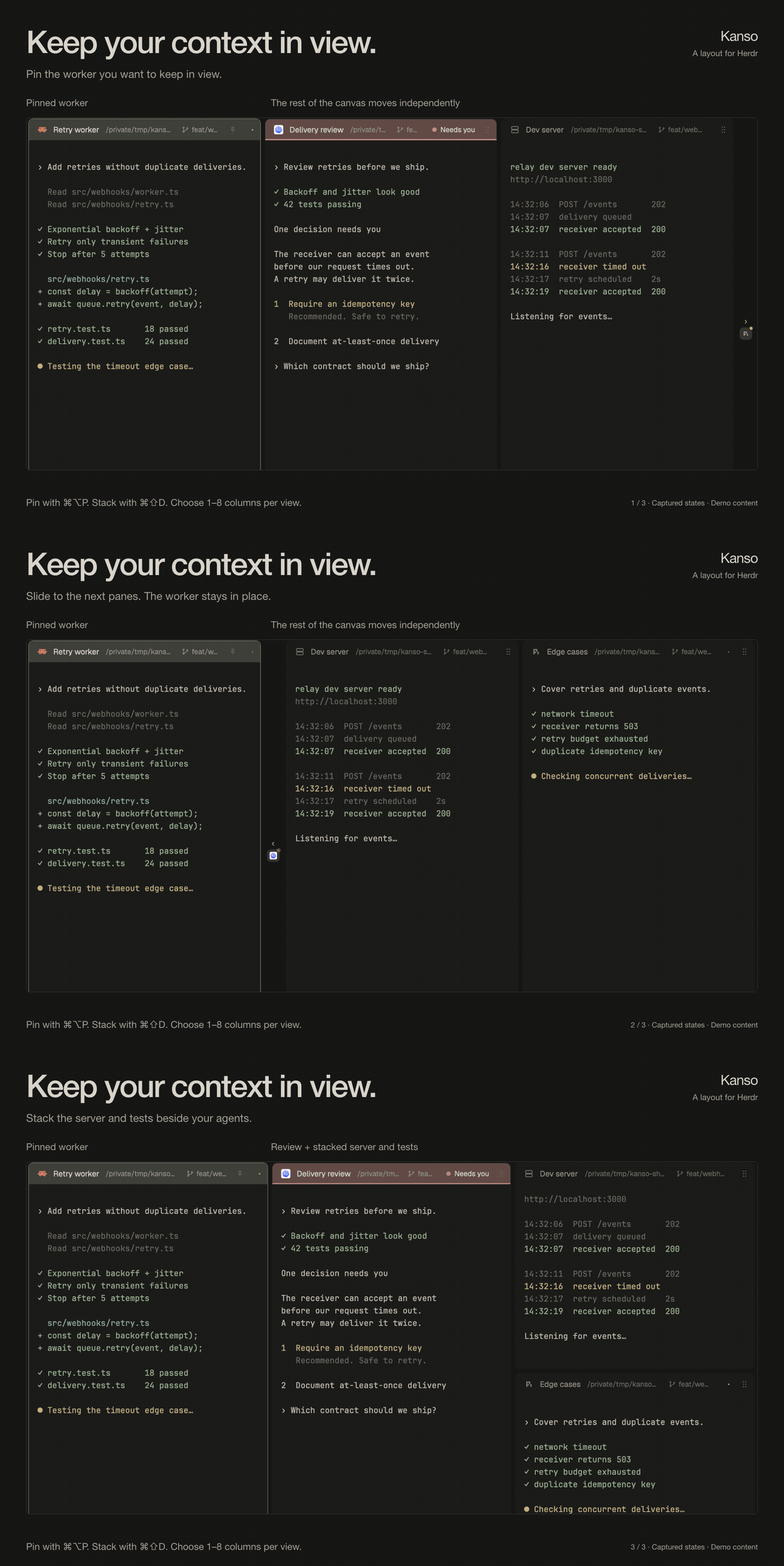
These are native app captures with edited timing, not a frame-rate demonstration.
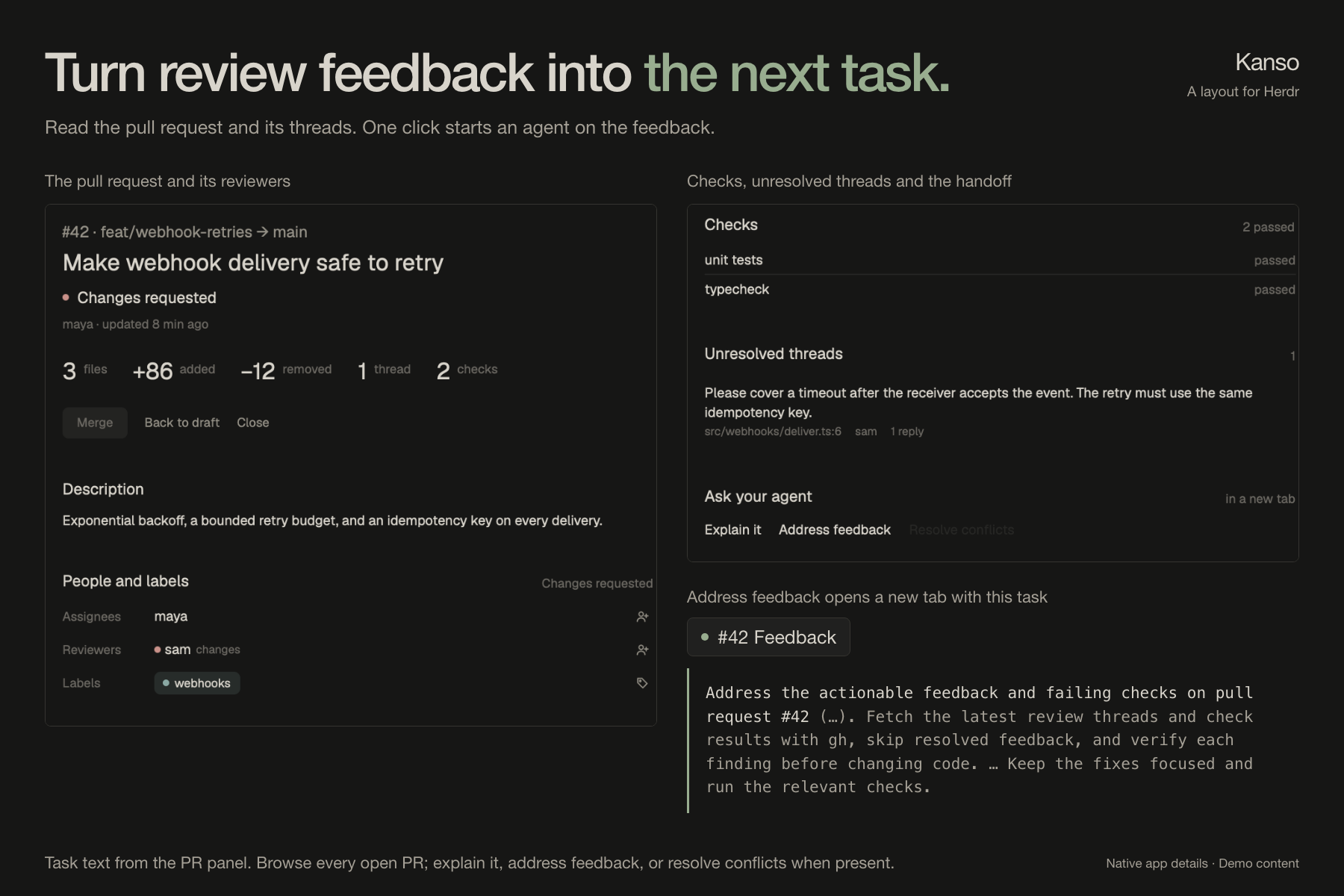
Turn review feedback into the next task
Browse every open pull request in the repository. Read the description and
diff, check CI and unresolved threads, manage reviewers and labels, and merge
from the panel. Then ask your agent to explain the pull request, address its
feedback or resolve its conflicts. The task opens in a new tab with the context
already in the prompt.
The agent's work, your editor
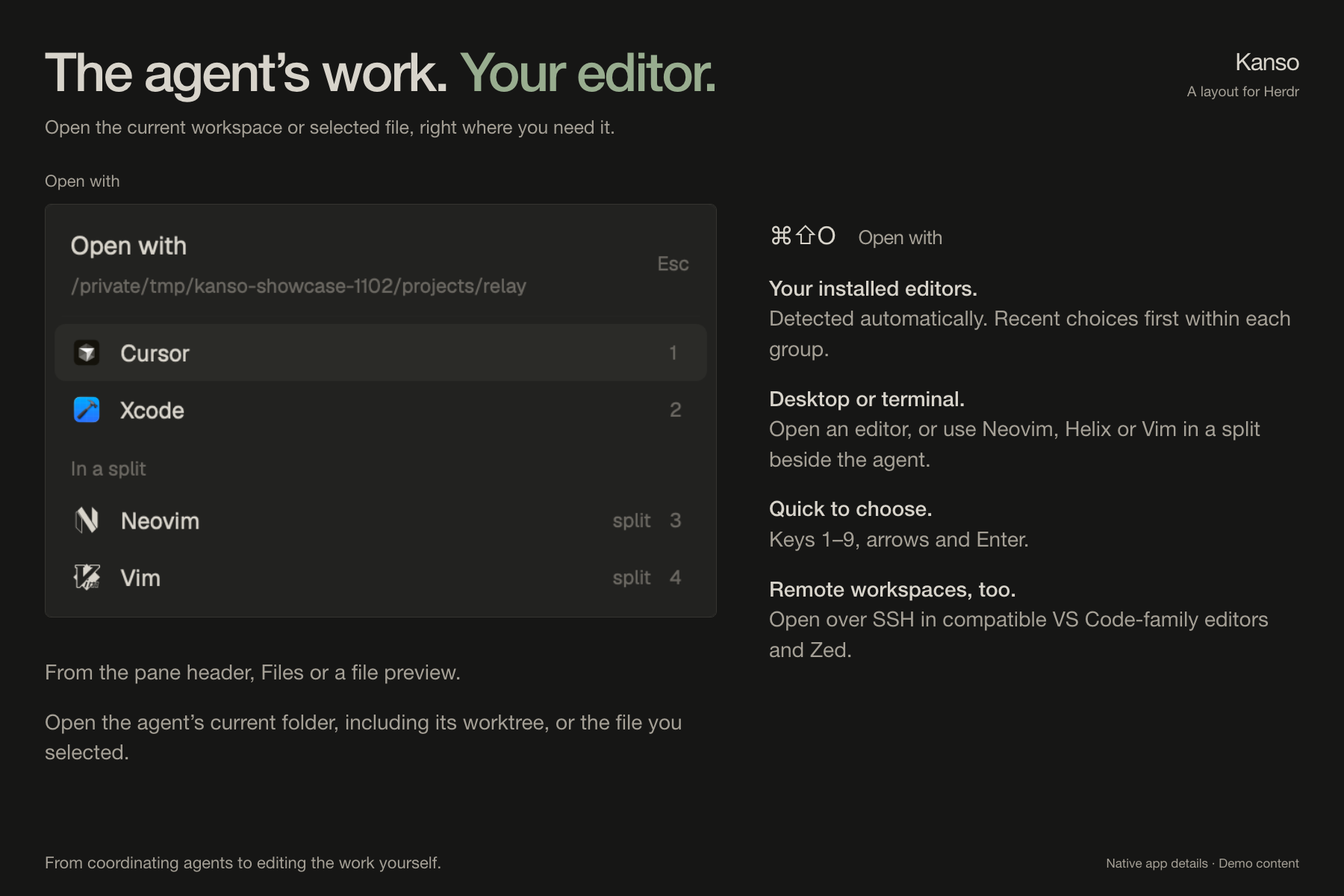
Open with (Cmd+Shift+O, or the pane header's button) opens the focused
agent's current folder, its Git worktree included, in your editor. You land in
the workspace the agent is actually using. From Files or a file preview it
opens that file instead.
The picker detects your installed editors and puts recent choices first. Choose
with 1 to 9, the arrow keys or Enter. Cursor, VS Code, Zed, Windsurf,
Antigravity, Kiro, Sublime Text, JetBrains IDEs and Xcode open as apps;
Neovim, Helix and Vim open in a split beside the agent. Remote workspaces
open over SSH in compatible VS Code-family editors and Zed. A text file can also
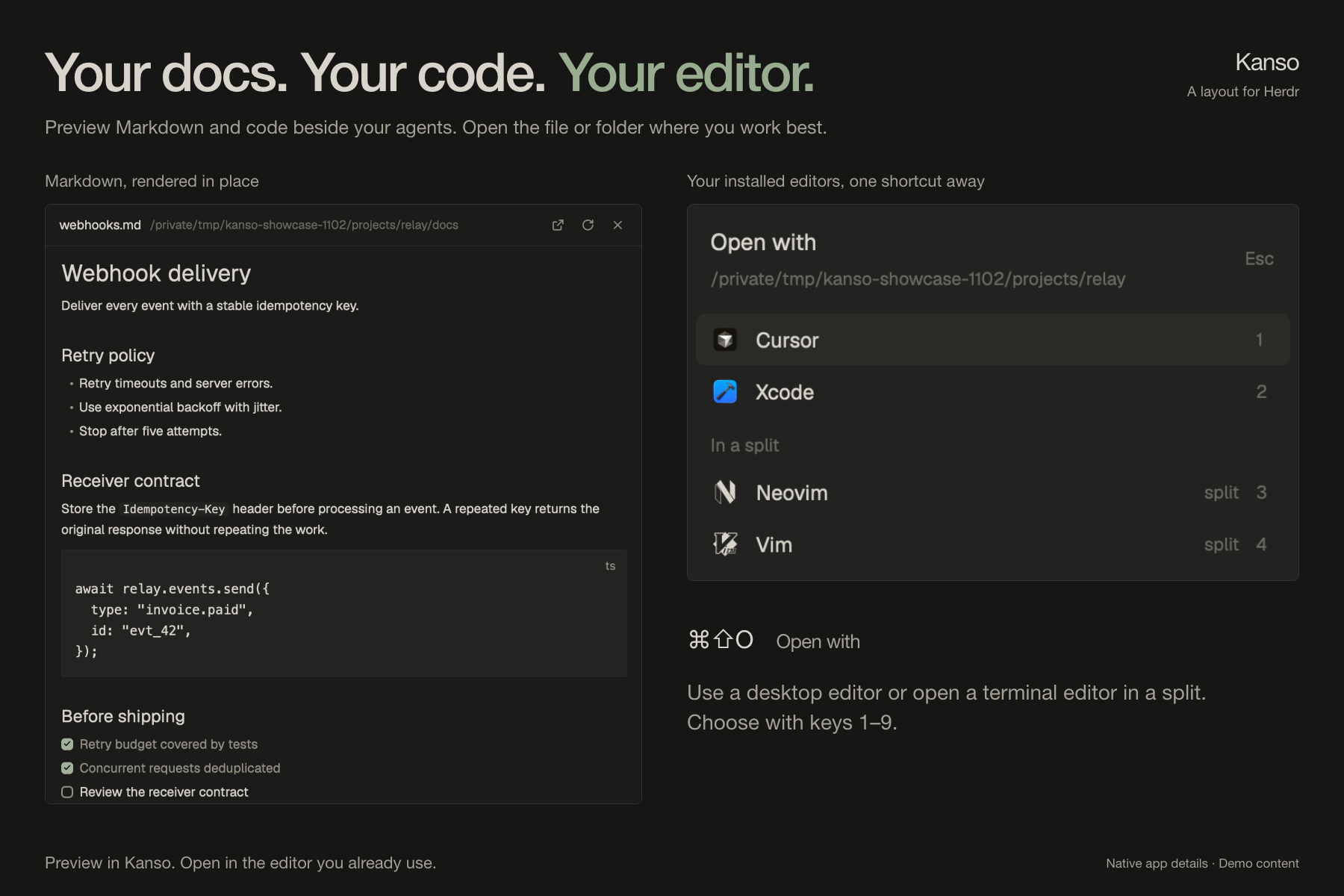
be previewed in the panel, with no editor at all.
Read the diff, make the commit
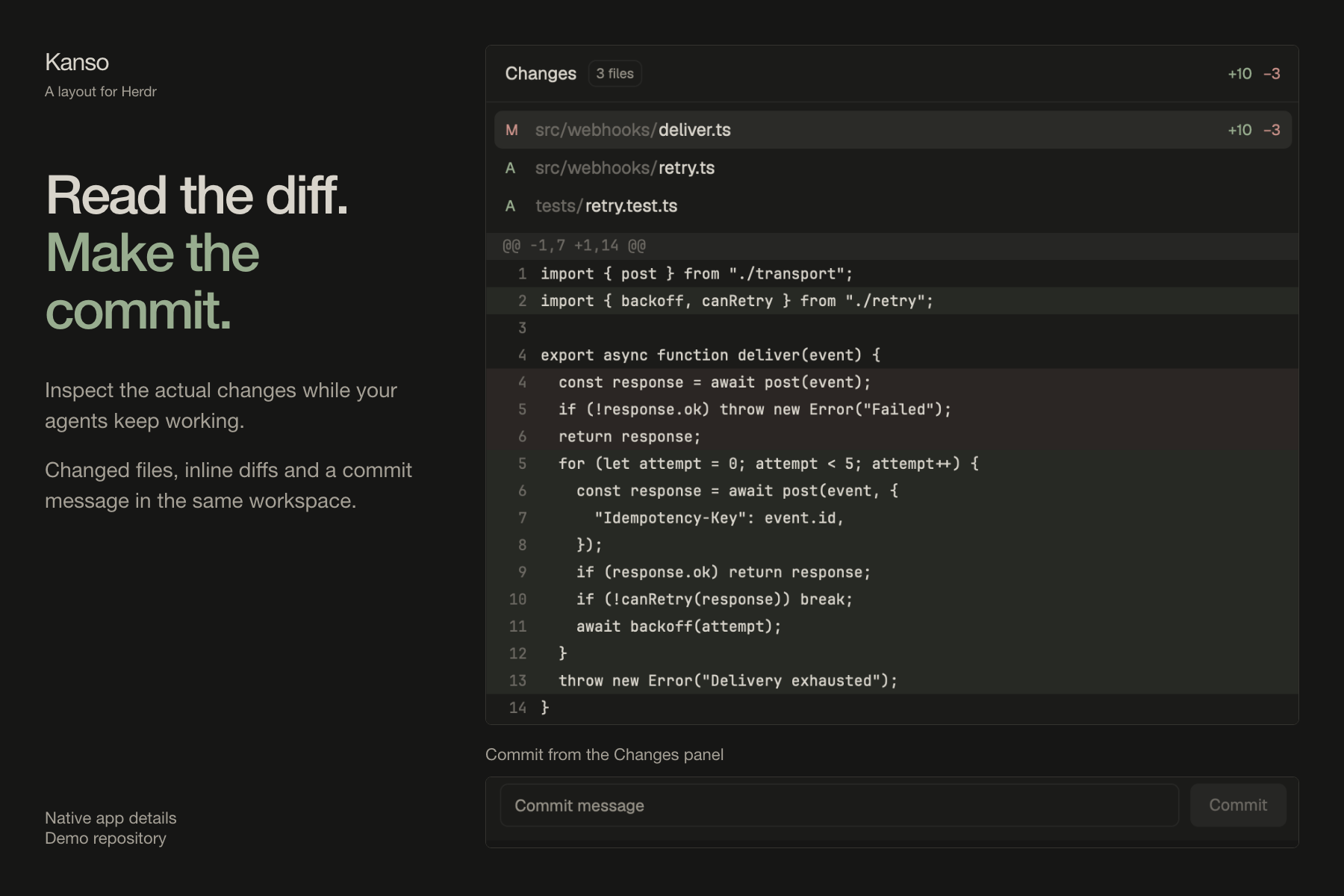
The Changes panel puts changed files, inline diffs and a commit message next
to your agents while they keep working. The Files panel previews code and
renders Markdown, including code blocks and checklists.
Every repo and worktree, one sidebar
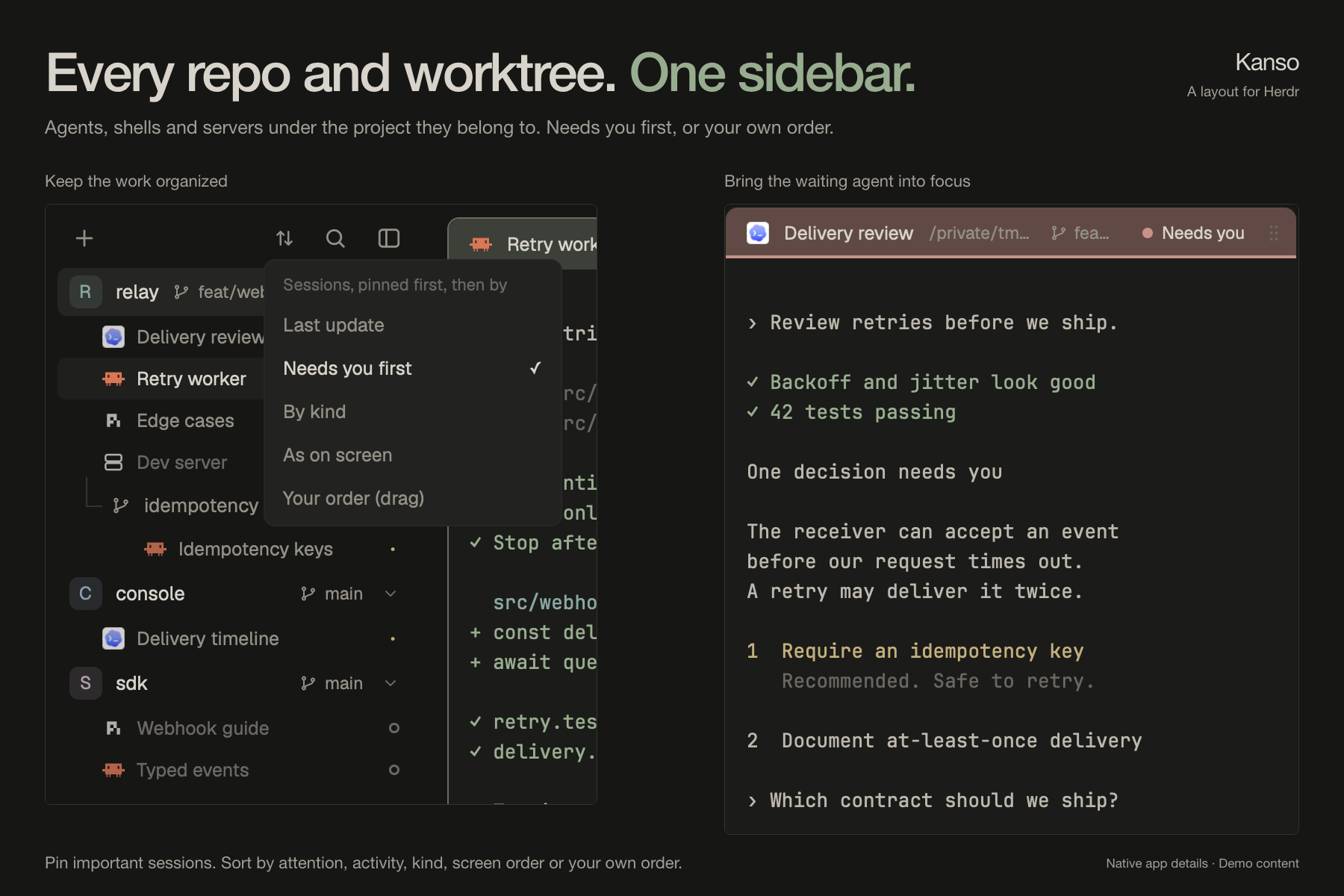
Repositories and their nested Git worktrees sit together, each with its
branch and sessions: agents, shells and dev servers. Group work by local or
remote machine. Order sessions by Needs you first, last update, kind, screen
position or your own drag order. Pin the important ones and rename anything.
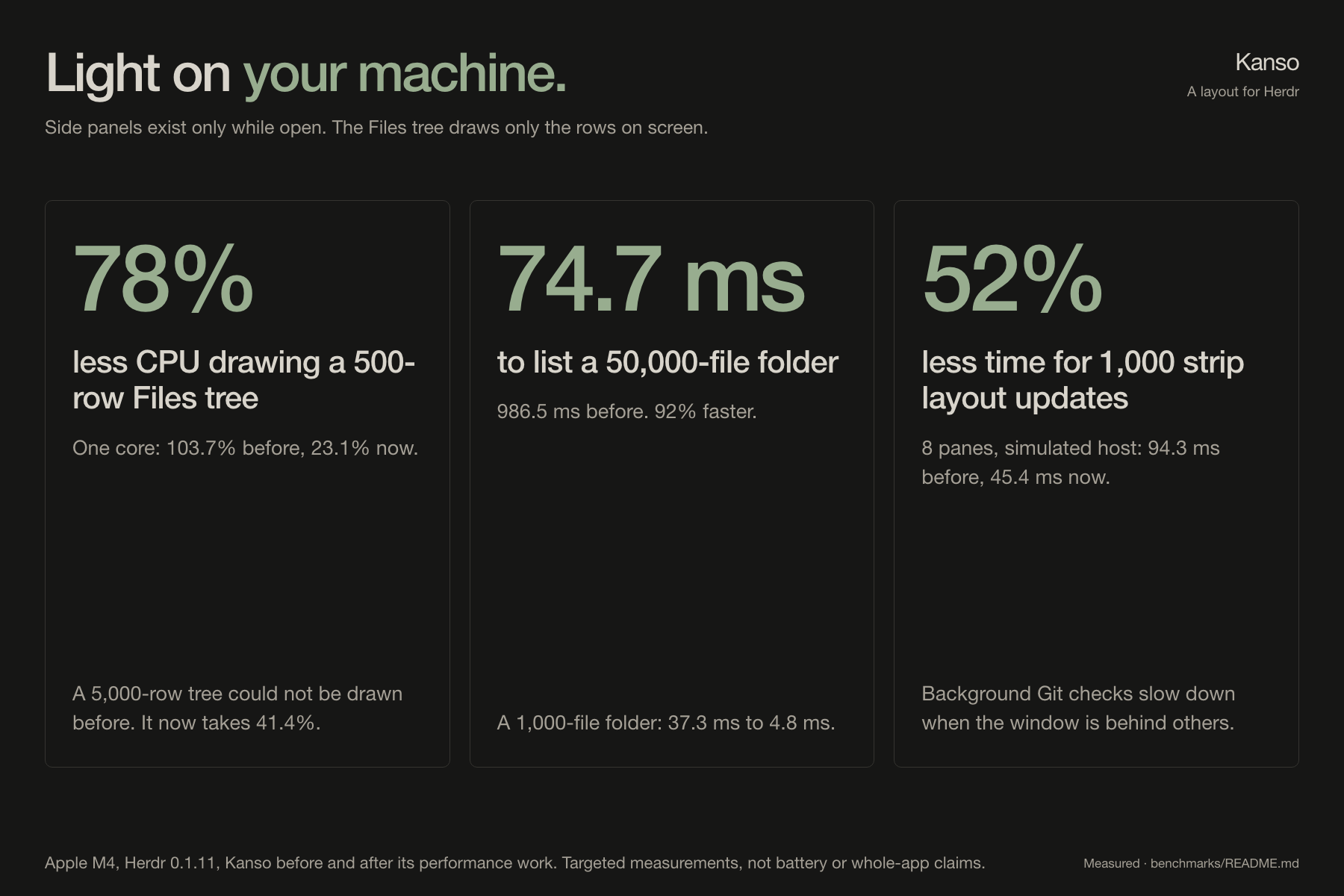
Light on your machine
Side panels are mounted only while open. Background Git checks slow down when
the window is behind others. The Files tree draws only the visible rows, and the
canvas avoids rendering off-screen panes.
On an Apple M4 with Herdr 0.1.11, against Kanso before its performance work:
78% less CPU for a 500-row Files tree and 74.7 ms to list a 50,000-file
folder. These are targeted measurements, not whole-app or battery-life claims.
Benchmark conditions and results.
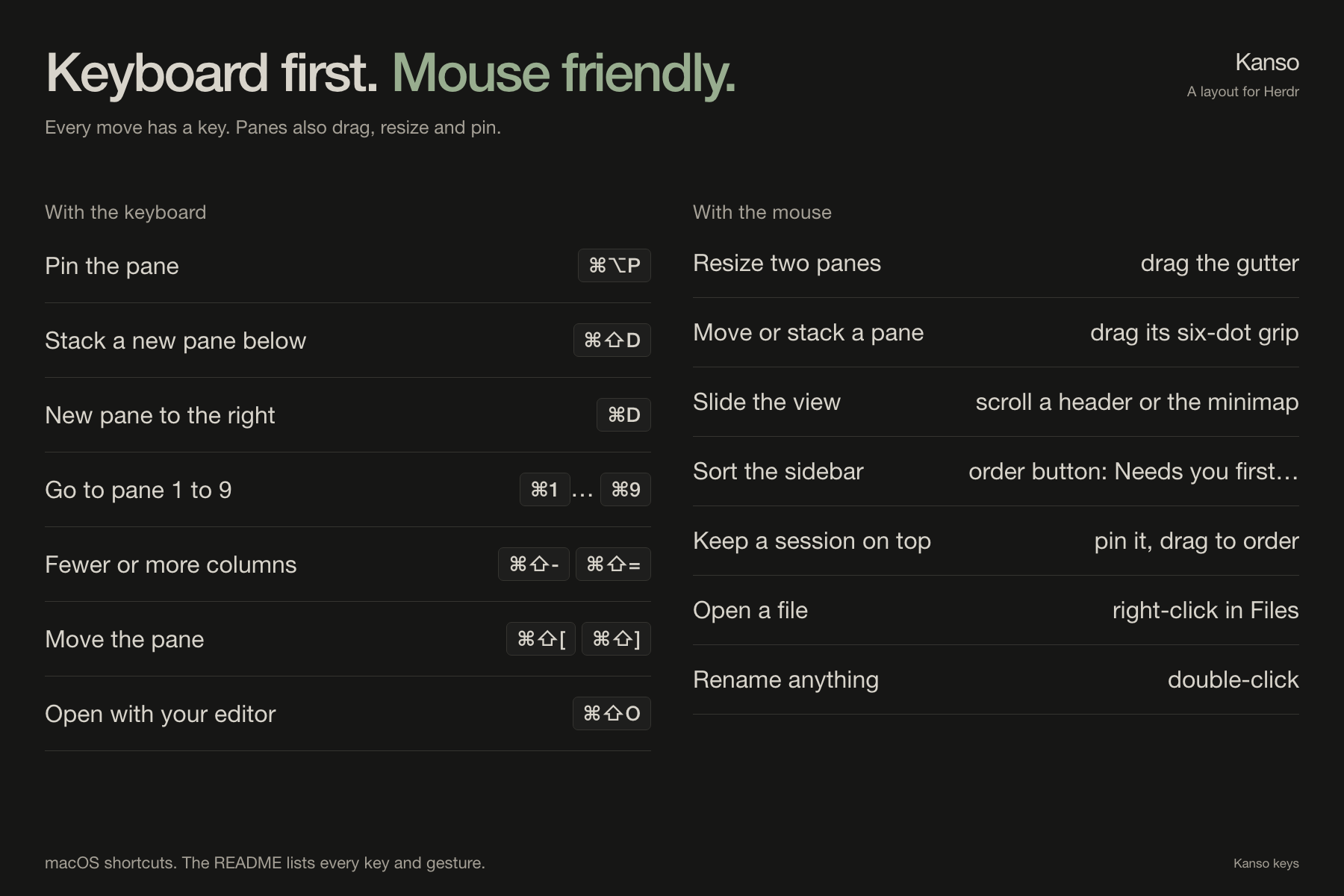
Keyboard first, mouse friendly
Every move has a key, and panes also drag, resize and pin with the mouse.
All shortcuts and gestures.
Light and dark
Kanso ships two themes: kanso (dark) and kanso-day (light), in warm stone
greys with color only where it helps you act.
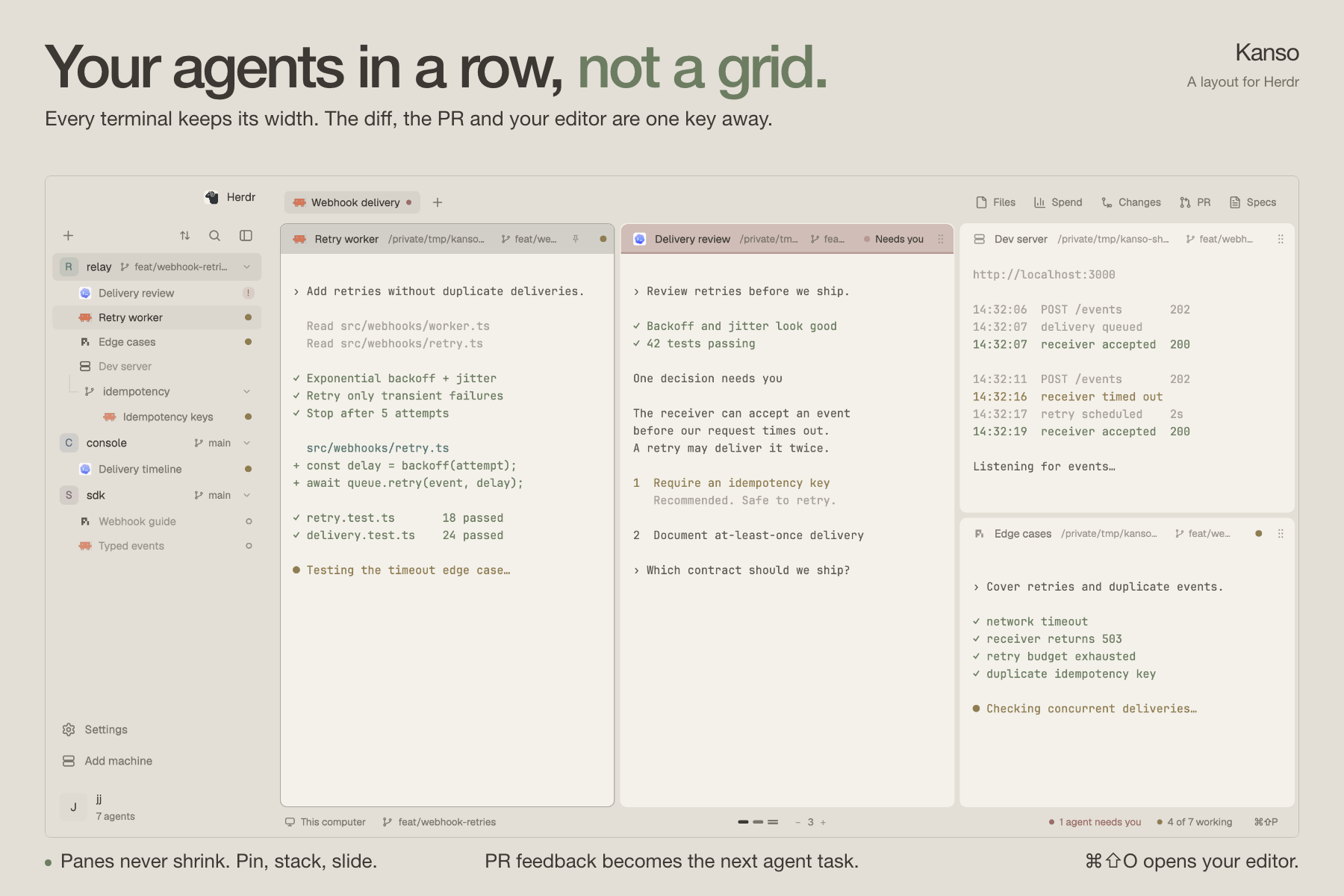
The images use native Herdr captures with staged repositories, terminal output
and pull request data. Spend and Specs, visible in the tab bar, are optional
integrations.
Kanso is the Japanese principle of simplicity: remove what is not needed. If it
saves you time, a star helps other
Herdr users find it.
Install
Ask your agent: "add herdr.dev/layouts/jlopezlira/kanso". Or by hand, from a
clone of this repository:
cp kanso/layouts/kanso.json ~/.config/herdr-app/layouts/
cp kanso/layouts/kanso.png  ~/.config/herdr-app/layouts/
cp kanso/themes/*.json      ~/.config/herdr-app/themes/
cp -R kanso/mods/kanso-* kanso/mods/open-with ~/.config/herdr-app/mods/
# then add the "layout:kanso" section of kanso/keys.json to ~/.config/herdr-app/keys.json
herdr-app do layout.switch --name kanso
ctrl-shift-l switches back to your previous layout. Deleting the files
removes Kanso. Light and dark themes are included (kanso-day, kanso).
Keys
| Keys | What they do |
|---|---|
| Cmd+1 ... Cmd+9 | Go to pane 1 to 9 |
| Cmd+[ and Cmd+] | Previous and next pane (the view glides to it) |
| Cmd+D, Cmd+Alt+D, Cmd+Shift+D | New pane right, left, below (stacked) |
| Cmd+Alt+Up/Down | Move the focus within a stack |
| Cmd+W | Close the pane |
| Cmd+Shift+[ and Cmd+Shift+] | Move the pane left and right |
| Cmd+Shift+- and Cmd+Shift+= | Fewer or more panes per view (1 to 8) |
| Cmd+Shift+0 | Even the panes out |
| Cmd+Shift+Enter | Make the pane wider or narrower |
| Cmd+Shift+O | Open the pane's folder in a code editor |
| Cmd+Alt+P | Pin the pane: it keeps its place and stays in view |
With the mouse:
| Do this | To |
|---|---|
| Drag the gutter between two panes | Resize them, sideways or up and down |
| Hold a pane's six-dot grip and drag it onto another | Move it: the left or right quarter makes a column before or after, the middle stacks it above or below |
| Scroll over a header or the minimap | Slide the view |
| Use the order button at the top of the sidebar | Sort each space's sessions by last update, needs you first, kind, screen order, or your own |
| Hover a session and click its pin | Keep it at the top of its space; drag pinned ones to order them |
| Right-click a file in the Files panel | Open it in an editor, or preview it in the panel |
| Double-click a session, a pane header, a space or a tab | Rename it (an empty name brings the automatic one back) |
Privacy: what it runs
The mods run git (the spaces list, Files, Changes), find (listing a folder
on Unix, with bash as a fallback) and hc machine ls (machines). They read
files only inside the folders you work in.
Only the pull request panel reaches the network: it runs the GitHub CLI
(gh) and talks to GitHub only while the panel is shown. Open with runs sh
to find installed editors (app folders, command -v, flatpak); on macOS it
opens an editor with open -a and caches each app's icon under~/.config/herdr-app/data/open-with/.
Specs (sdd-focused) and Insights are optional: install either mod and its
button appears in the tab bar. Install them while another layout is shown:
the first time Herdr sees a mod folder it docks a copy into the layout on
screen, so installing token-spend ("place": "right") while Kanso is shown
leaves a second Spend panel at the window's right edge. If that happened,
remove the token-spend block from the root of layouts/kanso.json.
Development
npm test                               # Node.js 20+, Git and Bash; macOS or Linux
npm run bench -- --base origin/main    # macOS, with the Herdr app installed
The tests load each mod's real code into a fake Herdr host and run it against
real temporary Git repositories and folders. The benchmark compares a git ref
with your working tree in isolated native Herdr windows; see
benchmarks/README.md.
How every part is built, in enough detail to rebuild it:
kanso/RECIPE.md. herdr-app check kanso/mods/<mod> loads a
mod once and reports what is wrong.
Credits
The mods grew out of the ones shipped with Herdr, through the 0oz-design fork
and the minimalistic layout; NOTICE and each file's header say who
changed what.
Contributors: Iván Campaña (icampana), who found
and fixed the layout writers saving another layout's tree into kanso.json.
License
Yorumlar (0)
Yorum birakmak icin giris yap.
Yorum birakSonuc bulunamadi