spy-ai
Health Uyari
- License — License: MIT
- Description — Repository has a description
- Active repo — Last push 0 days ago
- Low visibility — Only 6 GitHub stars
Code Gecti
- Code scan — Scanned 1 files during light audit, no dangerous patterns found
Permissions Gecti
- Permissions — No dangerous permissions requested
Bu listing icin henuz AI raporu yok.
SpyAI scans targets looking for ports, HTTP banners, and API paths typical of LLM agents, RAG, vector stores, and adjacent infrastructure. No authentication, no fuzzing, no exploits.
SpyAI
Passive reconnaissance for AI-facing systems
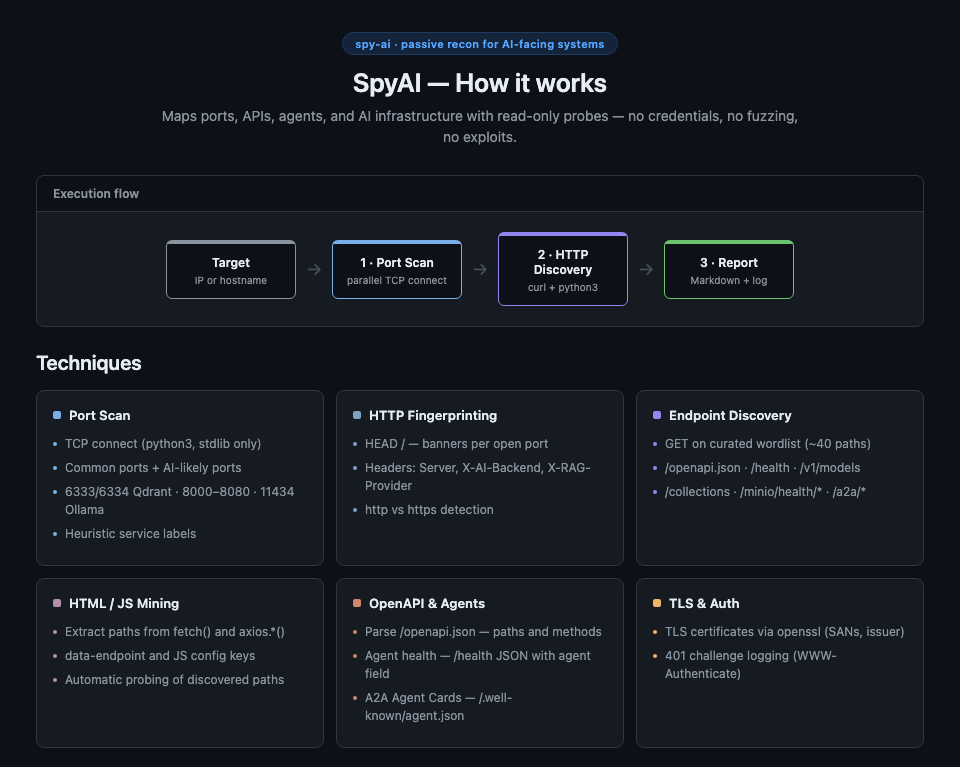
SpyAI maps ports, APIs, agents, and AI infrastructure with read-only probes — no credentials, no fuzzing, no exploits. It targets the footprints typical of LLM agents, RAG backends, vector stores, and adjacent infrastructure, then produces a Markdown report plus a full execution log.
Sample run
One command against a single authorized lab target:
./spy-ai 192.168.217.21
~66 seconds later — no chat message sent, no credentials used — SpyAI returned a full attack-surface map.
7 open ports, five of them in the AI-likely range, plus a PostgreSQL backend:
22 5432 8001 8002 8003 8011 8012
5 LLM agents, identified from unauthenticated /health responses:
| Port | Agent |
|---|---|
| 8001 | IT Helpdesk Assistant |
| 8002 | Secure IT Assistant |
| 8003 | Knowledge Base Assistant |
| 8011 | Secure Engineering Portal |
| 8012 | Department Resources Assistant |
Endpoints confirmed on each agent port:
| Path | Status | What it signals |
|---|---|---|
/ |
200 | Chat UI — JS mining target |
/docs |
200 | Interactive Swagger UI |
/redoc |
200 | API documentation |
/openapi.json |
200 | Full schema — 16 paths |
/health |
200 | Agent identity |
/chat |
405 | POST-only — confirmed via JS mining |
The exposed OpenAPI schema listed 16 routes, identical across all five ports — one codebase, five agent personas, one shared attack surface. Among them:
/debug/db-schema,/debug/query— debug surface/kb/add,/kb/search,/upload,/summarize— RAG ingestion and retrieval/logs/last-tool-call,/logs/latest— agent tool-call traces
Cost: 106 TCP connects and under 200 HTTP requests. No credentials, no fuzzing, no exploits.
Full walkthrough of the seven techniques: Spy Before You Prompt
Lab disclaimer:
192.168.217.21is a private RFC1918 address inside an isolated personal lab environment, not reachable from the public internet. No sensitive or proprietary information is disclosed.
Execution flow
Each run follows three phases:
| Phase | What happens |
|---|---|
| 1 · Port Scan | Parallel TCP connect (python3, stdlib) on common ports plus AI-likely ports |
| 2 · HTTP Discovery | Fingerprinting, endpoint probing, HTML/JS mining, OpenAPI and agent parsing |
| 3 · Report | Structured Markdown report and full execution log under output/ |
Techniques
Port Scan
- TCP connect (
python3, stdlib only — no nmap required) - Common ports + AI-likely ports: 6333/6334 Qdrant, 8000–8080, 11434 Ollama, 5601, 5678/n8n, 9000, 9200, etc.
- Heuristic service labels in the report (port-based; use nmap separately for
-sV)
HTTP Fingerprinting
HEAD /banners per HTTP-likely open port- Interesting headers:
Server,X-AI-Backend,X-RAG-Provider,X-Model,X-Inference-Engine - Automatic http vs https scheme detection
Endpoint Discovery
GETon a curated wordlist (~40 paths) fromdata/passive_probes.txt- AI-relevant paths:
/openapi.json,/health,/v1/models,/api/chat,/collections,/minio/health/*,/a2a/*
HTML / JS Mining
- Extracts embedded API paths from
fetch(),axios.*(),data-endpoint, and JS config keys (apiBase,endpoint) on/ - Automatically probes any newly discovered paths
OpenAPI & Agents
- Parses
/openapi.json— lists paths, methods, and summaries when status is 200 - Agent health — detects uvicorn-style
/healthJSON with anagentfield (ports 8000–8080) - A2A Agent Cards — parses
/.well-known/agent.json(name, description, skills, service endpoint)
TLS & Auth
- TLS certificate mining via
openssl— subject, issuer, dates, SANs (optional) - Logs
401responses withWWW-Authenticatechallenges
Dependencies
| Tool | Required | Enables |
|---|---|---|
python3 |
Yes | TCP port scan, OpenAPI/HTML parsing, agent /health JSON |
curl |
Yes | HEAD / GET HTTP probes |
openssl |
No | TLS certificate mining |
timeout / gtimeout |
No | Bounds TLS handshake (macOS: brew install coreutils) |
Not required: nmap. Use it separately for broader port coverage or version probes.
Install
git clone https://github.com/jmessiass/spy-ai.git
cd spy-ai
chmod +x spy-ai lib/scan_ports.py
Usage
./spy-ai 192.168.1.10
./spy-ai api.example.com
./spy-ai --help
The target may be an IPv4 address or a hostname (FQDN).
Project layout
spy-ai/
├── spy-ai                          # main script
├── spy-ai-overview.png             # visual overview diagram
├── lib/
│   └── scan_ports.py               # parallel TCP connect scanner
├── data/
│   ├── passive_probes.txt          # HTTP path wordlist
│   └── interesting_headers.txt     # headers echoed in exec log
└── output/
    ├── <target>-N.md
    └── logs/
        └── <target>-N.exec.log
Sample report excerpt
## Open Ports
| Port | Service |
| ---- | ------- |
| 8030 | http |

## HTTP Banners (HEAD /)
| Port | Scheme | Status | Server | Content-Type | Location |

## Discovered Endpoints
### Port 8030 (http)
| Path | Status | Content-Type | Size | Notes |
| /openapi.json | 200 | application/json | 1234 | |
| /health | 200 | application/json | 89 | |
| /collections | 200 | application/json | 60 | body={"result":{"collections":[]},...} |
Customization
Edit wordlists in data/ (one entry per line; # comments allowed):
passive_probes.txt— HTTP paths toGETon each open HTTP-likely portinteresting_headers.txt— response headers echoed in the execution log
To add ports to the TCP scan, edit COMMON_PORTS or HTTP_LIKELY_PORTS in spy-ai, or extend SERVICE_HINTS in lib/scan_ports.py for report labels.
Passive vs active
SpyAI does not send credentials or exploit payloads. From the application's perspective it is passive (read-only probes). It still generates active network traffic (TCP connect +
curl) — use only on systems you are authorized to test.
Legal
Unauthorized scanning may violate law or policy. You are responsible for obtaining permission before running SpyAI against any target.
License
MIT — see LICENSE.
Yorumlar (0)
Yorum birakmak icin giris yap.
Yorum birakSonuc bulunamadi