specmanager
Health Uyari
- License — License: MIT
- Description — Repository has a description
- Active repo — Last push 0 days ago
- Low visibility — Only 5 GitHub stars
Code Gecti
- Code scan — Scanned 12 files during light audit, no dangerous patterns found
Permissions Gecti
- Permissions — No dangerous permissions requested
Bu listing icin henuz AI raporu yok.
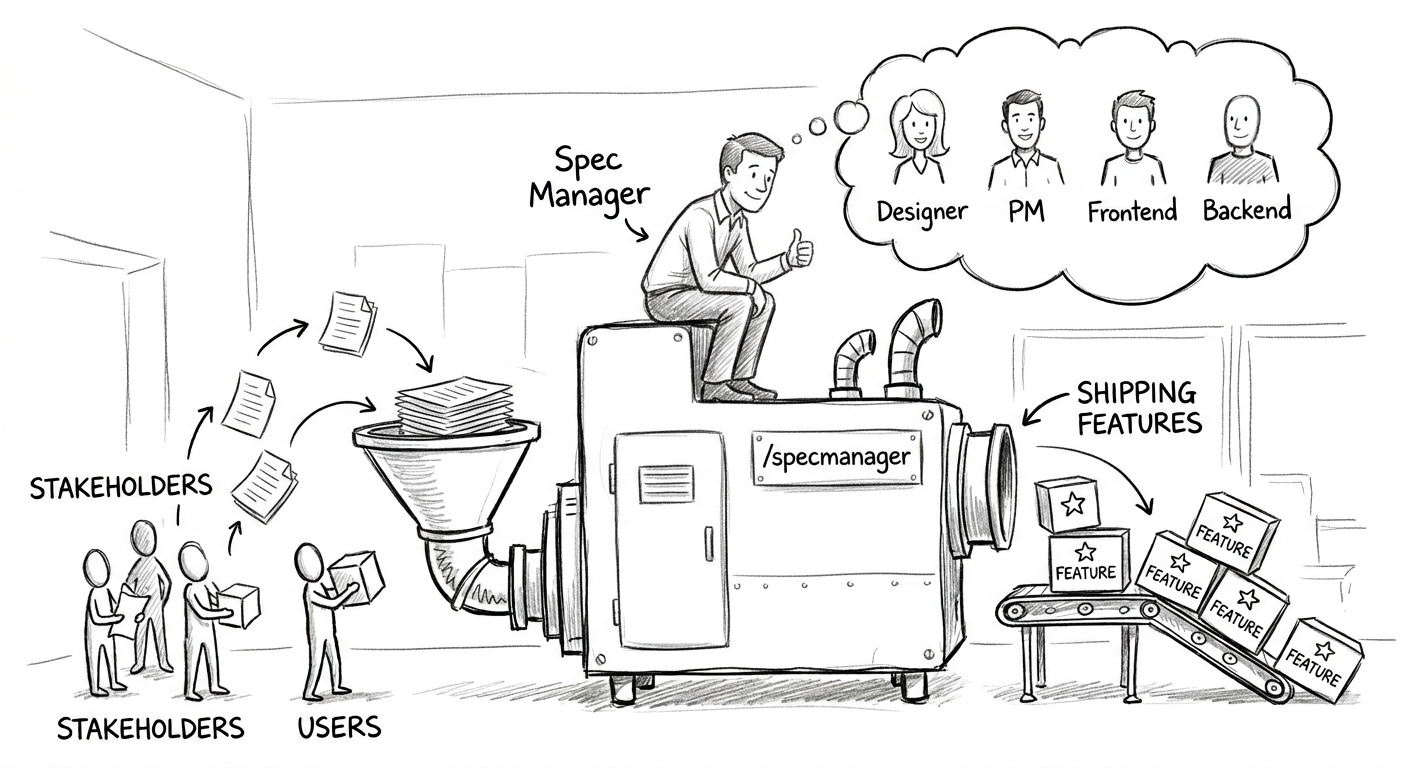
Spec-driven development for Claude Code. SpecManager turns AI coding into a gated PRD → Architecture → Plan → Build pipeline on a local kanban board, backed by git-tracked markdown. The speed of AI with the discipline of real product work.
SpecManager
Spec-driven development for Claude Code. A Claude Code plugin that replaces ad-hoc vibe coding with a gated lifecycle — PRD → Architecture → (Design) → Plan + tasks → Build → Walkthroughs — rendered as a localhost kanban board backed by plain markdown in your repo.
Claude drafts each stage from the previous approved one and your existing codebase; you edit and approve in the board. Every artifact is git-tracked markdown, so it diffs, reviews, and travels with the code. Single-user, fully local, no auth, bound to 127.0.0.1.
specmanager.org · MIT licensed
Quick start
# 1. Add the marketplace (from GitHub)
/plugin marketplace add joanseg/specmanager

# 2. Install
/plugin install specmanager@specmanager

# 3. Reload plugins
/reload-plugins

# 4. Reconnect MCP server
/mcp       ## If plugin:specmanager:specmanager ✘ failed select and click enter to reconnect

# 4. In your project, scaffold SpecManager and open the board
/specmanager-init
/specmanager-board
Example of a Specmanager board: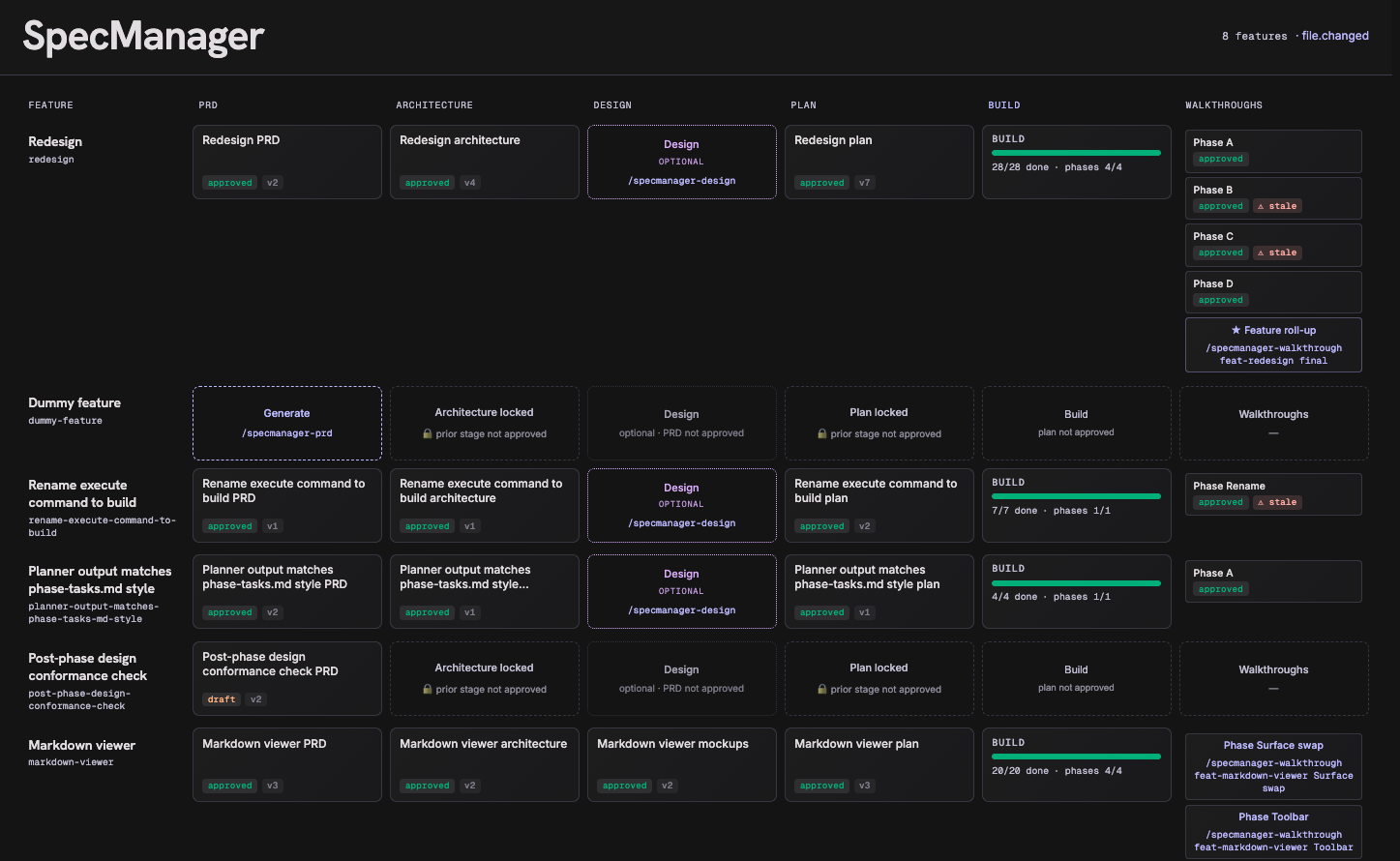
That's it — no build step. The compiled server and UI are committed, and a SessionStart hook installs runtime dependencies into the plugin's data dir on first launch.
Requirements: Node 20+ and Claude Code. The board runs at http://127.0.0.1:4317 (change the port in the plugin's user config).
The workflow
Each feature is a row on the board that flows left to right through the lifecycle. You drive it with slash commands; Claude does the drafting via dedicated subagents, and you approve each stage in the board before the next unlocks.
/specmanager-interview "Checkout corridor" # OPTIONAL pre-PRD interview — extracts & stress-tests the idea
/specmanager-prd "Checkout corridor"       # create the feature + draft its PRD → approve in board
/specmanager-architecture   <feature>       # draft the Architecture   → approve in board
/specmanager-design         <feature>       # OPTIONAL high-fi HTML mockups → approve
/specmanager-plan           <feature>       # plan.md + phased tasks   → approve in board
/specmanager-build          <feature> next  # build one phase at a time
/specmanager-walkthrough    <feature> <phase>   # per-phase walkthrough
/specmanager-walkthrough    <feature> final     # feature-level roll-up
/specmanager-board                          # open the kanban board anytime
<feature> is the feature's slug or id (reported by /specmanager-prd when it creates the feature).
/specmanager-interview is optional: a multi-turn interview in your Claude session that pulls the idea out of your head and challenges it (using the gstack office-hours forcing-question method) before any PRD exists. The result can be stored as interview.md in the feature's PRD folder — shown as a chip on the board, never gating anything — and the PRD drafter grounds itself in it when present.
Stages and gates
| Stage | Produces | Unlocks when |
|---|---|---|
| PRD | press-release.md, prd.md |
always (the entry point) |
| Architecture | architecture.md |
PRD approved |
| Design (optional) | high-fidelity HTML mockups | PRD approved (runs in parallel with Architecture) |
| Plan | plan.md + task records (tasks.json, rollup) |
Architecture approved (and Design, if one exists, approved) |
| Build | no doc — it's execution | Plan approved |
| Walkthroughs | <slug>.md per phase + a final roll-up |
the phase's tasks are all done |
Gates are enforced in shared code, not in prompts — Claude cannot draft a stage whose gate is closed. Plans are organised into phases, each a testable, runnable increment; tasks carry a Fibonacci complexity score and anything over 3 must be split. /specmanager-build builds one phase and stops at its boundary.
Living docs
approved is a commitment, not a freeze. Reopen an approved doc and every downstream doc that depended on it gets a non-blocking stale badge — a "the basis changed, review me" signal. Regenerate or re-approve to clear it.
The board
/specmanager-board opens a grid: one row per feature, one column per stage (PRD · Architecture · Design · Plan · Build · Walkthroughs). It updates live over websockets as Claude writes docs or you edit them.
- Each cell is a card showing status (
draft/approved), a stale badge, and whether it was generated by agent or human. - Clicking a card opens a doc panel drawer over the dimmed board to read, edit, and approve. Design docs get a CodeMirror HTML editor with a live sandboxed
<iframe>preview. - The Build cell groups tasks under collapsible phase headers with per-phase progress bars instead of a document.
- The Walkthrough column shows one card per phase plus a final roll-up card that stays locked until every phase walkthrough is approved.
Edits you make in the board and writes Claude makes both flow through the same shared logic layer, so the two views never drift. AI writes use optimistic concurrency, so a stale agent write can't clobber your manual edits.
Where your work lives
Everything is markdown with YAML frontmatter under your project, version-controlled by git:
<your-project>/
  CLAUDE.md                         # carries a managed SpecManager block (between markers)
  docs/DESIGN.md                    # managed design-system spec (inferred from your UI)
  .claude/specs/
    manifest.json                   # rebuildable board index (derived from frontmatter)
    features/<slug>/
      feature.json
      prd/        press-release.md, prd.md
      architecture/ architecture.md
      design/     <mockups>.html
      plan/       plan.md, tasks.md, tasks.json
      walkthroughs/ <slug>.md
Frontmatter is authoritative; manifest.json is a cache you can delete and rebuild. The managed regions in CLAUDE.md and DESIGN.md live strictly between <!-- specmanager:start --> / <!-- specmanager:end --> markers — nothing outside them is ever touched.
Contributing / building from source
The plugin ships its compiled server/dist and ui/dist, so users install with no build step. Rebuild before committing source changes:
cd plugins/specmanager/server
npm install
npm run build
npm run selftest          # core flow against a tmp dir
npm run selftest-board    # boots board: REST + WS + file watcher
npm run selftest-phases   # phase rollup + Fibonacci ≤3 validation
npm run selftest-build    # per-phase gates + walkthrough storage
npm run smoke-mcp         # MCP wire protocol + tools registered

cd ../ui
npm install
npm run build             # → ui/dist, served by the board server
Then reinstall in a test repo:
/plugin marketplace update specmanager
/plugin install specmanager@specmanager
/reload-plugins
CLose all Claude Code sessions.
Then open CLaude Code sesion and reconnect mcp:
/mcp ## select specmanager:specmanager, click enter and reconnect
Tech stack: Node 20+, TypeScript, MCP stdio transport, Fastify + ws, chokidar, gray-matter, zod, React 18 + Vite, CodeMirror 6. One shared @specmanager/core library backs both the MCP server (Claude's interface) and the board server (the UI's interface); one MCP process boots the board.
Repo layout: the marketplace manifest is at the repo root (.claude-plugin/marketplace.json); the plugin itself lives in plugins/specmanager/. Design docs are under docs/ (the original full spec is archived at docs/temp/original-specs/architecture-and-spec.md).
Troubleshooting
/mcpshows specmanager failed — select it and reconnect. If it persists, fully restart: quit Claude (Ctrl-Ctwice),claude daemon stop, kill stragglers (ps aux | grep mcp.js), confirm the port is free (lsof -nP -iTCP:4317 -sTCP:LISTEN), then relaunchclaudefrom your project.- Board won't open — the MCP process boots the board server on startup; if it isn't running, restart your Claude session.
/specmanager-boardreports the URL so you can open it manually. /reload-pluginsreports a load error — do the full restart above rather than retrying the reload.
Links
- Website: https://specmanager.org
License
Yorumlar (0)
Yorum birakmak icin giris yap.
Yorum birakSonuc bulunamadi