yardsort
Health Uyari
- License — License: GPL-3.0
- Description — Repository has a description
- Active repo — Last push 0 days ago
- Low visibility — Only 5 GitHub stars
Code Gecti
- Code scan — Scanned 12 files during light audit, no dangerous patterns found
Permissions Gecti
- Permissions — No dangerous permissions requested
Bu listing icin henuz AI raporu yok.
Run AI coding agents in parallel, each in its own git worktree. Desktop app for Linux, macOS and Windows (Tauri + Rust).

Yardsort
Run AI coding agents in parallel — each on its own track.
Yardsort is an open-source desktop app for Linux, macOS and Windows. Every task gets its own git worktree and its own terminal, running the coding agent of your choice.
yardsort.sh · Download · Quick start · Documentation · Contributing · Contact



What it is
A sorting yard is where rail cars are sorted onto parallel tracks and later joined back into one
train. That is the job: fan work out onto parallel branches, then merge it back.
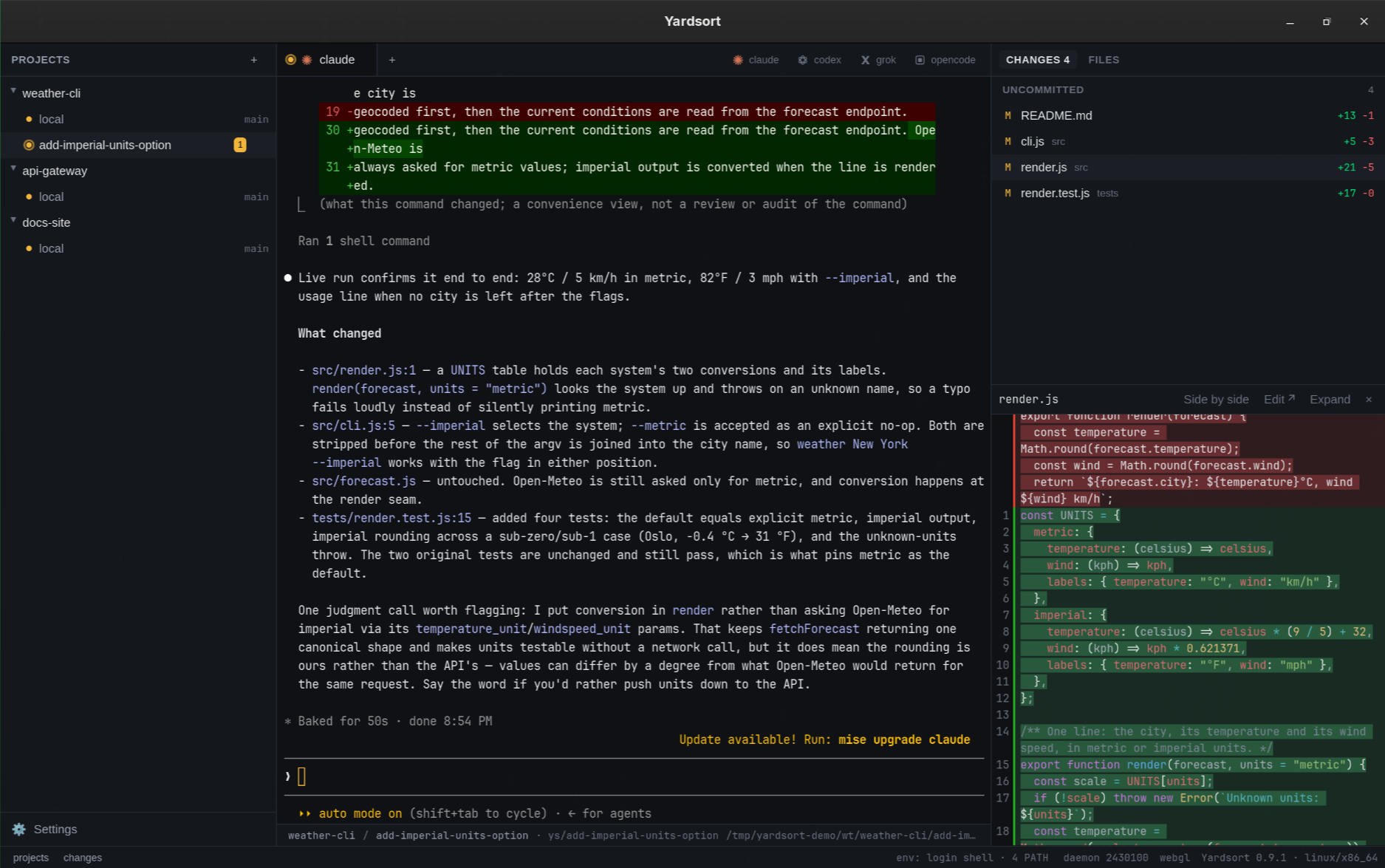
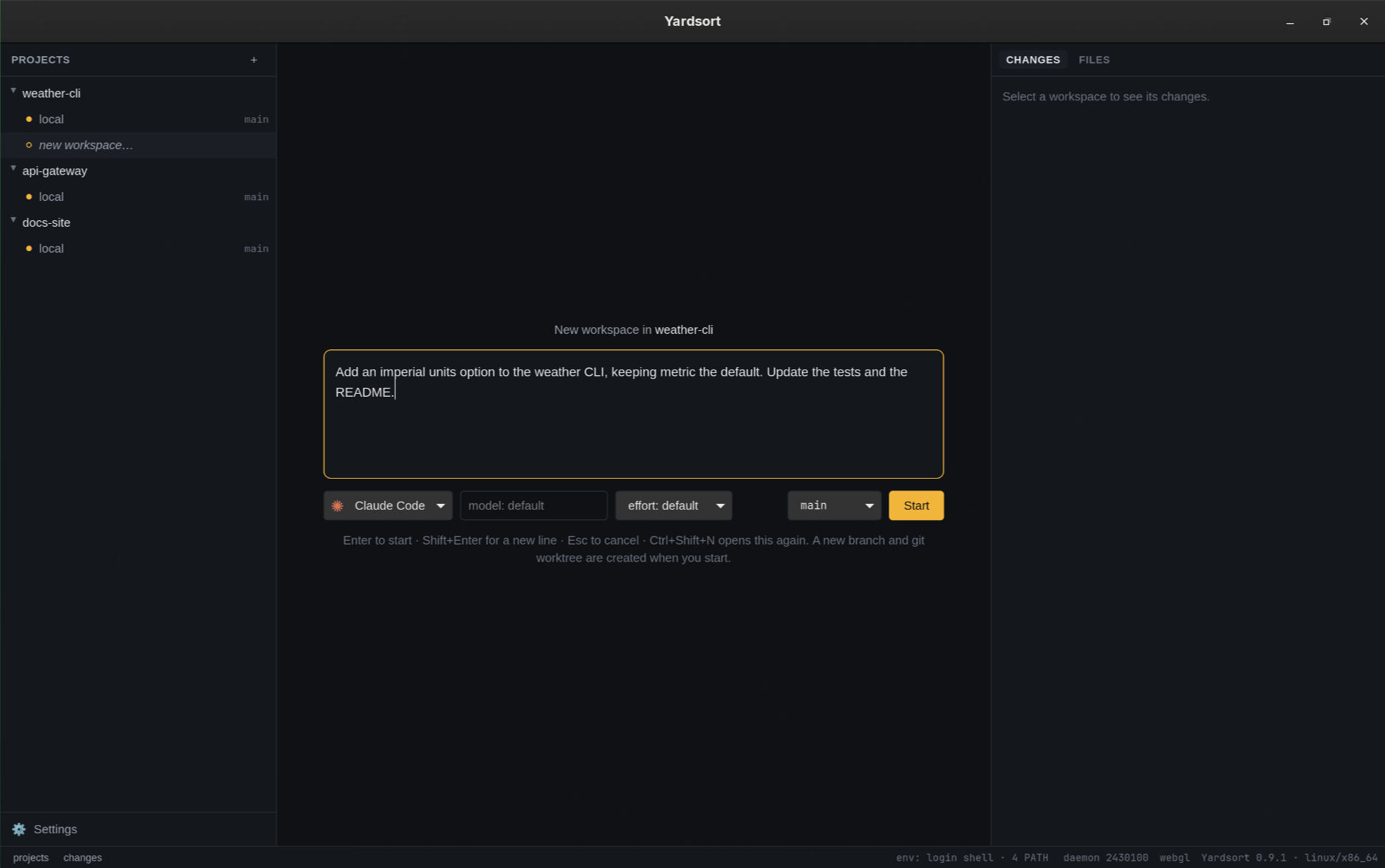
You describe a task, pick an agent, and press Enter. Yardsort creates a branch and a git
worktree for it — a separate folder — and starts the agent there in a real terminal. Start
another, and another. They cannot disturb each other, or your own checkout. On the right you
watch the files each one touches, live, with diffs.
It is modeled on tools like Conductor and Superset, with the requirement they do not meet:
Linux, macOS and Windows are all first-class, built and tested together on every change.
Highlights
Keyboard navigation you can configure. A command palette, panel focus and workspace/tab
switching, with an in-app shortcut cheat sheet and editor.A guided first look. An optional welcome tour explains the main panels; replay it from
Help / Tour any time.Any terminal agent. Claude Code, Codex, Grok, OpenCode, OMP, Cursor and Pi
out of the box; add any other with a few lines of configuration — no
plugin, no release to wait for.The terminal is the truth. Agents run in a real PTY with their own interface. Whatever they
can do in your terminal, they can do here — and Yardsort never parses their output.Plain git, no lock-in. Workspaces are ordinary worktrees and branches. Inspect or undo
anything withgit. Worktrees made elsewhere can be imported, and never appear uninvited.Closing the window doesn't stop them. Terminals live in a small background process, so
agents keep working while Yardsort is closed — or after it crashes. Open it again and every
screen is repainted where it got to. Closing with work in flight asks first.Pick up where you left off. For conversations that really did end, press Resume — it is
intact. Fork one to try a different approach without losing the first.Hand the work to another agent. One click writes the next agent's first message from what
Yardsort recorded — your task, where the branch stands, who wrote each file, what every agent
run did and what is not known — for you to read and edit before it goes. Codex after Claude,
without retyping the story. More below.Workflows: named agent work, in steps. A short YAML file — have a second agent review
this pull request, then tell me and the agent that wrote it — run from the sidebar or withys workflow run, its steps drawn as a chart, every mistake named at its line. The built-in
code review is one click in a workspace's menu. Describe one in your own words and a model
writes the file, for you to check and save. More below.See what happened. Live list of changed files, character-level diffs, a file tree, and
one click into your editor. With an agent reporting, each changed file says who wrote it: an
agent that reported writing it, one that was running a command when it was last written, or
nobody the record knows of.Send it on without leaving. Commit what an agent wrote, push it, and open the pull request
from the panel you reviewed it in — the title written from the commits. With the
GitHub CLI the pull request opens from here and its number and check
results appear on the workspace row, with any others the workspace opened beside it; one that
conflicts with its base can be handed back to the agent that opened it to resolve. Withoutgh, your browser opens the forge's own form, on GitHub, GitLab, Bitbucket or Gitea alike. See
Commits & pull requests.Know who needs you. Status dots show which agents are working and which are waiting; a
desktop notification tells you when one finishes while you are elsewhere.Careful with your work. Deleting or archiving a workspace always keeps the branch, and
never discards uncommitted changes without a second, explicit confirmation.A second pair of eyes, if you want one. Assist asks
Jev, TypeSafe's judgment model, small typed questions about each
changed diff, and badges the files that look unrelated to the task, or that add a secret, weaken
a test or switch a check off. It can also suggest a harness and an effort for the message you
are typing. Off unless you bring your own TypeSafe API key — see
below.Private by construction. No account, no telemetry, no keys of ours. Agents use their own
logins; Yardsort just starts them. It talks to the network to check for new versions, which you
can switch off — and, only if you switch Assist on and add your own key, to ask Jev about your
diffs.A record of what ran. Yardsort keeps a local note of when each agent started in a
workspace and how it ended — even if it ended while the window was closed — without reading a
word the agent printed. Turn it on, and every built-in agent — Claude Code, Codex, OpenCode,
Grok, OMP, pi and Cursor — reports its own tool calls, file changes and turns to the same
record, as metadata, with its own settings untouched. An experimental timeline shows it;ys activity exportwrites it out. See Activity.Project memory, approved by you. Short lessons about a project for its agents — "the tests
needTZ=UTC". You write them; agents propose them withys memory propose, and those wait for
you. Only what you approve reaches an agent: after its first message, cited, and in handoffs.
See Memory.Outcomes, in your words. After you archive or delete a workspace, one optional click says
how it went; a merged pull request counts as kept until you say otherwise. Each agent's history
on your own work sits beside the composer's picker — and says "too few to say" until there is
enough of it. See Outcomes.Keeps itself current. Signed in-app updates on macOS, Windows and the Linux AppImage — one
click, and your agents' conversations resume afterwards.Scriptable.
ys, a small command-line client that comes with the app,
starts a workspace and an agent without opening the window:ys workspace new <project> "<prompt>". The agent belongs to the background process, so it carries on after the command
returns — andys attachputs it back on your terminal,ys logsprints what a session ended
up with,ys workspace handoffprints the next agent's first message,ys workflow run
queues a workflow for the open app to carry out.ys workspace deleteremoves one when the
work is done, keeping the branch. Every command takes--json.Light. Built with Tauri and Rust: a few megabytes, not a bundled browser.
 |
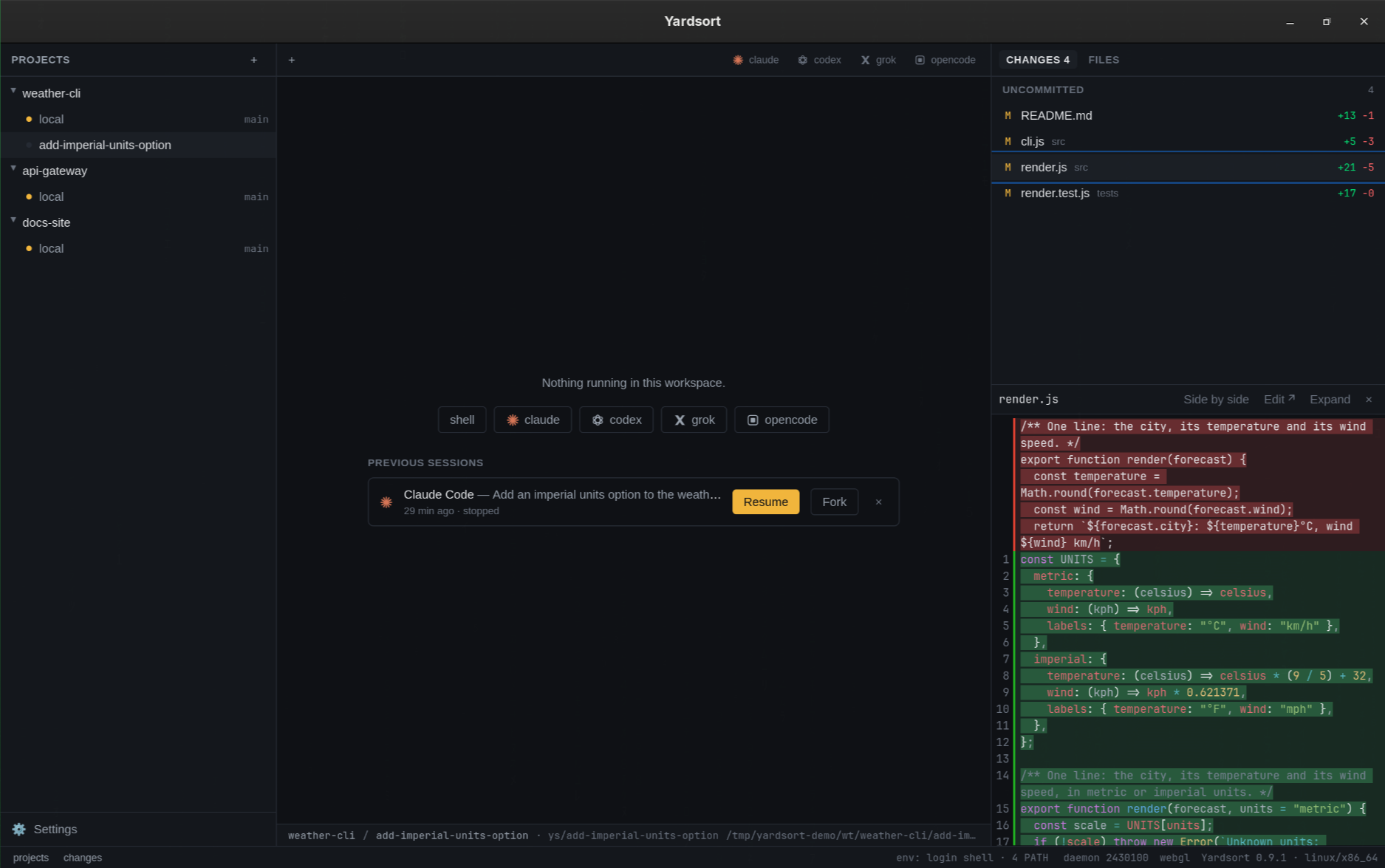 |
| Describe the task, pick the agent, press Enter | Come back later: Resume or Fork any conversation |
Hand the work to another agent
One agent has worked in a workspace and you want another there — Codex after Claude, or the same
agent from a clean start. The files and the diff carry over by themselves. What was asked, tried
and found does not. Hand off…, in the tab bar, writes the next agent's first message from
what Yardsort recorded and opens it in the composer, where you read it, edit it, pick the agent
and press Enter.
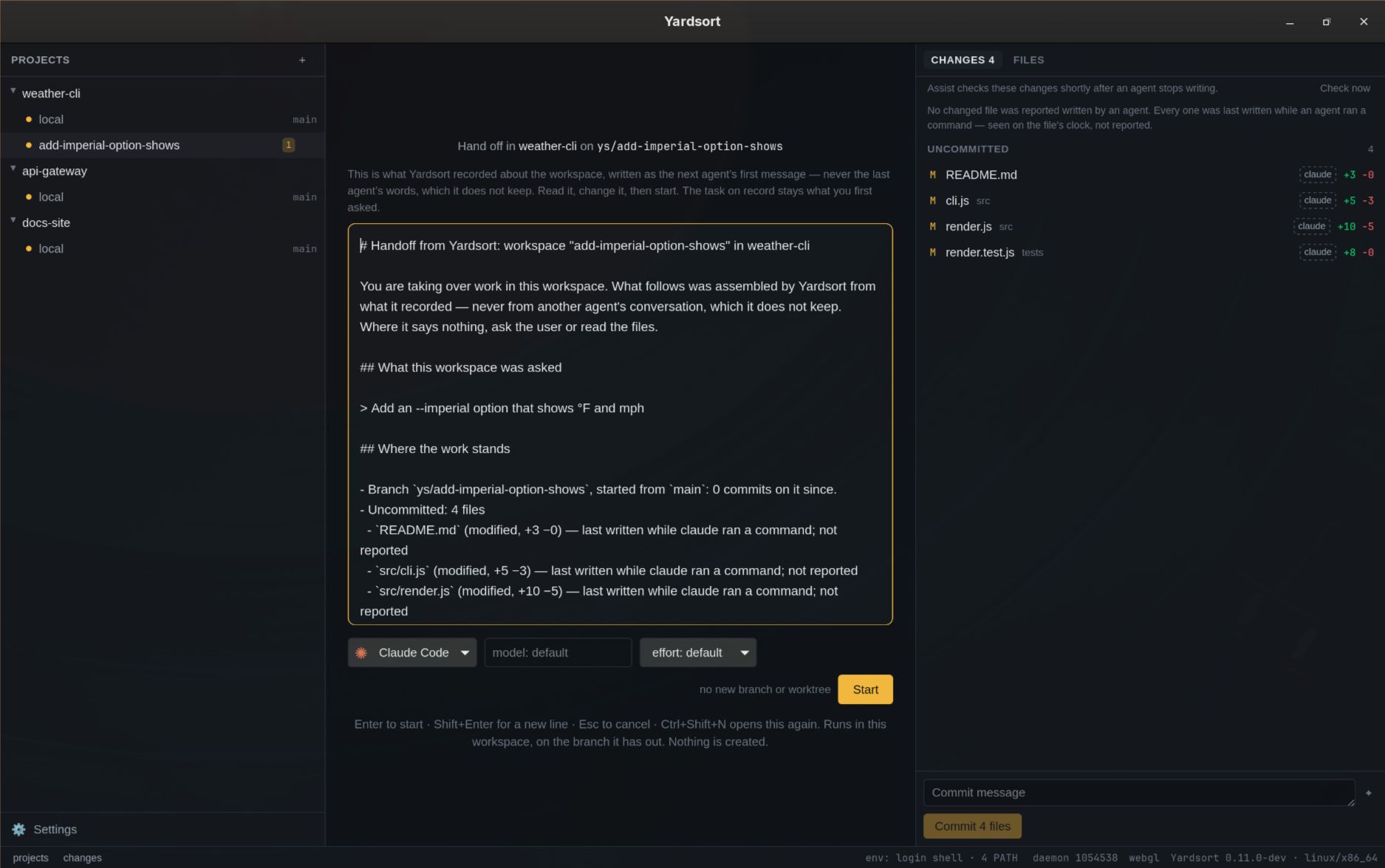
It is written from the record, not from the last agent's words — Yardsort never keeps a
conversation — and no model writes it. An excerpt of a real one:
## What this workspace was asked

> Add an --imperial option that shows °F and mph

## Where the work stands

- Branch `ys/add-imperial-option-shows`, started from `main`: 0 commits on it since.
- Uncommitted: 4 files
  - `src/render.js` (modified, +10 −5) — last written while claude ran a command; not reported
  - `tests/render.test.js` (modified, +8 −0) — last written while claude ran a command; not reported
    …

## What the agents did here

- **claude**, started 2026-09-27 11:39 UTC, **still running**.
  - 1 turn.
  - Tools: Bash ×2.

## What is not here

- The conversations themselves: what the agents said, reasoned, tried and rejected. Yardsort
  records metadata only. If that matters, ask the user before assuming.
It says where it is blind, and tells the next agent to ask you. With
Assist on, the changed files come in the order Assist
would look at them. The handoff is not the task: the new conversation keeps your original words
as what the workspace was asked. From a terminal, ys workspace handoff <workspace> prints the
same message. See
Handing work to another agent.
Workflows: named agent work, in steps
A workflow is a named, reusable piece of agent work that runs in steps — have a second agent
review this workspace's pull request, then tell me and the agent that wrote it. It is a short
YAML file in your profile: the inputs to ask for, and steps that start an agent, wait for it to
settle, type to it once it is quiet, wait for a review on the pull request, and notify you. A
step names the steps it needs, so the ones that need nothing of each other run side by side.
Yardsort checks every name and every {{ variable }} before it runs anything, and names the line
and column of each mistake.
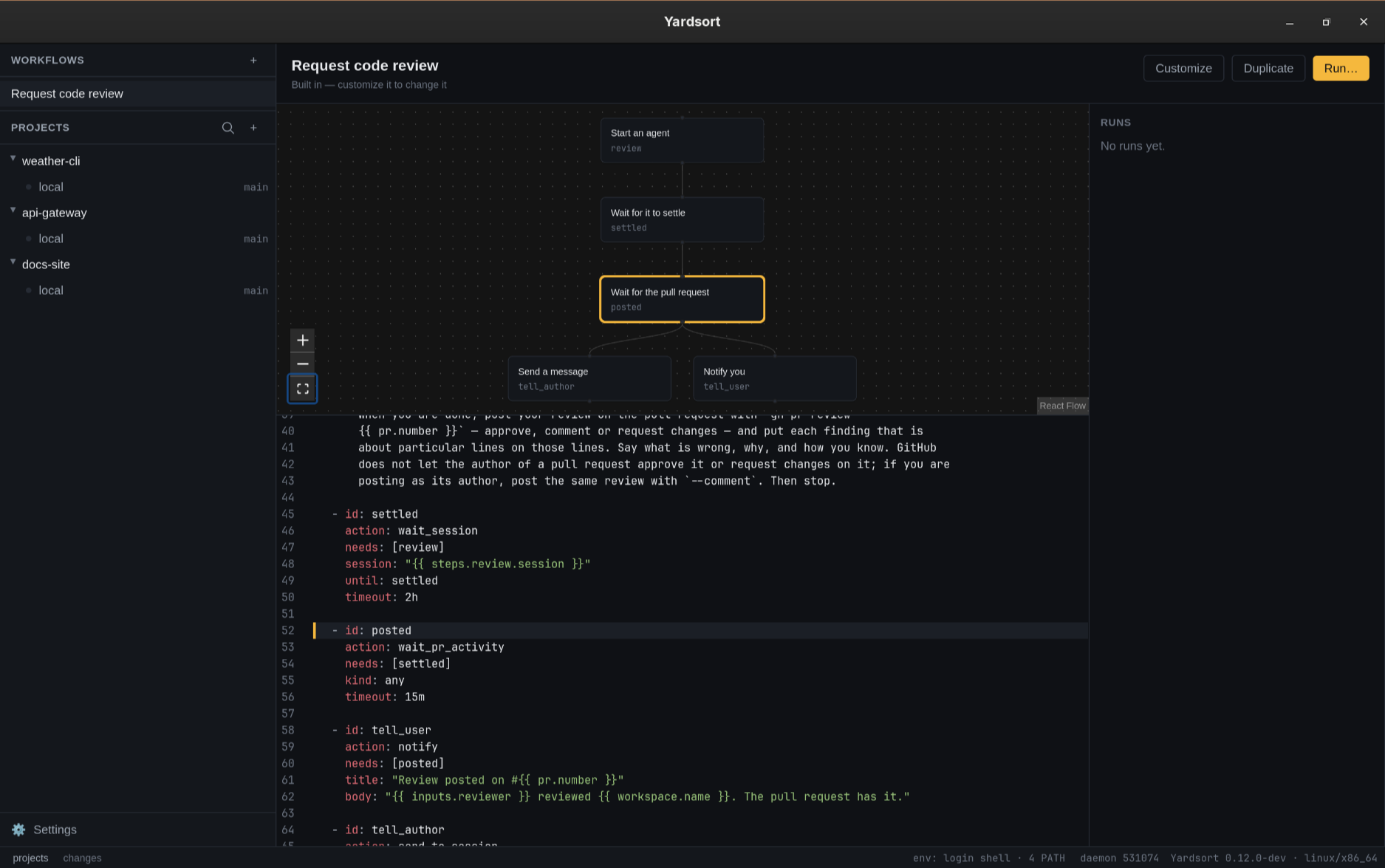
Workflows, above Projects in the sidebar, lists the built-in ones and yours. Open one to see
its steps as a chart, its file in an editor with every problem marked where it is, and its runs.
Rather not write the file? Say what it should do and press Write it: the agent you already
have, or your Anthropic key, writes it — checked like any other, and never saved until you say so.
The built-in Request code review is in every workspace's menu: a second agent reviews the
pull request in the same worktree and posts on GitHub, then you are told, and the agent that
wrote it is told to address the review. From a terminal, with Yardsort open:
ys workflow run code-review --workspace fix-login --input reviewer=codex
The app carries the run out in the background, with the agents it starts as ordinary tabs, andys workflow runs follows it step by step. See Workflows.
Supported agents
Yardsort starts any coding agent that runs in a terminal. These work out of the box:
| Agent | Command | Resume | Fork | Writes commit messages |
|---|---|---|---|---|
 Claude Code Claude Code |
claude |
Any conversation | Yes | Yes |
 Codex Codex |
codex |
Latest in workspace | Latest | Yes |
 Grok Grok |
grok |
Any conversation | Yes | Yes |
 OpenCode OpenCode |
opencode |
Latest in workspace | Latest | Yes |
 OMP OMP |
omp |
Latest in workspace | — | Yes |
 Cursor Cursor |
cursor-agent |
Latest in workspace | — | — |
 Pi Pi |
pi |
Any conversation | Yes | Yes |
| Any other terminal agent | yours | Configurable | Configurable | Configurable |
Anything else is a few lines in settings.toml —
a command and some argument templates, no plugin and no release to wait for:
[[harness]]
id = "aider"
label = "Aider"
command = "aider"
prompt_transport = "stdin"
Each agent uses its own login; Yardsort only starts it. Install and sign in to an agent before
launching a workspace with it.
Install
Download the latest build from the Releases page:
| System | File |
|---|---|
| Linux | .AppImage (portable), .deb, or .rpm (an AUR package, yardsort-bin, is on its way) |
| macOS | .dmg — universal (Apple Silicon and Intel), signed and notarized — or brew install --cask joaoh82/yardsort/yardsort |
| Windows | -setup.exe or .msi — not code-signed yet: choose More info → Run anyway. (winget install joaoh82.Yardsort is awaiting Microsoft's review.) |
On Linux, the quick start shows how to
add the AppImage to your app menu.
You also need git and at least one agent CLI that already works in your terminal (for
example Claude Code). Yardsort does not bundle agents and
never sees their credentials.
Quick start
- Open Yardsort and press + next to Projects → Open a folder → choose a git repository,
or Clone a GitHub repository to download one into a new local folder. - Press + on the project (or
Ctrl+Shift+N/⌘N), type what you want done, press Enter. - Watch the agent in the middle, and its changes on the right. Start more workspaces in parallel.
- The result is an ordinary git branch — review it, push it, open a PR — or have a second agent
review it: Request code review… in the workspace's menu.
The quick start guide walks through it with pictures, and the
documentation covers every part of the app. Both are also on the website, at
yardsort.sh/docs.
Assist: judgment from Jev, if you want it
Yardsort never parses what an agent prints — status, readiness and notifications come from
terminal activity alone, and that does not change. A diff, though, is text a model can be asked
about. Assist is the optional feature that does so, using Jev,
TypeSafe's judgment model.
Jev never generates text. It answers a typed question about a piece of state — a yes/no
probability, a choice among named options, or a position on ordered levels — and Yardsort decides
what the number means. That keeps the interesting part in code: the questions are narrow (one
property each), the thresholds live in your settings, and the model is pinned (jev-1.13.0) so a
new version cannot quietly move under them.
On the changes list, shortly after an agent stops writing, each changed file is checked
against what the workspace was asked to do, and flagged files get a badge:
| Badge | What it means |
|---|---|
| off-task | The change looks unrelated to what this workspace was asked to do. |
| secret | The change looks like it adds a literal key, token or password. |
| tests | The change looks like it deletes, skips or weakens a test. |
| checks | The change looks like it switches a lint, type check or CI step off. |
| credentials | The file's name says it holds credentials — decided locally, contents never sent. |
| unaccounted | A substantive change no agent accounted for, while agents were reporting. Only with the switch above. |
Who wrote each file, if you switch it on too: with each diff, Assist is told in one sentence
what the Changes list already says — reported written by an agent, written while one ran a
command, or by nobody the record knows of — never a tool, a time or a command. A substantive
change no agent accounted for then gets one more badge, unaccounted, and every badge's
tooltip ends with the sentence Assist was told.
In the composer, while you type the first message, Assist can offer a harness and an effort
level, built on your own "Good at" descriptions of your harnesses rather than on any opinion
of ours. Press Use to apply it; ignore it and nothing happens.
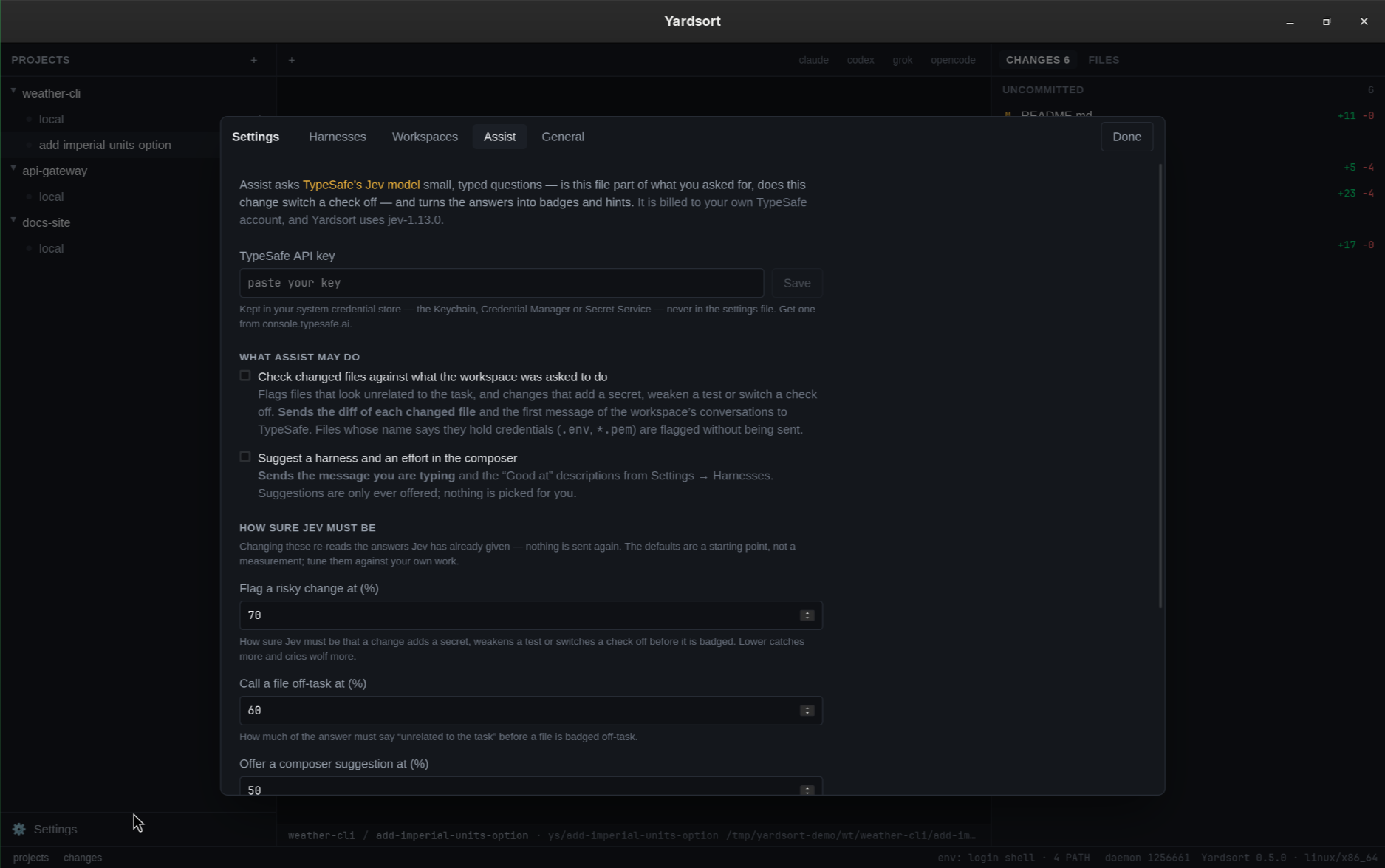
You decide how sure is sure enough. Three thresholds — flag a risky change at 70%, call a file
off-task at 60%, offer a suggestion at 50% — are settings with Restore defaults. Yardsort
caches Jev's answers rather than the badges, so moving a threshold re-reads what has already been
said: no new requests, no waiting.
What it costs you: Assist is off until you enter your own TypeSafe API key and tick a feature.
The key goes to your system credential store (Keychain, Credential Manager, Secret Service), never
into settings.toml, and requests are billed to your account. What leaves the machine is the diff
and path of a changed file plus the task — and, only with that switch, the one sentence on who
wrote it — or the message you are typing plus your "Good at" texts. Nothing else, and never a
terminal. Files whose names say they hold credentials are badged
without their contents being read. Nothing here is load-bearing: with no key, switched off,
offline or rate-limited, Yardsort behaves exactly as it does otherwise, minus a few badges.
The Assist guide covers all of it, including what to do when TypeSafe
says no.
Documentation
| Quick start | Download to first agent in five minutes |
| Projects · Workspaces | Repositories, branches, worktrees, archiving |
| Terminals & sessions | Tabs, status dots, notifications, resume and fork, handing off |
| Changes & files | Reviewing what an agent did |
| Activity | What ran, what each agent reported, who wrote which file |
| Memory | Lessons for a project's agents, approved by you |
| Outcomes | What became of each attempt, and each agent's history |
| Workflows | Named agent work in YAML: the built-in code review, your own |
| Updates | How new versions reach you |
| Settings & harnesses | Configure agents, add your own |
| Assist | Optional Jev checks on changes and composer hints |
The ys command line |
Installing it; workspaces, agents, attach, logs, handoffs |
| Keyboard shortcuts · Troubleshooting | |
| Design docs | Architecture, harness model, roadmap, open questions |
Build from source
You need Rust (stable), Bun, git,just, and Tauri's
system dependencies for your OS.
git clone https://github.com/joaoh82/yardsort && cd yardsort
just setup     # install dependencies
just dev       # run with hot reload
just check     # formatting, lints, types, all tests
just build     # installers for this OS, in target/release/bundle/
just alone lists every recipe. See CONTRIBUTING.md for how the code is laid
out and how to send a change.
Status
Early, and moving fast. The core loop — projects, parallel workspaces, configurable agents, live
review, resumable sessions — works on all three platforms and is covered by CI on each. Expect
rough edges, and please report them.
For complete examples, visit the tutorials.
The blog covers product decisions and tool comparisons.
The changelog says what changed, and the roadmap
what is next.
Contributing
Issues, ideas and pull requests are welcome — see CONTRIBUTING.md and the
Code of Conduct. To report a vulnerability, see SECURITY.md.
Get in touch
Bugs and feature requests belong in the
issue tracker, where everyone can find
them. For anything else — a question, help getting started, or just to say what you are building
with it — write to [email protected].
Team

License
GPL-3.0. Yardsort is free software: you may use, study, share and change it, and
versions you distribute must stay free under the same terms.
Yardsort was called Switchyard until v0.2; if you used that, your projects and settings come
along automatically the first time you start Yardsort.
Yardsort is an independent project, not affiliated with Anthropic, OpenAI, xAI or any other
maker of the agents it can launch. Product names belong to their owners.
Yorumlar (0)
Yorum birakmak icin giris yap.
Yorum birakSonuc bulunamadi