voz
Health Gecti
- License — License: MIT
- Description — Repository has a description
- Active repo — Last push 0 days ago
- Community trust — 26 GitHub stars
Code Gecti
- Code scan — Scanned 12 files during light audit, no dangerous patterns found
Permissions Gecti
- Permissions — No dangerous permissions requested
Bu listing icin henuz AI raporu yok.
Free, open source dictation for Mac. A Wispr Flow alternative that runs offline and grows with TypeScript extensions.
Voz
Type at the speed you talk.
Tap right Command, say what you mean, and clean text appears in any app.
Free, open source and on your Mac. Missing a feature? Your coding agent writes it as an extension.




Install
You need macOS 26 on Apple Silicon. Paste this in Terminal:
curl -fsSL https://voz.tools/install | bash
How it works
Tap right Command, talk, and tap again. You say:
um so tell kaitlyn the uh deck is ready
Voz types this at your cursor:
Tell Kaitlyn the deck is ready.
Speech recognition and cleanup run on your Mac, so Voz works offline. There is no account and no word limit.
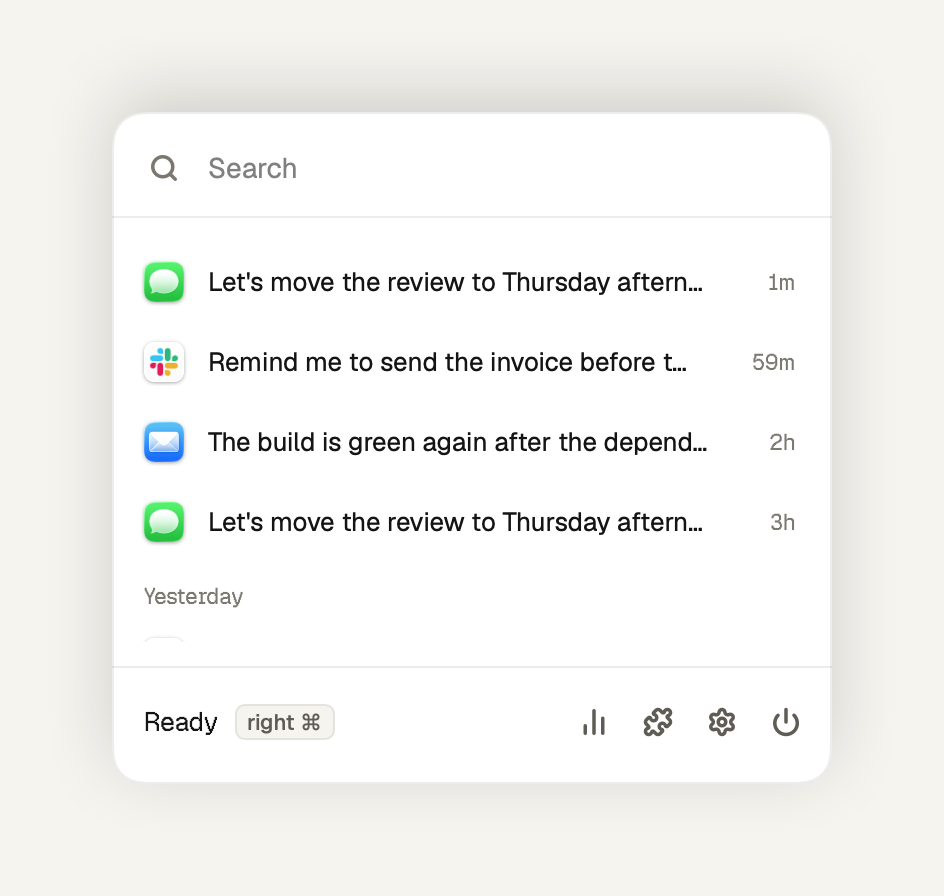
Voz lives in the menu bar and keeps your history on your Mac. Click a transcript to copy it, or search for older ones.
Why Voz
I paid for Wispr Flow until a subscription to talk to my own computer started to annoy me. The open source apps I tried had too many settings. Hex came closest, but every change I wanted meant a pull request and a long wait.
So Voz has a small core that records, transcribes, cleans up and types. Everything else is an extension you write for yourself and can share with others.
Extensions
Extensions are TypeScript files in ~/.voz/extensions. They can use your apps, files, terminal and the network.
import { defineExtension } from "voz";

export default defineExtension((voz) => {
  voz.registerCommand({
    phrase: "send it",
    run: (event, ctx) => ctx.press("return"),
  });
});
Now "let's ship it, send it" types "Let's ship it" and presses Return. Other ideas:
- Turn rambling into a clear prompt for your coding agent
- Write mail with your greeting and sign-off
- File a Linear issue from what you said
Extensions run with your permissions, so install only ones you trust. If one is slow or crashes, dictation keeps working. With no extensions installed, Voz runs nothing extra.
Build one with your coding agent
Click Build your own under Extensions and paste the prompt into Claude Code, Codex or another coding agent. The click also installs the voz-extension skill, so the agent asks what you want, writes the extension and tests it with you. Voz loads it when you save. The API is in api.md.
To install the skill without Voz, run npx skills add Joelheile/voz -g.
Share it
Publish it to npm with the voz-package keyword, and it shows up under Extensions for everyone. Install one from the menu bar or with voz install voz-meeting. Here is every published extension, updated hourly:

Terminal and MCP
Everything in the menu is a voz command, and extensions add their own. Your coding agent can dictate, search your history or set up an extension the same way you do.
voz start                         # open Voz in the background
voz status                        # permissions, model and extensions
voz dictation start               # record, then voz dictation stop
voz dictation stop --print        # print the text instead of typing it
voz logs --extensions --since 5m  # what extensions logged
voz history invoice --limit 5     # find what you dictated
voz vocabulary add Kubernetes     # teach Voz a word
voz config voz-jira token -       # set a token from stdin
voz disable voz-jira              # turn an extension off
voz jira issues VOZ               # run a tool an extension adds
voz feedback "Hotkey lags"        # tell the developer, privately
voz help calendar                 # find a command
voz guide                         # how to build an extension
voz <command> --helplists a command's flags.- Add
--jsonfor JSON. Coding agents get JSON without the flag. - Repeating a command is safe.
voz enable voz-jiratwice reports that it is already on and still succeeds. - When Voz is closed, most commands exit with code 3 and ask you to run
voz start.voz install,voz list,voz new,voz dev,voz logsandvoz guidework without it.
| Exit code | Meaning |
|---|---|
| 0 | Done, or it already was |
| 1 | The command failed |
| 2 | Wrong command or flag |
| 3 | Voz is not running |
| 4 | Voz heard no speech |
voz mcp offers the same commands to Claude, Codex and other MCP apps, and opens Voz if it is closed:
claude mcp add voz -- /Applications/voz.app/Contents/MacOS/voz mcp
codex mcp add voz -- /Applications/voz.app/Contents/MacOS/voz mcp
Each command becomes a tool, such as history, vocabulary_add or voz-jira_issues. Read-only commands are marked, so the app can run them without asking you. Commands that install code or need a terminal, such as voz install and voz dev, are not offered.
What's new
- Voz no longer freezes for a few seconds when you switch to a Chrome window
- Dictation records from your default microphone when the one you picked won't start
- Text appears sooner after you let go of the hotkey
- Extensions can ask you to check details in a card under the notch
- Extensions made for a newer Voz now load instead of asking you to update
Privacy
Dictation runs on your Mac. Your audio and transcripts stay there unless an extension you install sends them somewhere.
Voz sends PostHog, without your IP address:
- An anonymous ping on install, on update and on each day you dictate, with the app version, macOS version, chip and speech model
- Crash reports, on by default under Privacy, with a stack trace and no text, audio or app names
- Usage analytics, only if you opt in
- Feedback, only when you send it
None of these contain what you dictate. The local log at ~/Library/Logs/Voz/voz-logs.jsonl includes your text only when you turn on Include text under Privacy.
Voz asks for System Audio Recording to mute other apps while you dictate, and it saves no audio. Extensions see the app you dictate into and, in browsers, the hostname, never the full address. An AI app you connect with voz mcp can read your history, so connect only apps you trust.
Found a vulnerability? Open a private advisory, not a public issue.
Contributing
Pull requests that make the core faster or more reliable, add languages or add extension points are welcome. Everything else ships as an extension. If the API can't do what you need, open an issue.
You need the Command Line Tools, not Xcode:
scripts/test.sh          # run the tests
scripts/run.sh           # build a debug app and launch it
scripts/make-app.sh      # build and sign build/voz.app
AGENTS.md has the code map and release rules.
License
MIT. Dependencies and downloaded models keep their own licenses. Signed apps include Contents/Resources/ThirdPartyNotices.txt, with dependency licenses and model attributions.
Yorumlar (0)
Yorum birakmak icin giris yap.
Yorum birakSonuc bulunamadi