zeno-mobile-runner
Health Uyari
- License — License: MIT
- Description — Repository has a description
- Active repo — Last push 0 days ago
- Low visibility — Only 5 GitHub stars
Code Gecti
- Code scan — Scanned 12 files during light audit, no dangerous patterns found
Permissions Gecti
- Permissions — No dangerous permissions requested
Bu listing icin henuz AI raporu yok.
Agent-native mobile UI automation: one Zig binary drives real Android/iOS devices over MCP, JSON-RPC, or committed JSON scenarios, and emits replayable trace evidence. On npm.
Zeno Mobile Runner
Agent-native mobile UI automation: a single Zig binary that drives real
Android and iOS devices via MCP, JSON-RPC, or committed JSON scenarios, and
emits replayable trace evidence.


AI coding agents can change mobile apps quickly, but they have no reliable way to
see the screen, act on native UI, and prove the result. Zeno Mobile Runner
(ZMR) is that missing control plane: one local binary that installs and launches
apps, captures semantic UI state, performs typed actions, waits and asserts, and
writes a replayable trace.
ZMR deliberately does not embed an LLM. External agents, scripts, and CI
systems stay in charge of planning; ZMR is the device-facing engine they observe
and act through — over MCP, JSON-RPC, a JSON-output CLI, or deterministic
committed JSON scenarios.
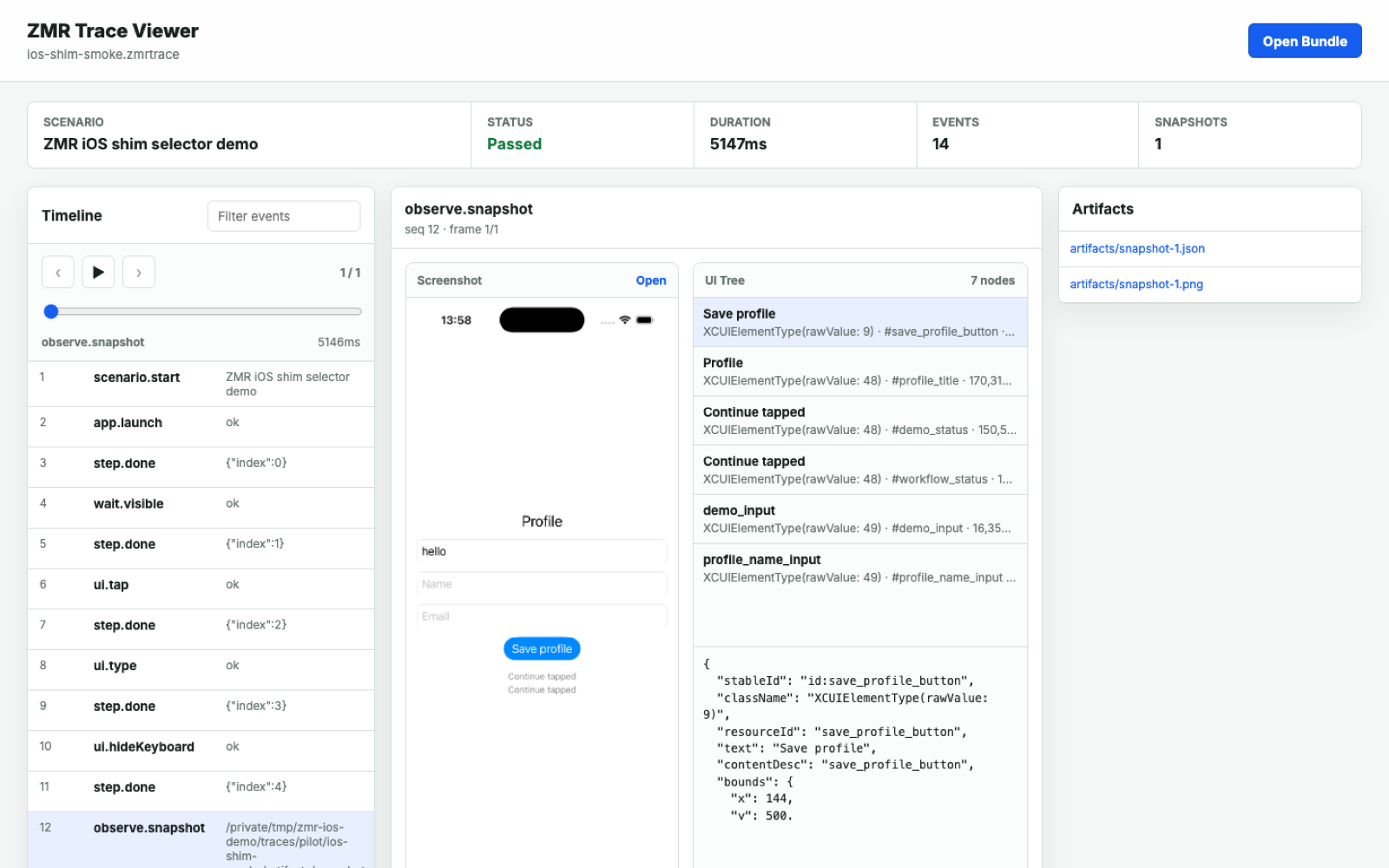
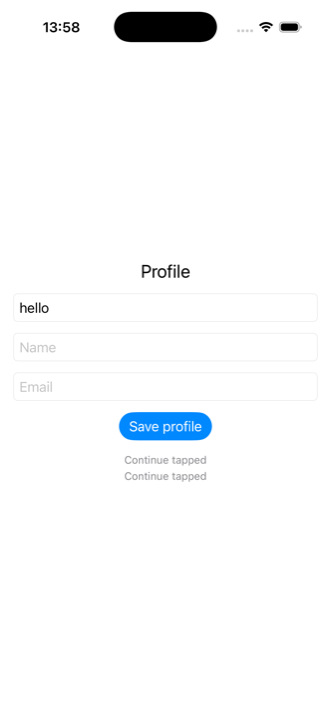
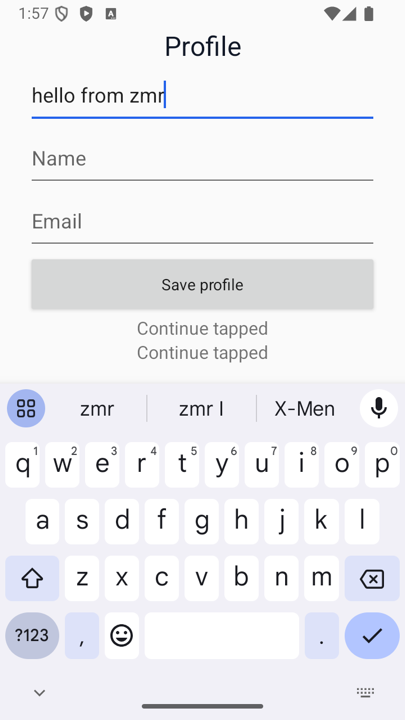
On-device screenshots from ZMR traces: the same demo flow driven on an iOS simulator and an Android emulator.
Why this exists
- Agents need structured mobile state, not terminal scrapings. ZMR returns
semantic UI trees, stable selectors, screenshots, and typed action results, so
an agent reasons from product state instead of guessing. - Product claims need evidence. Every traced session can produce events,
screenshots, UI hierarchies, timings, assertion results, HTML and JUnit
reports, and a redacted bundle safe to share. - Exploration should become tests. After a live agent session,
zmr discover/draftturn trace evidence into reviewable JSON scenarios
that replay in CI with no LLM in the loop — and no per-run LLM cost. - One model below the framework layer. ZMR drives native UI beneath the
JavaScript and Dart layers, so React Native, Expo, Flutter, and fully native
apps share the same runner, selectors, and traces.
How it works
flowchart LR
    A["AI coding agent<br/>AI IDE · Cursor · custom MCP harness"]
    subgraph zmr["ZMR — one small Zig binary"]
        MCP["MCP server<br/><code>zmr mcp</code>"]
        RPC["JSON-RPC stdio/TCP<br/><code>zmr serve</code>"]
        CLI["CLI + JSON scenarios<br/><code>zmr run</code>"]
        CORE["Core engine<br/>selectors · waits · assertions<br/>scenario runner · trace writer"]
        MCP --> CORE
        RPC --> CORE
        CLI --> CORE
    end
    subgraph devices["Devices"]
        AND["Android emulator/device<br/>ADB · UI Automator · optional shim"]
        IOS["iOS simulator/device<br/>simctl · devicectl · XCTest shim"]
    end
    TRACE["Trace bundle<br/>events.jsonl · screenshots · UI trees<br/>report.html · junit.xml · .zmrtrace"]
    A -- "MCP tools" --> MCP
    A -- "JSON-RPC" --> RPC
    A -- "CLI JSON" --> CLI
    CORE --> AND
    CORE --> IOS
    CORE --> TRACE
One core engine, four driver surfaces, two device backends:
- Core engine (Zig). Selector resolution, waits, assertions, the scenario
runner, and the trace writer live in one place and behave identically no matter
which surface invoked them. - Four surfaces, one contract. The MCP server (
zmr mcp), JSON-RPC over
stdio/TCP (zmr serve), the JSON-output CLI (zmr run/validate/explain/discover), and committed JSON scenarios all map onto the same
engine and the same versioned schemas. - Android backend. Real ADB and UI Automator (
exec-out uiautomator dump,screencap) with no app instrumentation required; an optional app-local Java
instrumentation shim speeds up native actions when you build it in. - iOS / iPadOS backend.
xcrun simctlanddevicectlhandle lifecycle; a
generated XCTest / XCUIAutomation Swift shim, scaffolded into your app,
performs native selector actions.
A standout capability is the trace-to-test loop: drive the app live with an
agent, then run zmr discover / draft / explore to convert the captured
trace into a reviewable, schema-validated replay scenario that runs in CI with no
LLM involved.
See docs/protocol.md, docs/ai-agents.md,
and docs/frameworks.md.
Install
ZMR is designed to run from your mobile app repository. The curl path downloads
the native zmr binary and verifies it against the release SHA256SUMS; it then
prints the recommended next steps, which scaffold app-local config (zmr init)
and verify the toolchain (zmr doctor):
curl -fsSL https://raw.githubusercontent.com/johnmikel/zeno-mobile-runner/main/install.sh | sh
export PATH="$HOME/.local/bin:$PATH"
zmr init --app --app-id com.example.mobiletest
zmr doctor --strict --json --config .zmr/config.json
JavaScript teams can pin ZMR inside the app repo via npm and generate npm
scripts with the wizard:
npm install --save-dev zeno-mobile-runner
npx zmr-wizard --app-id com.example.mobiletest --package-json
A Homebrew path is also documented (generate a formula, then install the native
binary). See docs/install.md.
Usage
As an MCP server for a coding agent
Point any MCP-capable client at the local binary:
zmr mcp --config .zmr/config.json --trace-dir traces/zmr-agent
Or wire it into an .mcp.json / MCP client config:
{
  "mcpServers": {
    "zmr": {
      "command": "zmr",
      "args": ["mcp", "--config", ".zmr/config.json", "--trace-dir", "traces/zmr-agent"]
    }
  }
}
Then ask the agent to verify its own work: "launch the app, walk through
onboarding, and show me the trace." The MCP server exposes the full loop as
26 mobile-native tools:
| Group | Tools |
|---|---|
| Observe | snapshot, semantic_snapshot |
| App lifecycle | install_app, launch_app, stop_app, clear_state, open_link |
| Act | tap, type, erase_text, hide_keyboard, swipe, press_back |
| Wait | wait_visible, wait_not_visible, wait_any, scroll_until_visible |
| Assert | assert_visible, assert_not_visible, assert_healthy |
| Evidence | trace_events, trace_explain, trace_discover, trace_explore, trace_export, scenario_validate |
A parallel JSON-RPC method set (runner.capabilities, device.list,session.create, observe.*, ui.*, trace.*, scenario.*) exposes the same
engine to harnesses that embed ZMR over stdio or TCP.
Deterministic scenarios for CI
Scenarios are plain JSON — no second DSL to learn. Agents and build scripts can
generate, validate, and mutate them, then replay them in CI with no LLM cost:
{
  "name": "Login smoke",
  "appId": "com.example.mobiletest",
  "steps": [
    { "action": "clearState" },
    { "action": "launch" },
    { "action": "assertHealthy", "timeoutMs": 5000 },
    { "action": "tap", "selector": { "resourceId": "email" } },
    { "action": "typeText", "text": "[email protected]" },
    { "action": "tap", "selector": { "text": "Login" } },
    { "action": "waitVisible", "selector": { "text": "Welcome" }, "timeoutMs": 30000 }
  ]
}
zmr validate --json .zmr/login-smoke.json
zmr run .zmr/login-smoke.json --json --trace-dir traces/login-smoke
zmr report traces/login-smoke --out traces/login-smoke/report.html --junit traces/login-smoke/junit.xml
zmr export traces/login-smoke --out login-smoke-redacted.zmrtrace --redact
Traced zmr run --json responses carry executable nextCommands, so an agent
can continue to reporting, explanation, discovery, or export without
reconstructing paths from text. When a run fails, zmr explain diagnoses the
trace for humans and agents alike. Open any exported bundle in the static
trace viewer, or serve it and deep-link withviewer/index.html?bundle=<url>.
For repeat-run reliability gates (pass-rate, failure-count, p95 duration),
device matrices, and baseline comparison, see
docs/benchmarking.md. Benchmark fixtures shipped in the
repo are generic — gather your own app/device evidence before making performance
claims.
Reference clients
Thin JSON-RPC wrappers ship for TypeScript, Python, Go, Rust, Swift, and
Kotlin, each with its own tests. They are optional — all of them callzmr serve --transport stdio and speak the same protocol. TypeScript and Python
are the usual starting points. See docs/clients.md and
docs/client-installation.md.
Platform support
| Target | Status | Notes |
|---|---|---|
| Android emulator | Supported | ADB / UI Automator, optional Android shim, emulator lifecycle helpers |
| Android physical device | Supported | Requires ADB connection and an app build/install surface |
| iPhone simulator | Supported | simctl plus app-local XCTest / XCUIAutomation shim for native selector actions |
| iPad simulator | Supported, evidence-needed | Same iOS simulator path; validate tablet layouts and size-class branches before production claims |
| iPhone physical device | Supported, validate locally | devicectl lifecycle plus XCTest shim; pilot on your app/device before relying on it in CI |
| iPad physical device | Supported, evidence-needed | Same iOS / iPadOS physical path; collect separate iPad pilot evidence first |
| Apple TV / Apple Watch | Not in this preview | Would require a separate platform lifecycle, shim, destination, and trace evidence |
| Cloud device farms | Not included | ZMR targets local and self-managed devices in this preview |
End-to-end device runs require a configured mobile toolchain (Android SDK / ADB,
Xcode / simctl) and, for iOS native selector actions, building the generated
XCTest shim into the app. To exercise the engine without hardware, the repo
ships fake-device test doubles (fake-adb, fake-xcrun, fake shims) used
throughout the test suite and the zmr validate examples/demo-fake.json demo.
Project status
ZMR is a 0.2.x developer preview (runner version 0.2.17, protocol version2026-04-28), published to npm
with curl / npm / Homebrew install paths. There is no 1.0 stability guarantee
yet, and surfaces may change between minor versions.
What backs that maturity claim:
- Tested. ~16.5k lines of non-test Zig across 78 non-test source files (141
.zigfiles insrc/including tests), with 284 in-source Zigtestblocks,
plus atests/directory of 68 shell / Node / Python script tests (a few of
which are fake-device doubles).build.zigwires three test targets (unit,
iOS, runner). - CI. Three GitHub Actions workflows:
ci.yml(builds Zig and runs the
cross-language client tests on macOS),device-smoke.yml(nightly cron that
boots a real Android emulator and iOS simulator end-to-end), andrelease.yml
(tagged release that builds the dist bundle, attests artifacts, and publishes
to npm). - Contracts. 24 published JSON Schemas covering scenarios, snapshots, action
results, trace events, protocol messages, and command outputs. - Supply chain. The release pipeline generates an SPDX SBOM and
SHA256SUMS, and attaches build provenance attestation viaactions/attest.
(macOS code-signing/notarization scripts exist inscripts/but are not yet
wired into the release workflow; npm publish does not currently set--provenance.) - Distribution. Also shipped as a Claude Code plugin (
.claude-plugin/) and
registered as an MCP server (glama.json).
Some Apple-platform and benchmark claims are honestly marked evidence-needed in
the support matrix; redaction is intentionally conservative. See
FEATURES.md, CHANGELOG.md,
SECURITY.md, and
docs/production-readiness.md for the full picture.
Documentation
- docs/install.md — install paths and first setup checks
- docs/ai-agents.md — JSON-RPC and MCP agent workflows
- docs/agent-discovery.md —
explore/discover/draftand the trace-to-test loop - docs/scenario-authoring.md — selectors, waits,
and scenario design - docs/frameworks.md — React Native, Expo, Flutter, native
- docs/protocol.md — JSON-RPC methods and schemas
- docs/trace-privacy.md — safe trace export
- docs/troubleshooting.md — common setup and runtime
issues - FEATURES.md — complete feature list and limitations
License
MIT © John Mikel Regida — see LICENSE.
Yorumlar (0)
Yorum birakmak icin giris yap.
Yorum birakSonuc bulunamadi