donewhen
Health Gecti
- License — License: AGPL-3.0
- Description — Repository has a description
- Active repo — Last push 0 days ago
- Community trust — 40 GitHub stars
Code Uyari
- process.env — Environment variable access in plugin/scripts/tasks.mjs
Permissions Gecti
- Permissions — No dangerous permissions requested
Bu listing icin henuz AI raporu yok.
A new way to work with your AI Agents. Self-hosted issue tracker that keeps the record of AI-built work: done-when checklists, linked commits, engineering docs, MCP-first.

DoneWhen
See what your AI built. Review it at a gate. Check it again later.

A 39-second tour, with sound. Watch the video (MP4) · vertical version (9:16) · case study
Hi, I'm Htet Wai Yan Soe. I am a senior backend engineer with 10+ years building payment systems and high-reliability APIs in Go, TypeScript/Node.js and PHP/Laravel, across mobile financial services, marketplaces and consumer platforms. I am based in Chiang Mai, Thailand, and I work remotely. More about me: burmese.dev · LinkedIn
Why I built this
I built DoneWhen to solve my own engineering problem.
I build backend systems with AI agents every day. The agents work very fast, often overnight. In the morning I could not tell what they built, why they built it, or if it was really done. The chat was gone. The commits said "fix". A task was "done" because the AI said so.
I did not want to read every line of code. I wanted three things:
- A record that I can read in minutes.
- A rule that the AI cannot skip.
- A human gate on quality.
I could not find a tool that did this. I built one and ran my own projects on it. Now it is open source.
What it does
DoneWhen is the place where you track the work of the AI. It has three jobs:
- Track. Every task is a ticket. The agent writes the ticket as a full spec, with a done-when checklist. The AI ticks each item as it works. You see the progress on a board.
- Understand. Tickets, attached documents and Mermaid diagrams show what the AI built and why. You do not read a long chat.
- Gate. A ticket cannot move to In Review while an item is open. Then a human reviews the quality and approves. The commits, the specs and the checklist stay, so you can check the work again later.
Read docs/CONCEPTS.md for the full idea.
Features
- Board and states. Continuous-flow Kanban: Triage, Backlog, Aligning, Ready, In Progress, Blocked, In Review, Done, Canceled. There are no sprints and no estimates.
- Done-when gate. Each ticket has a checklist. The server refuses a move to In Review or Done while an item is open.
- Review and approve. The Inbox lists the tickets that wait for you. You approve from the Inbox or from the ticket page.
- Blocked with a reason. A move to Blocked needs a reason. The Blocked page lists every blocked ticket with its reason.
- Commits and engineering docs. Link commits, branches and PRs to a ticket. Save a document (with Mermaid diagrams) for each change.
- Filters and saved views. Filter by state, priority, label and epic. Save a filter as a view in the sidebar.
- Quick capture and keyboard. Press
Nto add a ticket. Press?to see every key. - MCP for AI agents. An MCP server at
/mcp. Any MCP client works, including Claude Code. - A menu in Claude Code. The plugin adds
/dw. Browse your tickets, pick one and start work, with no model call to browse. - Live updates. The board updates in real time with Server-Sent Events.
- Installable PWA with Web Push. Add it to your phone. Get notifications in the background.
- Light and dark theme. The interface follows a written design system.
- Multi-workspace. Each workspace has its own issues, epics, labels and members. The workspace is a hard boundary.
Quick start
For the short path with Claude Code, read docs/GETTING-STARTED.md.
You need Docker with the Compose plugin, and Git. For Podman, see docs/PODMAN.md.
Clone the repo.
git clone https://github.com/johnreginald/donewhen.git
cd donewhen
Copy the example config.
cp .env.example .envSet the secrets in
.env. Generate a session secret and put it inDONEWHEN_SESSION_SECRET.openssl rand -hex 32The app rejects the placeholder secret from
.env.exampleunlessDONEWHEN_ENV=dev, so replace it. Also changePOSTGRES_PASSWORD. Then change the password insideDONEWHEN_DATABASE_URLtoo. Only a local run outside Docker reads that line.For a local try-out, set the public URL to the port that Compose publishes:
DONEWHEN_BASE_URL=http://localhost:8090Leave
DONEWHEN_ENV=dev. Inprodmode cookies need HTTPS. For a real server, follow docs/SELF-HOSTING.md.Start the app.
docker compose up -d --buildCreate the first user.
docker compose exec donewhen /app/donewhen user [email protected] 'a-strong-password'The password needs at least 8 characters.
Open http://localhost:8090 and sign in.
Compose publishes the app on
127.0.0.1:8090only. To change the port, useDONEWHEN_HOST_PORT.
Next, create a workspace in the app, or run docker compose exec donewhen /app/donewhen workspace create "My Work" MYW.
Try the demo
Run three commands to start DoneWhen with sample data:
docker compose up -d --build
docker compose exec donewhen /app/donewhen user [email protected] 'a-strong-password'
docker compose exec donewhen /app/donewhen demo
donewhen demo makes a workspace called Demo (key DEMO). It holds about 24 tickets in every state, done-when checklists, blockers, three engineering documents with diagrams, and 3 tickets that wait for your review in the Inbox. The data is fictional. If you run it again, it says "demo already exists" and changes nothing.
To seed the demo at start, set DONEWHEN_DEMO=1 in .env. Compose then seeds the demo at start, after a user exists. Create the user first. Then run docker compose restart donewhen.
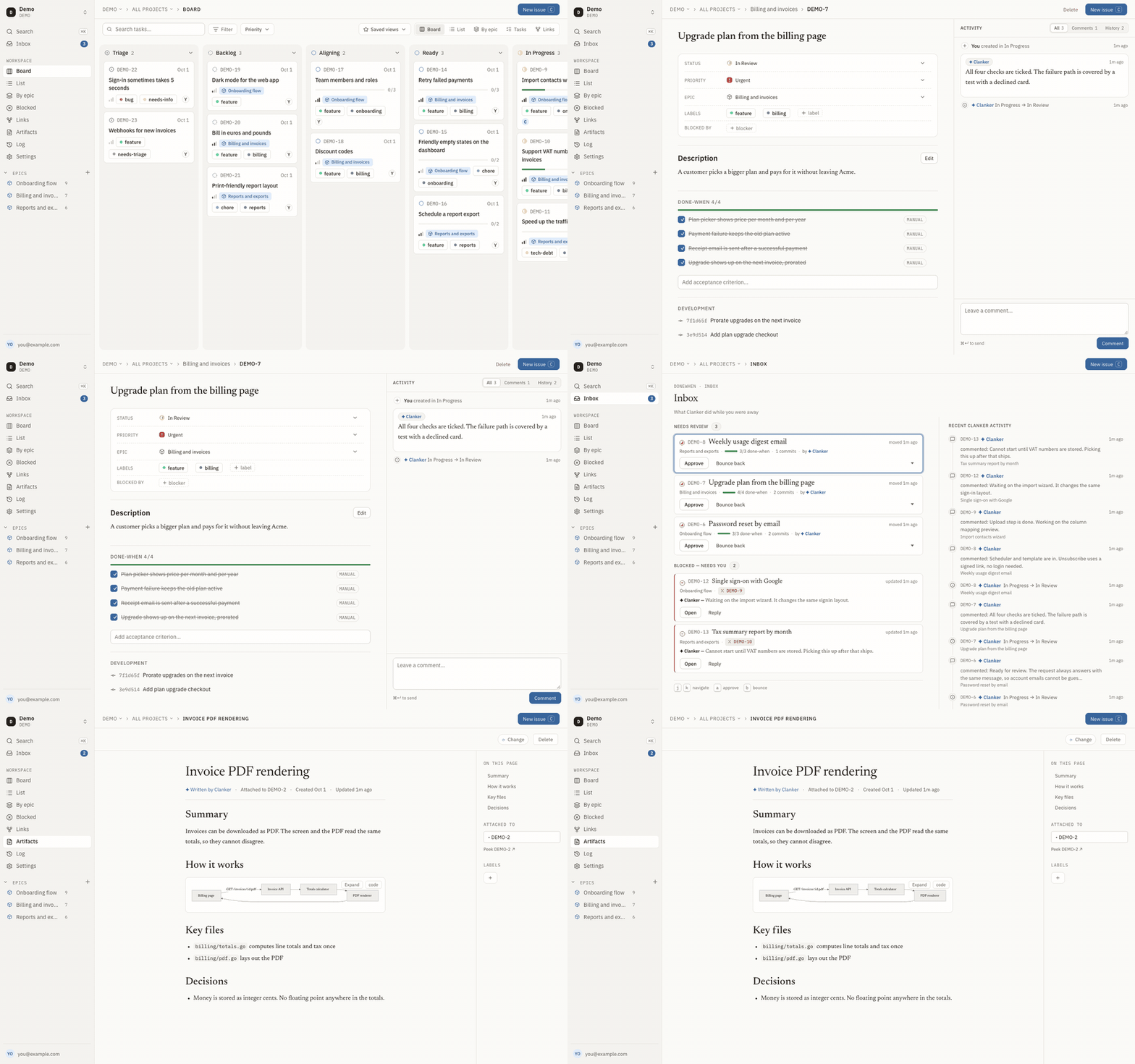
Screenshots
| Light | Dark | |
|---|---|---|
| Board | light | dark |
| Issue and done-when | light | dark |
| Inbox | light | dark |
| Artifacts reader | light | dark |
| List | light | dark |
Connect Claude Code
DoneWhen has an MCP endpoint at <your-server>/mcp (Streamable HTTP, bearer token).
Mint a token.
docker compose exec donewhen /app/donewhen token claudeThe command shows the token one time. Copy it.
Register the server.
claude mcp add --transport http donewhen http://localhost:8090/mcp \
  --header "Authorization: Bearer <token>"
Use your real server address in place of
http://localhost:8090, for examplehttps://tracker.example.com. The tools appear asmcp__donewhen__*.
Pinned tokens
A normal token reaches all of your workspaces. A pinned token reaches one workspace. Give the workspace slug as the second argument:
docker compose exec donewhen /app/donewhen token acme-agent acme
Use a pinned token for an agent that works in one repo.
The plugin: /dw
The plugin adds one command, /dw. It opens a menu inside Claude Code. You browse your tickets, pick one, and start work on it. Browsing makes no model call and uses no tokens. The plugin reads the REST API directly.
Install the plugin. This repo is its own marketplace.
claude plugin marketplace add johnreginald/donewhen
claude plugin install donewhen@donewhen
Set two environment variables. The most reliable place is the
envblock of~/.claude/settings.json. Every Claude Code session gets that block, however you start the session. A shell profile works only when you start Claude Code from that shell.{ "env": { "DONEWHEN_URL": "https://tracker.example.com", "DONEWHEN_TOKEN": "donewhen_..." } }Get a token from
donewhen token <name>. Restart Claude Code after you change the block.Run
/dwin Claude Code.
How the menu works:
- The first time, pick a workspace. Later,
/dwopens the last workspace you used. - The list shows the open tickets, 15 to a page, with a coloured state and the epic filter.
- Pick a ticket with Enter to see its description and its done-when checklist.
- Start work (
g) closes the menu and asks Claude Code to build the ticket. Put in prompt (f) puts the same text in your prompt box, so you can edit it first.
| Key | Action |
|---|---|
↑ ↓ and Enter |
Move and open |
r |
Show Ready tickets only |
e / s |
Step through the epics / the states |
d |
Show or hide Done and Canceled tickets |
n / p |
Next and previous page |
w |
Switch workspace |
g / f / c / b |
In a ticket: start work, put in prompt, copy the link, back to the list |
Esc |
Close the menu |
A token pinned to one workspace limits the menu to that workspace.
The repo also has a skill that teaches Claude how to use the tools well. See skills/README.md. For the full loop, see docs/AI-WORKFLOW.md.
Configuration
Set these in .env (Compose) or in the environment. The project was called Raenil before. The old RAENIL_* names work for one more release and log a deprecation warning. If both names are set, the DONEWHEN_* name wins.
| Name | Default | Meaning |
|---|---|---|
DONEWHEN_BASE_URL |
http://localhost:8080 |
Public URL of the app. Used for cookies, the Web Push origin and links. |
DONEWHEN_LISTEN_ADDR |
:8080 |
Address on which the server listens. Compose sets :8080 inside the container. |
DONEWHEN_DATABASE_URL |
postgres://donewhen:donewhen@localhost:5432/donewhen?sslmode=disable |
Postgres connection string. Compose builds it from the POSTGRES_* values. |
DONEWHEN_ENV |
dev (Compose: prod) |
dev or prod. prod needs a session secret and always sets Secure cookies (HTTPS). |
DONEWHEN_SESSION_SECRET |
none | Secret for sessions. At least 16 characters. Required in prod. Generate it with openssl rand -hex 32. |
DONEWHEN_ISSUE_PREFIX |
R |
Key prefix of the legacy default workspace. New workspaces have their own prefix. |
DONEWHEN_TRUSTED_PROXY_HEADER |
empty | Header that your proxy sets to the real client IP. Used to limit the login rate. See SELF-HOSTING.md. |
DONEWHEN_VAPID_PUBLIC |
empty | Web Push public key. Push is off if this key or the private key is empty. |
DONEWHEN_VAPID_PRIVATE |
empty | Web Push private key. Make a pair with donewhen genvapid. |
DONEWHEN_VAPID_SUBJECT |
mailto:admin@localhost |
Contact for push services. Use mailto:[email protected]. |
DONEWHEN_DEMO |
empty | Compose passes it through. 1 seeds the Demo workspace at start, after a user exists. |
DONEWHEN_BACKUP_CONFIRMED |
empty | Names of destructive migrations for which you made a backup, comma-separated. See SELF-HOSTING.md. |
DONEWHEN_HOST_PORT |
8090 |
Compose only. Host port on 127.0.0.1 for the app. |
DONEWHEN_SITE_ADDRESS |
:80 |
Compose only. Domain for the bundled Caddy (edge profile). |
POSTGRES_USER |
donewhen |
Compose only. Database user. |
POSTGRES_PASSWORD |
donewhen |
Compose only. Database password. Change it. |
POSTGRES_DB |
donewhen |
Compose only. Database name. |
DONEWHEN_URL |
none | Plugin only. Your server address. Set it in the env block of ~/.claude/settings.json. |
DONEWHEN_TOKEN |
none | Plugin only. An API token. Set it in the env block of ~/.claude/settings.json. |
Upgrading and backups
To upgrade, run:
git pull
docker compose up -d --build
Migrations run when the app starts. Make a backup first. If a destructive migration is pending, the app refuses to start and tells you what to do. See Migration safety.
If you upgrade from before the rename to DoneWhen, note that the Compose service was raenil. Run docker compose up -d --build --remove-orphans. Until you do, the old container holds the port. Keep POSTGRES_USER, POSTGRES_PASSWORD and POSTGRES_DB at raenil in .env.
To back up the database, run:
docker compose exec -T db pg_dump -U donewhen donewhen | gzip > donewhen-$(date +%Y%m%d-%H%M%S).sql.gz
Or run make backup. It writes to ./backups and uses your POSTGRES_USER and POSTGRES_DB. make uses Podman when Podman is installed. To use Docker, run make backup COMPOSE="docker compose".
To restore on a new machine or an empty data/pg, start only the database. Then load the dump and start the app:
docker compose up -d db
# wait until `docker compose ps db` says healthy (about 20 seconds on a first start)
gunzip -c donewhen-YYYYMMDD-HHMMSS.sql.gz | docker compose exec -T db psql -U donewhen donewhen
docker compose up -d --build
Start the app only after the load. If the app runs first, it creates the tables, and the load fails on them. To restore over a running install, see SELF-HOSTING.md.
More in docs/SELF-HOSTING.md.
Development
You need Go, Node 22 and Docker. Run make test to run every Go test against a throwaway Postgres. There is no CI, so run the checks before you push. See CONTRIBUTING.md for setup, tests and the PR process.
A tag that starts with v builds a multi-architecture image (linux/amd64 and linux/arm64) and publishes it to ghcr.io/johnreginald/donewhen.
Documentation
| Page | What it covers |
|---|---|
| docs/GETTING-STARTED.md | The short path: run it, connect Claude, give it the rules, work |
| docs/CONCEPTS.md | The idea, vocabulary and states |
| docs/AI-WORKFLOW.md | How an AI agent drives a ticket |
| docs/ARCHITECTURE.md | Parts, packages and data flow |
| docs/SELF-HOSTING.md | Put it on a server, with HTTPS |
| docs/PODMAN.md | Run it with Podman |
| skills/README.md | The Claude skill |
| CONTRIBUTING.md | How to contribute |
Security
Report vulnerabilities privately. See SECURITY.md.
License
Yorumlar (0)
Yorum birakmak icin giris yap.
Yorum birakSonuc bulunamadi