skillmaxxing
Health Pass
- License — License: MIT
- Description — Repository has a description
- Active repo — Last push 0 days ago
- Community trust — 17 GitHub stars
Code Pass
- Code scan — Scanned 3 files during light audit, no dangerous patterns found
Permissions Pass
- Permissions — No dangerous permissions requested
This tool is a portable operating system and configuration framework for AI coding agents (like Claude Code, Cursor, and Codex). It provides structured rules, decision-making systems, and distinct operational modes to help autonomous agents execute software development tasks more reliably.
Security Assessment
Overall risk: Low. The light code audit scanned three files and found no dangerous patterns, hardcoded secrets, or requests for elevated permissions. Since this is a Shell-based agent framework, it inherently involves executing commands and interacting with your local file system. However, the tool itself acts primarily as a set of guidelines and configurations rather than a standalone network service or data scraper. It does not appear to make unauthorized external network requests or access sensitive data beyond standard development operations.
Quality Assessment
The project is actively maintained, with its most recent push happening just today. It has a clean MIT license, making it fully open source and free for both personal and commercial use. Community trust is currently low-to-moderate; it has 17 GitHub stars, indicating a small but present user base. The repository includes a highly detailed README with clear documentation explaining its purpose, setup instructions, and core principles, which strongly suggests a well-thought-out and transparent project.
Verdict
Safe to use, though developers should be aware that it directs AI agents that will execute commands on their local machine.
Multi-agent AI system where autonomous agents collaborate, compete, and execute tasks in a shared, observable environment
skillmaxxing





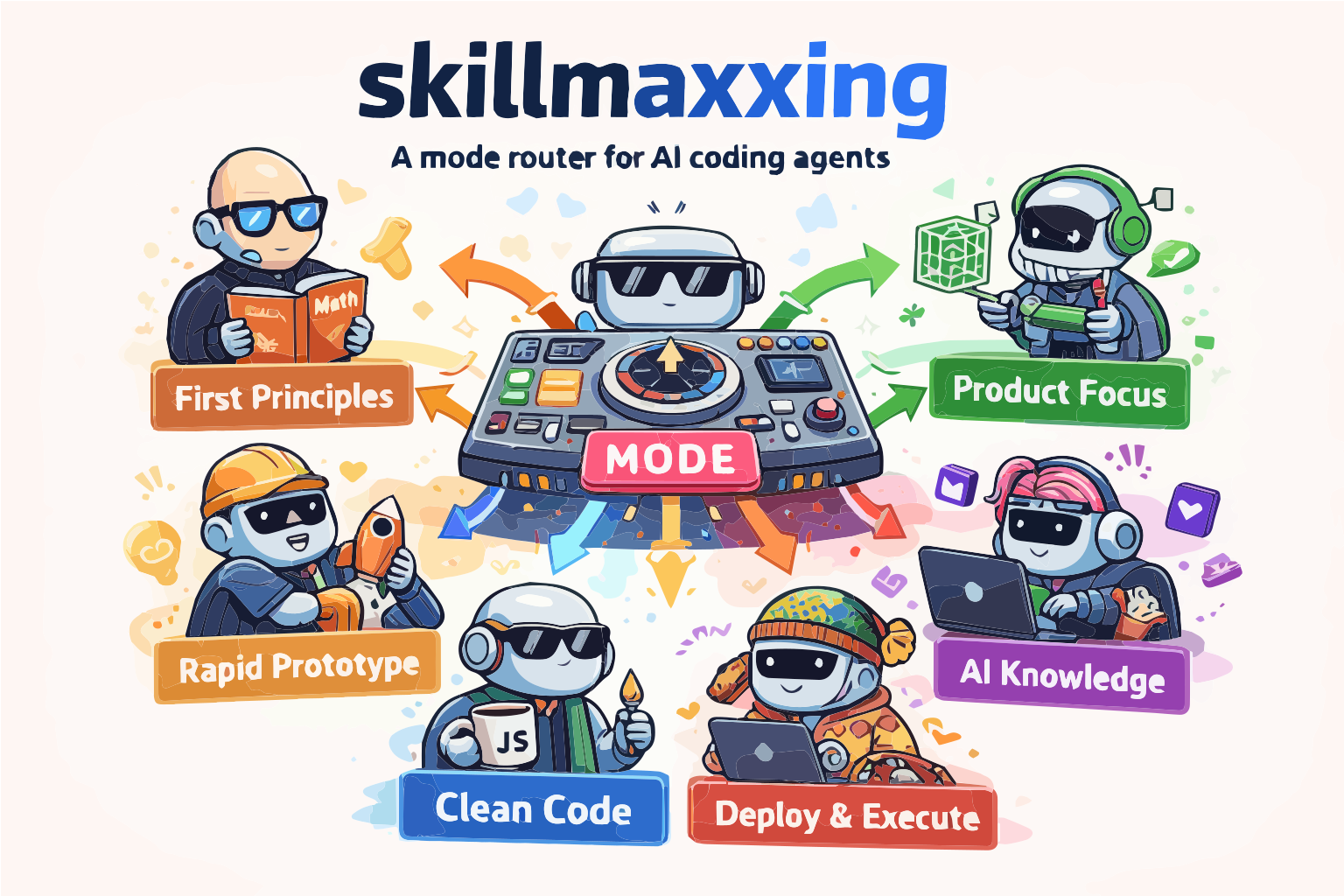
Inspired by forrestchang/andrej-karpathy-skills, with practical engineering-loop ideas adapted from mattpocock/skills.
Portable, production-oriented agent operating system for Codex, OpenCode, Claude Code, Cursor, Windsurf, Gemini CLI, Continue, and Aider.
If you have ever watched an agent:
- overthink a simple task
- rush a dangerous one
- polish before validating demand
- switch styles mid-task for no reason
- or give you no clean way to tell whether it actually worked
this repo is for that.
Works with: 


The Problem
Most agent setups fail in the same predictable ways:
- They blend incompatible instincts into one vague voice.
- They tell the agent to be fast, careful, polished, simple, and innovative at the same time.
- They do not separate prototype behavior from production behavior.
- They give style guidance, but not a real decision system.
- They tell the agent what to do, but not how to know it is working.
That leads to familiar failure modes:
- overbuilt MVPs
- under-validated launches
- unsafe shortcuts in auth, billing, or data paths
- endless refactoring before proof
- polished output with weak reasoning underneath
The Solution
This repo turns that mess into one coherent operating system:
| Layer | What it does | What it fixes |
|---|---|---|
| Universal core | Defines rules that never conflict | Stops contradiction |
| Decision system | Sets strict priority order | Resolves speed vs correctness, polish vs simplicity |
| Mode packs | Define six distinct execution contracts with first moves, required artifacts, switch signals, and hard no's | Stops personality blending |
| Routing logic | Chooses the right mode for the current bottleneck | Stops random drift |
| Operational loops | Standardizes alignment, durable context, TDD, diagnosis, vertical slicing, and architecture deepening | Gives modes concrete engineering habits |
| Conflict matrix | Makes tradeoffs explicit | Stops hidden contradictions |
| Example task | Shows the same task across all modes | Makes the system legible fast |
The six modes are:
karpathy_modefor first-principles clarityrauch_modefor UX clarity and product feellevels_modefor speed to validation and revenueswyx_modefor AI-native leverage and reusable artifactstheo_modefor pragmatic production correctnessamjad_modefor agent workflows and environment-driven execution
This is not a personality pack.
It is a phase-aware agent operating system with one active mode at a time.
Who It's Based On
| Person | What this system takes from them | Where it shows up |
|---|---|---|
| Andrej Karpathy | First-principles reasoning, minimal reference implementations, simplicity under pressure | karpathy_mode, core clarity rules |
| Guillermo Rauch | Product taste, UX clarity, strong defaults, low-config delivery | rauch_mode, polish and experience routing |
| Pieter Levels | Fast shipping, validation-first execution, monetization focus, ruthless scope control | levels_mode, MVP and launch behavior |
| Swyx | AI-native workflow thinking, reusable knowledge artifacts, ecosystem leverage | swyx_mode, compounding docs/prompts/evals |
| Theo Browne | Pragmatic full-stack patterns, strong contracts, boring choices for critical paths | theo_mode, production boundaries and risk control |
| Amjad Masad | Agent workflows, live environments, parallel execution, context-rich tooling | amjad_mode, workflow and environment orchestration |
The goal is not to imitate their personalities.
The goal is to extract the highest-signal parts of their public builder philosophies and turn them into one coherent routing system.
Why This Repo Is Different
Most prompt repos try to make the agent sound smart.
This one is designed to make the agent behave predictably under changing task phases:
- research without getting lost
- ship without getting reckless
- harden without getting bloated
- polish without losing the plot
It is built for the real sequence most builders face:
understand -> validate -> harden -> polish -> scale
How To Know It's Working
This repo is working if you start seeing these changes in behavior:
- The agent names the current bottleneck before it starts.
- It picks one mode for the current phase instead of blending voices.
- It states the mode's first move and what artifact must exist before it can switch.
- It states success criteria, not just actions.
- It picks a concrete operational loop when the work calls for one.
- It explains when it would switch modes and why.
- Diffs get smaller and more intentional.
- Debugging starts with a reproduction loop before theories.
- Large plans become vertical, independently verifiable slices.
- MVP tasks stop turning into architecture projects.
- Production tasks stop being treated like disposable prototypes.
- Conversations become clearer.
- Example:
We should stay in levels_mode until the offer is validated. - Example:
Now the bottleneck is trust, so switch to rauch_mode. - Example:
This touches billing, so theo_mode takes over the boundary.
60-Second Test
Open this repo in any supported harness and ask:
Use $agent-skills-system to route this task: build a simple SaaS landing page.
A good result should do four things:
- Pick a mode.
- Explain why that mode fits the current bottleneck.
- Define success criteria.
- Tell you when it would switch modes.
Then ask:
Now the page is converting, but it looks untrustworthy. Re-route.
The correct behavior is not "rewrite everything."
The correct behavior is a clean phase transition, usually from levels_mode to rauch_mode.
Across every harness, the working signal is the same:
- the agent picks one mode
- it names the bottleneck
- it defines success criteria
- it tells you when it would switch modes
- it does not blend all six modes into one vague answer
Quick Start
Use This Repo Directly
Clone it and open the repo in your tool of choice:
git clone https://github.com/your-handle/skillmaxxing.git
cd skillmaxxing
- Codex and OpenCode will read
AGENTS.md - Cursor and Windsurf can also use
AGENTS.mddirectly - Claude Code will read
CLAUDE.md - Gemini CLI will read
GEMINI.mdand can also discover.agents/skills/agent-skills-system/SKILL.md - Continue will load
.continue/rules/agent-skills-system.md - Aider will load
.aider.conf.ymlandCONVENTIONS.md - Generic skill tooling can start from
SKILL.md - The canonical source of truth is
agent-skills-system/SKILL.md
Important:
SKILL.mdat the repo root is a loader for cloned-source discovery.- For Codex or other user-skill installs, copy the
agent-skills-system/directory, not the entire repo root into a skills folder. - For Codex global installs, use
./scripts/install.sh codex-globalso the canonical skill lands in the right place automatically.
Install Into Another Project
Use the installer. For most people, all is the right default:
./scripts/install.sh all /path/to/project
That installs the shared stack:
AGENTS.mdfor Codex, OpenCode, Cursor, and WindsurfCLAUDE.mdfor Claude CodeGEMINI.mdplus.agents/skills/agent-skills-system/for Gemini CLI.continue/rules/agent-skills-system.mdfor Continue.aider.conf.ymlplusCONVENTIONS.mdfor Aideragent-skills-system/as the canonical source in the target project
If a target project already has AGENTS.md, CLAUDE.md, or GEMINI.md, the installer appends a managed section only if it is missing. If .aider.conf.yml already exists, the installer leaves it alone and prints the exact read: entries to merge.
Native Per-Tool Install
Use these when you want the harness-native format instead of the shared all setup:
./scripts/install.sh codex-global
./scripts/install.sh codex /path/to/project
./scripts/install.sh opencode /path/to/project
./scripts/install.sh claude /path/to/project
./scripts/install.sh cursor /path/to/project
./scripts/install.sh windsurf /path/to/project
./scripts/install.sh gemini /path/to/project
./scripts/install.sh continue /path/to/project
./scripts/install.sh aider /path/to/project
Native notes:
codex-globalinstallsagent-skills-system/into~/.codex/skills/agent-skills-systemand moves any previous install to~/.codex/skill-backups/cursorwrites.cursor/rules/agent-skills-system.mdcwindsurfwrites.windsurf/rules/agent-skills-system.mdgeminiwritesGEMINI.mdand.agents/skills/agent-skills-system/continuewrites.continue/rules/agent-skills-system.mdaiderwrites.aider.conf.ymlandCONVENTIONS.mdcodex,opencode, andclaudewrite their normal project entrypoints
Manual Install
Codex
./scripts/install.sh codex-global
This installs the canonical skill directory into ~/.codex/skills/agent-skills-system and moves any previous install to ~/.codex/skill-backups/ so Codex does not see two live skill directories.
OpenCode
Project-level install is the safest default, but OpenCode can also use the generic skill format:
mkdir -p .agents/skills
cp -R agent-skills-system .agents/skills/agent-skills-system
Then point your project AGENTS.md at the installed skill.
Claude Code
Project-level install:
cp -R agent-skills-system /path/to/project/agent-skills-system
printf '# Agent Skills System\n\n@agent-skills-system/SKILL.md\n' > /path/to/project/CLAUDE.md
Or import it from a global ~/.claude/CLAUDE.md:
@/absolute/path/to/agent-skills-system/SKILL.md
Cursor
Shared setup:
./scripts/install.sh all /path/to/project
Native rule setup:
./scripts/install.sh cursor /path/to/project
Windsurf
Shared setup:
./scripts/install.sh all /path/to/project
Native rule setup:
./scripts/install.sh windsurf /path/to/project
Gemini CLI
Project memory plus workspace skill:
./scripts/install.sh gemini /path/to/project
Continue
./scripts/install.sh continue /path/to/project
Aider
./scripts/install.sh aider /path/to/project
If you already have .aider.conf.yml, merge the printed read: entries instead of replacing your config.
Compatibility Matrix
| Tool | Recommended install | Entry file |
|---|---|---|
| Codex | codex-global, all, or codex |
~/.codex/skills/agent-skills-system or AGENTS.md |
| OpenCode | all or opencode |
AGENTS.md plus .agents/skills/agent-skills-system/ |
| Claude Code | all or claude |
CLAUDE.md |
| Cursor | all or cursor |
AGENTS.md or .cursor/rules/agent-skills-system.mdc |
| Windsurf | all or windsurf |
AGENTS.md or .windsurf/rules/agent-skills-system.md |
| Gemini CLI | all or gemini |
GEMINI.md plus .agents/skills/agent-skills-system/ |
| Continue | all or continue |
.continue/rules/agent-skills-system.md |
| Aider | all or aider |
.aider.conf.yml plus CONVENTIONS.md |
Suggested Prompts
Use $agent-skills-system to route this task and pick the right mode.Should this task start in karpathy_mode or theo_mode? Explain the switch point.Apply the agent skills system and build the smallest complete unit first.Use the agent skills system to resolve a speed vs correctness tradeoff.Use the agent skills system to diagnose this bug and build the feedback loop first.Route this feature and package it into vertical slices with acceptance criteria.We have validation but weak UX. Re-route this task using the system.
Repo Layout
.
|-- .aider.conf.yml
|-- .agents/skills/agent-skills-system/SKILL.md
|-- .continue/rules/agent-skills-system.md
|-- AGENTS.md
|-- CHANGELOG.md
|-- CLAUDE.md
|-- CONVENTIONS.md
|-- GEMINI.md
|-- LICENSE
|-- README.md
|-- SKILL.md
|-- agent-skills-system/
|   |-- SKILL.md
|   `-- agents/openai.yaml
|-- templates/
|   |-- cursor/agent-skills-system.mdc
|   `-- windsurf/agent-skills-system.md
`-- scripts/install.sh
Files
SKILL.md: repo-root loader for quick discovery and generic tool compatibility. Do not install the repo root as the Codex skill package.CHANGELOG.md: conventional record of notable unreleased and released repo changes.agent-skills-system/SKILL.md: canonical source of truth.AGENTS.md: shared project instructions for Codex, OpenCode, Cursor, and Windsurf.CLAUDE.md: Claude Code project memory.GEMINI.md: Gemini CLI project memory adapter..continue/rules/agent-skills-system.md: Continue always-on rule.CONVENTIONS.md: Aider companion instructions..aider.conf.yml: Aider config that loads the conventions and canonical skill..agents/skills/agent-skills-system/SKILL.md: generic workspace skill adapter for OpenCode and Gemini CLI.agent-skills-system/agents/openai.yaml: OpenAI skill metadata.templates/cursor/agent-skills-system.mdc: Native Cursor rule template.templates/windsurf/agent-skills-system.md: Native Windsurf rule template.
License
Reviews (0)
Sign in to leave a review.
Leave a reviewNo results found