quireink
Health Warn
- License — License: NOASSERTION
- Description — Repository has a description
- Active repo — Last push 0 days ago
- Low visibility — Only 5 GitHub stars
Code Fail
- network request — Outbound network request in docker-compose.yml
- spawnSync — Synchronous process spawning in scripts/build-admin.ts
- process.env — Environment variable access in scripts/build-admin.ts
Permissions Pass
- Permissions — No dangerous permissions requested
No AI report is available for this listing yet.
A self-hosted blog platform an AI agent can run for you. One Bun process, two SQLite files, no cloud account anywhere in the path.
quireINK 2.0.0
A blog you host yourself, and an AI agent can run for you.
One process. Two SQLite files. No cloud account anywhere in the path.



English · Tiếng Việt
Try it · Install · Speed · Let an agent write · Changelog · License
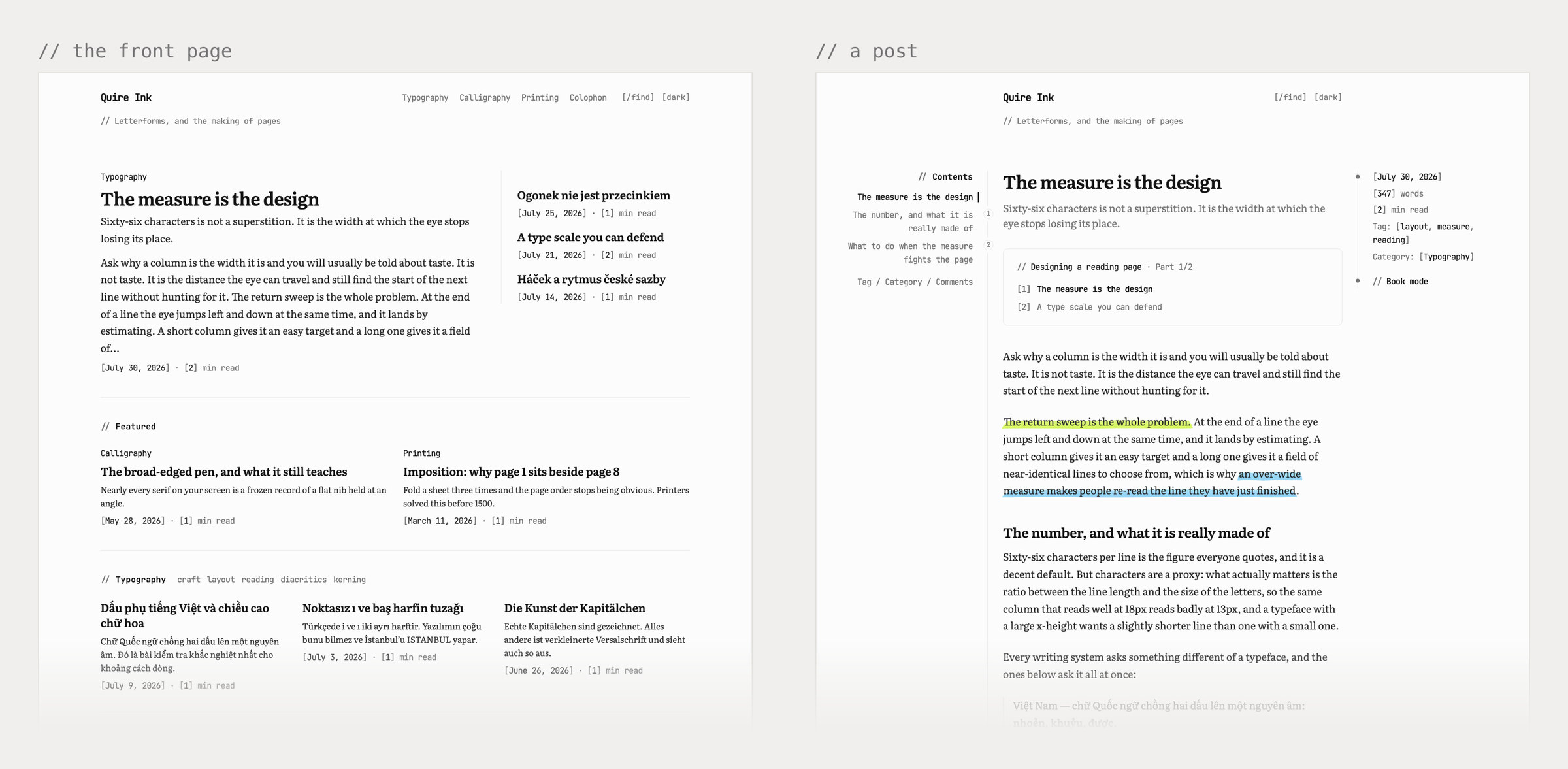
demo.quireink.com is the real thing. No sign-up, nothing to fill in. Use the bar at the bottom to jump between the front page, the list, an article, book mode, light and dark, and the admin. That bar is the only thing added, and it lives outside the code, so the demo is always the latest build.
What it is
You write, it publishes, and all of it sits on a server you control.
There is no database to install and nothing to deploy. Point a domain at one command and you have a blog:
bun src/index.ts
Three things shaped it.
The reading page is the product. Type, colour, size, spacing, layout: all of it is a setting you change in the admin. Not one size or colour is written into the reader's stylesheet, and the build fails if someone puts one there.
Readers download 4.4 KB of JavaScript, and nothing from anyone else. Pages arrive as finished HTML. A few small scripts handle search, the theme switch and book mode. React stays in the admin and never reaches a reader.
An agent can do the writing. Connect Claude or any MCP client and it can draft, tag, schedule and publish for you, through exactly the rules the admin follows.
You can read, change, run and fork it under PolyForm Noncommercial.
2.0.0 came out on 2026-07-30 and runs the demo above plus the author's own blog at
manhhung.me. Before it shipped, the whole thing was audited by
measuring the running site rather than reading the source. The
changelog has everything that changed.
What you get
| 🖋️ Writing | A real editor, TipTap 3 over Markdown, with a toolbar that stays put while you scroll. Drop an image in and it gets resized for every screen. Tables, video, footnotes, callouts, mathematics, Spotify and Apple Music. It saves as you type, keeps your last three versions, and can hold a post until Tuesday morning |
| 🏠 Your front page | Show the post list, or any page you wrote, or build a front page: a lead story, a few picks, a row per category, most read. Works for a site full of photos and for one that is only words. How it works |
| 🎨 How it looks | Six palettes, each with a light and a dark version. Four reading fonts, or upload your own. Every text size on the page comes from a role you can tune, so one change moves the whole page instead of one heading |
| 🔍 Reading | Search that answers as you type. A rail down the side with your categories and tags, or the contents of the post you are in. Related posts, reading time, a progress bar. And book mode: two columns on paper, with a drop cap |
| 📈 Numbers | Analytics without cookies. Who read what, how far down they got, where they came from. Plus an activity log, a trash you can undo, and a help page that explains the rest |
| 🔎 Search engines | Sitemap, RSS, robots.txt, llms.txt, and an OG image drawn per post. Rename a slug and the old URL keeps working on its own |
| 📬 Newsletter | Sign-ups with a confirmation email, an issue sent when you publish, and a note to anyone whose comment got a reply. Your own SMTP, so nothing to sign up for |
| 📚 Series | Write in parts, number them, and every part shows the others |
| 💾 Backups | One button downloads the whole install. There is also a cron script that ships it off the server. Details |
| 📥 Leaving WordPress | Upload the XML export. Posts and pages come out as Markdown |
| 🌍 Languages | English, Vietnamese, German, Japanese, Chinese and Korean, in the admin and on the site |
| 🔐 Signing in | Your own username and password, hashed with argon2id. An authenticator code every time, and ten recovery codes for the day you lose the phone. No Google, no anyone, in the login path |
| 📱 On a phone | Install it to the home screen and it opens like an app |
Made for one person, one server, one blog they mean to keep.
Not made for a team that needs roles, approvals and an editorial queue. It has one owner on purpose.
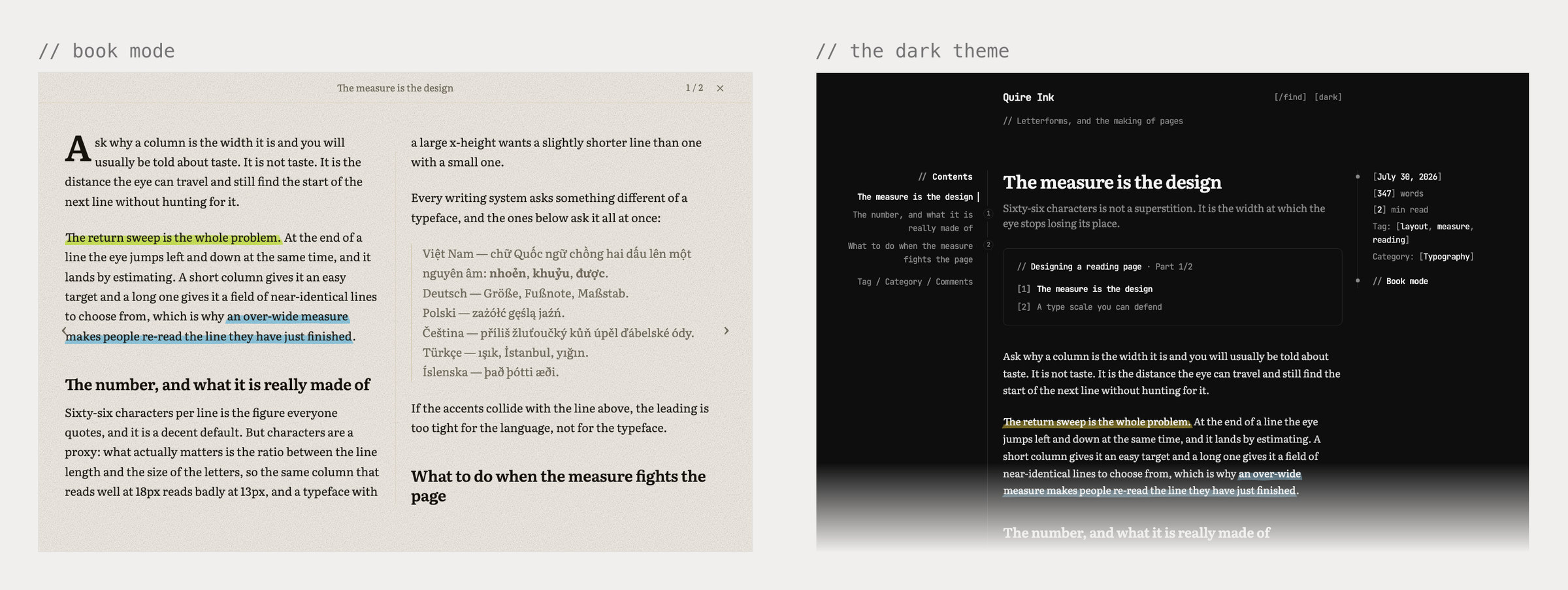
Book mode and the dark theme. Neither is a filter dropped over the page. Both are the reading typography itself. The fonts ship with Vietnamese and Central European accents included, so the specimen on the left is set properly instead of falling back to whatever the system has.
Speed
These are off the network, first visit, nothing cached. It is what a stranger on a phone actually waits for.
| Home | A post | ||
|---|---|---|---|
| Requests | 11 | 12 | |
| Total transferred | 139 KB | 140 KB | 86 KB of that is the fonts |
| JavaScript | 4.4 KB | 9.7 KB | written by hand, no framework |
| CSS | 7.6 KB | 7.6 KB | one file, minified, cached forever |
| Third-party requests | 0 | 0 | no CDN, no font host, no tracker |
| Coming back | ~23 KB | ~23 KB | only the HTML is fetched again |
It stays this way because of a few decisions that are hard to walk back.
Every bundle has a size limit the build enforces. Go over it and the build fails. A feature cannot quietly start costing every reader a little more forever.
The page cache is one Map, and any write empties all of it. That is the entire rule, so there is nothing to get subtly wrong. A miss costs a SQLite read and a render, well under a millisecond.
Rendered Markdown is stored under a hash of its input. Nothing ever needs invalidating. A long post went from 383 ms to 1 ms.
Fonts are yours, cut down per language, and only the ones this page needs are preloaded. Pinning one variable-font axis took that set from 97.6 KB to 46.2 KB.
The fade-in and the progress bar are pure CSS. No script, off the main thread, and if the browser is old it just shows the text.
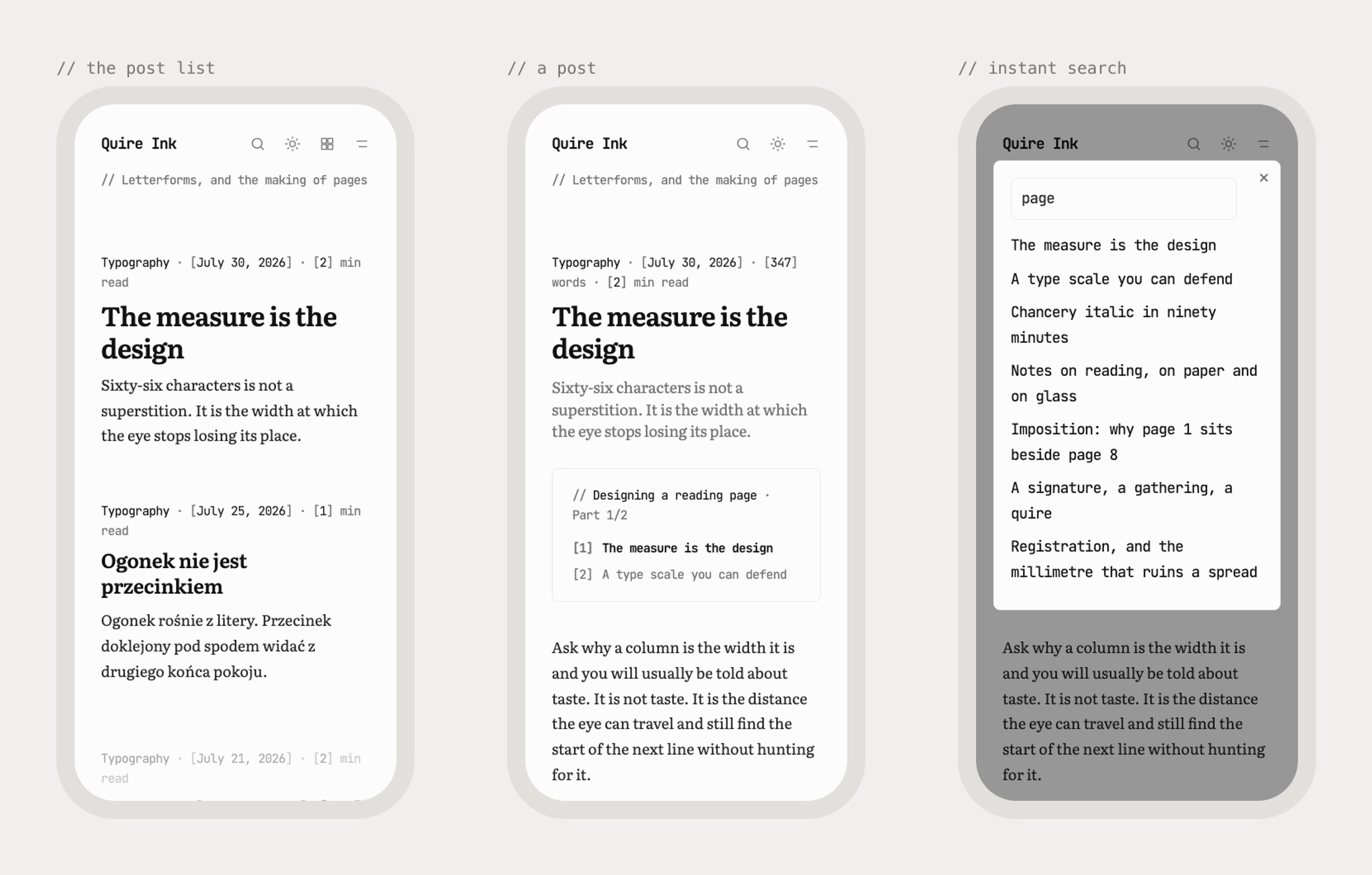
None of this is for a benchmark. It is for someone on a four-year-old phone who wanted to read four hundred words.
Why not something else
Instead of a hosted platform. Your writing is two SQLite files on your own disk. No account, no plan, no export button you have to hope still works in five years.
Instead of WordPress. No PHP, no MySQL, no plugins to keep patched. One process, and readers get 4 KB of JavaScript.
Instead of a static site generator. You get a real admin. Write, upload a photo, schedule and publish from a laptop or a phone, with search, comments, a newsletter and stats already there. No rebuild, no deploy, no git push to fix a typo.
Instead of writing your own. The boring half is done and tested: sign-in with TOTP, sessions, image resizing, feeds, OG images, redirects, an undo for deletes, revisions, backups, a WordPress importer, six languages.
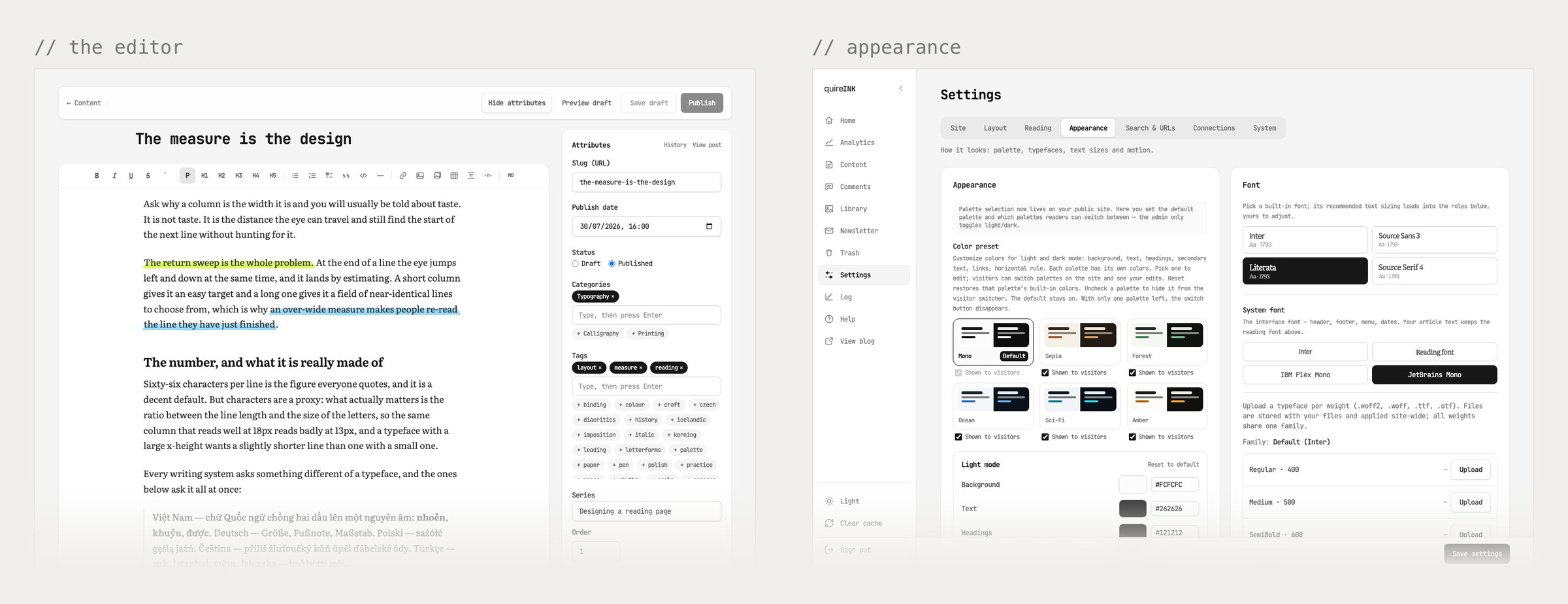
Palettes, fonts, sizes, layout, menu. All of it is a setting, none of it is code.
Install
You need Bun 1.3 or newer and a machine you can point a domain at. That is the list.
git clone https://github.com/joiha-steven/quireink.git && cd quireink
bun install
bun run build:assets && bun run build:admin     # the islands, then the admin
DATA_DIR=./data SITE_URL=https://example.com bun src/index.ts
Put a reverse proxy with TLS in front of the port, 3000 by default. Then make your account:
bun run user create --username <name> --email <address> # shows the TOTP secret and recovery codes, once
That is it. The database sets itself up on first boot, so there is no migration step to remember. If you want the full version with systemd, nginx, cache headers, backups and upgrades, it is in docs/self-host.md.
🐳 Would rather use Docker? Two commands[!NOTE]
bun run buildalso spits out a single binary atdist/quireink, butbun build --compile
leaves outsharp's native module, so that binary dies the first time it touches an image.
Until that is fixed, run from source. The live site does, and the command is the same.
cp .env.docker.example .env          # set SITE_URL
docker compose up -d --build
docker compose exec quire bun run user create --username you --email [email protected]
One service, two volumes, no sidecar. The port only listens on 127.0.0.1, so a reverse proxy still does TLS. Notes on volumes, ownership and upgrades are in docs/self-host.md.
Give an agent SSH to a fresh server and ask it to set the whole thing up: clone, build, write the systemd unit and the nginx vhost, create your account, hand you back the URL. There is no OAuth client to register and no service to sign up for, so it really can finish the job on its own.
[!TIP]
Uploads have no size limit when you host it yourself, because the browser posts straight to
your server. Put a CDN in front for TLS and edge caching, and let it obey thecache-controlthe app already sends instead of forcing its own.
Let an AI agent write for you (MCP)
Quire Ink has an MCP server built in, so an assistant can draft, edit, tag and publish straight to your live site. No git, no deploy. It goes through the same code the admin does, with the same rules about slugs, revisions and the trash.
- Turn it on. Admin → Settings → Connections → MCP, then create a token. You see it once, it is hashed after that, and it dies in 180 days.
- Point your agent at
https://<your-domain>/api/mcpwithAuthorization: Bearer <token>. OAuth connectors work too. - Ask for a post.
Using the Quire Ink MCP server, write a 600-word post titled
"What I learned shipping a blog with an AI agent", give it the tags
"ai" and "writing", set a friendly excerpt, and publish it.
The sensitive settings are off limits over MCP, and you stay in charge. Revoke the token in the admin and it stops working immediately.
Environment variables
These are the only things that live outside the admin.
| Variable | Needed | What it does |
|---|---|---|
DATA_DIR |
✅ | Where quire.db and analytics.db go. Defaults to ./data |
SITE_URL |
✅ | Your public address, used in feeds, OG images and email. Leave it empty and the app guesses per request, which goes wrong behind a proxy |
STORAGE_LOCAL_DIR |
◻️ | Where uploads go, served at /uploads. Defaults to ./uploads |
PORT |
◻️ | Defaults to 3000 |
CRON_SECRET |
◻️ | Guards /api/cron, which publishes scheduled posts and tidies image variants |
MCP_OAUTH_SECRET |
◻️ | Signs MCP OAuth codes. Leave it out and the server makes its own, which is the recommended way |
ANALYTICS_TZ |
◻️ | The timezone your analytics day starts in. Defaults to UTC |
SMTP, Turnstile and CDN credentials go in Settings → Connections and stay on the server. Your posts live in DATA_DIR and your uploads folder, never in git.
Develop
bun install
bun run build:admin                 # once, and again whenever src/admin changes
bun run dev                         # http://localhost:3000
bun run user create --username me --email [email protected]   # then sign in at /login
Nothing is finished until bun run check:all passes. It typechecks, runs the static guards and runs the tests, all offline, with no credentials and no services. Start at CONTRIBUTING.md, which points to the house rules in CLAUDE.md.
| Where | What is in it |
|---|---|
src/ |
The whole thing: Bun, Hono, SQLite. How the pieces fit |
docs/ |
How it works and why. docs/README.md indexes it; docs/decisions/ is every decision, including the ones that were reversed |
golden/ |
The rendering contract. One byte of different output fails the build |
scripts/checks/ |
The guards. Register a write route outside the owner-only group and the build stops, same as a hardcoded font size in the reader's stylesheet |
What is planned lives with the author's own notes rather than here, because it is one
person's intentions for one blog and not a promise to anybody running the software
(ADR 0017). What has
already shipped is in the changelog.
License
Two different things, and they are not covered by the same terms.
The code here is PolyForm Noncommercial 1.0.0. Source-available, not open source. Free for anything noncommercial, meant generously: your own blog, a hobby project, study, research, and also charities, schools, public research bodies and government. Read it, change it, host it, fork it, pass it on. Keep the licence text and the Required Notice: line with any copy you give someone.
Using it commercially needs a separate licence. Running Quire Ink for a business, or selling it, or selling hosting for it, is not covered. Open an issue or reach the owner through their GitHub profile.
What you write stays yours. Your posts and images are not covered by the code licence and are not in this repository.
Everything up to and including v2.0.0 was MIT, and stays MIT forever. A licence change
does not reach backwards: a copy taken before this one keeps the rights it came with. See
ADR 0015.
Reviews (0)
Sign in to leave a review.
Leave a reviewNo results found