atoll
Health Gecti
- License — License: GPL-3.0
- Description — Repository has a description
- Active repo — Last push 0 days ago
- Community trust — 12 GitHub stars
Code Gecti
- Code scan — Scanned 12 files during light audit, no dangerous patterns found
Permissions Gecti
- Permissions — No dangerous permissions requested
Bu listing icin henuz AI raporu yok.
A dynamic island for KDE Plasma, with media, notifications, focus sessions and Claude built in
Atoll
The dynamic island, for KDE Plasma.
Music, notifications, Claude and your focus - in one shape that grows out of the top of your screen.
Install · Features · Controls · In depth · GPL-3.0
Atoll sits at the top edge of your screen and changes shape to show whatever
just happened: the volume you changed, the message that arrived, the song that
started. Click it and it unfolds into a dashboard. Hold it and Claude is there.
When nothing is going on, it shrinks back to the clock.
It is a native Qt 6 / QML application on wlr-layer-shell - no Quickshell, no
AGS, no Hyprland - built to feel at home on Plasma. Every picture on this page
was taken on a real Plasma 6 desktop, not in a mock-up.
Everything at a glance

At restThe clock, the cover of whatever is playing and a dot for anything waiting. A small satellite buds off while music plays. |

Volume and brightnessAnything Plasma announces - volume, brightness, microphone, keyboard layout - appears right where you are looking. |

FocusA focus timer with breaks, gentle audio and a quiet mode for notifications, counting down on the island. |

Questions, as buttonsWhen Claude needs a decision, the answers arrive as buttons on the island. One tap, and it carries on. |
The dashboard
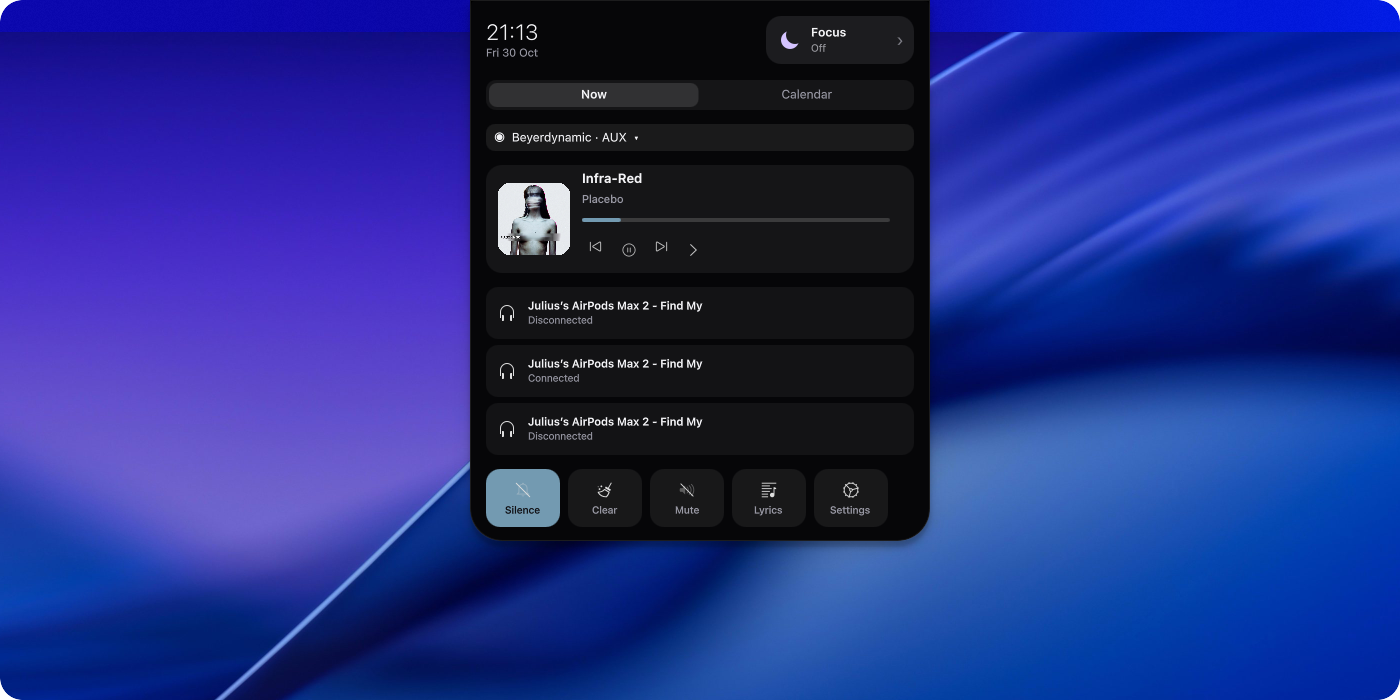
Click the island and it unfolds. The clock and the date sit at the top, then
whatever is playing with a seekable bar and its transport, then the
notifications you have not dealt with, then a row of toggles.
Which transport buttons are there is yours to choose under Settings → Media:
shuffle, previous, play/pause, next and repeat, in that order, with the classic
three shown when you have never said otherwise (media.transportButtons).
It also carries the audio output you are listening on, the Bluetooth devices
and Wi-Fi networks you use, and a Focus tile that starts a session with one
click.
Claude, on your island
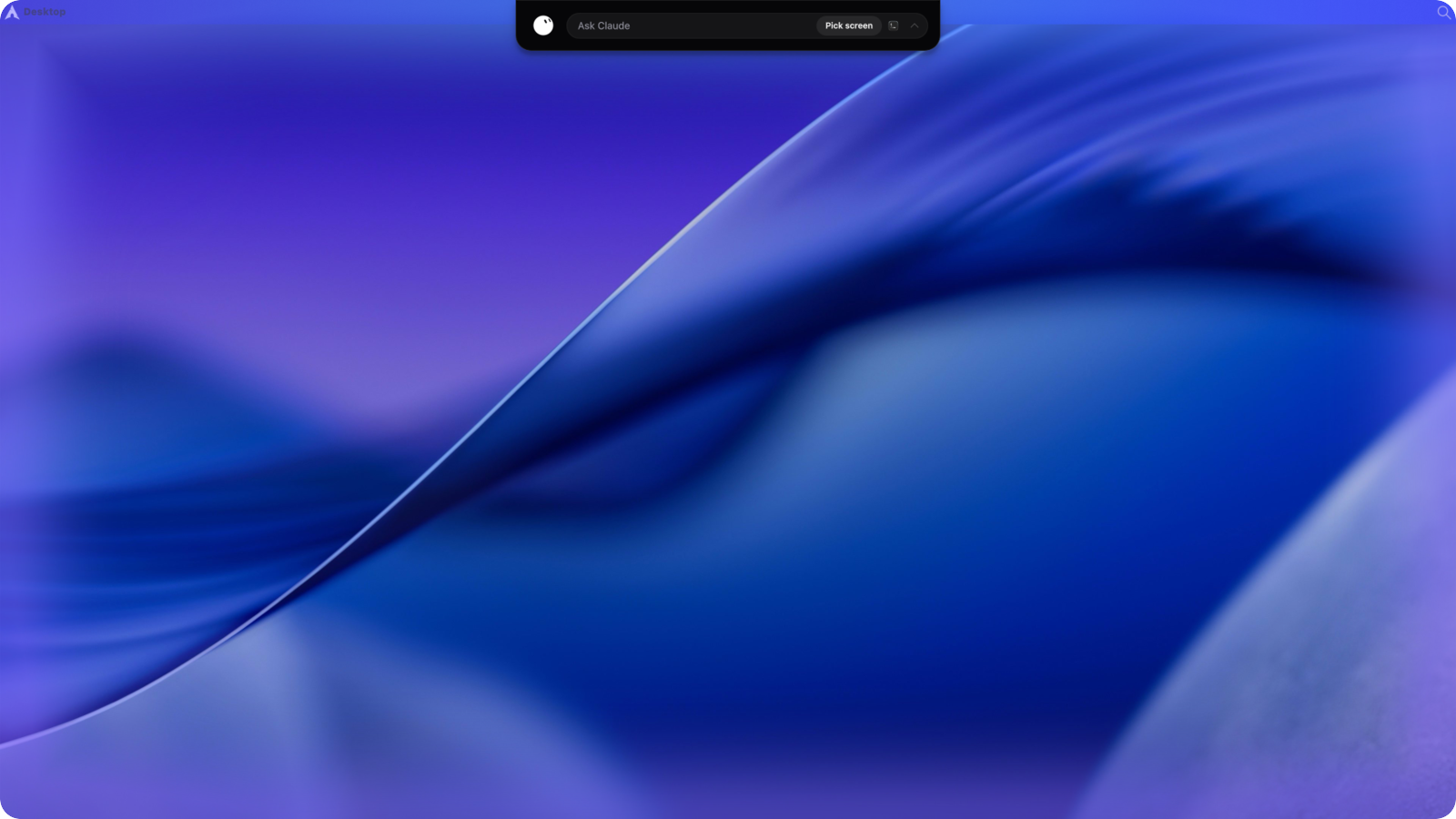
Press and hold the island. The edges of the screen light up, and a box opens
asking what you want.
You can ask it things ("why is my fan so loud", "what is taking up my disk"),
and you can ask it to do things ("install Firefox and make it the default",
"update my system", "set my wallpaper to that photo from Tuesday"). It works on
this machine, with the tools it has been given: run a command, read and write
files, install packages, change a Plasma setting, open an app, take a look at
the screen.
Every action it wants to take is sorted into reads, changes to your session and
administrator work - and the last two ask first. Root steps always go through
your desktop's own polkit dialog. How the permission gate works.
The Claude Office
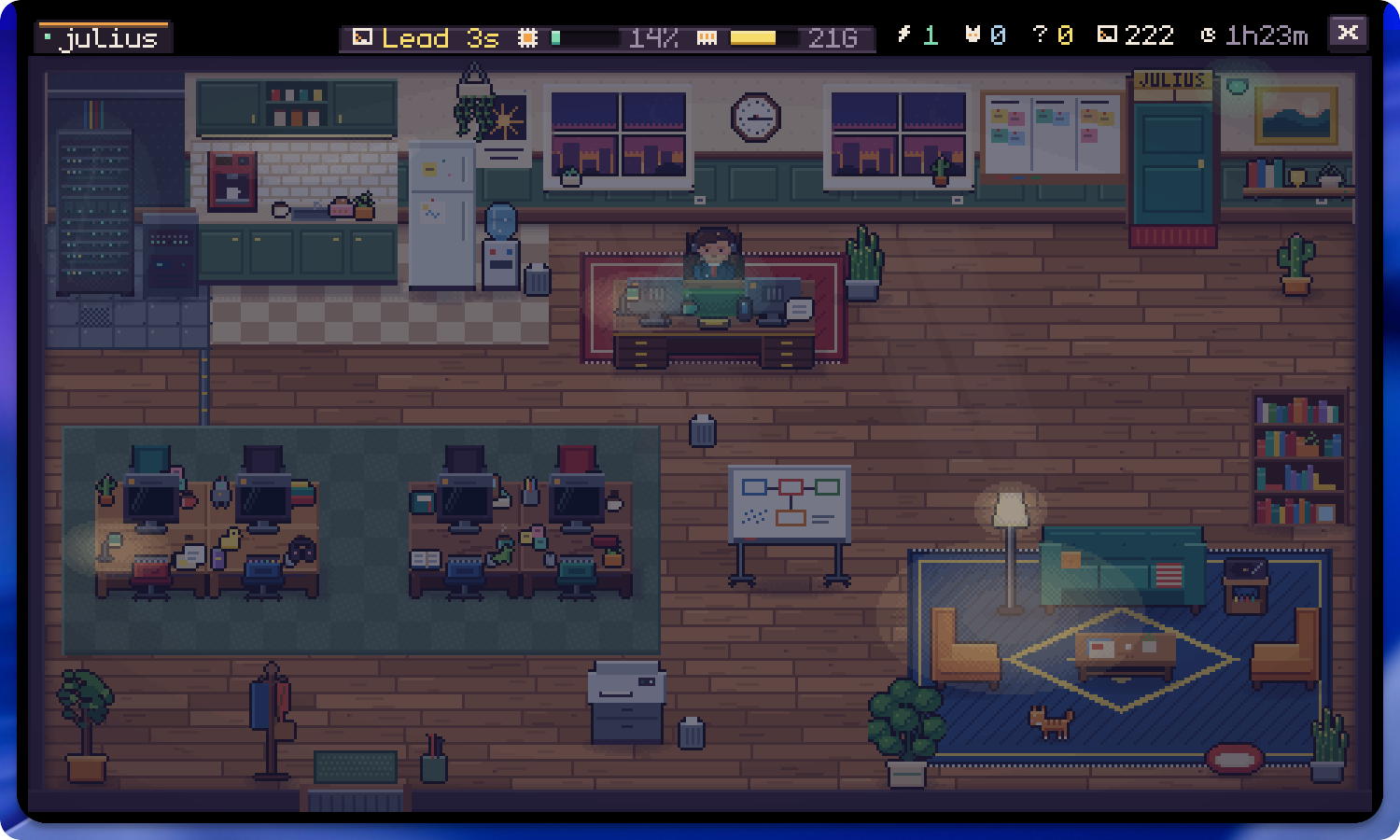
Run Claude Code in a terminal and a tiny office opens inside the island. Every
session gets a desk, and every subagent joins it. They type, read and run
commands at their desks, drift off for coffee or the lounge when they are on a
break, cheer when a turn goes well, and line up in front of your door when they
have a question - which you can answer right there on the island.
The office listens to Claude Code's hooks through a silent, zero-token hook.
Connect it once:
atoll-claude-hooks "$(command -v atoll)" ~/.claude/settings.json
Open it with a middle click, or give it any trigger or shortcut you like under
Settings → Controls. How it works: docs/office.md.
Controls
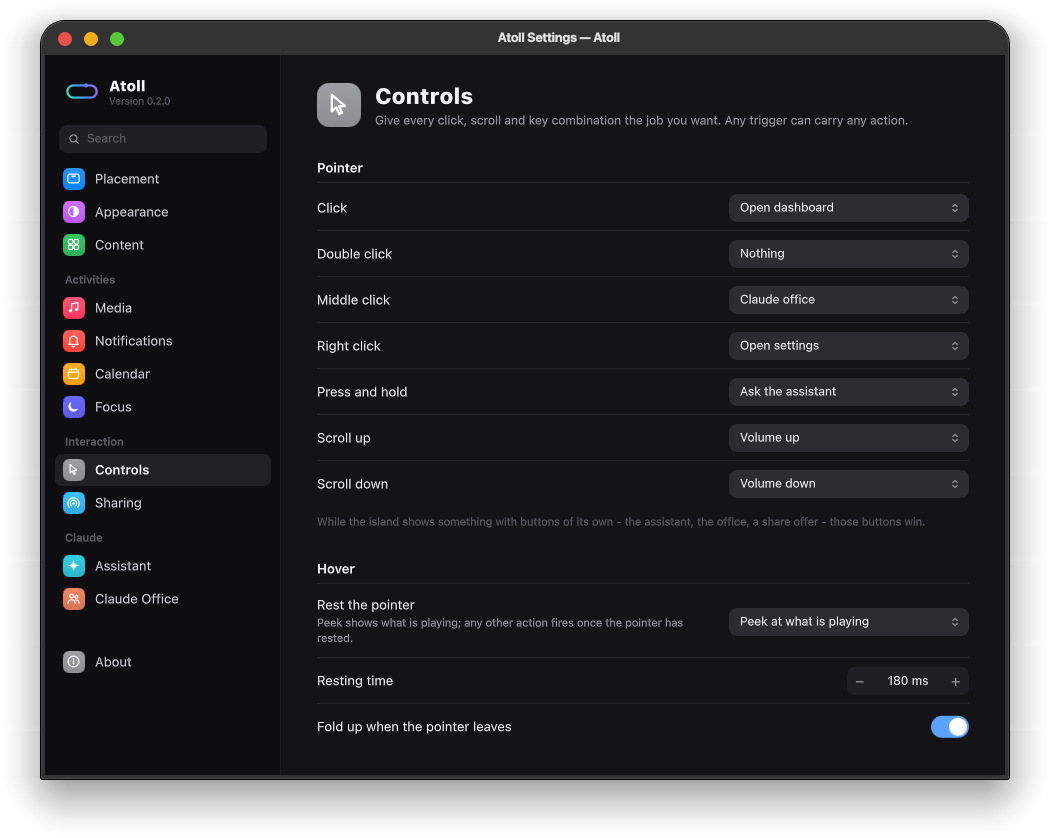
Every way of telling the island to do something lives on one page. Click,
double click, middle click, right click, press and hold, scroll up, scroll down
and resting the pointer can each carry any action: open the dashboard, open
the Claude office, ask the assistant, play or skip, change the volume, start a
focus session, toggle do-not-disturb, or open the settings.
Each action can also get a system-wide keyboard shortcut, recorded right on
the page. Shortcuts are registered with KDE's global shortcut service, so they
work in every app and appear under System Settings → Shortcuts → Atoll as
well. The full list of triggers and actions is in docs/controls.md.
Settings that stay out of the way
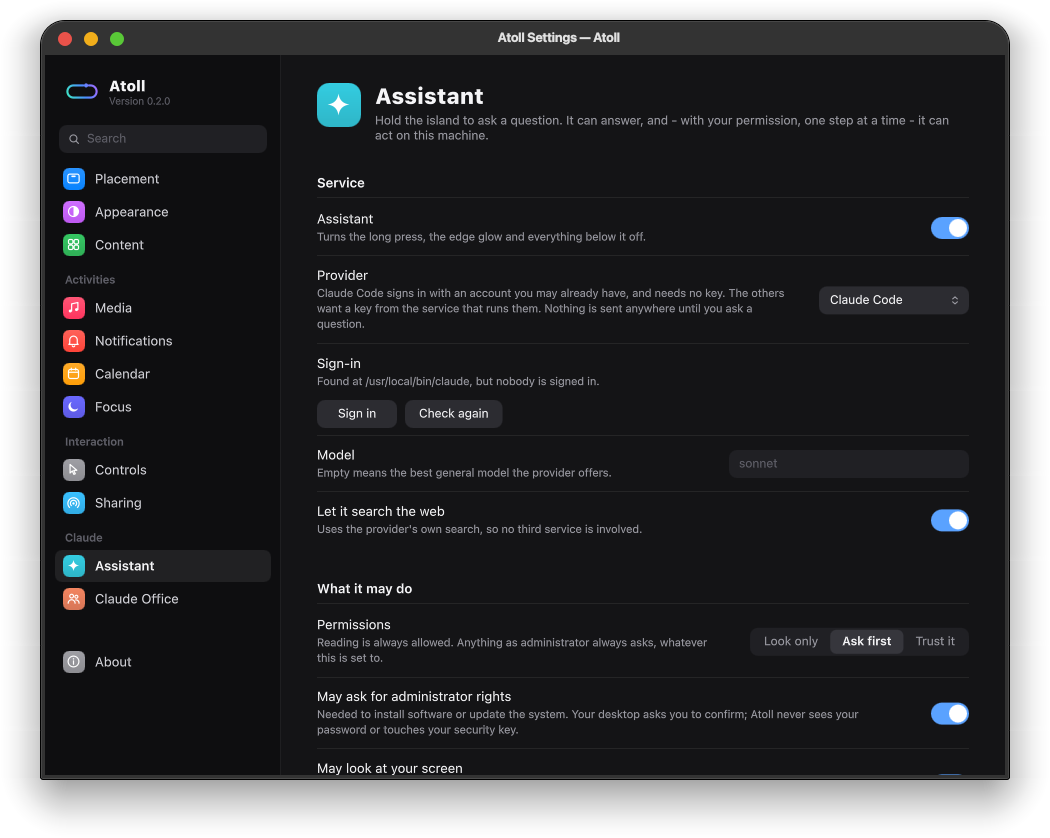
The settings window edits the same file the island watches, so every change
lands on the island as you make it. There is no apply button.
 |
 |
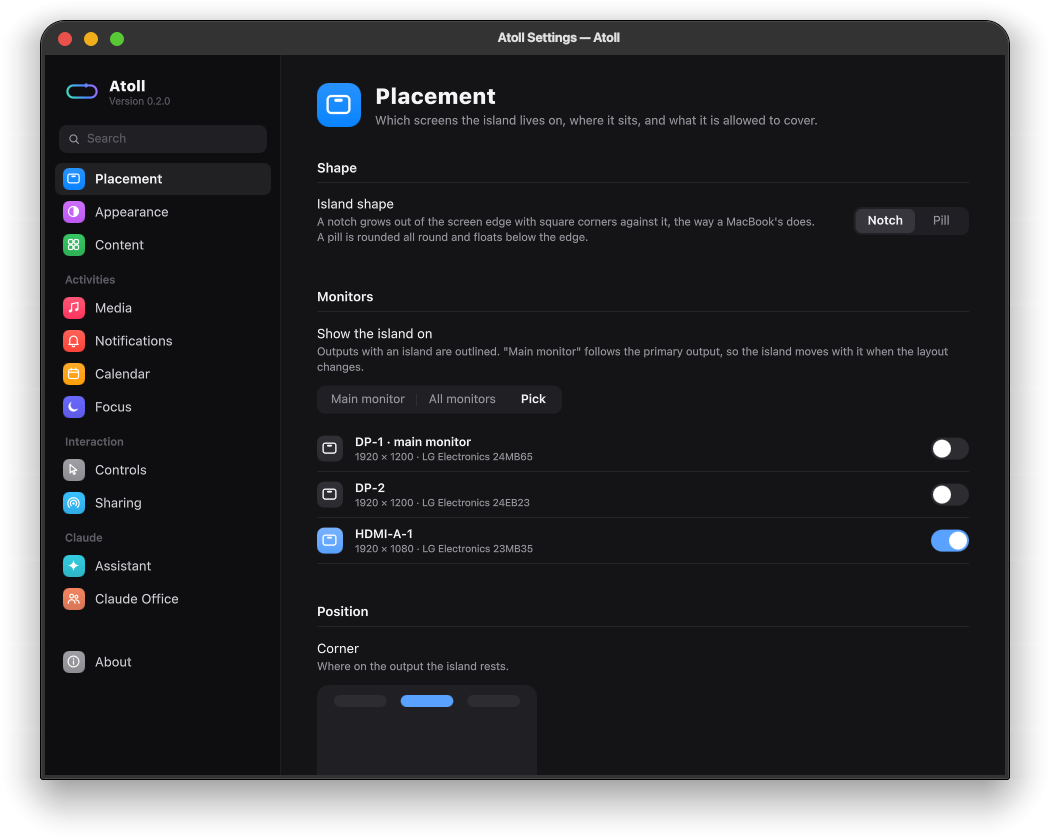
| Placement Notch or pill, which monitors, which corner. |
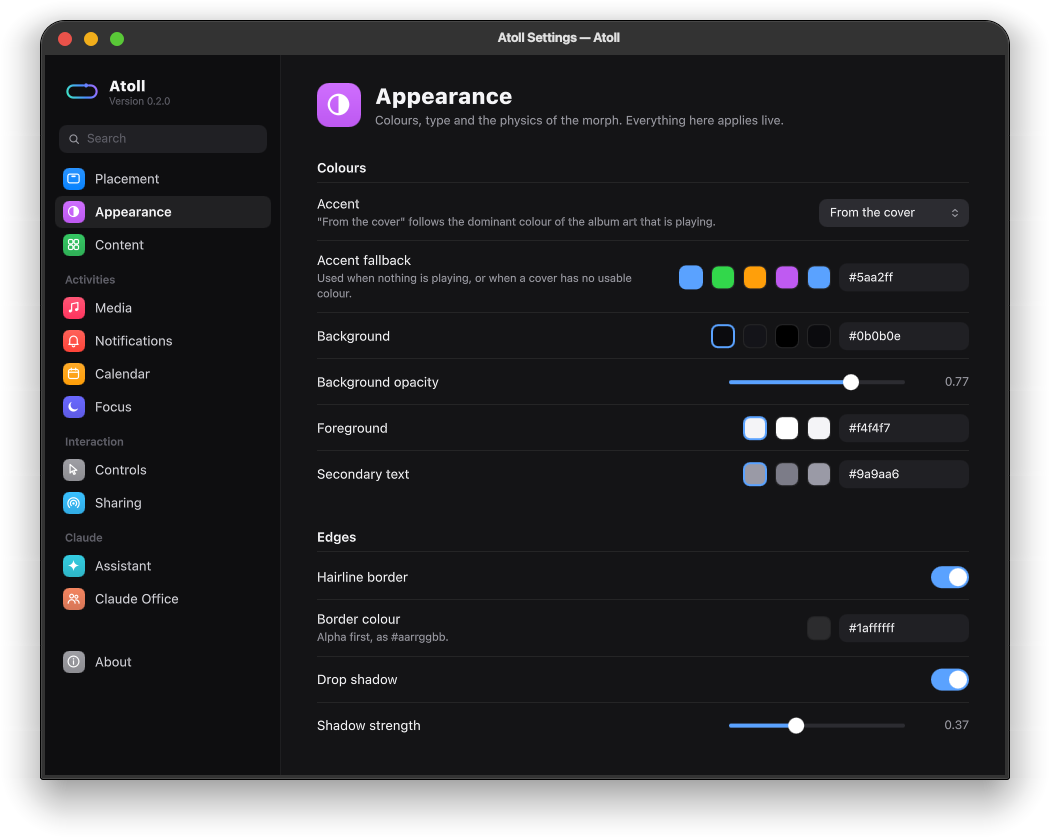
Appearance Accent from the album art, colours, edges and motion. |
 |
 |
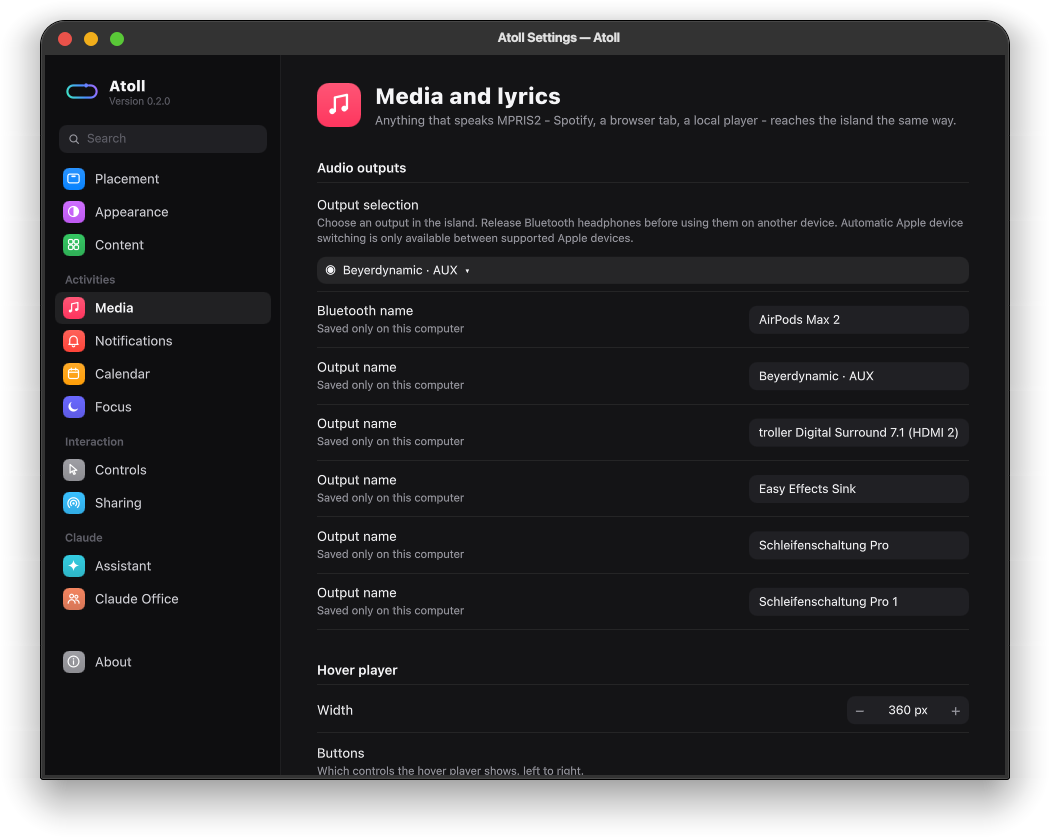
| Media Audio outputs, the hover player, lyrics. |
Assistant Claude Code, the Claude API, Gemini or OpenRouter. |
Open it with a right click on the island, the gear in the dashboard,atollctl settings or atoll --settings. Ctrl+F searches
every page.
Install
Arch, in one go
git clone https://github.com/jojo2k7/atoll.git
cd atoll
./scripts/install.sh
That installs what is missing, builds, installs into /usr and starts the
island as a user service, so it comes back with every login. It asks before it
installs the optional extras, and the only step it runs as root is the install
itself.
From the AUR, once it is published there: yay -S atoll for a release, oryay -S atoll-git to follow the development branch. Both PKGBUILDs live inpackaging/.
By hand
Dependencies: qt6-base qt6-declarative qt6-svg layer-shell-qt kcoreaddons ki18n dbus wayland,
plus cmake ninja qt6-shadertools extra-cmake-modules wayland to build
(wayland-scanner generates the lock-screen protocol; without it everything
else still builds).
Optional: kglobalaccel for system-wide shortcuts, claude-code for the assistant, cava for a real spectrum,wireplumber for volume control, openssl for encrypted sharing (see
Sharing files), polkit and a polkit agent so the assistant
can ask for administrator rights, libsecret to keep an API key in your
keyring, and xdg-desktop-portal-kde to let it look at your screen.
cmake -S . -B build -G Ninja -DCMAKE_BUILD_TYPE=Release -DCMAKE_INSTALL_PREFIX=/usr
cmake --build build
sudo cmake --install build
Start it with atoll, or enable the bundled user service:
systemctl --user enable --now atoll.service
Two things are worth doing from an installed copy rather than a build
directory: the lock screen (see below) and the
assistant, whose permission gate is the installed binary itself.
In depth
What it does
| State | What you see |
|---|---|
| Idle | The clock, the cover of whatever is playing and a dot for anything waiting - the island always has something to show. A satellite blob buds off it while music plays. |
| OSD | Volume, brightness, microphone, keyboard layout, power profile — anything Plasma announces. |
| Notification | App icon or image, summary and body, with a progress bar for the notifications that carry one. |
| Media | Album art, scrolling title, album, spectrum, and transport controls that fade in on hover. While synced lyrics exist, the second line becomes the words being sung. |
| Expanded | Clock, battery, seekable transport, a scrolling lyrics panel, notification history and quick toggles, on one tab - and today's calendar on the other. |
| Calendar | Point Atoll at an ICS feed and the dashboard's second tab fills with today's events. The pill mentions the next one when it is less than an hour away. |
| Sharing | Drag files onto the island and it turns into a drop target, then a list of the devices nearby. Files coming the other way ask before they land. |
| Assistant | Hold the island. The screen edges light up, a question box opens, and Claude or Gemini answers — and, one permission at a time, does the thing. When it needs a decision from you, the answers arrive as buttons on the island. |
How it gets its information
Atoll never takes anything over. It does not replace your notification daemon
and it does not replace Plasma's OSD:
- OSD events are read by watching the method calls Plasma already sends to
org.kde.osdService. That means hardware keys, third-party mixers and
Plasma's own applets all reach the island without polling PipeWire. - Notifications are read the same way, by asking the bus daemon to make
Atoll a monitor. Your real daemon — Plasma's, dunst, whatever you run —
keeps doing its job; Atoll mirrors it. Pairing each observedNotifycall
with its reply also recovers the id the daemon handed out, which is what
makes closing a notification from the island possible. - Media is plain MPRIS2, so Spotify, a browser tab and a local player all
reach the island the same way: title, artist, album, cover art and position.
Remote cover art (Spotify hands out an https URL) is fetched once and cached. - Lyrics come from an
.lrcfile next to a local track when there is one,
and otherwise from lrclib.net. See Network
for everything Atoll ever sends anywhere. - Calendar events come from ICS feeds you subscribe to - the
webcal://orhttps://address Google Calendar, iCloud, Nextcloud and Outlook all hand
out. Atoll reads them on a timer, expands repeating events itself, and never
writes anything back. - Nearby devices are found over the LocalSend protocol: a multicast group
everyone announces themselves into, and a small HTTP server for the files
themselves. See Sharing files. - The accent colour follows the dominant colour of the current album art.
Where it appears
By default: one island, on the main monitor, centred at the top, drawn over
whatever Plasma has there. All three parts of that are settings.
- Screens - the main monitor (which it keeps following when you dock,
undock or change which output is primary), every monitor at once, or a
hand-picked set. Plugging a monitor in or out adds and removes islands by
itself. - Shape - a notch flush with the edge, or a floating pill.
- Position - any of the six edge positions, with margins.
- Stacking - which compositor layer to sit on, and whether to cover panels
or make room for them. - Visibility - always there, stepping aside while an application window
has the focus ("dodge windows", which loads a small KWin helper script only
while it is chosen), or hidden whenever it is at rest. A hidden island comes
back as soon as the pointer reaches the edge.
Calendar
The dashboard has a second tab, and what fills it is any ICS feed you point
Atoll at. Google Calendar, iCloud, Nextcloud and Outlook all publish one;webcal:// and https:// are both accepted, and the feed is fetched on a
timer and parsed on this machine - repeating events, exceptions and all-day
events included. The tab is there whether or not you have added a feed; turnmodules.calendar off and it goes away.
Add feeds under Settings → Calendar, or write them into the config:
"calendar": {
  "sources": [
    { "name": "Work", "url": "https://example.com/work.ics" }
  ]
}
| Key | Default | Meaning |
|---|---|---|
modules.calendar |
true |
The calendar tab and everything below it. |
calendar.sources |
[] |
The feeds, each {"name": ..., "url": ...}. With none the tab is empty. |
calendar.lookaheadHours |
24 |
How far ahead an event counts as upcoming. |
calendar.fetchIntervalMinutes |
15 |
How often the feeds are re-read. |
calendar.showInIdle |
true |
Whether the pill mentions the next event when it is under an hour away. |
Nothing is written back to the calendar: the feeds are read-only to Atoll, and
an ICS URL is all it ever asks for.
The assistant in detail
It asks before it acts
Every action the assistant wants to take is sorted into one of three tiers
before it happens, and the assistant does not get to choose the tier — Atoll
looks at what the action would actually do:
| Tier | What it covers | What happens |
|---|---|---|
| Reads | Listing a directory, reading a file, pacman -Q, systemctl status |
Runs straight away. Nothing here is anything you could not have looked at yourself. |
| Changes your session | Writing in your home directory, changing a Plasma setting, opening an app | Asks. |
| Administrator | Installing packages, a system upgrade, anything as root | Asks, and then your desktop asks — the ordinary polkit dialog, which honours a password, a fingerprint or a hardware key exactly as it does everywhere else. |
The first button on that question is Allow, and stop asking, and it is the
one most people want: you asked for a job to be done, not to be consulted about
each of the four commands it turns out to take. Say it once and the assistant
carries on by itself for the rest of the conversation, reporting each step on
the island as it goes; the panel says acting on its own while it does, and
Stop ends it at any point. Just this once answers only the step in front
of you. Starting a new conversation forgets the whole arrangement.
What that permission cannot do is widen the rules: anything refused outright
stays refused, a tier switched off in the settings stays unreachable, and every
root step still meets your desktop's own password dialog, which is not Atoll's
to waive.
That gate is the same one however the assistant is connected. When the answer
comes from the Claude Code client, the client carries out its own tool calls -
so Atoll stops each one before it happens, asks here, and tells the client what
you said. A refusal reaches the model as an answer, and it moves on.
The point of that middle column is that a model asking nicely for root does not
get it. If the work fits inside your own account, that is where it runs.
Atoll never sees, stores or types your password, and a handful of operations —
wiping a disk, rewriting the password database, piping a download straight into
a shell — are refused no matter who asks or how the request is worded. Your
keys, ~/.ssh, ~/.gnupg and your keyring are never opened for it at all.
You decide how much of this is on at all, under Settings → Assistant:
Look only never changes anything, Ask first is the default, Trust it
stops asking about your own files but still sends every root action through
polkit. Administrator access can be switched off outright.
It can ask you back
The assistant is not only answering: sometimes it needs a decision from you -
which of two ways to do something, which of three files you meant, whether to
go ahead. There is no keyboard in front of you at that moment, only the island,
so a question like that is not written into the answer where nobody can reply
to it. It arrives as a line of text with the answers underneath it as buttons,
and the one it would recommend is the one that looks like the answer. Tap one
and it carries on with what you said; Never mind closes the question, which
the assistant is told about and works around.
A script of your own can put the same question up withatollctl choose "Which one?" "This" "That", which prints back whichever
answer was tapped.
Looking at the screen
Ask what do you see and the assistant takes one picture rather than asking
you to describe your desktop. With more than one monitor it asks which one
first, as buttons on the island: this screen (the one your pointer is on),
each of the others by name, or all of them.
That question is worth asking. Everything sent to a model is scaled down to fit
inside a box about 1568 pixels across, so one monitor arrives with its window
titles legible while three side by side arrive as a strip in which nothing can
be read. Your answer holds for the rest of the conversation, and a new
conversation starts asking again. Settings → Assistant sets where that
starts from - ask me, the one I am on, or all of them - and how much
detail the picture keeps.
Your desktop still asks before any picture is taken. Atoll does not work around
that dialog, and there is no route to the screen that skips it.
Long jobs
A system upgrade takes a while, and you should not have to watch it. Press
Continue in background: the glow goes away, the panel closes, and the
island keeps a small face on the pill that reports progress. Click it to bring
the conversation back. If the assistant needs an answer from you, it comes back
by itself.
Connecting it
There is no Atoll account and no server in between. Your question goes from
your machine to whichever service you picked, and nowhere else.
Hold the island before you have set one up and it offers to open the settings
for you. Under Settings → Assistant there are three ways in:
| What it needs | Where the answer comes from | |
|---|---|---|
| Claude Code | An account you sign in to once | The claude client on this machine, using your subscription |
| Claude API | A key from console.anthropic.com | Anthropic, billed per question |
| Gemini | A key from aistudio.google.com | Google, billed per question |
Claude Code is the default, because it is the one with nothing to set up:
no billing page to find, no key to create, nothing to paste. If the client is
missing, the settings page shows the one command that installs it; if it is
installed but signed out, the Sign in button opens a terminal onclaude auth login and you are done after that. Atoll then runs the client for
each question and reads the answer back onto the island.
The client is run deliberately narrowly. It is started with none of its own
configuration — no project instructions, no plugins, no skills, no saved
transcript — because the assistant on your island should behave the same on
every machine, and a question asked on a pill does not belong in a log you did
not ask for. What it is given is Atoll's own instructions and a gate: every
tool call it wants to make stops at the island first, where the same rules and
the same dialog decide it as for every other way of connecting.
If you use an API key instead: with libsecret installed the key goes into
your keyring, encrypted at rest and unlocked with your login; otherwise into a
file only you can read, and the settings page says which happened.ANTHROPIC_API_KEY and GEMINI_API_KEY from your environment are picked up as
well, so a machine that is already set up needs no configuration.
The glow, and the colour of it
The edge light is one fixed gradient: the assistant's colour where it leaves
the island, easing into a second colour by the far corners, fading in when the
panel opens and out when it closes. It does not follow the album art and its
hue does not travel along the border - a light that changes colour with the
music, or cycles while you read, is motion at the edge of your eye for as long
as the assistant is open. Both colours are yours to set under Settings →
Assistant, along with how bright and how wide the band is.
The panel itself is white for the same reason. Everything else on the island
picks up the colour of whatever is playing; the assistant is the one thing that
has nothing to do with it, so it keeps one colour of its own.
Turn the whole thing off with Settings → Assistant → Assistant, and the
long press, the glow and every line of it go away.
Focus sessions
Atoll includes a configurable focus timer with looping local audio, gentle
notch animations, recovery after restart, lock-aware pausing, and a field for
parking stray thoughts. Start one from the dashboard, with the focus action,
or with atollctl focus start. Configure it under Settings → Focus. See
Focus sessions for the details.
Audio output selection
Choose the system audio output directly in the island or hover player, including
connecting paired Bluetooth headphones and releasing them for another device.
Output names are configurable per computer. See audio outputs
for dependencies, command-line controls, and the limits of AirPods device switching.
Wi-Fi
The dashboard's toggle row carries the radio, and Settings → Content adds a
collapsible panel of nearby networks (wifi.showInExpanded). One row per SSID:
a dual-band router and a mesh show up once, the network in use first, the rest
by signal strength, and the list stops at wifi.maxRows (12) in dense areas.
Click a network to join it or a connected one to leave it. Joining goes through
NetworkManager on the system bus, so a saved profile reconnects without a
prompt, and a network Atoll has never seen puts up Plasma's own password
dialog - the key is stored by NetworkManager, exactly as for any other Wi-Fi
menu, and never passes through Atoll. Enterprise (802.1X) and WEP networks are
listed as such and hand off to Plasma's settings page rather than being
attempted with the wrong key management.
One row per network by default: a router that broadcasts the same network on
2.4, 5 and 6 GHz appears once, labelled with the bands its radios actually
report. Turn Merge bands of one network off in Settings → Content to
list every band as its own row (wifi.mergeBands); the change applies to the
open panel immediately.
Nothing is scanned while the panel is closed. The periodic poll only re-reads
the properties NetworkManager already holds, and a scan goes out when the panel
appears; turning modules.wifi off stops the service entirely.
On the lock screen
Atoll can stay visible while the screen is locked. KWin only hands thekde_lockscreen_overlay_v1 protocol to programs that ask for it by name, so
this needs two things:
- Atoll must be installed, not run from a build directory. KWin matches the
running executable against theExec=line ofio.github.atoll.Atoll.desktop,
which is why that line carries an absolute path andX-KDE-Wayland-Interfaces=kde_lockscreen_overlay_v1. lockScreen.enabledmust be on. The permission is asked for before the
window is mapped, so changing it takes a restart of the island.
What the island shows there is deliberately narrower than what it shows on an
unlocked desktop, because anybody walking past can read it:
| Key | Default | Meaning |
|---|---|---|
lockScreen.showMedia |
true |
Cover, title and artist stay visible. |
lockScreen.showNotifications |
false |
Notification summaries and bodies stay hidden. |
lockScreen.allowExpanding |
false |
The dashboard - and with it the notification history - cannot be opened. |
Locking the screen also collapses an open dashboard.
Scripting
Atoll exposes org.atoll.Atoll on the session bus, which makes the island a
general purpose heads-up display for your own scripts:
atollctl text drive-harddisk "Backup finished"
atollctl progress cloud-upload 64 "Uploading"
atollctl share ~/Pictures/holiday.jpg
atollctl ask "why is my laptop fan so loud"
atollctl screenshot DP-1
atollctl screens
atollctl choose "Which editor should I set up?" "Kate" "Neovim"
atollctl toggle
atollctl dismiss
atollctl settings
atollctl dismiss closes whatever has the island's attention - the assistant,
a notification sitting there waiting to be read - and leaves it at rest.atoll --dismiss is the same call by another name, as are atoll --toggle,--expand, --collapse, --ask "..." and --quit: each one hands the verb to
the running island over the bus and exits.
atollctl screenshot asks the desktop for one picture of the screen, writes it
where the assistant can open it and prints the path. It is also how the
assistant looks at the screen itself, so a question like what do you see is
answered rather than turned back into a request for a screenshot. Name an
output to take that one, all for every screen in one picture, or leave it out
and the island asks which one you meant. atollctl screens lists what there is
to choose between.
atollctl choose puts a question on the island as buttons and prints back the
one that was tapped, or a line starting error: if the question was closed.
It is how the assistant asks you something when it is running as the
command-line client, and it works just as well from a script of your own.
atollctl action office       # run any action from docs/controls.md
atollctl assistant           # open the assistant with an empty box
Sharing files
Drag files - or a whole folder - onto the island. It grows into a drop target
while the drag is over it, and once the files are dropped it lists the devices
it can see; click one and they go. Files arriving the other way announce
themselves the same way, with an Accept and a Decline, and land in your
downloads folder.
It speaks LocalSend, not AirDrop. AirDrop has been
reverse-engineered - by the Open Wireless Link project, and more recently by
Google for the Pixel's Quick Share - but on Linux it remains impractical: it
rides on AWDL, Apple's own link layer, and the open implementations need a
wifi card that can be driven in monitor mode with frames injected into it,
which takes the card off the network it was on. LocalSend is documented, has
an app on every platform including iOS and Android, and needs nothing but the
network you are already on. So: install LocalSend on the phone, and the notch
is the desktop half of it.
How it works, briefly:
- Devices find each other on the multicast group
224.0.0.167:53317, and
answer each other over HTTP. Nothing leaves the local network, and there is
no account and no server anywhere. - Transfers are TLS between two self-signed strangers: the SHA-256 of the
certificate is a device's identity in this protocol, so nothing is
verified against a certificate authority. Atoll makes its certificate on
first run withopenssland keeps it in~/.local/share/atoll. Withoutopensslinstalled sharing falls back to cleartext HTTP, which the
LocalSend app will not connect to. - The port is 53317, or the next free one - so Atoll and the LocalSend app can
run side by side on the same machine.
| Key | Default | Meaning |
|---|---|---|
modules.sharing |
true |
The drop target and the discovery of nearby devices. |
sharing.alias |
hostname | How this machine introduces itself. |
sharing.receive |
true |
Whether incoming files are accepted at all. |
sharing.autoAccept |
false |
Take offered files without asking. |
sharing.saveDirectory |
your downloads | Where received files land. |
sharing.port |
53317 |
HTTP and multicast port. |
atollctl share <file>... offers files from a script or a file manager's
"send to" menu, exactly as if they had been dropped on the island.
Configuring
~/.config/atoll/atoll.json is written on first run with every default
spelled out, and it is re-read live — save the file and the island changes
while you watch. Keys you are most likely to want:
| Key | Meaning |
|---|---|
island.screens |
["primary"], ["all"], or output names such as ["HDMI-A-1", "DP-2"]. |
island.shape |
"notch" sits flush against the edge, "pill" floats below it. |
island.position |
"top-center", "top-left", "top-right", or the three bottom-* variants. |
island.overlapPanels |
true draws over Plasma's panels; false respects island.exclusiveZone. |
island.layer |
"overlay", "top", "bottom" or "background". |
island.idleMode |
"auto", "clock", "notch" or "hidden". |
island.alwaysVisible |
Keeps the island on screen even in "hidden" mode. |
appearance.accent |
"auto" follows the album art, or pin a colour. |
effects.gooey |
The metaball merge between the island and its satellite. |
notifications.ignoredApps |
Apps the island should stay quiet about. |
media.preferred |
Player names to favour, in order. |
lyrics.enabled |
Whether to look lyrics up at all. |
lyrics.offsetMs |
Shifts every lyric line, for players that report position late. |
sharing.autoAccept |
Take offered files without asking first. |
media.transportButtons |
Which of shuffle, previous, playPause, next, repeat the dashboard shows. |
calendar.sources |
ICS feeds to read, each {"name": ..., "url": ...}. |
ai.provider |
"claude-cli" signs in with the Claude Code client, "anthropic" and "gemini" use an API key. |
ai.cliPath |
Where that client lives, for the installs Atoll does not find by itself. |
ai.permissions.mode |
"readonly", "guarded" or "trusted" - the same choice as in the settings window. |
ai.screen |
Which monitor it looks at: "ask", "current", "all", or an output name. |
ai.screenshotMaxEdge |
Longest edge of the picture it is sent, in pixels. 1568 is what the services keep. |
ai.glowColor / ai.glowColorFar |
The two ends of the edge light's gradient. |
lockScreen.enabled |
Whether to ask to stay visible while the session is locked. |
Configs written before islands could span outputs still work: anisland.screen string is used when island.screens is missing.
Network
Atoll has no server of its own and no account. Everything it can reach out to
is listed here, and each one is off unless the thing that needs it is on.
- Lyrics, while
lyrics.enabledis on and a track has no local.lrc
file: a lookup atlrclib.netcarrying the artist, title, album and duration
of what is playing. Results are cached under~/.cache/atoll/lyrics. Turn it
off in the settings window under Media and lyrics, or with"lyrics": { "enabled": false }. - Cover art, from whatever URL the player advertises - Spotify hands out an
https link rather than a file. That is the player's server, not ours, and
fetched art is cached. - Calendar feeds, but only the ones you added yourself, and only while
modules.calendaris on: a GET of each ICS URL everycalendar.fetchIntervalMinutes. Nothing is ever sent back to them. - Weather, only while
idle.showWeatheris on (it is off by default):
every 15 minutes a forecast request toapi.open-meteo.comcarrying a
latitude and longitude. Setweather.latitudeandweather.longitudeand
that is all; without them your rough position is looked up once per start
from your IP address atipwho.is. - The assistant, and only while you are asking it something: your question
goes to the service you connected it to, and nothing goes anywhere while it
sits idle. A picture of your screen goes with it only when you asked for one,
and your desktop asks you before it is taken.
Connected through Claude Code, the assistant's traffic is the client's own -
Atoll starts it, writes the question to it and reads the answer back - so it
uses the account you signed that client in with. Turn the assistant off under
Settings → Assistant and that path is not taken at all.
Sharing is local traffic only: a multicast announcement on 224.0.0.167:53317
and HTTP(S) straight between the two devices. Turn the whole thing off with"modules": { "sharing": false } and Atoll stops listening and announcing.
Troubleshooting
| Variable | Effect |
|---|---|
ATOLL_DEBUG_STATE=1 |
Logs every state change and incoming event. |
ATOLL_DEBUG_SURFACE=1 |
Paints the whole layer surface so its bounds are visible. |
ATOLL_DEBUG_GRAB=<path> |
Saves one rendered frame and exits (ATOLL_DEBUG_GRAB_DELAY in ms). |
ATOLL_NO_LAYER_SHELL=1 |
Falls back to an ordinary window, for X11 or a nested compositor. |
If the island says it cannot watch the session bus, the bus daemon refusedBecomeMonitor; media control still works but OSD and notification mirroring
do not.
Known limitations
- Notification actions are best effort. As a bus observer Atoll can
re-broadcastActionInvoked, but senders that filter on the daemon's bus
name will ignore it. - One island process per session. It serves every output you asked for; a
second instance refuses to start. - Staying on the lock screen only works on KWin, and only for an installed
Atoll. Other compositors do not offer the protocol, and the island then
disappears with the session like any other window. - Sharing is LocalSend, not AirDrop: an Apple device needs the LocalSend app
to appear in the list. Sending to the LocalSend app also needsopenssl
present when Atoll first runs, because that app refuses cleartext peers. - The assistant answers through somebody else's service, and Atoll has no
arrangement with any of them. Through Claude Code it uses the account you
signed that client in with; through an API key it costs whatever the provider
charges per question. Atoll adds nothing to that and takes no cut, and there
is no service of ours to fall back on. - What the assistant can do is bounded by the tools it has and by the
permission tiers above, not by how convincing its explanation is. It is still
a language model: read the command in the prompt before you allow it, the
same way you would read a command somebody pasted into a forum answer. - Lyrics are only as good as the database. Anything lrclib has never seen shows
as "No lyrics for this track"; an.lrcfile next to a local track always
wins.
License
GPL-3.0-or-later. See LICENSE.
Yorumlar (0)
Yorum birakmak icin giris yap.
Yorum birakSonuc bulunamadi