cc-crayon
Health Warn
- License — License: MIT
- Description — Repository has a description
- Active repo — Last push 0 days ago
- Low visibility — Only 5 GitHub stars
Code Fail
- exec() — Shell command execution in hooks/parse.ts
- exec() — Shell command execution in hooks/themes.ts
Permissions Pass
- Permissions — No dangerous permissions requested
No AI report is available for this listing yet.
Colorful, themed Claude Code replies: themed Markdown plus inline color/style tags the model can write, drawn with real Ink Text styling
crayon

Colorful Claude Code replies. crayon redraws every assistant reply with themed Markdown and teaches the model a small set of inline tags that render as real Ink <Text> styling: colors, bold, italic, badges, gradients, callouts and panels.

[!NOTE]
crayon is a function-hooks plugin (a "mod"). It needs Claude Code 2.1.287 or newer. The function-hooks API is in early access and may change between releases.
Install
In Claude Code:
/plugin marketplace add jonpojonpo/cc-crayon
/plugin install crayon@cc-crayon
Or from a shell:
claude plugin marketplace add jonpojonpo/cc-crayon
claude plugin install crayon@cc-crayon
Restart Claude Code, then run /crayon demo to see everything at once.
To try it without installing, clone the repo and load it for one session:
git clone https://github.com/jonpojonpo/cc-crayon
claude --plugin-dir ./cc-crayon
What you get
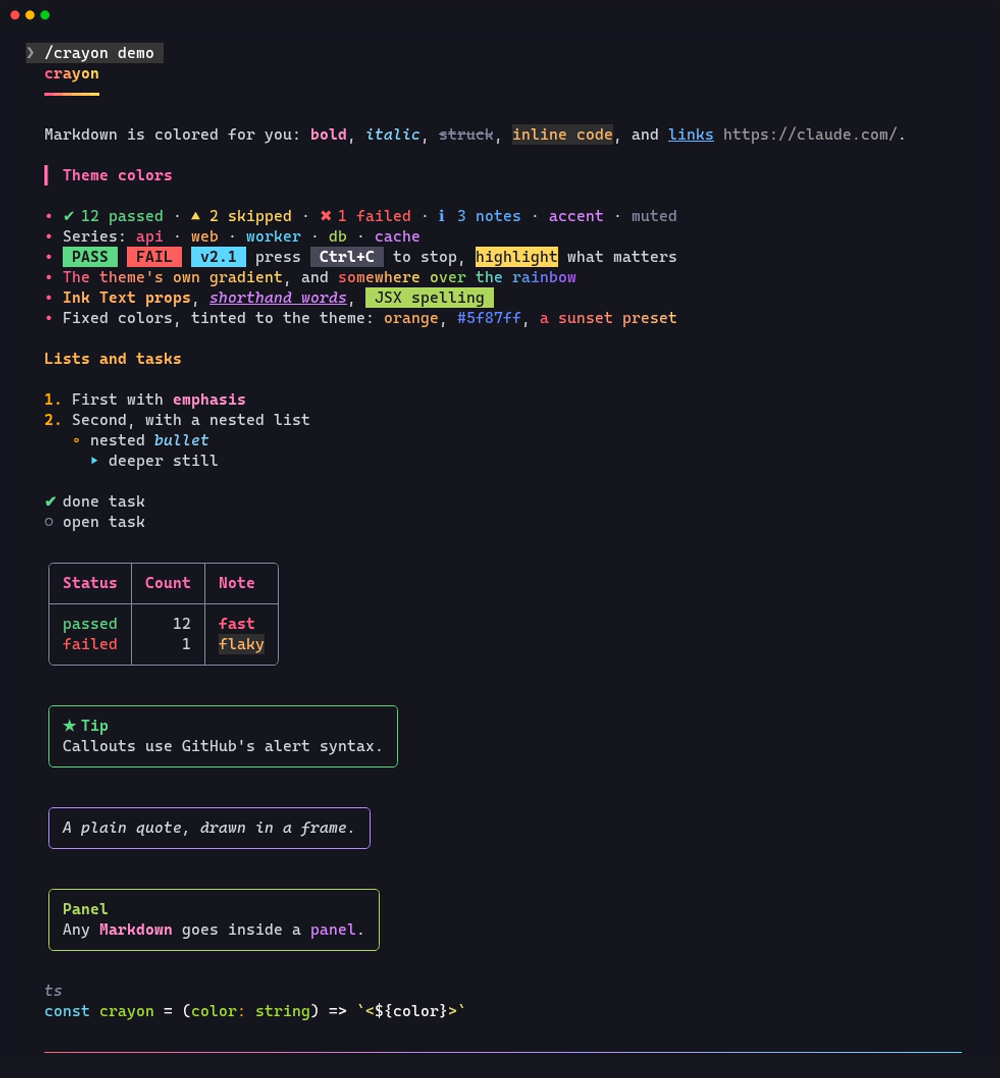
Plain Markdown is colored automatically, with no help from the model:
- H1 headings get a gradient and an underline, and H2s get a colored bar.
- Bold, italic, strikethrough and
codeeach get their own color. - List bullets change glyph and color by depth, and task items show ✔ or ○.
- Tables are drawn with rounded box lines and a colored header row.
- Quotes appear in a frame, and GitHub alerts (
> [!TIP],> [!WARNING], …) become colored callout boxes. - Horizontal rules are gradient lines, and code fences use Claude Code's own syntax highlighter.
The model can also write inline tags. crayon adds a short guide to the system prompt so the model knows them. The guide steers it toward the theme's own colors, so a reply follows whatever theme you pick:
| Write | Draws |
|---|---|
<ok> <warn> <err> <info> <accent> <muted> |
colors that carry meaning, from the theme |
<c1> … <c5> |
the theme's series colors, for telling items apart (services, cities, options) |
<badge ok>PASS</badge> <badge c2>v2.1</badge> |
a solid label in any of those colors |
<hl>…</hl> |
the theme's highlight |
<grad>…</grad> |
the theme's own gradient; <grad theme="ocean"> borrows another theme's |
<rainbow>…</rainbow> |
rainbow text |
<t color="c3" bold italic>…</t> |
Ink Text props: color, bg, bold, italic, underline, strike, dim, inverse |
<Text color="accent" bold>…</Text> <t accent bold>…</t> |
the same in JSX spelling, or with bare words as shorthand |
<bg accent>…</bg> |
a background color |
<b> <i> <u> <s> <dim> <kbd>Ctrl+C</kbd> <br> |
style shorthands and a key cap |
<panel title="…" color="info"> … </panel> (each tag on its own line) |
a bordered box around any Markdown |
<orange>…</orange> <#ff5f87>…</> <grad from="#f0f" to="#0ff"> |
fixed colors, tinted toward the theme (see below) |
Every place a color goes takes a theme name (ok, c2, accent, …), a named color, #hex or rgb(). </> closes the innermost tag. Named colors include the 16 ANSI names plus orange pink hotpink purple violet lavender indigo teal mint lime emerald gold amber coral salmon peach rose crimson ruby sky azure navy brown silver. Gradient presets: sunset fire ocean aurora candy neon mint peach lava ice gold forest.
Tags inside code spans and fences are left alone. Unknown tags such as <div> show as written, and an unclosed tag runs to the end of its paragraph instead of showing raw.
Themes
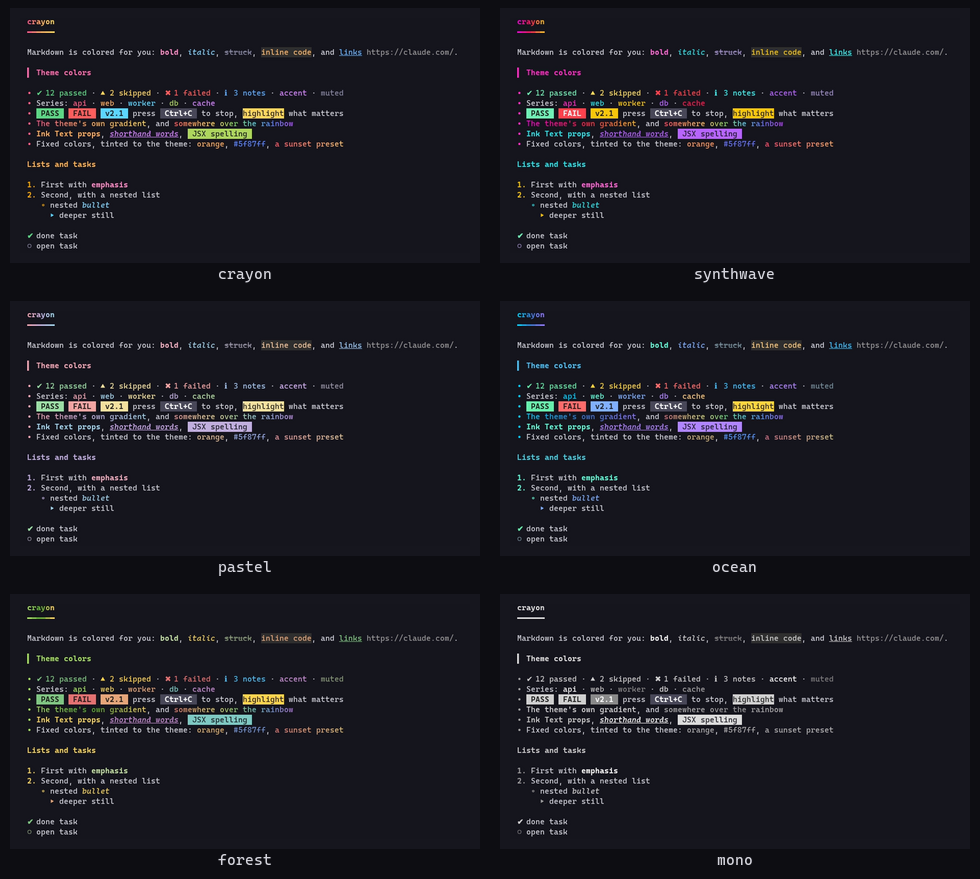
/crayon <theme> restyles everything: the Markdown, the meaning and series colors, badges and gradients. Replies already on screen are redrawn too.
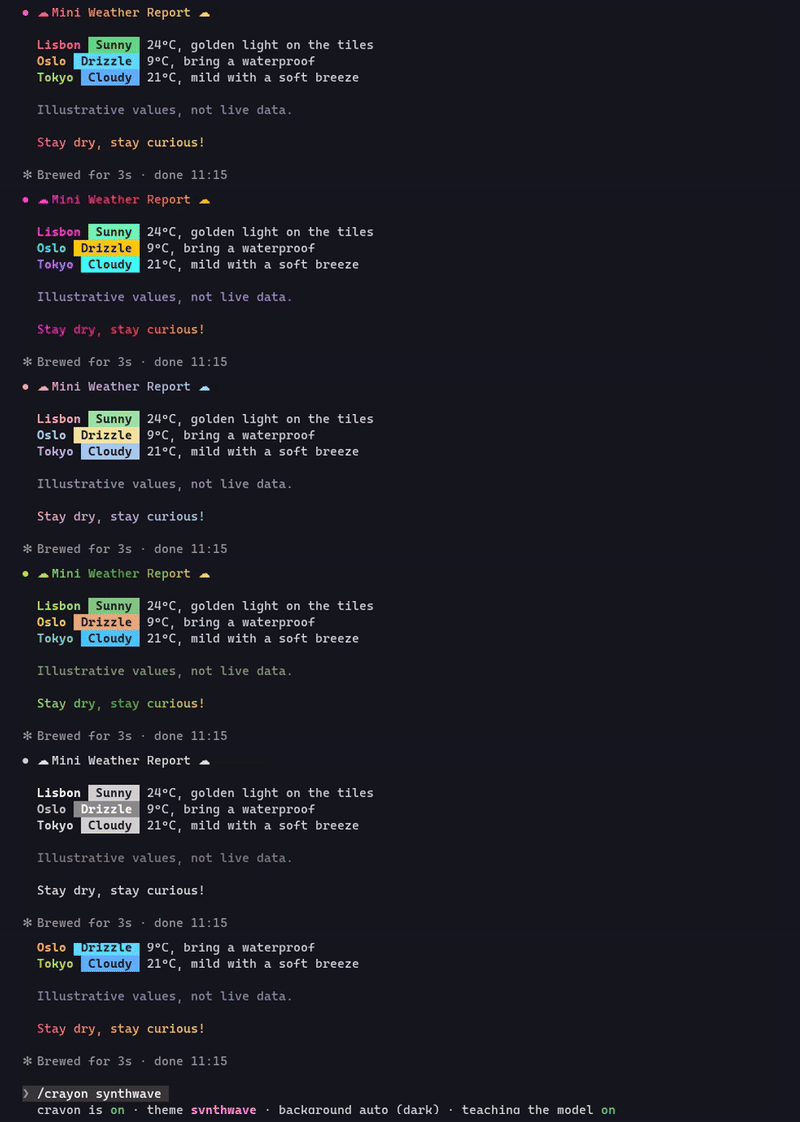
Fixed colors follow the theme too. Each theme has a tone that keeps a color's hue but restyles it: pastel softens it, synthwave turns it neon, ocean and forest tint it, and mono turns it gray. An <orange> the model picks still reads as orange, in the theme's style.
Commands
| Command | Does |
|---|---|
/crayon |
Shows the current settings and the themes |
/crayon demo |
Draws every feature once |
/crayon <theme> |
Switches theme: crayon, synthwave, pastel, ocean, forest, mono |
/crayon on / off |
Turns crayon's drawing on or off. When off, replies are drawn by Claude Code as usual |
/crayon dark / light / auto |
Forces a background. auto follows your /config theme |
/crayon teach on / off |
Adds or removes the tag guide in the system prompt |
Settings are saved across sessions, and changing the theme redraws earlier replies straight away.
Good to know
- Streaming. While a reply streams in, Claude Code draws it with its own renderer. crayon strips the tags from those lines so they never flash on screen, and each block switches to full color when it finishes.
- Tags stay in the transcript. The saved message keeps the tags, so the ctrl+o transcript view shows them raw and the model sees them in its history. The guide tells the model never to put tags in code, files, tool inputs or commit messages.
- System prompt cost. The guide is about 600 tokens per session. Use
/crayon teach offto drop it and keep only the automatic Markdown coloring. The guide is also left out of headless (claude -p) runs. - Fallbacks. Replies longer than 30,000 characters and tables wider than the terminal are drawn by Claude Code's normal renderer.
- Surfaces. The tests draw the full demo on the terminal, desktop, VS Code and mobile surfaces.
How it works
crayon is one hooks module, hooks/register.tsx. It parses replies with hooks/parse.ts, draws them with hooks/render.tsx, takes its palettes from hooks/themes.ts, and keeps the guide and demo text in hooks/text.ts. Every color it hands the surface is a #rrggbb string, and on light backgrounds each one is darkened until it reads.
Hooks
Each hook, what it does, and what it changes:
| Hook | What it does | What it changes |
|---|---|---|
session.start |
Reads crayon's saved settings from its plugin store, reads (never writes) the /config theme to tell whether the background is light, and registers the /crayon command |
Adds the /crayon command. Nothing else |
classic.SessionStart |
After /clear, a resume or a fork, reads the same saved settings and /config theme again, because the new session starts with empty plugin state |
Nothing: the event is passed on unchanged |
config.set (key theme only) |
Watches for a /config theme change so crayon can switch between its dark and light palettes |
Nothing: the event is passed on unchanged and crayon never writes settings. It only re-reads the theme afterwards |
prompt.compose |
Appends one system prompt section, the tag guide (about 600 tokens), when a UI draws replies and /crayon teach is on |
Adds that one section. Other sections are untouched, and nothing is added in headless (claude -p) runs |
command.run (/crayon only) |
Answers crayon's own /crayon command |
crayon's own settings, saved in its plugin store. No other command is touched |
classic.MessageDisplay |
While a reply streams, removes crayon's tags from the lines Claude Code draws live | Only the text shown on screen while streaming. The stored message is untouched |
ui.render (AssistantMessage) |
Draws each finished reply with themed Markdown and the inline tags | How replies look. When crayon is off, or a reply is over 30,000 characters, it hands the reply back to Claude Code's own renderer |
ui.render (CommandOutput, /crayon only) |
Draws the output of /crayon in color |
How /crayon's output looks |
What crayon touches. crayon makes no network requests and reads or writes no files. It starts no processes, and it doesn't change permissions, tools or settings. It keeps its settings (on/off, theme, background, teaching) in its own plugin store on your machine. While a session runs, it also holds those settings, the light/dark flag, and the original text of up to 3,000 streamed lines whose tags it removed.
Development
claude plugin validate .claude-plugin/plugin.json   # manifest + what the module hooks and calls
claude plugin test .                                # parser, render and prompt tests on every surface
claude --plugin-dir .                               # run it; saving a file hot-reloads the module
Once Claude Code has loaded the plugin from this folder, it writes the API types to .claude-plugin/types/ (gitignored), and tsc -p . type-checks the module against them.
License
Reviews (0)
Sign in to leave a review.
Leave a reviewNo results found