MacPilot
Health Uyari
- License — License: MIT
- Description — Repository has a description
- Active repo — Last push 0 days ago
- Low visibility — Only 5 GitHub stars
Code Basarisiz
- rm -rf — Recursive force deletion command in deploy.sh
Permissions Gecti
- Permissions — No dangerous permissions requested
Bu listing icin henuz AI raporu yok.
Turn your Mac into a wireless trackpad, keyboard & Stream-Deck — controlled from any phone's browser. No app install. Open source, built with Claude Code.

MacPilot
Turn your Mac into a wireless trackpad, keyboard & Stream-Deck — controlled from any phone's browser.
No app to install. Open source. Built end-to-end with Claude Code.
아이폰·아이패드·안드로이드 어디서든 브라우저만 열면 맥을 마우스/키보드/단축키 패널로 조작. 앱 설치 0.




🎬 Demo
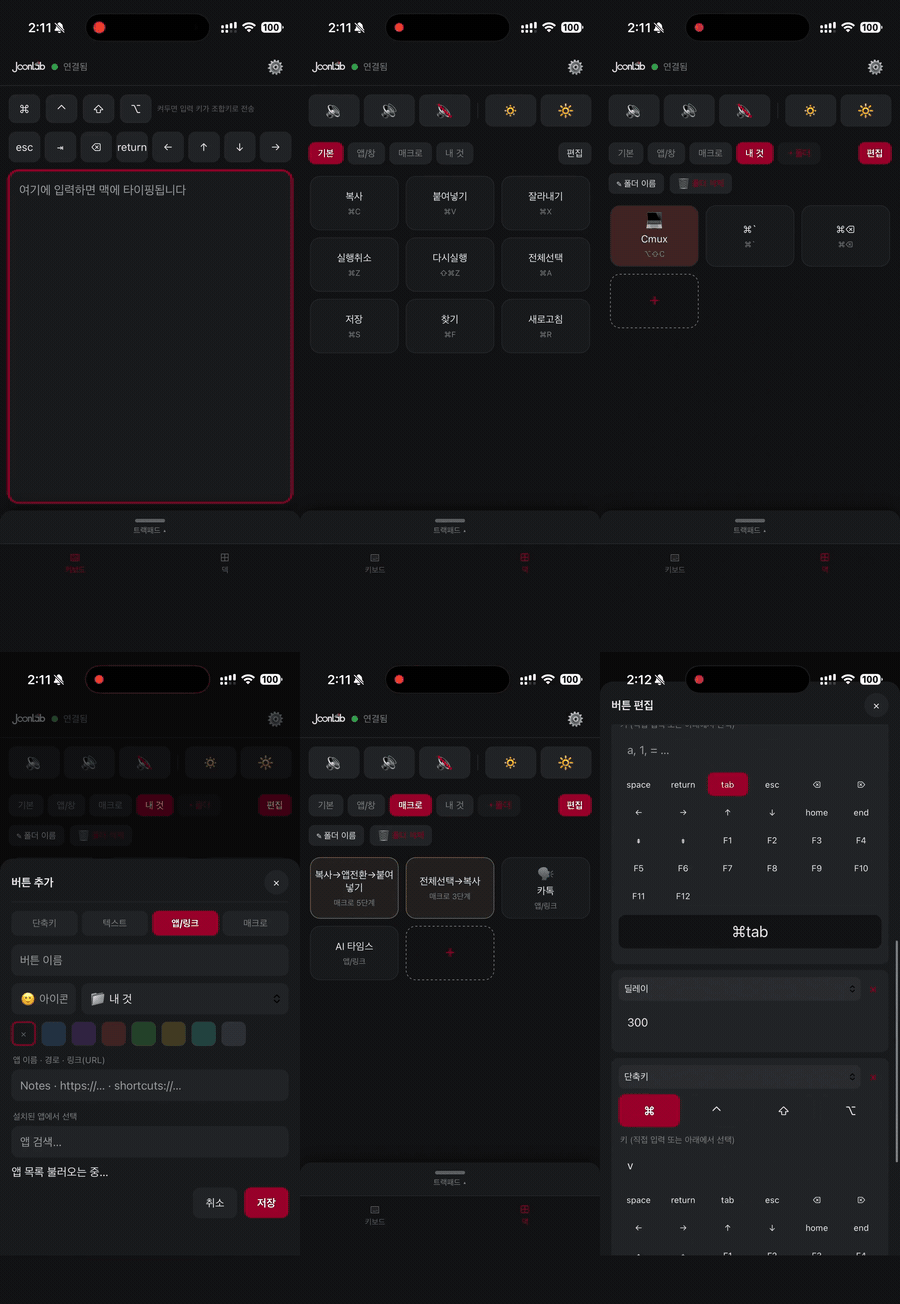
What is this?
MacPilot runs a tiny menu-bar helper on your Mac that serves a web app over your local Wi-Fi.
Open the URL on any phone or tablet and you get a full trackpad + keyboard + customizable shortcut/macro deck — all in the browser.
- No App Store. No install on the phone. Just open a URL (or scan the QR in the menu bar).
- Works on iOS, iPadOS, Android — anything with a browser.
- Free & open source — a replacement for paid apps like Remote Mouse, Unified Remote, etc.
원래 비슷한 기능은 유료 앱을 결제해서 써야 했지만, 이건 무료 오픈소스이고 폰에 앱을 깔 필요조차 없습니다.
✨ Highlights
- 🖱️ Real-trackpad feel — cursor with pointer acceleration, tap / double-tap / right-click, tap-and-drag, two-finger scroll with momentum, pinch-zoom, and three-finger swipes (Mission Control / spaces-style)
- ⌨️ Full keyboard — types real text incl. Korean & emoji (Unicode), plus held-modifier combos (hold ⌘ and type)
- 🎛️ Stream-Deck-style deck — folders, swipeable pages, and buttons for:
- Shortcuts up to 4-key combos (⌘⌃⇧⌥ + any key)
- Text snippets · App / link / deep-link launch (pick from your installed apps, with icons)
- Multi-step macros (key → delay → text → launch, in sequence)
- Per-button icons & colors, drag-to-reorder, move between folders
- → covers much of what a hardware Stream Deck does — on a device you already own, for free
- 🔊 System controls — volume up / down / mute and screen brightness, right from the deck (with the native macOS HUD)
- 🔁 Deck synced across devices — the Mac stores it, so iPhone & iPad share the same deck
- 🎨 Polished UI — LG-inspired theme, light / dark / system toggle, adjustable sensitivity
- 🛰️ Always-on local server — runs via
launchd; auto-starts at login, auto-restarts. No Xcode needed after setup. - 🔒 Local only — everything stays on your Wi-Fi; nothing goes to the cloud.
How it works
 Phone / Tablet (any browser)                 Your Mac (menu-bar helper)
 ┌───────────────────────┐   Wi-Fi / LAN     ┌──────────────────────────┐
 │  Trackpad · Keyboard  │  HTTP + WebSocket │  NWListener web server    │
 │  Deck (shortcuts/macro)│ ───────────────▶ │  → CGEvent (mouse/keys)   │
 └───────────────────────┘                   │  → open (apps/links)      │
        (just a URL)                          └──────────────────────────┘
The web client is served by the Mac itself and is plain HTML/CSS/JS with zero external dependencies. The Mac side is a small Swift menu-bar app that hand-rolls the HTTP+WebSocket server (no frameworks) and injects input via Quartz Event Services (CGEvent).
Requirements
- macOS 13+ (built & tested on macOS 26, Apple Silicon)
- Xcode 16+ and XcodeGen (
brew install xcodegen) — to build, once, on the Mac - A phone/tablet on the same Wi-Fi as the Mac
Install
git clone https://github.com/joonlab/MacPilot.git
cd MacPilot
brew install xcodegen          # if you don't have it
xcodegen generate
open MacPilot.xcodeproj
- In Xcode → target MacPilotHelper → Signing & Capabilities → set Team to your Apple ID (a free account works).
- Run (▶). A 📡 icon appears in the menu bar.
- Click the menu-bar icon → grant Accessibility (System Settings → Privacy & Security → Accessibility → enable MacPilot Helper). Required for input injection — one time, persists.
- On your phone, open the
http://<your-mac-name>.local:8765shown in the menu (or scan the QR).
Run it as an always-on server (recommended)
./deploy.sh
Builds a Release app into ~/Applications and installs a launchd LaunchAgent so it starts at login and auto-restarts — you never need to open Xcode again. See SERVER.md for management commands.
Gesture reference
| Gesture (on phone trackpad) | Action on Mac |
|---|---|
| 1-finger move / tap | Move cursor / left click |
| Double-tap | Double click |
| Tap then drag | Drag (select / move) |
| Two-finger drag | Scroll (with momentum) |
| Two-finger pinch | Zoom (⌘+/−) |
| Three-finger ←→ | ⌘← / ⌘→ |
| Three-finger ↑ / ↓ | Mission Control / App Exposé |
| Left / Right click buttons (below the pad) | Click — or press-and-hold + drag on the pad for a real drag-select / move |
Architecture
MacHelper/Sources/        Swift menu-bar helper
  HelperServer.swift        NWListener: HTTP + WebSocket, deck sync, app list
  HTTPWebSocketConnection   hand-rolled HTTP + WS framing (no dependencies)
  EventInjector.swift       CGEvent mouse/keyboard/scroll + text + macros
  AppList / DeckStore       installed-app scan, deck persistence
MacHelper/Web/            Web client (served to the phone)
  index.html / style.css / app.js   vanilla, no framework
project.yml               XcodeGen project definition
deploy.sh                 build → ~/Applications → launchd restart
Security
LAN-only and unauthenticated by default — anyone on the same Wi-Fi can connect.
Keep it on a trusted home network and do not expose port 8765 to the internet.
Credits & Attribution
Made by Park Joon (박준) — JoonLab, built end-to-end with Claude Code.
If you fork, modify, or redistribute this project, please keep the credit and link back to the original repo:
https://github.com/joonlab/MacPilot — the MIT license also requires retaining the copyright & license notice.
이 프로젝트를 변형·재배포해서 쓰실 땐 원저작자(JoonLab / 박준)와 위 repo 링크를 표기해 주세요.
License
MIT © 2026 Park Joon (JoonLab)
Yorumlar (0)
Yorum birakmak icin giris yap.
Yorum birakSonuc bulunamadi