ambits
Health Warn
- No license — Repository has no license file
- Description — Repository has a description
- Active repo — Last push 0 days ago
- Low visibility — Only 8 GitHub stars
Code Pass
- Code scan — Scanned 7 files during light audit, no dangerous patterns found
Permissions Pass
- Permissions — No dangerous permissions requested
This tool provides a real-time terminal UI that monitors AI coding agent sessions (like Claude Code) to visualize which parts of your codebase the agent has actually read, highlighting blind spots and stale reads.
Security Assessment
The tool reads local source code and Claude Code JSONL session logs to extract coverage data. No dangerous patterns were found during the code scan, no hardcoded secrets were detected, and it does not request dangerous permissions. It operates entirely locally, parsing files with tree-sitter or an optional LSP backend (Serena MCP). Network requests would only occur if the optional Serena MCP backend is used. The tool does not execute arbitrary shell commands. Overall risk: Low.
Quality Assessment
The project is actively maintained, with the last push being today. It has automated CI and code coverage reporting via GitHub Actions and Codecov. However, it has low community visibility with only 8 stars, meaning it has not been widely battle-tested or audited by many users. Critically, the repository has no license file, which means default copyright applies and others technically have no legal permission to use, modify, or distribute the code. This is a significant concern for adoption in any professional or open-source project.
Verdict
Use with caution — the tool itself appears safe with no malicious behavior, but the absence of a license is a legal risk, and the low community adoption means limited external validation. Best suited for personal experimentation; reach out to the author about adding a license before relying on it professionally.
visualize, and report code coverage within llm sessions
Ambits


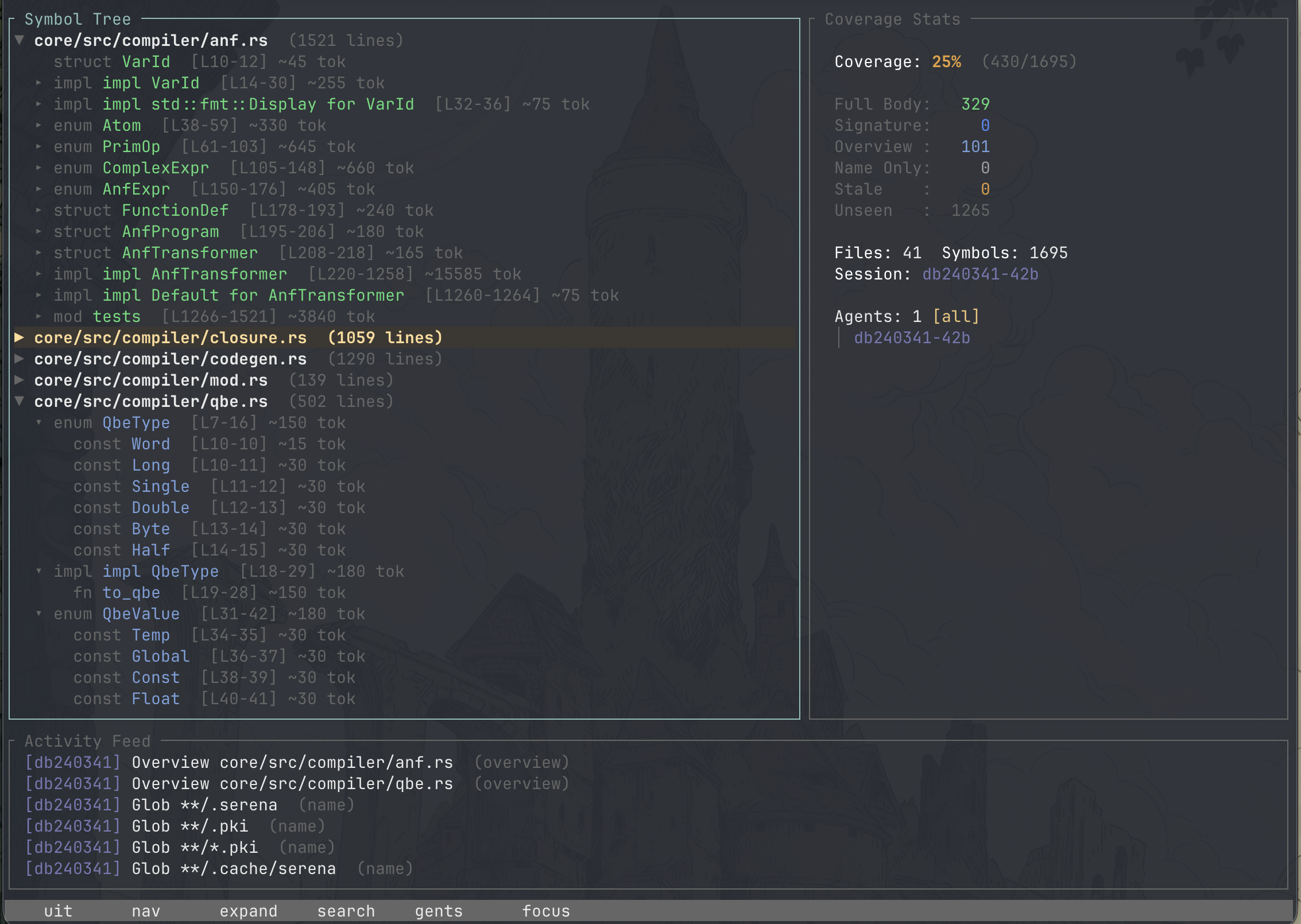
When an AI coding agent works on your project, it reads files, greps for patterns, and inspects symbols — but you have no way to see what it actually looked at. ambits gives you that visibility.
It's a real-time TUI that watches Claude Code session logs and paints every function, struct, and class in your codebase by how deeply the agent has read it. At a glance you can see blind spots the agent missed, stale reads that are out of date, and exactly how much of your project the agent actually understands.
Features
- Real-time session monitoring — Tails Claude Code's JSONL session logs as the agent works, updating the display live
- Depth-aware coverage — Every symbol is color-coded by read depth: unseen, name-only, overview, signature, or full body
- Staleness detection — When source files change on disk, previously-read symbols are automatically marked stale so you know what needs a re-read
- Coverage reports — Generate tabular per-file coverage summaries for CI or quick audits
- Per-file coverage counts — Each file shows a
seen/totalsymbol count so you can tell at a glance how much of it the agent has inspected - Sortable tree view — Toggle between alphabetical and coverage-grouped ordering to surface partially-covered files first
- Multi-agent coverage — When a session spawns sub-agents, ambits tracks each one independently. See which parts of your codebase each agent examined, filter the tree and activity feed by agent, and compare per-agent coverage side by side
- Multiple parsing backends — Tree-sitter for fast local parsing, or Serena MCP for richer LSP-based symbol data across more languages
Supported Languages
| Backend | Languages |
|---|---|
| Tree-sitter | Rust, Python, TypeScript |
| Serena MCP | Any language Serena supports |
Roadmap
- Multi-session comparison
Building from source
Requires Rust 1.70+.
cargo build --release
Installing through Cargo
cargo install ambits
Usage
ambits --project <path>
Flags
| Flag | Description |
|---|---|
--project, -p |
Path to the project root (required) |
--session, -s |
Session ID to track (auto-detects latest) |
--agent, -a |
Filter coverage to a specific agent ID (supports prefix matching) |
--dump |
Print symbol tree to stdout and exit |
--coverage |
Print coverage report to stdout and exit |
--format |
Coverage output format: table (default) or json |
--serena |
Use Serena's LSP symbol cache instead of tree-sitter |
--log-dir |
Path to Claude Code log directory (auto-derived) |
--log-output |
Output directory for event logs |
Examples
# Launch TUI for current project
ambits -p .

# Dump symbol tree without TUI
ambits -p . --dump

# Print coverage report
ambits -p . --coverage

# Filter coverage to a specific agent (supports prefix matching)
ambits -p . --coverage --agent a9fe23c
ambits -p . --coverage --agent a9fe    # prefix match

# Use Serena's symbol cache (more languages, finer detail)
ambits -p . --serena
Coverage Report
The --coverage flag prints a per-file breakdown of how much the agent has seen, useful for quick audits or piping into CI checks:
Coverage Report (session: 34e212cf-a176-4059-ba12-eca94b56e43b)
─────────────────────────────────────────────────────────────────────────────
File                                      Symbols    Seen    Full   Seen%   Full%
─────────────────────────────────────────────────────────────────────────────
src/events.rs                                   3       0       0      0%      0%
src/parser/mod.rs                               8       8       1    100%     12%
src/app.rs                                     23      23      23    100%    100%
─────────────────────────────────────────────────────────────────────────────
TOTAL                                         214     182     175     85%     82%
- Seen%: Symbols the agent has any awareness of (name, overview, signature, or full body)
- Full%: Symbols the agent has read completely (full body)
For machine-readable output, pass --format json to emit a single-line, schema-versioned JSON object suitable for jq or other tooling:
ambits -p . --coverage --format json | jq '.totals.full_percent'
Multi-Agent Coverage
When a Claude Code session uses the Task tool to spawn sub-agents, ambits automatically detects each agent and tracks its coverage independently. The Coverage Stats panel shows a hierarchical agent tree with per-agent seen percentages:
Agents: 5
  ▶ [All]              Seen: 95%
  ├─ 7842313b          35%
  │  ├─ a38e68c        20%
  │  ├─ a9fe23c        41%
  │  └─ a845182        15%
  └─ compact-0aff      10%
Use Tab to focus the Stats panel, then j/k to navigate the agent list and Enter to filter. When an agent is selected, the tree view, activity feed, and depth breakdown all update to show only that agent's coverage. Press a from any panel to quickly cycle through agents.
The --agent CLI flag lets you filter coverage reports by agent ID without launching the TUI:
ambits -p . --coverage --agent a9fe23c
Claude Code Skill
ambits includes a Claude Code skill so you can check coverage without leaving your editor. Type /ambit in any Claude Code session to get an instant coverage summary.
Installing the skill
# Install globally (available in all your projects)
ambits skill install --global

# Install into the current project only
ambits skill install

# Install into a specific project
ambits skill install --project /path/to/project
Global installs go to ~/.claude/skills/ambit/. Project installs go to .claude/skills/ambit/ within the target directory.
Using the skill
Once installed, use /ambit in Claude Code:
/ambit                    # Check coverage for current project
/ambit --session <id>     # Check a specific session
Claude will run the appropriate ambits commands and interpret the coverage results, highlighting blind spots and suggesting files to read for better understanding.
Keybindings
| Key | Action |
|---|---|
j / k |
Navigate up/down (tree or agent list depending on focus) |
h / l |
Collapse/expand tree nodes |
Enter |
Expand tree node, or select agent when Stats panel is focused |
/ |
Search symbols |
s |
Toggle sort (alphabetical / coverage) |
a / A |
Cycle agent filter forward / backward |
Shift+Tab |
Cycle agent filter backward |
Tab |
Switch panel focus (Tree / Stats / Activity) |
g / G |
Jump to first / last item |
PgUp / PgDn |
Scroll by page |
q |
Quit |
Color Legend
Symbol colors (by read depth):
| Color | Meaning |
|---|---|
| Dark gray | Unseen |
| Light gray | Name only (appeared in glob/listing) |
| Pale blue | Overview (grep match, symbol listing) |
| Blue | Signature seen |
| Green | Full body read |
| Orange | Stale (source changed since last read) |
File header colors (by coverage status):
| Color | Meaning |
|---|---|
| White | No symbols seen |
| Amber | Partially covered (some symbols seen) |
| Yellow-green | All seen (every symbol seen, but not all at full body depth) |
| Green | Fully covered (all symbols read at full body depth) |
Reviews (0)
Sign in to leave a review.
Leave a reviewNo results found