ai-quota-deck
Health Gecti
- License — License: MIT
- Description — Repository has a description
- Active repo — Last push 0 days ago
- Community trust — 10 GitHub stars
Code Uyari
- network request — Outbound network request in browser-bridge/src/gemini.js
- network request — Outbound network request in browser-bridge/src/grok.js
- fs module — File system access in browser-bridge/tests/content-scripts.test.js
- network request — Outbound network request in browser-bridge/tests/content-scripts.test.js
- fs module — File system access in browser-bridge/tests/interceptor.test.js
Permissions Gecti
- Permissions — No dangerous permissions requested
Bu listing icin henuz AI raporu yok.
A Windows tray dashboard for Claude Code, Codex, Gemini, and Grok usage limits.
📊 AI Quota Deck
A Windows tray dashboard for Claude Code, Codex, Antigravity, Gemini, Grok, and Grok Bot usage limits.
📘 繁體中文
Screenshots
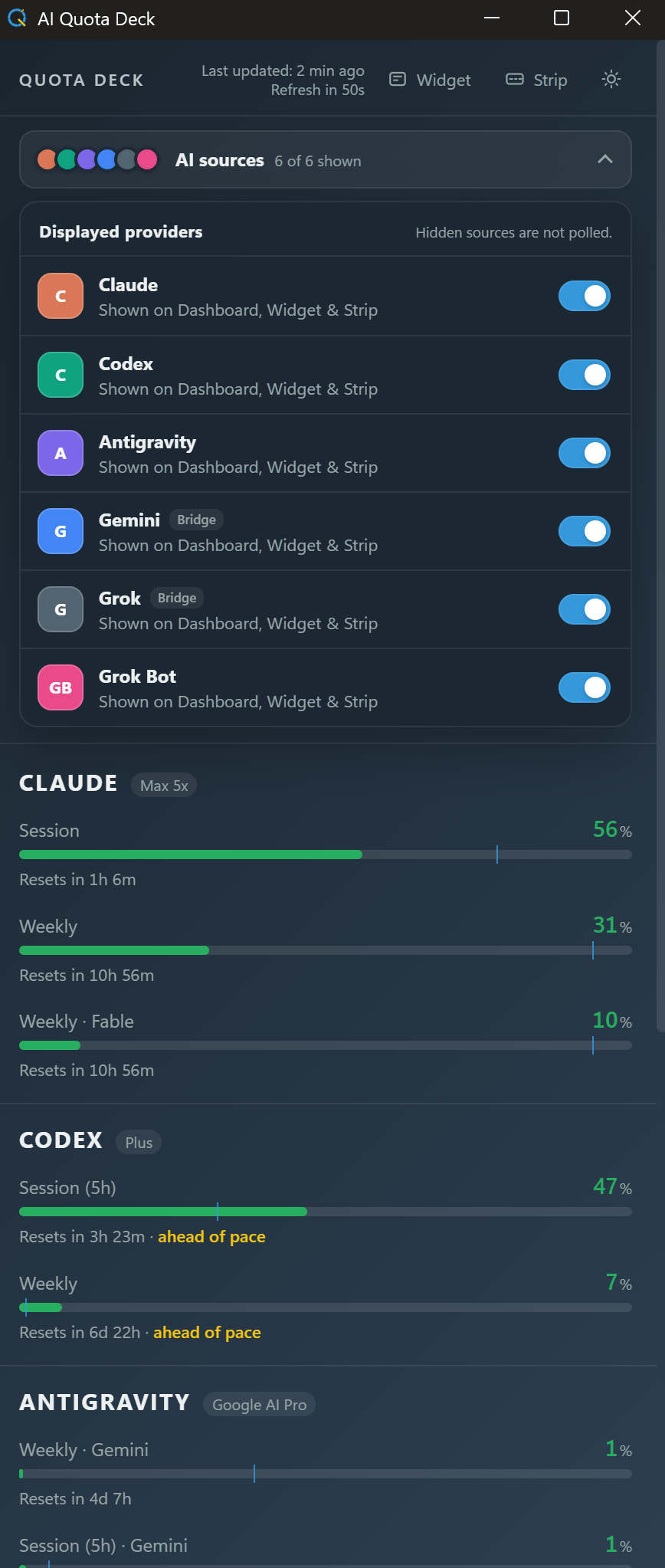
Dashboard
Widget
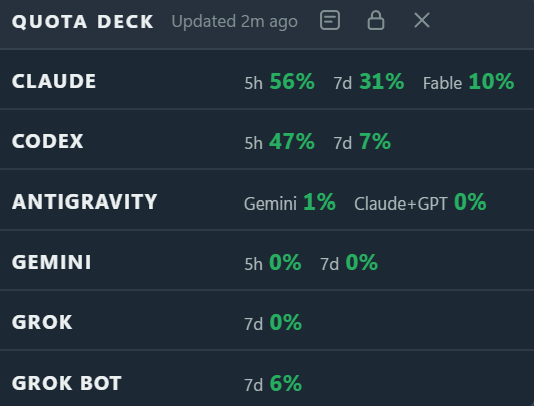
Strip

The dashboard includes reset times, pace indicators, plan badges, and cached-data status. Widget and Strip views keep the essential color-coded percentages in sight.
What it shows
| Provider | Usage windows | Setup |
|---|---|---|
| Claude | 5-hour, weekly, and model-specific limits when available | Sign in to Claude Code |
| Codex | Monthly (Free) or weekly (Plus), depending on the account | Sign in to Codex Desktop |
| Antigravity | Weekly and 5-hour limits for the Gemini pool and the Claude + GPT pool | Keep Antigravity IDE open |
| Gemini | 5-hour and weekly | Advanced Browser Bridge setup |
| Grok | Weekly and product breakdown; free query limits when applicable | Browser Bridge, or Grok Build fallback |
| Grok Bot | Independent weekly allowance | Sign in to the Grok Bot desktop app |
Providers that are not configured stay hidden. Each provider refreshes independently, so one failure does not block the others.
Other features:
- Dashboard, Widget, and Strip views
- Choose which providers appear; hidden providers are not polled at all
- Always-on-top widget with a remembered, lockable position
- Compact horizontal strip that can float anywhere or pin above the Windows taskbar without reserving work area
- Light, dark, and system themes
- Windows tray controls and optional launch at startup
- Cached readings when a provider or browser is temporarily unavailable
- Claude Code polling pauses while Windows is idle or locked, recovers expired OAuth sessions through the official CLI, and backs off safely after rate limits
In Strip view, click the pin-shaped taskbar button, then drag the Strip to any free part of the taskbar. It yields while the taskbar is auto-hidden or another app is full-screen.
Installation
Requires Windows 10 or 11.
- Download the latest installer.
- Run it, then launch AI Quota Deck.
- Close the window to return it to the system tray; left-click the tray icon to reopen it.
Codex: sign in to Codex Desktop.
Claude: if Claude Code is not detected, install it, run claude once in a terminal, and complete sign-in. The CLI does not need to remain open.
Antigravity: sign in to Antigravity IDE once and keep it open while you want live numbers. The deck reads the IDE's local language server on 127.0.0.1; while the IDE is closed the last reading stays visible as cached for up to 24 hours, then the card asks you to open the IDE.
Grok Bot: install the Grok Bot desktop app and sign in once. Its weekly allowance is separate from Grok/SuperGrok usage. The deck reuses only Grok Bot's short-lived access token and asks you to reopen the app when that token expires.
Widget and Strip
Use the two buttons at the top of the dashboard:
- Widget opens a small always-on-top view. Drag its header to place it; the lock button locks or unlocks that position.
- Strip arranges the same values in a compact horizontal bar. Drag anywhere outside its buttons to place it freely; it does not reserve or reduce the Windows work area.
Widget and Strip remember separate positions. Open the dashboard or hide either view with its controls or the tray menu. Both reuse the dashboard's readings and make no additional provider requests.
Advanced: Gemini and Grok
This setup is more involved. It requires Chromium Developer mode, a manually loaded unpacked extension, and a signed-in Gemini or Grok tab.
Gemini and Grok usage is read from a browser tab through the bundled AI Quota Deck Browser Bridge. Skip this section if you only use Claude Code, Codex, Antigravity, or Grok Bot.
- Gemini requires the bridge.
- Grok prefers the bridge but can fall back to a signed-in Grok Build CLI.
- Verified browsers: Chrome, Comet, Edge, and Brave. Vivaldi, Opera, and Chromium are registered but not yet verified.
Setup
Launch AI Quota Deck once and open AI sources near the top of the dashboard.
Copy or open the bridge folder shown by the app:
%LOCALAPPDATA%\ai-quota-deck\browser-bridgeOpen
chrome://extensions, enable Developer mode, and choose Load unpacked.Select the bridge folder.
Click the bridge toolbar icon once to grant desktop communication permission.
The card normally appears within about three minutes or when the deck is brought to the front.
Keep it installed
The bridge and a matching signed-in tab must remain available for fresh readings. Background tabs are fine, but the bridge cannot update while the browser or tab is closed, the account is signed out, or the computer is asleep. The deck keeps the last reading as cached and requests a new one after wake or unlock.
After updating AI Quota Deck, restart the browser so it reloads the bundled bridge files.
Standalone Browser Extensions
If you only need to check Gemini or Grok usage without running the desktop app, you can use these standalone Chrome extensions:
Troubleshooting
Gemini or Grok is missing: confirm the bridge is enabled, click its toolbar icon once, and open a signed-in provider tab.
Browser data is stale: open the matching tab and allow up to three minutes. The browser, bridge, tab, and tray app must all be running.
Claude is rate limited: the cached card shows the countdown. The deck honors the full server cooldown across restarts; new Claude Code credentials clear a deadline tied to the old sign-in.
Claude did not update while idle or locked: this is intentional. After you return, the app waits about two minutes before checking so it does not race Claude Desktop or Claude Code during wake-up. An existing rate-limit cooldown still takes priority.
Claude reports a rejected token: the deck asks the installed Claude Code CLI to refresh it in the background, then retries automatically. If that fails, open Claude Code once.
Antigravity asks you to open the IDE: the deck can only read Antigravity while the IDE is running. Start it and allow one refresh cycle.
Grok Bot asks you to sign in again: open Grok Bot once. The deck never refreshes the account itself; it will pick up the renewed short-lived access token on the next check.
Windows reports an unknown publisher: current releases are not code-signed. Download them only from this project's GitHub Releases page.
Privacy
AI Quota Deck has no telemetry and uploads nothing.
- It uses sign-ins already stored by the supported desktop or CLI clients.
- It never reads or uses provider refresh tokens. After a Claude
401, it runs the officialclaude updatecommand in the background and rereads Claude Code's access token; this command may also update Claude Code itself. - Antigravity is read from the IDE's local language server on
127.0.0.1only. The deck never reads, stores, or refreshes a Google sign-in. - Grok Bot's Chromium-encrypted local access token is unlocked with Windows DPAPI only for the live usage request. Its refresh token is never deserialized, decrypted, used, cached, or sent anywhere by the deck.
- The bridge can read only
gemini.google.comandgrok.com. - Only quota values, reset times, provider/account slots, and observation times reach the app. Cookies and page tokens stay in the browser.
Limitations
These providers expose usage through undocumented internal endpoints. A provider card may stop working when its response format changes; the other providers continue independently.
If the same browser provider is signed in with multiple accounts, the most recently reported account is shown. Account pinning is not implemented yet.
Project
- Changelog
- Architecture notes
- Report an issue
- Created by Joshua Wang
License
Licensed under the MIT License.
Yorumlar (0)
Yorum birakmak icin giris yap.
Yorum birakSonuc bulunamadi