agent-stack
Health Warn
- License — License: MIT
- Description — Repository has a description
- Active repo — Last push 0 days ago
- Low visibility — Only 5 GitHub stars
Code Warn
- network request — Outbound network request in frontend/public/app.js
Permissions Pass
- Permissions — No dangerous permissions requested
No AI report is available for this listing yet.
Lightweight multi-tenant Agent router.
agent-stack
Multi-tenant, multi-backend agent runtime exposing an OpenAI-compatible
HTTP surface aggregated across several agent runtimes (OpenClaw,
Hermes Agent, …).
A lightweight alternative to "OpenWebUI + many sidecar containers": one
router, one tiny SPA, per-user Docker-spawned agent runtimes that auto-stop
when idle, conversation history stored cloud-side.
Screenshots
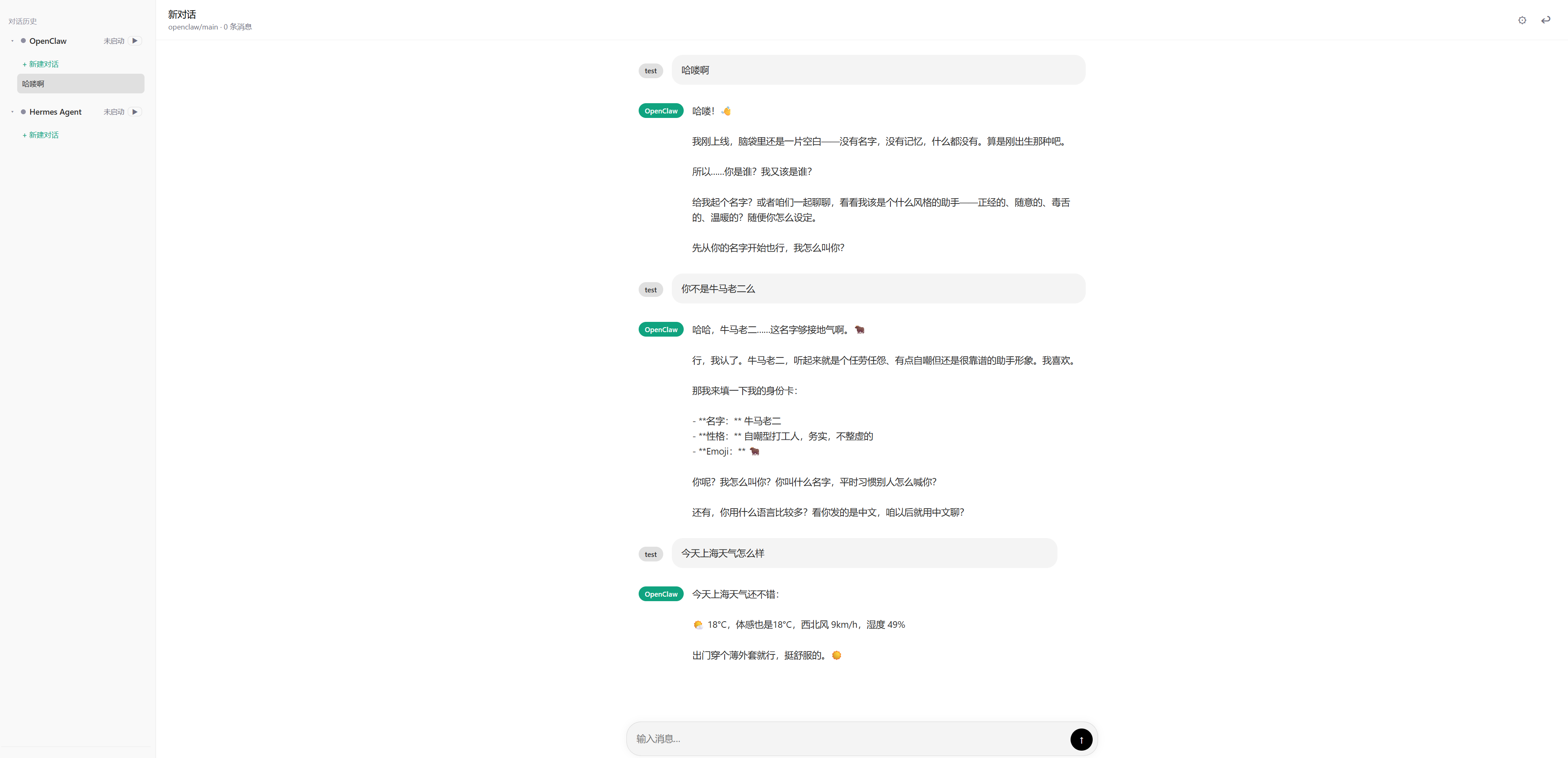
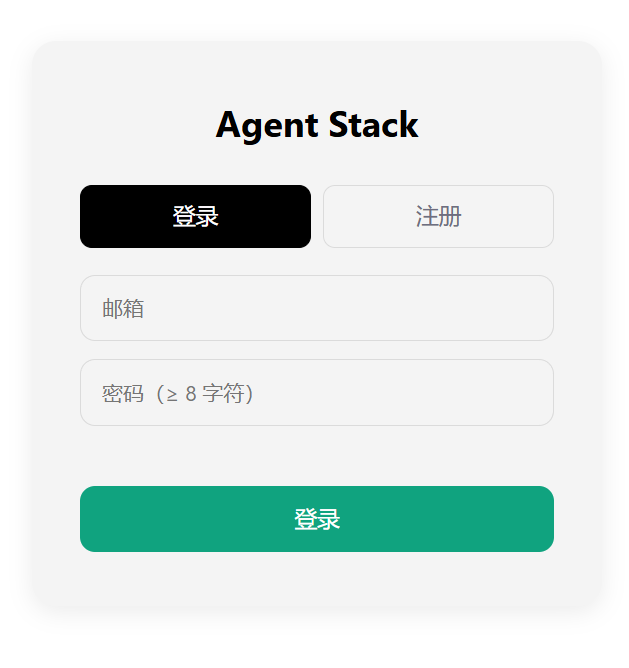
Highlights
- Per
(user, backend)Docker container — one runner per user per
backend kind, spawned on demand. - Idle reaper — runners are
docker stop+rm-ed (truly stopped, not
paused) once idle exceeds a user-configurable threshold. - Cold-start progress —
/api/runners/<backend>/progressSSE stream,
rendered as a progress bar in the SPA. - OpenAI compat —
POST /v1/chat/completionsis routed bymodelto
the correct runner. - Cloud conversations — chats and messages persist in the router's
sqlite DB; switch devices, history follows. - Three-tier upstream key — admin's web-UI Global value (optionally
shared with all users) + each user's own global override + each user's
per-backend override. The router never reads upstream LLM creds from.env/ process env. Toggling shares is live — no router restart. - JWT cookie auth with optional invite-code signup and bootstrap admin.
- Single-admin invariant — exactly one user has
role='admin'(the bootstrap one). The UI/API refuse to create, promote, demote or delete in a way that would break this. - Single-binary frontend — vanilla JS + nginx, zero build step.
Architecture
browser
  └── frontend (nginx :18000)
        ├── static SPA (login, sidebar with chats grouped by backend, chat pane)
        └── reverse-proxies /auth, /api, /v1 to the router
                                         │
                                         ▼
                              router (FastAPI :18080)
                              ├── users / runners / conversations / messages (sqlite)
                              ├── docker.from_env() spawns/stops backend containers
                              ├── idle reaper task (every 30s)
                              └── /v1 OpenAI proxy → routes by `model`
                                         │
                  ┌──────────────────────┴──────────────────────┐
                  ▼                                              ▼
       openclaw-with-chromium                            nousresearch/hermes
       agstack-openclaw-<slug>                          agstack-hermes-<slug>
       (per-user OPENCLAW_HOME at                       (per-user HERMES_HOME at
        /data/users/<slug>/openclaw)                     /data/users/<slug>/hermes-agent)
                  │                                              │
                  └──────────────► OpenAI-compatible upstream ◄──┘
                                       (LLM_BASE_URL / LLM_API_KEY / LLM_MODEL,
                                        admin sets in web UI; per-user
                                        override allowed)
Layout
agent-stack/
  router/                    FastAPI service
    app.py                   single-module FastAPI app
    Dockerfile
    requirements.txt
  frontend/                  static SPA + nginx
    public/{index.html,app.js,style.css}
    nginx.conf
    Dockerfile
  seeds/
    openclaw-home/           copied into each user's openclaw home on first start
      openclaw.json          enables /v1/chat/completions; ${LLM_*} substituted
    hermes-home/             hermes config.yaml + .env, templated per user
  images/
    openclaw/                optional thin overlay over upstream openclaw image
      Dockerfile             adds chromium + CJK fonts + (optional) proxy wrapper
      chromium-proxied
      README.md
  backends.json              backend registry (image, mounts, env, defaults)
  docker-compose.yml
  .env.example
  docs/                      hermes integration, openclaw setup, per-user env
Quick start
Requirements: Linux host, Docker 24+, ports 18000 (frontend) and 18080
(router) free. The router connects to the local docker.sock to spawn
backend containers.
git clone https://github.com/JoursBleu/agent-stack.git
cd agent-stack

# 1. Configure .env. The router will refuse to start if JWT_SECRET or
#    BOOTSTRAP_ADMIN_PASSWORD still look like the CHANGE_ME placeholders.
cp .env.example .env
sed -i "s|^JWT_SECRET=.*|JWT_SECRET=$(openssl rand -hex 48)|" .env
$EDITOR .env  # set BOOTSTRAP_ADMIN_EMAIL / _PASSWORD; HOST_STACK_ROOT
              # MUST be an absolute path (default /var/lib/agent-stack)
# Note: router does NOT read LLM_BASE_URL / LLM_API_KEY / LLM_MODEL from
# .env. The bootstrap admin saves them in the web UI after first login
# (see "Seed the upstream LLM key" below).

# 2. Create the data dir. Only mkdir is needed; backends.json and seeds/
#    are bind-mounted from this checkout into the router, so future
#    upgrades are just `git pull && docker compose up -d`.
DATA=$(grep ^HOST_STACK_ROOT .env | cut -d= -f2)
sudo mkdir -p "$DATA" && sudo chown $USER "$DATA"

# 3. Pull the OpenClaw backend image. docker compose only builds router
#    and frontend — it does NOT auto-pull backend images, so you must
#    do this once. The image lives on GHCR (it is NOT mirrored to
#    Docker Hub; `docker pull openclaw/openclaw` would 404).
docker pull ghcr.io/openclaw/openclaw:latest
# Or build the desktop-Chromium overlay shipped in this repo:
#   cd images/openclaw && docker build -t openclaw-with-chromium:latest .

# 4. Build + start router and frontend.
docker compose up -d --build
docker compose logs -f agent-stack-router

# 5. Smoke check: should print {"ok":true,...}
curl -fsS http://127.0.0.1:18080/healthz
Multiple checkouts on the same host?
docker-compose.ymlpinsname: ${COMPOSE_PROJECT_NAME:-agent-stack}, so by default every
checkout — regardless of directory name — is the same compose
project, andcompose upin checkout B will silently recreate
checkout A's containers under B's config. To run a second instance
side by side you must set a distinct project name in checkout
B's.env, e.g.COMPOSE_PROJECT_NAME=agent-stack-staging, AND
give it a distinctHOST_STACK_ROOTabsolute path AND non-overlappingROUTER_PORT/FRONTEND_PORT/BACKEND_PORT_START..END.
Relying on the directory name alone is not enough — two clones
both namedagent-stack/will collide.
Open http://<host>:18000/, log in with the bootstrap admin (signup is
allowed when ALLOW_SIGNUP=true, but signup always creates a regular
user — the only admin is the bootstrap one).
Seed the upstream LLM key (required before the first chat)
The router never reads LLM_BASE_URL / LLM_API_KEY / LLM_MODEL from .env. After
logging in as the bootstrap admin:
- Click the gear icon (lower-left) → Backend API keys.
- In the
LLM_BASE_URLcard, set the Global value to your
OpenAI-compatible base URL (e.g.https://api.openai.com/v1). - In the
LLM_API_KEYcard, set the Global value to your key. - In the
LLM_MODELcard, set the Global value to the upstream
model id (e.g.gpt-5-mini,qwen3-72b-instruct). This is what
hermes / openclaw will pass to the upstream/v1/chat/completions. - (Optional) Toggle "Share my Global value with other users" on
each card so non-admin users inherit the same value. Without this
toggle, every user has to fill their own key in their own settings.
Equivalent REST (admin's own session cookie):
BASE=http://<host>:18000
JAR=/tmp/admin.jar
# 1) login as bootstrap admin and grab a session cookie
read -srp 'admin password: ' ADMIN_PW; echo
curl -s -c $JAR -H 'Content-Type: application/json' \
     -d "{\"email\":\"admin@local\",\"password\":\"$ADMIN_PW\"}" $BASE/auth/login

# 2) save the global values
curl -s -X PUT -b $JAR -H 'Content-Type: application/json' \
     -d '{"value":"https://api.openai.com/v1","backend":""}' \
     $BASE/api/me/env-overrides/LLM_BASE_URL
curl -s -X PUT -b $JAR -H 'Content-Type: application/json' \
     -d '{"value":"sk-...","backend":""}' \
     $BASE/api/me/env-overrides/LLM_API_KEY
curl -s -X PUT -b $JAR -H 'Content-Type: application/json' \
     -d '{"value":"gpt-5-mini","backend":""}' \
     $BASE/api/me/env-overrides/LLM_MODEL

# 3) (optional) share them with non-admin users
curl -s -X PUT -b $JAR -H 'Content-Type: application/json' \
     -d '{"shared":true}' $BASE/api/admin/shared-env/LLM_BASE_URL
curl -s -X PUT -b $JAR -H 'Content-Type: application/json' \
     -d '{"shared":true}' $BASE/api/admin/shared-env/LLM_API_KEY
curl -s -X PUT -b $JAR -H 'Content-Type: application/json' \
     -d '{"shared":true}' $BASE/api/admin/shared-env/LLM_MODEL
Then start a new chat → pick a backend → first message triggers cold
start with progress bar; subsequent messages reuse the warm runner.
Upgrading
cd agent-stack
git pull
docker compose up -d --build
backends.json and seeds/ are bind-mounted from the checkout, so agit pull is enough to pick up new backend definitions or updated
seed templates. Already-spawned per-user containers keep running with
their previously rendered seed; new spawns (after stopping the old
container or letting the reaper recycle it) use the updated one.
Per-user state under $HOST_STACK_ROOT/users/ and the router DB
($HOST_STACK_ROOT/router.db) survive the rebuild.
Upstream LLM key — admin-shared default + per-user / per-backend override
Every spawned agent container needs an OpenAI-compatible upstream
(LLM_BASE_URL + LLM_API_KEY + LLM_MODEL). agent-stack resolves the value for each(user, backend, var) tuple in this order — no router restart needed
to switch any of these:
- Per-backend override — what this user explicitly set for this
backend in Settings. - User-global override — what this user explicitly set under
"Global (applies to all backends)". - Admin-shared default — the value some admin user has saved as
their own Global override, only if that variable's "share with
users" toggle is on. The router never reads upstream LLM credentials
from.env/ process env — the admin keeps the shared value in the
web UI. - Otherwise the spawn is refused with
422— the user is told to fill
the value in Settings before chatting.
Resulting policy:
- Admin shared = on: every user uses the value the admin saved in
their own Global row by default; any user can opt to override it for
themselves (globally or for one backend only). - Admin shared = off: each user must provide their own value.
- Users can never share their value with others — only the admin
can share, and the shared value is whatever the admin has stored in
their own Global row. - A user can keep one global value and also point a single backend at
a different upstream — useful when one backend needs a stronger model
account, etc.
API (all under /api/me/env-overrides, /api/admin/shared-env); UI
lives under Settings → Backend API keys, with one card per env var
showing every backend that uses it and the current effective source.
Full details: docs/per-user-env-overrides.md.
OpenClaw image
backends.json[openclaw].image defaults to ghcr.io/openclaw/openclaw:latest
(the upstream image as-is, what the Quick start docker pull line uses).
You have two options.
Option A (default) — use the upstream OpenClaw image as-is
The default image: value already matches; just make sure you randocker pull (Quick start step 4):
docker pull ghcr.io/openclaw/openclaw:latest
The image lives on GHCR; it is not mirrored to Docker Hub, sodocker pull openclaw/openclaw will 404. See
openclaw/openclaw for tags and
build matrix.
Option B — build the thin overlay shipped in this repo
If you need OpenClaw's browser plugin to drive a real desktop Chromium,
build the overlay and point backends.json at it:
cd images/openclaw
docker build -t openclaw-with-chromium:latest .
# then in backends.json: "image": "openclaw-with-chromium:latest"
The overlay only adds chromium, CJK + emoji fonts, the libs Chromium
links against, sudo for the node user, and an optionalchromium-proxied shell wrapper that routes browser traffic through an
HTTP proxy when CHROMIUM_PROXY is set. No modification to OpenClaw
itself.
See images/openclaw/README.md for trimming
the overlay (drop the proxy wrapper / sudo / fonts you don't need).
Configuration
.env
| Var | Default | Purpose |
|---|---|---|
HOST_STACK_ROOT |
./data |
host path bind-mounted into the router as STACK_DATA_ROOT; holds backends.json, seeds/, users/, router.db |
JWT_SECRET |
— | random hex; change before deploy |
COOKIE_SECURE |
false |
set true behind HTTPS |
ALLOW_SIGNUP |
true |
allow public signup |
INVITE_CODE |
empty | optional invite token; required if non-empty |
BOOTSTRAP_ADMIN_* |
— | seed an admin on first boot |
DEFAULT_IDLE_SECONDS |
600 |
per-runner idle TTL |
REAPER_INTERVAL_SECONDS |
30 |
reaper sweep period |
BACKEND_PORT_START..END |
19000..19999 |
host port pool for runner publish |
BACKEND_STARTUP_TIMEOUT |
90 |
seconds to wait for ready_path |
Upstream LLM credentials (
LLM_BASE_URL,LLM_API_KEY,LLM_MODEL) are intentionally
not in.env. The bootstrap admin saves them in Settings → Backend API
keys on first login (see Quick start above).
backends.json schema
{
  "name": "openclaw",                       // canonical model id
  "display_name": "OpenClaw",
  "image": "ghcr.io/openclaw/openclaw:latest",
  "container_prefix": "agstack-openclaw",
  "internal_port": 17567,                   // port inside container
  "health_path": "/healthz",
  "ready_path": "/v1/models",               // final readiness probe
  "extra_models": ["openclaw/main"],        // additional model IDs served
  "api_key_env": "OPENCLAW_GATEWAY_TOKEN",  // env var holding the runner's API key
  "api_key_header": "Authorization",
  "api_key_scheme": "Bearer",
  "seed_subdir": "openclaw-home",           // copied into per-user home on first start
  "mount_target": "/home/node/.openclaw",   // mount point inside the container
  "extra_env": {"OPENCLAW_GATEWAY_BIND": "0.0.0.0"},
  "user_overridable_env": ["LLM_BASE_URL", "LLM_API_KEY", "LLM_MODEL"],
  "templated_files": ["openclaw.json"],     // re-rendered each ensure() so user overrides apply
  "cmd": ["node", "openclaw.mjs", "gateway", "--allow-unconfigured"],
  "user": "node",                           // container user
  "chown_uid": 1000,                        // chown the per-user home before mount
  "chown_gid": 1000,
  "extra_hosts": {"some-host.example": "1.2.3.4"},  // optional --add-host
  "extra_networks": [],                     // attach to extra docker networks (e.g. reach a sidecar by name)
  "dns": [],                                // optional custom DNS servers
  "default_idle_seconds": 600
}
${ENV_VAR} references inside files under seeds/<seed_subdir>/ are
substituted from the merged env (router process env + per-user override)
when the seed is copied into / re-rendered for a user's home.
Two layers of "model"
backends.json extra_models and the seed file'smodels.providers.<provider>.models[] are two different lists:
| List | Where | Effect |
|---|---|---|
extra_models (e.g. openclaw/main) |
backends.json |
Router-side aliases. Determines what /v1/models returns and which model strings the router will accept and route to this backend. Never sent upstream. |
models.providers.upstream.models[] (e.g. ${LLM_MODEL}) |
seeds/<backend>-home/openclaw.json (and similarly for hermes' config.yaml) |
What the backend itself thinks it can call. The id placed here is what the backend will actually pass to LLM_BASE_URL/v1/chat/completions. |
When the user picks model openclaw (or openclaw/main) in the UI, the
router routes the request to the openclaw container, but the container
still calls LLM_MODEL (default: whatever the admin set in the UI)
upstream. To expose more upstream models per backend, edit the seed
file (and recycle the per-user runner so the new template is rendered
— see Tuning the upstream model list below).
API
All endpoints under /api/* and /v1/* require a session (cookie set
by POST /auth/login).
Auth
POST /auth/signup—{email, password, name?, invite_code?}POST /auth/login—{email, password}→ setsagent_stack_sessioncookiePOST /auth/logoutGET /auth/me
Backends and runners
GET /api/backends— list available kinds, per-user idle setting,user_overridable_envGET /api/runners— list this user's running runnersPOST /api/runners/{backend}/start— explicitly cold-startDELETE /api/runners/{backend}— stop and remove the runnerPUT /api/runners/{backend}/idle—{idle_seconds}user-set TTLGET /api/runners/{backend}/progress— SSE:{stage, progress, message}
Per-user env overrides
GET /api/me/env-overrides— list (values masked)PUT /api/me/env-overrides/{var}—{value}; empty string deletesDELETE /api/me/env-overrides/{var}
Conversations (cloud)
GET /api/conversations— list withmessage_countPOST /api/conversations—{backend, model?, title?}GET /api/conversations/{id}— conversation + messagesPATCH /api/conversations/{id}—{title}DELETE /api/conversations/{id}— cascade-deletes messagesPOST /api/conversations/{id}/messages—{role, content}; auto-fills
conversation title from the first user message
OpenAI surface
GET /v1/modelsPOST /v1/chat/completions— requestmodelselects the backend;
supportsstream: trueSSE; idle timer is touched on every chunk
Adding a new backend
- Drop the image's per-user config under
seeds/<seed_subdir>/. Use${ENV_VAR}placeholders for any secrets — they're substituted at
copy time from the router's environment, and re-rendered everyensure()if the file is listed intemplated_files.
Caveat: the entireseeds/<seed_subdir>/tree is copied into
every user's home on first run, so do NOT put large blobs (model
weights, datasets) in there — keep it config-only. - Append a backend entry to
backends.json(see schema above). For
agents that derive their own session id from the request body
(e.g. Hermes hashessystem_prompt + first_user_message), the
router auto-injectsX-Hermes-Session-Idfrom the OpenAIuser
field so each conversation maps to a unique session — see
docs/hermes-integration.md. - Restart
agent-stack-routerso it reloadsbackends.json. The router
does not hot-reloadbackends.json—image,extra_networks,extra_env,templated_files, etc. are read once at startup. After
editing, rundocker compose restart agent-stack-router. New
backends then show up in/api/backendsand the SPA's model picker
immediately.
Sidecar example: backend talks to a same-host LLM proxy
If LLM_BASE_URL points at another container on the same Docker host
(e.g. an openai-compat-proxy listening on its own bridge network),
the spawned per-user runner needs to be on that network — network_mode: host only applies to the router/frontend, not to backend runners.
// backends.json
{
  "name": "openclaw",
  "image": "ghcr.io/openclaw/openclaw:latest",
  "extra_networks": ["my-llm-proxy_default"],
  "extra_env": {
    // resolved by the proxy container's DNS name on that bridge:
    "LLM_BASE_URL": "http://openai-compat-proxy:8080/v1"
  }
}
The router writes a row in the docker network's container table, so
inside the runner getent hosts openai-compat-proxy resolves andcurl http://openai-compat-proxy:8080/v1/models works. Withoutextra_networks, every spawned runner lands on the default bridge
network and can't reach any sidecar by name (only public DNS
endpoints work).
Docs
- docs/hermes-integration.md — Hermes session
model, CSRF/Origin header stripping, container lifecycle, troubleshooting - docs/openclaw-multi-agent.md — OpenClaw
per-user agent layout - docs/per-user-env-overrides.md —
per-user backend env override (incl. upstream LLM key) - images/openclaw/README.md — building or
trimming the OpenClaw + Chromium overlay
Security notes
- Per-runner API keys are random per
(user, backend), kept server-side,
injected as env. The browser never sees them. - The router communicates with
docker.sock— treat the host as a trust
boundary. Do not expose:18080directly to untrusted networks.
The frontend reverse-proxies it; deploy nginx/Caddy in front for TLS
in production and setCOOKIE_SECURE=true. seeds/*/should not contain plaintext secrets — only${ENV}
references.- Conversation messages are stored unencrypted in
router.db. - Per-user upstream keys are stored plaintext in
user_env_overrides.
Encrypt the volume or wrap with KMS if your threat model needs it.
Tuning the upstream model list
The ${LLM_MODEL} placeholder in the seed files only declares one
upstream model. To expose more (e.g. let users switch between a fast and
a slow model in the OpenClaw UI), edit the seed file directly:
- OpenClaw: seeds/openclaw-home/openclaw.json
→ add more entries undermodels.providers.upstream.models[]. - Hermes: seeds/hermes-home/config.yaml
has a single${LLM_MODEL}per sub-component (vision, web_extract,
compression, ...); replace any of them with a literal id (or another
env placeholder) if you want sub-components on different upstream
models.
After editing, git pull && docker compose up -d is enough to push the
template into the router container, but already-spawned per-user
runners keep their previously rendered seed. Force a re-render by
recycling the user's runner (next section).
Recycling a runner after a config change
Changing LLM_BASE_URL / LLM_API_KEY / LLM_MODEL in the UI updates
the DB immediately, but the per-user backend container that's already
running was started with the old values baked into its rendered seed
files. The router only re-renders templated_files on the nextensure() call, and ensure() is a no-op when a runner exists. To
force it:
BASE=http://127.0.0.1:18000
curl -s -X DELETE -b $JAR $BASE/api/runners/openclaw       # stop+remove
curl -s -X POST   -b $JAR $BASE/api/runners/openclaw/start # respawn
Or wait for the idle reaper (DEFAULT_IDLE_SECONDS, default 600s).
Troubleshooting
| Symptom | Likely cause | Where to look |
|---|---|---|
pull access denied for openclaw/openclaw |
Wrong registry. The image is on GHCR. | docker pull ghcr.io/openclaw/openclaw:latest |
runner not ready: Connection refused after a few seconds |
The spawned backend container exited during startup (bad seed config, missing image, OOM, ...). | docker logs agstack-<backend>-<user-slug> |
Spawn works but /v1/chat/completions returns 404 / 400 from upstream |
The ${LLM_MODEL} value isn't a model id the upstream actually serves. |
curl -H 'Authorization: Bearer $LLM_API_KEY' $LLM_BASE_URL/models and reset the override in Settings → Backend API keys. |
| Two checkouts on the same host fight for the same container | Old hard-coded container_name. We removed it; on upgrade make sure your docker-compose.yml no longer pins container_name:. |
git diff docker-compose.yml |
Router refuses to start with JWT_SECRET looks like the placeholder |
.env still has CHANGE_ME_TO_RANDOM_HEX. |
`sed -i "s |
First POST /api/runners/<backend>/start times out at ~90 s with runner not ready |
docker compose up does not auto-pull backend images (they aren't compose services), and a 1-2 GB image pull blows past BACKEND_STARTUP_TIMEOUT. |
Run docker pull for every image in backends.json once, or set BACKEND_PREPULL_AT_STARTUP=true in .env to make the router pre-pull on boot. |
Backend runner cannot reach LLM_BASE_URL even though curl from the host works |
The runner container is on the default bridge network; same-host sidecars are only reachable by container DNS name when both are on the same user-defined network. |
Add the sidecar's network to extra_networks in backends.json (see "Sidecar example" above) and restart the router. |
| Backend runner stays "running" in the SPA after it crashed | Status is refreshed by the idle reaper (REAPER_INTERVAL_SECONDS, default 30 s). |
Wait ≤30 s, or curl DELETE /api/runners/<backend> to force-clean. |
BACKEND_PREPULL_AT_STARTUP=true but first spawn still times out |
One of the images failed to pre-pull (typo in backends.json, registry 404, no internet, no creds). |
curl -fsS http://127.0.0.1:18080/healthz | jq .prepull_status shows per-image outcome (ok / present / failed: ...). |
Backup vs reset
router.db is sqlite + WAL, so the on-disk file is normally accompanied
by router.db-wal and router.db-shm containing un-checkpointed
transactions. Do not copy router.db alone for backup; eitherdocker compose stop agent-stack-router first, or use:
sqlite3 "$HOST_STACK_ROOT/router.db" ".backup /tmp/router-$(date +%F).db"
For full removal:
Uninstall / reset
cd agent-stack
docker compose down                 # stop router + frontend
# Reap every per-user backend the router spawned (they're not in the
# compose file because they're created dynamically):
docker ps -a --filter name=agstack- --format '{{.Names}}' | xargs -r docker rm -f
# Wipe all persistent state (users, DB, per-user homes). DESTRUCTIVE.
sudo rm -rf "$(grep ^HOST_STACK_ROOT .env | cut -d= -f2)"
# Optionally drop the router/frontend images too:
docker image rm agent-stack-router:latest agent-stack-frontend:latest
License
Reviews (0)
Sign in to leave a review.
Leave a reviewNo results found