Hermes-Studio
Health Gecti
- License — License: NOASSERTION
- Description — Repository has a description
- Active repo — Last push 0 days ago
- Community trust — 44 GitHub stars
Code Uyari
- process.env — Environment variable access in playwright.config.ts
Permissions Gecti
- Permissions — No dangerous permissions requested
Bu listing icin henuz AI raporu yok.
Web UI & dashboard for Hermes Agent — chat, memory, skills, terminal, approvals, multi-agent orchestration. Self-hosted.
Hermes Studio
The only Hermes web UI with a built-in cron job manager — schedule, monitor, and control autonomous agent tasks without touching a terminal.






Not a chat wrapper. A complete studio — orchestrate multi-agent crews, approve actions, browse memory with a visual knowledge graph, manage skills, and schedule recurring tasks, all from one interface. Built for power users running Hermes Agent locally.
What is Hermes Studio?
Hermes Studio is an open-source, self-hosted web dashboard for Hermes Agent by NousResearch. It turns the Hermes AI agent into a full workspace you can control from your browser — with multi-agent orchestration, cron job scheduling, execution approvals, MCP server management, and 30+ features no other Hermes UI offers. Works with Ollama, OpenAI, Anthropic, and any OpenAI-compatible backend. Built with React, TypeScript, and TanStack. MIT licensed.
Table of Contents
- What is Hermes Studio?
- Features
- Cron Job Manager
- What's different from hermes-workspace
- Screenshots
- Quick Start
- Local Models (Ollama, LM Studio, vLLM)
- Docker Quickstart
- Install as App (PWA)
- Mobile Access via Tailscale
- Feature Details
- Troubleshooting
- Uninstall
- Roadmap
- Contributing
- License
✨ Features
- 🤖 Hermes Agent Integration — Direct gateway connection with real-time SSE streaming
- 👥 Multi-Agent Crews — Create named crews of specialised agents, dispatch tasks to all or specific members, watch live activity feeds
- 🗂️ Profile-Scoped Workspaces — Each agent crew member gets an isolated file system view via per-profile workspace roots
- 🕸️ Interactive Knowledge Graph — Force-directed visual graph of your memory's wiki-link relationships with zoom, pan, node drag, and hover highlights
- 🎨 8-Theme System — Official, Classic, Slate, Mono — each with light and dark variants
- 🔒 Security Hardened — Auth middleware on all API routes, CSP headers, path traversal guards, exec approval prompts
- 📱 Mobile-First PWA — Full feature parity on any device via Tailscale
- ⚡ Live SSE Streaming — Real-time agent output with tool call rendering
- 🧠 Memory & Skills — Browse, search, and edit agent memory; explore 2,000+ skills
- ✅ Execution Approvals — Approve, deny, or always-allow agent shell commands from the UI; resolved receipts shown inline
- 📦 Skill Installation — Install/uninstall/toggle skills directly from the browser
- ⏰ Cron Job Manager — The only agent UI with a full scheduler: create, edit, pause, trigger, and monitor jobs; manual triggers stream live tool events via SSE directly into the job card
- 🔐 Permissions & Toolsets — Configure approvals, command allowlist, toolsets, security scanner, code limits, and reasoning from Settings UI
- 💾 Session Persistence — Auth tokens, sessions, and active runs survive server restarts via Redis (auto-connects, graceful fallback)
- 🔀 Visual Workflow Builder — Build and run DAG-structured task pipelines for your crews; tasks run in topological order with live per-node status
- 📋 Crew Templates — 7 built-in pre-configured crew templates (Research, Engineering, Creative, Operations) plus save and manage your own custom templates
- 💰 Cost Tracking — per-crew token usage (input/output) and estimated API cost per agent; Usage tab on every crew with model-aware price table and reset control
- 🔌 MCP Server Management — add, edit, and remove MCP servers from the Settings UI; saves directly to
~/.hermes/config.yamland triggers a live reload; no manual file editing required - 🧬 Agent Library — create, edit, and delete custom agents with bespoke system prompts, emoji, role labels, and model overrides; built-in agents include pre-written system prompts you can copy and customize; custom agents appear in the crew builder and template picker alongside built-in personas
- 🕵️ Audit Trail — chronological timeline of every tool call, user message, and approval request across all sessions; filter by session, event type, and date range; expand tool events to inspect full args and results
- 📋 Clone Crew — duplicate any existing crew in one click; mints fresh sessions for every member and opens the new crew immediately; available on the crew card (hover) and from the crew detail header
- 🧪 Test Suite — vitest unit tests for core stores and utilities (23 tests, all passing); Playwright e2e smoke tests for all major pages; GitHub Actions CI with visible status badge
- ⚡ Fast Mode — one-click toggle in the chat composer activates Hermes v0.9.0's priority queue for OpenAI and Anthropic models; persists per-session
- 📋 Logs Viewer —
/logsscreen pulls the last 500 lines from~/.hermes/logs/(Hermes v0.8.0 centralised logging); filter All/Errors, live search, color-coded by level, auto-scroll - 💾 Backup & Import — one-click Hermes data backup and restore from Settings (Hermes v0.9.0)
- 📡 iMessage, WeChat & WeCom — BlueBubbles (iMessage), WeChat, and WeCom/Enterprise added to the platform integration settings alongside Telegram, Discord, Slack, and Signal (Hermes v0.9.0)
- 📊 Rate Limit Display — provider usage meter now surfaces API rate-limit headers (requests/tokens remaining, reset countdown) captured by Hermes v0.9.0 from LLM provider responses
- 🖥️ System Health Panel — fixed footer bar showing live CPU %, memory, disk usage, and uptime; color-coded thresholds (green/amber/red); toggle in Settings → Display
- 📈 Token Usage Chart — 14-day area chart in the usage modal breaks down daily input vs output tokens across all sessions
- 🔬 Event Analytics —
/analyticsscreen with aggregate event stats, daily volume bar chart, and top-15 tool frequency chart sourced directly from the SQLite event store - 🪪 Identity File Editor — Settings → Identity lets you read and write
SOUL.md,persona.md, andCLAUDE.mddirectly from the browser; no terminal required - 🧩 Patterns & Corrections Viewer —
/patternsscreen to browse agent-learned patterns and manage user corrections stored inMEMORY.md - 🕐 Session History Archive — two-pane session browser at
/session-history; sortable by date/model/tokens/cost; lazy-loads full message thread per session - ⚙️ Systemd Auto-start — Settings → Auto-start generates and installs a systemd user service unit; install/start/stop/enable/disable/uninstall from the UI with live status display
⏰ Cron Job Manager — a feature no other UI has
Every other Hermes/Claude web interface treats the agent as a request-response tool. You send a message, you get a reply.
Hermes Studio is the only one that lets you schedule the agent as a background worker — running prompts on a timer, automatically, while you do something else.
No crontab -e. No shell scripts. No babysitting.
From the Jobs tab you can:
- Create jobs with a natural-language prompt and a schedule — presets (every 15 min, hourly, daily, weekly) or any custom cron expression
- Pick delivery channels — route job output to Telegram, Discord, Slack, or Signal so you get notified when the run completes
- Set skills and repeat counts — attach specific skills to a job; cap how many times it reruns automatically
- Pause / Resume without deleting — freeze a job during a holiday, unfreeze it Monday morning
- Trigger now with live streaming — run any job immediately and watch real-time tool events, token output, and completion status stream directly into the job card — no polling, no page reload
- Edit live — change the prompt, schedule, or channels without recreating the job
- Monitor inline — expand any job card to see the last N run outputs with timestamps, or watch a live SSE event log while a manual run is in progress
- Auto-refresh — the job list polls every 30 seconds; you never need to reload
What this unlocks
| Use case | How |
|---|---|
| Daily briefing | Schedule a "summarise my emails and calendar" prompt every morning at 7am, delivered to Telegram |
| Repo health check | Run a code analysis prompt every night; get a Slack message only if issues found |
| Price / data monitor | Poll an API every 15 minutes; alert on thresholds |
| Automated reports | Weekly Markdown report generated into your workspace files |
| Maintenance tasks | Prune old memory entries, rotate logs, sync data — on a schedule, unattended |
The gateway already runs the jobs. Hermes Studio is the control plane that makes them manageable without a terminal.
What's different from hermes-workspace
Hermes Studio is a fork of hermes-workspace extended with:
- ✅ Cron Job Manager — the headline feature above; no other UI has it
- ✅ Execution Approvals UI — approve, deny, or always-allow dangerous agent actions from the browser with expand/context and three approval scopes
- ✅ Skill Installation — install, uninstall, and toggle skills from the skillsmp.com registry directly in the browser
- ✅ Permissions & Toolsets — configure approvals mode, command allowlist, toolsets, website blocklist, code execution limits, and reasoning effort from Settings
- ✅ Chat Platform Tokens — set Telegram, Discord, Slack, and Signal bot tokens from the Integrations settings page (no
.envediting required) - ✅ Session Persistence — chat history survives server restarts; Redis backend auto-connects to
localhost:6379and falls back to file store gracefully - ✅ Multi-Agent Orchestration — Crews: named groups of persona agents, parallel task dispatch, live SSE activity feed, per-member status tracking
- ✅ Profile-Scoped Workspaces — each agent works inside an isolated directory (
~/.hermes/profiles/<name>/) so crews don't collide on the file system - ✅ Interactive Knowledge Graph — force-directed canvas in the Memory screen: zoom, pan, drag nodes, hover to highlight connections, nodes sized by degree
- ✅ Visual Workflow Builder — DAG editor for orchestrating sequential and parallel agent task pipelines; nodes, bezier edges, auto-layout, and live execution with SSE status updates per node
- ✅ Crew Templates — 7 built-in templates across 4 categories (Research Team, Deep Dive, Full-Stack Squad, Code Review Crew, Content Studio, Ops Team, Sprint Team); save your own templates; one-click pre-fill of the create-crew dialog
- ✅ Cost Tracking — Usage tab on every crew detail screen; per-agent input/output token counts pulled from Hermes session API after each run; estimated cost using a built-in model price table; crew-level and per-member totals; reset control; requires Hermes enhanced mode
- ✅ MCP Server Management — Settings → MCP Servers: add/edit/delete stdio and HTTP MCP servers; "Save to Config" writes directly to
~/.hermes/config.yamland auto-triggers a live reload; YAML copy fallback retained for environments where file access is unavailable - ✅ Agent Library — new
/agentsscreen: create custom agents with system prompt, emoji, color, role label, model override, and tags; built-in personas ship with default system prompts; custom agents surface in crew builder and template gallery dropdowns; full CRUD via/api/agentsREST API; persisted in.runtime/agent-definitions.json - ✅ Audit Trail — new
/auditscreen: cross-session chronological timeline of all tool calls (with phase/args/result), user messages, and approval requests; backed byGET /api/audit/; filters by session, event type (Tool Call, User Message, Approval), and date range; tool event cards expand inline to show full args and result; 50-event pagination - ✅ Clone Crew —
POST /api/crews/:crewId/clone; duplicates name/goal/member roster, mints fresh sessions for all members in parallel; clone button on the crew grid card (hover) and on the detail screen header; navigates directly to the new crew on success; inspired by xaspx/hermes-control-interface + karmsheel/mission-control-hermes - ✅ Hermes v0.9.0 compatibility — Fast Mode toggle (
/fast),/compressand/debugslash commands, API_SERVER_KEY field, one-click backup/import, BlueBubbles + WeChat + WeCom platform integrations, rate-limit header display in provider usage meter - ✅ Hermes v0.8.0 compatibility — Logs viewer screen (
~/.hermes/logs/), cron delivery failure badges, pre-run script field in job creation
💰 Cost Tracking
Every crew gets a Usage tab on its detail screen. After each agent run completes, Hermes Studio fetches the accumulated token counts from the Hermes session API and records them per agent.
The tab shows:
- KPI strip — total tokens, input/output split, estimated total cost
- Per-agent breakdown — input tokens, output tokens, estimated cost per member; shows model badge and dashes for portable mode sessions
- Reset control — clear all usage data for a crew at any time
Cost estimates use a built-in price table covering Anthropic (Opus, Sonnet, Haiku), OpenAI (GPT-4.1, GPT-4o, o1/o3), and Google (Gemini 2.5 Pro/Flash) with fuzzy model matching and an __unknown__ fallback. Prices are for reference only.
Token data requires Hermes enhanced mode (a connected Hermes backend). Portable mode sessions show dashes with a notice.
📋 Crew Templates
Launching a new crew from scratch every time gets repetitive. Templates let you jump-start with a proven composition:
Built-in templates (7 total, 4 categories):
| Category | Template | Composition |
|---|---|---|
| Research | Research Team | Luna (analyst), Ada (reviewer), Kai (coordinator) |
| Research | Deep Dive | Luna + Roger (analysts), Kai (coordinator) |
| Engineering | Full-Stack Squad | Kai (coordinator), Roger (frontend), Sally (backend), Max (DevOps), Ada (QA) |
| Engineering | Code Review Crew | Ada (executor), Luna (reviewer), Nova (security) |
| Creative | Content Studio | Bill (coordinator), Luna (writer), Roger (reviewer) |
| Operations | Ops Team | Max (coordinator), Sally + Kai (executors) |
| Operations | Sprint Team | Kai (coordinator), Roger + Sally (executors), Ada (reviewer) |
Clicking Templates in the Crews header opens a filterable gallery. Selecting a template closes the gallery and pre-fills the New Crew dialog with the template's name, goal, and member roster — edit anything before confirming.
User-created templates are saved to .runtime/templates.json and persist across restarts. Delete them at any time from the gallery (built-ins are protected).
📸 Screenshots
New feature screenshots coming shortly — crews, knowledge graph, analytics, and visual workflow are all live; visuals are being captured from a fresh deployment this week.
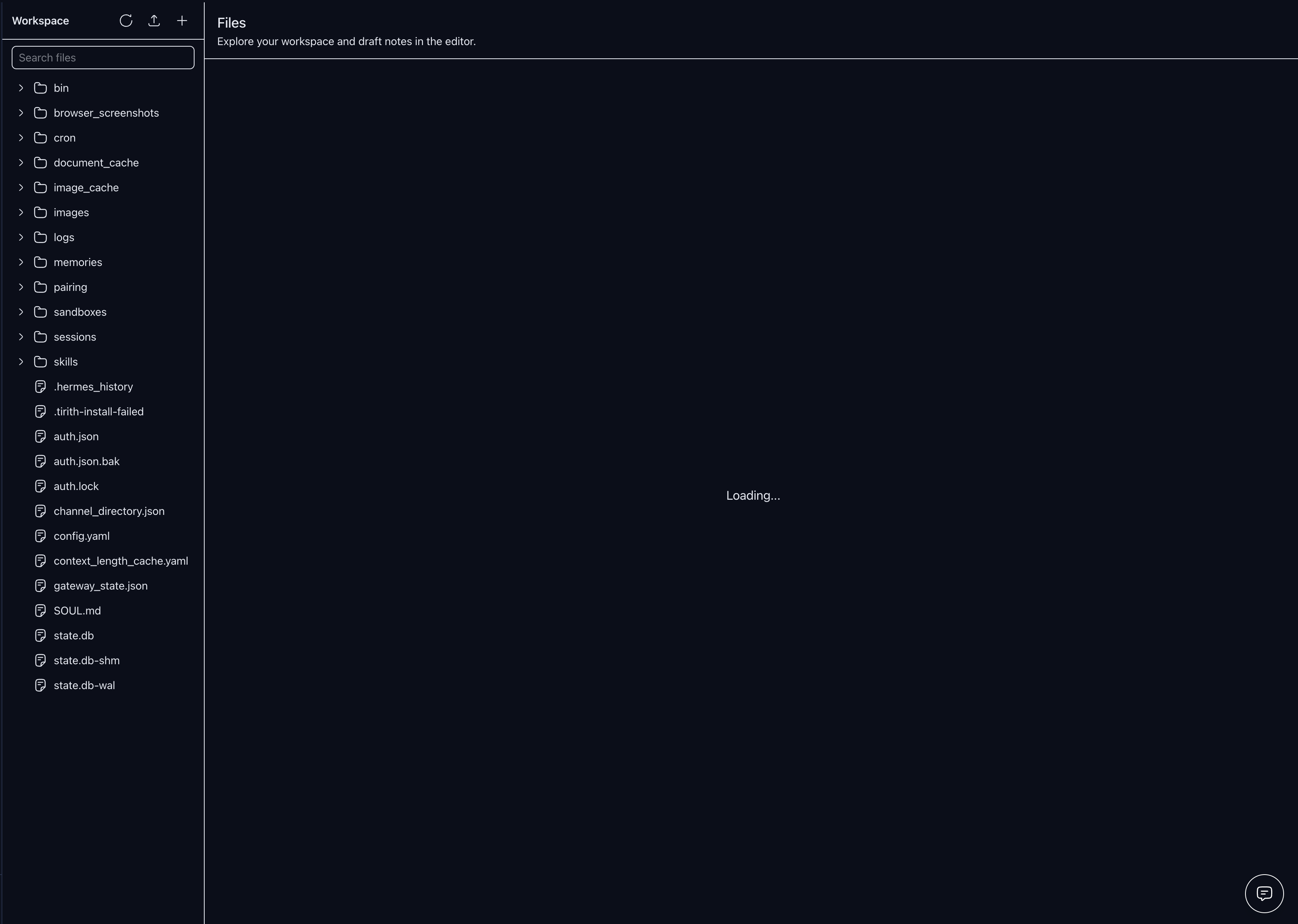
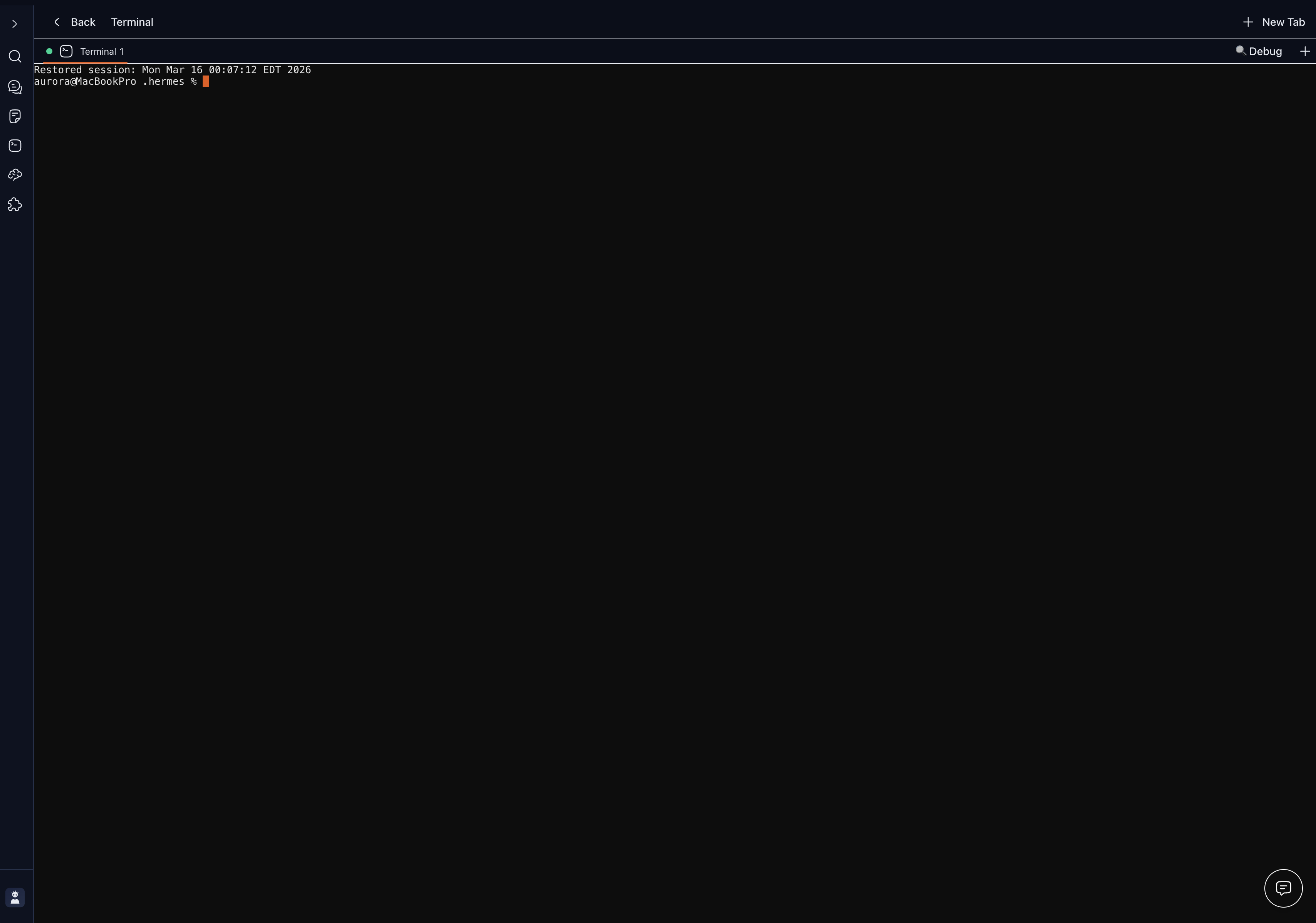
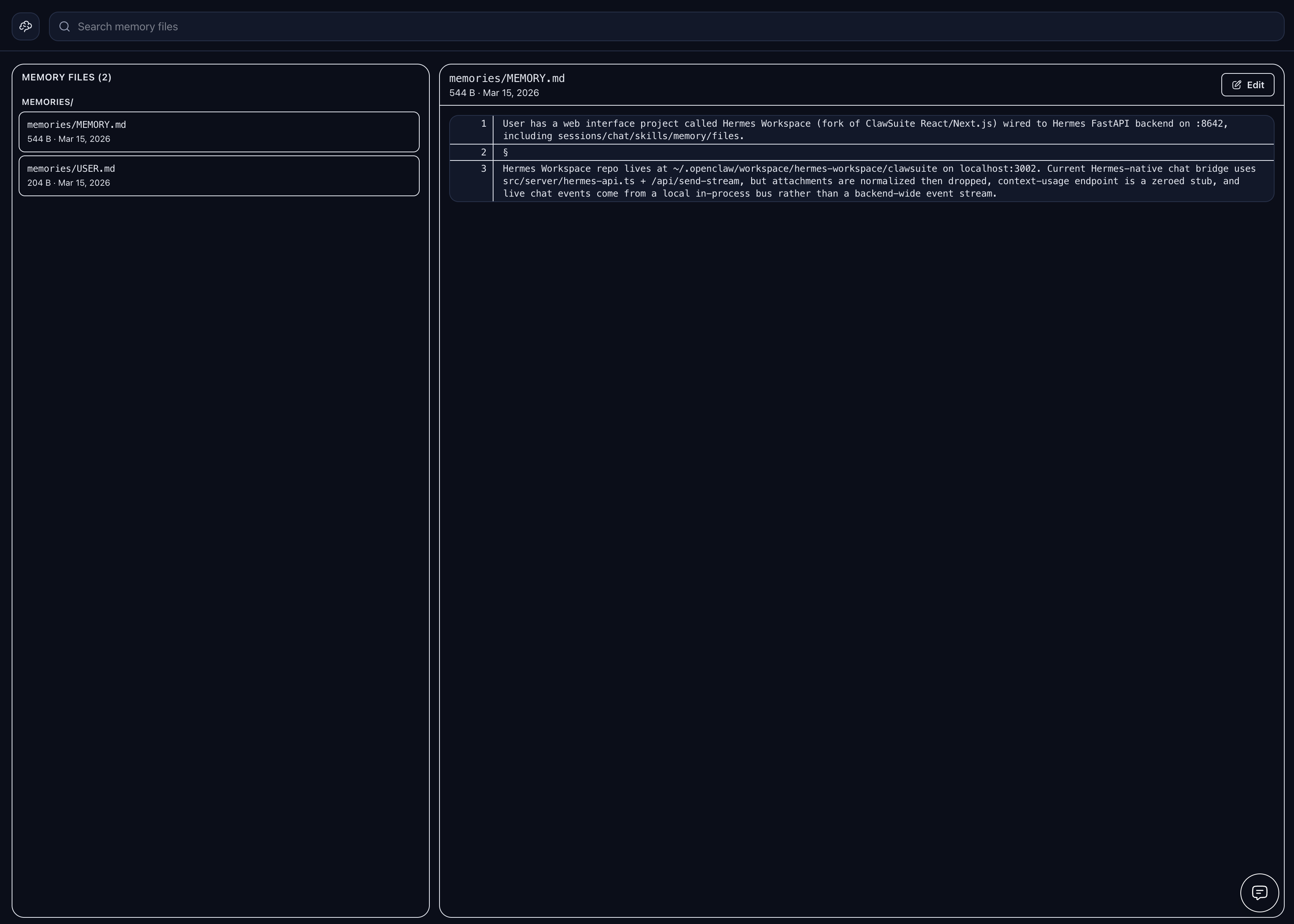
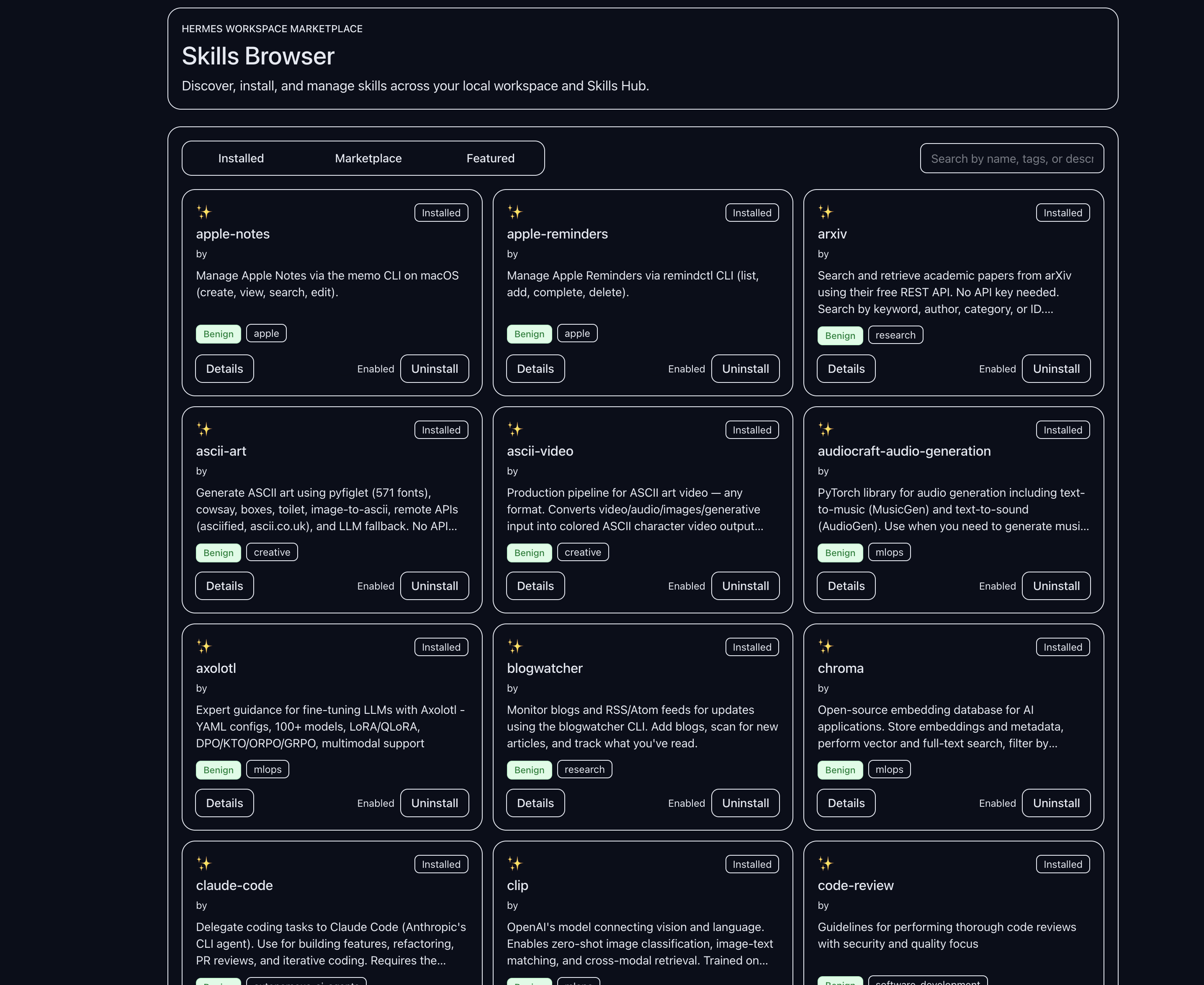
Original features
| Cron Job | Files |
|---|---|
 |
| Terminal | Memory |
|---|---|
 |
 |
| Skills | Settings |
|---|---|
 |
New in Hermes Studio
| Feature | Description |
|---|---|
| Multi-Agent Crews | Create named crews of specialised agents, dispatch tasks to all or specific members, watch live per-agent activity feeds |
| Visual Workflow Builder | SVG node graph for agent pipelines — add tasks, wire edges between them, auto-layout via topological sort, cycle detection |
| Interactive Knowledge Graph | Force-directed SVG graph of your memory's wiki-link relationships — zoom, pan, drag nodes, hover to highlight neighbours |
| Usage Analytics | 14-day token/cost charts, tool frequency breakdown, session volume heatmap |
| Session History Archive | Browse, filter, and replay every past session with token and cost metadata |
| Cron Job Manager | Schedule recurring agent tasks with cron expressions, live status, and run history |
| Systemd Auto-start | One-click service install/uninstall with status panel directly in Settings |
📷 Screenshots for each of the above are being added this week.
🚀 Quick Start
Hermes Studio works with any OpenAI-compatible backend. If your backend also exposes Hermes gateway APIs, enhanced features like sessions, memory, skills, approvals, and jobs unlock automatically.
Prerequisites
- Node.js 22+ — nodejs.org
- An OpenAI-compatible backend — local, self-hosted, or remote
- Optional: Python 3.11+ if you want to run a Hermes gateway locally
Step 1: Start your backend
Point Hermes Studio at any backend that supports:
POST /v1/chat/completionsGET /v1/modelsrecommended
Example Hermes gateway setup:
git clone https://github.com/NousResearch/hermes-agent.git
cd hermes-agent
python -m venv .venv
source .venv/bin/activate   # Windows: .venv\Scripts\activate
pip install -e .
hermes setup
hermes --gateway
If you're using another OpenAI-compatible server, just note its base URL.
Step 2: Install & Run Hermes Studio
# In a new terminal
git clone https://github.com/JPeetz/Hermes-Studio.git
cd Hermes-Studio
pnpm install
cp .env.example .env
printf '\nHERMES_API_URL=http://127.0.0.1:8642\n' >> .env
pnpm dev                   # Starts on http://localhost:3000
Verify: Open
http://localhost:3000and complete the onboarding flow. First connect the backend, then verify chat works. If your gateway exposes Hermes APIs, advanced features appear automatically.
Environment Variables
# OpenAI-compatible backend URL
HERMES_API_URL=http://127.0.0.1:8642

# Optional provider keys for Hermes gateway-managed config
ANTHROPIC_API_KEY=your-key-here

# Optional: password-protect the web UI
# HERMES_PASSWORD=your_password

# Optional: override Redis URL (defaults to redis://localhost:6379)
# REDIS_URL=redis://localhost:6379
Redis is optional. Hermes Studio automatically tries to connect to a local Redis instance for session persistence. If Redis isn't running, it silently falls back to file-based storage — no configuration needed.
🧠 Local Models (Ollama, LM Studio, vLLM)
Hermes Studio supports two modes with local models:
Portable Mode (Easiest)
Point Hermes Studio directly at your local server — no Hermes gateway needed:
# Start Ollama
OLLAMA_ORIGINS=* ollama serve

# Start Hermes Studio pointed at Ollama
HERMES_API_URL=http://127.0.0.1:11434 pnpm dev
Chat works immediately. Sessions, memory, skills, and jobs show "Not Available" — that's expected in portable mode.
Enhanced Mode (Full Features)
Route through the Hermes gateway for sessions, memory, skills, jobs, and tools:
1. Configure your local model in ~/.hermes/config.yaml:
provider: ollama
model: qwen2.5:7b # or any model you have pulled
custom_providers:
  - name: ollama
    base_url: http://127.0.0.1:11434/v1
    api_key: ollama
    api_mode: chat_completions
2. Enable the API server in ~/.hermes/.env:
API_SERVER_ENABLED=true
3. Start the gateway and workspace:
hermes gateway run          # Starts on :8642
HERMES_API_URL=http://127.0.0.1:8642 pnpm dev
All workspace features unlock automatically — sessions persist, memory saves across chats, skills are available, and the dashboard shows real usage data.
Works with any OpenAI-compatible server — Ollama, LM Studio, vLLM, llama.cpp, LocalAI, etc. Just change the
base_urlandmodelin the config above.
🐳 Docker Quickstart

The Docker setup runs both the Hermes Agent gateway and Hermes Studio together.
Prerequisites
- Docker
- Docker Compose
- Anthropic API Key — Get one here (required for the agent gateway)
Step 1: Configure Environment
git clone https://github.com/JPeetz/Hermes-Studio.git
cd Hermes-Studio
cp .env.example .env
Edit .env and add your API key:
ANTHROPIC_API_KEY=your-key-here
Important: The
hermes-agentcontainer requiresANTHROPIC_API_KEYto function. Without it, the gateway will fail to authenticate.
Step 2: Start the Services
docker compose up
This starts two services:
- hermes-agent — The AI agent gateway (port 8642)
- hermes-studio — The web UI (port 3000)
Step 3: Access the Workspace
Open http://localhost:3000 and complete the onboarding.
Verify: Check the Docker logs for
[gateway] Connected to Hermes— this confirms the workspace successfully connected to the agent.
📱 Install as App (Recommended)
Hermes Studio is a Progressive Web App (PWA) — install it for the full native app experience with no browser chrome, keyboard shortcuts, and offline support.
🖥️ Desktop (macOS / Windows / Linux)
- Open Hermes Studio in Chrome or Edge at
http://localhost:3000 - Click the install icon (⊕) in the address bar
- Click Install — Hermes Studio opens as a standalone desktop app
- Pin to Dock / Taskbar for quick access
macOS users: After installing, you can also add it to your Launchpad.
📱 iPhone / iPad (iOS Safari)
- Open Hermes Studio in Safari on your iPhone
- Tap the Share button (□↑)
- Scroll down and tap "Add to Home Screen"
- Tap Add — the Hermes Studio icon appears on your home screen
- Launch from home screen for the full native app experience
🤖 Android
- Open Hermes Studio in Chrome on your Android device
- Tap the three-dot menu (⋮) → "Add to Home screen"
- Tap Add — Hermes Studio is now a native-feeling app on your device
📡 Mobile Access via Tailscale
Access Hermes Studio from anywhere on your devices — no port forwarding, no VPN complexity.
Setup
Install Tailscale on your Mac and mobile device:
- Mac: tailscale.com/download
- iPhone/Android: Search "Tailscale" in the App Store / Play Store
Sign in to the same Tailscale account on both devices
Find your Mac's Tailscale IP:
tailscale ip -4
# Example output: 100.x.x.x
Open Hermes Studio on your phone:
http://100.x.x.x:3000Add to Home Screen using the steps above for the full app experience
💡 Tailscale works over any network — home wifi, mobile data, even across countries. Your traffic stays end-to-end encrypted.
🖥️ Native Desktop App
Status: Planned — A native Electron-based desktop app is on the roadmap.
The desktop app will offer:
- Native window management and tray icon
- System notifications for agent events and mission completions
- Auto-launch on startup
- Deep OS integration (macOS menu bar, Windows taskbar)
In the meantime: Install Hermes Studio as a PWA (see above) for a near-native desktop experience — it works great.
☁️ Cloud & Hosted Setup
Status: Planned
A fully managed cloud version of Hermes Studio is planned:
- One-click deploy — No self-hosting required
- Multi-device sync — Access your agents from any device
- Team collaboration — Shared mission control for your whole team
- Automatic updates — Always on the latest version
Features pending cloud infrastructure:
- Cross-device session sync
- Team shared memory and workspaces
- Cloud-hosted backend with managed uptime
- Webhook integrations and external triggers
✨ Feature Details
💬 Chat
- Real-time SSE streaming with tool call rendering
- Multi-session management with full history
- Markdown + syntax highlighting
- Chronological message ordering with merge dedup
- Inspector panel for session activity, memory, and skills
🧠 Memory
- Browse and edit agent memory files
- Search across memory entries
- Markdown preview with live editing
🧩 Skills
- Browse 2,000+ skills from the registry
- View skill details, categories, and documentation
- Install, uninstall, and toggle skills directly from the browser
- clawhub CLI fallback with inline install instructions when gateway doesn't support native install
- Loading spinners and success toasts on all skill actions
✅ Execution Approvals
- Real-time approval card when agent requests dangerous commands
- Expand full command and context before deciding
- Approve once, approve for session, or always-allow with a single click
- Deny to block the action immediately
- Resolved receipt shown inline in chat after every decision
- Global badge in sidebar when approvals are pending on another screen
- Dual-strategy resolution: native gateway endpoint → chat command fallback
⏰ Cron Job Manager
The only browser-based UI for scheduling Hermes agent tasks. No other Hermes or Claude web interface has this.
- View all scheduled tasks with live status indicators (active, paused, error)
- Create jobs: natural-language prompt + schedule preset or custom cron expression
- Delivery channels: route output to Telegram, Discord, Slack, or Signal
- Assign skills and set repeat limits per job
- Edit any field on a live job without recreating it
- Pause and resume without losing configuration
- Trigger immediately on demand
- Expand any job card to read recent run output inline
- Auto-refreshes every 30 seconds
👥 Multi-Agent Crews
Coordinate multiple AI agents working in parallel toward a shared goal — all from a single UI.
- Create crews — give each crew a name, a goal, and up to 8 agent members
- Persona agents — pick from specialised personas (Roger / Frontend, Sally / Backend, Ada / QA, Kai / General, and more) each with a role label, emoji, and colour
- Per-member model — assign any model to any agent independently
- Dispatch tasks — send a prompt to all agents simultaneously or target a specific member
- Live activity feed — SSE events from all crew members stream into a unified timeline in real time; tool calls, messages, and errors are colour-coded
- Status indicators — idle / running / done / error shown with animated pulse on each member card
- "Open chat" link on every member card navigates directly to that agent's chat session
- Persistence — crews and their member status survive server restarts (file-backed crew store)
🔀 Visual Workflow Builder
The Crew detail screen's Workflow tab is a full DAG editor for building and running structured task pipelines.
- SVG canvas — pure-SVG rendering; no external graph library required; pan, zoom (0.2×–4×), and node drag with pointer capture
- Add tasks — each task has a label, a full prompt sent to the agent, and an assignee (any crew member or "all agents")
- Draw dependencies — activate Connect mode, click a source node then a target to draw a bezier edge with arrowhead; a dependency means the target task only runs after the source completes
- Cycle detection — creating a cycle shows an immediate error and discards the edge; server-side validation also rejects cycles on save
- Auto Layout — Kahn's BFS topological sort lays nodes out in parallel columns, left-to-right, with vertical centering per layer
- Persistent — workflow is saved per crew in
.runtime/workflows.json(file-backed, same pattern as the crew store) - Run Workflow — click Run to execute tasks in topological order: root tasks dispatch in parallel; each layer waits for all its tasks to complete (via SSE
run_endevents) before the next layer dispatches - Live node status — each node shows a colour-coded tinted border and badge: idle → running (green pulse) → done (indigo) → error (red); active edges also highlight in green
- Edge deletion — click any edge (wide invisible hit area) to remove the dependency
- Task edit panel — click a node to open a right-side panel showing full prompt, assignee, dependencies, live status; double-click to edit inline
🗂️ Profile-Scoped Workspaces
Every crew member can be assigned a named profile that scopes their file system access to an isolated directory.
- Each profile resolves to
~/.hermes/profiles/<name>/— auto-created on first use - The File Explorer sidebar shows the profile's workspace root, not the global workspace
- All file operations (read, write, upload, delete, rename, mkdir) are profile-aware
- Path traversal is prevented server-side — profile names are validated,
../is rejected - The active profile drives the file explorer in the main chat screen via
useActiveProfilehook
🕸️ Interactive Knowledge Graph
The Memory screen's graph view is now a fully interactive force-directed canvas — not a static circle.
- Force-directed layout — nodes spread naturally; hubs cluster, orphans spread to the edges; computed synchronously on load (280 iterations of Coulomb repulsion + Hooke spring attraction)
- Node sizing by degree — highly-connected hubs appear larger; isolated nodes stay small
- Node type colours — guide, project, reference, concept, note each get a distinct palette; legend shown only when typed nodes exist in the data
- Hover highlights — hover any node to illuminate its direct connections and dim everything else to 22% opacity; a glow ring marks the hovered node
- Zoom — mouse wheel (non-passive, doesn't scroll the page) + +/− buttons; 0.25×–4× range
- Pan — drag the background to move the viewport
- Node drag — drag individual nodes to reposition them; position is pinned for the session
- Stats counter —
N nodes · M edgesshown in the bottom-right corner
🔐 Permissions & Toolsets
- Approvals mode selector (auto / always / never)
- Approval timeout control
- Command allowlist editor — tag-input for shell commands that bypass Tirith
- Toolset add/remove
- Website blocklist toggle + domain editor
- Code execution limits
- Reasoning effort selector
- All settings persist live via the config API
🔗 Integrations
- skillsmp.com API key for skill marketplace access
- Chat platform tokens — set Telegram, Discord, Slack, Signal bot tokens directly from the UI without editing
.env
📁 Files
- Full workspace file browser
- Navigate directories, preview and edit files
- Monaco editor integration
💻 Terminal
- Full PTY terminal with cross-platform support
- Persistent shell sessions
- Direct workspace access
🎨 Themes
- 8 themes: Official, Classic, Slate, Mono — each with light and dark variants
- Theme persists across sessions
- Full mobile dark mode support
💾 Session Persistence
- Chat sessions and message history survive server restarts
- Auth tokens persist across restarts — no forced re-login
- Active run dedup state persists — no duplicate runs on restart
- Redis backend auto-connects to
localhost:6379on startup; gracefully falls back to file store if Redis is not available - Override with
REDIS_URLfor remote or non-default Redis
🔒 Security
- Auth middleware on all API routes
- CSP headers via meta tags
- Path traversal prevention on file, memory, and skill uninstall routes
- Rate limiting on endpoints
- Optional password protection for web UI
- Execution approvals — dangerous commands require explicit user sign-off
🔧 Troubleshooting
"Workspace loads but chat doesn't work"
The workspace auto-detects your gateway's capabilities on startup. Check your terminal for a line like:
[gateway] http://127.0.0.1:8642 available: health, models; missing: sessions, skills, memory, config, jobs
[gateway] Missing Hermes APIs detected. Update Hermes: cd hermes-agent && git pull && pip install -e . && hermes --gateway
Fix: Make sure you have the latest Hermes Agent with extended gateway support:
git clone https://github.com/NousResearch/hermes-agent.git
cd hermes-agent && pip install -e . && hermes --gateway
"Connection refused" or workspace hangs on load
Your Hermes gateway isn't running. Start it:
cd hermes-agent
source .venv/bin/activate
hermes gateway run
Ollama: chat returns empty or model shows "Offline"
Make sure your ~/.hermes/config.yaml has the custom_providers section and API_SERVER_ENABLED=true in ~/.hermes/.env. See Local Models above.
Also ensure Ollama is running with CORS enabled:
OLLAMA_ORIGINS=* ollama serve
Use http://127.0.0.1:11434/v1 (not localhost) as the base URL.
Verify: curl http://localhost:8642/health should return {"status": "ok"}.
"Using upstream NousResearch/hermes-agent"
The upstream hermes-agent supports basic chat via hermes --gateway, but older versions may not include extended endpoints (sessions, memory, skills, config). Hermes Studio will work in portable mode with basic chat. For full features, ensure you have the latest version: cd hermes-agent && git pull && pip install -e .
Docker: "Unauthorized" or "Connection refused" to hermes-agent
If using Docker Compose and getting auth errors:
Check your API key is set:
cat .env | grep ANTHROPIC_API_KEY
# Should show: ANTHROPIC_API_KEY=sk-ant-...
View the agent container logs:
docker compose logs hermes-agentLook for startup errors or missing API key warnings.
Verify the agent health endpoint:
curl http://localhost:8642/health
# Should return: {"status": "ok"}
Restart with fresh containers:
docker compose down
docker compose up --build
Check workspace logs for gateway status:
docker compose logs hermes-studioLook for:
[gateway] http://hermes-agent:8642 mode=...— if it showsmode=disconnected, the agent isn't running correctly.
Docker: "hermes webapi command not found"
The hermes webapi command referenced in older docs doesn't exist. The correct command is:
hermes --gateway # Starts the FastAPI gateway server
The Docker setup uses hermes --gateway automatically — no action needed if using docker compose up.
🗑️ Uninstall
Run the included script from inside the project folder:
bash scripts/uninstall.sh
This will:
- Stop and disable the systemd service (if installed)
- Kill any running
server-entry.jsprocess - Ask for confirmation, then delete the project folder (including
.runtime/data)
Data locations removed with the project folder:
| File | Contents |
|---|---|
.runtime/events.db |
Analytics SQLite database |
.runtime/costs.json |
Token cost history |
.runtime/crews.json |
Saved agent crews |
.runtime/workflows.json |
Crew workflows |
.runtime/agent-definitions.json |
Custom agent definitions |
.runtime/local-sessions.json |
Session metadata |
.runtime/templates.json |
Message templates |
Manual steps after the script:
- Browser localStorage — open DevTools → Application → Storage → Local Storage → clear the entry for
http://localhost:<port> ~/.hermes/— this belongs to Hermes Agent, not Hermes Studio. Do not delete it unless you are also uninstalling Hermes Agent.- Redis — if you used password protection, session tokens in Redis will expire naturally (or run
redis-cli FLUSHDBto clear immediately).
🗺️ Roadmap
| Feature | Status |
|---|---|
| Chat + SSE Streaming | ✅ Shipped |
| Files + Terminal | ✅ Shipped |
| Memory Browser | ✅ Shipped |
| Skills Browser | ✅ Shipped |
| Mobile PWA + Tailscale | ✅ Shipped |
| 8-Theme System | ✅ Shipped |
| Execution Approvals UI | ✅ Shipped v1.1.0 |
| Skill Install / Toggle UI | ✅ Shipped v1.2.0 |
| Cron Job Manager UI | ✅ Shipped v1.3.0 |
| Permissions & Toolsets Settings | ✅ Shipped v1.4.0 |
| Session Persistence (Redis) | ✅ Shipped v1.5.0 |
| Multi-Agent Orchestration (Crews) | ✅ Shipped v1.6.0 |
| Profile-Scoped Workspaces | ✅ Shipped v1.6.0 |
| Interactive Knowledge Graph | ✅ Shipped v1.6.0 |
| Crew/Agent Metrics Dashboard | ✅ Shipped v1.7.0 |
| Visual Workflow Builder (DAG editor) | ✅ Shipped v1.8.0 |
| Crew Templates | ✅ Shipped v1.9.0 |
| Cost Tracking per Crew | ✅ Shipped v1.10.0 |
| MCP Client Protocol | ✅ Shipped v1.11.0 |
| Agent Library (custom agents) | ✅ Shipped v1.12.0 |
| Audit Trail | ✅ Shipped v1.13.0 |
| Test Suite + CI Badges | ✅ Shipped v1.15.0 |
| Clone Crew | ✅ Shipped v1.14.0 |
| Setup Wizard | ✅ Shipped v1.16.0 |
| Hermes v0.8.0 + v0.9.0 compat | ✅ Shipped v1.17.0 |
| Design System v1.0 | ✅ Shipped v1.16.0 |
| Command Palette (Ctrl+K) | ✅ Shipped v1.18.0 |
| System Health Panel | ✅ Shipped v1.18.0 |
| Token Usage Time-Series Chart | ✅ Shipped v1.18.0 |
| State.db Analytics | ✅ Shipped v1.18.0 |
| Identity File Editor | ✅ Shipped v1.18.0 |
| Patterns & Corrections Viewer | ✅ Shipped v1.18.0 |
| Session History Archive | ✅ Shipped v1.18.0 |
| Systemd Auto-start | ✅ Shipped v1.18.0 |
| Native Desktop App (Electron) | 🔜 Planned |
| Cloud / Hosted Version | 🔜 Planned |
⭐ Star History
💛 Support the Project
Hermes Studio is free and open source. If it's saving you time and powering your workflow, consider supporting development:
ETH: 0xdfa8ac0f37d1129af72d0c4c6c0dff22e7a816b7

Every contribution helps keep this project moving. Thank you 🙏
🤝 Contributing
PRs are welcome! See CONTRIBUTING.md for guidelines.
- Bug fixes → open a PR directly
- New features → open an issue first to discuss
- Security issues → see SECURITY.md for responsible disclosure
📄 License
MIT — see LICENSE for details.
🙏 Acknowledgments
Hermes Studio is built on hermes-workspace by @outsourc-e, released under the MIT license.
Yorumlar (0)
Yorum birakmak icin giris yap.
Yorum birakSonuc bulunamadi