hetzner-cloud-audit-skills
Health Warn
- License — License: Apache-2.0
- Description — Repository has a description
- Active repo — Last push 0 days ago
- Low visibility — Only 5 GitHub stars
Code Pass
- Code scan — Scanned 12 files during light audit, no dangerous patterns found
Permissions Pass
- Permissions — No dangerous permissions requested
No AI report is available for this listing yet.
Evidence-backed attack paths, drift, and cost auditing for Hetzner Cloud.
Skill Audit for Hetzner Cloud
Know your Hetzner Cloud: what is exposed, what is wasted, and what to fix next.





Free and open source (Apache-2.0). No account, no SaaS, no telemetry. hetzner-audit runs on your machine and sends nothing anywhere except read-only GET requests to the Hetzner API.
Do you really know your Hetzner infrastructure?
- Is any database reachable from the Internet? Or only through one careless firewall rule?
- Can a compromised preview box reach your production database? Hetzner Cloud Firewalls do not filter private networks, so it probably can.
- Are you paying for things nobody uses? Unattached volumes, stopped servers that are still billed, deprecated server types.
- Which three servers make up half of your bill? Which of them could be smaller or run on ARM?
- What changed since last week? A new public port, or a firewall that quietly disappeared?
One read-only token and one command answer the provider-level part of all of it; host details (UFW, Docker, databases) come from an optional read-only bundle you run yourself. You get an architecture map, a blast-radius view, a per-VM cost breakdown, and a ranked list of what to do next. Every finding cites its evidence.
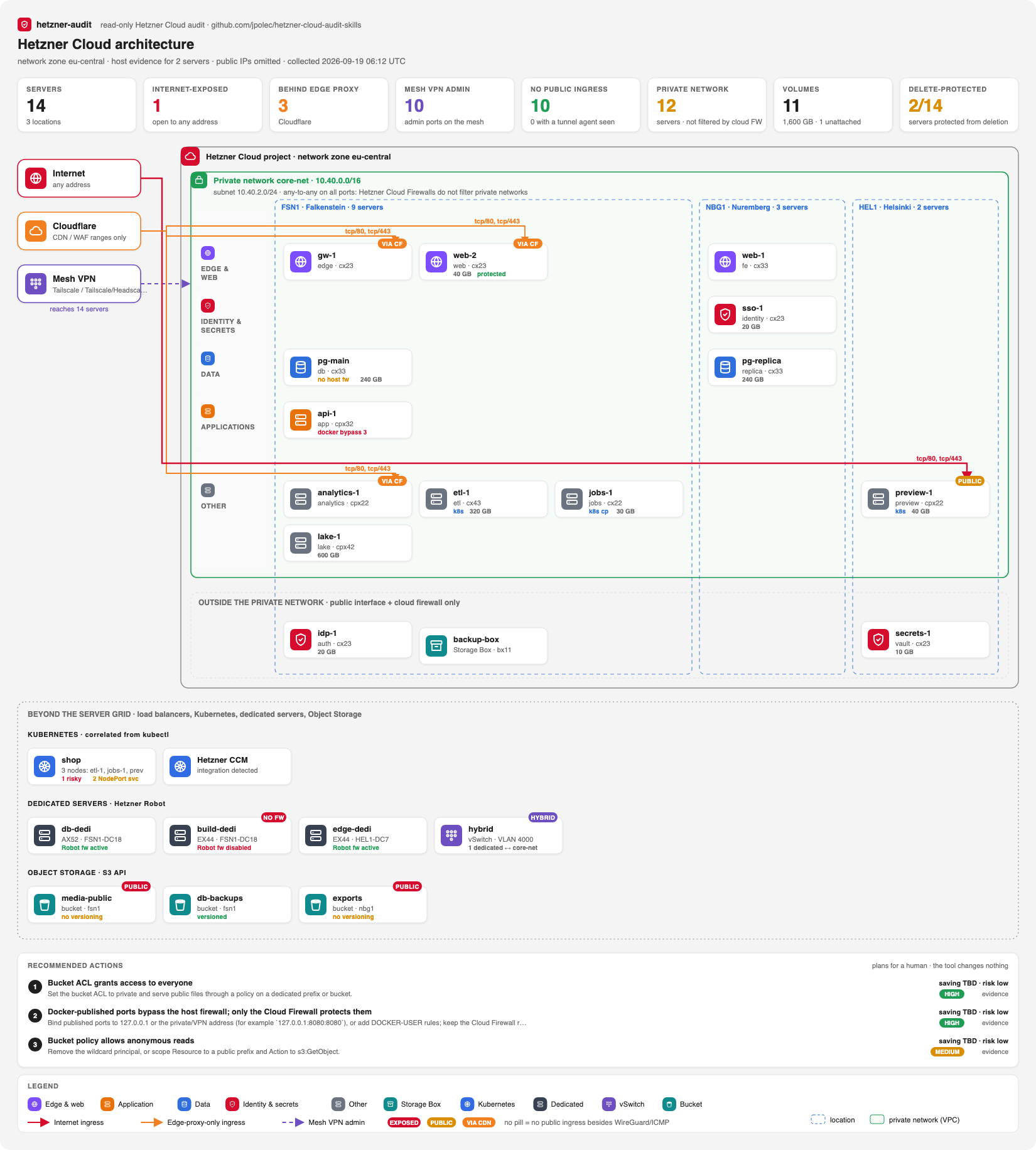
Example project, generated by hetzner-audit map from a read-only token. Public IP addresses are never rendered.
Independent open-source project. Not affiliated with or endorsed by Hetzner, Cloudflare, or any other provider it recognizes. v0.8 is alpha: review every high-impact result before acting on it.
1. What you get
 |
Security | Public exposure, Cloudflare bypass, blast radius on shared private networks, and trust-boundary paths |
 |
Cost | Catalog cost per VM, spend concentration, identifiable waste, and rightsizing or ARM candidates |
 |
Architecture | AWS-style diagrams: network zone, private network, locations, role tiers, and trust sources |
|
Beyond the API | Host firewall, listeners, and Docker from an owner-run bundle; Terraform drift; Robot dedicated servers; Object Storage; Kubernetes; several projects |
 |
Actions | A ranked to-do list: saving, evidence level, risk of acting, and the concrete next step |
 |
Change tracking | Timestamped snapshots, coverage-aware diff, a GitHub Action, and SARIF |
 |
Agent-ready | Ships as a SKILL.md agent skill for Claude Code, OpenAI Codex, and compatible agents |
Full list of what it recognizes (Cloudflare and other CDNs, Tailscale and other mesh VPNs, tunnels, host firewalls, Docker, databases, Robot, Object Storage, Kubernetes) with an honest live/fixture status per item: What hetzner-audit sees.
What makes it different from a cost dashboard or a port scanner: it separates what it proved from what it suspects.
| Result | Meaning |
|---|---|
confirmed / reachable |
Every link in the chain is evidenced: network, firewall, host rule, listener, service config |
reachable_after_pivot |
Every layer admits the flow, but only after another host is compromised, which the evidence does not prove |
needs_validation / cloud_path_present |
Hetzner topology allows it, but host or runtime evidence is missing |
unknown |
No path was seen, but coverage is too incomplete to claim isolation |
A missing collector is reported as a gap. It is never reported as "secure". Confirmed savings stay at zero until there is proof. The tool never inflates a number.
Two ways to start
| AI agent skill: fastest, recommended | Command-line tool | |
|---|---|---|
| Install | npx skills add https://github.com/jpolec/hetzner-cloud-audit-skills/tree/v0.8.2 --skill hetzner-security-audit |
uvx hetzner-audit …, or git clone and uv run |
| Run | Ask your agent: "audit my Hetzner infrastructure" | hetzner-audit audit, hetzner-audit map |
| What happens | The agent runs the preflight, snapshot, audit, and diagrams. It then explains the findings in plain language and walks you through the fixes. | Markdown, JSON, SARIF, and SVG files land in your output folder |
| Best for | A first look, questions like "can staging reach prod?", and guided remediation | CI, cron jobs, scripting, and repeatable reports |
Both use the same read-only engine and the same evidence rules. Works with Claude Code, OpenAI Codex, and other SKILL.md-compatible agents.
2. Quick start
Steps 1 and 2 are the same for both ways. Then pick A (agent) or B (command line).
Step 1: create a read-only token
In Hetzner Console: your project → Security → API tokens → Generate API token → Read.
Never choose Read & Write; the tool makes GET requests only. The illustrated token guide covers every step, including revocation.
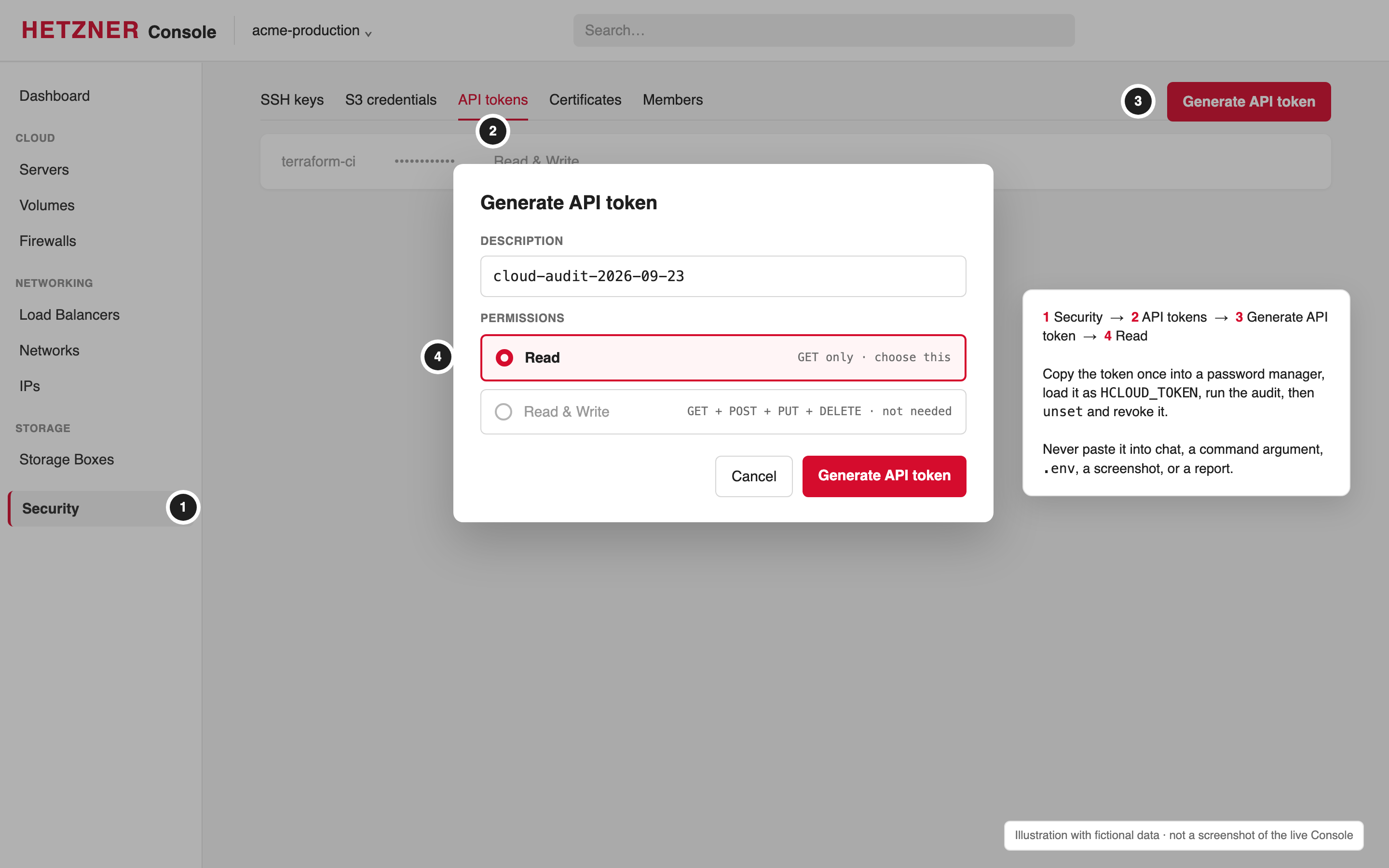
Step 2: load it into your terminal without leaking it
printf 'Hetzner read-only token: '
IFS= read -rs HCLOUD_TOKEN; printf '\n'
export HCLOUD_TOKEN
This keeps the token out of shell history. Never paste it into an agent prompt, command argument, .env, screenshot, or report.
Option A: AI agent skill (about 30 seconds)
npx skills add https://github.com/jpolec/hetzner-cloud-audit-skills/tree/v0.8.2 --skill hetzner-security-audit
The /tree/v0.8.2 part pins the skill to a tagged release, which is what you want for a security tool. Drop it to follow main (development).
Start your agent (for example claude or codex) from the same terminal, so it inherits HCLOUD_TOKEN without ever seeing the value. Then just ask:
audit my Hetzner infrastructure
Or go straight to what you care about:
draw the architecture of my Hetzner project
can anything reach my production database?
where am I overpaying on Hetzner?
what changed since the last audit?
The agent checks the setup with doctor, confirms the project scope with you, and collects a read-only snapshot. It then loads the network, Linux, Docker, PostgreSQL, Redis, backup, or cost guidance only when the evidence makes it relevant. For cost-first work there is a dedicated skill: --skill hetzner-cost-audit.
Option B: command-line tool
uvx hetzner-audit doctor --report-dir ./_output              # preflight: token, API, project scope
uvx hetzner-audit audit --format markdown --output _output/audit.md
uvx hetzner-audit map --format svg --output _output/architecture.svg
uvx runs the PyPI package without installing it. You can also work from source:
git clone https://github.com/jpolec/hetzner-cloud-audit-skills
cd hetzner-cloud-audit-skills
uv run hetzner-audit audit --format markdown --output _output/audit.md
To pin a release, use uvx --from 'git+https://github.com/jpolec/[email protected]' hetzner-audit --help. For CI, see the GitHub Action.
doctor confirms the token works without printing it. It shows the project scope (server, firewall, network, and volume counts), so you can check you picked the right project. It also warns if reports would land in a Git-tracked directory.
No token yet? Try the demo
git clone https://github.com/jpolec/hetzner-cloud-audit-skills && cd hetzner-cloud-audit-skills
uv run hetzner-audit audit --input benchmarks/scenarios/v0.1-insecure.json --format markdown --output demo.md
This runs against a synthetic, intentionally insecure fixture. You can also just read the sample security report and sample cost report.
When you are done
unset HCLOUD_TOKEN # then revoke the token in Hetzner Console
Treat reports as sensitive. They contain names, private addresses, and topology. Do not commit real reports or snapshots to a public repository.
3. The report: what to fix, in order
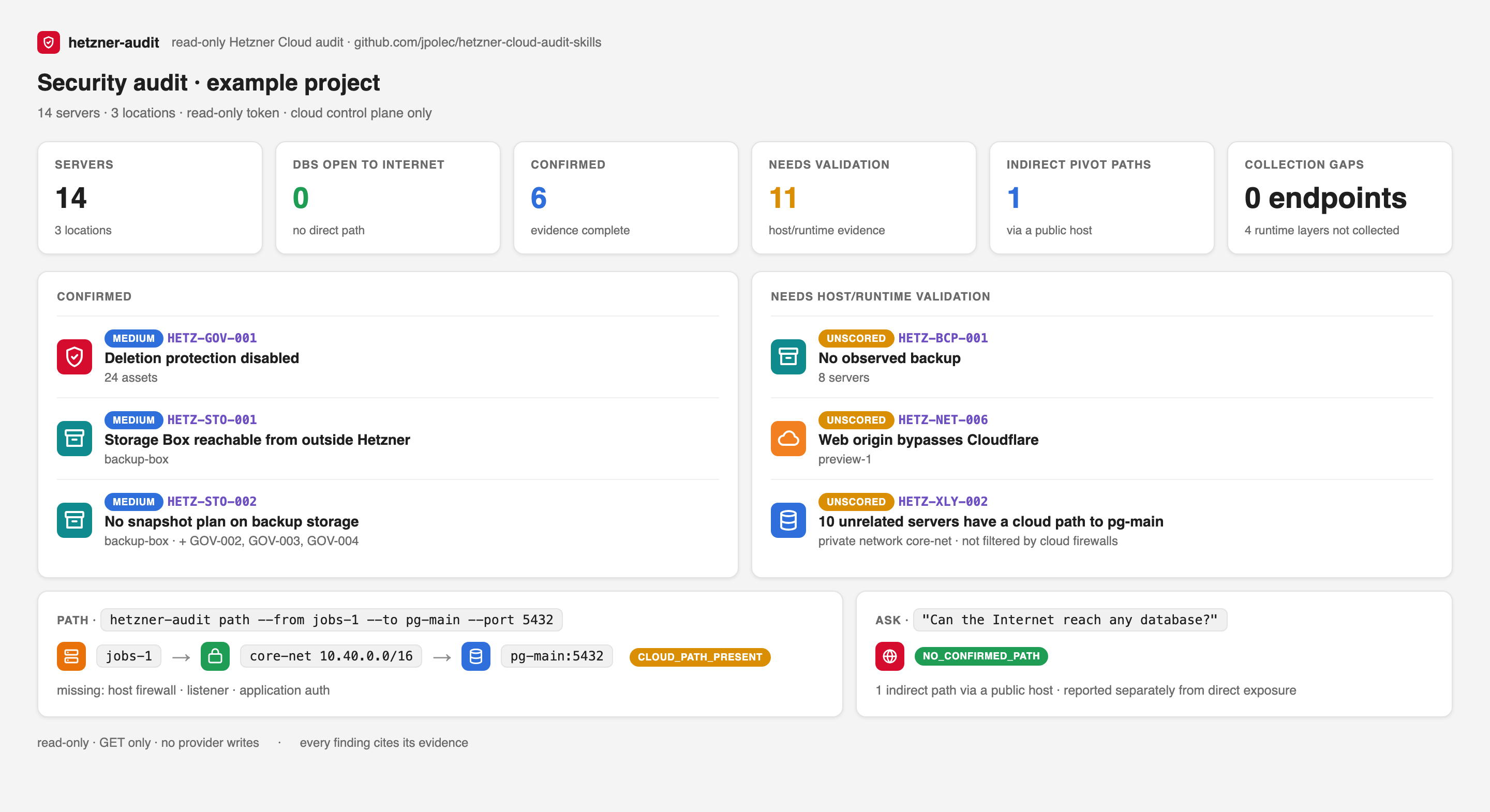
Every audit opens with three things:
- At a glance. Scope, confirmed findings, hypotheses that still need host or runtime evidence, and collection gaps. Cost is split into immediately identifiable waste (no telemetry needed), optimization candidates, and savings in three tiers (theoretical, expected, measured), plus spend concentration (for example, "top 3 VMs = 56% of spend"). Provider changes from the last 30 days are counted too.
- What this audit knows. Coverage for cost, CPU, RAM and disk telemetry, ownership, backups, and host evidence; every evidence source used (API, host bundles, Terraform, Robot, Object Storage, kubectl, owner checklist); and, per server with a host bundle, what each layer admits and what is reachable end to end.
- Recommended actions, ranked. Each one has a saving, an evidence level (HIGH, MEDIUM, or LOW, with the reason), the risk of acting, and the concrete next step. For example:
- "Migrate jobs-1 off deprecated cx22. The same-family successor is unavailable in this location right now. Available replacement: cpx22, +15.00/mo. ARM alternative: cax11, +1.50/mo, which needs multi-arch images and a benchmark."
Where the fix is a plain hcloud command (deletion protection, labels, removing an all-ports rule), the action includes a suggested command for a human to review. Such commands need a Read & Write token, so hetzner-audit never runs them, and provider names are sanitized so a crafted name cannot inject shell syntax.
The detailed findings follow, each with its evidence chain, impact, and remediation. Indirect paths are kept separate from direct exposure: a database reachable only by pivoting through another host is not reported as Internet-exposed.
4. Security: exposure and blast radius
Out of the box, the API-only layer checks:
- Public exposure of about 30 sensitive TCP and UDP services and ranges: SSH, databases, Docker, Kubernetes API and kubelet, etcd, Vault, Consul, Kafka, AMQP, Elasticsearch, RDP, SMB, SNMP, memcached UDP, and the NodePort range.
- Firewall quality:
- rules that open every port to the Internet;
- firewalls that protect nothing;
- IPv4/IPv6 drift;
- duplicate rules;
- public servers with no firewall.
- Edge: web origins open to any address while peer servers accept only an edge proxy. Cloudflare, Fastly, Bunny CDN, AWS CloudFront, Gcore, and Imperva are recognized from their published ranges (each list dated and checkable with
scripts/update_provider_ranges.py --check). - Mesh VPNs and tunnels: Tailscale, Headscale, NetBird, WireGuard, and ZeroTier admin access is recognized, and their UDP ports do not count as exposure. Servers that accept nothing from the Internet are counted as the good pattern, with any tunnel agent (Cloudflare Tunnel, ngrok, frp) named when a host bundle shows it.
- Lateral movement: paths from unrelated workloads to database, identity, and secrets hosts on shared private networks.
- Load balancers: Internet → load balancer → target edges in the attack graph, and backends that are also reachable directly. Plus:
- plain HTTP;
- HTTP without a redirect to HTTPS;
- unhealthy targets;
- a single target;
- no targets at all.
- Certificates: expired, expiring soon, failing to renew, or unused.
- DNS: records pointing at IPs the project does not own (takeover risk) or at private addresses.
- Storage Boxes: reachable from outside Hetzner, or without a snapshot plan.
- SSH keys: weak algorithms (DSA, RSA below 3072 bits) and keys older than two years. Key strength is read before the key material is redacted.
- Lifecycle and resilience:
- operating systems past end of support;
- deprecated server types;
- disabled deletion protection;
- missing backups;
- replicas outside a spread placement group.
- Governance:
- servers that policy cannot evaluate because
environmentorrolelabels are missing; - missing owner labels;
- environment-policy violations.
- servers that policy cannot evaluate because
Mark databases and secrets hosts with the label sensitivity=high so detection does not depend on server names.
- Egress: Hetzner Cloud Firewalls allow all outbound traffic until a firewall has at least one outbound rule. The report counts servers that can connect anywhere, naming data and identity hosts, and your policy can forbid it per role (
[roles.db] internet_egress = false, or["tcp/443"]), which raisesHETZ-EGR-001. - Load balancer targets by server, label selector, or IP address. An IP target resolves to a Cloud server or a Robot dedicated server where possible, and otherwise stays visible as an endpoint, so a hybrid LB path is never lost.
Every finding also says whether its rule has been run against a live Hetzner project or only against fixtures.
You stay in control of the noise. Add audit.ignore=true, or audit.ignore.HETZ-BCP-001=true for a single rule, to a resource that is deliberately different, such as a throwaway build box. The finding moves to a Suppressed by owner labels section of the report instead of disappearing silently.
Hetzner Cloud Firewalls do not filter private network traffic (Hetzner FAQ). Every member of a private network has a route to every other member, and firewall rules with private source ranges have no effect on that traffic. Whether a port is actually reachable is then decided by the listener, its bind address, the host firewall, and application controls.
hetzner-auditmodels it that way: a private path iscloud_path_presentuntil host evidence confirms or refutes it.
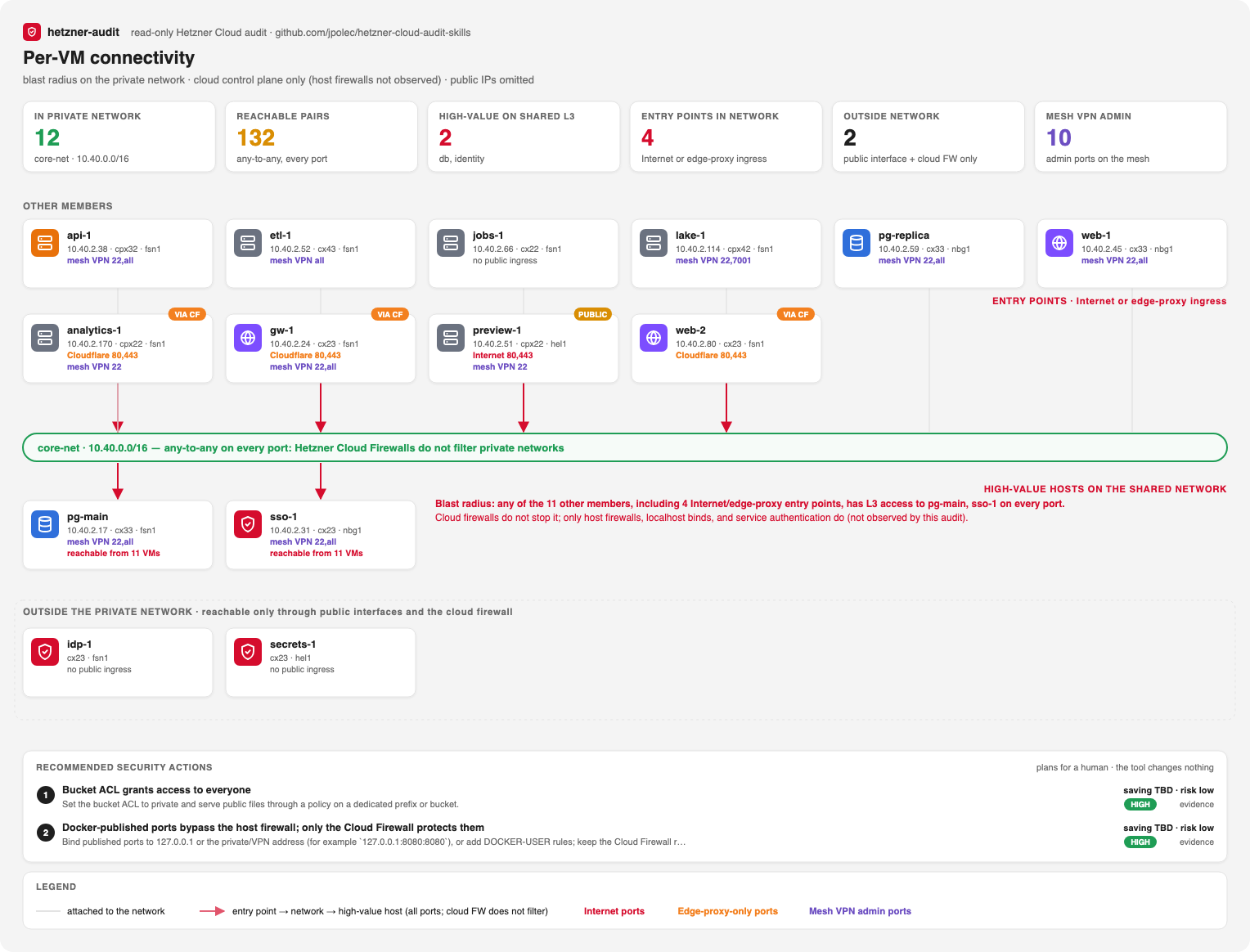
Ask direct questions:
hetzner-audit ask "Can the Internet reach any database?" --input snapshot.json
hetzner-audit path --from staging-worker --to prod-db --protocol tcp --port 5432 --input snapshot.json
hetzner-audit explain HETZ-XLY-002-0123456789abcdef --input snapshot.json
explain prints the stored evidence chain, attack path, verifier challenge, unresolved prerequisites, and remediation. It does not ask a model to invent a new explanation.
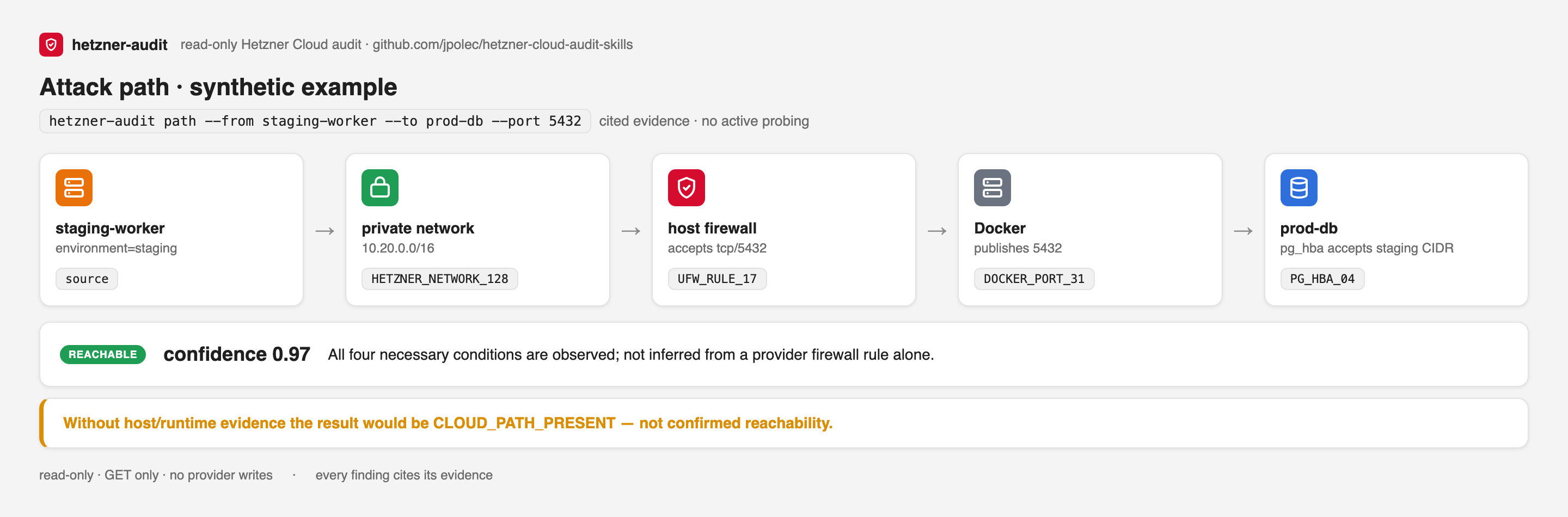
The Hetzner API cannot see host listeners, Docker port publishing, PostgreSQL HBA, Redis ACLs, or guest memory. Without host evidence those findings stay needs_validation and show what is missing. The next section closes that gap.
5. Host evidence: what the API cannot see
hetzner-audit host-bundle > host-bundle.sh          # review it: a fixed list of read-only commands
ssh web-1 'sudo HETZNER_AUDIT_SERVER=web-1 sh -s' < host-bundle.sh > _output/web-1.bundle
hetzner-audit audit --host-bundle _output/web-1.bundle --output _output/audit.md
hetzner-audit map --format svg --view host --host-bundle _output/web-1.bundle --output _output/host.svg
hetzner-audit never connects to your servers. You run the script yourself; it prints UFW, nftables, and iptables rules, listeners (ss), the effective sshd settings, Docker isolation settings and published ports, pg_hba.conf, and Redis bind/ACL state. It prints no environment variables, no passwords (Redis shows only <set>), and no ACL hashes.
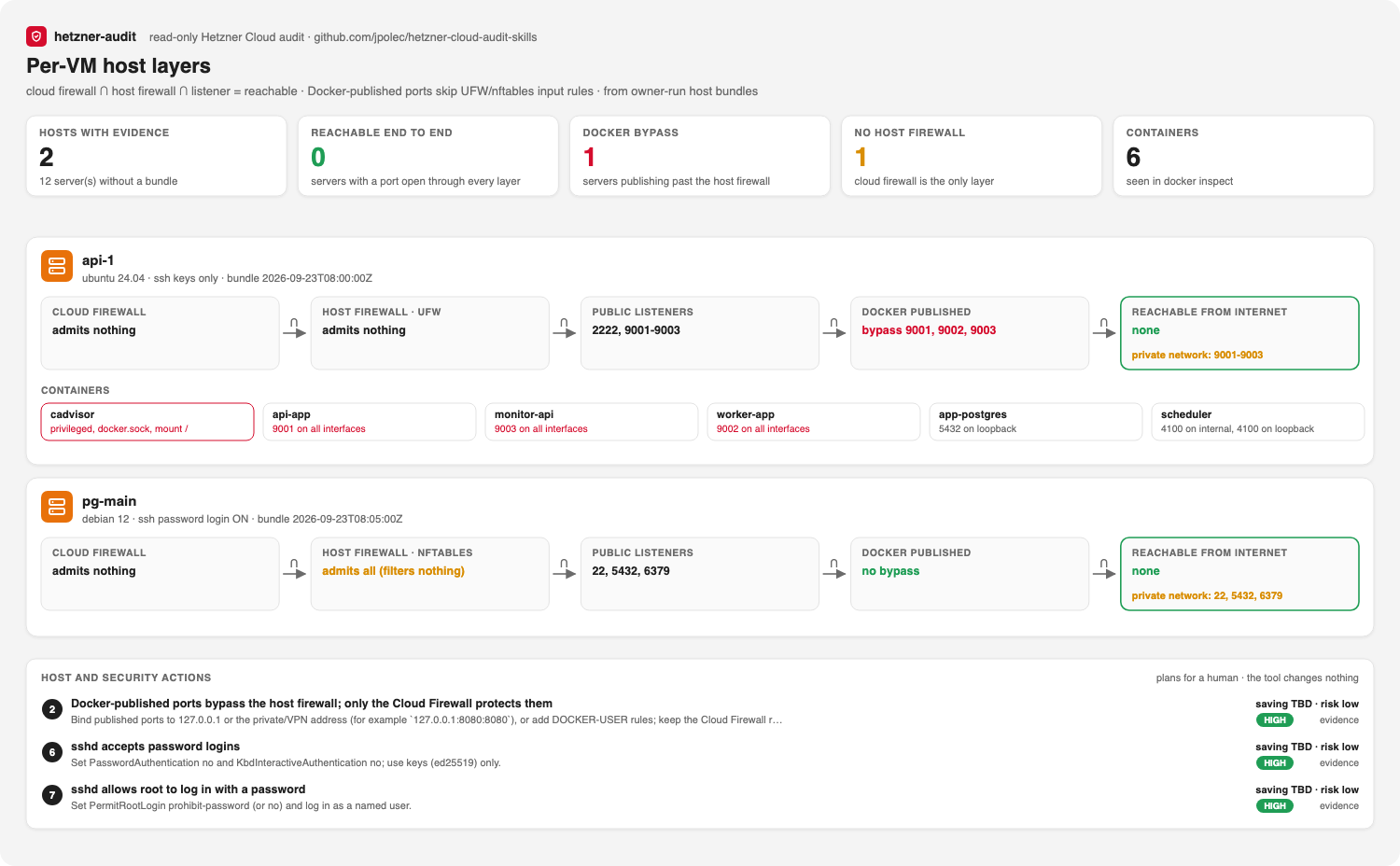
With a bundle, public exposure is decided by flow intersection: Cloud Firewall ∩ host firewall ∩ listener. A finding becomes confirmed when every layer admits the port, and rejected when host evidence refutes it. If a layer could not be read (for example UFW without root, a firewalld jump chain, or no ss), the finding stays needs_validation. Unknown never counts as safe.
What it finds that the API alone cannot:
- Docker-published ports that bypass the host firewall. Docker forwards published ports before UFW or nftables input rules run. A port "closed" in UFW can still be open, with only the Cloud Firewall in the way.
- sshd accepting passwords, root password login, or empty passwords.
- No host firewall at all, so the Cloud Firewall is the only layer.
- Databases listening on all interfaces, and unauthenticated Redis or PostgreSQL reachable over the private network, which no Cloud Firewall filters.
pg_hba.confin first-match order. An earlierrejecthides a latertrustonly when it really covers it (connection type, address family, range).- Containers that are privileged, mount the Docker socket or host paths, or hold dangerous capabilities.
6. Beyond one Cloud project
Each source is optional, read-only, and has its own credentials or saved file:
| Source | How | What it checks |
|---|---|---|
| Terraform | --terraform plan.json (terraform show -json, state or saved plan) |
Resources outside Terraform, resources deleted outside it, drifted protection/backups/firewalls/labels, firewall sources that differ from code, security-relevant pending plan changes |
| Provider change history | automatic (last 30 days of /actions) |
Rescue mode, console sessions, password resets, rebuilds, firewall removal, protection switched off |
| Several projects | snapshot --project prod --token-env HCLOUD_TOKEN_PROD, then merge |
One report; a firewall in one project trusting another project's public address; production mixed with other environments |
| Hetzner Robot | --robot (GET with a webservice user) or a saved file |
Dedicated servers without an active Robot firewall, sensitive ports it admits (first match, SYN-only), unfiltered IPv6, vSwitch coupling to Cloud networks, weak keys |
| Object Storage | --object-storage (S3 GET, SigV4) or a saved file |
Public ACLs, wildcard bucket policies (read or write), versioning off; with --verify-public-buckets, public access is confirmed by one anonymous listing |
| Kubernetes | --k8s cluster.json (kubectl get nodes,pods,services -A -o json) |
NodePorts the Cloud Firewall opens to the Internet on nodes, workloads with node-level access, CCM/CSI detection |
| Guest telemetry | hetzner-audit metrics --prometheus URL > metrics.json, then --node-metrics |
RAM p95, RAM peak, and root filesystem peak; rightsizing only proposes types that fit them |
| Console checklist | hetzner-audit checklist, answers via --attestations |
2FA for every member, member roles, Read & Write tokens, Robot login, S3 keys, Storage Box sub-accounts, recovery contacts |
The architecture view adds all of it below the server grid: load balancers, the Kubernetes cluster, Robot servers and the vSwitch, and buckets.
7. Cost: waste first, then optimization
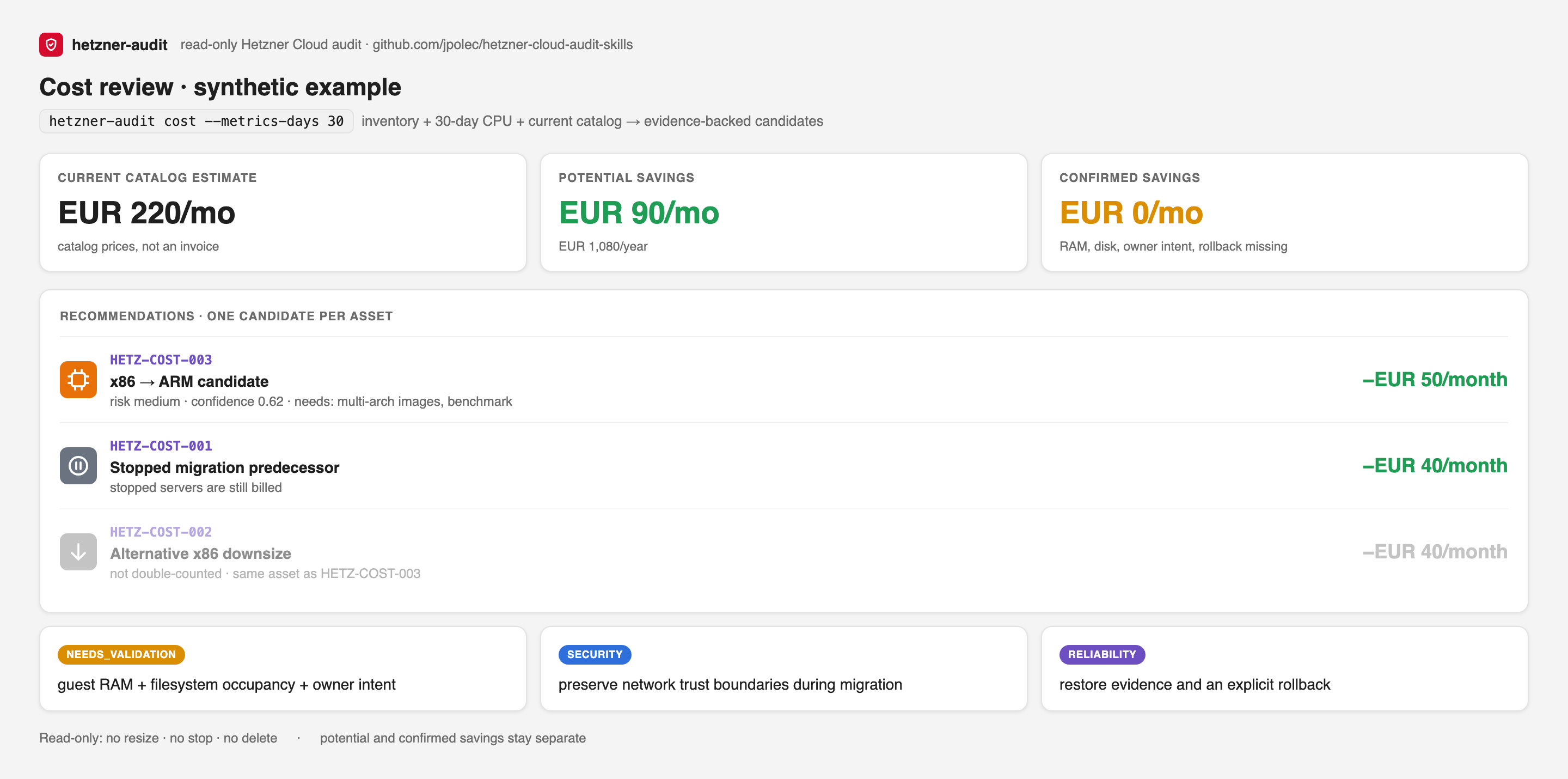
hetzner-audit cost --metrics-days 30 --format markdown --output cost.md
hetzner-audit map --format svg --view cost --output cost.svg
- Identifiable waste: unattached volumes, unassigned IPs, stopped-but-billed servers, and stale snapshots. These need no telemetry.
- Optimization candidates: rightsizing and x86 → ARM moves based on 30-day CPU p95. Only one candidate per server counts toward the total, so savings are never double-counted.
- Traffic: outgoing traffic against each server's included quota, overage already incurred this period, and an action when a server passes 80%.
- Structure signals: spend concentration, storage-heavy servers (volumes above half the compute cost), and deprecated types with a replacement and cost delta.
- Three savings numbers, never mixed:
- theoretical: every candidate, the best one per server;
- expected: unused resources, plus rightsizing where CPU, RAM, and disk telemetry cover the whole window and RAM use is not rising;
- measured: after a change,
hetzner-audit diff before.json after.jsonprices both snapshots at the earlier catalog, so the saving from your change is separated from provider price changes. It is a catalog delta, not an invoice reconciliation, and collection gaps block it.
- RAM and disk decide the candidate. With
--node-metrics, a smaller type is proposed only if RAM p95 stays under 70%, the RAM peak under 90%, and disk use under 80% of the candidate.
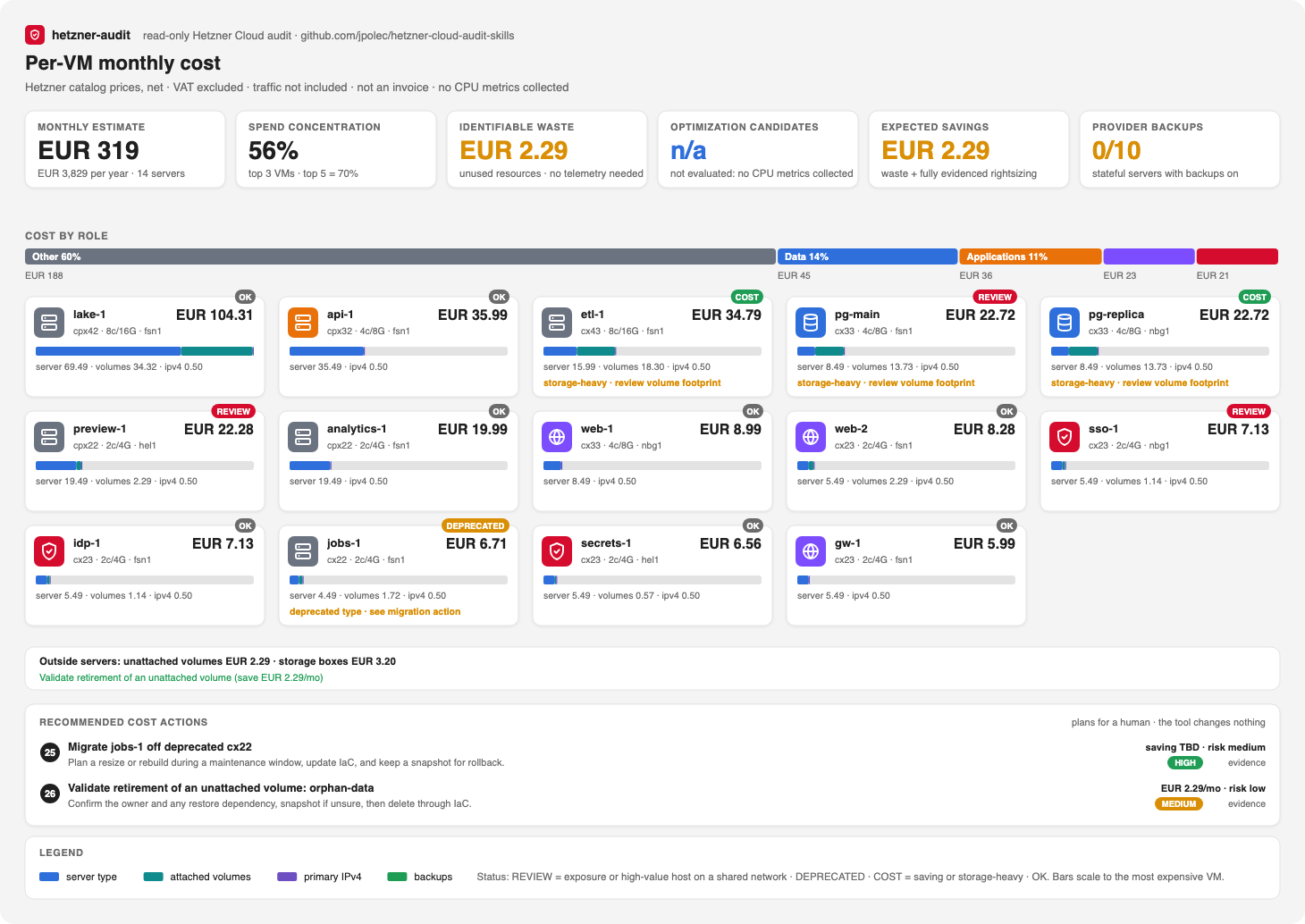
The cost audit is deliberately conservative. A stopped server is still billed. ARM savings require image, dependency, and performance validation. The tool has no resize, stop, delete, detach, or purchase action.
8. Architecture maps and views
hetzner-audit map --format svg --view architecture --output architecture.svg   # --theme dark available
hetzner-audit map --format svg --view connectivity --output connectivity.svg
hetzner-audit map --format svg --view cost --output cost.svg
hetzner-audit map --format svg --view host --output host.svg                   # needs --host-bundle
hetzner-audit map --format svg --view posture --output posture.svg
hetzner-audit map --format markdown --output network-map.md                    # Mermaid; renders on GitHub
The architecture view is laid out like an AWS or OCI diagram:
- summary tiles across the top;
- trust sources on the left (Internet, edge proxies such as Cloudflare or Fastly, mesh VPNs such as Tailscale, allow-lists);
- the network zone and the private network (Hetzner's VPC equivalent);
- one column per location, crossed by role tiers;
- a band for servers outside any private network and for Storage Boxes;
- when supplied: load balancers, Kubernetes, Robot servers and vSwitches, and buckets, plus host flags on servers (Docker bypass, no host firewall, Kubernetes role);
- recommended actions and a legend along the bottom.
Example gallery: other stacks, same audit. Four synthetic projects (every name and address invented) rendered with hetzner-audit map:
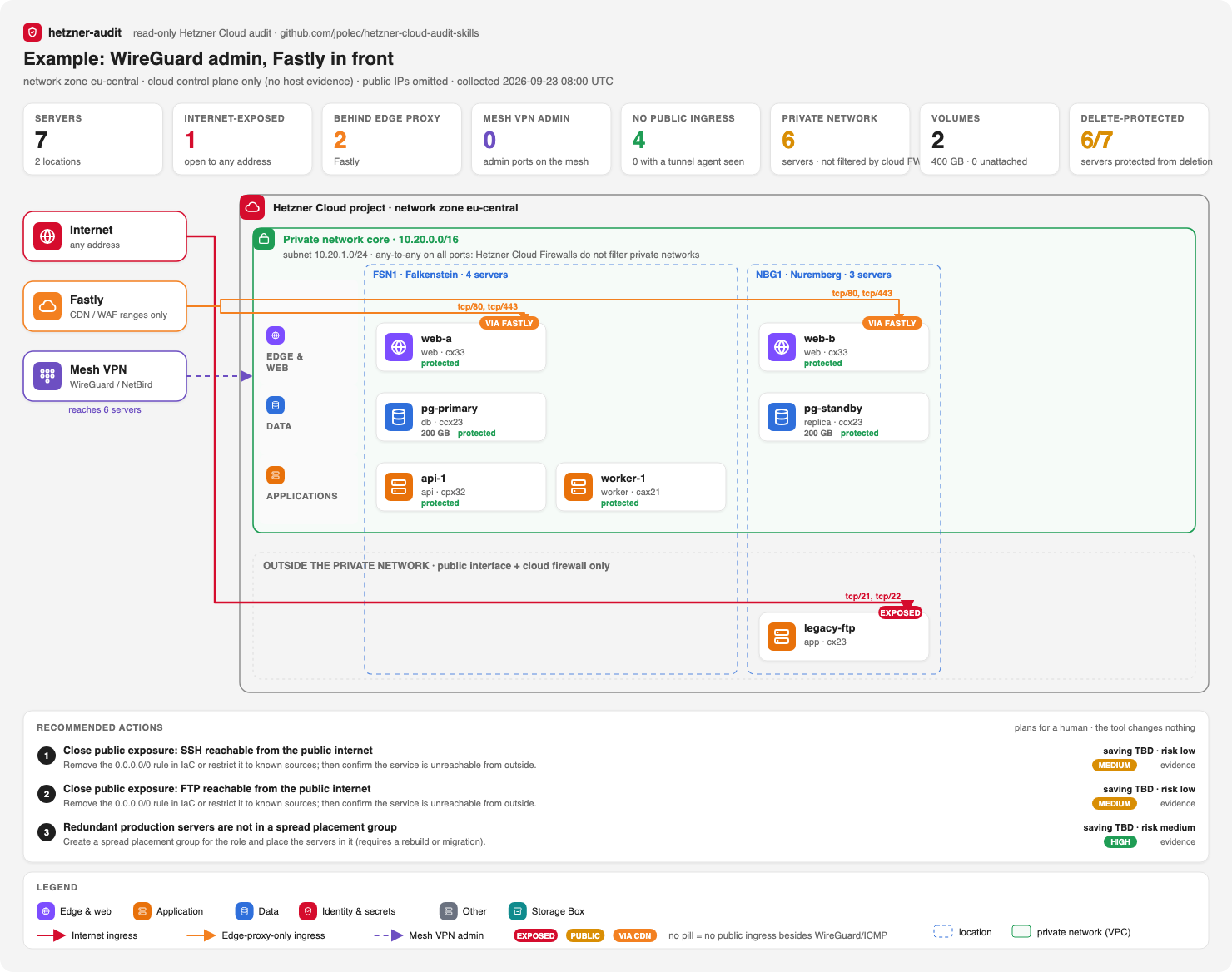 WireGuard + Fastly. The web tier accepts HTTP/HTTPS only from Fastly; WireGuard's UDP port is not counted as exposure; a legacy box with SSH and FTP open to the world is flagged. |
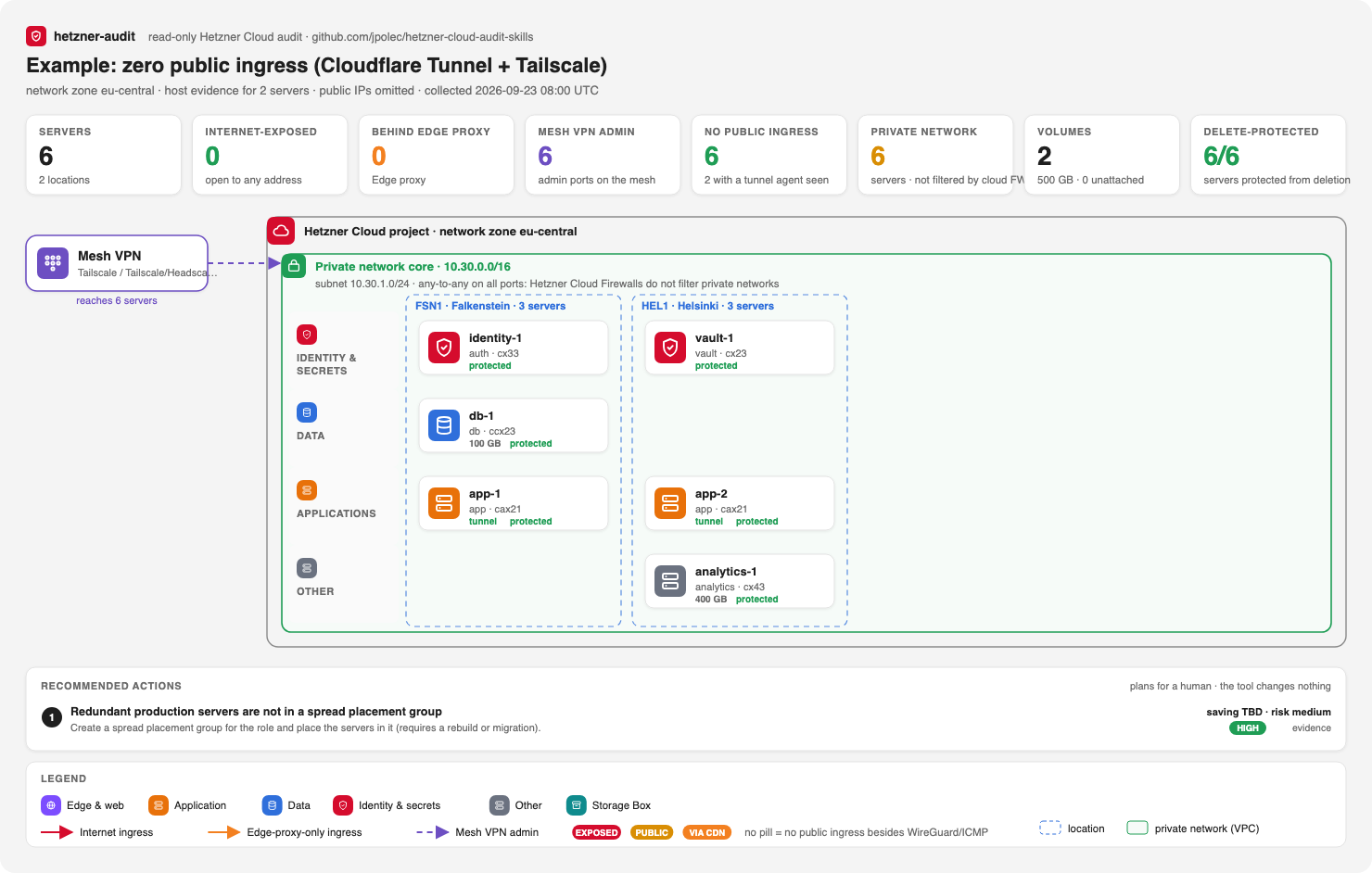 Zero public ingress. Apps are published through Cloudflare Tunnel (seen in the host bundle), admin runs over Tailscale, and nothing accepts traffic from the Internet: the pattern to aim for. |
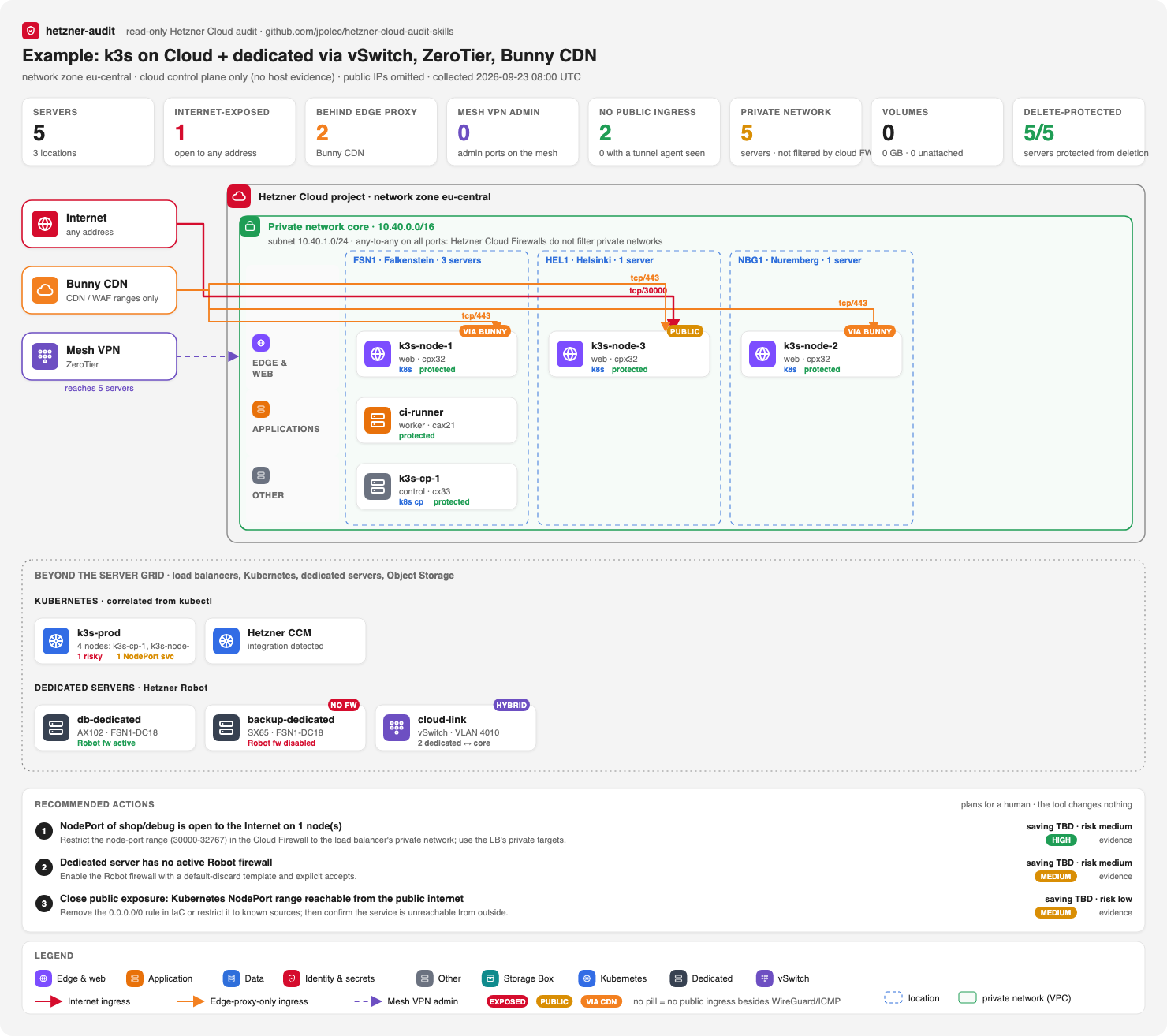 Hybrid. k3s on Cloud behind Bunny CDN, dedicated Robot servers joined by a vSwitch, ZeroTier admin. A NodePort open to the world, a privileged workload, and a Robot server without a firewall are flagged. |
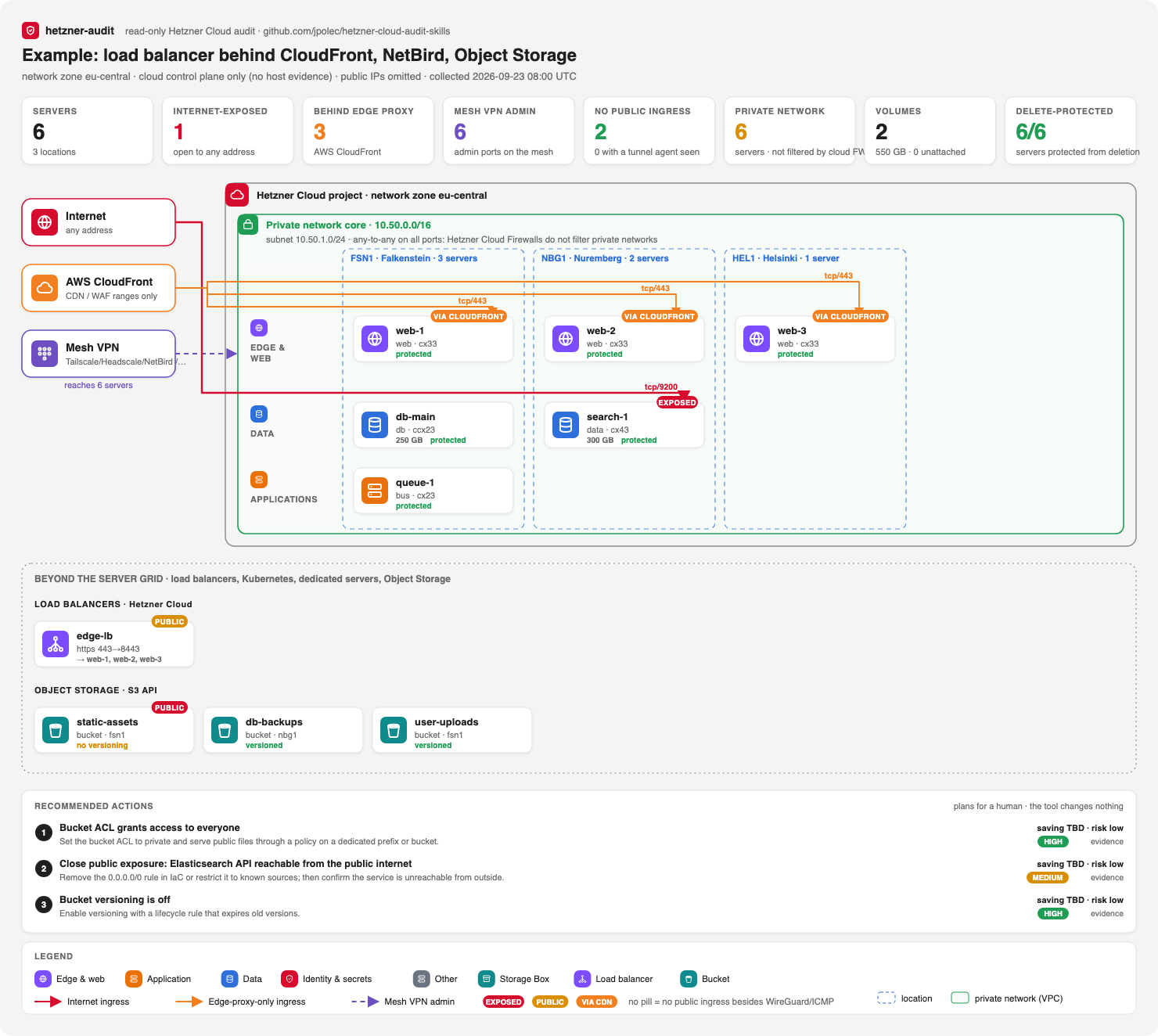 Load balancer + CloudFront. Three web servers behind a Hetzner LB and CloudFront, NetBird admin, and Object Storage. A public bucket and an Elasticsearch port open to the world are flagged. |
The posture view is a matrix of domains (network, host, data, identity, resilience, governance) by severity. It shows confirmed findings next to those still to validate, with coverage bars and the evidence sources.
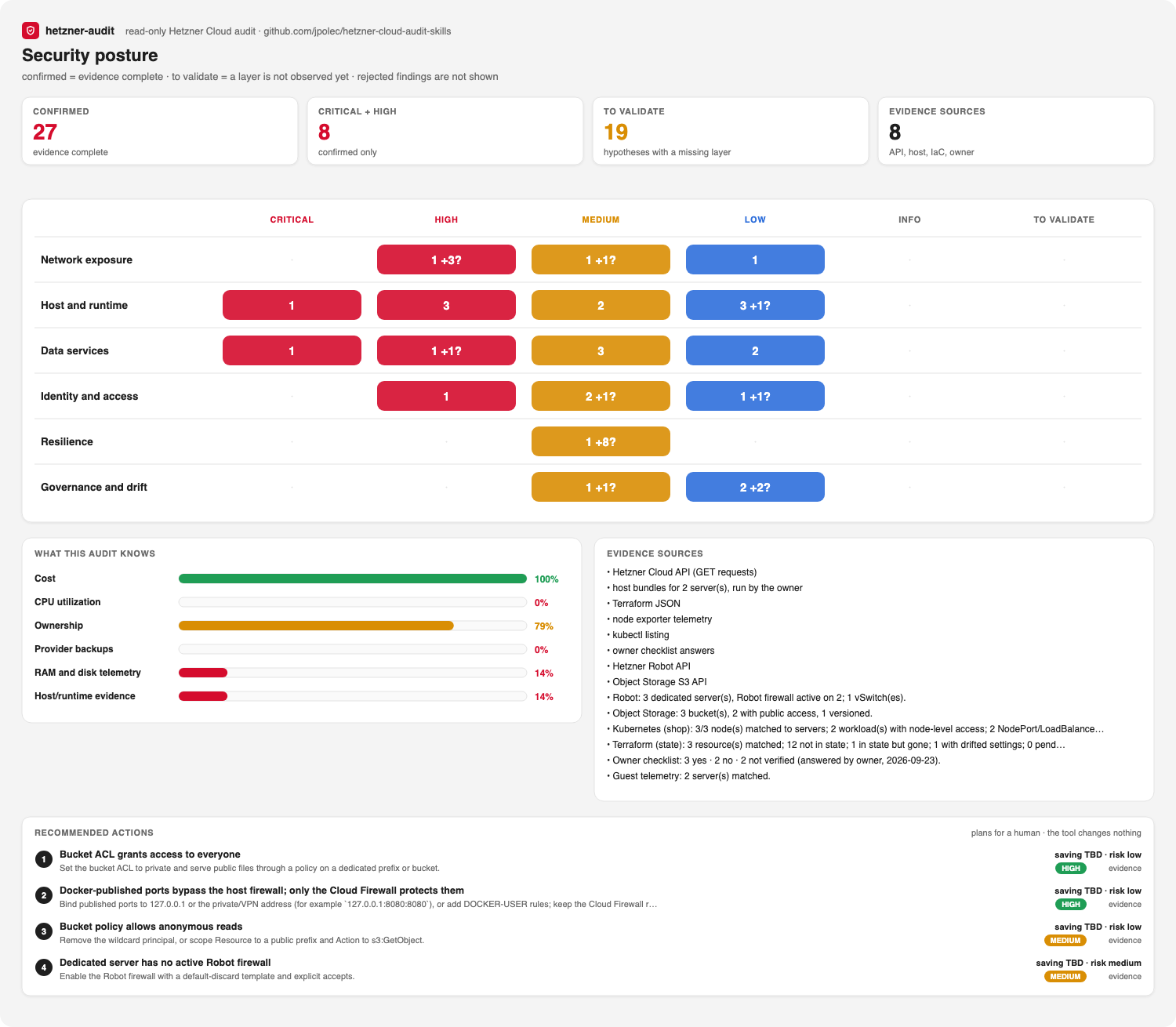
--max-actions controls how many actions are drawn.
| Exposure | Meaning |
|---|---|
| critical | A sensitive port or all ports are open to any address, or the server has no cloud firewall |
| public | Other ports are open to any address |
| proxied | Reachable only from an edge proxy's ranges (the pill names it, for example VIA CF or VIA FASTLY) |
| private | No public ingress except a mesh VPN's UDP port (Tailscale, WireGuard/NetBird, ZeroTier) |
The maps show firewall intent, not host or application controls. They never print public IP addresses, but they do reveal your topology, so keep them private. See the example map.
9. Track changes in CI
hetzner-audit snapshot --output before.json --read-only --no-ssh
# ... later ...
hetzner-audit snapshot --output after.json --read-only --no-ssh
hetzner-audit diff before.json after.json --fail-on-regression                       # broad: new world/wide exposure
hetzner-audit diff before.json after.json --fail-on-regression --regression-policy strict   # any growth
The diff compares exact allowed-flow spaces, not graph edges: for every server and load balancer, per address family and protocol, the set of (source address, destination port) pairs the firewalls admit, and the same for egress. after − before is computed exactly and then classified (world, wide, edge provider, allow-list):
- widening
80-443to80-8443, or opening a port only on IPv6, is new exposure (broadandstrict); - widening
203.0.113.4/32to203.0.113.0/24, swapping one trusted address for another, or new Internet egress is a change thatstrictfails on; - a new public IP behind a deny-all firewall, or a world-open rule on a server without a public interface, is not exposure at all.
Closed exposure is listed too. It also reports asset and fact changes and collector coverage regressions. A resource that failed to collect is not reported as deleted. Each fact records its source, observation time, collector version, and run ID.
- uses: jpolec/[email protected]
  env:
    HCLOUD_TOKEN: ${{ secrets.HCLOUD_TOKEN }}
  with:
    mode: audit
    policy: policies/infrastructure.toml
    fail-on: confirmed-high   # hypotheses never fail the job
    format: sarif
    output: hetzner-audit.sarif
Set fail-on: confirmed or confirmed-high to fail the job on confirmed findings only. needs_validation hypotheses never fail a job, and they appear in SARIF at level none. A green job means nothing was confirmed at that threshold; it does not mean the infrastructure is secure.
Run live collection only from protected schedule or workflow_dispatch jobs, and never expose the token to fork code. See the full GitHub Action guide. SARIF works best when a finding maps to IaC. Runtime-only topology findings stay in Markdown and JSON.
Tell it what "correct" means. Generic best practice is weaker than your own architecture contract:
[environments.production]
may_receive_from = ["production"]

[services.postgres]
public = false

[ssh]
public = false
hetzner-audit audit --policy policies/example-policy.toml --format markdown --output audit.md
Observed facts, owner policy, IaC declarations, and inferred hypotheses are kept as separate records.
10. Safety model
- Read-only. The code contains no Hetzner
POST,PUT, orDELETEcall. Use a Read token anyway. - No SSH, no port scanning. The tool never connects to your servers. Host evidence comes from a script you review and run yourself. The only unauthenticated request it can make is one anonymous listing of your own bucket, and only with
--verify-public-buckets, to confirm that a bucket that already looks public really is. - Separate, optional credentials.
HROBOT_USER/HROBOT_PASSWORD(a Robot webservice user),HETZNER_S3_ACCESS_KEY/HETZNER_S3_SECRET_KEY, andPROMETHEUS_TOKENare read from the environment and never printed.doctorwarns if any of them sits in a.envfile. - No auto-remediation. Every action is a plan with validation and rollback steps for a human to review.
- Secrets and personal data are redacted. Snapshots have these removed:
- tokens, passwords, private keys, and
user_data; - email addresses and reverse-DNS names;
- Storage Box usernames and hostnames;
- SSH public-key material and comments;
- uploaded certificate PEMs, sshd user lists, Redis passwords, and container environment variables (never collected);
- DNS record values other than A, AAAA, and CNAME (TXT often holds verification tokens), kept only as a count.
- tokens, passwords, private keys, and
- No project backend, no telemetry. Audit data is never sent to anything operated by this project. Requests go only to the providers and endpoints you configure (Hetzner Cloud, Robot, Object Storage, your Prometheus).
- Crafted names cannot hijack reports. Provider text is escaped in Markdown and Mermaid, so a server name cannot inject links, HTML, or instructions into a report an agent reads.
- Bounded and polite. API calls retry 429 and 5xx responses with backoff and honor
Retry-After. Pagination and path search are capped.
See the threat model and permissions.
11. How it works
flowchart LR
  H[Hetzner GET-only API] --> F[Temporal facts]
  I[IaC and owner policy] --> F
  R[Host bundles, Robot, S3, kubectl, telemetry] --> F
  F --> G[Typed evidence graph]
  G --> P[Attack paths]
  G --> D[Temporal diff]
  G --> S[Security findings]
  G --> C[Cost and architecture candidates]
  P --> V[Deterministic verification]
  D --> V
  S --> V
  C --> V
  V --> A[Ranked recommended actions]
  A --> O[Markdown / SVG / JSON / SARIF]
The pipeline is collect → reason → verify → recommend. The deterministic verifier is a separate component, not an independent human or agent reviewer. Agent-generated candidates without an independent verifier stay needs_validation.
More detail: architecture, FinOps architecture, Cloudflare reference analysis, landscape.
12. Status, limits, and roadmap
| Capability | v0.8 status |
|---|---|
Inventory with per-endpoint coverage, doctor preflight, retry/backoff |
Beta, tested on a live project |
| Public exposure (~30 services), firewall quality, Cloudflare bypass | Beta, tested on a live project |
| Private-network blast radius | Beta (host/runtime stays needs_validation) |
| Storage Box exposure and snapshot plan; label governance | Beta, tested on a live project |
| Load balancers (incl. attack-graph edges and bypass), certificates, DNS, OS lifecycle, placement | Beta, fixture-tested only (positive case and clean twin) |
| SSH key strength and age | Beta: fields verified on a live project (no weak key there, so the positive case is fixture- and benchmark-tested) |
| Traffic quota and overage | Beta, tested on a live project |
| Semantic exposure diff (flow sets, not edge IDs) | Beta, property-tested against brute force |
| Recommended actions with evidence levels; five views (architecture, connectivity, cost, host, posture) | Beta |
Provider change history (/actions) |
Beta, tested on a live project |
| Host evidence bundle and flow intersection | Beta, fixture-tested (modeled on a real UFW + Docker host, plus adversarial parser cases); not yet run live |
| Terraform drift, Robot, Object Storage, Kubernetes, console checklist | Beta, fixture-tested only. Object Storage signing is verified against the AWS SigV4 test vectors |
| Multi-project merge | Beta, merge tested live with one project; cross-project rules fixture-tested |
| Guest RAM/disk telemetry and savings tiers | Experimental, fixture-tested |
| Exact flow-space diff (ingress and egress), broad/strict policy | Beta, property-tested against brute force |
| Egress model and per-role egress policy | Beta, tested on a live project |
| Load balancer IP targets (Cloud and Robot) | Beta, fixture-tested |
anonymize and the validation corpus scorer |
Beta; anonymized output tested live to produce identical findings; corpus still empty |
Snapshots and diff; GitHub Action with fail-on; SARIF |
Beta |
| Cost: waste, concentration, rightsizing and ARM candidates | Experimental |
What it is not (yet)
- Host evidence is only as complete as the bundle. Firewalls built from chains the parser does not model (firewalld zones, CSF, custom iptables chains) stay "unknown", so the related findings stay
needs_validation. The script reads only; you still decide where to run it. - Robot, Object Storage, Kubernetes, and Terraform have not been run against a live account by the maintainer. They are tested on documented response shapes. Please report cases the tool gets wrong.
- Not a compliance mapping. There is no CIS, NIST, or C5 matrix.
- Not a billing tool. Costs use net catalog prices without VAT. Traffic covers only overage already incurred this period, and nothing is reconciled with invoices.
Use it for topology, public exposure, private-network blast radius, firewall drift, and a ranked fix list. Do not treat it as the only security or FinOps audit.
See the roadmap.
Help measure real-world accuracy. hetzner-audit anonymize snapshot.json --output anon.json replaces names, label values, addresses, IDs, unusual ports, and free text consistently, so the findings stay the same. Label the findings of an anonymized project and scripts/corpus_eval.py reports the false-confirmed rate, which is the number that matters for an auditor (corpus guide).
Two benchmarks are included:
- Fixture benchmark: plants 33 security problems. 23 meet the deterministic evidence contract and 10 intentionally remain
needs_validation. - Generated benchmark: 150 random projects, each mixing planted issues with clean twins. It scores 18 rules (cloud, host, Robot, Object Storage, Kubernetes) on true positives, false positives, and false negatives. All score 1.00 precision and recall; one scenario caught a real bug in the "no host firewall" rule before release.
Both measure the rules against their specification, not real-world detection accuracy (methodology).
13. Contributing
Issues, rule ideas, and pull requests are welcome, especially real-world cases the tool gets wrong. See CONTRIBUTING.md and AGENTS.md.
uv sync --extra dev
uv run ruff check . && uv run mypy src && uv run pytest
./scripts/demo.sh                              # regenerate examples/reports
uv run python scripts/validate_artifacts.py
Runtime code uses only the Python standard library. Licensed under Apache-2.0 for its explicit patent grant.
Maintainer
Created and maintained by Jakub Połeć.
Report security issues through GitHub private vulnerability reporting, not a public issue.
If hetzner-audit saved you money or caught something scary, a ⭐ on GitHub helps others find it.
Reviews (0)
Sign in to leave a review.
Leave a reviewNo results found