local-genai-lab
Health Warn
- License — License: MIT
- Description — Repository has a description
- Active repo — Last push 0 days ago
- Low visibility — Only 5 GitHub stars
Code Warn
- network request — Outbound network request in frontend/src/api/artifactApi.js
- network request — Outbound network request in frontend/src/api/chatApi.js
- network request — Outbound network request in frontend/src/api/modelApi.js
- network request — Outbound network request in frontend/src/api/sessionApi.js
Permissions Pass
- Permissions — No dangerous permissions requested
No AI report is available for this listing yet.
Local-first GenAI lab with a React frontend and Spring Boot backend, supporting Ollama, Amazon Bedrock, and Hugging Face, plus MCP-backed AWS tools, streaming chat, persistent sessions, and artifact/report workflows.
Local GenAI Lab








Local-first GenAI lab for building and testing tool-assisted chat workflows.
Not just a chatbot UI.
This project combines a React frontend, a Spring Boot orchestration backend, local and managed model providers, persistent session memory, and MCP-backed AWS tooling in one full-stack repository.
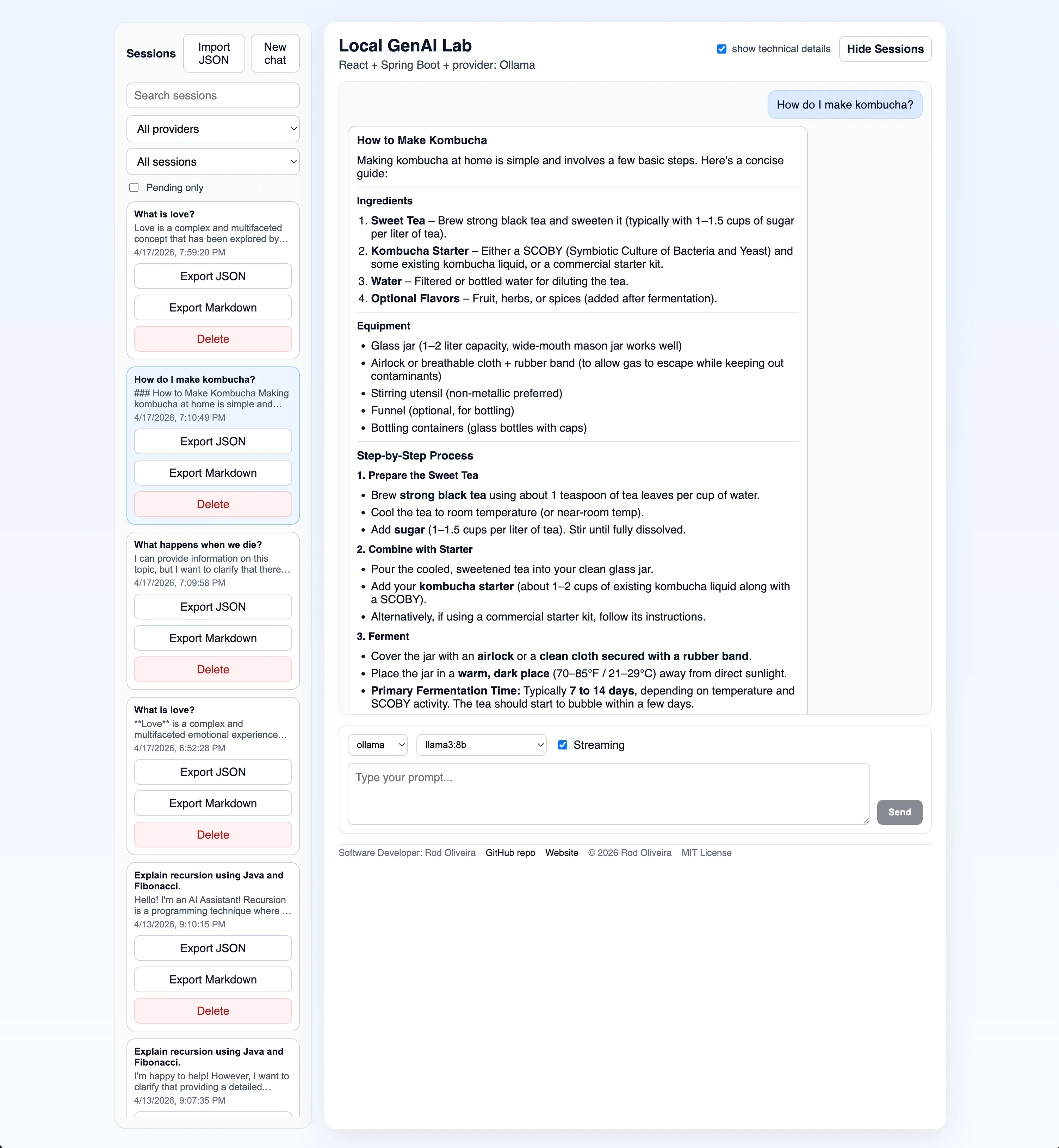
Fastest Path
If you want the shortest path to a running local setup:
cp .env.example .env
cd scripts && ./run-backend.sh
cd ../frontend && npm install && npm run dev
Then open:
- frontend:
http://localhost:5173 - backend health:
http://localhost:8080/actuator/health
Notes:
- By default, the backend starts with
APP_MODEL_PROVIDER=ollama. - If you want Bedrock or Hugging Face available in the provider selector, add their config to
.envfirst. - For the default Ollama path, make sure
llama3:8bis installed locally.
Why This Matters
Most LLM demos stop at chat. This project explores how to connect models to real systems.
It focuses on:
- tool-assisted chat with backend-side orchestration instead of direct frontend-to-model calls
- provider abstraction with Ollama by default plus Amazon Bedrock and Hugging Face as optional runtimes
- persistent session memory with resume, search, filter, import, and export flows
- MCP-backed local tool execution for AWS audits, reports, and artifact generation
- structured report rendering, artifact preview, streaming responses, and API observability
Architecture
High-level interaction flows:
For the full system-level view, see docs/architecture.md.
React -> Spring Boot
          |-> MCP -> Shell Scripts -> AWS CLI -> Report artifacts
          |-> Prompt enrichment with tool result -> Ollama / Bedrock
In the successful tool-assisted path, the backend:
- receives the user message
- decides a tool is needed
- calls the MCP-backed tool
- gets structured tool output back
- builds an augmented prompt with that tool context
- sends that enriched prompt to Ollama or Bedrock
Primary chat path:
React Frontend -> Spring Boot Backend -> Ollama or Bedrock
Tool-assisted chat path:
React Frontend -> Spring Boot Backend -> Local MCP Server -> Shell Scripts -> AWS CLI / report artifacts -> Spring Boot Backend prompt enrichment -> Ollama or Bedrock
Immediate backend response path:
React Frontend -> Spring Boot Backend -> clarification or tool-failure response
Project Structure
local-genai-lab/
├── backend/
│   ├── src/
│   ├── pom.xml
│   └── README.md
├── frontend/
│   ├── src/
│   ├── package.json
│   └── README.md
├── scripts/
│   ├── reports/
│   ├── tests/
│   ├── Makefile
│   └── README.md
├── mcp/
│   ├── src/
│   ├── package.json
│   └── README.md
├── docker-compose.yml
└── README.md
Prerequisites
- Java 21+
- Maven 3.9+
- Node 20+
- Ollama installed locally for the default provider
- Docker + Docker Compose, optional
- AWS CLI v2 +
jq+ valid AWS credentials, only for AWS shell tools and local MCP-backed report flows
Quick Start
1. Pull a local model
ollama pull llama3:8b
ollama run llama3:8b
Ollama should be reachable at http://localhost:11434.
2. Optional: create a local environment file
cp .env.example .env
Fill in only the providers you want available in the running backend process. The backend helper script will auto-load .env if it exists.
3. Start the backend
cd scripts
./run-backend.sh
If you want Bedrock or Hugging Face as the default backend provider instead of Ollama, set APP_MODEL_PROVIDER=bedrock or APP_MODEL_PROVIDER=huggingface in .env or the shell before starting the backend. Provider configuration details live in docs/providers.md.
Backend URLs:
- API root:
http://localhost:8080 - OpenAPI:
http://localhost:8080/v3/api-docs - Swagger UI:
http://localhost:8080/swagger-ui/index.html - Health:
http://localhost:8080/actuator/health - Info:
http://localhost:8080/actuator/info
GET /actuator redirects to /actuator/health. Swagger excludes /actuator/** so the generated API docs stay focused on the application API.
4. Start the frontend
cd frontend
npm install
npm run dev
Frontend URL:
http://localhost:5173
The frontend provider and model selectors now load from the backend's /api/models endpoint. You can switch between supported providers at runtime without restarting the backend. For Ollama, the UI only offers locally installed models. If no local models are installed, the UI shows a clear pull hint instead of failing only after submit.
The provider selector only shows providers configured in the running backend process. The provider status banner is cached briefly to avoid excessive live checks, shows Last checked, and includes a manual Refresh status action when you want to re-fetch the current status explicitly.
5. Optional: build the local MCP server
cd mcp
npm install
npm run build
MCP is enabled by default in the backend. To run without it, set MCP_ENABLED=false.
Docker
Keep Ollama running on the host first, then:
docker compose up --build
- frontend:
http://localhost:3000 - backend:
http://localhost:8080
Configuration Overview
The most important backend settings are:
APP_MODEL_PROVIDERdefault:ollamaOLLAMA_DEFAULT_MODELdefault:llama3:8bBEDROCK_REGIONdefault:us-east-1BEDROCK_MODEL_IDdefault: emptyHUGGINGFACE_BASE_URLdefault:https://router.huggingface.co/v1/chat/completionsHUGGINGFACE_DEFAULT_MODELdefault: emptyHUGGINGFACE_MODELSdefault: emptyMCP_ENABLEDdefault:trueAPP_TOOLS_ROUTING_MODEdefault:hybridAPP_STORAGE_SESSIONS_DIRECTORYdefault:data/sessionsAPP_STORAGE_REPORTS_DIRECTORYdefault:scripts/reports
The storage defaults are resolved from the project root so they stay stable whether the backend starts from backend/ or the repository root.
You can also point APP_STORAGE_REPORTS_DIRECTORY to an absolute path outside the repository if you want report artifacts stored elsewhere.
Provider switching details and helper startup scripts live in docs/providers.md.
Main Features
Chat and Providers
- normal and streaming chat endpoints
- Ollama as the default provider
- Amazon Bedrock as an optional provider
- Hugging Face as an optional hosted provider with a configured candidate list that the backend validates dynamically
- provider metadata in responses and saved session history
- typed JSON SSE events for streaming chat
- provider-aware model discovery for the frontend selector
- runtime provider switching across providers configured in the current backend process
Observed model behavior:
- successful tool execution still flows through the selected model by design
- the backend enriches the prompt with grounded tool output instead of bypassing the model
- different models may still phrase the final answer differently after receiving the same tool context
- that variance is intentional in this lab because it helps compare model behavior under grounded prompts
Sessions
- local JSON-backed conversation memory
- generated session titles and summaries
- session sidebar with search and filters
- JSON and Markdown export
- JSON import with collision-safe session ids
- backend-managed opaque session ids with strict validation
Tools and Artifacts
- local MCP-backed AWS audit and reporting flows
- LLM-assisted tool routing with fallback
- multi-turn clarification for missing tool inputs
- structured report cards in the UI
- read-only artifact preview and file listing under
scripts/reports/
Artifact API note:
- the configured reports directory may be inside or outside the repository
- artifact endpoints accept only paths relative to that configured reports directory
- absolute artifact paths are rejected intentionally so the backend keeps a strict read-only boundary
Shell Scripts
The shell tooling lives under scripts/. Useful entrypoints:
cd scripts
make help
make check-app
make test
make audit
make s3-cloudwatch BUCKET=example.com
make check-app verifies backend health, backend model discovery, frontend reachability, and optional Ollama availability with sensible local defaults.
Documentation Map
- docs/architecture.md: system overview, request flows, provider architecture, tool orchestration, storage, and design decisions
- docs/testing.md: automated suites, manual smoke tests, and current non-automated areas
- docs/troubleshooting.md: common local runtime problems and practical fixes
- backend/README.md: backend API, provider config, MCP integration, Actuator, sessions, Bedrock notes
- frontend/README.md: frontend-specific details
- scripts/README.md: shell tooling, report formats, smoke checks
- mcp/README.md: local MCP server details
- docs/providers.md: switching between Ollama and Bedrock
Current Scope
- single-user, local-first GenAI lab for hands-on learning and AWS Generative AI Developer Professional exam preparation
- optimized for correctness, inspectability, and local workflow clarity rather than multi-user scale
- intended to run on a developer machine with local Ollama, optional Bedrock access, and optional MCP-backed AWS tooling
Known Limitations
- not designed as a multi-tenant or internet-facing production service
- MCP tool execution currently uses short-lived local subprocesses, which is acceptable for this local lab but not tuned for shared high-concurrency use
- backend health/readiness is backend-only; whole-stack local checks still belong to
scripts/check-app.sh - artifact access is intentionally read-only and bounded to the configured reports directory
- Bedrock and AWS tool flows depend on your local AWS credentials and runtime environment being configured correctly
- some operational choices favor simple local behavior over production-style resilience, especially around local process orchestration and developer-machine assumptions
Notes for Heavier Models
codellama:70bis optional and not the recommended first-run default- larger local models can be much slower and more memory intensive
- if you use a heavier model, you may need to raise backend read timeouts
Contact
- Software Developer: Rod Oliveira
- GitHub: https://github.com/jrodolfo
- Webpage: https://jrodolfo.net
License
- MIT License
- Copyright (c) 2026 Rod Oliveira
- See LICENSE
Reviews (0)
Sign in to leave a review.
Leave a reviewNo results found