slack-mcp-server
Health Pass
- License — License: MIT
- Description — Repository has a description
- Active repo — Last push 0 days ago
- Community trust — 15 GitHub stars
Code Warn
- fs module — File system access in .github/workflows/ci.yml
Permissions Pass
- Permissions — No dangerous permissions requested
No AI report is available for this listing yet.
Session-based Slack MCP for Claude and MCP clients: local-first workflows, secure-default HTTP.
Slack MCP Server



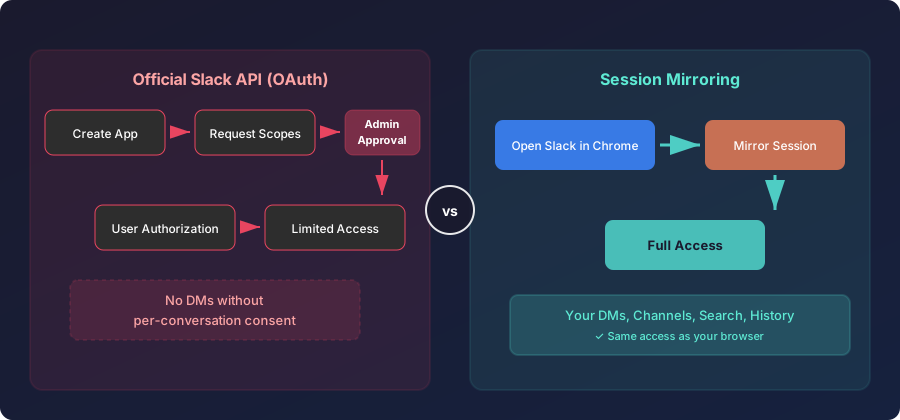
Give your AI agent full Slack access. No app registration, no admin approval, no OAuth. One command, 16 tools, works with any MCP client.
npx -y @jtalk22/slack-mcp --setup

Ask Claude to catch you up on #engineering from the last 24 hours. Search for that deployment thread from last week. Find every message mentioning the API key. Send a reply. All from your editor.
Interactive demo · Latest release
Why This Exists
Slack's official MCP server requires a registered app, admin approval, and doesn't work with Claude Code or GitHub Copilot due to OAuth/DCR incompatibility. Screenshotting messages is not a workflow.
This server uses your browser's session tokens instead. If you can see it in Slack, your AI agent can see it too. No app install, no scopes, no admin.
Tools
| Tool | Description | Safety |
|---|---|---|
slack_health_check |
Verify token validity and workspace info | read-only |
slack_token_status |
Token age, health, and cache stats | read-only |
slack_refresh_tokens |
Auto-extract fresh tokens from Chrome | read-only* |
slack_list_conversations |
List DMs and channels | read-only |
slack_conversations_history |
Get messages from a channel or DM | read-only |
slack_get_full_conversation |
Export full history with threads | read-only |
slack_search_messages |
Search across workspace | read-only |
slack_get_thread |
Get thread replies | read-only |
slack_users_info |
Get user details | read-only |
slack_list_users |
List workspace users (paginated, 500+) | read-only |
slack_users_search |
Search users by name, display name, or email | read-only |
slack_conversations_unreads |
Get channels/DMs with unread messages | read-only |
slack_send_message |
Send a message to any conversation | destructive |
slack_add_reaction |
Add an emoji reaction to a message | destructive |
slack_remove_reaction |
Remove an emoji reaction from a message | destructive |
slack_conversations_mark |
Mark a conversation as read | destructive |
12 read-only, 4 write-path. All carry MCP safety annotations.
* slack_refresh_tokens modifies local token file only.
Install
Node.js 20+
npx -y @jtalk22/slack-mcp --setup
The setup wizard handles token extraction and validation.
Claude Desktop (macOS)Edit ~/Library/Application Support/Claude/claude_desktop_config.json:
{
  "mcpServers": {
    "slack": {
      "command": "npx",
      "args": ["-y", "@jtalk22/slack-mcp"]
    }
  }
}
Edit %APPDATA%\Claude\claude_desktop_config.json:
{
  "mcpServers": {
    "slack": {
      "command": "npx",
      "args": ["-y", "@jtalk22/slack-mcp"],
      "env": {
        "SLACK_TOKEN": "xoxc-your-token",
        "SLACK_COOKIE": "xoxd-your-cookie"
      }
    }
  }
}
Claude CodeWindows/Linux users must provide tokens via
envsince auto-refresh is macOS-only.
Add to ~/.claude.json:
{
  "mcpServers": {
    "slack": {
      "type": "stdio",
      "command": "npx",
      "args": ["-y", "@jtalk22/slack-mcp"]
    }
  }
}
Any client that supports stdio MCP servers works. Add to your client's MCP config:
{
  "slack": {
    "command": "npx",
    "args": ["-y", "@jtalk22/slack-mcp"],
    "env": {
      "SLACK_TOKEN": "xoxc-your-token",
      "SLACK_COOKIE": "xoxd-your-cookie"
    }
  }
}
On macOS, tokens are auto-extracted from Chrome — env block is optional.
For browser-based clients that can't run local processes, use the hosted HTTP endpoint:
https://mcp.revasserlabs.com/oauth/mcp
Add this as a remote MCP server in your client's settings. Transport: Streamable HTTP. Auth: OAuth 2.1 + PKCE.
Dockerdocker pull ghcr.io/jtalk22/slack-mcp-server:latest
{
  "mcpServers": {
    "slack": {
      "command": "docker",
      "args": ["run", "-i", "--rm",
               "-v", "~/.slack-mcp-tokens.json:/root/.slack-mcp-tokens.json",
               "ghcr.io/jtalk22/slack-mcp-server"]
    }
  }
}
Restart your client after configuration. Full setup: docs/SETUP.md
How It Works
Session tokens (xoxc- + xoxd-) from your browser. If you can see it in Slack, this server can see it too.
Token persistence — four-layer fallback:
- Environment variables (
SLACK_TOKEN,SLACK_COOKIE) - Token file (
~/.slack-mcp-tokens.json, chmod 600) - macOS Keychain (encrypted)
- Chrome auto-extraction (macOS)
Tokens expire. The server notices before you do — proactive health monitoring, automatic refresh on macOS, warnings when tokens age out. File writes are atomic (temp file → chmod → rename) to prevent corruption. Concurrent refresh attempts are mutex-locked.
Hosted HTTP Mode
For remote MCP endpoints (Cloudflare Worker, VPS, etc.):
SLACK_TOKEN=xoxc-... \
SLACK_COOKIE=xoxd-... \
SLACK_MCP_HTTP_AUTH_TOKEN=change-this \
SLACK_MCP_HTTP_ALLOWED_ORIGINS=https://claude.ai \
node src/server-http.js
Details: docs/DEPLOYMENT-MODES.md
Troubleshooting
Tokens expired: Run npx -y @jtalk22/slack-mcp --setup or use slack_refresh_tokens (macOS).
DMs not showing: Use slack_list_conversations with discover_dms=true.
Client not seeing tools: Check JSON syntax in config, restart client fully.
More: docs/TROUBLESHOOTING.md
Docs
- Setup Guide
- API Reference
- Architecture
- Deployment Modes
- Use Case Recipes
- Troubleshooting
- Compatibility
Security
- Token files:
chmod 600(owner-only) - macOS Keychain encrypted backup
- Web server binds to localhost only
- API keys:
crypto.randomBytes - See SECURITY.md
Contributing
PRs welcome. Run node --check on modified files before submitting.
License
MIT — See LICENSE
Disclaimer
Not affiliated with Slack Technologies, Inc. Uses browser session credentials — check your workspace's acceptable use policy.
Managed hosting available — mcp.revasserlabs.com
Reviews (0)
Sign in to leave a review.
Leave a reviewNo results found