IntuneGraph
Health Uyari
- License — License: MIT
- Description — Repository has a description
- Active repo — Last push 0 days ago
- Low visibility — Only 9 GitHub stars
Code Gecti
- Code scan — Scanned 12 files during light audit, no dangerous patterns found
Permissions Gecti
- Permissions — No dangerous permissions requested
Bu listing icin henuz AI raporu yok.
Turn your Microsoft Intune tenant into an interactive relationship graph, and ask your AI why a policy applies through the bundled MCP server. See what applies to a device or user and why, preview a group's blast radius, find broken assignments. Read-only Graph, offline demo, self-contained HTML viewer. Zero write scopes.
IntuneGraph
Turn your Microsoft Intune tenant into an interactive relationship graph, and ask your AI why a policy applies through the bundled MCP server. See what applies to a device or user and why, preview a group's blast radius, find broken assignments. Read-only Graph, offline demo, self-contained HTML viewer. Zero write scopes.





Intune assignments are a graph, groups nest, filters narrow, includes and excludes fight. But every existing tool shows you flat lists. IntuneGraph makes the graph the data model, so the questions admins actually ask become simple queries.
Demo:
https://juandresrodca.github.io/IntuneGraph/demo/
Try it in 30 seconds, no tenant needed
git clone https://github.com/juandresrodca/IntuneGraph.git
Import-Module .\IntuneGraph\src\IntuneGraphKit\IntuneGraphKit.psd1 -Force
Export-IntuneGraph -DemoData -PassThru | Show-IntuneGraph -Open
Once it is on the PowerShell Gallery, the first two lines collapse into one. They do not work yet, since the module has not been published, which is #5:
Install-Module IntuneGraphKit -Scope CurrentUser
Import-Module IntuneGraphKit
The Gallery package will be IntuneGraphKit. The
IntuneGraphpackage already on the Gallery is an unrelated module by another author, and unlike this one it writes to Intune. Check the name before you install.
That builds the bundled Silver Chariot Corporate demo tenant and opens the interactive graph in your browser: zero Graph auth, zero setup. The whole tool works offline against demo data, which means you can evaluate it (and contribute to it) without ever touching a real tenant.
Ask your AI why a policy applies, and get the group path, not a guess
IntuneGraph ships an MCP server, so Claude Code or GitHub Copilot can query the
graph directly:
claude mcp add intunegraph -- pwsh -NoLogo -NoProfile -NonInteractive \
  -File ./tools/mcp/mcp-server.ps1 -Path ./graph.json
> why does Win11 Security Baseline apply to DEV-FIN-01?

  [intune_target]
  Win11 Security Baseline  ConfigPolicy  Applies
  via  DEV-FIN-01 -> SG-Finance -> SG-AllStaff

> what happens if I add KIOSK-01 to SG-Finance?

  [intune_blast_radius]
  Gains 3 workload(s), loses 0.
   + LOB Finance App (required)
   + Win11 Security Baseline
   + Adobe Reader (available)
Answering why a policy applies means resolving group nesting, assignment filters and
include/exclude collisions, which is what this graph is made of, so the server returns a
resolved path rather than a list. Tools that read the live tenant answer the other half of
the question, and docs/comparison.md
sets out the overlap and the closest twin to this server.
And it never touches your tenant. The server reads a local graph.json snapshot,
so the assistant gets the answers without ever getting your credentials. You decide
when to refresh it. Six read-only tools: intune_target, intune_blast_radius,intune_orphans, intune_path, intune_node, intune_summary. See
docs/mcp.md.
Packaging the same six tools as a Claude Code plugin with a bundled skill (one install
for the server and the method for using it) is specified in
docs/skill.md. It is a specification, not yet something you can install.
One HTML file, zero network calls
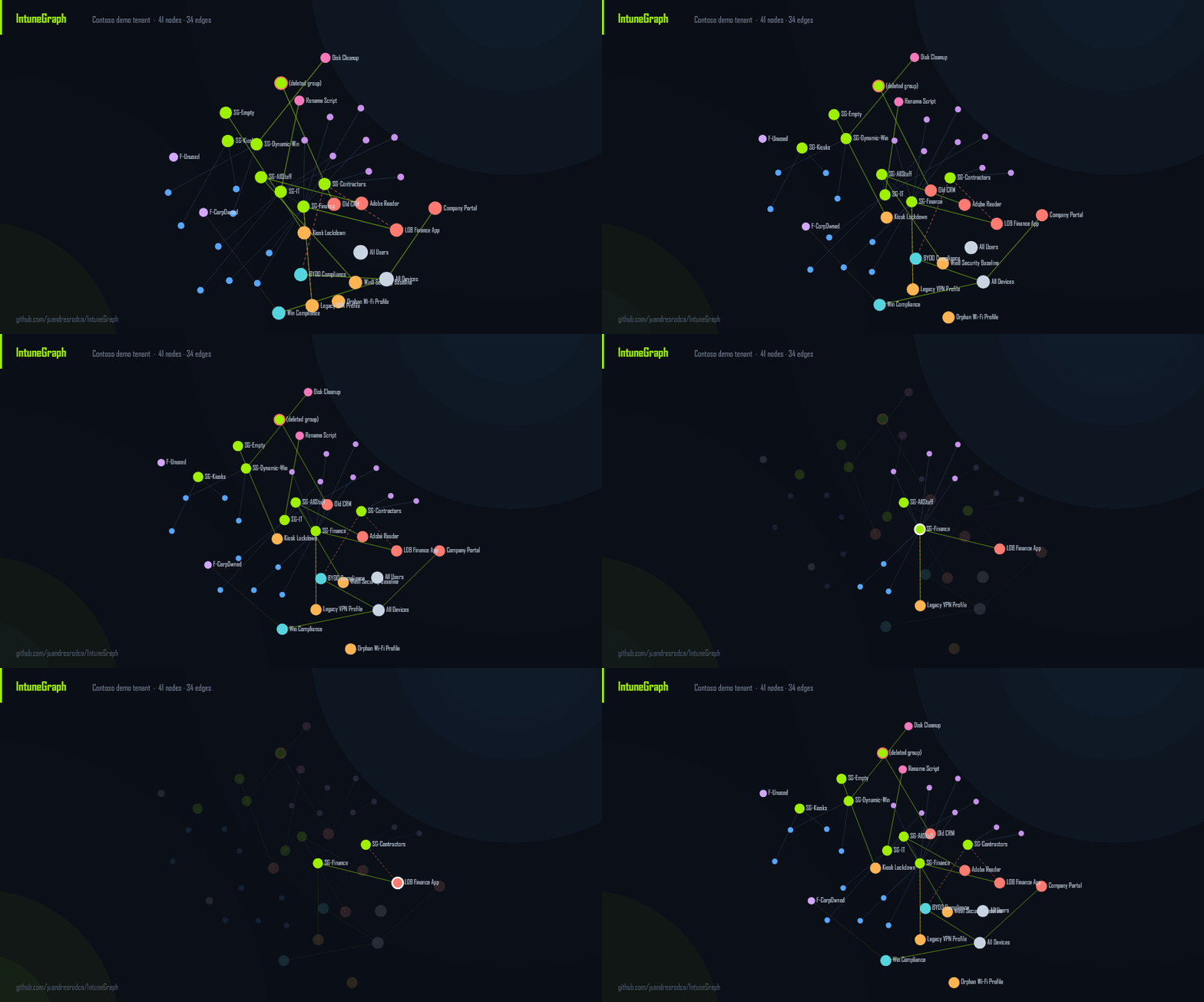
Show-IntuneGraph writes the graph to a single self-contained HTML file. The renderer,
the styles and the data are all inlined, so the page makes zero network calls: no
CDN, no web fonts, no telemetry. It opens from disk, offline, with nothing to install,
and a Pester test fails the build if the generated report links to anything external.
Because the data travels inside the file, treat a report from a real tenant the way you
would treat the graph.json it came from.
The three questions it answers
1. "What applies to this device, and why?" → Get-IntuneTarget
PS> Get-IntuneTarget -Identity DEV-FIN-01

Workload                Type             Status           Intent    Via
--------                ----             ---------        - -  ------    ---
Adobe Reader            App              Applies          available DEV-FIN-01 -> SG-Finance -> SG-AllStaff
Company Portal          App              Applies          required  DEV-FIN-01 -> All Devices
LOB Finance App         App              Applies          required  DEV-FIN-01 -> SG-Finance
Win Compliance          CompliancePolicy AppliesPreFilter           DEV-FIN-01 -> All Devices          (F-CorpOwned)
Win11 Security Baseline ConfigPolicy     Applies                    DEV-FIN-01 -> SG-Finance -> SG-AllStaff
The Via column is the exact group path that causes each assignment, through nesting, and it is what flat-list tools do not give you. Add -IncludeExcluded to see what's blocked by an exclusion and why.
2. "What breaks if I touch this group?" → Get-IntuneBlastRadius
PS> Get-IntuneBlastRadius -Group SG-Finance -WhatIfAddMember KIOSK-01

Adding 'KIOSK-01' to 'SG-Finance':
  Gains 3 workload(s), loses 0.
Preview the impact of a membership change before you make it: exactly which policies, apps and scripts a device or user gains or loses, resolved through nesting and exclusions.
3. "What's assigned to nothing / broken?" → Find-IntuneOrphan
PS> Find-IntuneOrphan

Check                   Severity NodeName
-----                   -------- --------
BrokenGroupReference    High     Old CRM                (targets a deleted group)
IncludeExcludeCollision High     Legacy VPN Profile     (same group included and excluded)
EmptyTarget             Warning  Kiosk Lockdown         (assigned only to an empty group)
MixedTargeting          Warning  BYOD Compliance        (device policy excludes a user group - does nothing)
Unassigned              Info     Orphan Wi-Fi Profile   (no assignments)
UnusedFilter            Info     F-Unused               (referenced by nothing)
Quick start against your tenant
Connect-IntuneGraph                    # least-privilege, read-only consent
Export-IntuneGraph -Html -PassThru | Show-IntuneGraph -Open
Get-IntuneTarget    -Identity <deviceName|UPN|GUID>
Get-IntuneBlastRadius -Group <groupName>
Find-IntuneOrphan
Export-IntuneGraph is the only command that talks to Graph. It writes a graph.json snapshot; every query runs against that snapshot: fast, offline, and reproducible.
Permissions & security
IntuneGraph requests four read-only scopes and zero write scopes, and the code contains no POST/PATCH/DELETE paths: the single function that calls Graph hardcodes GET.
| Scope | Why |
|---|---|
DeviceManagementConfiguration.Read.All |
config/compliance policies, scripts, filters |
DeviceManagementApps.Read.All |
apps + assignments |
DeviceManagementManagedDevices.Read.All |
managed devices |
Group.Read.All |
groups + membership |
No telemetry. The HTML report makes zero network calls (the renderer is vendored inline). Your data never leaves the graph.json you exported. See docs/permissions.md.
Found a security problem? Please report it privately. The process, the supported versions and the guarantees this project treats as invariants are in SECURITY.md.
How it stacks up
IntuneGraph is the relationship-and-impact layer rather than another config-backup tool. The excellent tools below solve adjacent problems; use them together.
| IntuneGraph | IntuneAssignmentChecker | IntuneCD | Intune portal | |
|---|---|---|---|---|
| "What applies to X" as a list | ✅ | ✅ | – | ✅ |
| Membership path ("via" / why) | ✅ | – | – | – |
| Blast-radius / change impact | ✅ | – | – | – |
| Assignment hygiene checks | ✅ | partial | – | – |
| Interactive graph visualization | ✅ | – | – | – |
| MCP server (ask an AI, offline) | ✅ | – | – | – |
| Config backup / config-as-code | – | – | ✅ | – |
Wondering when to reach for Graph Explorer or the Intune admin centre instead? docs/comparison.md has the decision table, four worked workflows, and an explicit list of what IntuneGraph will not tell you.
The same guide credits the wider set of community projects that overlap with this one (live-tenant assignment auditors, cross-tenant migration tooling, app-supersedence reporting and operational dashboards), with a line each on when to reach for them instead: community tools that overlap.
Shorter questions (which package to install, why an exclusion wins, what AppliesPreFilter means, whether graph.json is safe to share) are answered in docs/FAQ.md.
When something is broken rather than surprising, docs/troubleshooting.md goes failure mode by failure mode (consent refused partway through an export, a throttled tenant that looks like a hang, an empty graph, a blank report, 5.1-versus-7 differences, an MCP server the client will not start), each written as symptom, cause and fix.
Requirements
- PowerShell 7+ recommended; ** Windows PowerShell 5.1 ** supported.
Microsoft.Graph.Authentication(only for live tenant use; loaded on demand). Demo mode needs nothing.
Contributing
Every test runs on fixtures: no tenant needed to contribute. .\build.ps1 -Task Test. CONTRIBUTING.md covers the layout, the build tasks, the PSScriptAnalyzer settings and the guarantees a change must not break; see docs/fixtures.md for how the demo tenant is structured and how to add a scenario.
Decisions that are easy to undo by accident are written down rather than remembered: docs/permissions.md for the read-only scope guarantees, docs/discoverability.md for what the repository's topics and description are meant to do.
What changed between versions, and what is queued for the next one, is in CHANGELOG.md; how a version gets cut and published is CONTRIBUTING.md.
Participation is governed by the Code of Conduct; security problems go through SECURITY.md's private route rather than the issue tracker.
License
MIT. Not affiliated with Microsoft. IntuneGraph is a read-only reporting tool, so always verify changes in the Intune portal.
Yorumlar (0)
Yorum birakmak icin giris yap.
Yorum birakSonuc bulunamadi