gob
Health Pass
- License — License: MIT
- Description — Repository has a description
- Active repo — Last push 0 days ago
- Community trust — 55 GitHub stars
Code Fail
- rm -rf — Recursive force deletion command in scripts/dev-env.sh
Permissions Pass
- Permissions — No dangerous permissions requested
This tool is a process manager designed for both AI agents and humans. It provides a shared, synchronized terminal interface to manage background processes, stream logs, and monitor ports across different projects.
Security Assessment
Overall risk: Low. As a process manager, the tool inherently executes and manages shell commands. It also monitors network ports and relies on local SQLite databases for job persistence. However, the audit found no hardcoded secrets and confirmed that the application does not request dangerous overarching system permissions. A failed check flagged a recursive force deletion command (`rm -rf`) inside a development environment script (`scripts/dev-env.sh`). While this is standard for cleaning up local developer setups, users should be aware of what the repository's scripts execute before running them locally.
Quality Assessment
The project appears to be highly maintained and well-structured. The repository received its last push today, indicating active development. It uses the permissive MIT license and has garnered 55 GitHub stars, showing a decent level of community trust for a specialized developer utility. Automated quality checks, such as Go Report Card integration, further demonstrate a commitment to maintaining good code health.
Verdict
Safe to use, but exercise standard caution with any tool that manages and executes system processes.
Process manager for AI agents (and humans)
gob





Process manager for AI agents (and humans).
gob (pronounced job, of course) is a CLI for managing background processes with a shared interface for you and your AI coding agent.
Start a dev server with Claude Code, check its logs yourself. Or vice-versa. The agent can monitor what you started. Everyone has the same view.
No more "can you check if that's still running?" No more copy-pasting logs through chat. Just direct access to your processes, for everyone.
Features
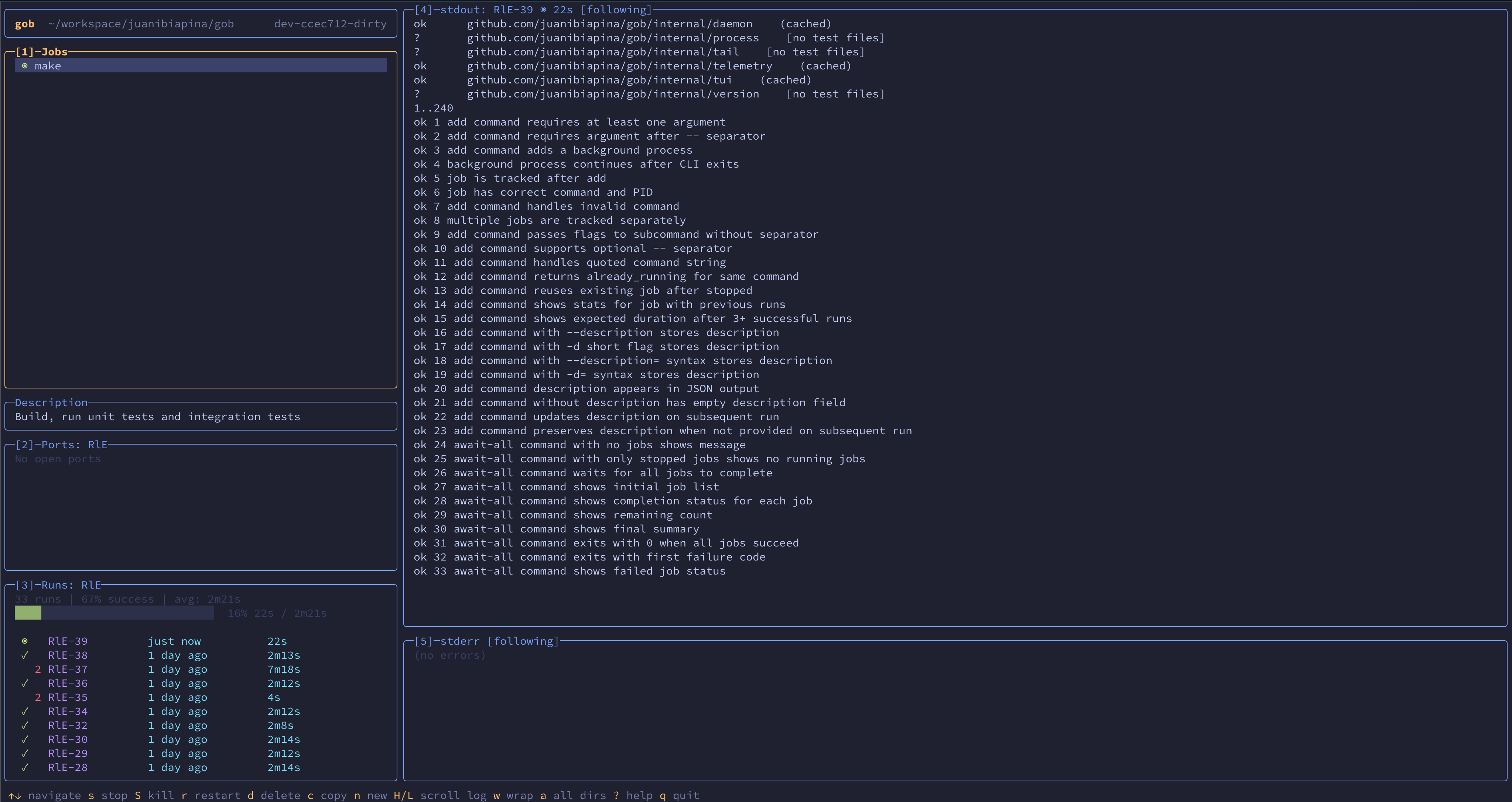
- Interactive TUI - Full-screen terminal interface with real-time job status
- Real-time log streaming - Follow stdout/stderr from CLI, TUI, or AI agents without copying output
- AI agent friendly - Shared view of all processes for you and your coding agent
- Real-time sync - Changes from CLI instantly appear in TUI, and vice-versa
- Per-directory jobs - Jobs are scoped to directories, keeping projects organized
- Process lifecycle control - Start, stop, restart, send signals to any job
- Port monitoring - Inspect listening ports across a job's entire process tree
- Reliable shutdowns - Stop, restart, and shutdown verify every child process in the tree is gone
- Job persistence - Jobs survive daemon restarts with SQLite-backed state
- Run history - Track execution history, statistics, and progress estimates for repeated commands
- Stuck detection - Automatically detects jobs that may be stuck and returns early, while the job continues running
- Blocked jobs - Prevent AI coding agents from accidentally running dangerous commands
Installation
Homebrewbrew tap juanibiapina/taps
brew install gob
go install github.com/juanibiapina/gob@latest
Requirements:
- Go 1.25.4 or later
The binary will be installed to $GOPATH/bin (or $GOBIN if set). Make sure this directory is in your PATH.
Download the latest release for your platform from the Releases page.
Available platforms: Linux, macOS (both amd64 and arm64)
# Download the appropriate binary for your platform
# For example, macOS Apple Silicon (arm64):
curl -LO https://github.com/juanibiapina/gob/releases/latest/download/gob_VERSION_darwin_arm64.tar.gz

# Extract the archive
tar -xzf gob_VERSION_darwin_arm64.tar.gz

# Move to your PATH
sudo mv gob /usr/local/bin/

# Verify installation
gob --version
See CONTRIBUTING.md for build instructions.
Quick Start
# Usage overview
gob

# Run a command and wait for completion
gob run make test

# Add a background job (returns immediately)
gob add -- make test
gob add -- pnpm --filter web typecheck

# Wait for a job to complete
gob await abc

# List all jobs
gob list

# View stdout and stderr
gob logs abc

# Stop a job
gob stop abc

# Remove a stopped job
gob remove abc
Using with AI Coding Agents
For AI agents, add the following instructions to your agent's configuration file (CLAUDE.md, AGENTS.md, etc).
## Background Jobs with `gob`

Use `gob` for servers, long-running commands, and builds.

### When to Use gob

Use `gob` for:
- **Servers**: `gob add npm run dev`
- **Long-running processes**: `gob add npm run watch`
- **Builds**: `gob run make build`
- **Parallel build steps**: Run multiple builds concurrently

Do NOT use `gob` for:
- Quick commands: `git status`, `ls`, `cat`
- CLI tools: `jira`, `kubectl`, `todoist`
- File operations: `mv`, `cp`, `rm`

### gob Commands

- `gob add <cmd>` - Start command in background, returns job ID
- `gob add --description "context" <cmd>` - Start with description for context
- `gob run <cmd>` - Run and wait for completion (output on failure only)
- `gob run --description "context" <cmd>` - Run with description for context
- `gob await <job_id>` - Wait for job to finish, stream output in real-time
- `gob list` - List jobs with IDs, status, and descriptions
- `gob logs <job_id>` - View stdout and stderr (stdout→stdout, stderr→stderr)
- `gob stdout <job_id>` - View current stdout (useful if job may be stuck)
- `gob stop <job_id>` - Graceful stop
- `gob restart <job_id>` - Stop + start

### Stuck Detection

`gob run` and `gob await` automatically detect potentially stuck jobs:
- Timeout: avg duration + 1 min (or 5 min if no history), triggers if no output for 1 min
- Job continues running in background
- Use `gob logs <id>` or `gob stdout <id>` to check output, `gob await <id>` to continue waiting

### Examples

Servers and long-running:
```
gob add npm run dev                              # Start dev server
gob add --description "File watcher" npm run watch  # With description
```

Builds:
```
gob run make build                           # Run build, wait for completion
gob run npm run test                         # Run tests, wait for completion
gob run --description "Type check" npm run typecheck  # With description
```

Regular commands (no gob):
```
git status
kubectl get pods
jira issue list
```
Interactive TUI
Launch a full-screen terminal interface for managing jobs:
gob tui
Layout
The TUI has an info bar and five panels:
- Info bar: Shows working directory and version
- Panel 1 (Jobs): List of all jobs with status (◉ running, ✓ success, ✗ failed)
- Description: Shows job description (only visible when selected job has one)
- Panel 2 (Ports): Listening ports for the selected job
- Panel 3 (Runs): Run history for the selected job
- Panel 4 (stdout): Standard output of selected run
- Panel 5 (stderr): Standard error of selected run
Key Bindings
| Key | Action |
|---|---|
↑/k, ↓/j |
Navigate / scroll |
h/l |
Scroll log horizontally (in log panels) |
H/L |
Scroll log horizontally (from jobs/runs panels) |
g/G |
Go to first/last |
f |
Toggle follow mode |
w |
Toggle line wrap |
s/S |
Stop / kill job |
r |
Restart job |
d |
Delete stopped job/run |
n |
New job |
1/2/3/4/5 |
Switch to panel |
? |
Show all shortcuts |
q |
Quit |
Auto-Start with Gobfile
Create a .config/gobfile.toml in your project directory to automatically start jobs when the TUI launches:
[[job]]
command = "npm run dev"
description = "Frontend on http://localhost:3000. Check here for UI errors."

[[job]]
command = "npm run api"
description = "API server on http://localhost:4000. Check logs for request debugging."

[[job]]
command = "npm run storybook"
description = "Component library on http://localhost:6006"
autostart = false  # Add but don't start automatically

[[job]]
command = "npm run db:reset"
description = "DANGER: Drops and recreates the database"
blocked = true  # Prevent accidental execution
Fields:
command(required): The command to rundescription(optional): Context for AI agents (ports, URLs, what to check for)autostart(optional): Whether to start the job when TUI opens (default:true)blocked(optional): Iftrue, the job cannot be started; CLI shows description when attempted (default:false)
Behavior:
- Jobs are started asynchronously when TUI opens (if
autostart = true) - Jobs are stopped when TUI exits (including when terminal is killed)
- Already-running jobs have their descriptions updated if different
- Stopped jobs with matching commands are restarted
- Jobs with
autostart = falseare added but not started
Tip: Add .config/gobfile.toml to .gitignore if you don't want to share it.
CLI Reference
Run gob <command> --help for detailed usage, examples, and flags.
| Command | Description |
|---|---|
run <cmd> |
Run command and wait for completion (--description to add context) |
add <cmd> |
Start background job (--description to add context) |
await <id> |
Wait for job, stream output, show summary |
list |
List jobs (--all for all directories) |
runs <id> |
Show run history for a job |
runs delete <run_id> |
Delete a stopped run and its logs |
stats <id> |
Show statistics for a job |
stdout <id> |
View stdout (--follow for real-time) |
stderr <id> |
View stderr (--follow for real-time) |
logs [id] |
View stdout and stderr (--follow for real-time) |
ports [id] |
List listening ports (--all for all jobs) |
stop <id> |
Stop job (--force for SIGKILL) |
start <id> |
Start stopped job |
restart <id> |
Stop + start job |
signal <id> <sig> |
Send signal (HUP, USR1, etc.) |
remove <id> |
Remove stopped job |
shutdown |
Stop all running jobs, shutdown daemon |
tui |
Launch interactive TUI |
Shell Completion
gob supports shell completion for Bash, Zsh, and Fish. Completions include dynamic job ID suggestions with command descriptions.
# Add to ~/.bashrc
source <(gob completion bash)
# Add to ~/.zshrc
source <(gob completion zsh)
If you get "command not found: compdef", add this before the source line:
autoload -Uz compinit && compinit
# Add to ~/.config/fish/config.fish
gob completion fish | source
Telemetry
gob collects anonymous usage telemetry to help inform development priorities. Only usage metadata is collected; command arguments and output are never recorded.
You can opt out by setting GOB_TELEMETRY_DISABLED=1 or DO_NOT_TRACK=1 in your environment.
See docs/telemetry.md for details on what's collected.
Contributing
Interested in contributing? Check out CONTRIBUTING.md for development setup, build instructions, testing instructions, and contribution guidelines.
Star History
Reviews (0)
Sign in to leave a review.
Leave a reviewNo results found