seshctl
Health Uyari
- License — License: MIT
- Description — Repository has a description
- Active repo — Last push 0 days ago
- Low visibility — Only 5 GitHub stars
Code Gecti
- Code scan — Scanned 12 files during light audit, no dangerous patterns found
Permissions Gecti
- Permissions — No dangerous permissions requested
This tool is a macOS session manager designed for terminal-based AI coding workflows. It tracks active coding sessions across various terminal applications and provides a native menu bar app alongside a CLI for quick management.
Security Assessment
The overall risk is rated as Low. The automated code scan of 12 files found no dangerous patterns, no hardcoded secrets, and the tool does not request dangerous system permissions. It executes local shell commands via `make` to build the software, register LLM CLI hooks, and modify local IDE settings. It integrates closely with local development environments and may make network requests if you manually configure it to sync with remote claude.ai sessions. Because it modifies local configurations (like `~/.claude/settings.json`), you should inspect the hook scripts before running a full installation.
Quality Assessment
The project is actively maintained, with its most recent code push happening today. It is properly licensed under the standard MIT license. However, community visibility and trust are currently very low. With only 5 GitHub stars, it is effectively a new or niche project, meaning it has not undergone widespread peer review or battle-testing by a large user base.
Verdict
Use with caution—the code is clean and licensed, but the lack of community adoption means you should review the installation scripts before integrating it into your daily workflow.
macOS session manager for terminal-based AI coding workflows
Seshctl
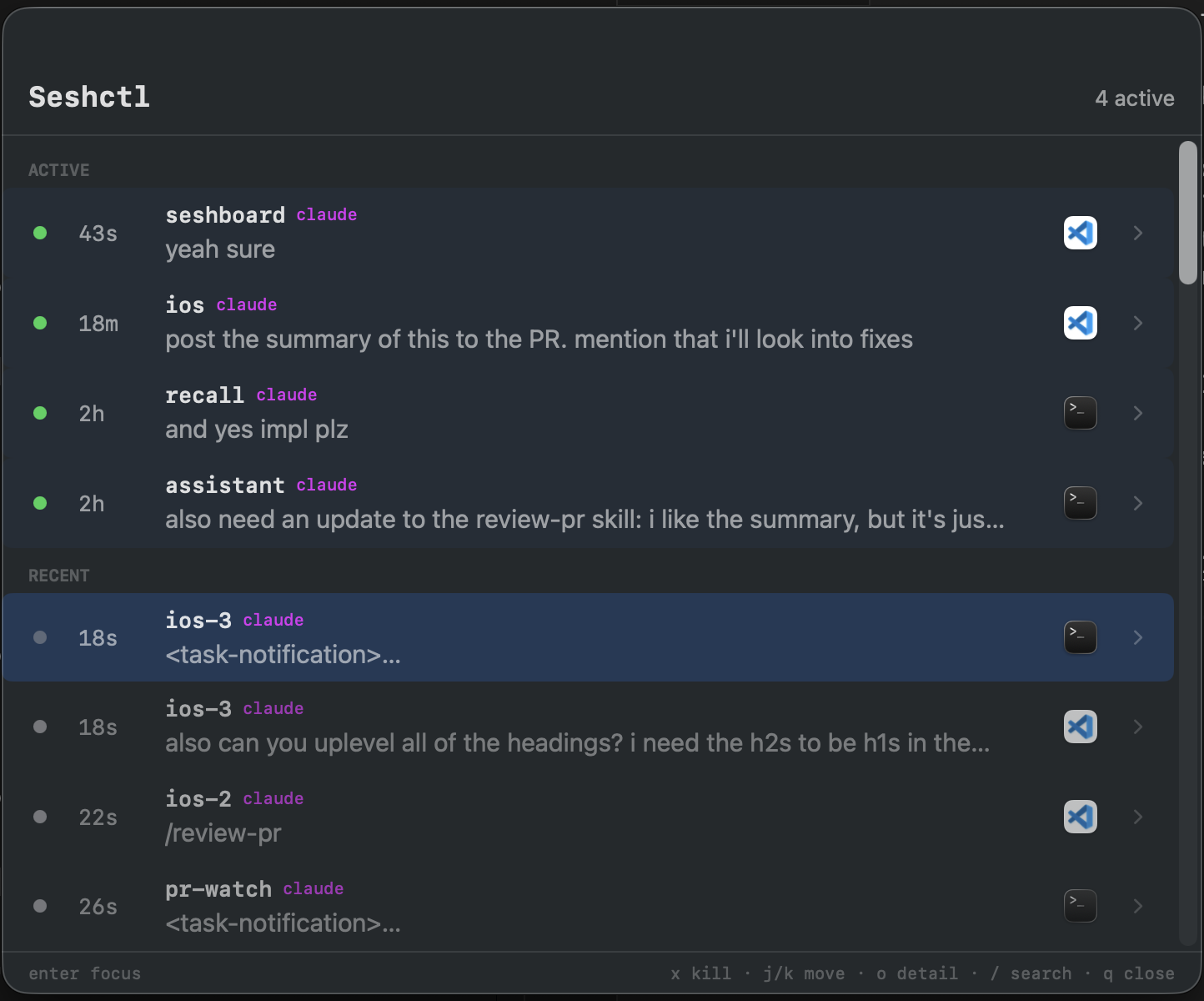
A macOS session manager for terminal-based workflows. Tracks coding sessions across Terminal.app, iTerm2, and VS Code terminals, with a native menu bar app and CLI.
Requirements
- macOS 13+
- Swift 6.0+ (comes with Xcode 16+)
- jq (for
make install-hooks)
Install
Build from source
git clone https://github.com/julo15/seshctl.git
cd seshctl
make install    # builds release + installs CLI + hooks + launches app
make install builds a release, installs seshctl-cli to ~/.local/bin, registers hooks, and launches the menu bar app. Make sure ~/.local/bin is on your PATH.
VS Code extension
If you use VS Code (or Cursor / VS Code Insiders), install the companion extension so Seshctl can focus terminal tabs by PID:
make install-vscode
Reload VS Code after installing to activate the extension.
Uninstall
make uninstall # stops app + removes CLI + unregisters hooks
LLM CLI hooks
Seshctl tracks session status through hooks for Claude Code and Codex. make install registers these automatically. To manage hooks separately:
make install-hooks    # register hooks for Claude Code and Codex
make uninstall-hooks  # remove hooks for Claude Code and Codex
Hook scripts are installed to ~/.local/share/seshctl/hooks/{claude,codex}/ and registered in ~/.claude/settings.json and ~/.agents/hooks.json respectively. Both commands are idempotent.
Usage
Press Cmd+Shift+S to toggle the session panel.
Session list
- j / k or Arrow keys — navigate sessions
- gg — jump to top
- G — jump to bottom
- Enter — focus the selected session's terminal
- o — open session detail view
- x — kill session process (then y to confirm, n to cancel)
- u — mark the selected session as read (clears the "Unread" pill)
- U — mark all sessions as read (then y to confirm, n to cancel)
- r — cycle the source filter: all → local only → cloud only → all
- v — toggle list/tree view
- h / l — in tree mode, jump to previous/next group (h jumps to the current group's first session, then to the previous group)
- / — search/filter sessions
- q or Esc — dismiss the panel
Session detail
- j / k or Arrow keys — scroll line by line
- gg — jump to top
- G — jump to bottom
- Ctrl+d / Ctrl+u — half-page down/up
- Ctrl+f / Ctrl+b — full page down/up
- q or Esc — back to list
Claude remote sessions
Seshctl can list Claude Code sessions hosted on claude.ai (Cowork) alongside local terminal sessions, and pair a local CLI with its claude.ai counterpart so Enter focuses the terminal. Until the in-app flow has built-in guidance, connecting requires a one-time manual step.
Connecting to claude.ai
- Open the session panel (Cmd+Shift+S) and click the ⋯ button in the header (or press Cmd+,) to open Settings.
- Click Connect…. A sign-in window opens on
claude.ai/login. - Sign in with email, not Google. Google's "Continue with Google" flow is blocked inside embedded WebViews, so the sheet rejects it. Enter your email to request a magic link.
- Open the magic-link email in your mail client. The link is set to open in your default browser, so clicking it won't complete sign-in inside the sheet. Instead, right-click the link → Copy Link Address.
- Paste the URL into the Paste magic-link URL field at the top of the sign-in window and press Enter (or click Go). The sheet navigates to the URL, completes auth, and auto-dismisses on success.
Once connected, remote sessions appear in the panel with a cloud glyph. The connection persists until the claude.ai session cookie expires (~28 days) or you click Disconnect in Settings.
Accounts that only have Google sign-in: add an email/password or passkey on claude.ai's account settings first, then use that method in the sheet.
Compatibility
LLM tools
| Tool | Hooks | Transcript parsing | Notes |
|---|---|---|---|
| Claude Code | Full | Full | All hook events, full transcript support. Sessions bridged to claude.ai (via /remote-control) show as a single row with a cloud glyph on line 2; Enter focuses the terminal. |
| Codex | Partial | Full | SessionStart hook doesn't fire until the first message is sent. No UserPromptSubmit (sessions never show "In Progress"). No SessionEnd hook — sessions close on Stop only. Requires codex_hooks = true feature flag (set automatically by make install-hooks) |
| Gemini | None | None | Tracked via CLI only (seshctl-cli start --tool gemini), no auto-hooks or transcript parsing yet |
Terminal apps
| App | Focusing | Notes |
|---|---|---|
| Terminal.app | Full | TTY-based tab matching via AppleScript |
| VS Code | Full | Requires the companion extension for terminal tab focusing |
| iTerm2 | Implemented | TTY-based tab matching via AppleScript, not extensively tested |
| Ghostty | Full | Working-directory matching via native AppleScript API; resume via surface configuration |
| Warp | Full | DB-assisted tab matching via Warp's internal SQLite; resume via keystroke simulation. No split pane support yet |
| cmux | Full | AppleScript focus across cmux's two-level hierarchy (workspace = sdef tab, horizontal tab within = sdef terminal). $CMUX_WORKSPACE_ID and $CMUX_SURFACE_ID are captured by the session-start hook and packed into windowId as "<workspace>|<surface>"; focus matches id of tab for the workspace, then focuses the matching terminal so both levels are raised. AppleScript resume via new tab + input text |
| Conductor.build | None | No focus support — Conductor exposes no AppleScript dictionary, URI handler, or extension API for targeting a specific terminal pane. Implementing focus requires an integration point from Conductor |
| Other | Basic | Falls back to window-name matching via System Events |
The first time seshctl focuses a session in an AppleScript-driven terminal (Terminal.app, iTerm2, Ghostty, Warp, or cmux), macOS will prompt you to grant SeshctlApp Automation permission for that terminal. You can review or revoke these grants in System Settings → Privacy & Security → Automation.
Development
make build          # debug build
make test           # run all tests
make run-app        # run menu bar app (debug)
make run-cli ARGS="list"  # run CLI with arguments
make help           # see all available commands
Yorumlar (0)
Yorum birakmak icin giris yap.
Yorum birakSonuc bulunamadi