claude-skill-codex-imagegen
Health Warn
- License — License: MIT
- Description — Repository has a description
- Active repo — Last push 0 days ago
- Low visibility — Only 8 GitHub stars
Code Warn
- Code scan incomplete — No supported source files were scanned during light audit
Permissions Pass
- Permissions — No dangerous permissions requested
No AI report is available for this listing yet.
A Claude Code skill that generates and edits images via Codex CLI's $imagegen (gpt-image-2).
claude-skill-codex-imagegen
Use OpenAI's gpt-image-2 — OpenAI's most capable image generation model — from inside Claude Code.
📦 What
A Claude Code skill that calls Codex CLI's $imagegen (gpt-image-2) on plain natural-language asks — "generate a hero image", "make a favicon", "insert images that fit the site" — and lands the result where you actually wanted it. No new slash command to learn. Claude calls it as part of whatever it's already doing.
💡 Why
Claude Code has no built-in image model. So most vibe-coded sites either ship without imagery or paste in stock that doesn't match. And generated images from a year ago screamed "AI" louder than the layout did, so people stopped trying. gpt-image-2 finally clears that bar — near-perfect text rendering, consistent lighting, real subject framing — which makes the image layer the cheapest way out of the "every AI site looks the same" trap. This skill makes that an in-session step, optionally guided by a DESIGN.md you keep at your project root.
🚀 Quickstart
git clone https://github.com/JunSeo99/claude-skill-codex-imagegen \
  ~/.claude/skills/codex-imagegen
Restart Claude Code, then ask in natural language:
"Generate a 1600×900 hero image for this landing page, save to assets/hero.png."
Want consistency across an entire site? Drop a DESIGN.md at the project root, then:
"Using DESIGN.md as the style reference, insert images that fit the site."
That's it. Full details below.
Claude Code does not ship with an image-generation model of its own. This skill closes that gap by teaching Claude Code to call gpt-image-2 through the OpenAI Codex CLI's built-in $imagegen feature — so you can generate icons, banners, OG cards, illustrations, infographics, and photo edits without ever leaving your Claude Code session.
The skill bundles a verified prompting playbook, a CLI reference, a security note, and a sample asset produced during validation.
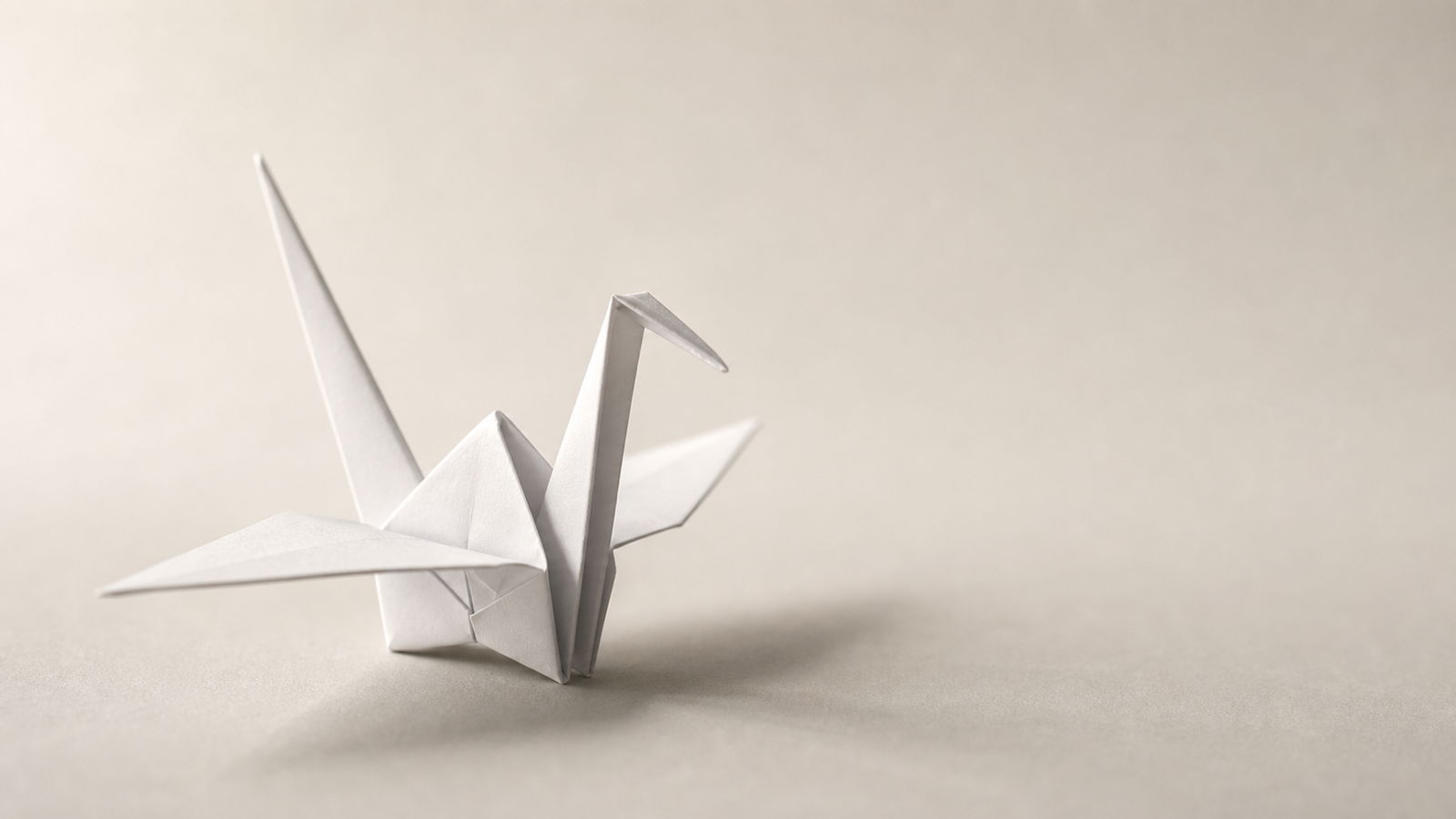
Sample 1600×900 hero image generated by gpt-image-2 via this skill.
Why this skill exists
Claude Code can already drive the Codex CLI, but $imagegen has rough edges that Claude misses on its own:
- Your prompt gets rewritten before it reaches the model. The Codex agent restructures every prompt into its internal labeled schema (verified via session logs), and augments vague prompts with its own taste. This skill writes prompts in that native schema directly, so nothing is lost or invented in translation.
- Size failures are deterministic, not random. gpt-image-2 enforces a total-pixel floor of 655,360 (plus multiples-of-16 edges, ≤3:1 ratio) — that's why 256×256 comes back as 1254×1254. The skill generates at valid sizes and downscales on the host.
- Transparent PNGs are not natively supported by gpt-image-2 — but the skill ships a working default: generate on a flat chroma-key background, then convert key to alpha with the removal helper bundled inside Codex itself (no API key needed). True native alpha via
gpt-image-1.5 --background transparentis available through the bundled CLI whenOPENAI_API_KEYis set. quality, masks, andinput_fidelityare not controllable through codex at all — they exist only on the bundled CLI (image_gen.py), which the skill runs host-side when those levers matter.- The raw PNG lands at
~/.codex/generated_images/<session-uuid>/ig_*.png— not where you asked - "Stunning, cinematic, 8K" keyword prompts produce visibly worse output than structured briefs — the skill enforces a schema-based prompt with concrete art direction
- The naive non-interactive recipe requires
--dangerously-bypass-approvals-and-sandbox, which hands the Codex sub-agent broad shell power — not a safe default
This skill bakes those facts in, defaults to a safer split workflow (Codex generates only; the host does the file moves and post-processing), and only opts into the bypass mode when explicitly requested.
What people use it for
The tool is general — anything that needs a PNG/JPEG/WebP written to disk fits. In practice the workflows that come up most often:
- Hero images and background photography for landing pages and marketing sites
- OG cards and social previews generated per page
- Favicons and app icons at the sizes you actually need
- Blog post illustrations that match the post's tone instead of leaning on stock libraries
- Brand asset drafts — logos, banners, badges — to iterate before committing to a designer
- Transparent cutouts — stickers, product shots, character art with real alpha, via the chroma-key workflow (no API key) or gpt-image-1.5 native transparency
- Infographic placeholders and diagrams with consistent visual language
- Photo edits — change-X-keep-Y patterns on an existing image, including multi-image compositing with role-labeled references
The workflow it was originally built around is solo developers shipping sites without a designer — where image quality and stylistic consistency are the main signal separating a vibe-coded site from a polished product. With a DESIGN.md at the project root (see Usage), Claude Code can generate a coherent image set across the whole site in one pass. But none of that requires you to be using it for a site; the skill is just as happy producing a single OG card or a batch of game-asset placeholders.
⚠️ Security note: this skill defines two run modes. The default is safe; the opt-in "automated" mode uses
--dangerously-bypass-approvals-and-sandbox. ReadSECURITY.mdbefore using the automated mode in a directory whose prompts or contents you do not control.
Requirements
- macOS or Linux
- Claude Code — this skill is a filesystem skill loaded from
~/.claude/skills/, which is a Claude Code feature (Claude.ai web uses a different skill upload mechanism) - Codex CLI v0.130 or newer (
npm i -g @openai/codex) — the transparent-cutout and host-run CLI workflows rely on helper scripts (remove_chroma_key.py,image_gen.py) that ship inside recent Codex versions (verified on 0.144.1) - A logged-in Codex session (
codex login) — uses your ChatGPT/Codex subscription - Optional:
OPENAI_API_KEYin your environment (pluspip install openai) for the host-run bundled CLI — quality control, exact sizes, native transparency, batches, per-image billing
Verified against codex-cli 0.144.1 on macOS (Darwin 25.4.0); originally validated on 0.130.0. sips ships with macOS; on Linux the skill falls back to ImageMagick convert.
Installation
Option A — clone into the skills directory (recommended for daily use)
git clone https://github.com/JunSeo99/claude-skill-codex-imagegen.git
mkdir -p ~/.claude/skills
ln -s "$(pwd)/claude-skill-codex-imagegen/skill" ~/.claude/skills/codex-imagegen
Symlinking from skill/ lets you git pull to update without re-copying files.
Option B — install the prebuilt .skill bundle
A pre-packaged distributable lives in dist/codex-imagegen.skill (it's a zip with a .skill extension).
git clone https://github.com/JunSeo99/claude-skill-codex-imagegen.git
mkdir -p ~/.claude/skills
unzip claude-skill-codex-imagegen/dist/codex-imagegen.skill -d ~/.claude/skills/
Option C — copy the folder
git clone https://github.com/JunSeo99/claude-skill-codex-imagegen.git
mkdir -p ~/.claude/skills
cp -r claude-skill-codex-imagegen/skill ~/.claude/skills/codex-imagegen
Restart Claude Code (or start a new session) so the skill is discovered.
Usage
The skill activates on phrases such as:
- "generate an image", "make an icon", "create a banner", "OG image"
- "hero illustration", "make a favicon", "brand mark", "product shot"
- "imagegen", "GPT Image 2", "codex image"
Multilingual triggers are supported via the skill's description field — localized prompts (Korean, Japanese, etc.) work without configuration.
Basic usage — single asset
Any request that produces a visual file saved to disk:
You: Make a 512×512 hero icon for my landing page — a single seedling growing from a flat horizon, line-art only, no text.
Claude: (invokes the skill, composes a prompt in Codex's native labeled schema, runs
codex execin Mode A — safe, parses the absolute path from stdout,cps andsips-resizes it to./assets/hero-icon.png, then opens the file with Read to verify it matches your intent)
By default Claude runs Codex without --dangerously-bypass-approvals-and-sandbox and does the cp/sips step itself, in its own approved-tool context. The Codex sub-agent never gets carte-blanche shell access during normal use.
If you want a single-step automated flow (Mode B) — e.g. for batching — you can opt in:
You: Generate these 12 favicons in automated mode.
Claude: (after confirming, runs Codex with
--dangerously-bypass-approvals-and-sandboxso the sub-agent handlescp/sipsitself)
Read SECURITY.md before opting in.
For complex prompts (text in the image, photo edits, brand assets), Claude reads references/prompting-guide.md before generating to apply the structured prompt template and avoid known pitfalls.
For full-site image sets — pair with a DESIGN.md
For projects that need a coherent visual language across multiple slots — hero, OG card, empty states, illustrations, favicons — drop a DESIGN.md at the project root with your palette, typography, and illustration style. Then ask Claude Code:
You: Using DESIGN.md as the style reference, insert images that fit the site.
Claude reads DESIGN.md, scans the codebase for slots that need imagery, writes prompts that incorporate the palette and tone, calls this skill for each, and inserts the resulting paths into the right <img> tags. The hero image, the empty-state illustration, and the OG card all end up looking like they belong to the same product.
A minimal DESIGN.md that works well:
# Design

## Concept
Calm, considered, modern.

## Palette
- Surface (main):  #F4F1ED  — warm off-white
- Surface (cards): #FFFFFF
- Text:            #1A1A1A
- Accent / CTA:    #C46A4E  — soft terracotta, used sparingly

## Typography
- Inter, system-ui sans-serif

## Illustration style
- Single subject, plenty of whitespace, no busy backgrounds
- Soft natural light from upper left
- No text inside images unless explicitly asked
- Avoid stock-photo vibes and over-saturated colors
The qualitative Illustration style block carries most of the consistency work. Palette obviously matters too, but it's the descriptive instructions ("hand-folded paper feel", "no busy backgrounds", "warm tones") that keep each image from looking like it came from a different stock-image library.
Before / After — what the image layer changes
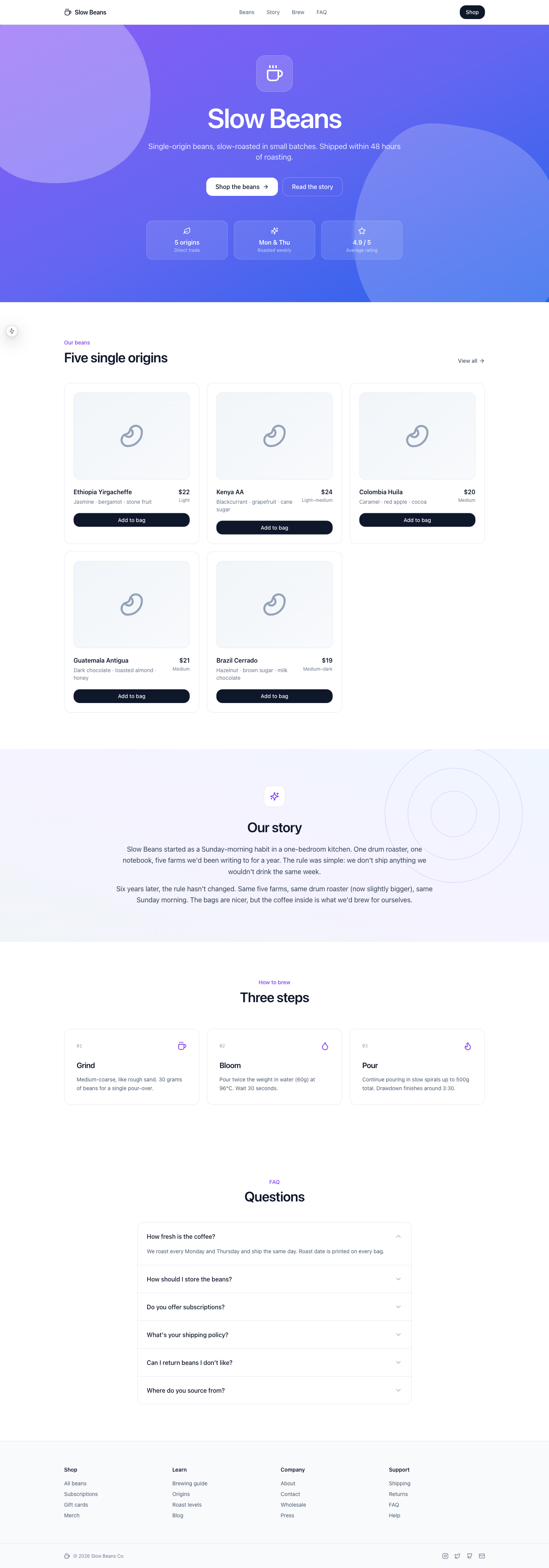
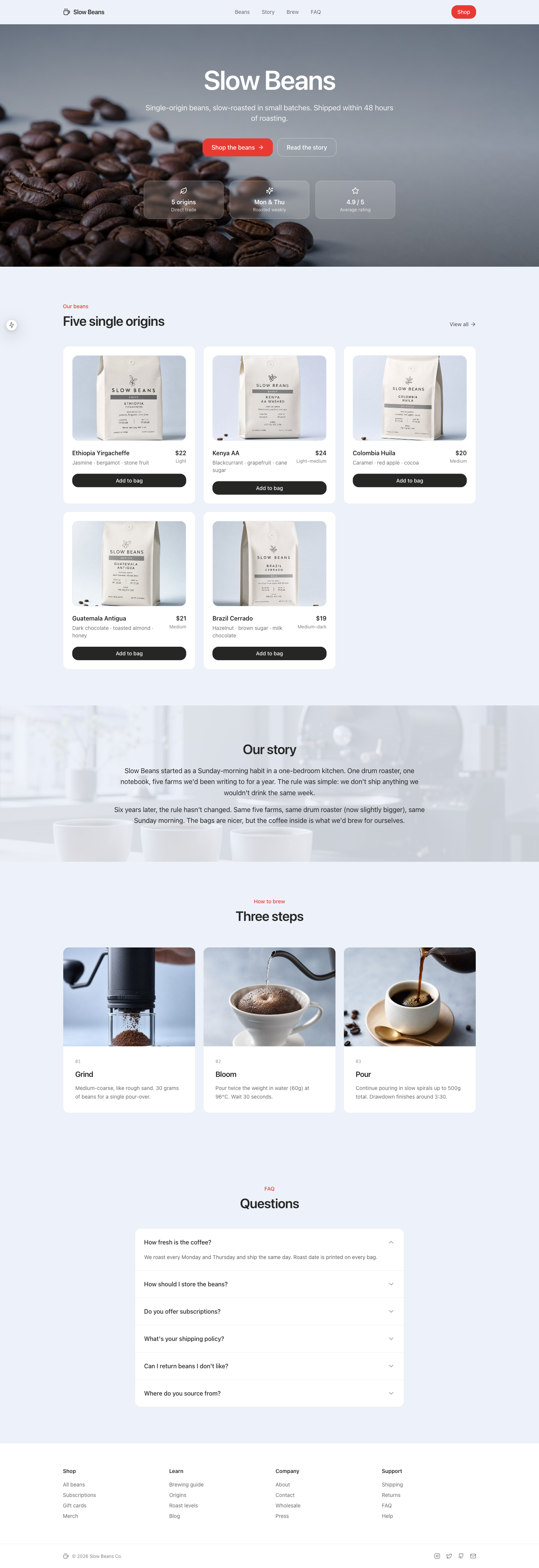
To make the difference concrete, here's the same coffee-shop landing page built two ways. Identical component code in both — same Next.js 15, same Tailwind, same shadcn-style markup, same content, same navigation. The only thing that varies is the image layer.
| Without images | With images |
|---|---|
 |
 |
0 images. Lucide Coffee over a purple-blue gradient hero, Bean icons inside product cards, Sparkles over a gradient story, Droplet/Flame brewing icons. The textbook AI default stack. |
8 images generated by this skill with a DESIGN.md at the project root. Hero photography, five custom coffee-bag product shots (origin, roast, tasting notes, roast/best-by dates, brew recipe all on-label), a roastery story background, three brewing macro shots. |
Both pages were produced in the same session. The right-hand one took roughly one extra command — "Using DESIGN.md as the style reference, insert images that fit the site." The demo project itself is intentionally kept outside this repo to keep the skill bundle small.
What's in the skill
skill/
├── SKILL.md                  Prompt-flow model, Mode A & B, execution-control table,
│                             transparency decision tree, recipes, failure modes
├── references/
│   ├── prompting-guide.md    Native schema, first-50-words, text rendering, people,
│   │                         edit pattern, multi-image/consistency, anti-patterns, Korean text
│   └── cli-reference.md      Mode A/B flags, host-run bundled CLI (image_gen.py),
│                             remove_chroma_key.py flags, size rules, costs, troubleshooting
└── assets/
    └── hero.png              Sample 1600×900 hero image generated by gpt-image-2
Prompts are written in the Codex agent's own labeled schema — because the agent restructures every prompt into that schema anyway, writing it directly means nothing is lost in translation:
Use case → Asset type → Primary request → [Input images] → Scene/backdrop → Subject
→ Style/medium → Composition/framing → Lighting/mood → Color palette
→ Materials/textures → [Text (verbatim)] → Constraints → Avoid
Every slot left empty is a slot the Codex agent fills with its own taste — the skill's core rule is to arrive fully specified.
Cost
- ChatGPT/Codex subscription: 1 image turn ≈ 3–5 text turns of usage limit
- API key mode (
OPENAI_API_KEYset): priced per image, typically $0.04 – $0.35- Image output: $30.00 / 1M output tokens
- Image input: $8.00 / 1M input tokens ($2.00 / 1M cached input)
- Plus text-input tokens for your prompt (see OpenAI pricing for the current text rate on gpt-image-2)
For batch work (10+ images), the API key mode is generally cheaper than the subscription.
Known limitations of gpt-image-2
| Limitation | Workaround the skill applies |
|---|---|
| Output size must satisfy hard constraints (multiples-of-16 edges, ≥655,360 total pixels, ≤3:1 ratio) | Generates at a valid size; host resizes with sips -z H W (macOS) or convert -resize WxH! (Linux) |
| No transparent PNG on gpt-image-2 | Default: chroma-key generation + host-run remove_chroma_key.py (bundled inside Codex, no API key). Complex edges (hair/fur/glass): gpt-image-1.5 --background transparent via the bundled CLI |
quality/masks/input_fidelity not settable through codex |
Runs the bundled CLI (image_gen.py) host-side with --quality high etc. when those levers matter (OPENAI_API_KEY) |
| Long multi-line text passages, brand names, and very small text in dense layouts still wobble (short labels and CJK render near-perfectly) | EXACT TEXT marker + double quotes for literal strings; letter-by-letter spelling for brand names; HTML/CSS overlay for paragraph-length text |
| Latency up to 2 min on complex prompts | Bash timeout set to 300000 ms |
| Imprecise element placement in complex layouts | Falls back to simplification or SVG-then-rasterize suggestion |
Compatibility
| Component | Tested |
|---|---|
codex-cli |
0.144.1 (originally verified on 0.130.0) |
| OS | macOS (Darwin 25.4.0); Linux untested but expected to work with ImageMagick fallback |
| Claude Code | App / CLI (filesystem skills) |
Output-path layout under ~/.codex/generated_images/ and $imagegen invocation semantics are not part of the Codex CLI's public contract. If a future codex-cli release changes them, please open an issue with the new behavior.
Contributing
Issues and PRs welcome. Useful directions:
- Linux-side post-processing parity (ImageMagick verified end-to-end)
- Additional recipes (favicons, app store screenshots, social card pipelines)
- Improved non-Latin text rendering tips (CJK, Arabic, Devanagari, etc.)
- Migration notes when newer Codex CLI versions change
$imagegenbehavior
When changing the skill body, run the validators from anthropics/skills:
python3 path/to/skill-creator/scripts/quick_validate.py skill/
python3 path/to/skill-creator/scripts/package_skill.py skill/ dist/
Security
See SECURITY.md for the trust boundary and the threat model around --dangerously-bypass-approvals-and-sandbox.
Changelog
See CHANGELOG.md.
Acknowledgements
- OpenAI — Codex CLI image generation feature
- OpenAI — Image Generation guide
- OpenAI Cookbook — GPT Image Prompting Guide
- fal.ai — GPT Image 2 Prompting Guide
- anthropics/skills — skill-creator template
This project is independent and not affiliated with, endorsed by, or sponsored by Anthropic or OpenAI. "Claude", "Claude Code", "OpenAI", "Codex", and "GPT" are trademarks of their respective owners.
License
MIT © 2026 JunSeo99
Reviews (0)
Sign in to leave a review.
Leave a reviewNo results found