ATP-Rankings-API
Health Uyari
- License — License: Apache-2.0
- Description — Repository has a description
- Active repo — Last push 0 days ago
- Low visibility — Only 5 GitHub stars
Code Gecti
- Code scan — Scanned 12 files during light audit, no dangerous patterns found
Permissions Gecti
- Permissions — No dangerous permissions requested
Bu listing icin henuz AI raporu yok.
Python/SQLITE3 based project which scrapes data from ATP Rankings website and uses Matplotlib for data visualization. Also updated to include FastAPI and MCP server deployment on render
ATP Rankings Data Visualization
A comprehensive Python project for ATP tennis rankings data collection, analysis, and visualization. Features include web scraping, database management, interactive web interface, and AI integration via Model Context Protocol (MCP).

Features
- ** Data Collection**: Automated scraping from atptour.com
- ** Database**: 2,600+ weeks of historical ATP rankings (1973-2025)
- ** Web Interface**: Modern FastAPI application with interactive charts
- ** CLI Analysis**: Command-line tools for player statistics and comparisons
- ** AI Integration**: MCP server for AI assistant access
- ** Visualizations**: Matplotlib (CLI) and Chart.js (web) graphs
- ** Testing**: Comprehensive test suite with pytest
Quick Start
Installation
Clone the repository
git clone https://github.com/Jupiterian/ATP-Rankings-Data-Visualization.git
cd ATP-Rankings-Data-Visualization
Install dependencies
pip install -r requirements.txtRun the web application
uvicorn src.main:app --reloadOpen your browser to
http://localhost:8000
Update Database
To get the latest rankings data:
python scripts/filler.py
Project Structure
ATP-Rankings-Data-Visualization/
├── src/                      # Core application code
│   ├── main.py              # FastAPI web application
│   ├── services.py          # Business logic layer
│   ├── mcp_router.py        # MCP API endpoints
│   └── mcp_manifest.json    # MCP schema definition
├── scripts/                  # Utility scripts
│   ├── generate.py          # Regenerate entire database
│   ├── filler.py            # Update database with latest data
│   ├── analyze.py           # CLI data analysis tool
│   ├── debug.py             # Database debugging utility
│   ├── test_mcp.sh          # Quick MCP endpoint tests
│   ├── test_render_mcp.py   # Production deployment tests
│   ├── keep_alive.py        # Render free tier keep-alive
│   └── deploy.sh            # Deployment helper
├── docs/                     # Documentation
│   ├── MCP_README.md        # MCP server documentation
│   ├── MCP_DEPLOYMENT.md    # Deployment guide
│   ├── MCP_IMPLEMENTATION_SUMMARY.md
│   └── MCP_QUICK_REFERENCE.md
├── templates/                # HTML templates (Jinja2)
│   ├── index.html           # Home page
│   ├── week.html            # Weekly rankings
│   ├── comparison.html      # Player comparison
│   ├── weeks_at_no1.html    # Histogram visualization
│   └── api_docs.html        # API documentation
├── tests/                    # Test suite
│   └── test_mcp.py          # MCP endpoint tests
├── Examples/                 # Example visualizations
├── rankings.db              # SQLite database (2,600+ tables)
├── Dockerfile               # Container image
├── docker-compose.yml       # Docker Compose config
├── Procfile                 # Render/Heroku deployment
├── runtime.txt              # Python version
└── requirements.txt         # Python dependencies
Web Application
Features
- Browse Rankings: View all 2,600+ weeks organized by year
- Player Search: Autocomplete search across all players
- Player Comparison: Side-by-side statistics with career graphs
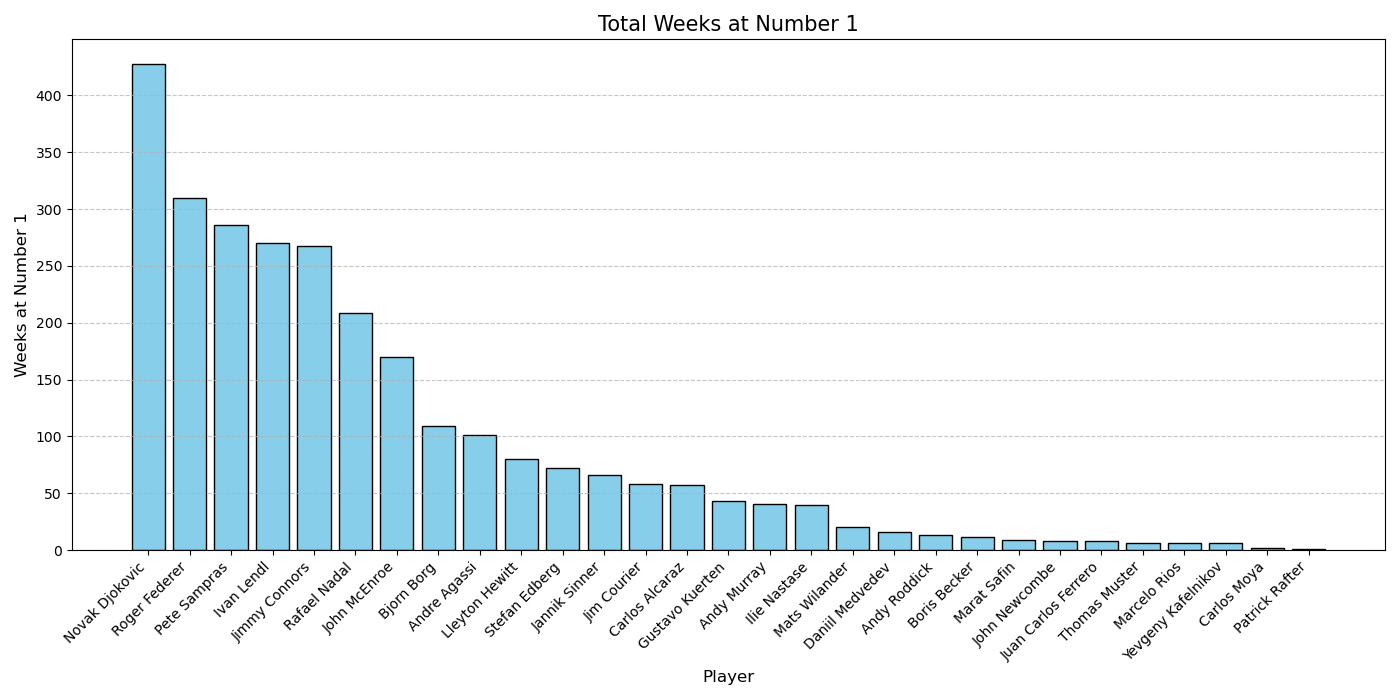
- Weeks at #1: Interactive histogram of world #1 rankings
- API and MCP Access: RESTful API with comprehensive documentation
- Keyboard Navigation: Arrow keys to navigate between weeks
Running Locally
uvicorn src.main:app --reload
Access at http://localhost:8000
API Endpoints
GET /- Home pageGET /week/{week_id}- Weekly rankingsGET /comparison- Player comparison toolGET /weeks-at-no1- Weeks at #1 histogramGET /api-docs- API documentationGET /api/weeks- List all available weeksGET /api/week/{week_id}- Get week dataGET /api/search-players?q={query}- Search playersPOST /api/player-factfile- Player statisticsPOST /api/player-career- Career time-series data
MCP Server (AI Integration)
The MCP server allows AI assistants like Claude to query ATP rankings data.
MCP Endpoints
Base URL: http://localhost:8000/mcp
GET /mcp/health- Health checkGET /mcp/manifest- Server capabilitiesPOST /mcp/tools/search_players- Search for playersPOST /mcp/tools/get_player_factfile- Player statisticsPOST /mcp/tools/get_player_career- Career historyGET /mcp/tools/get_weeks_at_no1- Weeks at #1 leaderboardGET /mcp/tools/get_all_weeks- Available weeks listPOST /mcp/tools/get_week_rankings- Specific week data
Testing MCP
# Run test suite
pytest tests/test_mcp.py -v

# Quick smoke test
bash scripts/test_mcp.sh

# Test production deployment
python scripts/test_render_mcp.py https://your-app.onrender.com
Full Documentation: See docs/MCP_README.md
CLI Analysis Tools
analyze.py
Analyze player data and generate matplotlib visualizations.
# Show player statistics
python scripts/analyze.py -f Roger_Federer

# Plot ranking history
python scripts/analyze.py -r Roger_Federer Rafael_Nadal

# Plot points history
python scripts/analyze.py -p Novak_Djokovic

# Weeks at #1 histogram
python scripts/analyze.py -n
Options:
-h- Show help menu-f- Player factfile (statistics)-r- Ranking history plot-p- Points history plot-n- Weeks at #1 bar graph
Examples: See Examples/Examples.md
Database Management
Update Database (Recommended)
Add latest rankings data:
python scripts/filler.py
Regenerate Database
Complete database rebuild (takes ~1 hour):
python scripts/generate.py
Debug Database
Find and fix problematic tables:
python scripts/debug.py
Browse Database
Recommended GUI tool: DB Browser for SQLite
Deployment
Deploy to Render (Free)
Push to GitHub
git add .
git commit -m "Deploy ATP Rankings"
git push origin main
Connect to Render
- Go to render.com
- Click "New Web Service"
- Connect your GitHub repository
- Render auto-detects settings from
Procfile
Deploy
- Click "Create Web Service"
- Wait 2-3 minutes for deployment
Keep Alive (Optional)
python scripts/keep_alive.py https://your-app.onrender.com
Full Guide: See docs/MCP_DEPLOYMENT.md for Railway, Fly.io, Heroku, Docker, and VPS options.
Testing
# Run all tests
pytest tests/ -v

# Run with coverage
pytest tests/ --cov=src --cov-report=html

# Test specific module
pytest tests/test_mcp.py::TestMCPHealth -v
Technologies
Backend:
- Python 3.12
- FastAPI (web framework)
- SQLite3 (database)
- Uvicorn (ASGI server)
- Pydantic (validation)
Frontend:
- Jinja2 (templates)
- Chart.js (interactive charts)
- HTML5/CSS3
Scraping & Analysis:
- BeautifulSoup4 (web scraping)
- Matplotlib (static visualizations)
Testing & Deployment:
- Pytest (testing framework)
- Docker (containerization)
- Render/Railway/Fly.io (hosting)
License
See LICENSE file for details.
Contributing
Contributions welcome! Please:
- Fork the repository
- Create a feature branch
- Make your changes
- Add tests
- Submit a pull request
Contact
For questions or issues, please open a GitHub issue.
** If you find this project useful, please star the repository!**
Yorumlar (0)
Yorum birakmak icin giris yap.
Yorum birakSonuc bulunamadi