chemdraw-mcp
Health Uyari
- License — License: Apache-2.0
- Description — Repository has a description
- Active repo — Last push 0 days ago
- Low visibility — Only 5 GitHub stars
Code Gecti
- Code scan — Scanned 12 files during light audit, no dangerous patterns found
Permissions Gecti
- Permissions — No dangerous permissions requested
Bu listing icin henuz AI raporu yok.
MCP server for Claude: molecule names or SMILES → publication-style 2D structure drawings (PNG/SVG, offline via RDKit), reaction schemes, curved-arrow mechanisms and schematic spectra. Optional ChemDraw CDXML export — unofficial, not affiliated with Revvity.
chemdraw-mcp



Chat → chemical structure. An MCP server for Claude Desktop that turns
molecule names or SMILES into publication-style 2D structure drawings —
"draw aspirin" produces a print-ready PNG/SVG, rendered fully offline with
RDKit. No ChemDraw required; ChemDraw CDXML is available as an optional extra
format for users who want to keep editing there.
Built for pharmacy/chemistry students who spend too much time clicking
hexagons: structures, full reaction schemes, step-by-step mechanisms,
substance data sheets and Ph.Eur. assay calculations — straight from the chat,
with an interactive preview panel rendered inline.
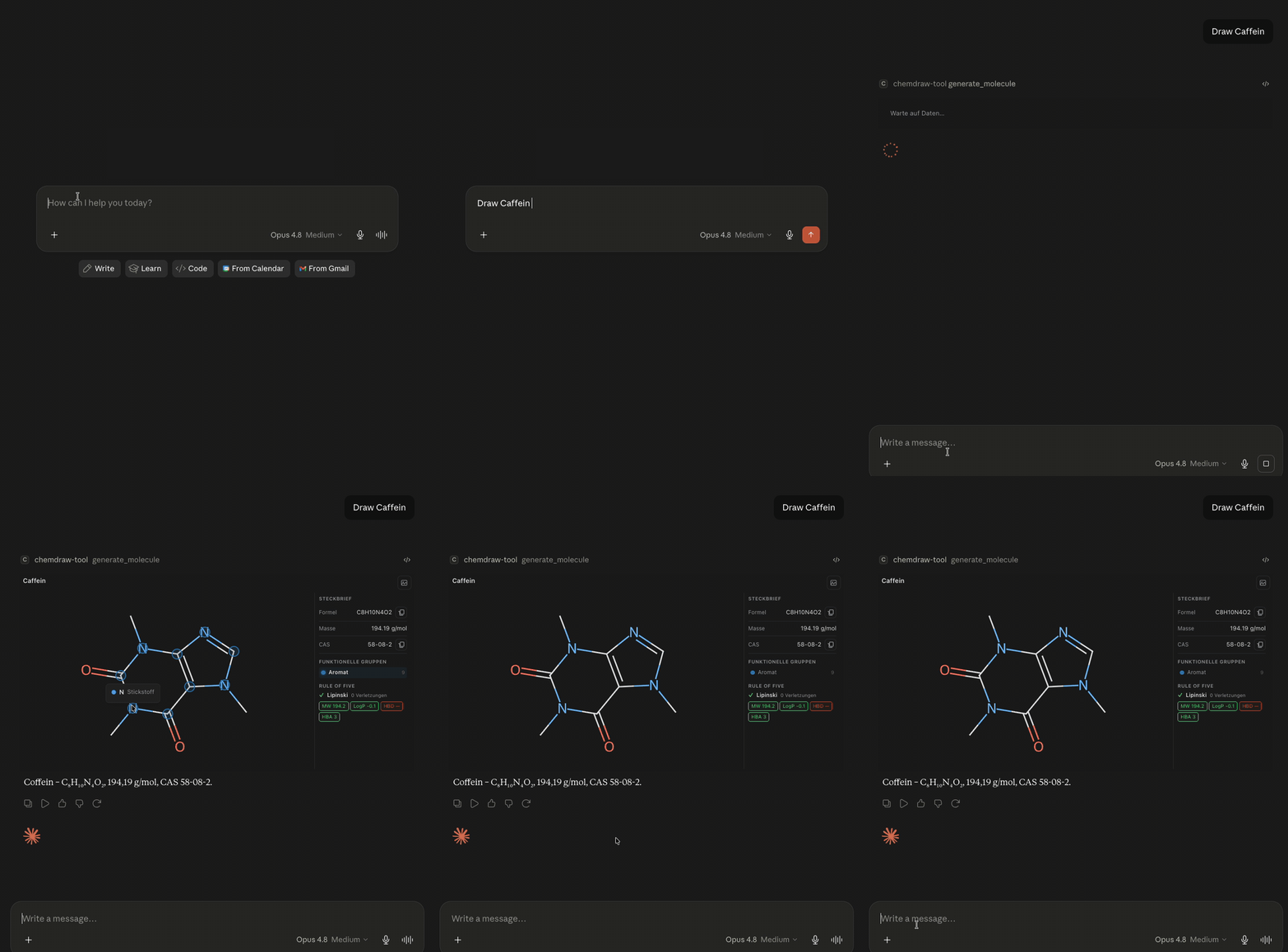
Example output
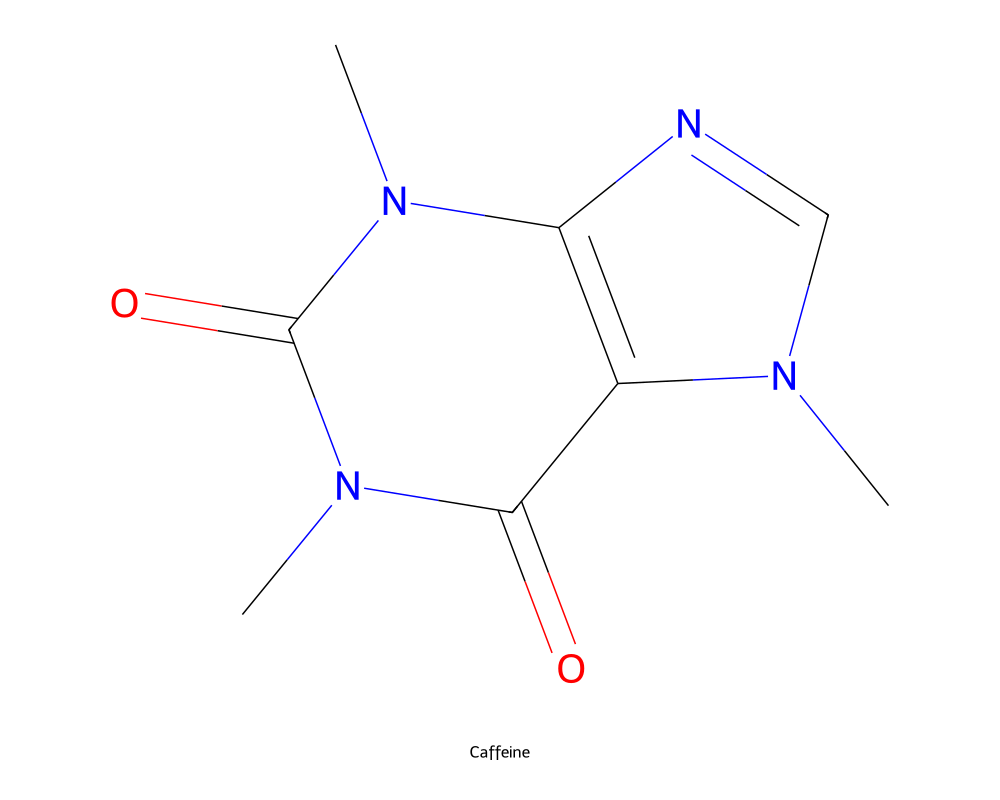
"Draw caffeine" — print-ready PNG, generated by generate_molecule:
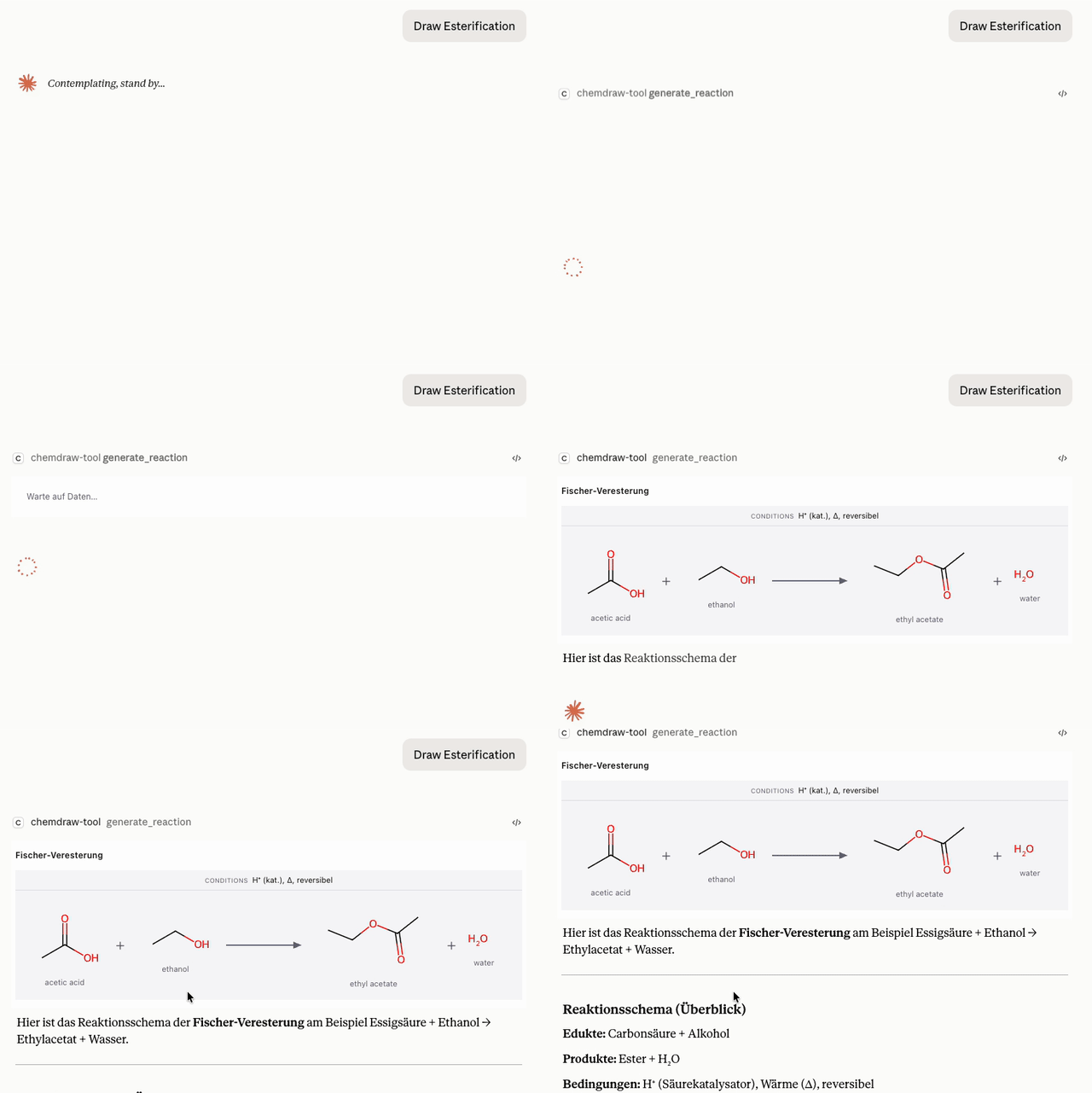
"Show the Fischer esterification of ethanol with acetic acid" —generate_reaction renders the scheme with conditions above the arrow,
live in the chat panel:
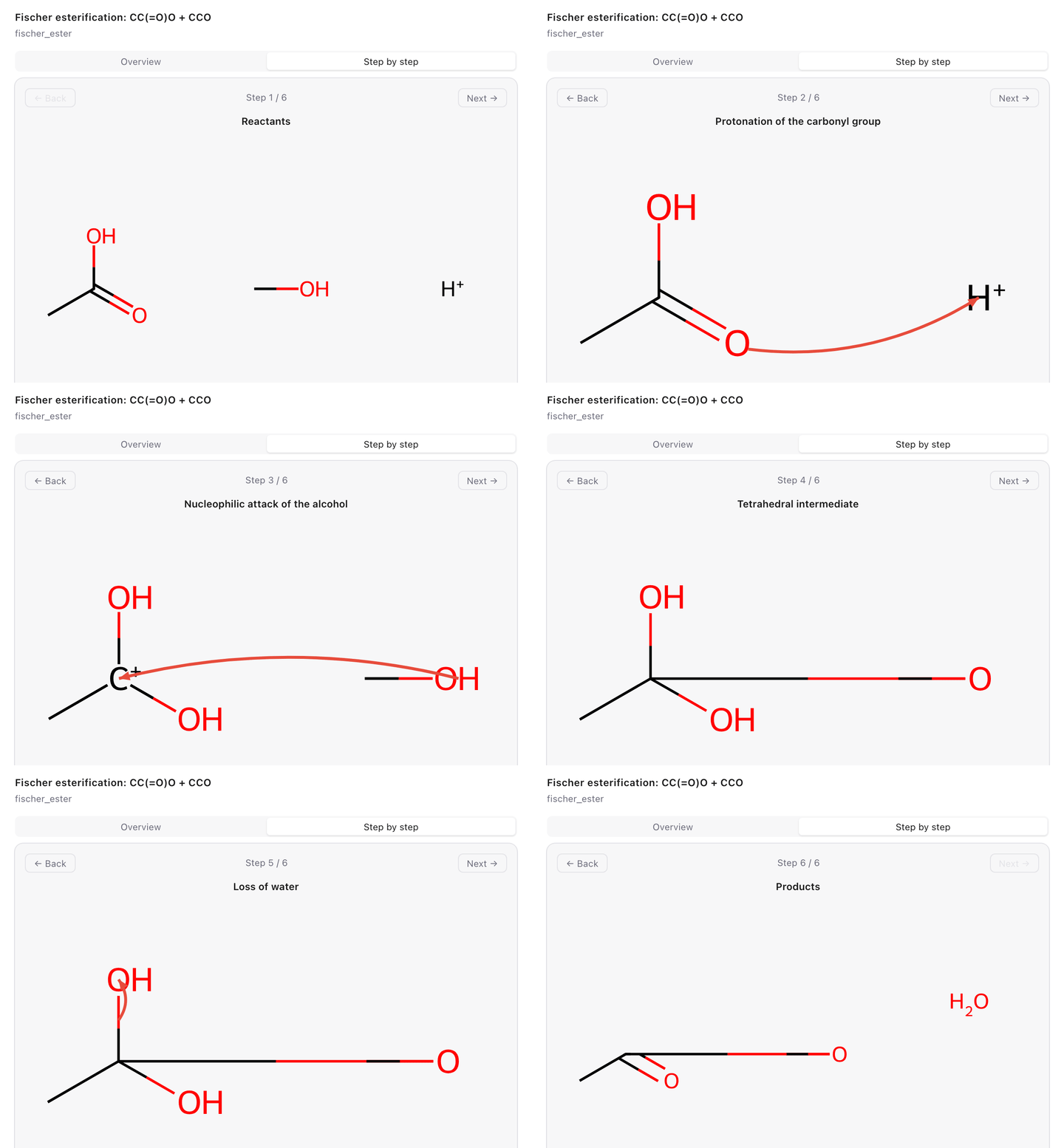
"Show the Fischer esterification mechanism step by step" —generate_mechanism renders curved electron-flow arrows in the interactive
panel:
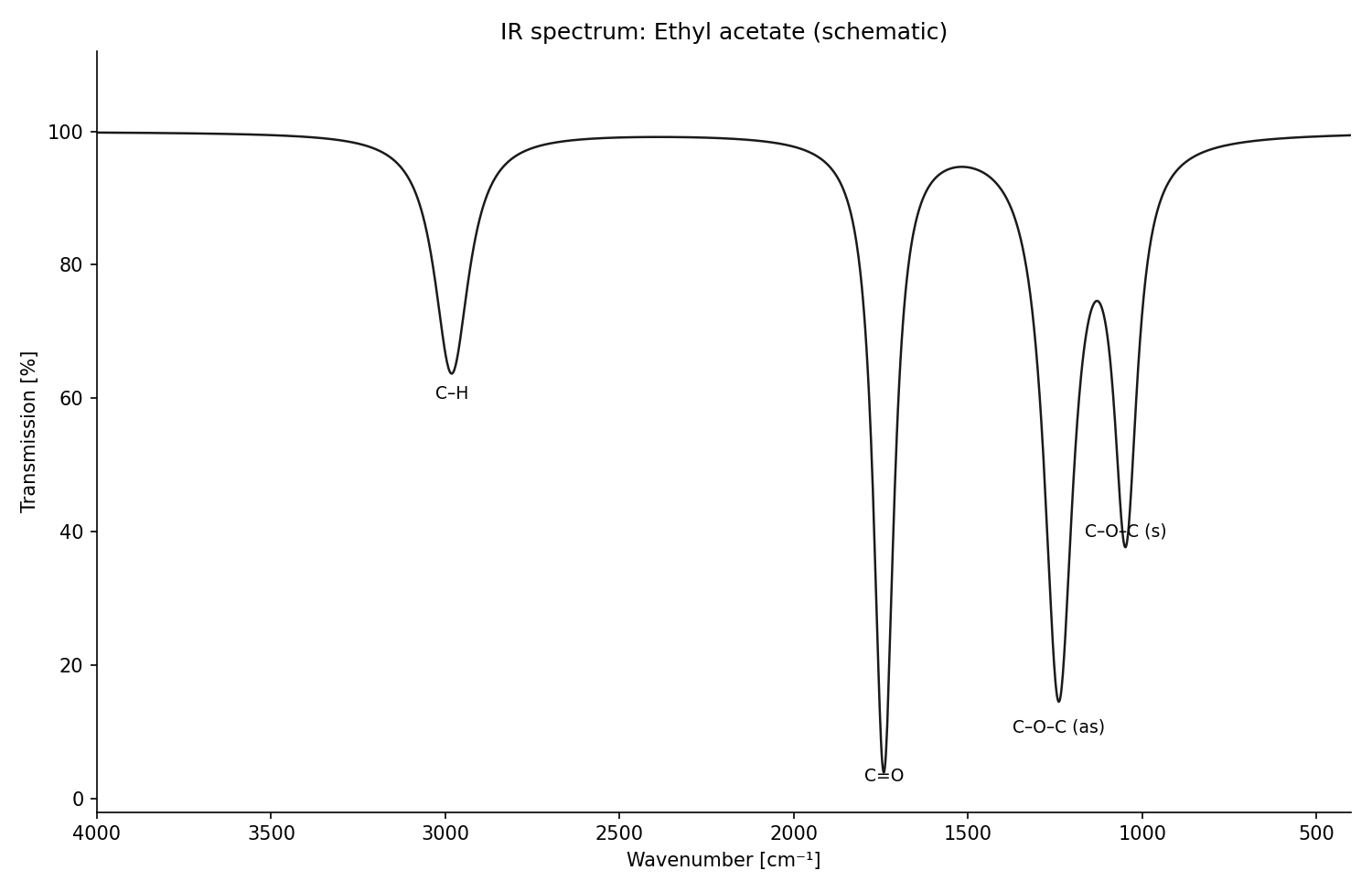
"Sketch the IR spectrum of ethyl acetate" — generate_spectrum (draws the
peaks it is given, with per-type axis conventions):
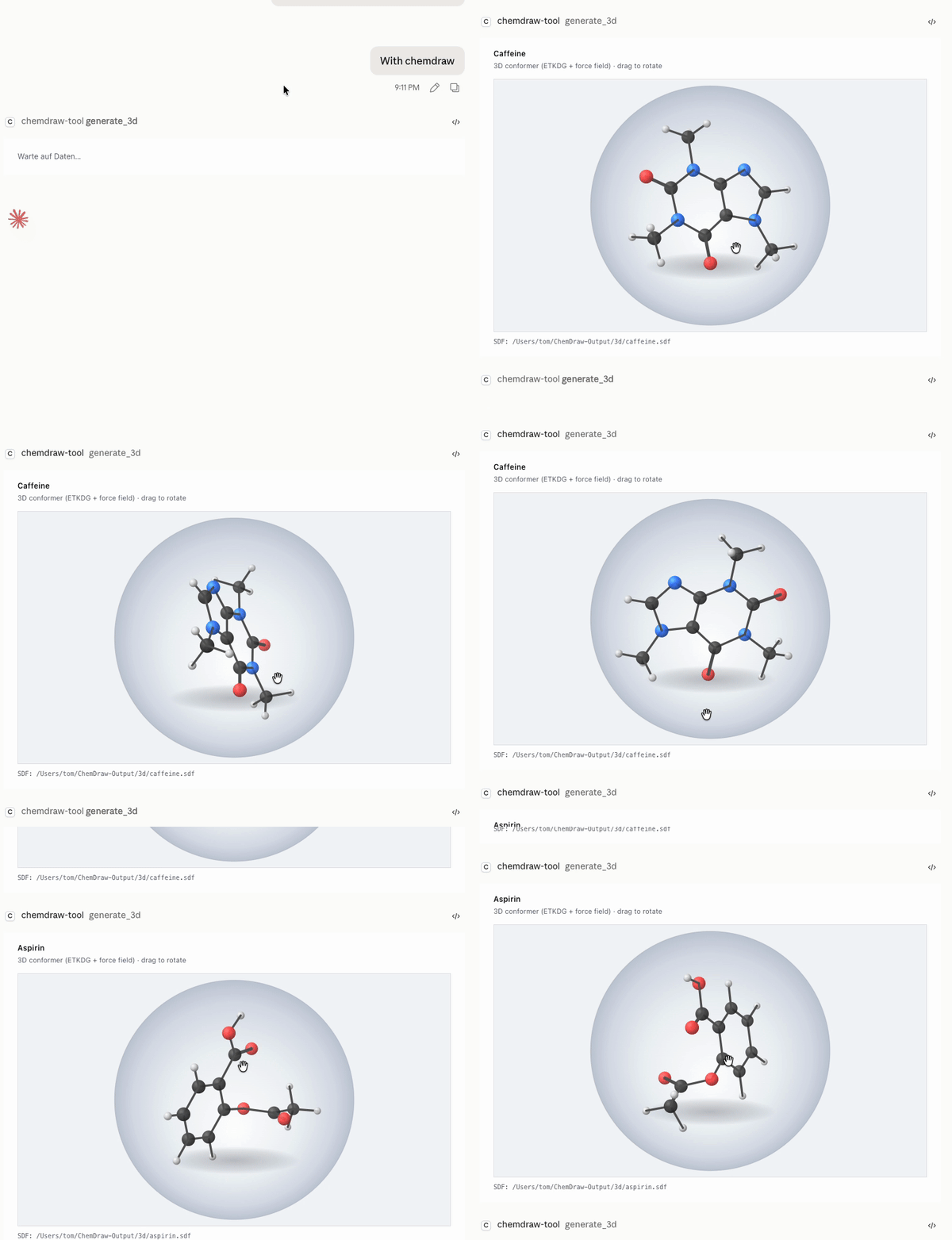
"Show caffeine in 3D" — generate_3d embeds the molecule (ETKDG + force
field) and opens a drag-to-rotate ball-and-stick viewer in the chat panel:
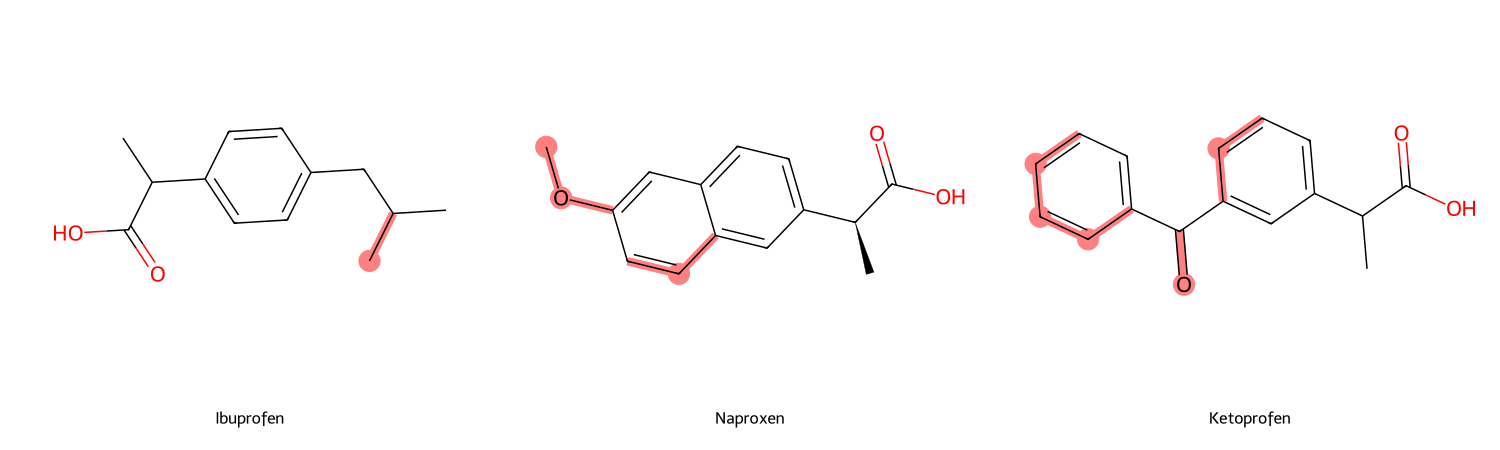
"What distinguishes ibuprofen from naproxen and ketoprofen?" —compare_molecules keeps the shared scaffold (MCS) neutral and highlights
everything that differs:
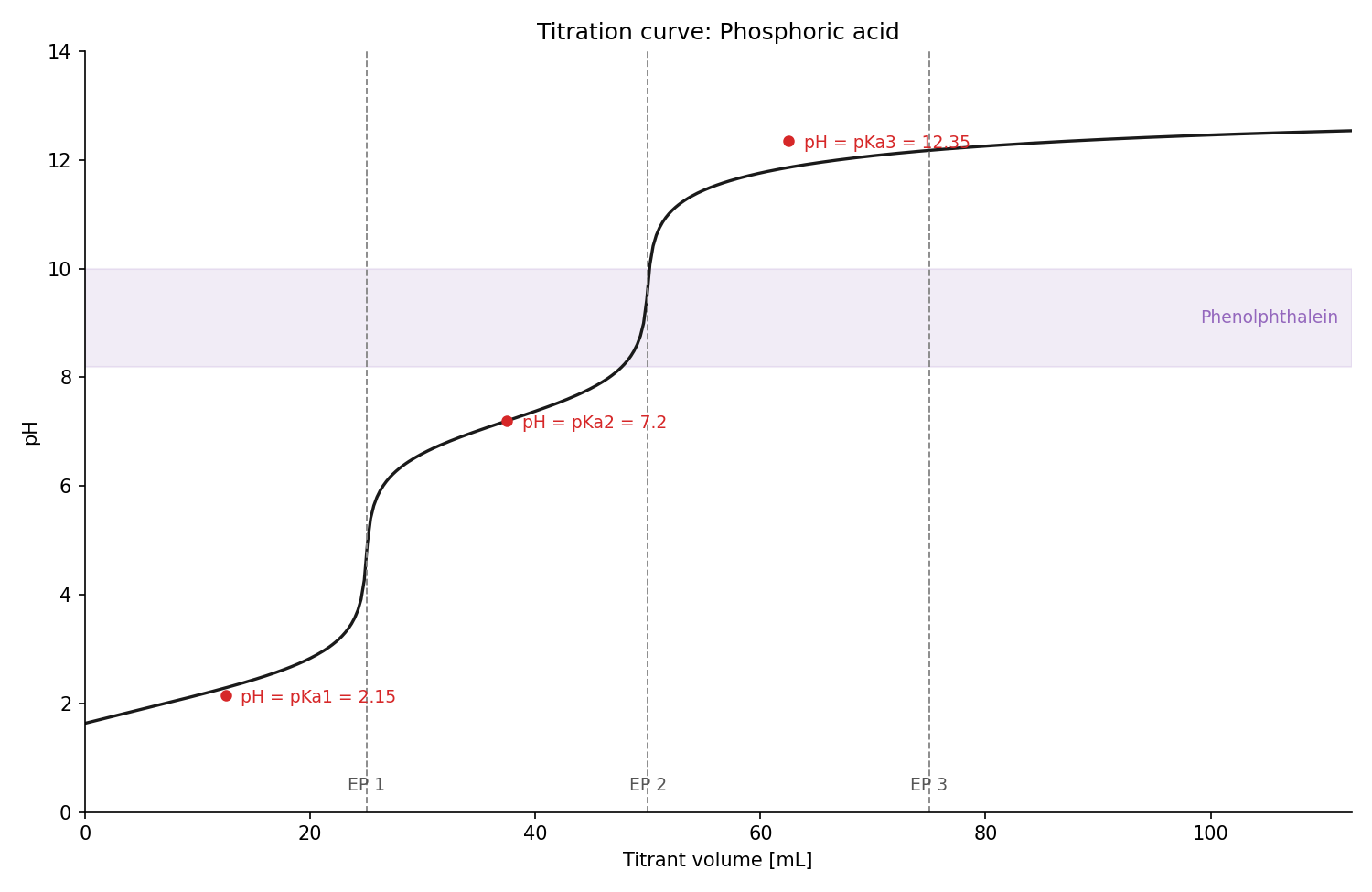
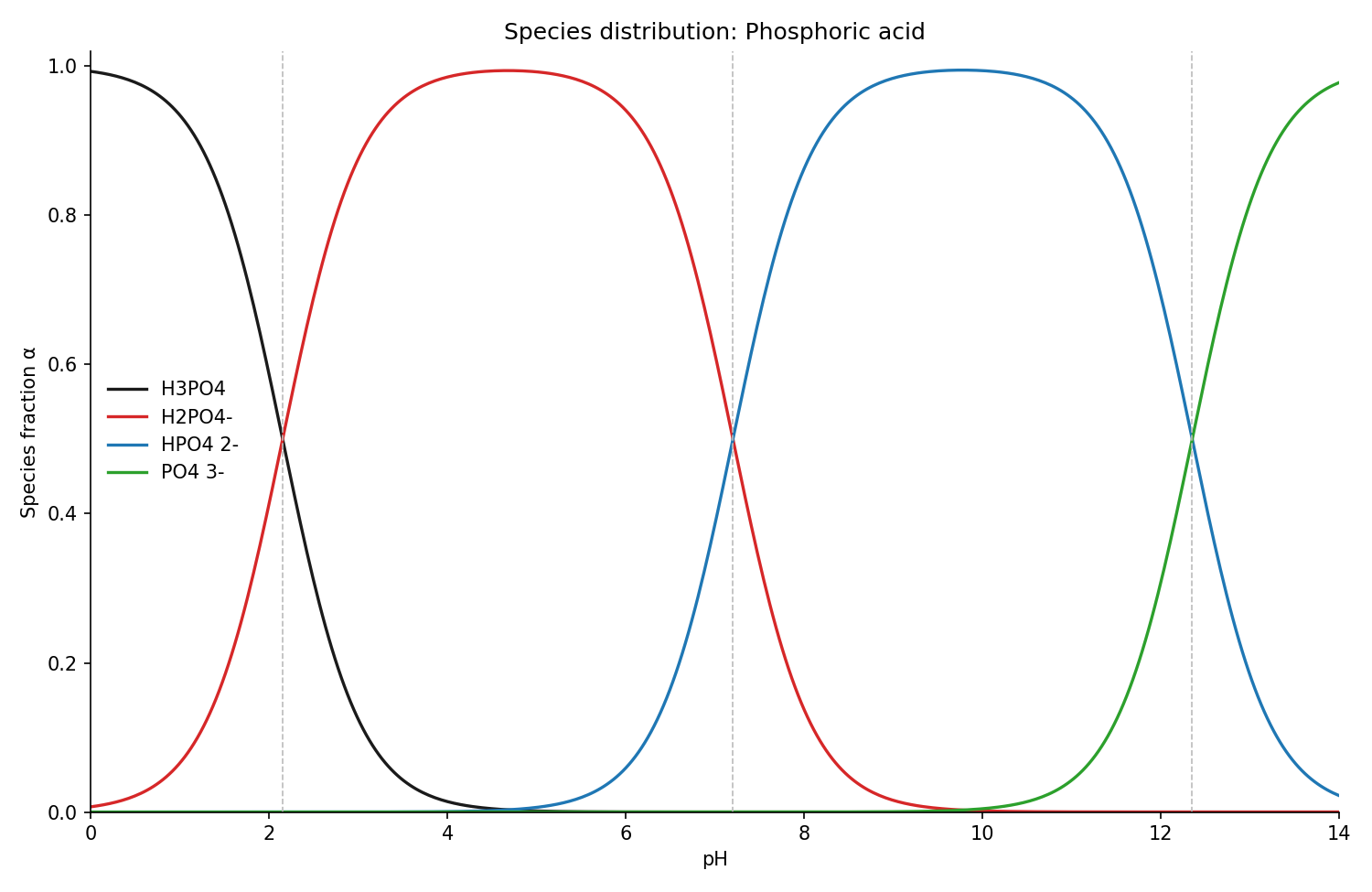
"Titration curve of phosphoric acid with NaOH, phenolphthalein as
indicator" — generate_titration_curve computes pH from the exact charge
balance, with equivalence points, buffer points (pH = pKa) and the indicator
band; its sibling generate_species_distribution shows which protonation
species dominates at every pH:
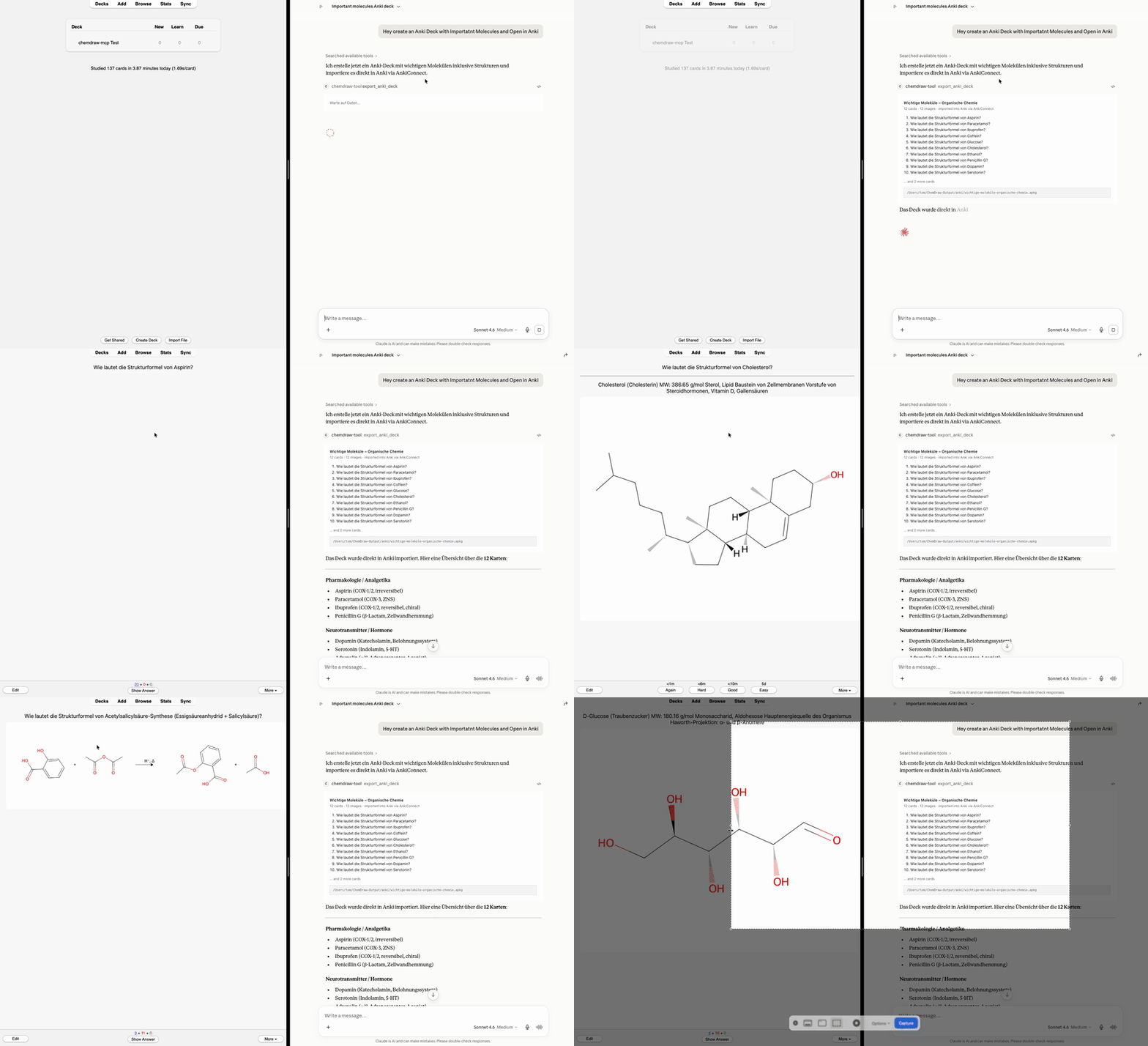
"Create an Anki deck with important molecules and open it in Anki" —export_anki_deck / export_curated_deck build a ready-to-import .apkg
with rendered structures embedded; with the optional AnkiConnect add-on the
cards land straight in the running Anki, no clicks:
Features
generate_molecule— name/SMILES → 2D structure as PNG + SVG
(optionally CDXML), with properties, functional-group detection and a
Lipinski rule-of-five checkgenerate_reaction— educts + products + conditions → reaction schemebatch_generate— a whole list of structures in one callgenerate_mechanism— curved-arrow mechanisms (SN1, SN2, Fischer
esterification) step by stepgenerate_spectrum— schematic spectra from peak lists (IR, NIR,
Raman, UV/Vis, fluorescence, ORD, CD, ¹H/¹³C NMR, MS) with per-type axis
conventions — draws given peaks, does not predict spectraexport_anki_deck— exam-prep flashcards as a ready-to-import
Anki.apkg: structure↔name drills (optionally reversed: one note,
both directions), cloze/fill-in-the-blank cards, identity/detection
reactions, spectrum band assignment — with rendered images embedded,
per-card tags,Parent::Childsubdecks; re-exporting a deck updates
cards instead of duplicating them. Optional delivery straight into the
running Anki via the AnkiConnect add-onexport_curated_deck— small, formula-verified starter decks
(classic analgesics, Ph.Eur. identity reactions)generate_titration_curve— pH vs. titrant volume from the exact
charge balance, with equivalence points, buffer points (pH = pKa) and
indicator transition bandgenerate_species_distribution— protonation species fractions
over pH (Henderson-Hasselbalch) with pKa crossovers markedcompare_molecules— 2-4 structures side by side, differences
highlighted, shared scaffold (MCS) neutralgenerate_3d— rotatable 3D ball-and-stick conformer in the chat
panel (ETKDG + force field) plus SDF export; stereo descriptors (R/S,
E/Z) available on 2D drawings viaannotate_stereolookup_*— substance data from PubChem, ChEBI, KEGG and UniProt
(properties, GHS safety, pathways)calculate_validation— Ph.Eur.-style content determination with full
calculation steps, t-test/F-test statistics- Interactive in-chat UI (MCP App): hover atoms, inspect functional
groups, export PNG with one click - macOS ChemDraw bridge (optional): open any generated structure directly
in ChemDraw viaopen_chemdraw_file
Installation
Option 1 — straight from PyPI (needs uv):
add this to your Claude Desktop config (claude_desktop_config.json →mcpServers):
"chemdraw": {
  "command": "uvx",
  "args": ["chemdraw-mcp"]
}
Option 2 — one-command installer (clones the repo and registers the
server in Claude Desktop automatically):
git clone https://github.com/jurimaxam-dotcom/chemdraw-mcp.git
cd chemdraw-mcp && ./install.sh
Both are idempotent and leave existing MCP servers untouched. Restart
Claude Desktop, then ask: "draw caffeine".
Optional: with a Java runtime installed (e.g. brew install openjdk),
systematic IUPAC names — including ones no database indexes — are parsed
offline via OPSIN. Without Java the
server falls back to the PubChem/NCI online lookup.
How it works
name / SMILES
   │
   ▼
resolver ──► OPSIN (systematic IUPAC names, offline) ──► PubChem / NCI (names)  ·  direct parse (SMILES)
   │
   ▼
RDKit 2D coordinates ──► validation (sanity, round-trip)
   │
   ├──► image_export   → PNG + SVG files          (primary, offline)
   ├──► svg_renderer   → interactive chat preview (MCP App resource)
   └──► cdxml_writer   → ChemDraw CDXML           (optional, on request)
Development
uv sync                      # backend deps
cd chemdraw_tool/ui && npm install && npx playwright install chromium  # frontend, once
./test.sh                    # the gate: pytest + JS unit + headless-Chromium e2e
~400 tests, written test-first. The e2e test rasters a real RDKit SVG in
headless Chromium and compares it against an exact pixel snapshot.
License
Apache-2.0 — see LICENSE. Copyright 2026 jurimaxam-dotcom.
Disclaimer: This is an unofficial, independent project, not affiliated
with or endorsed by Revvity. ChemDraw is a trademark of Revvity Signals
Software, Inc. This tool does not include or require ChemDraw; it can
optionally export files in the open CDXML format.
Yorumlar (0)
Yorum birakmak icin giris yap.
Yorum birakSonuc bulunamadi