cc-agent-teams-action-monitor
Health Uyari
- License — License: MIT
- Description — Repository has a description
- Active repo — Last push 0 days ago
- Low visibility — Only 5 GitHub stars
Code Basarisiz
- eval() — Dynamic code execution via eval() in .agents/skills/microsoft-agent-framework/examples/02-tool-integration.py
Permissions Gecti
- Permissions — No dangerous permissions requested
This tool is a real-time monitoring dashboard for Claude Code Agent Teams. It watches your local `~/.claude/` directory to visualize team structures, task progress, and inter-agent messaging through a web interface.
Security Assessment
The tool accesses the local `.claude` directory, which contains sensitive session data and agent configurations. The backend runs a local FastAPI server and the frontend requires Node.js, meaning it establishes local HTTP connections. No hardcoded secrets or dangerous permission requests were found in the primary codebase.
However, the scan raised a High risk flag due to a failure regarding dynamic code execution: an `eval()` function was detected inside an example file located at `.agents/skills/microsoft-agent-framework/examples/02-tool-integration.py`. While this is likely just a vulnerable example script rather than a core dependency, dynamic code execution presents a significant security risk if accidentally run or integrated.
Quality Assessment
The project is very new and received its latest push recently. It is released under the standard MIT license, which is safe for commercial and private use. However, it suffers from very low community visibility, currently sitting at only 5 GitHub stars. This means the codebase has not been widely peer-reviewed or battle-tested by the open-source community, so hidden bugs or vulnerabilities might be present.
Verdict
Use with caution — the core application is relatively safe for local use, but developers should strictly avoid executing the flagged example file containing `eval()`.
Real-time monitoring dashboard for Claude Code Agent Teams — visualize team status, task progress, and agent messaging. Created by Justin Wang with vibe coding using GLM-5.
Agent Teams Dashboard
Claude Code Agent Teams のリアルタイム監視ダッシュボード



言語 / Languages / 语言
概要
Agent Teams Dashboard は、Claude Code の Agent Teams 機能をリアルタイムに監視・管理するための Web アプリケーションです。~/.claude/ ディレクトリを監視し、チーム構成、タスク進捗、エージェント間のメッセージングを可視化します。
主な特徴
- リアルタイム更新: HTTP Polling による自動データ更新(5秒〜60秒間隔)
- チーム監視: アクティブなエージェントチームの一覧表示・ステータス判定
- タスク管理: ステータス別のタスク可視化(カンバン形式)
- 統合タイムライン: エージェント間メッセージ + セッションログの統合表示
- 多言語対応: 日本語・英語・中国語の3言語サポート(UI/APIエラーメッセージ)
- 言語自動検出: Accept-Language ヘッダーまたはブラウザ設定から自動判定
- ダークモード: テーマ切り替え対応
クイックスタート
前提条件
| ソフトウェア | バージョン | 確認コマンド |
|---|---|---|
| Python | 3.11以上 | python --version |
| Node.js | 18以上 | node --version |
| npm | 9以上 | npm --version |
インストール
# リポジトリのクローン
git clone <repository-url>
cd cc-agent-teams-action-monitor

# バックエンド
cd backend
pip install -e ".[dev]"

# フロントエンド
cd ../frontend
npm install
起動方法
ターミナル 1(バックエンド):
cd backend
uvicorn app.main:app --reload --host 127.0.0.1 --port 8000
ターミナル 2(フロントエンド):
cd frontend
npm run dev
アクセス: http://localhost:5173/
スクリーンショット
メインページ(概要ビュー)
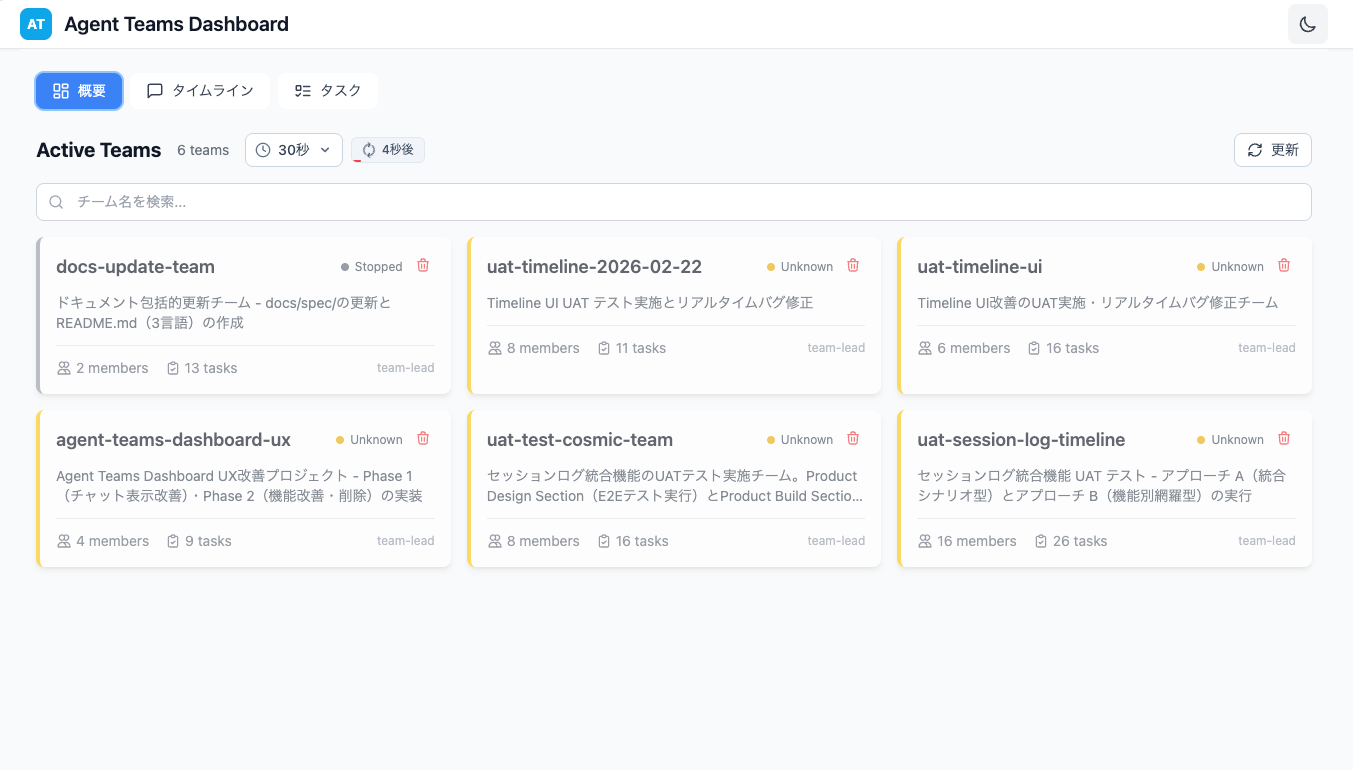
チーム一覧を表示し、アクティブなエージェントチームのステータスを確認できます。
チーム詳細
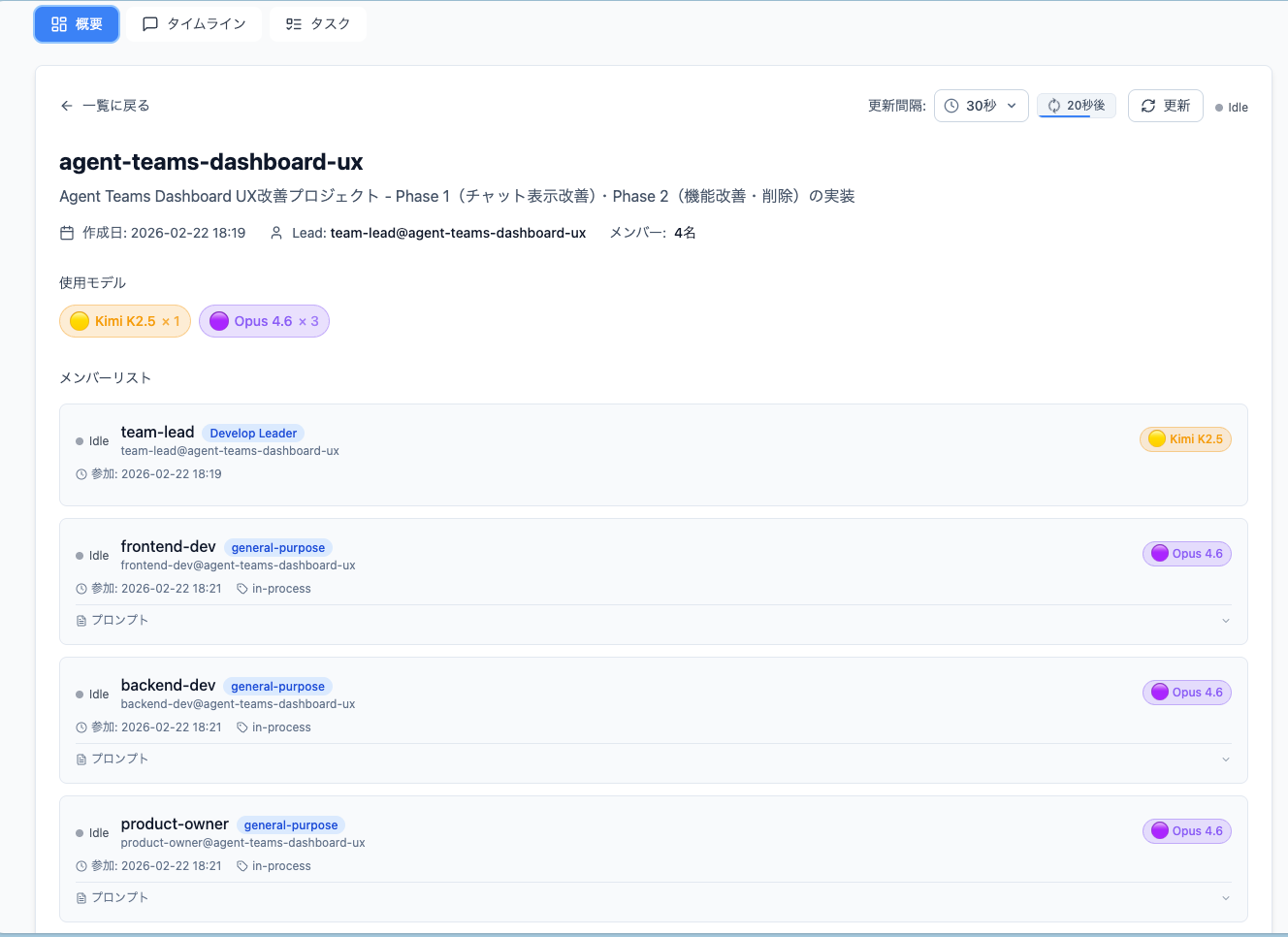
チームを選択すると、メンバー構成やステータスの詳細情報が表示されます。
タイムラインビュー
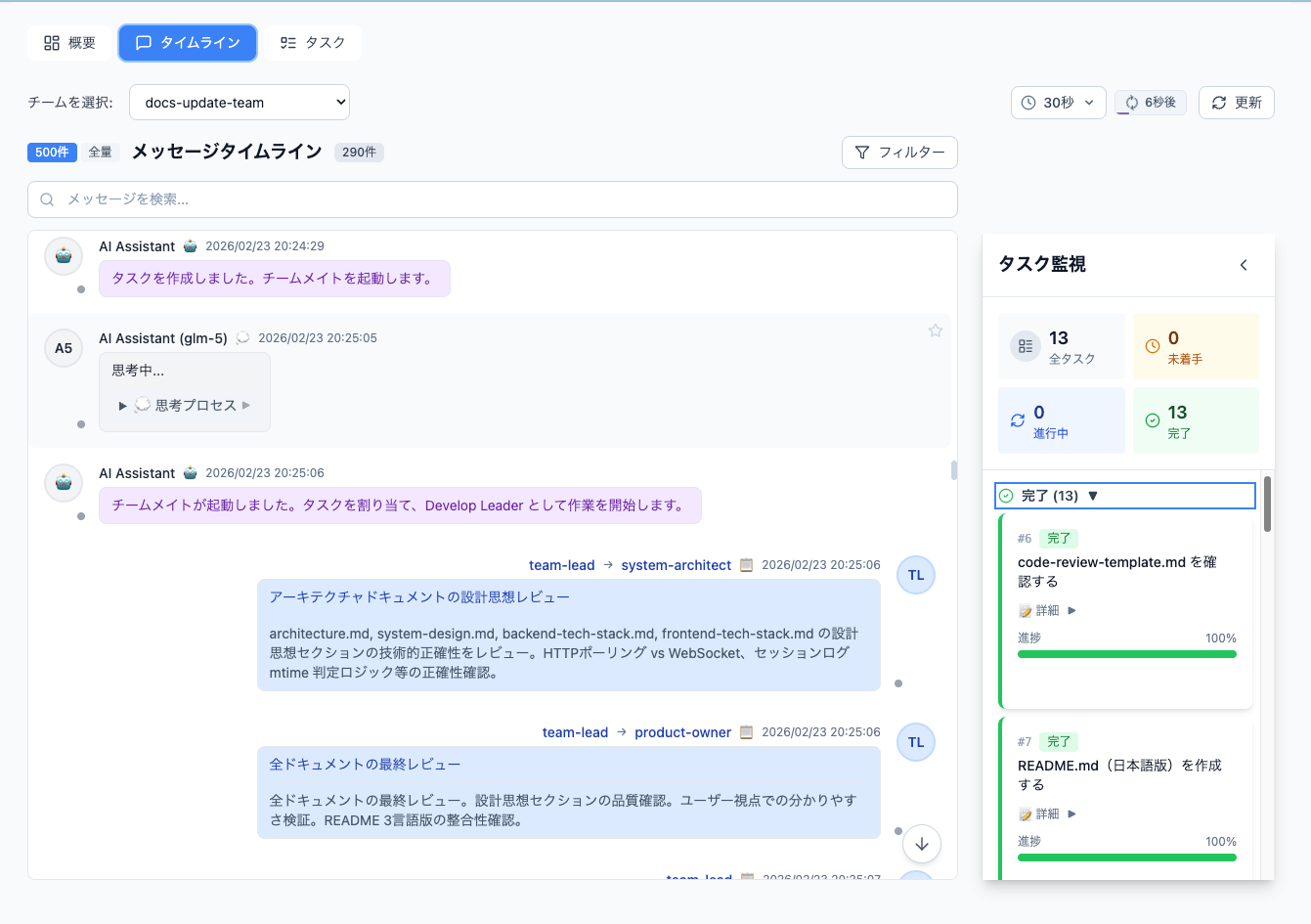
エージェント間のメッセージ履歴とタスク進捗を統合的に確認できます。
メッセージ詳細
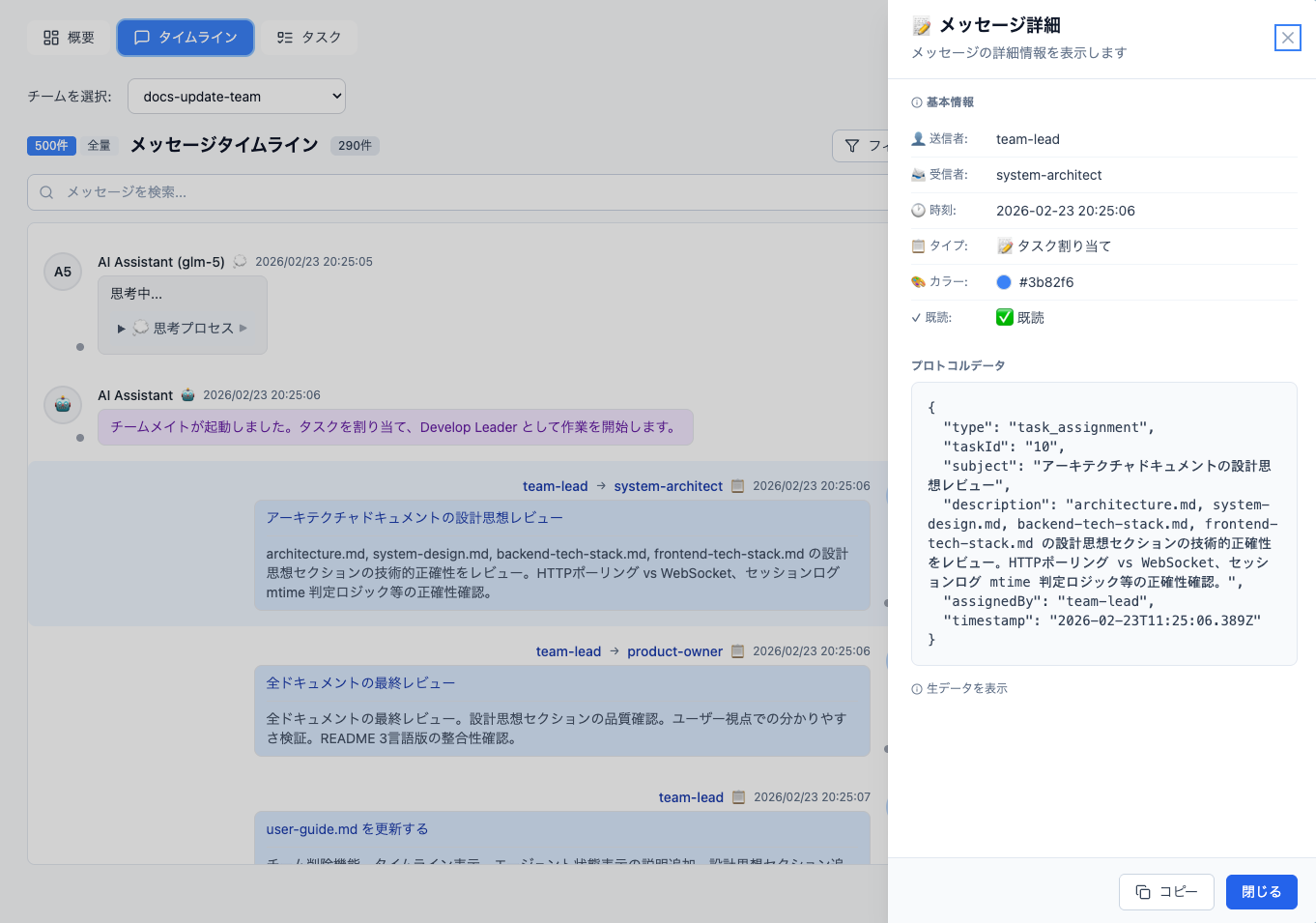
メッセージをクリックすると、詳細な内容を確認できます。
タスク管理(カンバン)
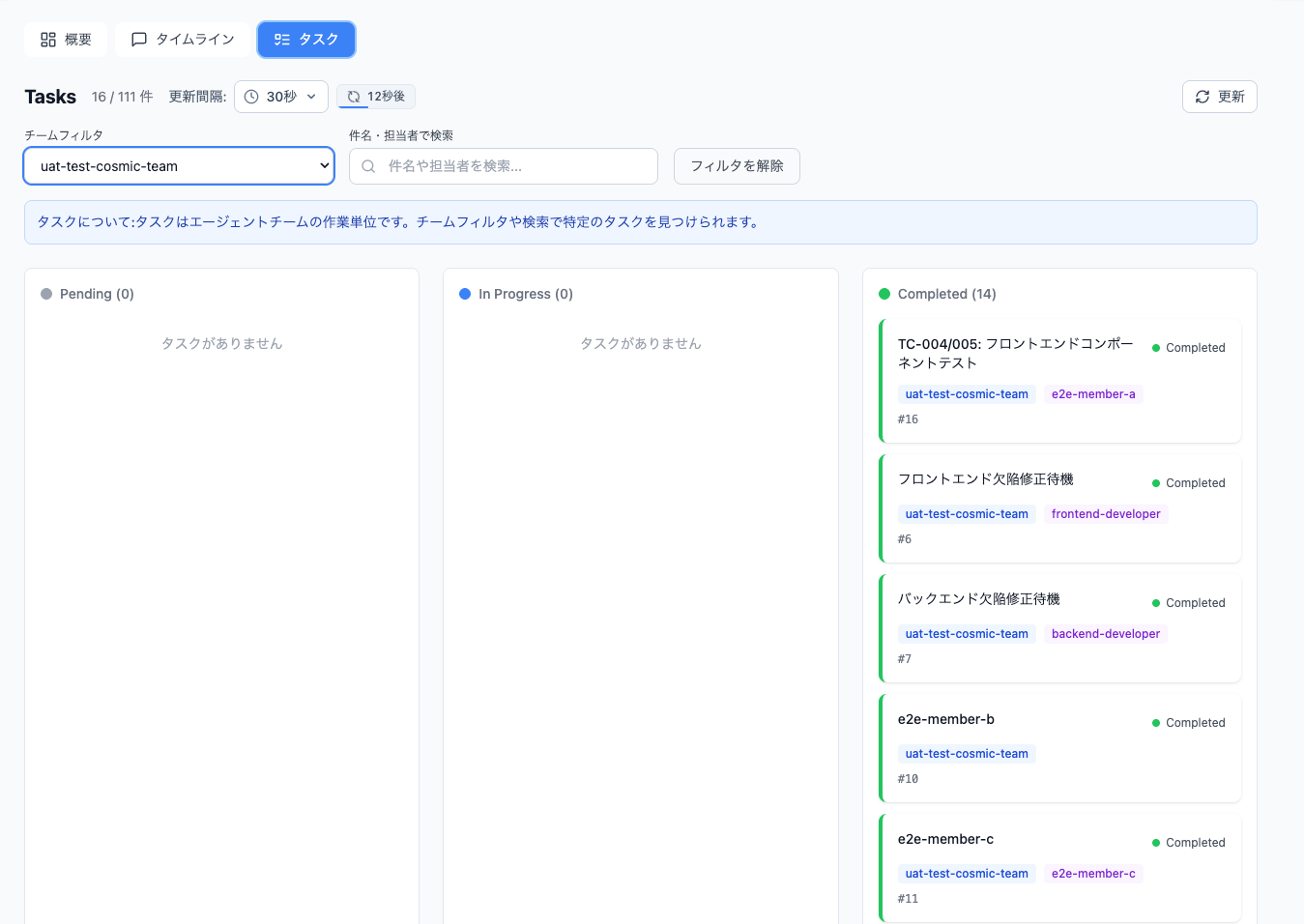
タスクをステータス別(Pending / In Progress / Completed)に管理できます。
設計思想
背景と課題認識
Claude Code の Agent Teams 機能は強力ですが、ターミナル上での運用には以下の課題があります:
- タスクアサインの不透明性: Team Lead から Teammates へのタスク割り当てが見えづらい
- コミュニケーション追跡の困難さ: エージェント間の協調コミュニケーションの流れが追いにくい
- 思考プロセスのブラックボックス化: 各 Agent の思考・行動プロセスが可視化されていない
Teamworks Skill の設計思想
専門特化による汎用エージェントの限界を超える
汎用エージェント(General-Purpose)だけでは、プロジェクト固有の Skills や MCP Servers を十分に活用できません。Teamworks Skill は、各ロールに最適な Agent Type、Skills、MCP Servers を綿密に定義し、専門特化したエージェントとして動作させます。
YAGNI 原則に基づく最小構成
開発要件・タスク詳細に基づき、必要最小限のエージェントのみをアサインします。エージェント数に比例してトークン消費量と管理コストが増加するため、費用対効果の観点から最適な体制を設計します。
コミュニケーション経路の明確化
Section 間通信は Section リード同士のみに限定し、メンバー間の直接横断通信を禁止します。これにより、メインセッション(あなた)は各 Section の Lead とのみやり取りすれば済み、大規模開発でも承認フローが簡素化されます。
監視ダッシュボードの設計思想
透明性の向上
Agent Teams の動きをリアルタイムで可視化し、以下を実現します:
- システムプロンプトの可視化: 各エージェントの役割・設定を確認
- 思考プロセスの追跡: LLM との通信メッセージ、思考履歴を時系列で表示
- 通信メッセージの監視: Teammates 間の協調コミュニケーションを可視化
- タスク進捗の確認: GUI 上でリアルタイムに進捗を把握
📚 ドキュメント参照
詳細な情報は docs/spec/ 内の各ドキュメントを参照してください:
| ドキュメント | 内容 |
|---|---|
| architecture.md | アーキテクチャ設計、コンポーネント構成、データフロー |
| system-design.md | システム設計、API仕様、データモデル |
| frontend-tech-stack.md | フロントエンド技術スタック詳細 |
| backend-tech-stack.md | バックエンド技術スタック詳細 |
| feature-specification.md | 機能仕様詳細 |
| user-guide.md | ユーザーガイド詳細 |
| ut-plan.md | ユニットテスト計画 |
| qa-strategy.md | QA戦略 |
| uat-test-cases.md | UATテストケース |
| code-review-template.md | コードレビューテンプレート |
技術スタック
バックエンド
| カテゴリ | 技術 |
|---|---|
| 言語 | Python 3.11+ |
| フレームワーク | FastAPI 0.109+ |
| データ検証 | Pydantic 2.5+ |
| ファイル監視 | watchdog 4.0+ |
| 国際化 | 独自i18nサービス |
フロントエンド
| カテゴリ | 技術 |
|---|---|
| 言語 | TypeScript 5.3+ |
| フレームワーク | React 18 |
| バンドラー | Vite 5+ |
| CSS | Tailwind CSS 3.4+ |
| 状態管理 | Zustand 5.0+ |
| データフェッチ | TanStack Query 5.90+ |
| 国際化 | i18next + react-i18next |
詳細なバージョン情報は docs/spec/frontend-tech-stack.md および docs/spec/backend-tech-stack.md を参照
API 概要
主要エンドポイント
| エンドポイント | メソッド | 説明 |
|---|---|---|
/api/health |
GET | ヘルスチェック |
/api/teams |
GET | チーム一覧(ステータス付き) |
/api/teams/{name} |
GET | チーム詳細 |
/api/teams/{name} |
DELETE | チーム削除(active以外) |
/api/tasks |
GET | タスク一覧 |
/api/timeline/{name}/history |
GET | 統合タイムライン |
/api/timeline/{name}/updates |
GET | 差分更新 |
完全なAPI仕様は docs/spec/system-design.md §6 を参照
開発コマンド
バックエンド
cd backend

# 開発サーバー起動
uvicorn app.main:app --reload

# テスト実行
pytest                    # 全テスト
pytest --cov=app          # カバレッジ付き
pytest tests/test_api_teams.py -v  # 個別テスト
フロントエンド
cd frontend

# 開発サーバー起動
npm run dev

# 型チェック
npx tsc --noEmit

# テスト実行
npm run test
npm run test:coverage     # カバレッジ付き

# 本番ビルド
npm run build
トラブルシューティング
| 問題 | 原因 | 解決方法 |
|---|---|---|
| チームが表示されない | ~/.claude/teams/ が空 |
Claude Code でチームを作成 |
| HTTP 接続エラー | バックエンド停止 | バックエンドを再起動 |
| ページが読み込めない | フロントエンド未起動 | npm run dev を実行 |
| リアルタイム更新が動作しない | ポートがブロック | ファイアウォール設定を確認 |
詳細は docs/spec/user-guide.md §トラブルシューティング を参照
環境変数
| 変数 | デフォルト | 説明 |
|---|---|---|
DASHBOARD_HOST |
127.0.0.1 |
サーバー待ち受けアドレス |
DASHBOARD_PORT |
8000 |
サーバー待ち受けポート |
DASHBOARD_DEBUG |
True |
デバッグモード |
DASHBOARD_CLAUDE_DIR |
~/.claude |
Claude データディレクトリ |
DASHBOARD_DEFAULT_LANGUAGE |
ja |
デフォルト言語(ja/en/zh) |
Contributing
コントリビューションを歓迎します!
開発に参加する
- このリポジトリをフォーク
- 機能ブランチを作成 (
git checkout -b feature/amazing-feature) - 変更をコミット (
git commit -m 'Add amazing feature') - ブランチにプッシュ (
git push origin feature/amazing-feature) - Pull Request を作成
開発環境のセットアップ
# バックエンド
cd backend
pip install -e ".[dev]"
pytest --cov=app  # テスト実行

# フロントエンド
cd frontend
npm install
npm run test:coverage  # テスト実行
コーディング規約
- Python: PEP 8 に準拠、Ruff でフォーマット
- TypeScript: ESLint + Prettier でフォーマット
- コミットメッセージ: Conventional Commits 形式
Roadmap
v0.1.0 (現在)
- HTTP Polling によるリアルタイム更新
- チーム監視・ステータス判定
- タスク管理(カンバン形式)
- 統合タイムライン(inbox + セッションログ)
- 多言語対応(i18n: 日本語/英語/中国語)
- ダークモード対応
ライセンス
MIT License
最終更新日: 2026-03-04
Yorumlar (0)
Yorum birakmak icin giris yap.
Yorum birakSonuc bulunamadi