content-factory
Health Uyari
- License — License: MIT
- Description — Repository has a description
- Active repo — Last push 0 days ago
- Low visibility — Only 6 GitHub stars
Code Uyari
- network request — Outbound network request in app/src/api.ts
Permissions Gecti
- Permissions — No dangerous permissions requested
Bu listing icin henuz AI raporu yok.
Open-source AI faceless video generator for TikTok, YouTube Shorts and Reels. A free, local alternative to Higgsfield Content Factory: script to finished video with AI frames, motion, voiceover, subtitles and music. MCP server for Claude.
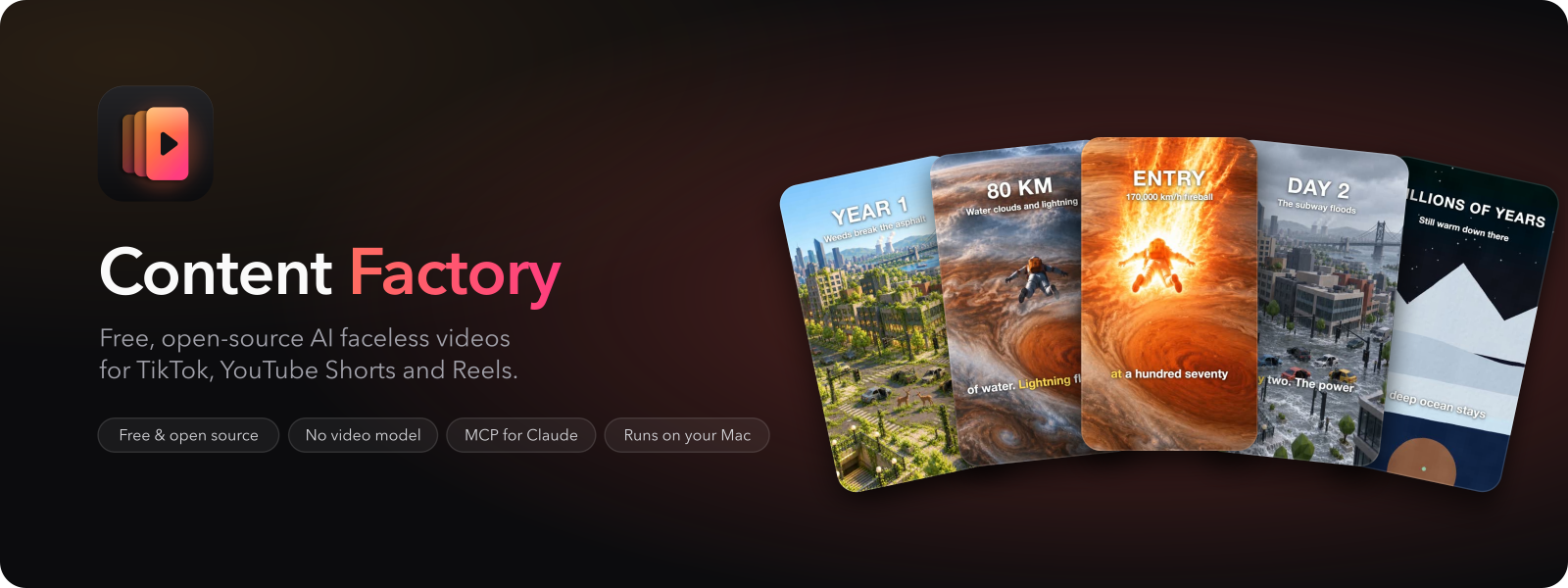
Content Factory
Content Factory is a free, open-source faceless video generator for Apple silicon Macs,
and a local alternative to Higgsfield Content Factory. It turns a script into a 30–120 s vertical video
for TikTok, Shorts or Reels from about 8 AI images a minute, with voiceover, subtitles and music.
By Jutsu Studio, open-source Mac tools for AI video.






Quick start · How it works · vs Higgsfield · vs MoneyPrinterTurbo · Claude and MCP · FAQ · Architecture · Contributing
At a glance
| Platform | macOS on Apple silicon. No signed build yet: you build the app from source. Windows and Linux are planned |
| Requirements | To build: uv, Node.js 20+, FFmpeg and Rust. First launch installs Remotion (about 1 GB), RIFE, Depth Anything V2 and the starter music |
| License | MIT. Remotion, installed at setup, has its own license |
| Cost per video | $0 from us: no subscription, credits or watermark. Drawn videos need nothing else; AI-frames videos pay your own image provider for about 8 images a minute |
| Output | Vertical 1080×1920 video, 30–120 s (65 s by default), with narration, word-by-word subtitles, CC0 music and loudness at −14 LUFS |
| Models | Images (your key): OpenAI GPT Image, Google Nano Banana, FLUX.1 Kontext on fal.ai. On the Mac: Kokoro voice (English) or Vosk (Russian), Whisper alignment, Depth Anything V2, RIFE |
| Formats and styles | What if, plus your own as a folder; 6 style presets, or drawn SVG scenes with no images at all |
| Install | git clone https://github.com/jutsuhq/content-factory && cd content-factory/app && npm install && npx tauri build --bundles app (Quick start) |
| Agents | MCP server: factory mcp (Claude and MCP) |
| Releases | v0.1.0 with three demo videos |
| Website | jutsustudio.com/content-factory |
Compared with Higgsfield Content Factory and with
MoneyPrinterTurbo and short-video-maker: see below. What
Content Factory does not do: generate video with a video model, write the script itself, post for you, or run on
Windows, Linux or Intel Macs yet.
Demo
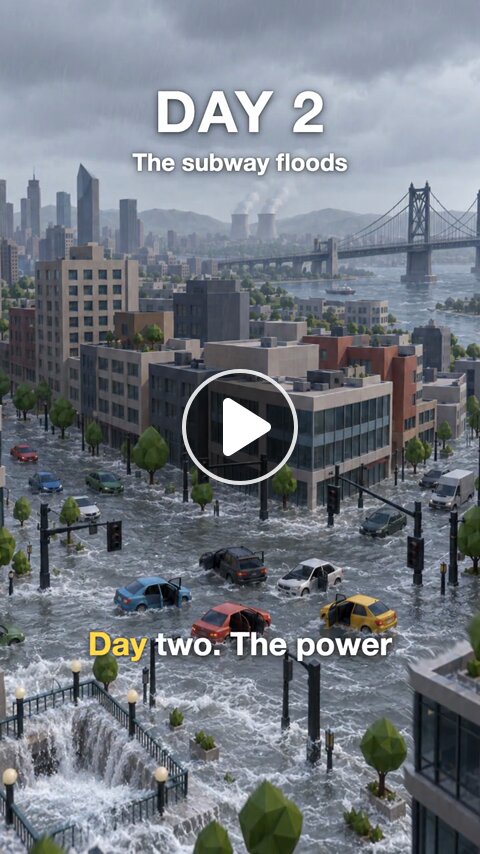
|
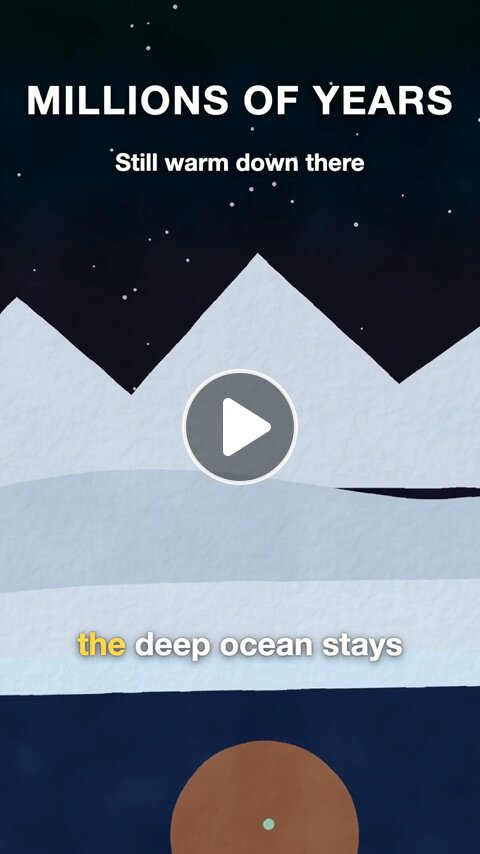
|
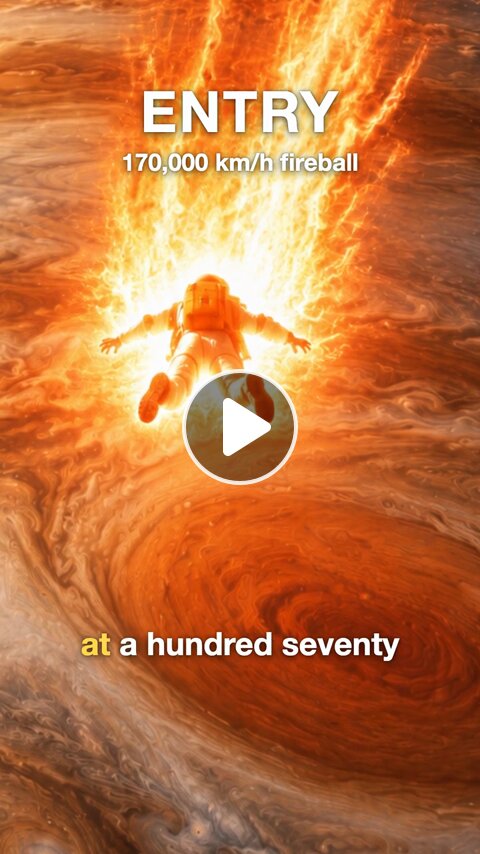
|
|
What if every human vanished today? 57 s · AI frames · Low-poly City 8 beats, a source for every fact. Script |
What if the Sun went out? 31 s · Drawn · gouache Every scene is SVG code, no image generated. Script |
What if you fell into Jupiter? 53 s · AI frames · Space Epic Cuts between a wide shot and punch-ins on the diver. Script |
Claude wrote each script and handed it to the engine over MCP; the scripts are in formats/what-if/examples/. The engine
did the rest: frames, depth parallax, transitions, narration, word-by-word subtitles, CC0 music ducked under the voice, and a quality check.
Why Content Factory
Faceless short-video channels run on formats: the same structure, a new topic every day. Content Factory turns a
format into a pipeline you own.
- No video model. Motion comes from a handful of AI stills: depth parallax, frame interpolation, layers and
camera moves. A one-minute video needs only eight images. - Formats are data. A format is a folder with a script schema, an author's guide, prompts, style presets and a
render template; the engine, the app and the MCP server read whichever formats are there. The bundled reference
format is What if: one world, one axis of change, a counter on screen and a loop back to the hook. - Edit one beat, rebuild one beat. Every stage is cached by the hash of its input, so a changed line re-voices
one beat and a new take of a frame re-renders only what depends on it. - A human at the gate. You write or approve the script and accept the result. Nothing is posted for you.
- Local first. Voice, speech alignment, depth, interpolation and rendering run on your machine. Only image
prompts go to the provider you picked, with your own key. - Agent-ready. An MCP server lets Claude Code or any MCP client write scripts, run the pipeline and pick up the
result, sharing one queue with the app.
Open-source alternative to Higgsfield Content Factory
Higgsfield Content Factory turns a topic into a
faceless What if video in the cloud. Content Factory makes the same kind of video as an open-source app you run
yourself.
| Content Factory | Higgsfield Content Factory | |
|---|---|---|
| Source code | open, MIT | closed |
| Runs on | your Mac | Higgsfield's cloud |
| Price | free: no plan, no credits, no watermark | a Higgsfield plan |
| Motion | AI stills animated by depth parallax and frame interpolation, no video model | generative video models |
| Script | you, Claude or any MCP agent, checked against the format's schema | written by the platform |
| Formats | data in a folder: add your own without touching the engine | the platform's |
| Automation | MCP server, HTTP API and a factory command |
the web app |
| Your data | stays on your machine; only image prompts go to the provider you pick | uploaded to the service |
Content Factory is an independent project, not affiliated with or endorsed by Higgsfield AI. Higgsfield is a
trademark of its owner.
Compared with MoneyPrinterTurbo and short-video-maker
MoneyPrinterTurbo and
short-video-maker are the best-known open-source faceless video
generators. Both cut a voiceover over background footage, mostly stock video from Pexels. Content Factory draws every
beat instead: one AI still per beat in one style, so the same place, character and camera carry through the video
and only the state of the world changes.
| Content Factory | MoneyPrinterTurbo | short-video-maker | |
|---|---|---|---|
| Visuals | an AI still per beat in one style, animated on your Mac; or SVG scenes drawn by Claude | stock footage (Pexels, Pixabay, Coverr), your own clips, or AI video and image providers | stock video from Pexels |
| Script | you or an MCP agent, checked against the format's schema | written by an LLM from a topic, or your own | your text, scene by scene |
| Voice | Kokoro (English), Vosk (Russian), on device | Edge TTS, Azure, ElevenLabs, Kokoro and others | Kokoro, English only |
| Subtitles | word by word, aligned with Whisper | yes, styled | Whisper captions |
| Formats | a folder per format (schema, guide, prompts, styles, Remotion template); agents can add one | one generic pipeline | one generic pipeline |
| Interface | Mac app, MCP server, HTTP API, factory CLI |
web UI, API, CLI | MCP and REST server in Docker |
| Runs on | macOS, Apple silicon | Windows, macOS, Linux | Docker |
| Posting | never; you accept and export each video | can publish to TikTok, Instagram and YouTube Shorts | no |
Pick MoneyPrinterTurbo for footage-based videos on any OS, short-video-maker for an n8n or REST pipeline over stock
video, and Content Factory when the video is a story that needs its own consistent world, such as What if.
What it does
- Channels: a project per TikTok, YouTube or Instagram account keeps its videos alike. A channel has variants
(ready settings for one kind of video: format, style, language, voice, length, hashtags) and a cast of recurring
characters whose looks text and reference images go with every frame, so they look the same in every video. - New video: format, topic, style, language, length (within the format's limits), narration or on-screen text
only. - Script editor: the format's fields per beat (for What if: counter, caption, narration and image state),
checked against its schema. - Frames: six style presets or your own; another take of any frame in one click.
- Drawn mode (prototype): pick Drawn in New video and Claude draws each beat as an SVG scene, animated by data
attributes and painted with a gouache, ink or crayon look. No image generation, so a video costs nothing. - Voice: one engine per language, set in
profile.yaml: Kokoro on MLX by default, Vosk for Russian (an optional
component); pauses
([pause 0.8]), loudness normalised to −14 LUFS. - Subtitles word by word from forced alignment.
- Music from a local library of CC0 tracks, ducked under the voice.
- Quality check: length, black frames, loudness, speech clarity, text length, music license.
- Copies in other languages that reuse the frames: English, Spanish, German, French, Portuguese, Russian.
- Review and export: copy the video file to the clipboard, show it in Finder, save accepted videos to a folder.
- Queue with live logs and cancel; Storage settings with disk usage and cache cleanup.
Quick start
There are no signed builds yet, so build the app from source. You need macOS on Apple silicon,
uv, Node.js 20+, FFmpeg and
Rust.
brew install uv node ffmpeg
git clone https://github.com/jutsuhq/content-factory && cd content-factory
cd app && npm install && npx tauri build --bundles app
open "src-tauri/target/release/bundle/macos/Content Factory.app"
On first launch the onboarding:
- Installs the components: the video renderer (Remotion, about 1 GB), RIFE for transitions, the Depth
Anything V2 model and the starter music. FFmpeg and Node.js come with a one-line install command if missing. - Asks for an image provider key and checks it without generating anything. Drawn videos need no key, so this step can wait.
- Sets your defaults: language, style, and narration or on-screen text only.
Everything can be changed later in Settings.
Image providers
| Provider | Model |
|---|---|
| OpenAI | GPT Image |
| Google Gemini | Nano Banana |
| fal.ai | FLUX.1 Kontext |
Several providers can run at once and share the frames.
How it works
flowchart LR
  S["Script<br/><sub>you or Claude</sub>"] --> A{{"Approve"}}
  A --> F["Frames<br/><sub>image API</sub>"] --> D["Depth<br/><sub>Depth Anything</sub>"] --> T["Transitions<br/><sub>RIFE</sub>"] --> R
  A -. drawn mode .-> R
  A --> V["Voice<br/><sub>Kokoro</sub>"] --> W["Align<br/><sub>Whisper</sub>"] --> R["Render<br/><sub>Remotion</sub>"]
  R --> Q["Quality check"] --> X{{"Accept"}}
Every script names its format; the format decides the fields, the checks and the Remotion composition that
renders it. In AI-frames mode the first frame sets the style; every other frame is an edit of it that changes only
the state of the world, so the camera holds still while the world changes. See docs/architecture.md for the engine, the
format files and the job queue.
From the command line
The engine is the Python project in engine/; run these there.
cd engine
uv sync                                    # add --extra vosk for the Russian voice
uv run factory doctor                      # detect the machine, write profile.yaml
uv run factory setup all                   # renderer, RIFE, depth model, music
uv run factory catalog format              # formats and how to write a script in one
uv run factory create "<topic>" --script beats.json
uv run factory create "<topic>" --project <id> --variant <id> --cast milo,biscuit
uv run factory run <slug> approve          # make the video, wait for the job
uv run factory run <slug> rebuild --stages render
uv run factory accept <slug>
The command line is a client of the engine's API, like the app and the MCP server: the same commands as the MCP
tools, one shared job queue. uv run factory --help lists them all.
Claude and MCP
Content Factory is an MCP server for the whole AI video pipeline, from script to rendered video. factory mcp is an MCP server over stdio. It talks to the running engine (and starts it if needed), so the app and
the agent see the same queue. The factory never writes scripts itself: the agent lists the formats and reads one's
rules with catalog('format'), writes the script and passes it to create with the format id.
claude mcp add -s user content-factory -- uv run --project /path/to/content-factory/engine factory mcp
Tools: status, episodes, episode, create, edit_script, run (approve, rebuild, redo a frame, translate),job, accept, catalog (skill, format, new_format, styles, music, voices, projects), format_source, save_format; prompt make-video. Then ask Claude something like "make a What if
video about falling into Jupiter, 70 seconds, space epic style", or "two new videos for Tiny Town Tales, English
variant, with Milo": catalog('projects') gives the channel's brief, variants and cast. When no format fits, Claude
can bring a new one: it reads the closest format with format_source, writes its own (schema, guide, prompts,
styles, Remotion template, an example) and save_format checks and adds it, ready in the app at once
(formats/README.md).
The MCP server also carries the make-video skill: how to make a video well, from the
idea test and the script rules to the checks on the result and a checklist before posting. Any MCP client gets it as
the make-video prompt and as catalog('skill'), which the server's instructions tell the agent to read before the
first video. The reasoning behind it, from picking an idea to staying original on a channel, is in
docs/playbook.md.
Repository layout
Each top-level folder is a module with its own README, so a change usually stays inside one of them.
| Folder | What it is | Stack |
|---|---|---|
engine/ |
the engine: pipeline stages, job queue, HTTP API, MCP server, factory command |
Python, uv |
formats/ |
video formats as data: schema, guide, prompts, styles, render template, example scripts | YAML, JSON, React |
render/ |
the Remotion project that renders any format's template | Node, Remotion |
app/ |
the desktop app that drives the engine | Tauri, React |
docs/ |
architecture notes, the playbook and README images | |
skills/ |
the make-video skill, served by the MCP server |
Everything the engine writes in a checkout goes to data/, which git ignores.
Privacy
- No backend, no account, no telemetry. The engine listens on
127.0.0.1only. - Image prompts and the reference frame go to the image provider you chose, with your key. Nothing else leaves your
machine. - API keys live in the app's data folder (
.env, owner-only permissions). - Found a vulnerability? Report it privately as described in SECURITY.md.
Status
Early. macOS on Apple silicon is the tested platform. Windows and Linux builds are planned: the engine avoids shell
scripts and platform-only tools, but the voice back end there is not finished yet.
Credits
- Remotion renders the video. It is installed on your machine by the setup step and has
its own license, which may require a company license for some teams. - Depth Anything V2 small (Apache-2.0), via
onnx-community. - RIFE ncnn Vulkan (MIT) for frame interpolation.
- Kokoro (Apache-2.0) via MLX-Audio.
- Music: CC0 tracks from OpenGameArt, downloaded at setup.
FAQ
What is Content Factory?
An open-source desktop app and engine that turns a script into a finished faceless short video for TikTok, YouTube
Shorts and Instagram Reels: AI frames, parallax motion, transitions, voiceover, subtitles, music and a quality check.
Is it free?
Yes. Content Factory is free and open source under the MIT license, with no subscription, credits or watermark.
Drawn videos need nothing else; AI-frames videos draw their images with your own OpenAI, Gemini or fal.ai key.
Is it a Higgsfield alternative?
Yes, for faceless What if videos: the same format, made locally and open source. It does not generate video with
a video model; motion comes from stills.
Does it write the script for me?
No. You write it in the app, or Claude (or any MCP client) writes it through the MCP server. The engine checks it,
voices it and renders it.
Which platforms does it run on?
macOS on Apple silicon today. The engine avoids platform-only tools; Windows and Linux are planned.
Which languages can it narrate?
English out of the box with Kokoro, Russian with the optional Vosk voice; other languages take a voice set inprofile.yaml. Scripts and on-screen text can be English, Spanish, German, French, Portuguese or Russian, and a video
can be copied into another language that reuses its frames.
Can I add my own video format?
Yes. A format is a folder in formats/ with a schema, a guide, prompts, styles and a Remotion template;
see formats/README.md.
Related
Other open-source projects from Jutsu Studio:
- Jutsu Studio: the open-source Higgsfield desktop app for Mac · jutsustudio.com
- Swapjutsu: free character swap for Mac, no watermark · jutsustudio.com/swapjutsu
- Kawarimi: free local AI character swap for Windows and Linux, no cloud · jutsustudio.com/kawarimi
- EdgeTAM Core ML: EdgeTAM video object tracking in Core ML, on the Apple Neural Engine
- edgetam-onnx: the same tracker in Rust on ONNX Runtime CUDA, for Windows and Linux
- Higgsfield Gateway: a budget-capped Higgsfield API gateway on Cloudflare Workers · jutsustudio.com/blog/higgsfield-api-production
- Seedance 2.5 Prompt Skill: a Claude skill that writes Seedance 2.5 prompts for Higgsfield · jutsustudio.com/blog/seedance-prompt-skill
- AI video API prices: what one second of AI video costs at 30+ providers, updated daily · jutsustudio.com/video-api-pricing
- Open Source Higgsfield: every #OpenSourceHiggsfield challenge project, by category · jutsustudio.com/open-source-higgsfield
- awesome-higgsfield: tools, SDKs, agent skills and apps for Higgsfield
License
MIT © Content Factory contributors

Made for people who would rather tell the story than edit the timeline.
Yorumlar (0)
Yorum birakmak icin giris yap.
Yorum birakSonuc bulunamadi