swapjutsu-seedance-character-swap
Health Warn
- License — License: MIT
- Description — Repository has a description
- Active repo — Last push 0 days ago
- Low visibility — Only 6 GitHub stars
Code Fail
- rm -rf — Recursive force deletion command in scripts/fetch-models.sh
- network request — Outbound network request in scripts/fetch-models.sh
Permissions Pass
- Permissions — No dangerous permissions requested
No AI report is available for this listing yet.
Free open-source Seedance 2.5 / Wan 2.2 Animate character swap for Mac. A Viggle and Higgsfield Recast alternative: on-device prep (Vision, Core ML, MLX), render via Comfy or free on your own ComfyUI. MCP server. Unofficial.

Swapjutsu
Open-source character swap for video, native on macOS.
Put any character into any clip. The camera, the moves and the timing stay; the person changes.
Everything up to the render runs on your Mac, for free.

Examples · Install · Quick start · How it works ·
Rendering · Agents · Docs · Website






Examples
Unedited Seedance 2.5 drafts at 480p, the cheapest render.

Cloister · one character, new place · 7 s · $1.19

Duo · two characters, one each · 5 s · $0.85
Install
Download Swapjutsu-<version>.dmg from the latest release and drag the app to Applications.
It is signed and notarized, for Apple Silicon on macOS 15 or later. To check the download:
shasum -a 256 -c Swapjutsu-<version>.dmg.sha256
Models download on first use and are verified against pinned SHA-256 hashes.
Quick start
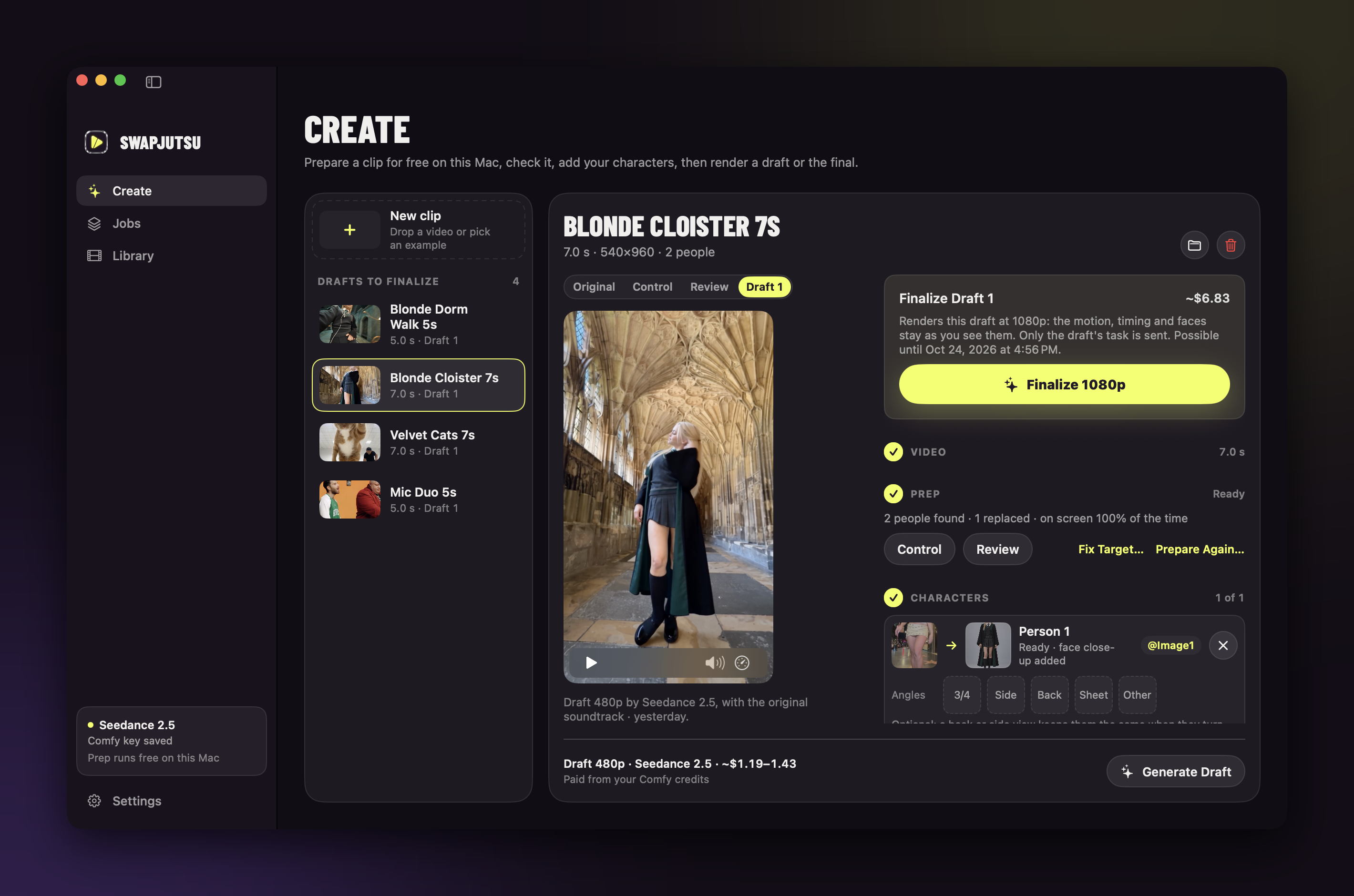
- Add a Comfy key. Create one at platform.comfy.org, add
credits, and paste it in Settings › Comfy. It is stored in the Keychain. - Prepare a clip. In Create, drop a clip (or show the examples and pick one), trim it to 4–30 s, choose who to
replace and click Prepare Clip. This runs on the Mac and costs nothing. - Assign characters. Drop an image for each person, and a place if you replace the background. The prompt
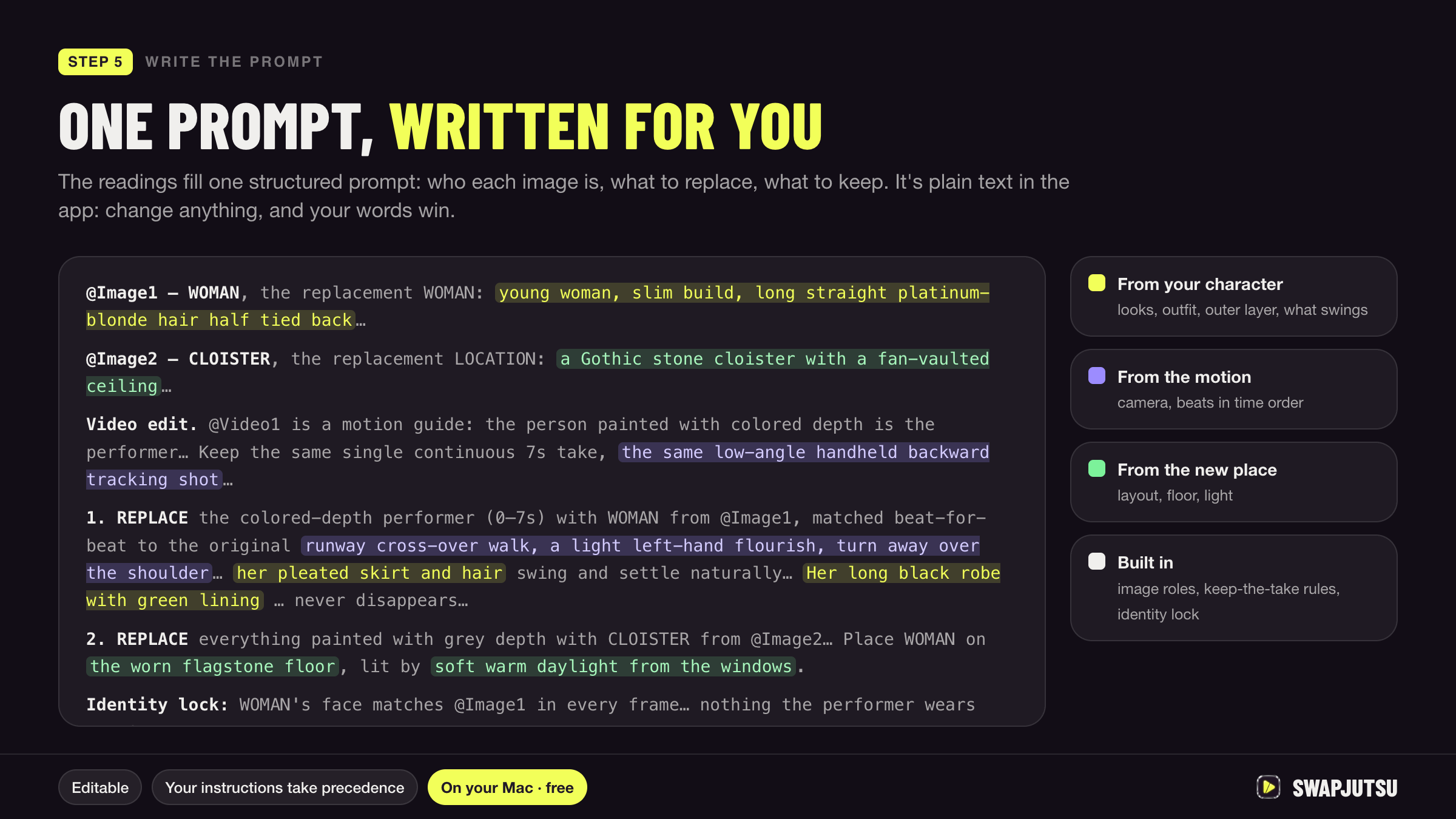
writes itself (download Qwen3-VL 8B in Settings › Prompt for the best one); edit it if you want. - Render a draft. Generate Draft shows the price before it sends anything. Results land in Library.
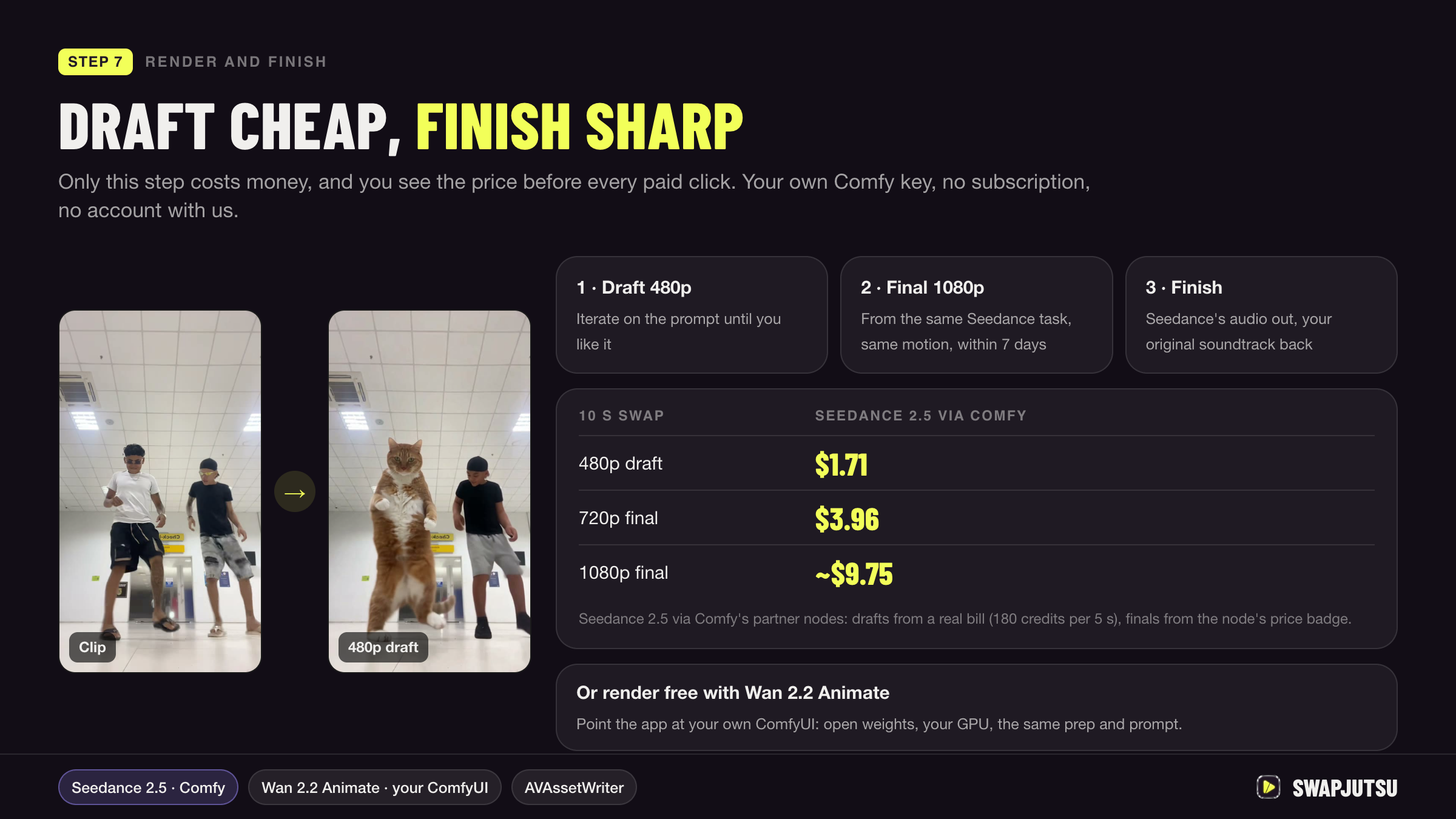
- Finalize. Happy with the draft? Finalize 1080p within 7 days, with the same motion.
How it works
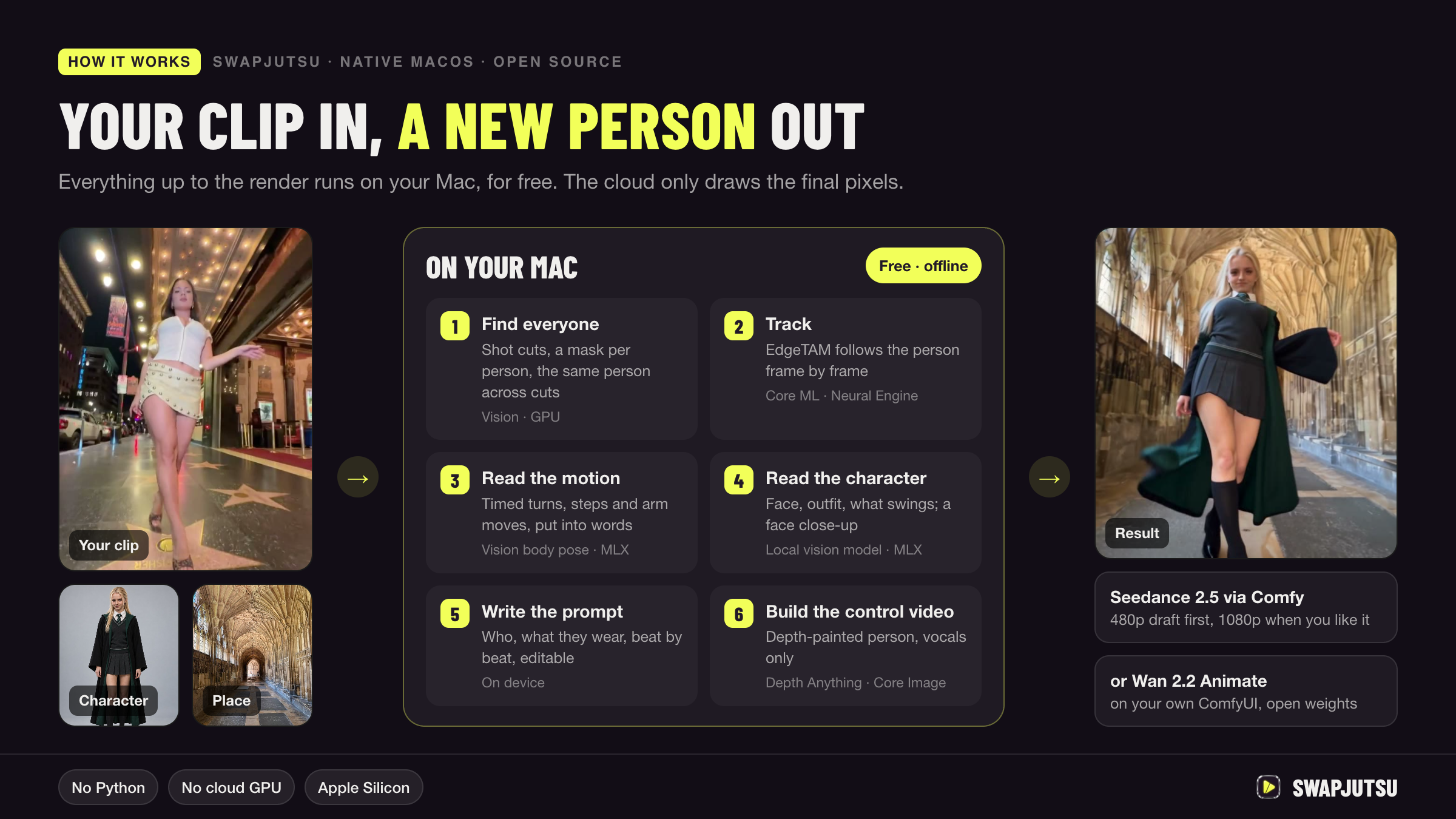
| Step | On | What happens | Details | |
|---|---|---|---|---|
| 1 | Shots | Mac | Cuts found from feature-print and colour-histogram jumps | 02 |
| 2 | People | Mac | A separate mask per person: Vision instances + person matte | 03 |
| 3 | Tracking | Mac | EdgeTAM in Core ML on the Neural Engine; the same person kept across cuts | 05 |
| 4 | Motion | Mac | A pose tracker times the moves, a local vision model (MLX) names them | prompt writer |
| 5 | Characters | Mac | The same model reads each character image; face close-ups for full-body shots | 04 · 10 |
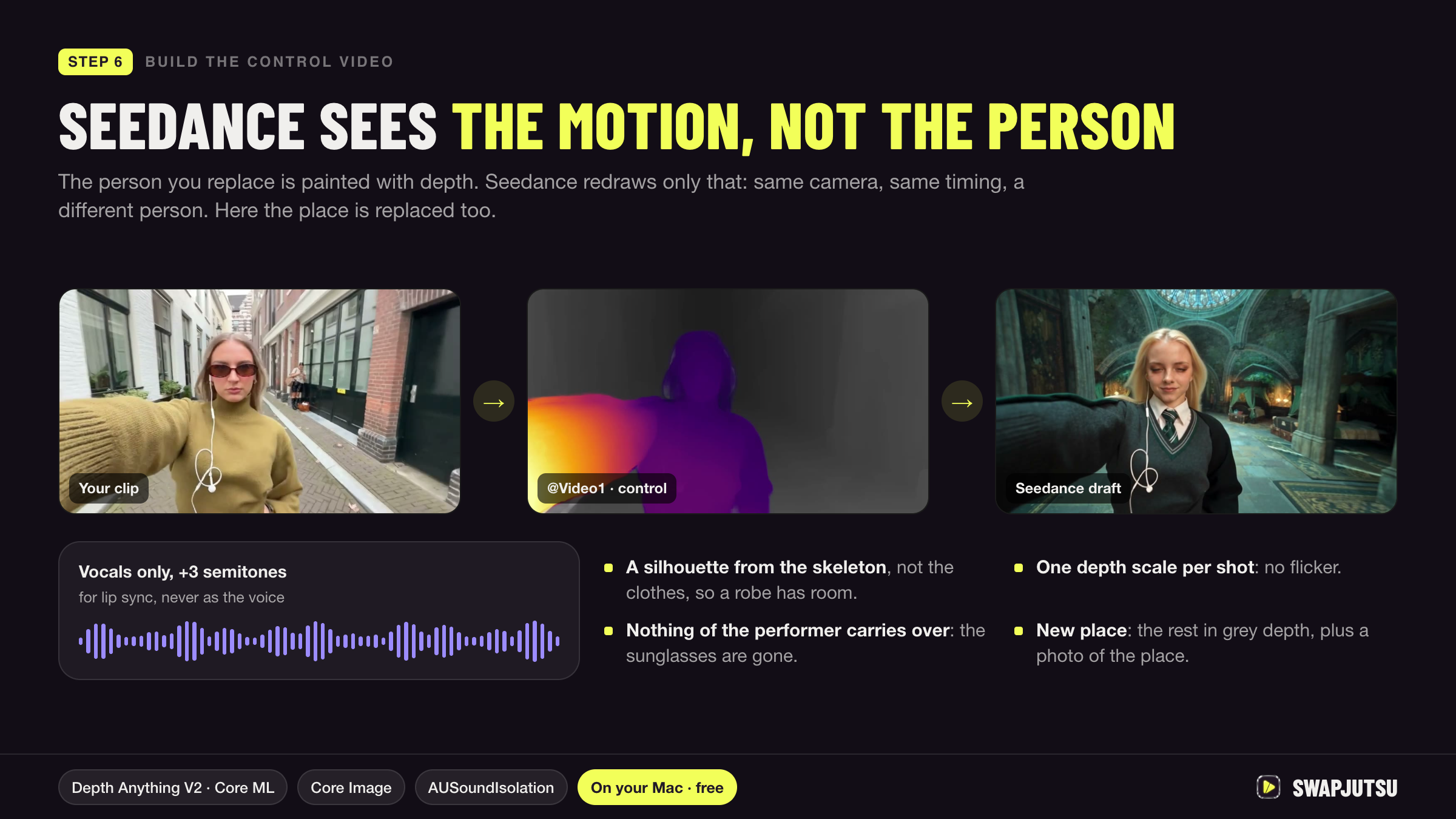
| 6 | Depth | Mac | Depth Anything V2 in Core ML, one scale per shot | 07 |
| 7 | Control video | Mac | The person painted in depth over the original; vocals only, +3 semitones | 08 · 09 |
| 8 | Render | Comfy or your GPU | Seedance 2.5 or Wan 3.0, or Wan 2.2 Animate on your own ComfyUI | 11 |
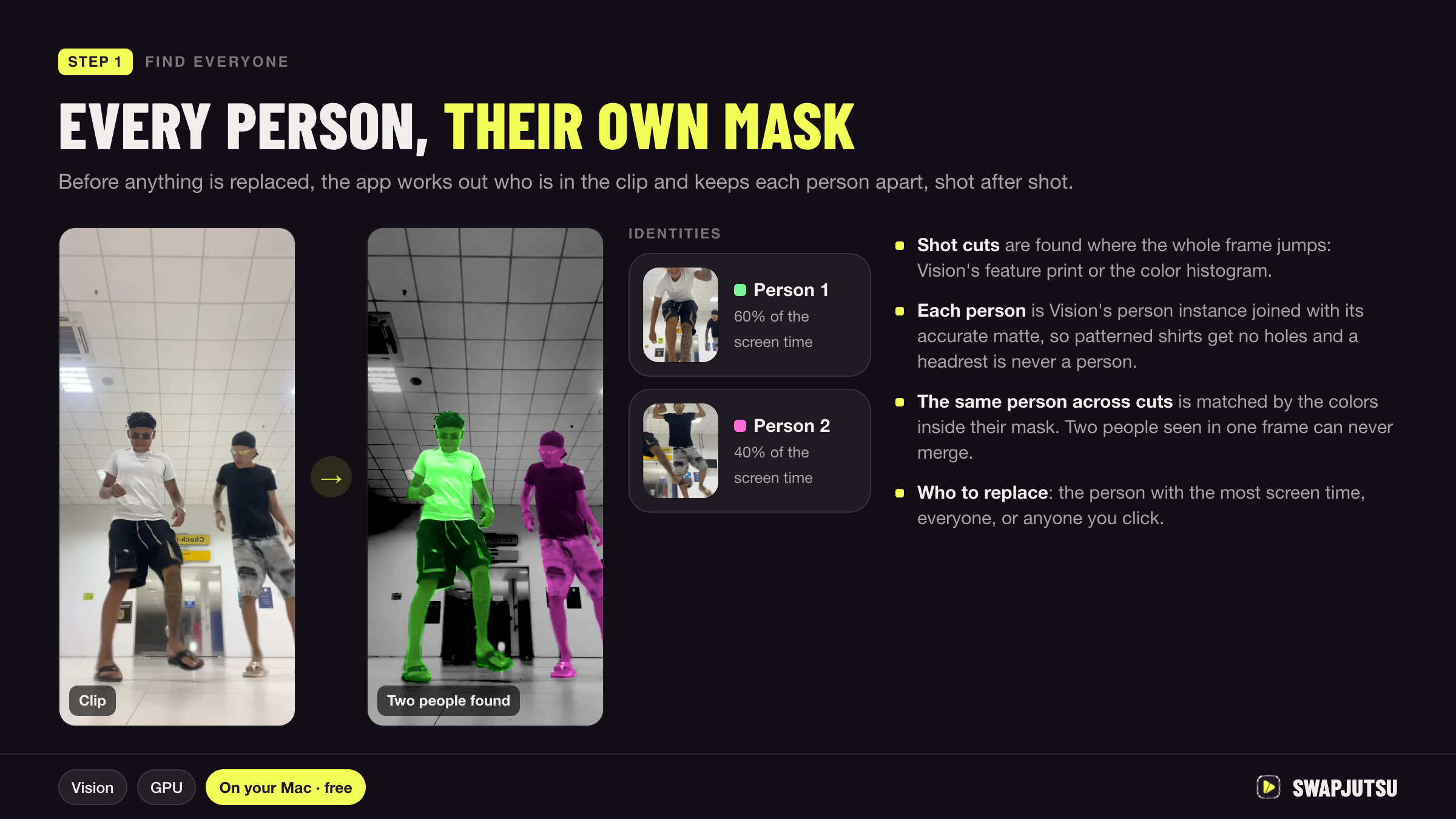
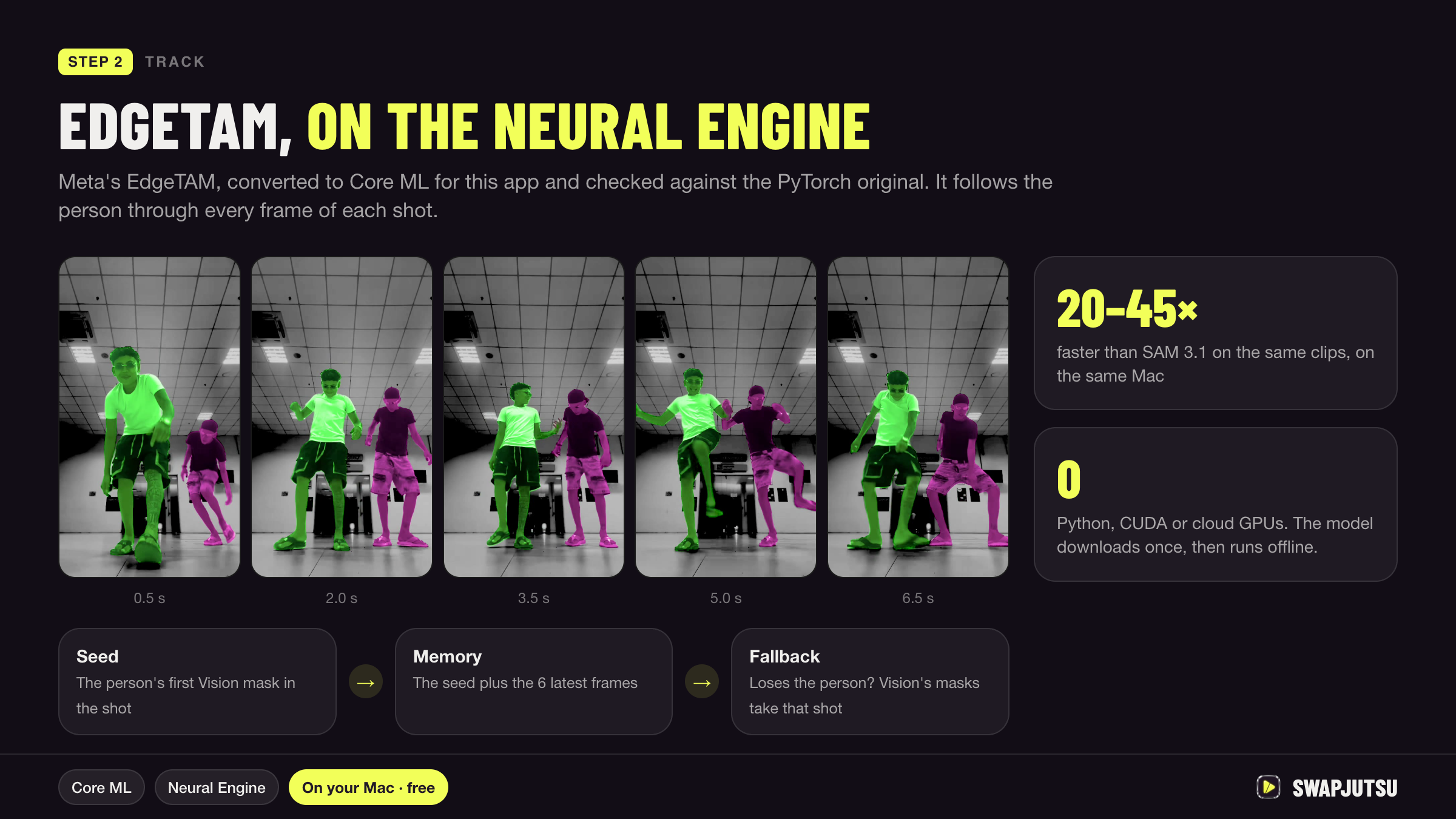
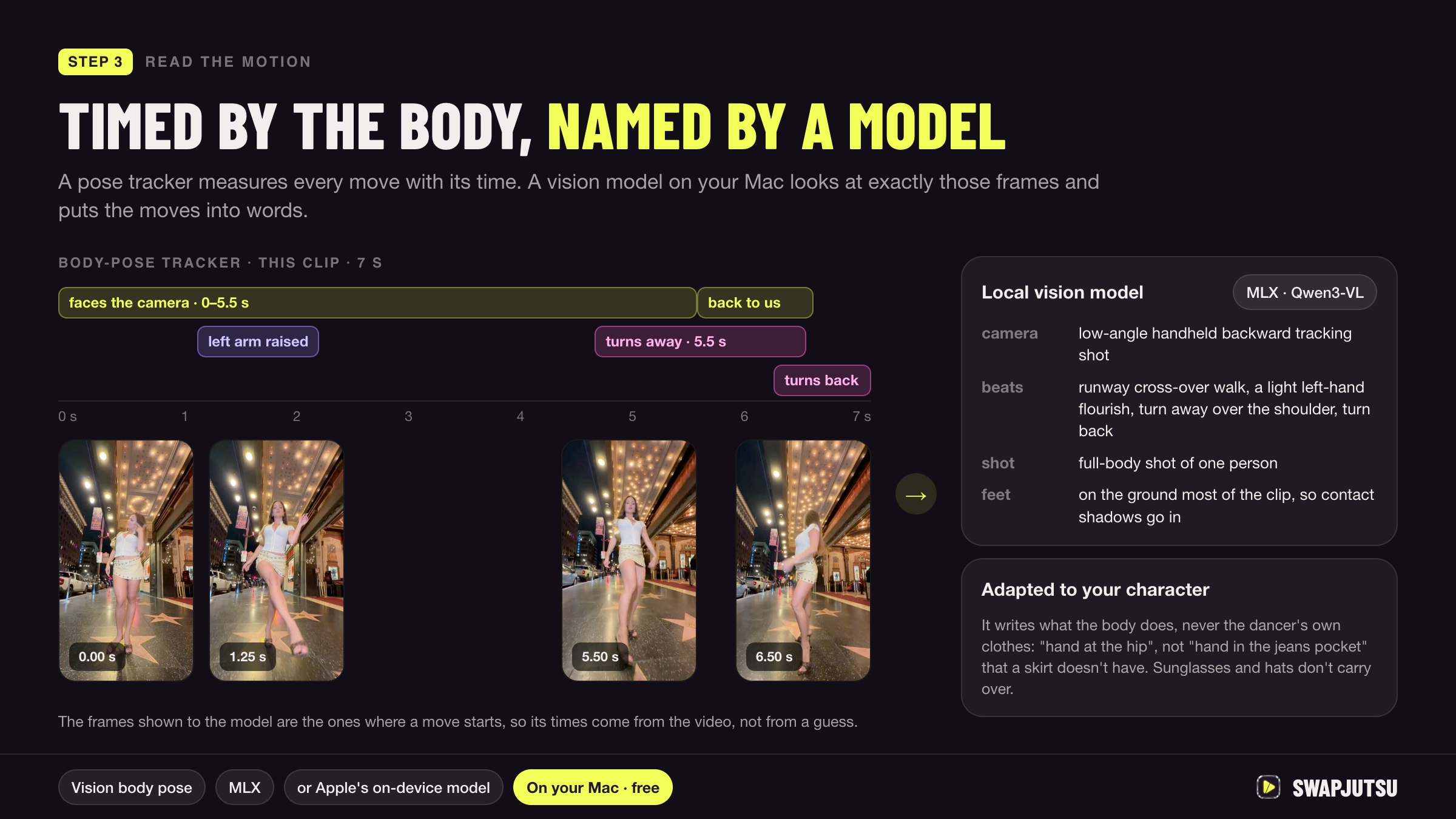
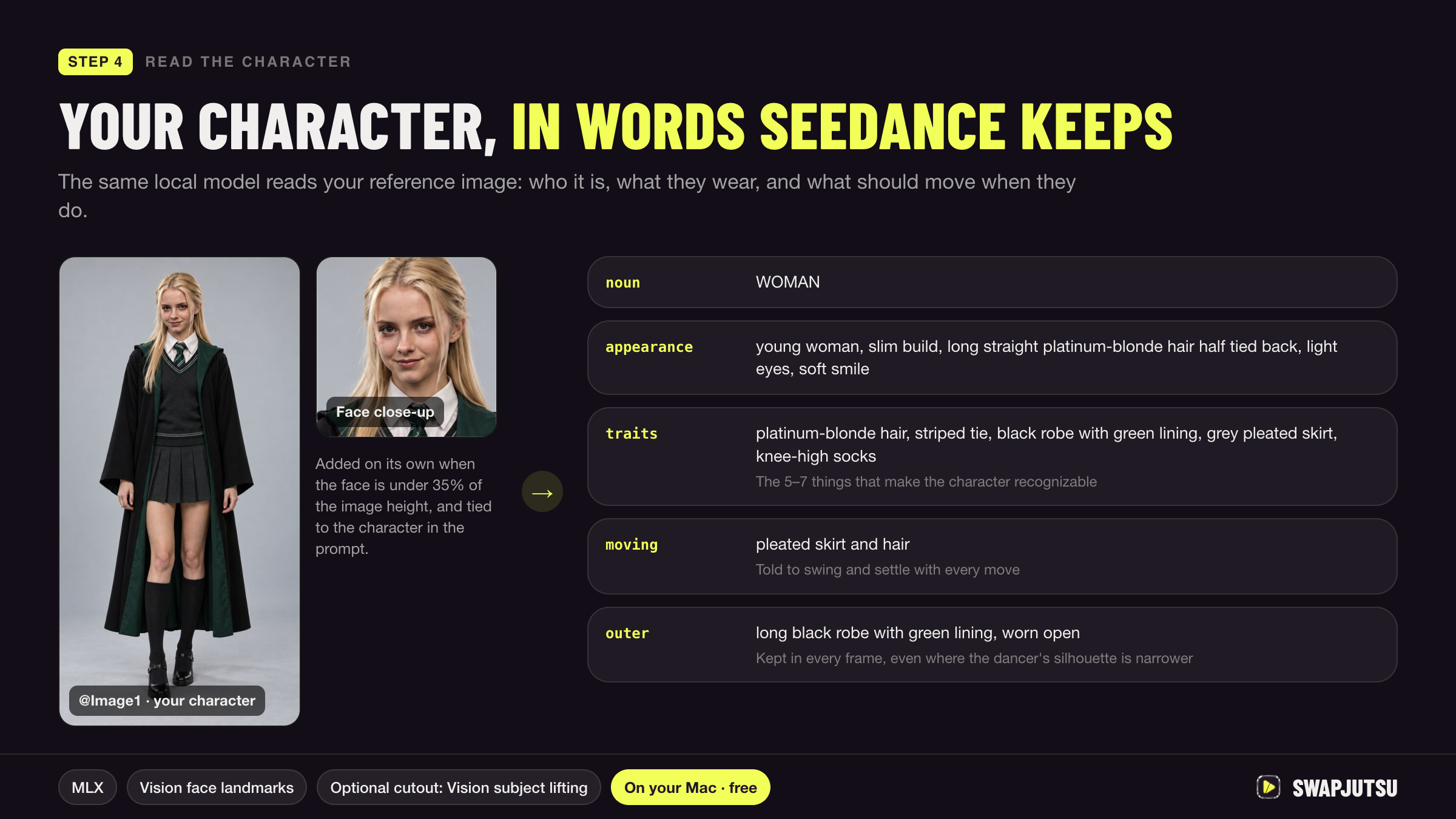
Why each step works the way it does: docs/PIPELINE.md.
Rendering
| Route | Model | Billing |
|---|---|---|
| Direct (default) | Seedance 2.5 through Comfy's Partner Nodes API | Prepaid Comfy credits, no subscription |
| Direct | Wan 3.0 through Comfy's Partner Nodes API, clips up to 15 s | Prepaid Comfy credits, for the control video's seconds plus the render's |
| Comfy Cloud | Seedance 2.5 through the Comfy API | Comfy Cloud subscription |
| Own ComfyUI | Wan 2.2 Animate, open weights | Free, on your GPU |
For your own ComfyUI, enter its address in Settings › Own ComfyUI and click Check; Create offers Wan once the check
passes. Workflows, calls and what the server needs: docs/COMFY_API.md.
Agents
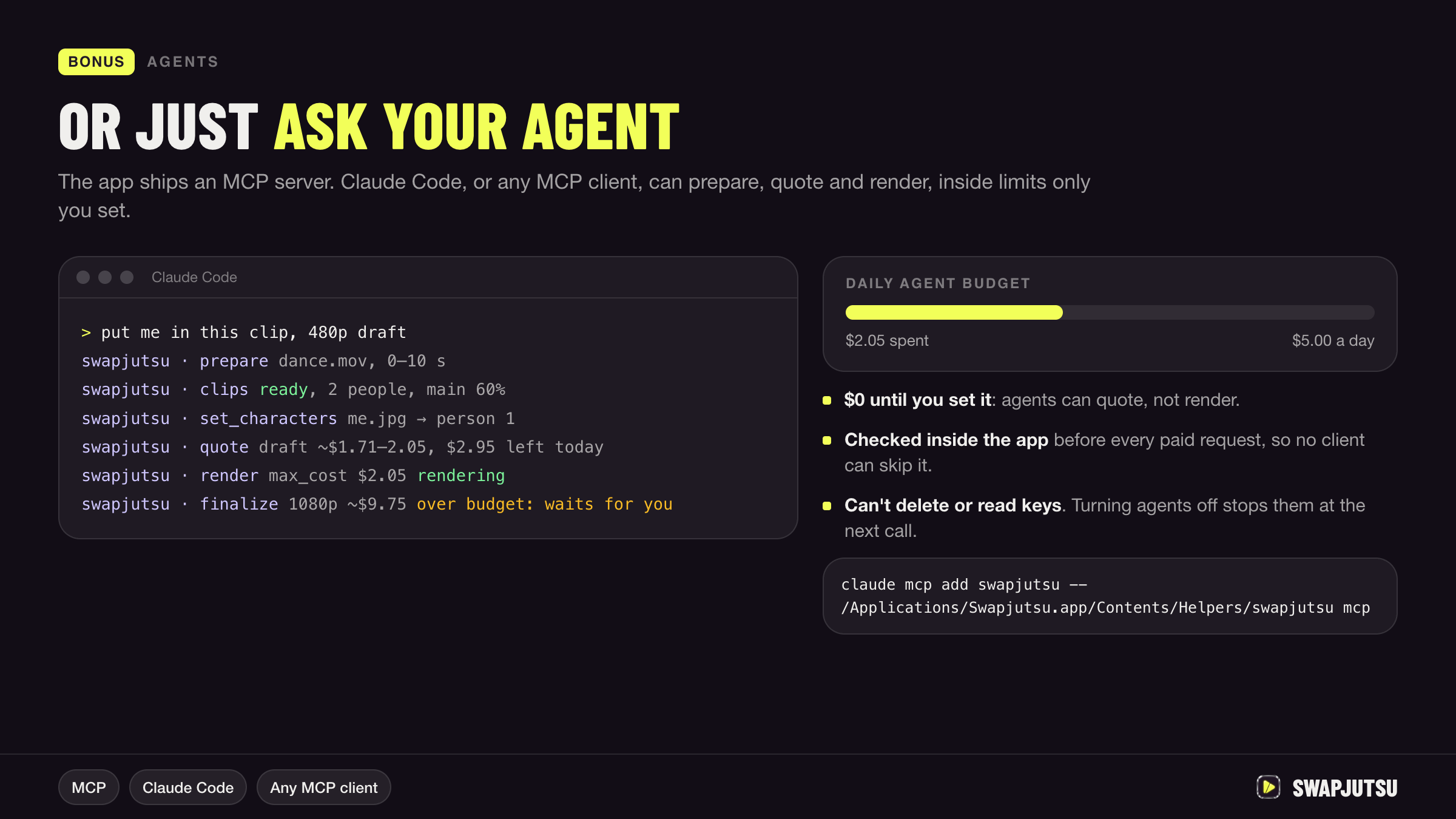
The app ships an MCP server, so Claude Code or any MCP client can prepare and render for you:
claude mcp add swapjutsu -- /Applications/Swapjutsu.app/Contents/Helpers/swapjutsu mcp
Off until you turn on Settings › Agents › Allow agents. Agents spend only within a daily budget you set, cannot delete
anything and never see your key. Tools and limits: docs/AGENTS.md.
Build from source
scripts/fetch-models.sh
swift build --product Swapjutsu && .build/debug/Swapjutsu   # the app
swift build -c release && .build/release/swapjutsu-prep my-clip.mov   # the prep alone, no render
swift test
The command-line tool: docs/CLI.md. App bundle, tests and releases: CONTRIBUTING.md.
Requirements
- macOS 15+ on Apple Silicon; Xcode 27 and Swift 6.4 to build
- Prep: about 3–5 s per second of video and 250–500 MB of memory on an idle M4, with tracking
(measured); slower while other apps use the GPU - Local prompt writer: 16 GB of memory (Qwen3-VL 8B, 5.8 GB download)
- Render: Comfy credits, a Comfy Cloud subscription, or a ComfyUI server with a capable GPU
Privacy
- No account and no telemetry. Swapjutsu has no server of its own, and prep runs offline on your Mac.
- Models come from Hugging Face and GitHub, each pinned to one commit or release and checked against SHA-256 before
use. The depth and tracking models (about 100 MB) download with the first prep; a prompt writer model only when
you click Download in Settings › Prompt. - The examples in Create come from Higgsfield's public gallery and load only after you click Show Examples or
turn on Settings › Prep › Higgsfield examples. - A Seedance render uploads
control.mp4and your images to Comfy. Wan gets the clip, its mask and your images, on
your own ComfyUI. - The Comfy key stays in the login Keychain.
- The prompt writer runs locally; if you point it at an API instead, it sends that API the images and a few frames.
Documentation
- PIPELINE.md: every step in one table, the control modes and the key decisions
- stages/: one page per stage: how it works, why, numbers, papers
- ARCHITECTURE.md: modules, swappable stages, the prompt writer, sandbox and packaging
- COMFY_API.md: Seedance on Comfy and Wan 2.2 on your own ComfyUI
- AGENTS.md: MCP tools and spending controls
- CLI.md:
swapjutsu-prepoptions and output - TESTING.md: tests and measured results
- benchmarks/: the research behind the target masks, tracking and depth, with data and ground truth
Guides on jutsustudio.com:
- How to swap a character in a video with AI
- Face swap vs character swap
- Higgsfield Genjutsu alternatives, free and paid
- Seedance 2.5 guide: modes, limits and cost
Disclaimer
Unofficial and community-built. Not affiliated with, endorsed by, or connected to Higgsfield AI, ByteDance or
Comfy Org. Genjutsu, Seedance, ComfyUI and other names are trademarks of their respective owners. Renders are
billed to your own Comfy account.
Credits
- EdgeTAM by Meta, Apache-2.0, in our
Core ML conversion. Not affiliated with or endorsed by Meta. - Depth Anything V2 Small, Apple's Core ML
conversion, Apache-2.0. - Prompt writer models, downloaded from Hugging Face only when chosen, as 4-bit MLX conversions by
mlx-community:
Qwen3-VL 8B (the default),
Qwen3.5 9B, Qwen3.5 35B-A3B
and Qwen3.8 27B by the Qwen team, Alibaba Cloud, and
Gemma 4 E4B by Google; all Apache-2.0. The Gemma conversion is
labeled with the Gemma Terms of Use, which apply alongside. - Wan 2.2 Animate by Alibaba's Wan team, Apache-2.0. Runs on your own
ComfyUI; not bundled or downloaded. - ComfyUI by Comfy Org, GPL-3.0. Used through its API only.
- Barlow Condensed, SIL OFL 1.1.
The models are not in the repository: the app downloads them on first use, and scripts/fetch-models.sh fetches
the same files for the command-line tool. The licenses of the Swift packages compiled into the app (MLX, Hugging
Face's swift-transformers and others) ship with it in
ThirdPartyNotices.txt, under Swapjutsu › Acknowledgements;scripts/third-party-notices.sh regenerates it when Package.resolved changes.
License
MIT © Swapjutsu contributors.
Reviews (0)
Sign in to leave a review.
Leave a reviewNo results found