blacksmith
Health Warn
- License — License: MIT
- Description — Repository has a description
- Active repo — Last push 0 days ago
- Low visibility — Only 5 GitHub stars
Code Fail
- rm -rf — Recursive force deletion command in .claude/settings.json
Permissions Pass
- Permissions — No dangerous permissions requested
No AI report is available for this listing yet.
Autonomous agent factory — loop runner, worktree engine, and a local dashboard over the event log.

Blacksmith
An autonomous agent factory.
You co-plan the spec. It decomposes, codes, tests, reviews, refutes itself —
and hands you exactly one pull request.


Features · Install · Using it ·
How it works · Safety ·
Dashboard · Status · Docs
goal → contracts you sign → one worktree per contract, run in parallel
     → schema · tests · reviewer · verifier → one pull request you merge
Two touchpoints. Everything between them runs unattended.
Why Blacksmith
Handing a whole feature to an agent tends to fail in the same place, and it is
rarely the code. Two workers edit the same file. One quietly renegotiates the
goal it was given. A third reports itself done, and you find out in review. The
usual remedy is to watch it work — which costs exactly what the automation was
supposed to buy.
Blacksmith removes the watching instead. A goal becomes a set of immutable spec
contracts. Each contract runs in its own git worktree, under a token budget,
over paths no other worker is allowed to touch. What merges is decided by gates
— a schema check, tests, a reviewer that never saw the coder's session, and a
verifier whose only job is to refute the reviewer.
Your job shrinks to two touchpoints: agree on the spec, then review one
pull request. Everything in between runs unattended.
Features
|
Nothing is dispatched without a contract Every task carries an objective, an output schema, acceptance criteria, a tool |
Workers that cannot collide Path claims come from static analysis, not from epic prose. A wave is admitted |
|
Gates decide what merges, not confidence Schema check → tests → coverage evidence → a fresh-context reviewer that never |
A second opinion from another vendor The factory grades its own judgment calls against models from a different |
|
It learns from its own errors Errors are classified against a taxonomy, and a scribe distills them into |
A frontier planner, cheap workers Planning and judgment go to a frontier model; the bulk of the work goes to |
|
The log is the source of truth Every prompt, dispatch, gate result and error is an append-only event on disk. |
Also in the box
- Project scaffolding.
/bs new <project>generates a target project from
the stack you answered for at install time;/bs mcplayers an MCP surface
onto it. - An audit that ends in an epic.
/bs audit <project-dir>reads a project
that already exists on four axes, ranks what it finds, and cuts one epic from
what you accept. - A factory that extends itself. New agent roles, policies and taxonomy
values are data files, not code — see
extending. - One integration branch per epic, one pull request at the end, merged by
you. - A local dashboard, eleven read-only pages over the same event log —
optional, and further down.
Install
Say "install Blacksmith" to a Claude Code session and it does the whole
thing: INSTALL.md is an executable runbook, and it stops to ask
before anything that touches your machine.
By hand it is one command in a shell:
npm i -g @juzser/blacksmith
and two inside Claude Code:
/plugin marketplace add juzser/blacksmith
/plugin install blacksmith@blacksmith
Then smith init in the project you want it to work on. That creates.blacksmith/ beside your code — the event log, your epic plans, a roadmap and
a stack.yml to answer — and writes nothing anywhere else; SMITH_HOME moves
that root if you want one home for several projects. You now have /bs.
Both halves are required. The package
(@juzser/blacksmith) is the
deterministic smith CLI; the plugin is /bs and the fourteen agent roles it
dispatches. smith alone never gives you /bs, because Claude Code loads
skills from a project's .claude/, your ~/.claude/, or a plugin — never fromnode_modules — and a /bs with no smith on PATH can run nothing. Takelatest: 0.1.0 predates smith init and keeps state inside its own install
directory, which the next npm i replaces.
A clone is for hacking on Blacksmith itself, and for the two things an install
does not carry: the dashboard and this repo's own enforcement.
git clone https://github.com/juzser/blacksmith.git && cd blacksmith
pnpm install --frozen-lockfile
pnpm run build                          # tsc -> factory/orchestrator/dist/
bash scripts/check.sh                   # the gate CI runs; ends in `== PASS ==`
Open a Claude Code session in the clone and you have /bs already, from the
checkout's own .claude/ — do not also install the plugin there. You would
get two of everything (bs and blacksmith:bs, auditor andblacksmith:auditor, once per role), pay the always-on cost twice, and the two
copies are free to disagree: the plugin's is a pinned checkout of main, the
project's is whatever branch you have out. claude plugin disable blacksmith
settles it.
The dashboard is clone-only because ui/ is in neither the tarball nor the
plugin, so smith ui serve answers ui.not-built in an install and means it.
Enforcement is clone-only because this repo's .claude/settings.json deny
rules and its policy hook resolve paths against a checkout; the plugin ships nohooks/hooks.json and loads neither (Hooks (0)), since a /bs that asked
you about every Bash command would be worse than one that asks about none. The
rest of that port is scoped indocs/specs/plugin-port-scope.md.
INSTALL.md Part 2 is the long form of the clone above: per-platform
setup (macOS, Debian/Ubuntu, Fedora, Alpine, WSL2), the stack interview,
troubleshooting, and the known platform gaps stated rather than papered over.
Using it
Starting a new project
Blacksmith never builds inside itself. It builds a separate project, in
its own directory, with its own git history — and what comes out is not a
Blacksmith dependency. No config pointing back here, no docs about the
factory; one Built by Blacksmith line in its README is the whole trace.
Open a Claude Code session in this clone and say /bs new my-app. If you
would rather drive it yourself, it is three commands:
$EDITOR factory/policies/stack.yml   # your stack answers: language, frontend,
                                     # database, deploy target. `none` is fine.
smith stack check                    # which answers the templates honour,
                                     # which they only record, which they refuse
smith new my-app --target-dir ~/code/my-app     # add --ui for a frontend
The last call scaffolds (TS strict, Biome, Vitest, CI), installs, runs the
project's own gates, commits it on a setup branch, and registers a bootstrap
milestone. Read toolchain in the JSON it prints: verified means you may
plan against it. An answer the templates cannot build stops it before
anything is created rather than handing you something else.
Creating the remote and the first push are printed, not run — that is an
operator action, and no agent session here will do it for you:
gh repo create my-app --private --source ~/code/my-app
git -C ~/code/my-app push -u origin setup
Then /bs plan <goal> against it, and you are in the loop below. The MCP
surface comes later, at its own milestone (/bs mcp my-app), once there are
tools worth declaring.
→ Step 0 of the operator loop has the same
ground with the failure modes spelled out.
Auditing an existing project
The other way in. A project that already exists — built here or not — is
audited, not scaffolded: say /bs audit <project-dir> and four judges read
it at HEAD on four fixed axes — performance, code quality, architecture,
security — from a detached, read-only worktree the command cuts and verifies
against its opening fingerprint before it removes it. The project's working
tree is never touched; the one thing the audit leaves behind is<project-dir>/.blacksmith/, state rather than source, where the findings
accumulate across runs, so a second audit does not re-ask what the first one
settled — though a finding that comes back after its fix does, as a regression.
The returns are folded into one ranked list and the command stops. You
accept or decline each finding — a decline is remembered for 90 days — and
the accepted ones become one roadmap milestone and one epic spec. From there
it is the ordinary loop: /bs plan against that epic, then /bs run, and
closing the epic marks its findings fixed. There is no audit-specific run
path; the command's value is the insight and the ranking.
Underneath it is the smith audit family — open, record, consolidate,decide, cut, resolve, close — anddocs/specs/audit-command-scope.md is the
contract each of them keeps.
The loop
Day to day, from a Claude Code session opened in this repo:
| Command | What it does |
|---|---|
/bs new <project> [--ui] |
Scaffold a new target project from your stack answers |
/bs mcp <project> |
Layer the MCP surface on and make its milestone due |
/bs audit <project-dir> |
Audit an existing project on four axes, rank, decide at a hard stop, cut one epic |
/bs plan <goal> |
Draft or re-plan an epic with the planner + spec-reviewer |
/bs run <epic> |
Admit a wave and drive it through the loop to merge |
/bs status |
Live agent count, budget burn, epic phase |
/bs ui |
Serve the local dashboard |
/bs waivers |
Answer the pending S3/S4 waiver batch for an epic |
/bs lessons |
Review pending lesson candidates |
/bs report |
Render the scribe's progress digest |
Each of those is a playbook, not a script: the deterministic half is a smith
command you can run yourself — smith --help lists all of them — and the
judgment half is a Claude Code session the playbook dispatches. That is also
the line between the two installs: the smith half travels in the package, the
playbooks are read from a clone.
→ The operator loop — the six steps, in the
order you meet them.
→ Operator guide — the same ground with real
commands and real output.
How it works
You describe a goal. A planner on a frontier model turns it into spec contracts
and a spec-reviewer hunts holes in them before you sign; signing freezes plan
v1. From there the loop admits a wave whose path claims do not overlap, sends
researcher and UI/UX work ahead of code where the epic needs it, runs a coder
and a tester in a worktree, grades the result against its own acceptance
criteria, then puts it through the gates and a serial merge queue intosmith/<epic>/integration. One epic, one integration PR, merged by you.
→ The pipeline diagram and the reasoning behind each stage:
architecture §3 — The loop.
Safety
Enforced mechanically — a PreToolUse policy layer on every command an agent
runs, plus branch protection — not by trust. Full rules:docs/standards/guardrails.md.
- Secrets are environment-only.
.env.exampleis the only committed env
file (variable names, never values), and the event logger redacts
credential-shaped strings before write. - Only you merge to
main. No agent may push or merge to a protected
branch, and force-push is refused on every branch, protected or not — an
agent's pushed branch is append-only. Task branches reach the integration
branch solely through the serial merge queue. - No autonomous deploy or outbound sends. Deploys, publishes and message
sends each need per-invocation approval. - Budgets are declared per role. 4M tokens per epic with an alarm at 70%;
150K tokens and 400 diff lines per coder task. Fan-out is bounded by the
claim graph, andmax_in_flight_tasksis available on top of it, off by
default. Which of these block versus report is spelled out infactory/policies/budgets.yml— the task cap
reports on purpose.
Found a vulnerability? SECURITY.md — report privately, not in
a public issue.
The dashboard
Optional, and deliberately small: /bs ui (or smith ui serve) binds eleven
read-only pages to 127.0.0.1. They are a projection of the event log and
nothing else — smith db rebuild reconstructs them from it, smith stats
prints the same facts in a terminal, and nothing you click there dispatches an
agent. The factory runs without ever opening it.
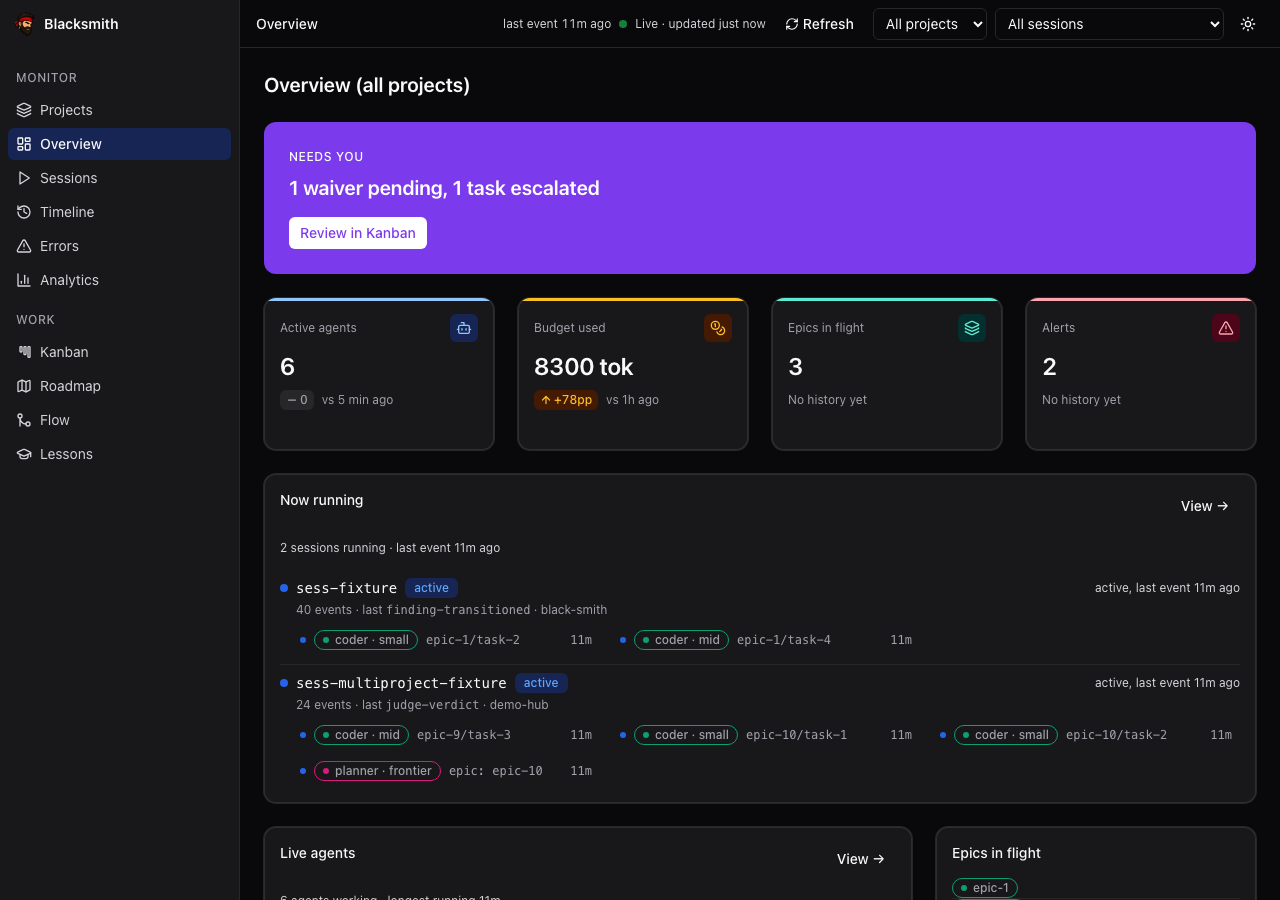 Overview — the one screen that asks something of you. |
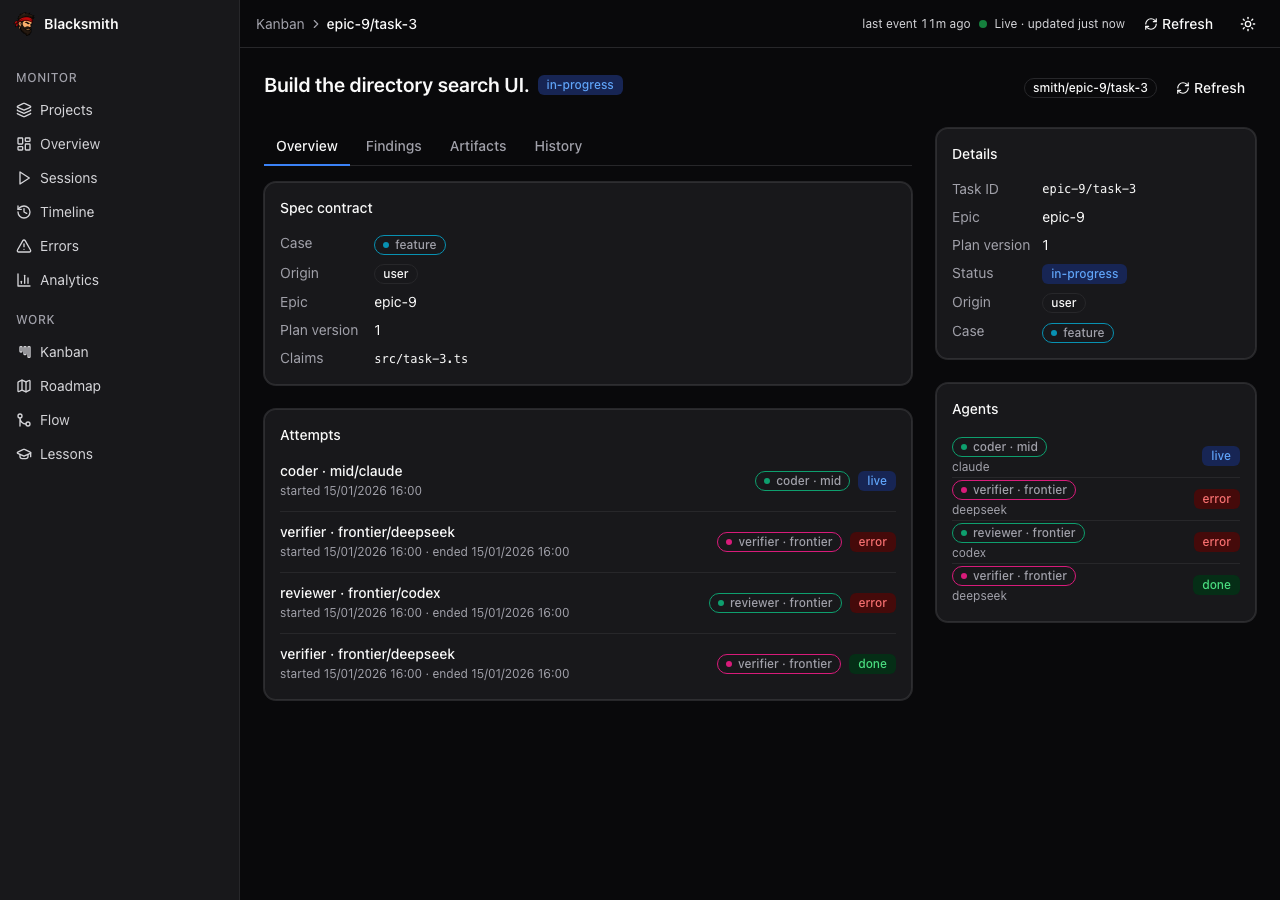 Task detail — the contract, and every attempt against it. |
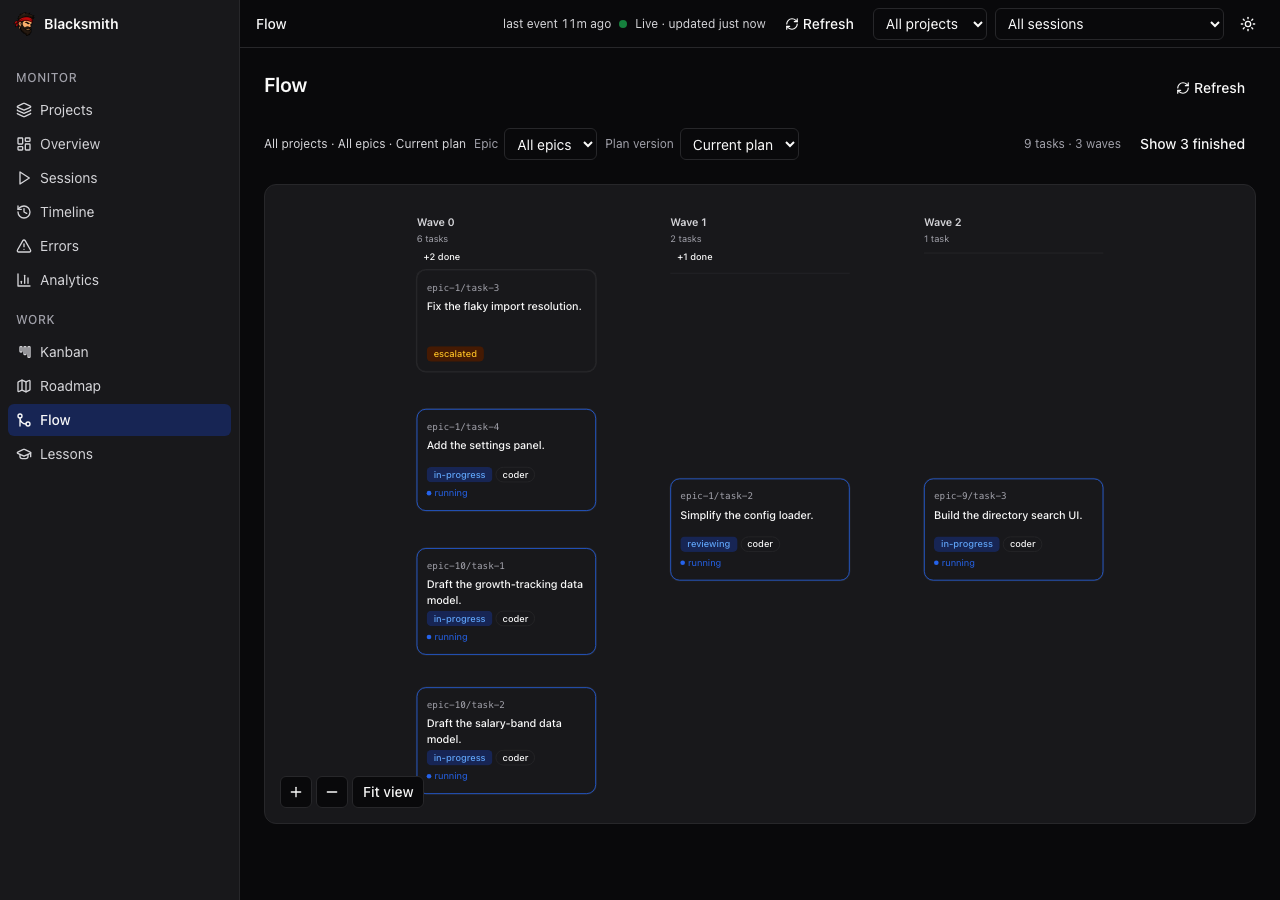 Flow — waves and the dependency edges that shaped them. |
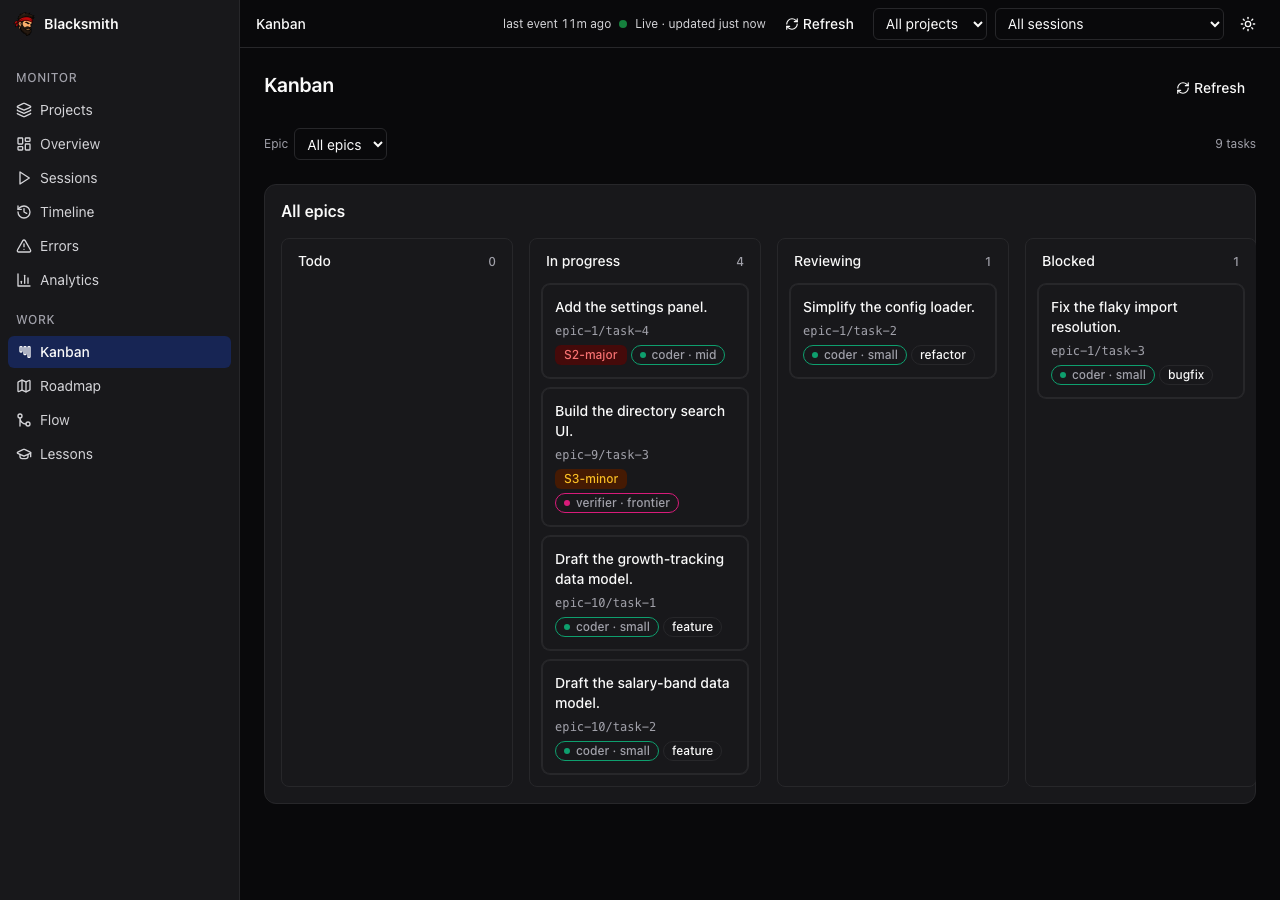 Kanban — what is moving, and what is stuck and why. |
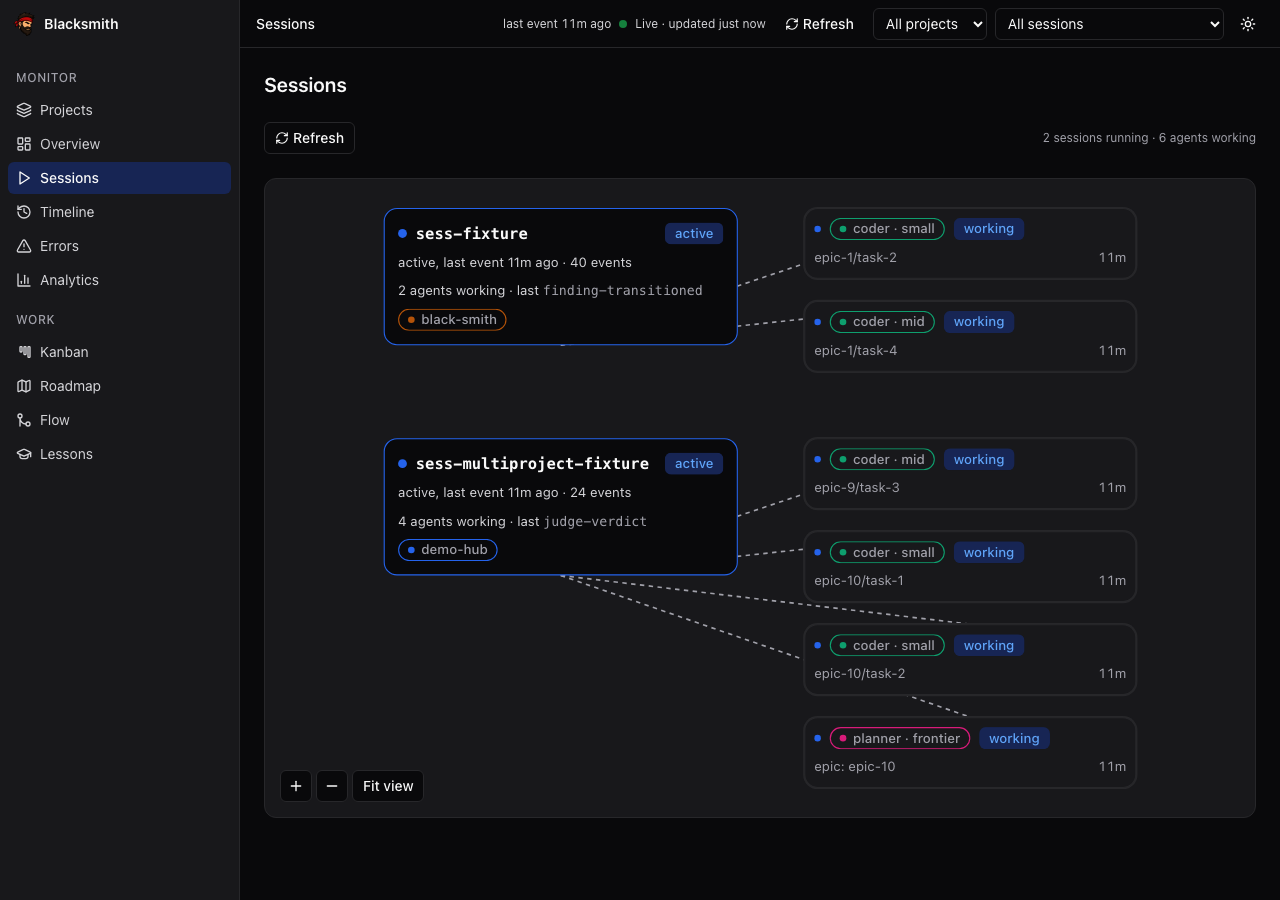 Sessions — every live agent and the tier that drew it. |
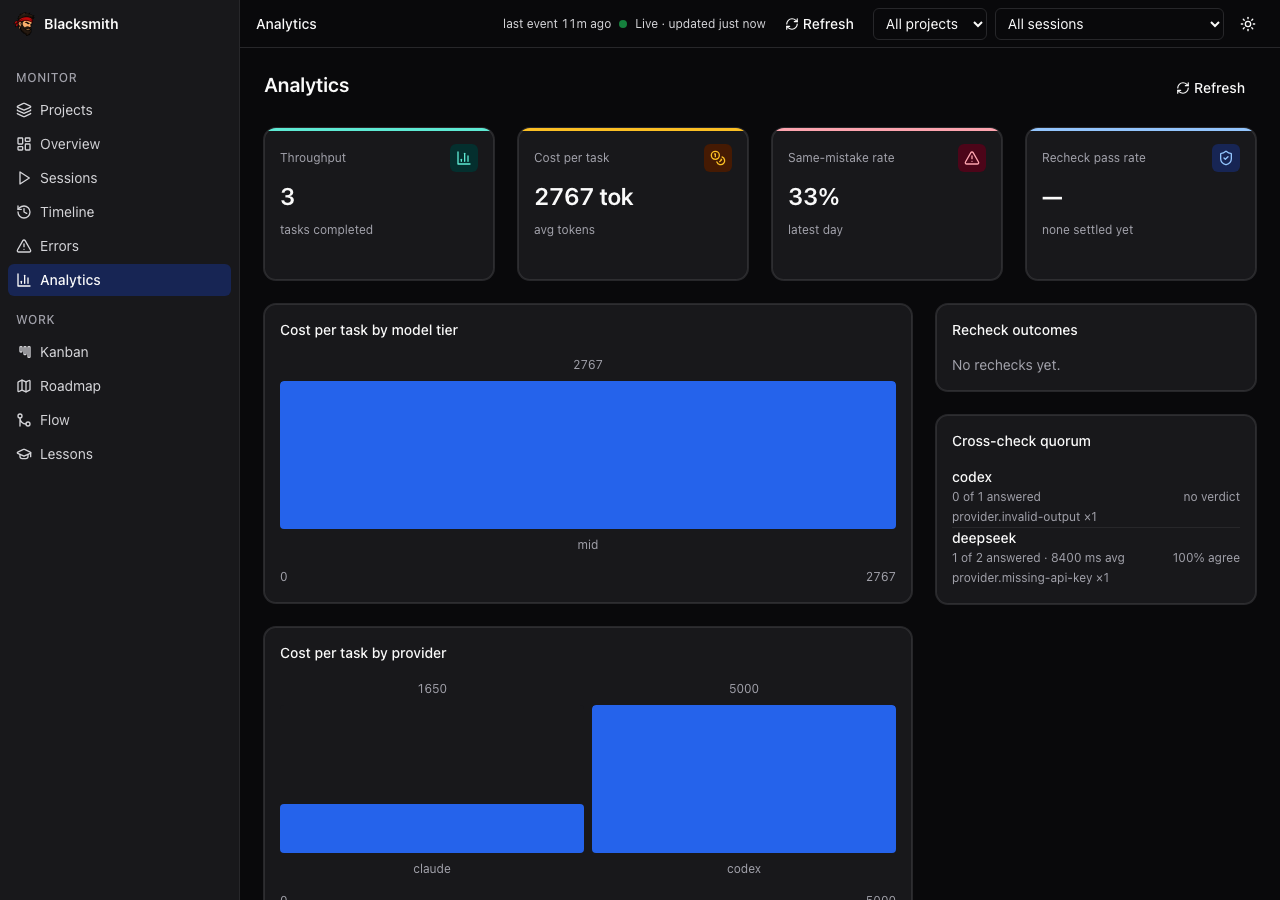 Analytics — cost per task, per tier, per provider, and the same-mistake rate. |
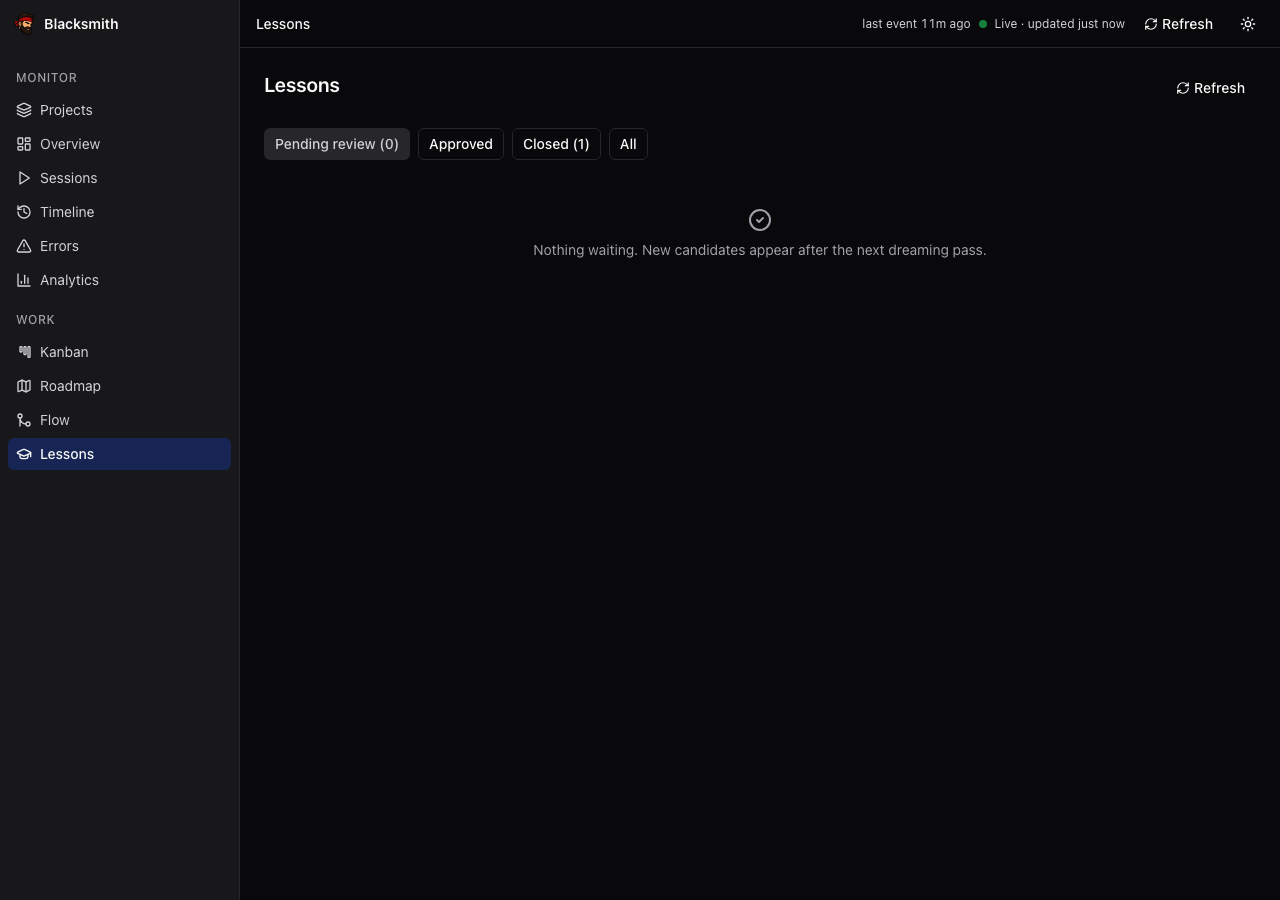 Lessons — candidates waiting on your approve or reject. |
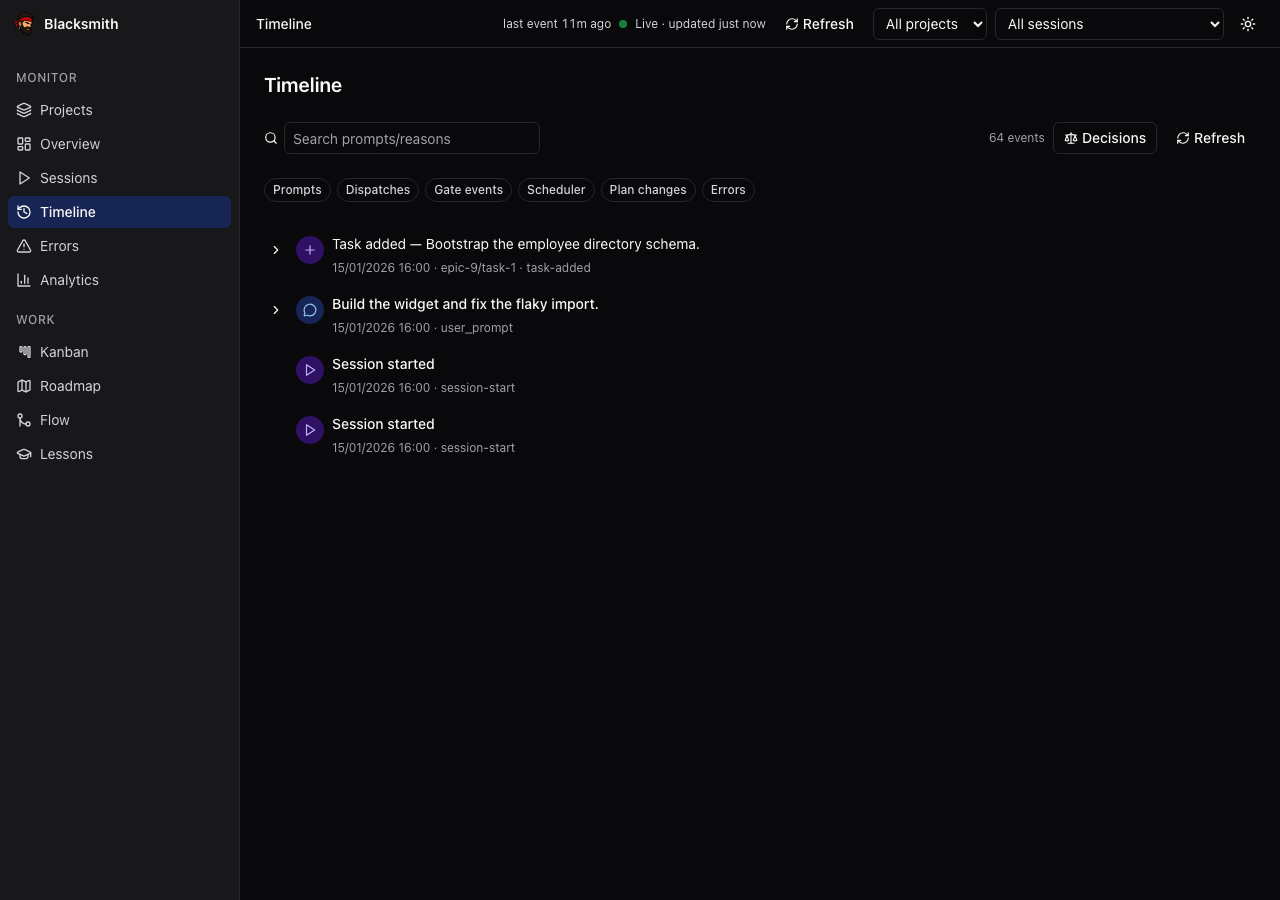 Timeline — the append-only log itself, filtered. |
Dark and light, desktop and mobile; errors by taxonomy category, roadmap
progress joined to real task and token counts, and per-project scoping.
→ The dashboard — what each of the eleven pages
shows you. It is part of the clone, not of the package.
Status
Phases 1–9 are built and merged: loop runner, worktree engine, gates, state and
analytics, dashboard, self-extension, cross-provider judges, hardening. Phase 10
is half in: smith daemon watches the factory in the background and its ops
runbook is written; the hosted UI stays deferred. Beside the phases, /bs audit
is built: an existing project can be read on four axes and one epic cut from
what you accept.
The CLI is on npm as @juzser/blacksmith, at 0.1.1 — the first version
that runs beside you and knows it is a package, rather than out of the
clone-shaped install 0.1.0 was. The package is the binary and what it
reads. The dashboard, the docs, the test suite and /bs itself come from a
clone; a plugin is what would move /bs, and it is
scoped, not cut.
The one thing to know up front: the daemon watches, it does not drive. It
tells you what the factory needs — budget alarms, agents that never came back,
rechecks and cadences that are due — without an open session. Doing the work is
still /bs run, a playbook your Claude Code session follows; close the session
and nothing advances.
→ What is built, what is not, and the unflinching
version in
Limitations today.
Docs
| Doc | For |
|---|---|
INSTALL.md |
Getting it running, per platform |
docs/guide/operator-loop.md |
The six steps you actually do |
docs/guide/operator-guide.md |
Every command, end to end, with output |
docs/guide/status.md |
What is real today |
docs/guide/extending.md |
Adding agents, policies, taxonomy values |
docs/specs/black-smith-architecture.md |
Why it is shaped this way |
docs/specs/audit-command-scope.md |
What /bs audit promises an audited project, and why |
docs/specs/plugin-port-scope.md |
How /bs runs without a clone, and what the plugin leaves behind |
docs/guide/dashboard.md |
The dashboard tour |
docs/runbooks/providers.md |
Setting up the cross-provider judges |
docs/runbooks/ops.md |
Running smith daemon unattended |
docs/README.md |
Everything else, one line each |
Agents read AGENTS.md and CLAUDE.md instead — this
repo is self-governing, and the rules it runs under live there.
Contributing
CONTRIBUTING.md has the details. Two things up front: the
gate is bash scripts/check.sh and it is the same script CI runs, so red
locally is red there; and several artifacts here are generated — see
extending for which files you may hand-edit.
CODE_OF_CONDUCT.md ·SECURITY.md ·CHANGELOG.md
License
Reviews (0)
Sign in to leave a review.
Leave a reviewNo results found