claude-status-bar-macos
Health Gecti
- License — License: MIT
- Description — Repository has a description
- Active repo — Last push 0 days ago
- Community trust — 10 GitHub stars
Code Basarisiz
- rm -rf — Recursive force deletion command in scripts/bake-clawd-frames.sh
- rm -rf — Recursive force deletion command in scripts/hook-integration-test.sh
- rm -rf — Recursive force deletion command in scripts/make-app.sh
Permissions Gecti
- Permissions — No dangerous permissions requested
Bu listing icin henuz AI raporu yok.
Native macOS menu bar app showing Claude usage and Claude Code activity at a glance
Claude Status Bar for macOS


Native macOS menu bar app showing Claude usage and Claude Code activity at a
glance. A clean-room Swift port of the idea behind
claude-status-bar-kde,
with multi-account support.

Features
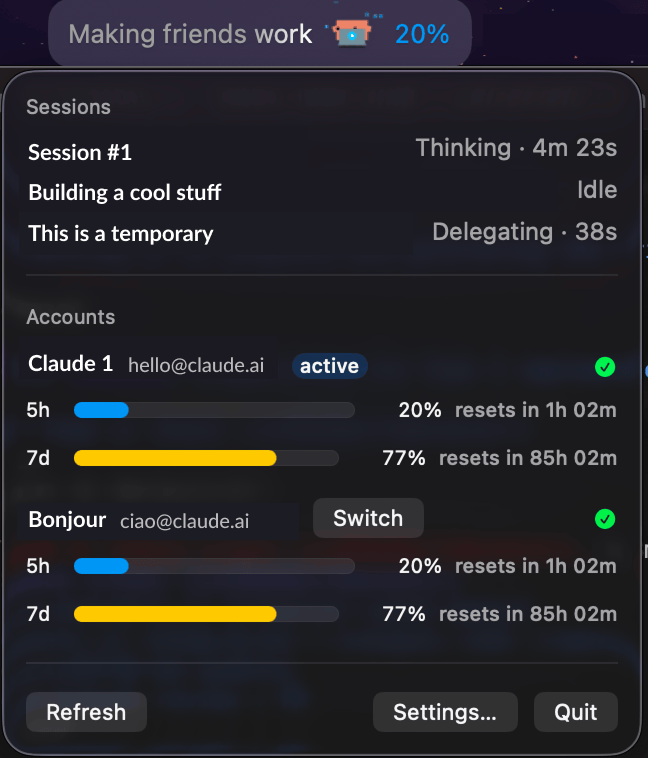
- Usage at a glance — 5-hour and 7-day utilization for the active Claude
account in the menu bar, color-coded (green / yellow ≥50% / red ≥80%,
configurable). - Multi-account — discovers every account managed by
cux under~/.cux(falls back to~/.claude/.credentials.json); per-account usage bars in the popover. - Claude Code activity — Clawd shows what your sessions are doing right
now (thinking, editing, running…), with playful verbs and elapsed timers,
driven by Claude Code hooks + file watching (no polling loop). - Settings — display style, poll interval, thresholds, per-account
visibility, launch at login, hook install/remove.
Install
Prerequisites
- macOS 14 (Sonoma) or later.
- Claude Code installed, if
you want the menu bar to show live session activity (step 4 below). The
app also works purely as a usage monitor without it. - Command Line Tools only if you're building from source — no full Xcode
install needed:xcode-select --install.
Get the app
Download
ClaudeStatusBar.dmgfrom
Releases,
open it, and dragClaudeStatusBar.appto/Applications.To build from source instead (contributors, or Command-Line-Tools-only
setups), see Build from source below, then:cp -R dist/ClaudeStatusBar.app /Applications/First launch / Gatekeeper
The app is ad-hoc signed, so macOS quarantines it and the first launch is
refused ("cannot verify" / "damaged") — expected either way you installed
it. Right-click the app in Applications and choose Open (twice if
needed), or clear the quarantine flag directly:xattr -d com.apple.quarantine /Applications/ClaudeStatusBar.appThe app lives in the menu bar only (no Dock icon) — look for its icon
there after launch.Enable activity tracking
Settings → Claude Code tab → Install. This adds hook entries for
SessionStart,UserPromptSubmit,PreToolUse,PostToolUse,Stop,
andNotificationto~/.claude/settings.json(a timestamped backup is
written first; running Install again is safe — it replaces its own prior
entry rather than duplicating it). Remove deletes exactly what
Install added.Multi-account usage (optional)
Install cux and add your accounts — the app
reads account slots straight from~/.cux(falling back to the single
account in~/.claude/.credentials.json). Each cux slot shows up as its
own row in the popover with 5h/7d usage bars; click Switch to make a
different slot active. If a row shows re-login needed, click
Log in: for a cux slot this runscux switch <slot> && cux /login,
for the bare~/.claudeaccount it runsclaude /login— either opens a
terminal window to complete the OAuth flow.Verify it works
The menu bar label shows (depending on display style): activity text
(e.g. "Editing… · 12s"), the Clawd icon, and your active account's
5-hour usage percentage. Click it to open the popover for per-account
usage bars and active Claude Code sessions.Uninstall
Settings → Claude Code tab → Remove, quit the app (menu bar icon
→ popover → Quit), then delete it:rm -rf /Applications/ClaudeStatusBar.app
Build from source
Requires macOS 14+ and Command Line Tools (no Xcode needed).
make build   # debug build
make test    # unit + integration tests
make app     # dist/ClaudeStatusBar.app
make dmg     # dist/ClaudeStatusBar.dmg
Security notes
- OAuth tokens are read from disk only at request time and sent only to
api.anthropic.com. They are never logged, cached, or written elsewhere. - The app is not sandboxed (it must read
~/.claudeand~/.cux). - The hook binary always exits 0 and prints nothing, so it can never block
or corrupt a Claude Code session.
Contributing
Contributions are welcome. See CONTRIBUTING.md for the
build/test/PR workflow, and CLAUDE.md if you're using Claude
Code (or another AI coding agent) to work in this repo.
License
MIT. Clawd artwork from
clawd-tank (MIT) — seeLICENSE.clawd-tank.
Yorumlar (0)
Yorum birakmak icin giris yap.
Yorum birakSonuc bulunamadi