motif
Health Pass
- License — License: MIT
- Description — Repository has a description
- Active repo — Last push 0 days ago
- Community trust — 20 GitHub stars
Code Warn
- process.env — Environment variable access in e2e/claude-science-analysis-results.spec.ts
- process.env — Environment variable access in e2e/claude-science-construct-verification.spec.ts
- process.env — Environment variable access in e2e/claude-science-feature-semantics.spec.ts
- process.env — Environment variable access in e2e/claude-science-msa-interactions.spec.ts
- process.env — Environment variable access in e2e/claude-science-pane-placement.spec.ts
- process.env — Environment variable access in e2e/claude-science-pcr-materialization.spec.ts
- process.env — Environment variable access in e2e/claude-science-real-sanger.spec.ts
- process.env — Environment variable access in e2e/claude-science-workspace-integrity.spec.ts
- network request — Outbound network request in e2e/claude-science-workspace-integrity.spec.ts
Permissions Pass
- Permissions — No dangerous permissions requested
No AI report is available for this listing yet.
An AI-native molecular biology workbench for Claude Science: Claude opens sequence files and prepares analyses on request; you annotate, align, and review them in an interactive workspace.
Motif for Claude Science
Website ·
Installation ·
Capabilities ·
Examples ·
Security
Motif is an AI-native molecular biology workbench for Claude Science. It
combines sequence records and analysis results in a self-contained HTML
workspace that opens locally or in Claude Science. You can inspect and edit
records, review maps and alignments, save checkpoints, and export a workspace
ZIP.
Claude Science can use motif_open_workbench to open the MCP App. If the host
does not display the App, motif_create_workbench_artifact returns a
self-contained HTML workbench that opens in the right pane.
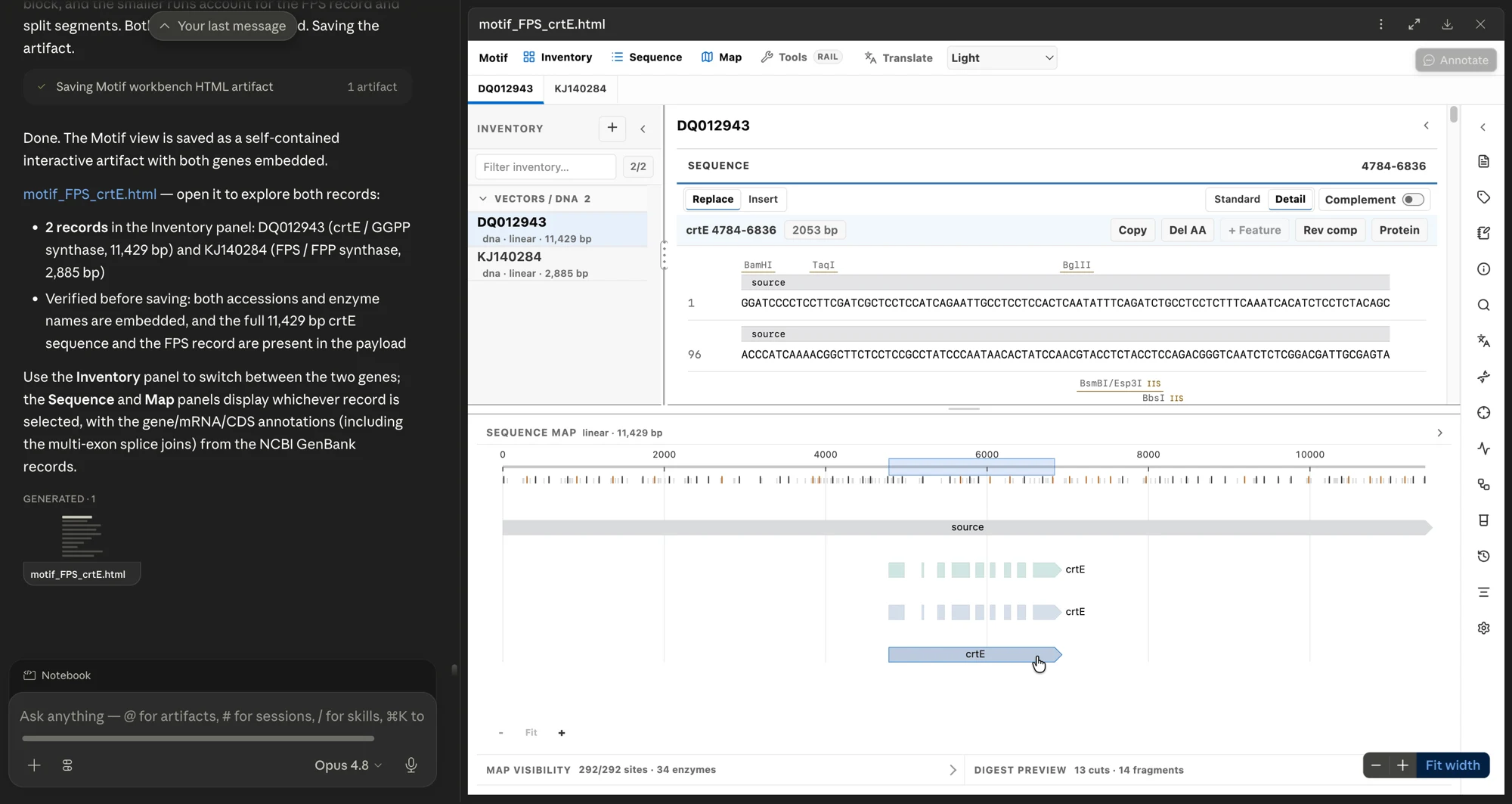
Motif in Claude Science with two sequence records, annotated sequence detail, a linear map, and restriction-digest results.
This repository contains the source for the workbench, Claude plugin,
standalone skill, and local connector. The connector builds and runs from this
checkout.
Motif is an independent hackathon project and is not an Anthropic product or
an official Claude Science integration.
Install with a coding agent
Give Claude Code, Codex, or another local coding agent with terminal access
this repository and the following request:
Install the latest released version of Motif for Claude Science from
https://github.com/jvogan/motif.

Follow docs/CLAUDE_SCIENCE_QUICKSTART.md. Place the checkout in a stable local
folder, run npm ci and npm run claude-science:setup, and use only the bundled
examples/motif-demo.gb file for the first test. Verify any downloaded release
assets against the published checksums. Preserve unrelated local connectors.
Tell me when I need to grant folder access, restart Claude Science, or
reconnect motif-local.
For manual installation, follow the
Claude Science quickstart.
What is included
- DNA, RNA, and protein records with annotations, tags, notes, and editing
tools - Standard and per-base Detail sequence views with selection and editing
- Circular and linear maps with features, coordinates, restriction sites,
selection, labels, and pan/zoom - Restriction digest prediction, fragment records, and a qualitative gel
- Primer/PCR design, Gibson, Golden Gate, GoldenBraid, and traditional ligation
workflows - In-browser MSA for 2–10 compatible records of up to 3,000 residues each,
plus import and review of aligned FASTA/CLUSTAL - An external MSA runner for MAFFT, MUSCLE, and Clustal Omega that invokes one
selected executable without a command shell and records its version,
arguments, and hashes - AB1/ABI Sanger import and chromatogram review using existing base calls
- ORF and translation analysis, plus PAM-based CRISPR guide candidates
- Workflow history, typed analysis results, and plain-text or JSON attachments
that Motif stores and displays without executing - Database JSON checkpoint and restore, plus workspace ZIP export
- A deterministic Claude plugin bundle, standalone skill, and local MCP
connector with a full-workbenchui://App and embedded HTML fallback
Develop from source
Requires Git and Node.js 22.12 or newer. From a source checkout:
git clone https://github.com/jvogan/motif.git
cd motif
npm ci
npm run preview:motif
Open preview/motif-artifact.html, or start an editable Vite session with:
npm run dev
First success in Claude Science
Install the local connector from the checkout you intend to keep:
npm run claude-science:setup
Setup registers this checkout's path. Moving the folder later requires running
setup again. Grant Claude Science access to the exact folder, fully quit and
reopen the app, then reconnect motif-local. The connector exposes exactlymotif_open_workbench and motif_create_workbench_artifact.
For the most reliable first visual result, attach the bundled syntheticexamples/motif-demo.gb and ask Claude Science:
Read the complete text of motif-demo.gb, including ORIGIN. Call motif-local's
motif_create_workbench_artifact exactly once with filename "motif-demo.gb",
the complete content, title "Motif demo — MOTIFDEMO", and outputFilename
"motif-demo-workbench.html". Preserve the exact returned HTML as a Claude
Science artifact and open it in the right pane. Report the record name,
topology, residue count, and runtime build ID.
Click the generated HTML to open the interactive workbench. The file contains
a snapshot of the input and Motif build used to create it; later source or
build changes do not update it. Settings shows the Motif version and runtime
build ID. Export a new checkpoint to preserve edits made in the workbench. See the
Claude Science quickstart for permission,
verification, and optional live-App steps.
To have Claude prepare a workbench with colored annotations, replace the
bracketed text in this prompt:
Read the complete attached sequence file. Build a Motif payload that preserves
the source sequences, record names, molecule types, topology, coordinates, and
existing annotations. Add only these annotations: [names, types, coordinates,
and directions]. Give new annotation types distinct, readable colors; use the
same color for annotations with the same type and keep adjacent features easy
to distinguish. Call motif_create_workbench_artifact with the payload, preserve
the exact returned HTML as a Claude Science artifact, and open it in the right
pane.
The public examples also include synthetic FASTA,
aligned CLUSTAL, and complete workspace JSON inputs with expected identities.
Build the distributable
npm run build:motif
The build writes:
dist-motif/
├── claude-science/
│   ├── motif-mcp-app.html
│   └── motif-mcp-server.mjs
├── motif-template.html
├── motif-artifact.html
├── motif-for-claude-science/
├── motif-for-claude-science.zip
├── motif-for-claude-science.checksums.json
└── motif-for-claude-science-skill/SKILL.md
The HTML and MCP App are self-contained: Vite's JavaScript and CSS assets are
inlined, and the plugin contains its compiled connector, App, standalone
template, and artifact resource. The ZIP is deterministic and its file/archive
SHA-256 values are recorded beside it.
The plugin ZIP is for Claude/plugin hosts. It does not install the Claude
Science local connector. Run npm run claude-science:setup from a source
checkout instead.
To generate an additional repo-local artifact with preloaded data:
npm run build:motif -- \
  --payload ./inventory.json \
  --out ./preview/my-motif-workspace.html
Use --handoff /explicit/path/motif-artifact.html only to write a copy outside
the repository. By default, the build writes nothing outside it.
Validate
npm run typecheck
npm run lint
npm test
npm run test:plugin
npm run test:connector
npm run check:css-tokens
npm run check:aria-controls
npm run build:motif
npm run test:e2e
npm run test:e2e:msa
npm run validate:plugin adds strict validation through the Claude CLI when it
is installed.
Claude Science local connector
For a fresh installation, follow the
public Claude Science quickstart.
Build, check, and register the connector:
npm run claude-science:setup
Setup builds the connector and checks its protocol before changing Claude
Science's configuration. It then adds exactly one motif-local entry,
preserves unrelated entries, and writes a private backup before installing a
changed configuration. Grant the Motif checkout read access in Claude Science,
fully quit and reopen the app, then reconnect motif-local.
The connector exposes motif_open_workbench for bounded Motif payload, FASTA,
GenBank, raw-sequence, or Motif JSON review. Pass the complete text and its
exact filename. A successful result means Motif parsed the input; only a
visible Motif frame confirms that Claude Science mounted the MCP App. Some
local/custom connector builds do not list Motif in the artifact viewer chooser;
use that path only when Motif appears there.
If no workbench appears, use motif_create_workbench_artifact. Save the exact
returned HTML resource, then open it in Claude Science's right pane. The file
contains a snapshot of the input and Motif build used to create it; later
source or build changes do not update it.
The connector does not write a database or run external executables. It uses
Motif's bounded page-local workspace API and does not expose a generic DOM,
evaluation, shell, or filesystem bridge. Setup, verification, rollback, and
host limitations are documented in
Claude Science integration.
Known host errors, reload boundaries, and visual acceptance steps are in the
Motif + Claude Science troubleshooting guide.
Data safety
Motif has no hosted backend. The standalone HTML does not upload sequence data
to a Motif service. External MSA tools run only when explicitly invoked outside
the HTML. Data supplied through Claude Science remains subject to your Claude
and organization data policies. Do not use sensitive or unpublished sequences
without authorization. Workspace exports are unencrypted files; store and
back them up according to their sensitivity.
See the plugin README
for payload, MSA, Sanger, installation, and security details.
The public capability reference distinguishes built-in
analysis from externally produced results that Motif can store and display.
For project support and release information, see SUPPORT.md,
SECURITY.md, CHANGELOG.md, and
THIRD_PARTY_NOTICES.md.
License
MIT. Redistributed plugin bundles must retain LICENSE,THIRD_PARTY_NOTICES.md, and record-level reference provenance.
Reviews (0)
Sign in to leave a review.
Leave a reviewNo results found