ccusage-web
Health Pass
- License — License: MIT
- Description — Repository has a description
- Active repo — Last push 0 days ago
- Community trust — 10 GitHub stars
Code Fail
- os.homedir — User home directory access in agent/agent.js
- process.env — Environment variable access in agent/agent.js
- fs module — File system access in agent/agent.js
- network request — Outbound network request in agent/agent.js
- rm -rf — Recursive force deletion command in agent/setup.sh
Permissions Pass
- Permissions — No dangerous permissions requested
This tool provides a web-based dashboard for monitoring Claude Code token usage and costs across multiple devices using an agent-based reporting system.
Security Assessment
The tool presents a Medium overall risk. While it does not request dangerous permissions and lacks hardcoded secrets, the agent component raises several concerns. It accesses the user's home directory, reads environment variables, interacts with the file system, and makes outbound network requests.
Most critically, the automated setup script uses a recursive force deletion command (`rm -rf`), which can be highly destructive if the path variables are ever incorrectly resolved or modified. Furthermore, the quick start instructions recommend piping a remote script directly into the shell or executing downloaded web scripts, bypassing the opportunity for manual code review.
Quality Assessment
The project is actively maintained, with its most recent code push occurring today. It is properly licensed under the standard MIT license. The community trust level is currently very low, with only 10 GitHub stars, indicating that the codebase has not been widely vetted by a large audience.
Verdict
Use with caution—while the core dashboard appears functional, the agent and deployment scripts execute potentially destructive file operations and require a thorough manual code review before running on your machine.
Web dashboard for monitoring Claude Code usage and costs. Built with Next.js, ECharts, and SQLite.
CCUsage Web
A web-based monitoring dashboard for Claude Code token usage across multiple devices.
Features
- 🌍 Full i18n support - Complete English and Chinese localization
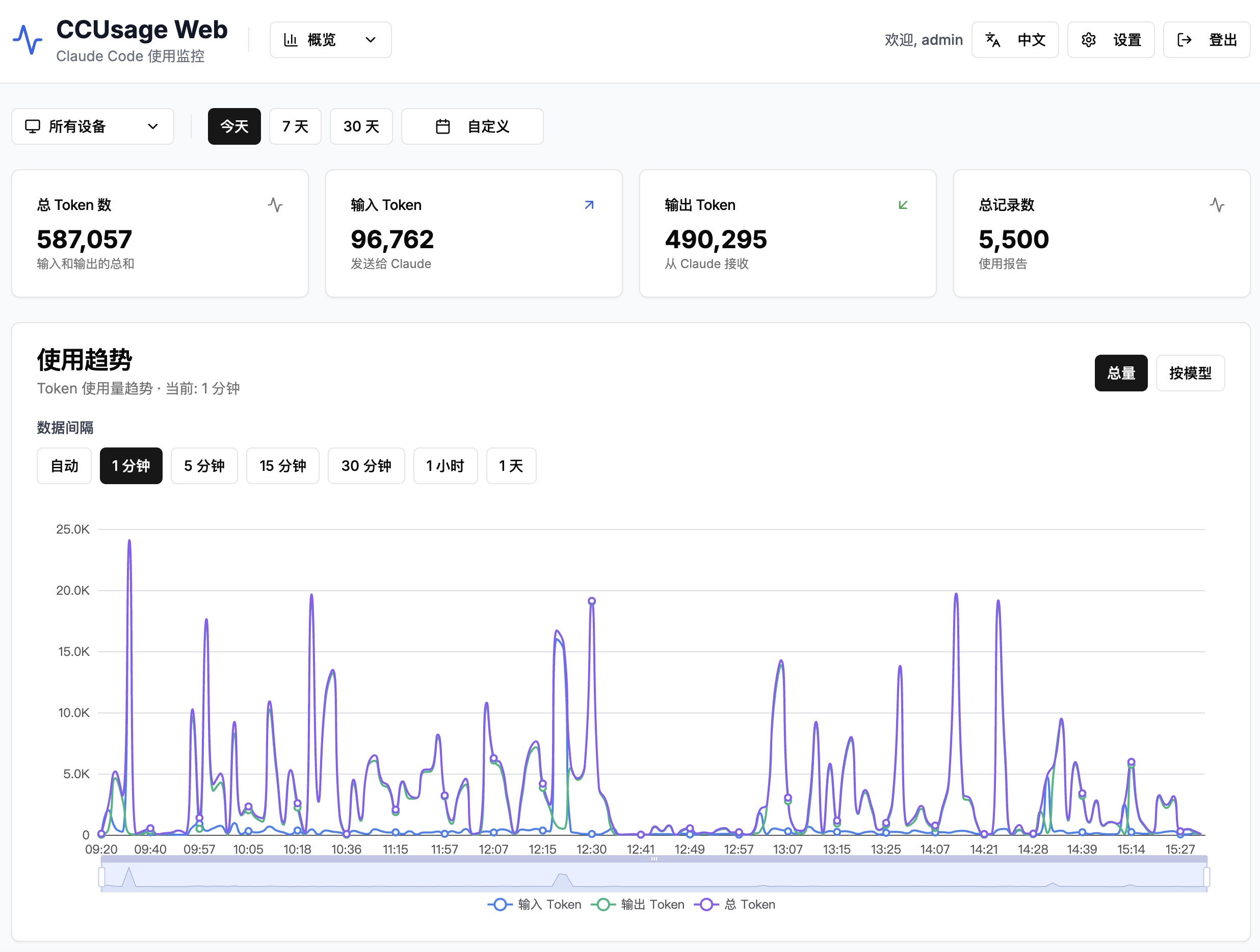
- 📊 Real-time token usage monitoring - Track Claude Code usage across all devices
- 🖥️ Multi-device support - Agent-based reporting from multiple machines
- 🔐 Secure authentication - JWT-based admin system with password management
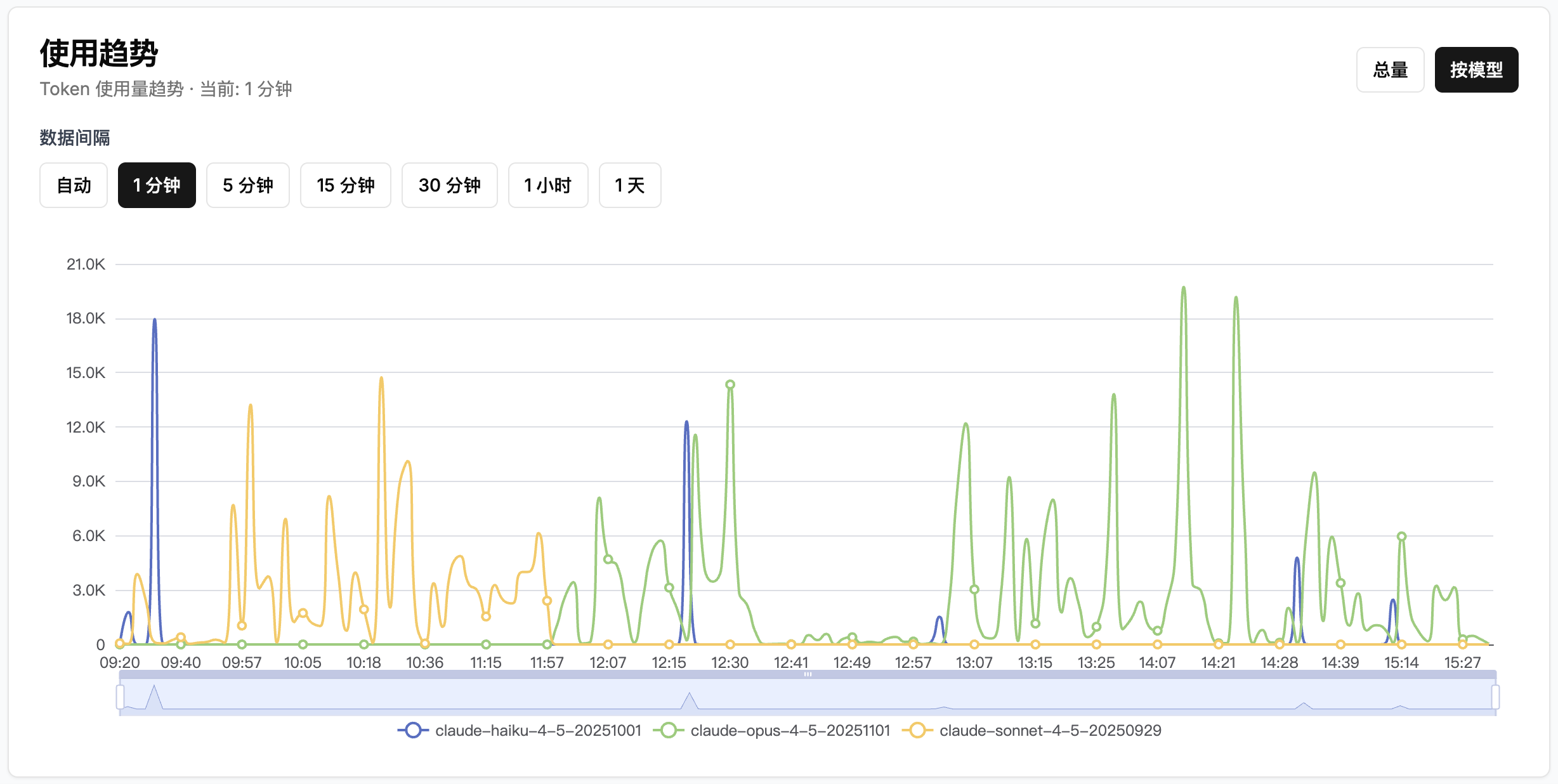
- 📈 Interactive dashboard - Beautiful charts with usage statistics and trends
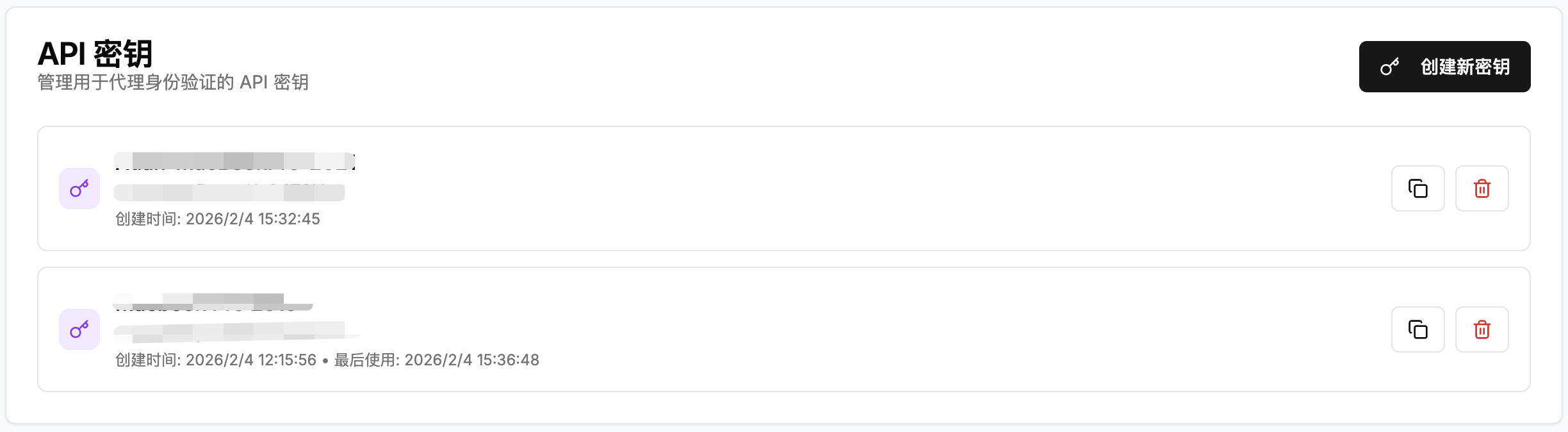
- 🔑 API key management - Create and manage device-specific API keys
- ⚙️ Settings panel - Change password and manage account settings
- 🚀 Docker ready - One-command deployment with docker-compose
- 💾 SQLite database - Automatic initialization and data persistence
- 📱 Responsive design - Works seamlessly on desktop and mobile devices
Tech Stack
- Frontend: Next.js 15 (App Router), React 19, TypeScript
- UI: shadcn/ui, Tailwind CSS, Recharts
- i18n: next-intl for internationalization
- Backend: Next.js API Routes
- Database: SQLite (better-sqlite3)
- Authentication: JWT with bcrypt password hashing
- Deployment: Docker + docker-compose
Quick Start
Step 1: Deploy Server (For Administrators)
First, set up the monitoring server:
Option A: Docker Deployment (Recommended)
- Download deployment files:
mkdir ccusage-web && cd ccusage-web
curl -sL https://raw.githubusercontent.com/jx453331958/ccusage-web/main/deploy.sh -o deploy.sh
curl -sL https://raw.githubusercontent.com/jx453331958/ccusage-web/main/docker-compose.yml -o docker-compose.yml
curl -sL https://raw.githubusercontent.com/jx453331958/ccusage-web/main/.env.example -o .env.example
chmod +x deploy.sh
- One-command deployment:
./deploy.sh deploy
The script will:
- Check Docker availability
- Create
.envfile (you'll be prompted to edit it) - Create data directory
- Pull pre-built image from ghcr.io and start the container
- Access the dashboard at http://localhost:3000
- Login with your configured credentials
- The SQLite database will be stored in
./data/ccusage.db
Deploy Script Commands
./deploy.sh deploy   # First-time deployment
./deploy.sh update   # Pull latest image and restart
./deploy.sh start    # Start the service
./deploy.sh stop     # Stop the service
./deploy.sh restart  # Restart the service
./deploy.sh status   # Show status and recent logs
./deploy.sh logs     # Follow container logs
./deploy.sh backup   # Backup the database
./deploy.sh clean    # Remove containers and images
Manual Docker Deployment
If you prefer manual setup:
- Configure environment variables:
cp .env.example .env
nano .env  # Edit with your settings
Recommended .env settings:
ADMIN_USERNAME=admin
ADMIN_PASSWORD=your-secure-password
COOKIE_SECURE=false  # Set to true if using HTTPS
- Start with Docker Compose:
docker compose pull
docker compose up -d
- Access the dashboard at http://localhost:3000
Option B: Development Setup
- Clone and install:
git clone [email protected]:jx453331958/ccusage-web.git
cd ccusage-web
npm install
- Configure environment:
cp .env.example .env
nano .env  # Edit your credentials
- Run development server:
npm run dev
- Access at http://localhost:3000
Step 2: Install Agent (For End Users)
After the server is running, users can install the monitoring agent:
Get credentials from admin:
- Server URL (e.g.,
http://your-server:3000) - API Key (create in dashboard → API Keys tab)
- Server URL (e.g.,
One-line installation (with environment variables):
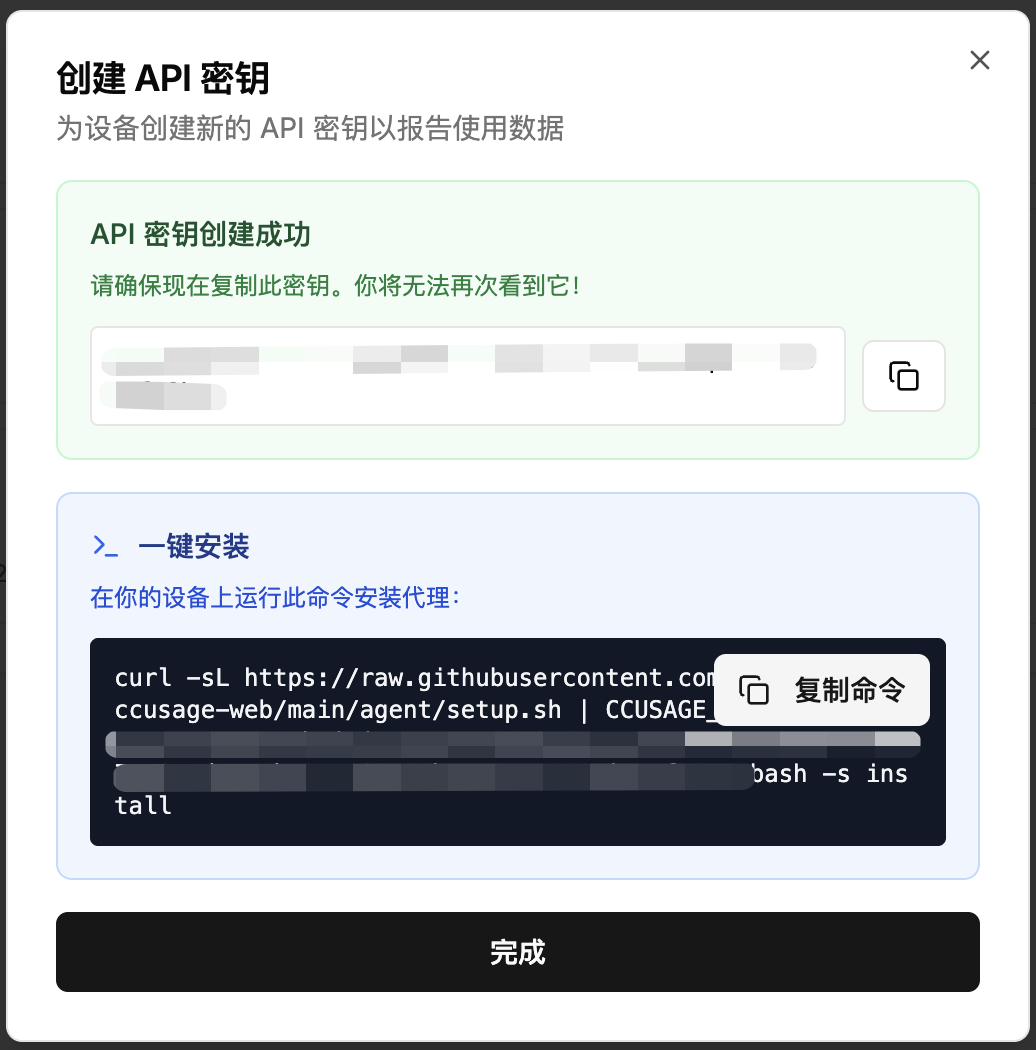
curl -sL https://raw.githubusercontent.com/jx453331958/ccusage-web/main/agent/setup.sh | \
  CCUSAGE_SERVER=http://your-server:3000 CCUSAGE_API_KEY=your-key bash -s install
Or download and run interactively:
curl -sL https://raw.githubusercontent.com/jx453331958/ccusage-web/main/agent/setup.sh -o setup.sh
chmod +x setup.sh
./setup.sh install
The script will:
- Auto-detect OS (macOS/Linux)
- Install as background service (launchd/systemd/cron)
- Start reporting usage every 5 minutes
That's it! The agent runs in the background and reports to your server automatically.
Agent Management
Quick Install (One-liner)
curl -sL https://raw.githubusercontent.com/jx453331958/ccusage-web/main/agent/setup.sh | \
  CCUSAGE_SERVER=http://your-server:3000 \
  CCUSAGE_API_KEY=your-api-key \
  REPORT_INTERVAL=5 \
  bash -s install
Check Agent Status
curl -sL https://raw.githubusercontent.com/jx453331958/ccusage-web/main/agent/setup.sh | bash -s status
Update Agent
curl -sL https://raw.githubusercontent.com/jx453331958/ccusage-web/main/agent/setup.sh | bash -s update
Restart Agent
curl -sL https://raw.githubusercontent.com/jx453331958/ccusage-web/main/agent/setup.sh | bash -s restart
Uninstall Agent
curl -sL https://raw.githubusercontent.com/jx453331958/ccusage-web/main/agent/setup.sh | bash -s uninstall
Download Script First (Recommended)
If you prefer to download once and run multiple times:
curl -sL https://raw.githubusercontent.com/jx453331958/ccusage-web/main/agent/setup.sh -o setup.sh
chmod +x setup.sh
./setup.sh install    # Install agent
./setup.sh status     # Check status
./setup.sh update     # Update to latest version
./setup.sh restart    # Restart the service
./setup.sh reset      # Clear local state, re-report all data
./setup.sh config     # Edit configuration file
./setup.sh run        # Test run once
./setup.sh uninstall  # Remove agent
Configuration File
The agent stores configuration in ~/.ccusage-agent.conf:
# Edit configuration
./setup.sh config

# Then restart to apply changes
./setup.sh restart
See agent/README.md for manual setup and advanced configuration.
API Documentation
Authentication
All admin endpoints require a JWT token set as an HTTP-only cookie.
Login
POST /api/auth/login
Content-Type: application/json

{
  "username": "admin",
  "password": "admin123"
}
Logout
POST /api/auth/logout
Change Password
POST /api/auth/change-password
Cookie: auth_token=JWT_TOKEN
Content-Type: application/json

{
  "currentPassword": "admin123",
  "newPassword": "newpassword123"
}
Usage Reporting (Agent API)
Report Usage
POST /api/usage/report
Authorization: Bearer YOUR_API_KEY
Content-Type: application/json

{
  "records": [
    {
      "input_tokens": 1000,
      "output_tokens": 500,
      "cache_write_tokens": 200,
      "cache_read_tokens": 800,
      "total_tokens": 2500,
      "session_id": "optional-session-id",
      "timestamp": 1234567890
    }
  ]
}
Statistics
Get Usage Stats
GET /api/usage/stats?range=7d
Cookie: auth_token=JWT_TOKEN
Query parameters:
range:1d,7d,30d, orall
API Keys Management
List API Keys
GET /api/api-keys
Cookie: auth_token=JWT_TOKEN
Create API Key
POST /api/api-keys
Cookie: auth_token=JWT_TOKEN
Content-Type: application/json

{
  "device_name": "MacBook Pro"
}
Delete API Key
DELETE /api/api-keys/:id
Cookie: auth_token=JWT_TOKEN
Environment Variables
| Variable | Description | Default |
|---|---|---|
DATABASE_PATH |
Path to SQLite database | ./data/ccusage.db |
ADMIN_USERNAME |
Default admin username | admin |
ADMIN_PASSWORD |
Default admin password | admin123 |
COOKIE_SECURE |
Enable secure cookies (HTTPS) | false |
PORT |
Server port | 3000 |
Project Structure
ccusage-web/
├── src/
│   ├── app/                 # Next.js App Router pages
│   │   ├── api/            # API routes
│   │   ├── dashboard/      # Dashboard page
│   │   └── login/          # Login page
│   ├── components/         # UI components
│   │   ├── ui/            # shadcn/ui components
│   │   └── dashboard/     # Dashboard-specific components
│   └── lib/               # Utility libraries
│       ├── db.ts          # Database setup
│       ├── auth.ts        # Authentication
│       └── utils.ts       # Helpers
├── agent/                 # Agent script for monitoring
├── data/                  # SQLite database (auto-created)
├── Dockerfile            # Docker configuration
└── docker-compose.yml    # Docker Compose setup
Screenshots
Dashboard Overview
Usage Trend by Model
Multi-Device Support

API Key Management
One-Click Agent Installation
License
MIT License
Reviews (0)
Sign in to leave a review.
Leave a reviewNo results found