persona-shell
Health Warn
- License — License: MIT
- Description — Repository has a description
- Active repo — Last push 0 days ago
- Low visibility — Only 5 GitHub stars
Code Fail
- Hardcoded secret — Potential hardcoded credential in config.example.yaml
- execSync — Synchronous shell command execution in src/claude-process.ts
- network request — Outbound network request in src/console.ts
Permissions Pass
- Permissions — No dangerous permissions requested
This agent bridges Feishu (Lark) messaging with AI coding agents like Claude Code or Codex, enabling persistent, multi-instance "digital personas" that can autonomously handle tasks, maintain memory, and run in the background.
Security Assessment
Overall risk is High. The most critical factor is architectural: the tool explicitly runs Claude Code using the `--dangerously-skip-permissions` flag. This grants the AI unrestricted ability to execute shell commands and read/write files on your machine without human confirmation. While the tool itself does not request dangerous OS permissions, the automated bridge effectively exposes a high-privilege shell to anyone who can message the connected Feishu bot. The developers explicitly warn that the current authentication model is basic and the bot should not be exposed to untrusted users. Additionally, there is a hardcoded credential example in `config.example.yaml`, active synchronous shell execution in the source code, and outbound network requests used to communicate with the Feishu API.
Quality Assessment
The project is actively maintained, with recent repository pushes and a clear MIT license. However, community trust and visibility are very low, evidenced by only 5 GitHub stars. It is also explicitly labeled as an early-stage project that has only been tested on macOS (Apple Silicon). It relies on user-managed local Markdown files for memory and configuration, which offers good data portability but requires manual git maintenance.
Verdict
Not recommended for production use; use with extreme caution in isolated environments only if you fully trust all users who have access to the connected Feishu bot.
用你最趁手的 AI Agent 作为你的数字分身 — 飞书 ↔ Claude Code/Codex 消息桥接 + 持久记忆 + 多实例编排
Persona Shell
不重复造轮子——用你最趁手的 AI Agent 作为你的数字分身。
把现成的 agent 接入 IM、赋予持久记忆和人格、7×24 替你在线。Persona Shell 不造 agent,只做这层壳。
不知道怎么用?clone 下来,让你的 agent 来读。
⚠️ 早期项目:本项目仅在 macOS (Apple Silicon) 上开发和日常使用,没有经过广泛测试。Linux 理论可用但未验证,Windows 不支持(依赖 named pipe / mkfifo)。欢迎反馈问题。
⚠️ 安全提示:Persona Shell 以
--dangerously-skip-permissions模式运行 Claude Code,即 AI 可以无需确认地执行 shell 命令、读写文件。这是 AI 分身自主运行所必需的,但意味着你应该:
- 仅在你信任的机器上运行
- 不要将 Shell 暴露到公网(Web 控制台默认仅监听 localhost)
- 了解你的
soul.md和personas/中定义的行为边界当前的
master_id机制仅做基础的本体识别,没有经过严格的权限模型设计。不推荐将 Bot 暴露给任意不可信用户。 如果你的飞书 Bot 可被组织外成员触达,请自行在网络层或飞书应用可见范围中做额外限制。
TL;DR
外挂IM让CC干活、并行干,后台干、定时干、用不同身份干。
干完了写md。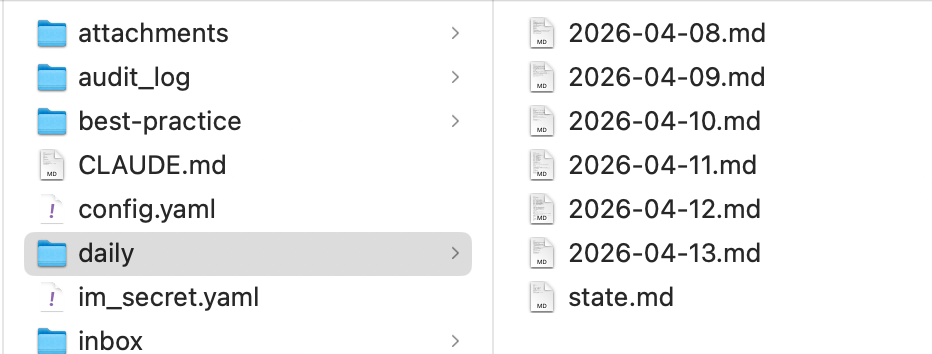
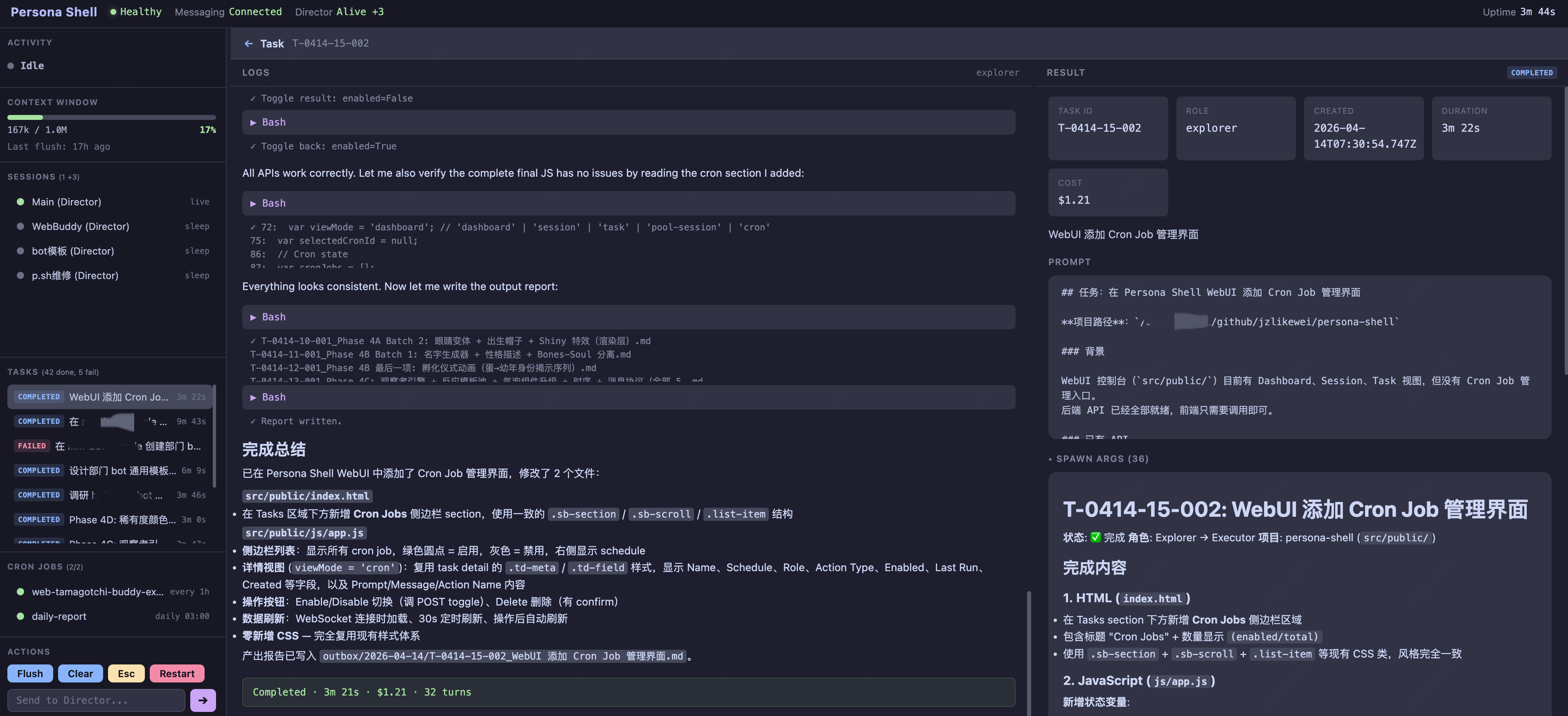
有个简单的管理页面。
设计理念
- 保持简单 agent 的推理、工具调用、代码能力由 Claude Code / Codex 提供,Persona Shell 只做编排,消息转发,没有任何添加。你平时怎么用,现在怎么用。
- 持久记忆 Just md file. 五层渐进式记忆架构(Soul → Core → Work → Project → Daily),跨会话保留认知
- 长期运行 daemon 模式 + 自动上下文刷新(FLUSH),不怕 context window 耗尽
- 多实例 主分身 + 群聊 Director Pool,一个分身同时服务多个对话,并行任务、后台任务、定时任务,想怎么来怎么来。。
- 数据可控 只有md文件,soul、人格、todo、state、日报,所有内容,统统打包。
身份数据
和日常的agent数据隔离,建议使用独立的git仓库维护
~/.persona/                    # 身份仓库(独立 git,AI 可读写)
├── soul.md                      # 灵魂:性格、价值观、行为边界
├── meta.md                      # 运维指令:FLUSH 流程、日报格式等
├── CLAUDE.md                    # 项目级指令(Claude Code 自动加载)
├── personas/                    # 角色人格
│   ├── director.md                # 主分身人格
│   ├── explorer.md                # 研究员角色
│   └── critic.md                  # 审查员角色
├── skills/                      # 技能(= Claude Code plugin)
│   ├── code-review/               # 代码审查 skill
│   ├── feature-dev/               # 功能开发 skill
│   ├── soul-crafting/             # 自我人格调优 skill
│   └── ...                        # 用户/AI 可自由增删
└── daily/                       # 记忆
    ├── state.md                   # 工作记忆(FLUSH checkpoint)
    └── 2026-04-13.md              # 日报
这些文件通过 CLI 参数在启动时注入 Claude Code,通过 bare 模式忽略系统CC的配置(--append-system-prompt-file、--plugin-dir、--add-dir),详见 docs/claude-code-startup.md。
支持的 Agent 后端
| Agent | 状态 |
|---|---|
| Claude Code | ✅ 已支持 |
| Codex | ✅ 已支持后台任务 |
前置准备:创建飞书应用
打开 飞书开放平台,创建一个企业自建应用
开启机器人能力:应用能力 → 添加应用能力 → 机器人
添加权限(权限管理 → API 权限):
权限 用途 im:message接收消息 im:message:send_as_bot发送消息 im:chat:readonly获取群名称和成员数 im:resource上传图片和文件 im:message.reactions:write添加表情回复 事件订阅:事件与回调 → 事件配置 → 添加
im.message.receive_v1(接收消息)连接方式选择 WebSocket:事件与回调 → 使用长连接接收事件(非 Webhook)
发布应用:版本管理与发布 → 创建版本 → 申请发布
复制 App ID 到
~/.persona/config.yaml,复制 App Secret 到~/.persona/im_secret.yaml
已经配置过各种虾?直接从开放平台控制台复制凭据即可,确保权限和事件订阅配齐。
快速开始
git clone https://github.com/jzlikewei/persona-shell.git
cd persona-shell

# 一键初始化(安装依赖 + 创建身份仓库 + 配置飞书凭据)
bun run init

# 自定义你的分身(可选,推荐)
cd ~/.persona && claude /soul-crafting

# 启动
bun run dev
配置说明
配置文件位于 ~/.persona/config.yaml,敏感凭据位于 ~/.persona/im_secret.yaml(均不在项目目录内,避免密钥泄露)。
时区说明:日志时间戳、日报触发、Cron 调度等全部使用
Asia/Shanghai时区。当前版本不可配置。
agents:
  defaults:
    default: "claude"
    director: "claude"
    explorer: "claude"
    executor: "claude"
    critic: "claude"
    introspector: "claude"
  providers:
    claude:
      type: "claude"
      command: "claude"
      bare: true
      dangerously_skip_permissions: true
      effort: "max"
    codex:
      type: "codex"
      command: "codex"
      sandbox: "danger-full-access"
      approval: "never"
      search: false

feishu:
  app_id: "cli_xxxx"
  master_id: "ou_xxxx"                       # 本体的飞书 open_id(见下文)

director:
  persona_dir: "~/.persona"               # 身份/记忆仓库路径
  pipe_dir: "/tmp/persona"                # named pipe 存放
  pid_file: "/tmp/persona/director.pid"
  time_sync_interval_hours: 2             # 时间同步注入间隔(小时)
  flush_context_limit: 700000             # 上下文 token 阈值,超过自动 flush
  flush_interval_days: 7                  # 距上次 flush 最大天数
~/.persona/im_secret.yaml:
feishu:
  app_secret: "xxxx"
Slash命令
| 命令 | 作用域 | 说明 |
|---|---|---|
/esc |
当前会话 | 取消队列中最早的消息 🔒 |
/flush |
当前会话 | 保存上下文后刷新(checkpoint → 新 session → bootstrap)🔒 |
/clear |
当前会话 | 清空上下文(不保存,直接重置)🔒 |
/session-restart |
当前会话 | 重启当前 Director(保留 session,加载新配置)🔒 |
/shell-restart |
全局 | 重启整个 Shell 进程(launchd 自动拉起,代码更新生效)🔒 |
/status |
当前会话 | 查看 Director 状态摘要 |
/help |
全局 | 显示可用命令列表 |
🔒 标记的命令仅限本体执行。配置 feishu.master_id 后,非本体发送这些命令会被静默忽略。未配置时所有用户均可执行(向后兼容)。
命令语义详见 docs/architecture.md 附录 A。
服务化(launchd)
# 安装并启动(自动生成 plist,路径从项目目录推断)
bun run install-service

# 管理
launchctl start com.persona.shell
launchctl stop  com.persona.shell

# 卸载
bun run uninstall-service
Web 控制台
Shell 在 http://localhost:3000 提供 Web 管理控制台 + HTTP API,仅监听 localhost。
Web 控制台:浏览器打开 http://localhost:3000,提供:
- 系统状态面板(Director / Token / Queue / Uptime)
- 会话消息查看(支持流式 streaming 实时显示回复)
- DirectorPool 群聊 Director 列表
- 后台任务管理 + Cron Jobs 管理
- 操作按钮:Flush / Clear / Esc / Restart
HTTP API:
# 生命周期管理
curl -X POST localhost:3000/api/flush     # 保存上下文后刷新
curl -X POST localhost:3000/api/clear     # 清空上下文(不保存)
curl -X POST localhost:3000/api/esc       # 取消当前处理中的消息
curl -X POST localhost:3000/api/session-restart   # 重启 Director 进程

# 向 Director 发消息(绕过飞书)
curl -X POST localhost:3000/api/send -H "Content-Type: application/json" -d '{"text":"你好"}'

# 任务管理
curl localhost:3000/api/tasks                          # 任务列表
curl -X POST localhost:3000/api/tasks -H "Content-Type: application/json" \
  -d '{"role":"explorer","agent":"codex","description":"测试","prompt":"hello"}'
curl localhost:3000/api/tasks/{id}                     # 任务详情
curl -X POST localhost:3000/api/tasks/{id}/cancel      # 取消任务

# 会话查看(支持 ?director={label} 查询 pool Director)
curl localhost:3000/api/messages?limit=100
curl localhost:3000/api/sessions
详细协议见 docs/web-console-plan.md。
架构
IM 消息 → TS Shell → MessageQueue → Director (主, named pipe)
              │                         │
              │  群聊 → DirectorPool ─→ Director (群1)
              │                    └──→ Director (群2)
              │
              └── Web Console (localhost:3000)
                    ├─ 状态快照 (1s WebSocket)
                    ├─ 流式 chunk (实时 WebSocket)
                    └─ HTTP API
FLUSH 机制
Director 作为长驻 daemon 运行,上下文窗口会持续膨胀。FLUSH 定期重启认知:
- Drain — 等待 in-flight 消息处理完成
- Checkpoint — Director 将工作状态保存到
daily/state.md - Reset — kill 进程 + 清空 session
- Bootstrap — 新 Director 读取
state.md恢复上下文
触发条件:上下文超 700k token 或距上次 flush 超 7 天。支持 /flush 手动触发。
时间同步
Director session 跨天时 currentDate 会过期。Shell 在消息间隔超过 2 小时时自动注入时间前缀。
后台任务
Director 可以派发任务给子角色(Explorer / Executor / Critic)独立执行,不阻塞主对话:
- Director 通过 MCP 工具调用
create_task,指定角色、prompt、描述,必要时可显式指定agent - Shell 按角色默认 agent 或请求参数中的
agent,为任务 spawn 对应后端进程 - 任务产出写入
~/.persona/outbox/YYYY-MM-DD/ - 完成后 Shell 将结果回调给发起方 Director(支持 pool Director 路由)
任务有超时保护(默认 30 分钟)、重试机制、取消功能,全部通过 SQLite 持久化。
其中系统依赖的协议参数由 Shell 内部固定管理。配置里只开放少量策略项:Claude 可配 bare、dangerously_skip_permissions、effort;Codex 可配 sandbox、approval、search、model。
Cron 调度
Director 可以创建定时任务("闹钟"),支持三种调度格式:
| 格式 | 示例 | 说明 |
|---|---|---|
every Nm |
every 30m |
每 N 分钟 |
every Nh |
every 2h |
每 N 小时 |
daily HH:MM |
daily 09:00 |
每天固定时间(Asia/Shanghai) |
三种动作类型:
- spawn_role — 创建子角色任务(调研、执行等)
- director_msg — 给 Director 发消息(提醒、日报触发等)
- shell_action — 执行 Shell 内部动作(如定时 flush)
日报
Director 每天自动写日报到 ~/.persona/daily/YYYY-MM-DD.md,记录当天的决策、产出和待办。FLUSH 时的 checkpoint 也会写入 daily/state.md,确保新 session 能恢复工作上下文。
大小群策略
群聊消息不走主 Director,而是由 DirectorPool 动态分配独立会话:
- 小群(成员 ≤
small_group_threshold,默认 5 人)→ 分配专属 Director,保持上下文连续 - 大群(成员 > 阈值)→ one-shot 模式,无状态响应,避免资源浪费
- 话题/并行群(
parallel_chat_ids配置)→ 无论人数,始终分配专属 Director,按 thread_id 路由 🚧
Pool 有容量上限(默认 5 个),满时 LRU 淘汰最久未活跃的 Director。空闲超 30 分钟自动回收。
Claude Code 启动细节
Shell 将 Claude Code CLI 作为子进程通过 FIFO named pipe 双向通信,完整的 CLI 参数链、stream-json 协议和会话恢复机制见 docs/claude-code-startup.md。
日志
| 日志 | 路径 |
|---|---|
| Shell stdout | logs/shell.stdout.log |
| Shell stderr | logs/shell.stderr.log |
| 消息队列 | logs/queue.log |
| Director stderr | /tmp/persona/director-stderr.log |
| 会话输出 | logs/{label}/output-{date}.log |
| 会话输入 | logs/{label}/input-{date}.log |
目录结构
persona-shell/               # 本仓库(基础设施代码)
├── src/
│   ├── index.ts               # 入口,编排层
│   ├── feishu.ts              # 飞书 WebSocket 客户端
│   ├── messaging.ts           # MessagingClient 接口
│   ├── messaging-router.ts    # 多渠道路由器
│   ├── session-bridge.ts      # 会话协议层(named pipe + FLUSH + 响应路由)
│   ├── claude-process.ts      # Claude CLI 进程生命周期管理
│   ├── director-pool.ts       # DirectorPool 多 Director 实例管理
│   ├── queue.ts               # 消息队列(correlation ID + cancel)
│   ├── console.ts             # Web 控制台 + API + WebSocket 广播
│   ├── log-parser.ts          # Director 日志解析(对话重建 / session 列表 / 任务日志)
│   ├── task-runner.ts         # 后台任务进程管理
│   ├── task-store.ts          # 任务/Cron SQLite 存储
│   ├── task-mcp-server.ts     # MCP Server(Director 的任务工具)
│   ├── scheduler.ts           # Cron 调度器
│   ├── persona-process.ts     # Persona 实例 spawn
│   ├── config.ts              # 配置加载
│   ├── logger.ts              # 日志分级
│   └── public/                # Web 控制台前端
│       ├── index.html           # HTML 结构
│       ├── css/style.css        # 样式
│       └── js/app.js            # 交互逻辑
├── config.example.yaml
├── start.sh                   # launchd wrapper(source shell profile)
├── com.persona.shell.plist   # launchd 服务定义
├── docs/                      # 设计文档 + 审查报告
└── logs/

~/.persona/                    # 身份/记忆仓库(独立 git,结构详见"设计理念")
License
Reviews (0)
Sign in to leave a review.
Leave a reviewNo results found