tcmux
skill
Pass
Health Pass
- License — License: MIT
- Description — Repository has a description
- Active repo — Last push 0 days ago
- Community trust — 41 GitHub stars
Code Pass
- Code scan — Scanned 7 files during light audit, no dangerous patterns found
Permissions Pass
- Permissions — No dangerous permissions requested
No AI report is available for this listing yet.
tcmux is a terminal and coding agent mux viewer.
README.md
tcmux 


tcmux is a terminal and coding agent mux viewer.
Supports Claude Code, GitHub Copilot CLI, and Codex CLI.
Usage
$ tcmux list-windows  # List coding agent instances in tmux windows (alias: lsw)
0: editor (1 panes) ✻ Fix login bug [Idle]
2: server (2 panes) ✻ Add API endpoint [Running (1m 30s)], ✻ Write tests [Idle]
5: docs (1 panes) ✻ Update README [Idle]
7: review (1 panes) ⬢ Review PR [Waiting]
8: codex (1 panes) ❂ Refactor parser [Running]

$ tcmux list-windows -A  # Show all windows, not just coding agents
0: editor (1 panes) ✻ Fix login bug [Idle]
1: shell (1 panes)
2: server (2 panes) ✻ Add API endpoint [Running (1m 30s)], ✻ Write tests [Idle]
3: logs (1 panes)
4: htop (1 panes)
5: docs (1 panes) ✻ Update README [Idle]
7: review (1 panes) ⬢ Review PR [Waiting]
8: codex (1 panes) ❂ Refactor parser [Running]

$ tcmux list-sessions  # List tmux sessions with coding agent status (alias: ls)
dev: 7 windows (attached) - 3 Idle, 1 Running, 1 Waiting
main: 2 windows - 1 Idle
work: 1 window

$ tcmux stats  # Show total coding agent stats across all sessions
I:4 R:1 W:1

$ tcmux stats -F "#{agent_status}"
4 Idle, 1 Running, 1 Waiting
Supported Agents
| Agent | Icon | Detection |
|---|---|---|
| Claude Code | ✻ | pane title starts with ✳ or Braille spinner, process is claude or node |
| GitHub Copilot CLI | ⬢ | process is copilot |
| Codex CLI | ❂ | process name starts with codex (e.g. codex, codex-aarch64-a) |
Options
list-windows:
| Option | Description |
|---|---|
-A, --all-windows |
Show all windows, not just coding agents. Use this when replacing tmux list-windows with tcmux |
-a, --all-sessions |
List windows from all sessions |
-t, --target-session |
Specify target session |
-F, --format |
Specify output format (tmux-compatible with tcmux extensions) |
stats:
| Option | Description |
|---|---|
-F, --format |
Specify output format (default: I:#{total_idle} R:#{total_running} W:#{total_waiting}) |
Global:
| Option | Description |
|---|---|
--color |
When to use colors: always, never, or auto (default: auto) |
Format Variables
tcmux supports all tmux format variables (e.g., #{window_index}, #{window_name}) plus:
| Variable | Description |
|---|---|
#{agent_status} |
Coding agent status (context-dependent) |
#{total_idle} |
Total idle count (stats only) |
#{total_running} |
Total running count (stats only) |
#{total_waiting} |
Total waiting count (stats only) |
#{total_agents} |
Total agent count (stats only) |
- list-windows:
✻ Fix login bug [Idle], ⬢ Review PR [Running], ❂ Refactor parser [Running (plan mode)] - list-sessions:
2 Idle, 1 Running - stats:
4 Idle, 1 Running, 1 Waiting
Example:
$ tcmux list-windows -F "#{window_index}:#{window_name} #{agent_status}"
$ tcmux list-sessions -F "#{session_name}: #{agent_status}"
$ tcmux stats -F "💤#{total_idle} 🏃#{total_running} ⏳#{total_waiting}"
Recipe: Window switcher with coding agent status
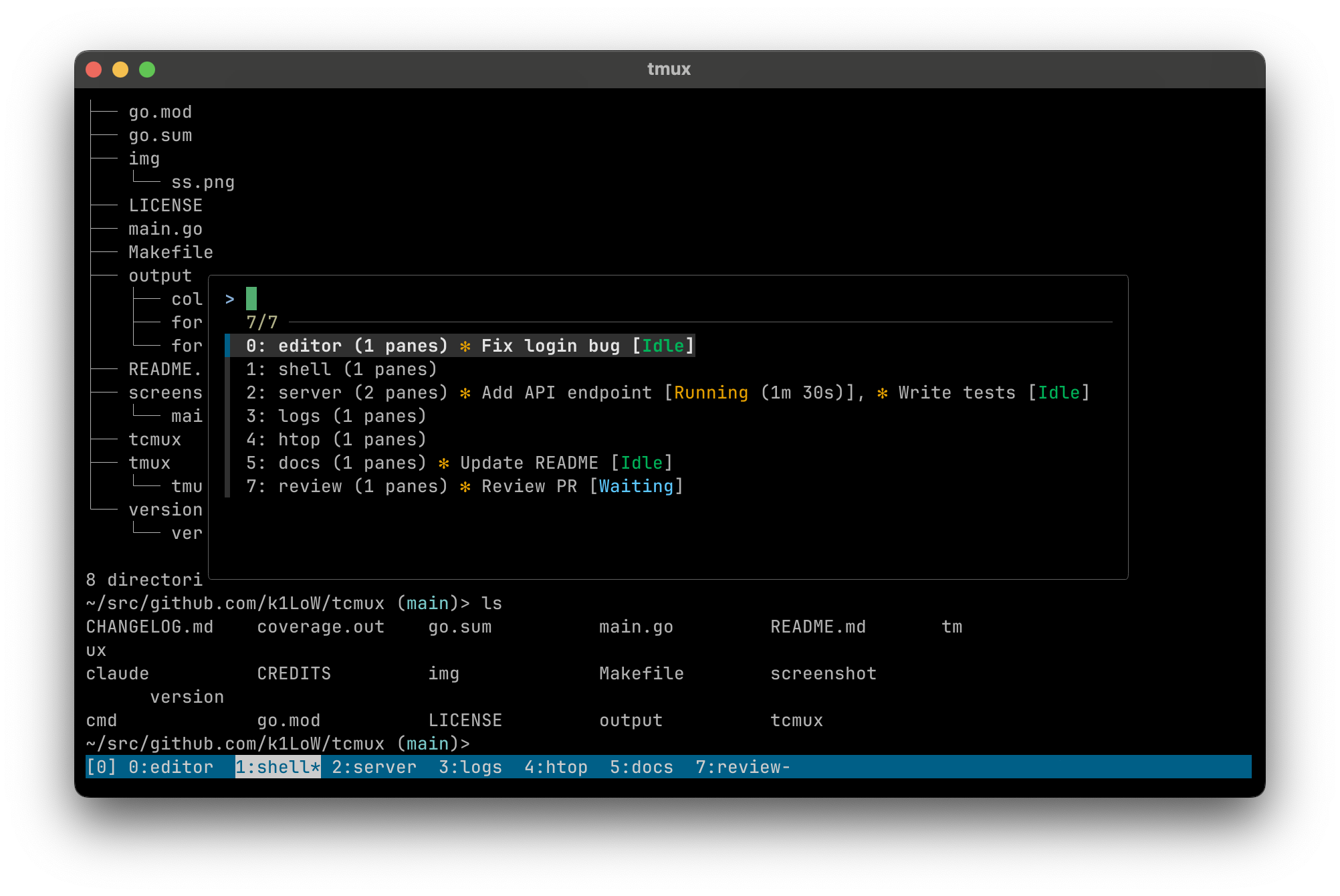
Replace tmux list-windows with tcmux list-windows -A in your .tmux.conf:
# before
bind-key w run-shell "tmux list-windows | fzf --tmux | cut -d: -f1 | xargs tmux select-window -t"
# after
bind-key w run-shell "tcmux list-windows -A --color=always | fzf --ansi --tmux | cut -d: -f1 | xargs tmux select-window -t"
# screenshot example
bind -r w run-shell "tcmux lsw -A --color=always | fzf --ansi --layout reverse --tmux 80%,50% --color='pointer:24' | cut -d: -f 1 | xargs tmux select-window -t"
Install
homebrew tap:
$ brew install k1LoW/tap/tcmux
go install:
$ go install github.com/k1LoW/tcmux@latest
manually:
Download binary from releases page
Reviews (0)
Sign in to leave a review.
Leave a reviewNo results found