SOMA
Health Pass
- License — License: GPL-3.0
- Description — Repository has a description
- Active repo — Last push 0 days ago
- Community trust — 158 GitHub stars
Code Fail
- rm -rf — Recursive force deletion command in .github/workflows/dist.yml
- process.env — Environment variable access in app/electron-builder.config.cjs
- fs module — File system access in app/electron-builder.config.cjs
- fs.rmSync — Destructive file system operation in app/esbuild.config.mjs
- fs.rmSync — Destructive file system operation in app/scripts/electron-local.mjs
- process.env — Environment variable access in app/scripts/electron-local.mjs
- exec() — Shell command execution in app/src/main/about.ts
- process.env — Environment variable access in app/src/main/about.ts
Permissions Pass
- Permissions — No dangerous permissions requested
No AI report is available for this listing yet.
Desktop app for designing parametric 3D models in CadQuery together with the coding agent of your choice
SOMA
Solid Object Modeling with Agents. A desktop app for designing parametric 3D models together with a coding agent.
somacad.app · Download · Changelog
https://github.com/user-attachments/assets/3294d1e4-1f06-477d-9770-c91f3470330d
You tell the agent what you need. It writes the model as Python code with CadQuery, SOMA builds it and shows the result. You look at it, measure it, point at what is wrong, and the agent changes the code.
What is SOMA?
A CAD program where the AI does the CAD and you are the designer. SOMA brings together the three parts this needs: a code workspace with a terminal for your agent, an editor and Git for every version; a 3D viewer that rebuilds the model on every change; and instructions for the agent, with rules, skills and a command line tool.
It's vibe coding, but for CAD. Made for makers and tinkerers who need a case, a bracket or a mount for their project and don't want to spend hours in a CAD program to get it. Describe or sketch the part, check the result, export it, print it. You don't have to know CadQuery. The code is there if you want to change a dimension yourself.
SOMA is not an agent of its own. Any CLI agent that can read files and run commands works: Claude Code, OpenCode, Codex CLI, Gemini CLI or whatever comes next. It runs in a normal terminal inside the model folder, SOMA detects the common ones and can start them. You install and log in to them yourself, so your subscription, your model choice and your permission settings stay yours. SOMA gives the agent a command line tool (soma build, soma analyze, soma render …) and an AGENTS.md with the rules of the project.
Install
Download SOMA from somacad.app/download, which offers the right package for your system, or from the releases: an installer or a portable ZIP for Windows, an AppImage or tar.gz for Linux, a dmg for macOS (Apple Silicon). Python, CadQuery, Git and CalculiX are included.
- You need a CLI agent installed and logged in, for example Claude Code, OpenCode, Codex CLI or Gemini CLI. SOMA does not bring one
- The installed app takes over 1 GB of disk space, most of it for Python, CadQuery and OpenCascade
- The packages are not signed yet. On Windows, SmartScreen warns on the first start ("More info" > "Run anyway"). For the portable ZIP, tick "Unblock" in its Properties before extracting to avoid the warning, and extract it to a local folder. On macOS, open the app the first time with right-click > Open
- Linux needs glibc 2.31 or newer
- SOMA shows on its start page when a new version is out. Download it from the website or the releases page
Quick start
- Start SOMA and click New model on the start page. It starts from a small example, a box with a lid.
- Start your agent with the + above the terminal on the right. SOMA lists the agents it found on your computer.
- Tell the agent what you need, for example "A case for a Raspberry Pi 5 with vents in the lid, printed in PETG". SOMA builds the model on every change and shows it.
- Click parts, measure, or draw on the view and send it to the agent until it fits. Then export it from the menu, for example as STL or 3MF.
Press F1 in the app for a short guide with numbered screenshots. The agent knows the same guide, so you can also just ask it how something works.
Features
- Models as code: Python with CadQuery, rebuilt on every change
- One file per model: a
.somafile holds code, result and history, like a CAD file - Point, measure, draw: click a part, measure exactly or sketch on the view, and send it to the agent
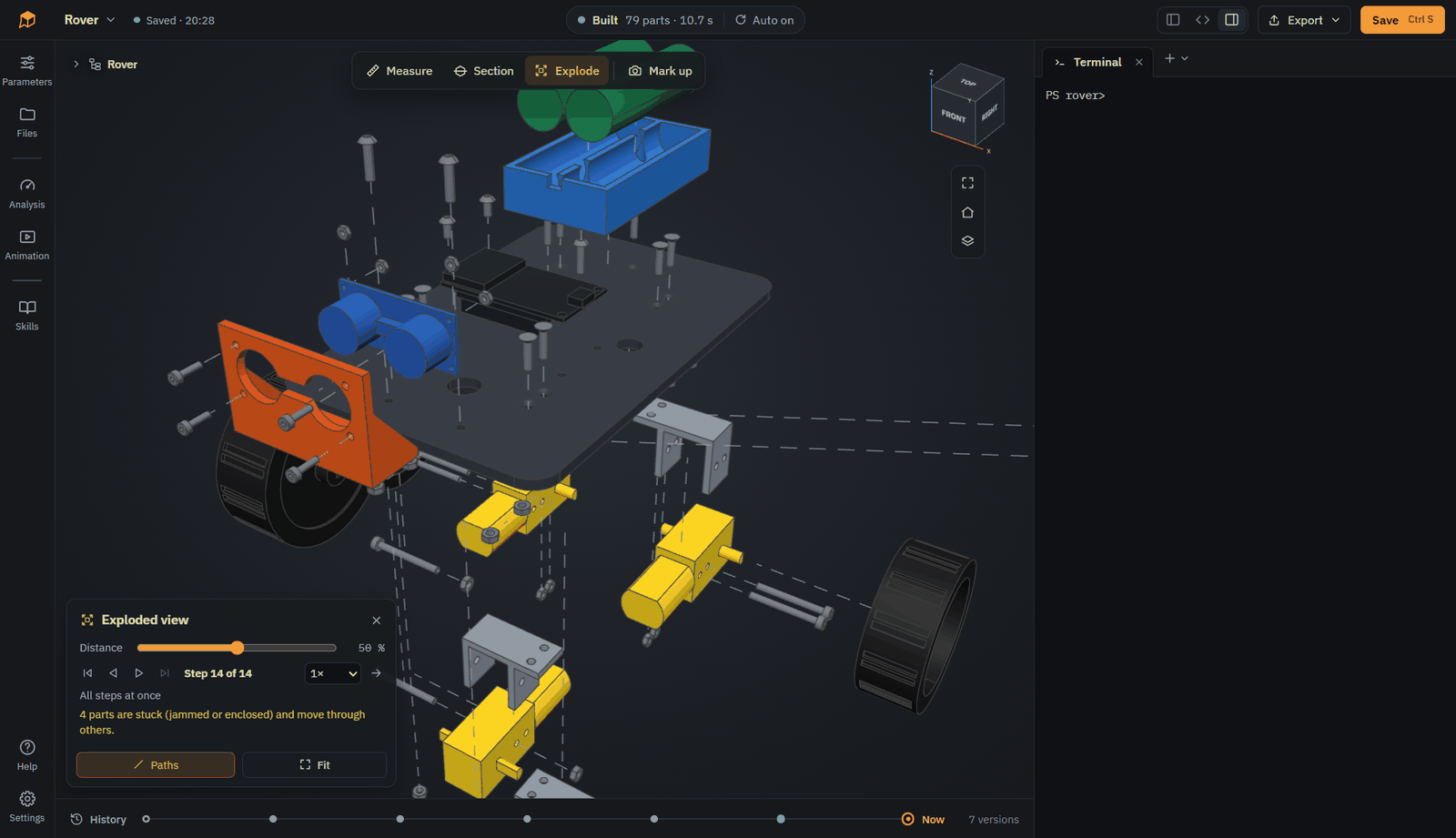
- Section and explode: cut the model open, take an assembly apart
- Parameters: change the values the agent made adjustable, without touching the code
- History: every step of the agent on a timeline, preview and restore old states
- Standard parts and STEP import: screws, nuts, washers and heat-set inserts from dimension tables, purchased parts as STEP
- Skills: rule sets for the agent, such as 3D printing, CNC, laser cutting, sheet metal and tolerances, switched on per model. Edit them or add your own
- Analysis: overhangs, wall thickness, and strength with FEM (CalculiX)
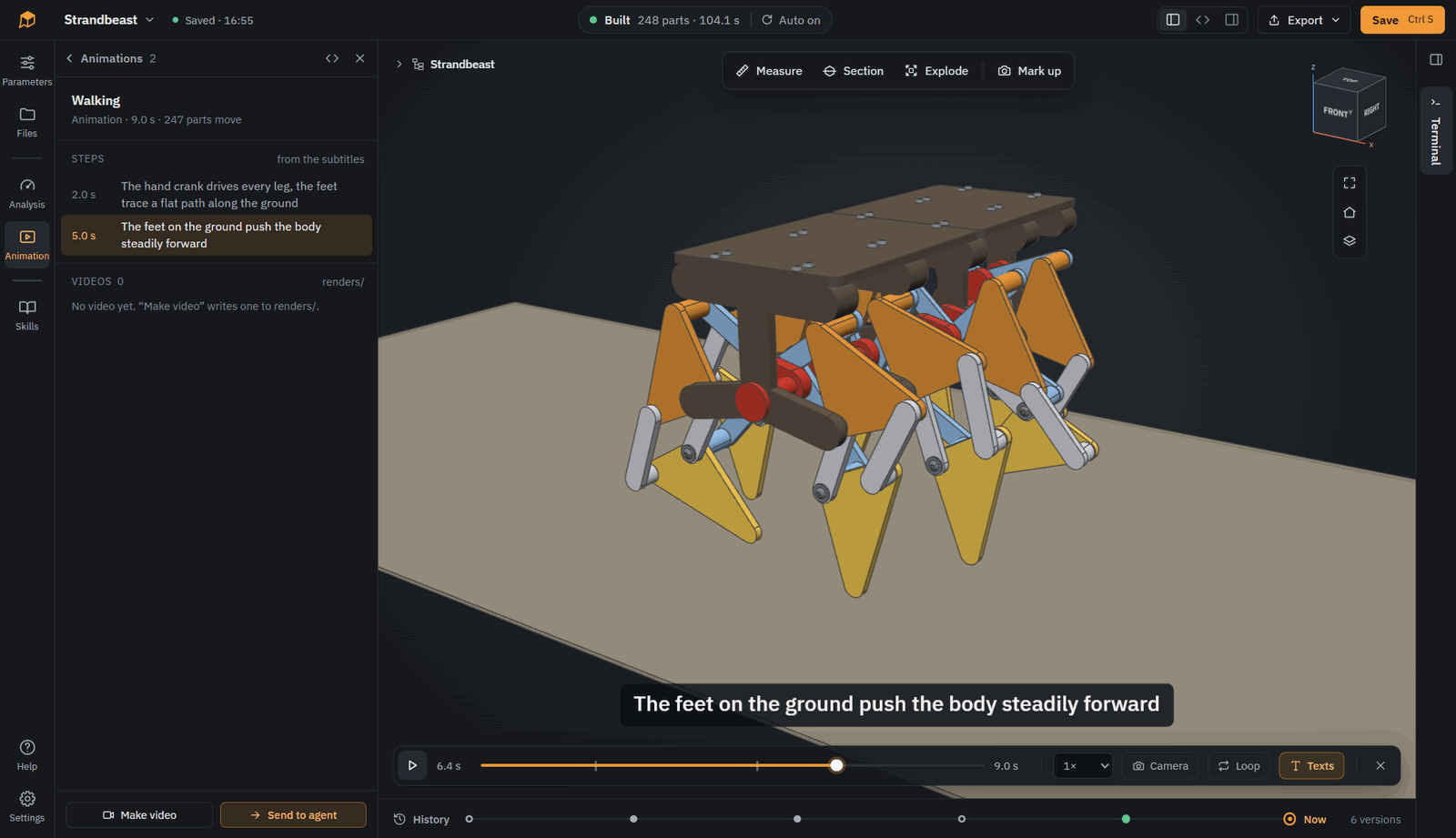
- Animation: motion described in Python, played in the viewer or rendered to video
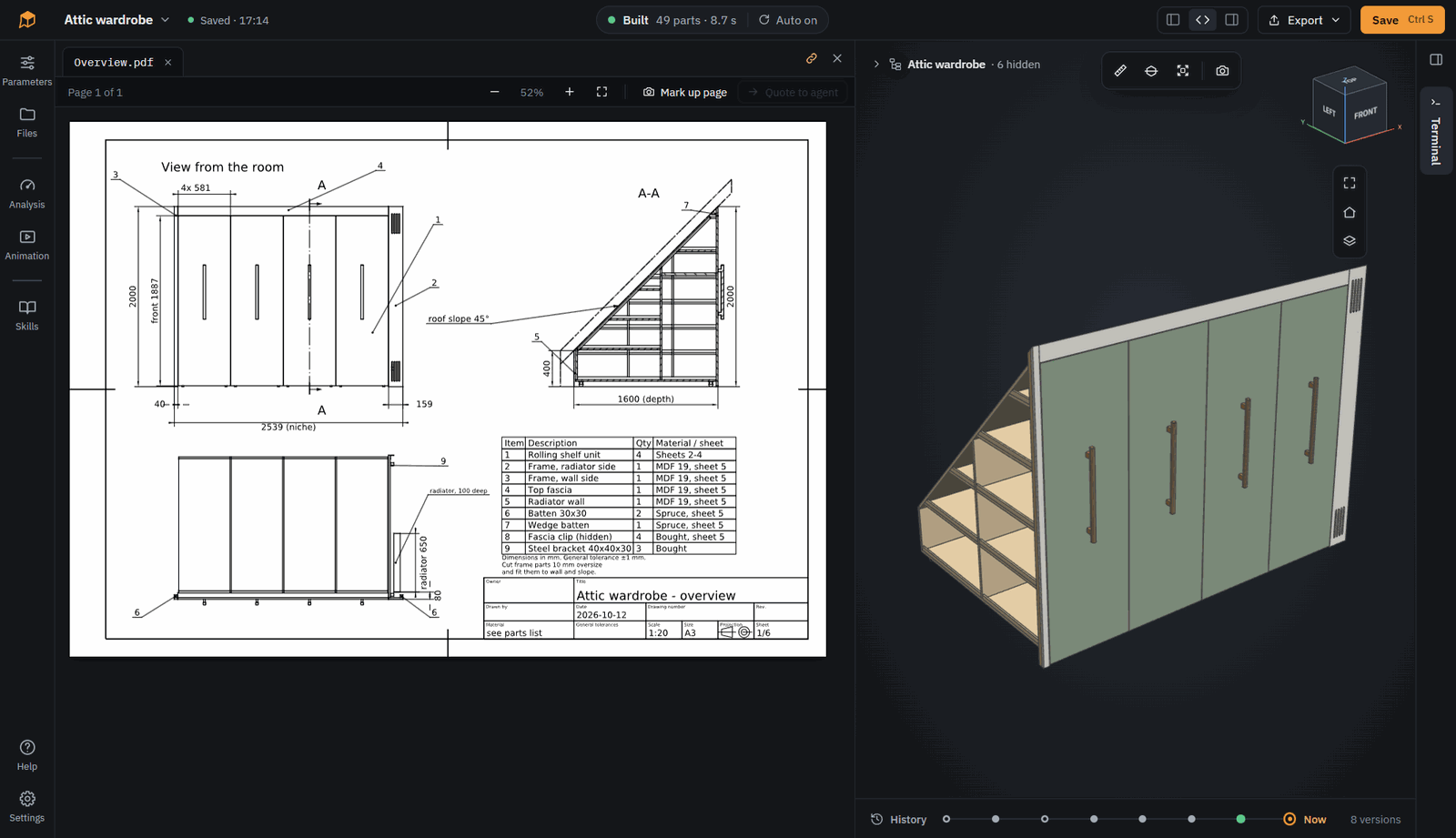
- Export: STEP, STL, 3MF, DXF and more, technical drawings as PDF
- Plain CadQuery in and out: start from an existing CadQuery script, export the model as a script for CQ-editor or VS Code
Screenshots
Explode: take your assembly apart. SOMA works out in which direction each part comes off.
Animate: bring your models to life. Animations are created by your agent and rendered to video.
Draw: technical drawings from the model. The agent writes them in Python, with views, sections and dimensions measured on the model, as PDF and DXF.
Look at more examples in 3D on somacad.app: a CNC router, a parametric organizer, a walking robot dog and a shelf with FEM.
Status
Early prototype. The current version is on the releases page, changes are in CHANGELOG.md.
- Developed and mainly tested on Windows. The packages also run on Linux (Kubuntu) and macOS (Apple Silicon), but have seen much less use there
- Mostly tested with Claude Code and Claude Opus 5.5 as the agent's model, with very good results. Other agents and models work too
- File formats and the
somaAPI may still change between 0.x versions
Note: SOMA itself is vibe coded. Most of the code was written by coding agents (mainly Claude Code) under human direction and review. It has tests, but expect rough edges.
Feedback
Bug reports, ideas and experiences with different agents are very welcome as issues. Pull requests are not accepted for now, see CONTRIBUTING.md.
Running from source
For development. The setup script is for Windows only. Requirements: Windows, Node.js 22, Python 3.12 and uv.
powershell -File python/scripts/setup_env.ps1
cd app
npm install
npm start
More in app/README.md.
License
SOMA is free software under the GNU General Public License v3.0 or any later version. You can use, change and share it. If you distribute a changed version, its source code has to be open under the same license.
What you design with SOMA is yours. The SOMA Model Exception lets you license your model files under any terms you like, even though they import soma. Exported files like STEP or STL are not affected by the GPL at all. The compatibility code that "As CadQuery script" puts into an exported script is also available under the Apache License 2.0.
Third-party components keep their own licenses, see THIRD_PARTY_NOTICES.md.
Reviews (0)
Sign in to leave a review.
Leave a reviewNo results found