bento
Health Warn
- License — License: Apache-2.0
- Description — Repository has a description
- Active repo — Last push 0 days ago
- Low visibility — Only 5 GitHub stars
Code Pass
- Code scan — Scanned 10 files during light audit, no dangerous patterns found
Permissions Pass
- Permissions — No dangerous permissions requested
No AI report is available for this listing yet.
Checkpoint everything git misses in AI agent workspaces. Save, fork, push to any OCI registry.
🍱 bento
Portable agent workspaces. Pack, ship, resume.

Bento packages AI agent workspace state into portable, layered OCI artifacts. Save a checkpoint of your code, agent memory, and dependencies. Push it to any container registry. Open it anywhere.
Works with any agent. Works on macOS, Linux, and Windows. Works offline. One binary.
bento init                          # start tracking a workspace
bento save -m "auth module done"    # checkpoint
bento open cp-3                     # restore
bento fork cp-3                     # try a different approach
bento push                          # share via registry
The Problem
AI coding agents checkpoint code via git, but lose everything else when the session ends: installed dependencies, agent memory, tool configurations, build caches, conversation history.
Git tracks your source code. Bento tracks everything git doesn't.
How It Works
Each bento save captures your workspace as a bento workspace, a portable OCI artifact containing your files, agent state, and dependencies organized into layers:
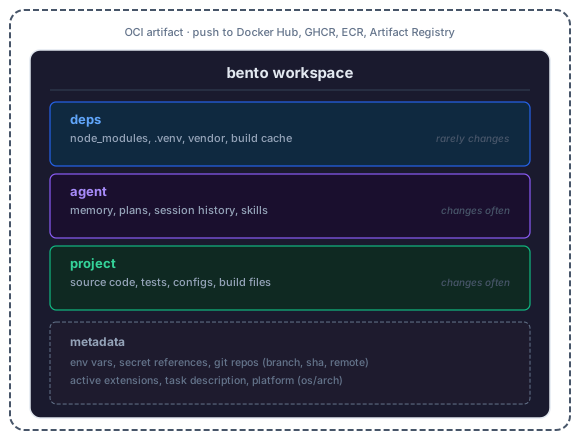
Layers that haven't changed share digests and aren't re-uploaded. Your 200MB node_modules is stored once, not once per checkpoint.
Each checkpoint also stores workspace metadata: environment variables, secret references (resolved on demand, never stored), the git repos the workspace depends on (branch, sha, remote for each), active extensions, and the OS/arch it was created on. This makes checkpoints self-describing so bento open on a new machine knows what the workspace needs.
Install
# macOS / Linux (Homebrew)
brew tap kajogo777/bento
brew install kajogo777/bento/bento

# Upgrade
brew upgrade kajogo777/bento/bento

# From source
go install github.com/kajogo777/bento@latest

# Or download a binary from GitHub Releases
# https://github.com/kajogo777/bento/releases
Note: A different
bentopackage exists in homebrew-core. Always use the fully-qualifiedkajogo777/bento/bentoto get the right one.
Quick Start
cd my-project
bento init
# Detected agent: claude-code

bento save -m "refactored auth module"
# Scanning workspace...
#   deps:     1204 files, 89MB (unchanged, reusing)
#   agent:    8 files, 64KB (changed)
#   project:  42 files, 128KB (changed)
# Tagged: cp-1, latest

# Keep working, save more checkpoints...
bento save -m "added tests"
# Tagged: cp-2, latest

# Something went wrong? Restore an earlier checkpoint
bento open cp-1

# Try a different approach
bento fork cp-1 -m "trying redis instead"

# Push to a registry
bento push ghcr.io/myorg/workspaces/my-project
Core Concepts
Checkpoints
Immutable, content-addressed snapshots of your workspace. Checkpoints form a DAG through parent references:
cp-1 → cp-2 → cp-3
                ↘
                 cp-4 (forked) → cp-5 → latest
Layers
Three core layers, ordered bottom to top:
| Layer | Contents | Change frequency |
|---|---|---|
| deps | Installed packages, build caches | Rarely |
| agent | Agent memory, plans, skills, commands | Often |
| project | Everything else (source, tests, configs, binaries) | Often |
The project layer is a catch-all. Any workspace file not matched by agent or deps patterns is captured here.
Unchanged layers are deduplicated automatically. Custom layers can be defined in bento.yaml.
Auto-Detection
Bento uses composable extensions that auto-detect agents, languages, and tools in your workspace on every save and diff. If you add a new agent or framework mid-project, bento picks it up automatically.
bento init
# Detected extensions: claude-code, agents-md, node

# Later, start using Codex too...
bento save -m "multi-agent"
# Detected extensions: claude-code, codex, agents-md, node
Each extension contributes patterns to the right layer. Multiple extensions merge naturally -- their patterns are unioned into the same layer. Extensions capture a superset of all known storage paths across agent versions, so state is never silently missed when a user runs an older or newer release. Directories that do not exist on disk cost nothing (no files matched = no bytes in the layer).
Built-in agent extensions: Claude Code, Codex, OpenCode, OpenClaw, Cursor, Stakpak, AGENTS.md (cross-agent).
Built-in deps extensions: Node (npm, yarn, pnpm, bun, deno), Python (pip, uv, pipenv, poetry), Go, Rust, Ruby, Elixir, OCaml.
Built-in tool extensions: tool-versions (asdf / mise).
Define custom layers in bento.yaml for unsupported agents. Patterns starting with ~/ or / capture files from outside the workspace:
layers:
  - name: deps
    patterns: [".venv/**", "~/.cache/pip/"]
  - name: agent
    patterns: [".my-agent/**", "~/.my-agent/sessions/"]
  - name: project
    patterns: ["**"]
Hooks
Optional shell commands at lifecycle points:
hooks:
  pre_save: "make clean-temp"
  post_restore: "make setup"
  pre_push: "npm test"
Pre-hooks abort the operation on failure. Post-hooks warn but continue.
Watch Mode
bento watch runs a background file-system watcher that automatically creates checkpoints as you work:
bento watch                          # start watching (Ctrl-C to stop)
bento watch --debounce 5 -m "wip"   # 5s quiet period, custom message
Each layer is monitored according to its watch method:
| Layer | Watch | Behavior |
|---|---|---|
| project | realtime |
Instant detection via fsnotify |
| deps | periodic |
Checked every ~30s (avoids FD exhaustion on large dirs) |
| agent | periodic |
Checked every ~30s |
Unchanged saves are skipped automatically. Old checkpoints are pruned via tiered retention (full granularity for the last hour, hourly for 24h, daily for 7d).
Override watch methods per layer in bento.yaml:
layers:
  - name: build-cache
    patterns: ["dist/**"]
    watch: off             # don't trigger saves on build output
Secrets
Bento never stores secrets. It stores references that are resolved on demand:
env:
  NODE_ENV: development
  DATABASE_URL:
    source: env
    var: DATABASE_URL
  API_KEY:
    source: file
    path: /run/secrets/api-key
Manage env vars and secrets from the CLI:
bento env set NODE_ENV development                           # plain env var
bento env set DATABASE_URL --source env --var DATABASE_URL   # secret ref
bento env show                                               # inspect config
bento env export -o .env                                     # generate .env file
A pre-save scan powered by gitleaks (~200+ rules) catches credentials before they're stored. Files are scanned concurrently with a SHA256 cache so repeat saves skip unchanged files.
To suppress false positives, add a .gitleaksignore file to your workspace root with one fingerprint per line (file:ruleID:line). When a scan fails, bento prints the fingerprints in copy-pasteable format:
Secret scan found 3 potential secret(s):

  .stakpak/session/cached-page.txt:generic-api-key:42
  config/dev.env:aws-access-token:7
  config/dev.env:private-key:15

To suppress false positives, copy the lines above into .gitleaksignore (one per line).
CLI Reference
bento init [--task <desc>]                    Initialize workspace tracking
bento save [-m <message>] [--tag <tag>]       Save a checkpoint
bento open <ref> [<target-dir>]               Restore a checkpoint
bento list                                    List checkpoints
bento diff <ref1> <ref2>                      Compare two checkpoints
bento fork <ref> [-m <message>]               Branch from a checkpoint
bento tag <ref> <new-tag>                     Tag a checkpoint
bento inspect [ref]                           Show metadata and layer summary
bento inspect [ref] --files                   Show metadata with file listing
bento push [<remote>]                         Push to registry
bento watch [-m <message>] [--debounce <s>]   Watch and auto-checkpoint on changes
bento gc [--keep-last <n>] [--keep-tagged]    Clean up old checkpoints and blobs
bento env show                                Show env vars and secret refs
bento env set <key> <value>                   Set a plain env var
bento env set <key> --source <src> [flags]    Set a secret reference
bento env unset <key>                         Remove an env var or secret
bento env export [-o <file>] [--template t]   Export resolved .env file
Configuration
bento.yaml at your workspace root:
task: "refactor auth module"

store: ~/.bento/store
remote: ghcr.io/myorg/workspaces

# Optional: override auto-detected layers
# layers:
#   - name: deps
#     patterns: ["node_modules/**", ".venv/**"]
#   - name: agent
#     patterns: [".claude/**", "CLAUDE.md", "~/.claude/projects/*/"]
#   - name: project
#     patterns: ["**"]

env:
  NODE_ENV: development
  DATABASE_URL:
    source: env
    var: DATABASE_URL

ignore:
  - "*.log"
  - "tmp/"

hooks:
  post_restore: "make setup"

retention:
  keep_last: 10
  keep_tagged: true
Artifact Format
Bento artifacts follow the OCI Image Spec v1.1. Each checkpoint is an OCI manifest with typed layer descriptors:
Bento uses standard OCI media types for native Docker compatibility:
| Component | Media Type | Identified by |
|---|---|---|
| Config | application/vnd.oci.image.config.v1+json |
- |
| All layers | application/vnd.oci.image.layer.v1.tar+gzip |
org.opencontainers.image.title annotation |
| Artifact type | application/vnd.bento.workspace.v1 |
manifest artifactType field |
This means COPY --from=<bento-ref> works natively in Dockerfiles.
Full format details in SPEC.md.
Architecture
├── cmd/bento/            # entrypoint
├── internal/
│   ├── cli/              # cobra commands
│   ├── workspace/        # scanning, layer packing, .bentoignore
│   ├── registry/         # OCI image layout store
│   ├── manifest/         # OCI manifest construction
│   ├── secrets/          # scanning, hydration, .env population
│   ├── extension/        # composable extensions (agent, deps, tool detection)
│   ├── hooks/            # lifecycle hook execution
│   └── policy/           # retention and GC
Comparison
| git | Docker checkpoint | E2B pause | Bento | |
|---|---|---|---|---|
| Tracks source code | yes | - | - | yes |
| Tracks agent memory | - | - | yes | yes |
| Tracks dependencies | - | yes | yes | yes |
| Portable | yes | - | - | yes |
| Deduplication | yes | - | - | yes |
| Inspectable | yes | - | - | yes |
| Branching | yes | - | - | yes |
| Docker interop | - | yes | - | yes |
| Works offline | yes | yes | - | yes |
| Open standard | yes | - | - | yes |
FAQ
Why not just use git?
Git doesn't track dependencies, agent memory, build caches, or conversation history. Bento tracks everything git doesn't.
Why not Docker commit / CRIU?
Those capture raw process memory: opaque, architecture-dependent, uninspectable. Bento captures semantic file layers you can inspect, diff, and partially restore.
Why OCI?
The infrastructure exists. Every cloud runs an OCI registry. No new accounts or tools needed.
What about sandboxes?
Bento makes workspaces portable across sandboxes. Save a checkpoint in one sandbox (E2B, Docker, Fly.io), open it in another. Move between providers based on cost, GPU availability, or region without rebuilding context.
Can I use this without an AI agent?
Yes. Bento works on any directory.
Cross-platform?
Yes. Checkpoints are portable across macOS, Linux, and Windows.
Roadmap
- Core CLI (init, save, open, list, diff, fork, tag, inspect, gc)
- Local OCI store with shared blob deduplication
- Secret scanning and hydration
- Agent support:
- Claude Code (with session capture)
- Codex (with session capture)
- OpenCode (with session capture)
- OpenClaw (with session capture)
- Cursor
- Stakpak
- GitHub Copilot
- Remote registry push/pull
- Store schemes (
oci://,file://) -
bento attach(OCI referrers for diffs, test results, logs) - MCP server (agents checkpoint themselves)
-
bento watch(auto-checkpointing) - Docker sandbox integration
License
Apache 2.0. See LICENSE.
Reviews (0)
Sign in to leave a review.
Leave a reviewNo results found