codeSee
Health Uyari
- License — License: MIT
- Description — Repository has a description
- Active repo — Last push 0 days ago
- Low visibility — Only 7 GitHub stars
Code Gecti
- Code scan — Scanned 12 files during light audit, no dangerous patterns found
Permissions Gecti
- Permissions — No dangerous permissions requested
Bu listing icin henuz AI raporu yok.
Visualize your project's feature logic as a semantic flow graph — not call graphs, not import maps. AI writes the data, you see the story.
CodeSee
AI writes the code. You see the story.
The feature-level canvas for AI-collaborative development. AI maintains a semantic flow graph of your project — you stay in control without reading every line.









Think of it like this: if a feature is "making scrambled eggs with tomatoes",
the graph shows "prep → crack eggs → heat oil → stir-fry → season → plate" —
not "prepare()callsslice()thenwhisk()".
Not call graphs. Not import maps. A human-readable story of what your project does.
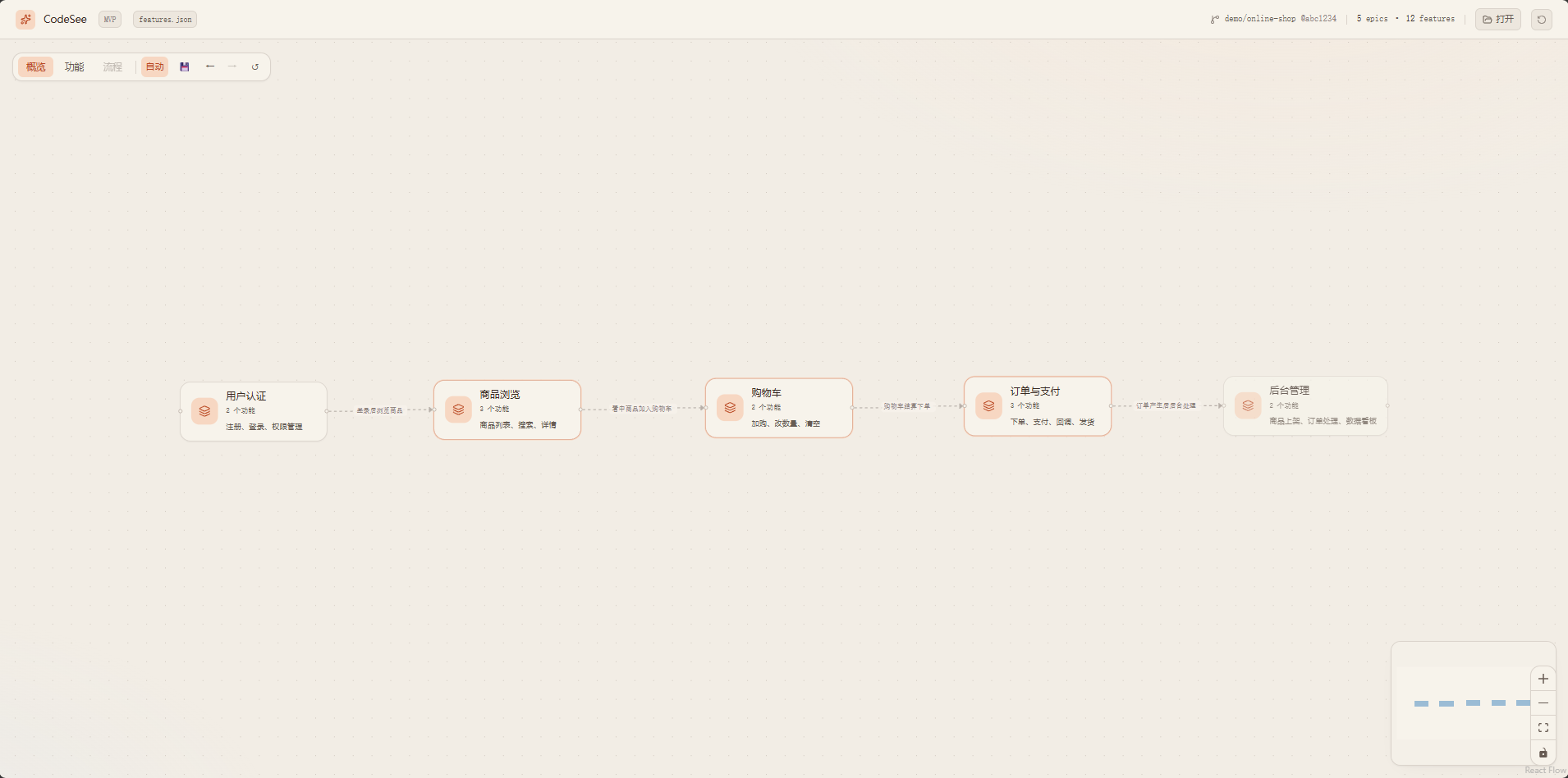
Overview — Epics arranged by user journey order, connected by semantic flow arrows
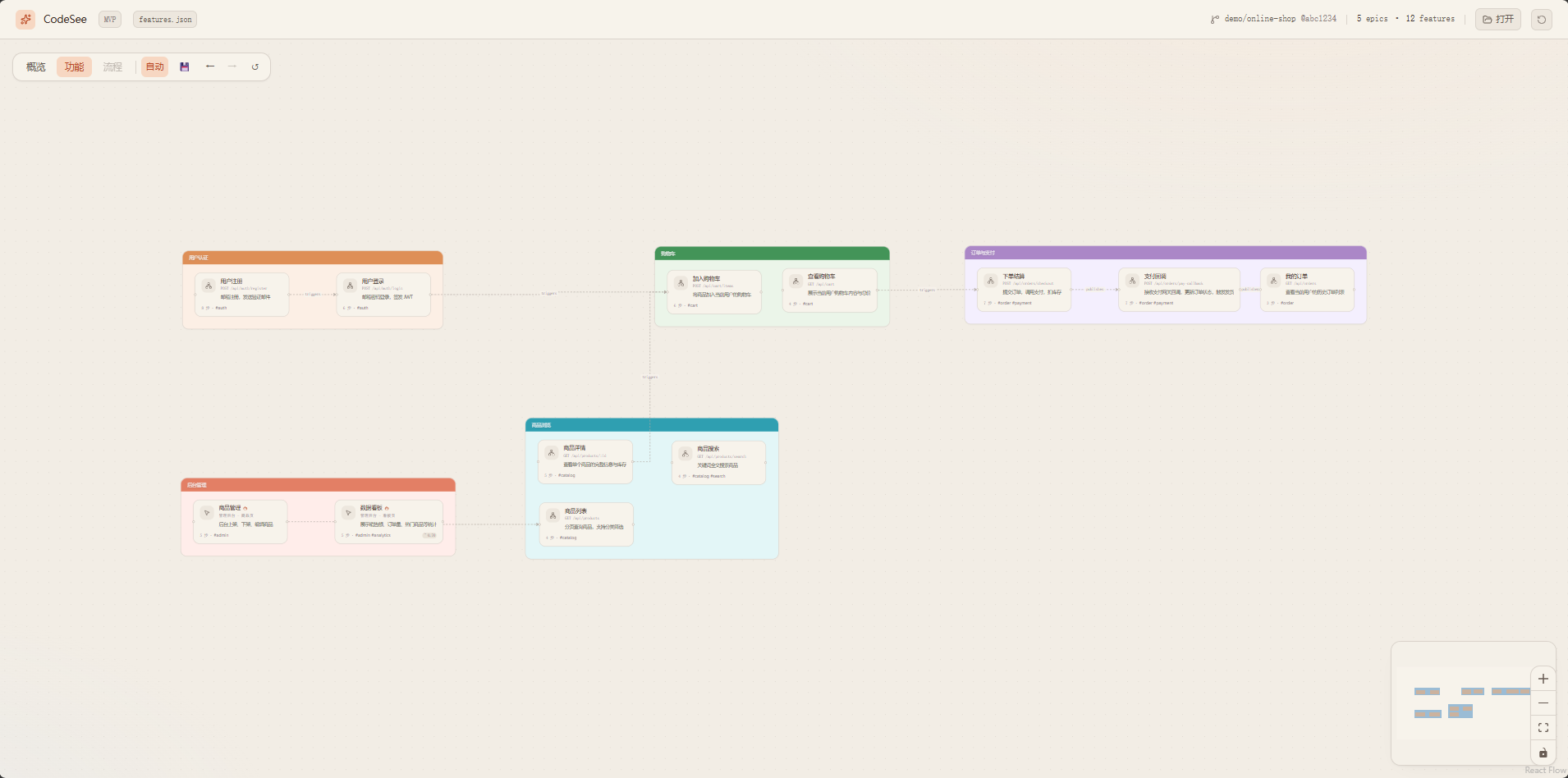
Features — grouped in Epic containers, drag to rearrange
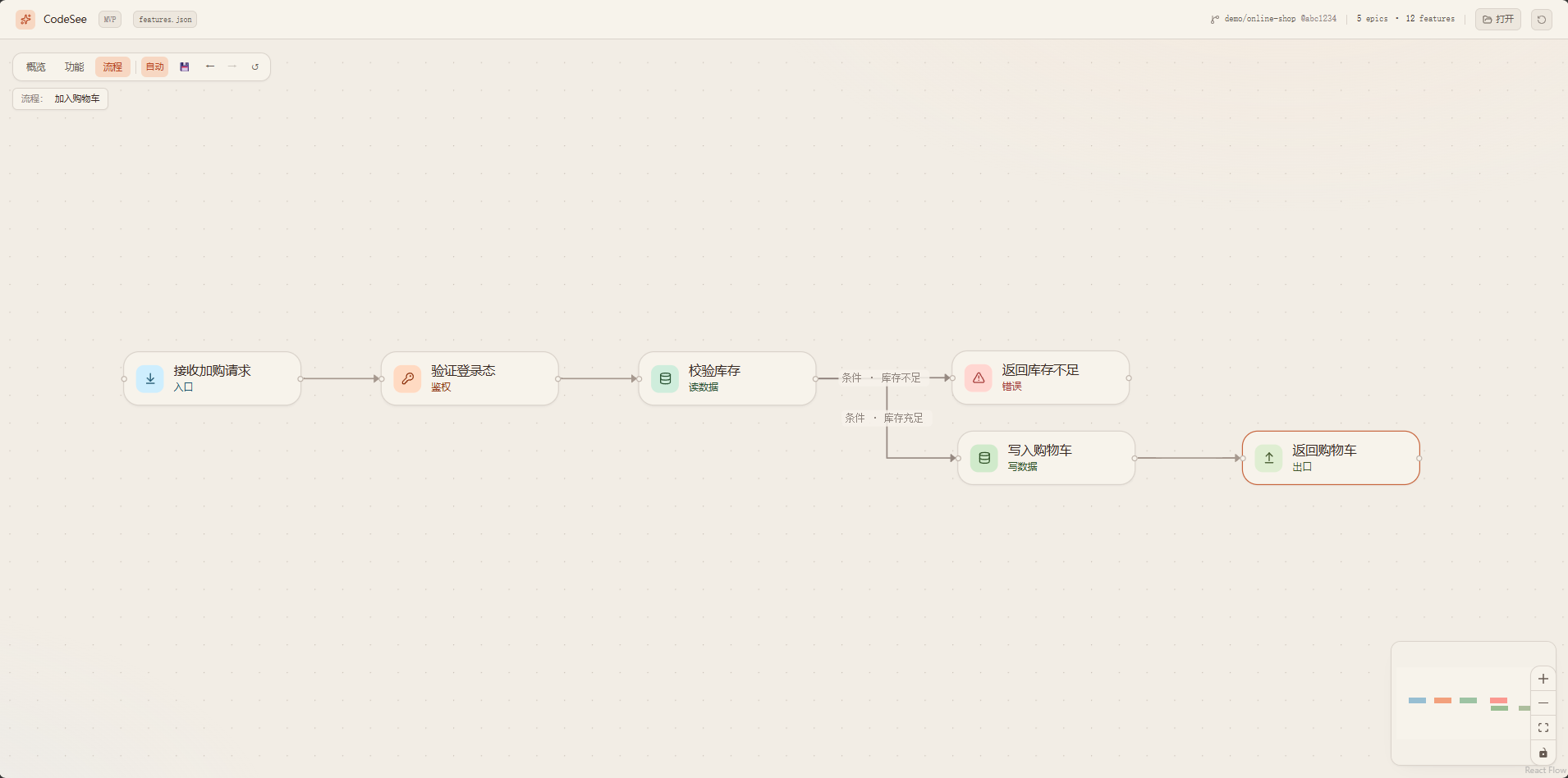
Steps — directed flow within a single feature (async, conditional, error branches)
Why
When collaborating with AI on code:
- 🤯 AI writes 5000 lines in 5 minutes — but you need hours to review them all
- 🔍 You need to understand logic, not syntax — "what does this feature do" matters more than "which function calls which"
- 🐛 When something breaks, you trace the full chain — but the chain might span 20 files you've never read
- 😤 You lose the sense of ownership — the project grows faster than your understanding of it
CodeSee solves this: AI writes the code AND writes the feature map. You see the story, not the syntax.
Core Capabilities
| Capability | Description |
|---|---|
| Semantic flow graph | Three-level drill-down: Epics → Features → Steps. See the "what" and "why", not the "how". |
| AI-maintained | AI writes features.json after every code change. No manual diagramming. Works with any AI IDE. |
| Interactive canvas | Drag, zoom, undo/redo, auto-save layout. Warm-ivory theme designed for long review sessions. |
| Zero lock-in | Plain JSON file. Human-readable, git-diffable, lockable. Switch AI providers anytime. |
| Incremental sync | Each code change updates only affected features. The graph grows with your project. |
| Validation | Built-in validator catches schema violations, hallucinated enums, and structural issues before you see them. |
| Multi-language | UI supports Chinese/English toggle. Semantic text language configurable via manifest.lang. |
Quick Start
1. Install into your project
# Windows
.\scripts\install.ps1 D:\path\to\your\project

# macOS / Linux
./scripts/install.sh /path/to/your/project
This injects AGENTS.md + .codesee/ (prompts, validator) into your project.
2. Let AI scan
Open your project in any AI IDE (Cursor / Claude Code / Kiro / Copilot).
The AI reads AGENTS.md and automatically generates .codesee/features.json.
3. View the graph
cd codeSee/viewer
npm install
npm run dev
Open http://localhost:5173/, drag in your .codesee/features.json.
How It Works
Your Project/                      CodeSee Viewer/
├── AGENTS.md          ←───────── templates/AGENTS.md
├── .codesee/                      viewer/
│   ├── prompts/*.md   ←───────── prompts/*.md
│   ├── scripts/       ←───────── scripts/validate-features.mjs
│   ├── features.json  ──────────→ Drag into viewer
│   └── layout.json    ←───────── Saved from viewer (FSA)
└── your code
| Layer | What | Who maintains |
|---|---|---|
features.json |
Semantic flow (epics, features, steps, relations) | AI + human review |
layout.json |
Node positions on canvas | User drag + auto-save |
| Viewer | Rendering, interaction, layout algorithms | This repo |
Three Views
| View | Shows | Interaction |
|---|---|---|
| Overview | Epics as nodes, epic_flow as edges |
Drag to arrange; double-click → Features |
| Features | Features grouped in Epic containers | Drag nodes/containers; double-click → Steps |
| Steps | Step-by-step flow within one feature | Directed graph with async/conditional/error edges |
Best Practices
Two usage scenarios
| Scenario | When | How |
|---|---|---|
| A. Greenfield (recommended) | Starting a new project from scratch with AI | Install CodeSee first, then develop. AI updates features.json after each feature it writes. |
| B. Brownfield | Adding CodeSee to an existing project | Run a full scan first, then switch to incremental sync. |
Why Greenfield is the best practice
When you develop from zero with CodeSee integrated from day one:
- AI never loses context — it just wrote the code, so it knows exactly what each step does, which lines to reference, and how features connect
- Granularity stays fine — each sync covers one small feature, not 50 features at once
- No hallucination risk — AI doesn't need to guess what existing code does; it wrote it moments ago
- The graph grows with your project — you can review the canvas at any point and catch design issues early
- refs are precise — file paths and line numbers are accurate because the code was just written
Greenfield workflow
1. Install CodeSee into your empty project
2. Tell AI: "Build feature X"
3. AI writes code → AI updates features.json (trigger 2 in AGENTS.md)
4. You review the canvas → spot issues → tell AI to fix
5. Repeat for next feature
The canvas becomes your living architecture diagram that's always in sync with reality.
Brownfield workflow
1. Install CodeSee into your existing project
2. AI runs scan (trigger 1) → generates full features.json
3. You review on canvas → lock correct features → tell AI to fix wrong ones
4. From now on, every code change triggers incremental sync
Design Principles
- Semantic control belongs to AI / features.json — node order, naming, grouping, relations
- Visual & interaction belongs to the viewer — drag, zoom, theme, layout algorithms
- When in doubt, let AI write it explicitly — no heuristic inference in the frontend
Full details: docs/principles.md
Project Structure
codeSee/
├── viewer/                  Canvas frontend (Vite + React + React Flow + Tailwind v4 + ELK)
│   ├── src/{fcg,graph,app,lib}
│   └── public/{features,layout}.json   Example data
├── prompts/                 AI prompt templates (copied to target projects)
│   ├── scan.md              Entry point (routes to light/heavy)
│   ├── scan-light.md        Light projects (one-shot)
│   ├── scan-heavy.md        Heavy projects (phased)
│   ├── sync.md              Incremental sync
│   ├── _schema.md           Schema + enums + example (single source of truth)
│   └── _rules.md            Constraints (MUST/SHOULD/MAY)
├── templates/               AGENTS.md templates
├── scripts/                 Install script + validator
├── docs/                    Design docs
├── LICENSE                  MIT
└── README.md
FAQ / Troubleshooting
Viewer shows a blank white screen after loading features.jsonThe AI likely used enum values outside the schema (e.g. role: "logic" instead of role: "compute").
- Run the validator:
node .codesee/scripts/validate-features.mjs - Fix the reported errors (usually invalid
step.role,flow.kind, ortrigger.kind) - Reload the viewer
The viewer has fallback handling for unknown enums, but severely malformed JSON can still cause issues.
Browser doesn't show the directory picker when I click 💾The File System Access API only works in Chromium-based browsers (Chrome, Edge, Arc). Firefox and Safari don't support it.
- Use Chrome or Edge
- Make sure you're on
localhostor HTTPS (FSA is blocked onfile://) - If it still doesn't work, the viewer falls back to localStorage (your layout is still saved, just not to a file)
The AI assigned sequential order values (0, 1, 2, ..., N) to every Epic instead of grouping parallel modules under the same order.
Fix in features.json: Epics that represent parallel capabilities should share the same order value. Only use different orders for sequential stages in the user journey.
This is the most common issue. The prompts include strict enum tables, but some models still hallucinate.
- Always run the validator after AI writes/updates
features.json - The validator reports exact JSONPath locations of invalid values
- Common mappings:
logic→compute,init/cleanup→other,websocket→http,internal→event
Re-run the install script with -Force (PowerShell) or --force (Bash):
.\scripts\install.ps1 D:\path\to\your\project -Force
This refreshes prompts, validator, and the AGENTS.md CodeSee section without touching your features.json or layout.json.
Roadmap
Top priority
- Prompt refinement (community-driven) — real-world usage produces the best constraints; contributions welcome for edge cases, anti-patterns, and domain-specific rules
- Semantic-aware layout — layout should respect feature logic, not just node positions; exploring AI-driven layout via
layout.json(already decoupled from data)
Ecosystem & integrations
- Trellis integration — consume
.trellis/spec/and.trellis/tasks/as the source forfeatures.json(forward projection from PRD instead of reverse engineering from code); aim to become Trellis's visualization sidecar - Spec-driven scan — generalize the Trellis approach: prefer reading project specs/PRDs/workflow docs over scanning source code, when available
- Real-time observation mode — local watcher + auto-refresh canvas when
features.jsonchanges; mount alongside the CLI/IDE so users see the graph update live as the AI works
Canvas & UX
- Canvas editing — edit feature names, add notes, lock nodes directly on the canvas
- Search & filter — find features by name, filter by epic/tag/role
- Diff view — highlight what changed between two versions of
features.json - Multi-project dashboard — switch between projects without re-dragging files
- Export — PNG / SVG / PDF export of the current view
- Dark theme — toggle between warm-ivory and dark mode
Tooling
- CI integration — validate
features.jsonin GitHub Actions / GitLab CI - Plugin system — custom node renderers, custom layout algorithms
Long-term (optional)
- Vector index — semantic embedding for "find similar features" / cross-project reuse; must remain optional and never replace the JSON-as-source-of-truth principle
Community
- 💬 LinuxDo — Discussion & feedback
- 🐛 GitHub Issues — Bug reports & feature requests
Contributing
See CONTRIBUTING.md for development setup, code style, and PR process.
Quick start:
- Fork & clone
cd viewer && npm install && npm run dev- Make changes, ensure
npm run buildpasses - Open a PR
License
Yorumlar (0)
Yorum birakmak icin giris yap.
Yorum birakSonuc bulunamadi