TitanVault
Health Warn
- License — License: Apache-2.0
- Description — Repository has a description
- Active repo — Last push 0 days ago
- Low visibility — Only 5 GitHub stars
Code Fail
- network request — Outbound network request in compose/agents.yml
- child_process — Shell command execution capability in config/hermes/skills/darwin-skill/scripts/screenshot.mjs
- execSync — Synchronous shell command execution in config/hermes/skills/darwin-skill/scripts/screenshot.mjs
Permissions Pass
- Permissions — No dangerous permissions requested
No AI report is available for this listing yet.
A turnkey, fully-local AI workstation engineered for the AMD Ryzen AI Max+ 395. LLM inference, voice, document parsing, browser automation, agents — all on-device.

TitanVault
A fully-local AI workstation for AMD Ryzen AI Max+ 395 (Strix Halo).
One command turns a Strix Halo mini-PC into a complete on-device AI stack — LLM inference, voice, document parsing, browser automation, AI agents — all running locally, no cloud, no API keys.



-ED1C24?style=flat-square&logo=amd&logoColor=white)
English · 简体中文
🔧 One-command install · 📦 Zero post-setup · 🖥️ 100% on-device · 🔒 No data leaves your machine
What is this
TitanVault is an open-source AI workstation distribution designed specifically for the AMD Ryzen AI Max+ 395 (codename Strix Halo, GPU gfx1151 / Radeon 8060S). It leverages the APU's 128 GB unified memory and 40 RDNA 3.5 compute units to run a 35B parameter LLM fully on-device, along with speech, vision, document processing, browser automation, and AI agents — all behind a unified web portal.
No OpenAI API key. No cloud inference. No data sent to third parties.
✨ Capabilities
| Capability | Details | Stack | |
|---|---|---|---|
| 🧠 | LLM Inference | Qwen3.6-35B-A3B, full GPU offload, multimodal (text + vision) | llama.cpp → Vulkan |
| 🎙️ | Speech | Real-time ASR · Neural TTS · Meeting transcription with diarization | SenseVoice · Kokoro · Aham Voice |
| 📄 | Document AI | PDF parsing: layout analysis + OCR + table extraction | MinerU (ROCm) |
| 🎨 | Image Generation | Stable Diffusion / SDXL | ComfyUI (ROCm) |
| 🤖 | AI Agents | Ops agent (Docker/systemd management) · Coding agent · Cron scheduling | Hermes · OpenSquilla |
| 🌐 | Browser Automation | AI-driven headless Chrome: click, type, navigate, read pages, solve captchas | browser-use + CDP |
| 📚 | Productivity Apps | Knowledge base (RAG) · Self-hosted Git · File manager · Meta-search | Open Notebook · Gitea · Filebrowser · SearXNG |
| 📊 | Observability | 18 services auto-monitored · Real-time system metrics | Uptime Kuma · Glances |
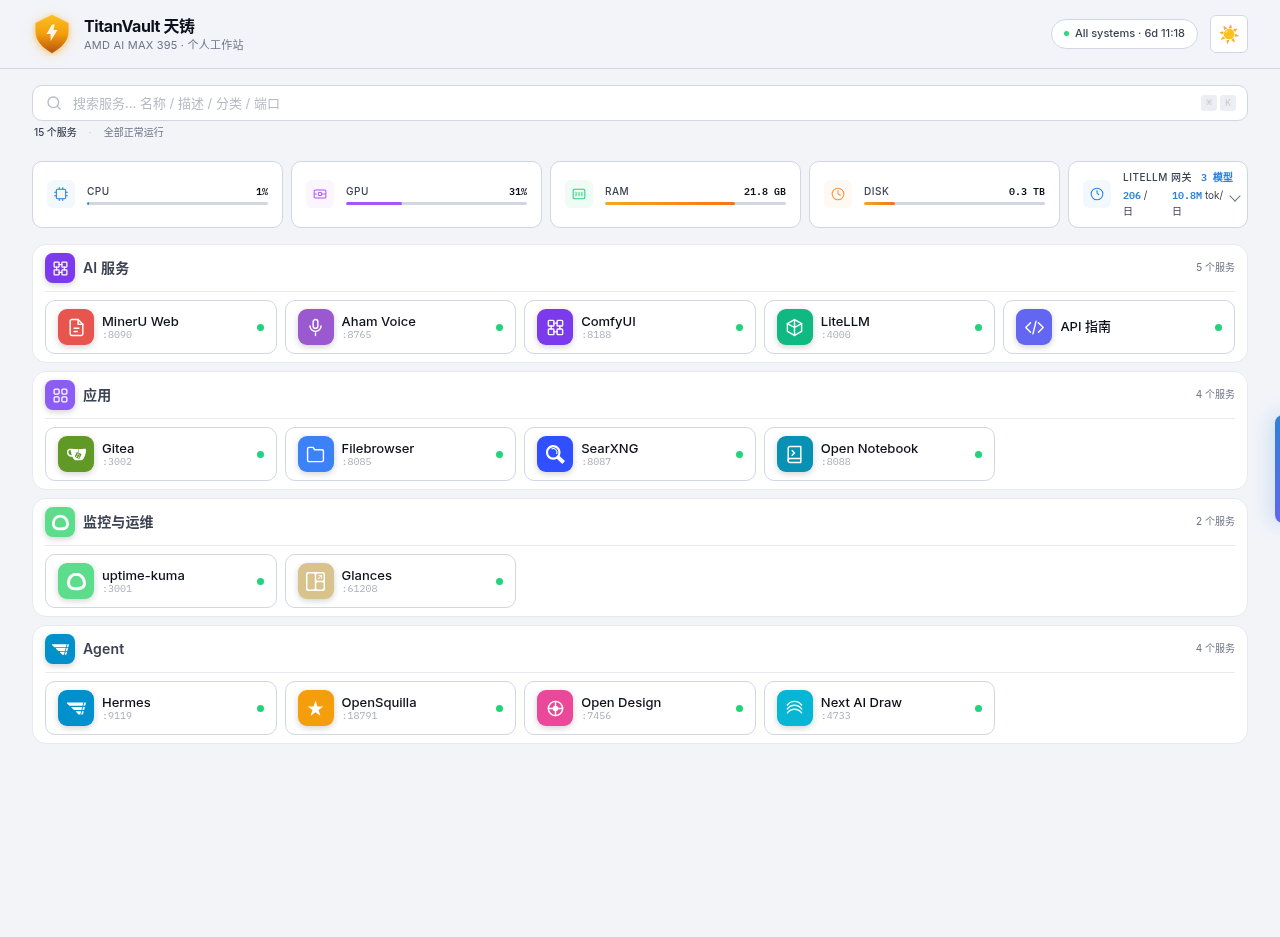
All services are unified under a Caddy reverse proxy and presented through a custom TitanVault Portal (React).
🔥 Why TitanVault
Setting up a local AI stack normally means: spend a weekend debugging ROCm/Vulkan drivers, manually configure a dozen services, wire up authentication, and still end up with something fragile. TitanVault eliminates all of that:
- One command, fully configured —
bash install.shhandles GPU drivers, Docker, image builds, model downloads, service orchestration, password generation, and monitoring seeding. Walk away, come back in an hour, everything's running. - Nothing to configure after install — Open Notebook gets 4 model types auto-assigned; Uptime Kuma gets 18 monitors pre-loaded; Hermes ops agent ships with hardware-specific knowledge. Open the portal and start using it.
- Runs entirely offline — All inference happens on your GPU. After the initial model download, no internet connection is required.
- Private by architecture — Passwords are auto-generated and locked down. Caddy handles auth injection. Your conversations, documents, and voice data stay on your machine.
- Survives reinstalls — The installer is idempotent with credential fingerprinting. Upgrade or reinstall without losing data or breaking configurations.
🛠️ Original Components
TitanVault isn't just glue around existing tools — it includes several original open-source components built specifically for this distribution:
| Component | What it does | Source |
|---|---|---|
| TitanVault Portal | Custom React dashboard: service cards with brand icons, AI assistant chat, LLM usage panel, real-time uptime | images/titanvault-homepage/ |
| Aham Voice | Full-stack meeting intelligence: audio upload → transcription → speaker diarization → emotion detection → AI-generated meeting minutes (ROCm GPU) | kaka86mm/aham-voice-web · local mirror |
| SenseVoice | Lightweight ASR API service: real-time speech-to-text with emotion and event detection | images/sensevoice/ |
| Token Usage API | LLM consumption tracker: aggregates LiteLLM spend logs into a clean dashboard | images/token-usage-api/ |
| API Discover | Auto-generated API explorer: discovers all services, tests endpoints, renders interactive docs | images/api-discover/ |
Plus custom ROCm Dockerfiles for MinerU and ComfyUI — adapted to run on gfx1151 where official CUDA images won't work.
🎯 Hermes Skills
Hermes ships with scenario-driven skills — not raw API wrappers, but end-to-end workflows that chain services together to accomplish a user goal. Each skill follows the same pattern: a permission matrix, a deterministic shell script, a failure-mode table, and an anti-pattern blacklist.
| Skill | What it does | Triggers |
|---|---|---|
| mozin-ops | Operate & troubleshoot the workstation (health, heal, backup, report) | "check status", "heal", "disk full" |
| mozin-meeting | Turn a meeting recording into structured markdown minutes | "process this meeting", "transcribe recording", "meeting minutes" |
| mozin-ingest | Ingest any URL / PDF / text into the knowledge base, then ask questions | "save this link to notebook", "ingest this PDF", "what does this say" |
| titanvault-ops | Hardware & architecture knowledge base (passive) | hardware questions, GPU/port/config lookups |
Meeting skill offers two paths: full mode (Aham Voice: transcription + speaker diarization + AI minutes + emotion) or quick mode (SenseVoice: fast plain-text transcript). The ingest skill auto-detects PDFs and routes them through MinerU for table/formula-preserving parsing before embedding.
Two meta-skills are also included for building and refining further skills:
| Meta-skill | Role | Source |
|---|---|---|
| 女娲 (Nuwa) | Distill a person/topic's thinking framework into a runnable skill | alchaincyf/nuwa-skill |
| 达尔文 (Darwin) | Evaluate & optimize any skill via a 9-dimension rubric (SkillLens) with hill-climbing | alchaincyf/darwin-skill |
The meeting & ingest skills were evaluated with Darwin's 9-dimension rubric and verified end-to-end on-device (full-test, not dry-run): meeting transcription, URL ingest, and RAG Q&A all pass.
🚀 Quick Start
git clone https://github.com/kaka86mm/TitanVault.git
cd TitanVault
bash install.sh
The installer guides you through preset selection, installs GPU drivers, builds images, downloads models, and starts everything. First install: ~1 hour. Reinstalls with cached assets: ~15 minutes.
📋 Installation phases📦 Offline install (China): If Docker Hub is blocked, download the offline image pack (1.5GB) and place it in
images/offline/. The installer auto-loads it. Without it, a 4-source mirror fallback still works but some niche images may fail to pull.
| Phase | What happens | Time | Needs you? |
|---|---|---|---|
| 0 | Hardware verification (gfx1151 + Ubuntu) | 5s | No |
| 1 | Interactive config: preset / data dir / model source | 2 min | Yes |
| 2 | GPU drivers (GRUB + Mesa + Vulkan), reboots once | ~15 min | Reboot |
| 3 | Docker images (build ROCm + pull + offline packs) | ~30 min | No |
| 4 | Model download (35B + embedding + reranker + ASR) | ~30 min | No |
| 5 | Compile llama.cpp → start all services + agents | ~10 min | No |
| 6 | Print access URLs and passwords | instant | Save them |
🎛️ Presets
| Preset | What you get | Best for |
|---|---|---|
| minimal | LLM inference core (llama.cpp + LiteLLM + portal) | Just need a local LLM API endpoint |
| standard | + Speech / Document / Image AI | Voice, PDF, image generation |
| full | + Apps + Agents + Browser automation + Monitoring | Complete workstation (recommended) |
🏗️ Architecture
flowchart TD
    User["🖥️ Browser"] --> Caddy["Caddy :80"]

    subgraph Portal["TitanVault Portal — original"]
        Dashboard["Service cards · AI assistant · Usage panel"]
    end
    Caddy --> Portal

    subgraph Native["Native systemd (GPU-direct)"]
        LLM["llama.cpp :8082<br/>Qwen3.6-35B · Vulkan · full offload"]
        Embed["llama-embed :8084"]
        Rerank["llama-rerank :8083"]
        Hermes["Hermes :8642 · :9119<br/>Ops agent + browser tools"]
        Squilla["OpenSquilla :18791<br/>Coding agent"]
        Chrome["Chrome CDP :9222<br/>Headless browser"]
    end

    subgraph Docker["Docker (31 containers)"]
        LiteLLM["LiteLLM :4000<br/>OpenAI-compatible API"]
        PG[("PostgreSQL + pgvector")]
        Redis[("Redis")]
        Qdrant[("Qdrant")]
        ROCm["MinerU · ComfyUI · Aham Voice<br/>ROCm GPU"]
        CPU["SenseVoice · Kokoro<br/>Open Notebook · Gitea · SearXNG"]
        Obs["Uptime Kuma · Glances"]
    end

    Caddy --> LiteLLM & Hermes
    LiteLLM --> LLM & Embed & Rerank
    Hermes --> Chrome & LiteLLM & Docker
    LiteLLM --> PG
📡 Ports
| Port | Service | Note |
|---|---|---|
| 80 | Caddy + TitanVault Portal | Main entry point |
| 4000 | LiteLLM | OpenAI-compatible API |
| 8082 | llama.cpp main | Qwen3.6-35B (Vulkan GPU) |
| 9119 | Hermes Dashboard | Agent Web UI |
| 8642 | Hermes Gateway | Agent API (portal AI assistant) |
| 9222 | Chrome CDP | Browser automation |
| 9991 | SenseVoice | ASR API |
| 8188 | ComfyUI | Image generation |
| 8090 | MinerU | PDF parsing |
| Port | Service |
|---|---|
| 80 | Caddy + TitanVault Portal |
| 4000 | LiteLLM |
| 8082 / 8084 / 8083 | llama.cpp (main / embed / rerank) |
| 9119 / 8642 | Hermes (dashboard / gateway) |
| 18791 | OpenSquilla |
| 9222 | Chrome CDP |
| 9991 / 8081 | SenseVoice / Kokoro TTS |
| 8765 | Aham Voice (meeting minutes) |
| 8090 / 18080 | MinerU (web / API) |
| 8188 | ComfyUI |
| 8088 / 5055 | Open Notebook |
| 3002 | Gitea |
| 8085 / 8087 | Filebrowser / SearXNG |
| 3001 / 61208 | Uptime Kuma / Glances |
🔧 Hardware
| Spec | |
|---|---|
| APU | AMD Ryzen AI Max+ 395 (Strix Halo / gfx1151 / Radeon 8060S) |
| OS | Ubuntu 24.04 or 26.04 LTS |
| RAM | 64 GB+ (128 GB recommended for 35B full offload) |
| Storage | 120 GB+ free |
| Network | Internet required for first install only |
Exclusively targets the Ryzen AI Max+ 395. The installer verifies the GPU in Phase 0. Other hardware is not supported.
🇨🇳 For users in China
Docker Hub and GitHub are often slow or blocked in mainland China. TitanVault handles this with multiple fallbacks:
- Docker images: 4 mirror sources with automatic failover (
1ms.run→1panel.live→xuanyuan.me→daocloud) - Models: Select
cnduring install to download from ModelScope instead of HuggingFace - npm (browser-use): Uses
registry.npmmirror.comfor Node.js packages - PyPI: Uses Tsinghua/Aliyun mirrors for Python packages
- GitHub source clones: Multi-source fallback (
github.com→ghfast.top→gh-proxy.com→gitee.com)
Offline pack — If all mirrors fail, download the offline image pack and place it in images/offline/. The installer auto-loads it via docker load.
💡 GitHub Release downloads may also be slow. If so, use a proxy or download via a mirror service like ghproxy.com.
📁 Repository
TitanVault/
├── install.sh                # Installer (6 phases, resumable)
├── compose.yaml              # Docker Compose entry (7 profile layers)
├── compose/                  # Layered service definitions
├── images/                   # Original component sources (portal, ASR, voice, ...)
├── native/                   # systemd services (llama.cpp, Hermes, OpenSquilla, Chrome)
├── config/                   # Templates (.env, Caddy, LiteLLM, Hermes)
│   └── hermes/skills/        # Hermes skills (ops knowledge + nuwa/darwin meta-skills)
├── ops/                      # Scenario skills (meeting, ingest, mozin-ops)
├── presets/                  # minimal / standard / full
├── hardware/                 # Strix Halo-specific parameters
├── models/                   # Model manifest + download config
├── scripts/                  # Setup automation (models, kuma, notebook, ...)
└── docs/                     # Documentation
📖 Docs
| Doc | Contents |
|---|---|
| Quick Start | Install & first run |
| Service Catalog | Every service, port, and model |
| Operations | Day-to-day management |
| Troubleshooting | Common issues & fixes |
| Customization | Models, ports, passwords |
⚠️ Status
This project is in early stage. It has only been tested on the author's machine (Framework Mini PC, Ryzen AI Max+ 395, 128 GB). You may encounter issues on different hardware configurations, Ubuntu versions, or network environments.
Found a bug? Please open an issue with:
- Your hardware info (
rocminfo | head) - The failing phase and error log
- Your Ubuntu version and preset choice
🤝 Contributing
See CONTRIBUTING.md. This project targets only the Ryzen AI Max+ 395 — PRs for other GPUs can't be tested and won't be accepted.
📜 License
Apache-2.0 — see LICENSE. Third-party components retain their original licenses — see NOTICE.
⭐ Star History
Reviews (0)
Sign in to leave a review.
Leave a reviewNo results found