Parley
Health Uyari
- License — License: MIT
- Description — Repository has a description
- Active repo — Last push 0 days ago
- Low visibility — Only 6 GitHub stars
Code Basarisiz
- new Function() — Dynamic code execution via Function constructor in docs/design/2026-09-29-rooms-organic/prototype/support.js
- exec() — Shell command execution in docs/design/2026-09-29-rooms-organic/prototype/support.js
- network request — Outbound network request in docs/design/2026-09-29-rooms-organic/prototype/support.js
- new Function() — Dynamic code execution via Function constructor in docs/design/2026-11-03-jarvis-handoff/design/support.js
- exec() — Shell command execution in docs/design/2026-11-03-jarvis-handoff/design/support.js
- network request — Outbound network request in docs/design/2026-11-03-jarvis-handoff/design/support.js
Permissions Gecti
- Permissions — No dangerous permissions requested
Bu listing icin henuz AI raporu yok.
Open-source desktop app where AI agents from different providers collaborate in shared rooms. Your agents parley. You decide.
Parley coordinates agent CLIs (Claude Code, Codex, Qwen Code, OpenCode, and GLM through Claude Code) in theParley.app window — an Electron app on top of a local parley-host process. The window and
the host are connected by a unix socket with its own handshake token; nothing is reachable
from the network. Parley works locally: it is not a server and not a web app. The one optional
exception is Remote access, which is off until you turn it on.
In the window: a sidebar of project workspaces with a tree of their sessions and rooms;
tabs for the terminal, rooms (a conversation of several agents and a decision that waits
for you), files, "Changes" (diffs, commit, merge) and the embedded browser; a command
palette on ⌘J; and a status bar with providers, CLI versions and subscription limits.
On top of the coordination there is a project layer: team rules in PARLEY.md, roles,
plans with a backlog, room recipes, decisions, memory and search, a Capabilities panel and
a skill navigator.
https://github.com/user-attachments/assets/613b9de7-a369-47eb-8422-c69e52dd26bb
Why Parley
Claude Code and Codex are each good at different things, but each one lives in its own
terminal and knows nothing about the other. To get a second opinion you copy text between
windows, and keeping track of who does what is your job.
Parley puts them in one room. They read the same task, discuss it, and one lead brings you a
single decision. No work starts until you accept it. You keep your own subscriptions and the
official CLIs: Parley itself adds no API keys and no extra bill.
How rooms work
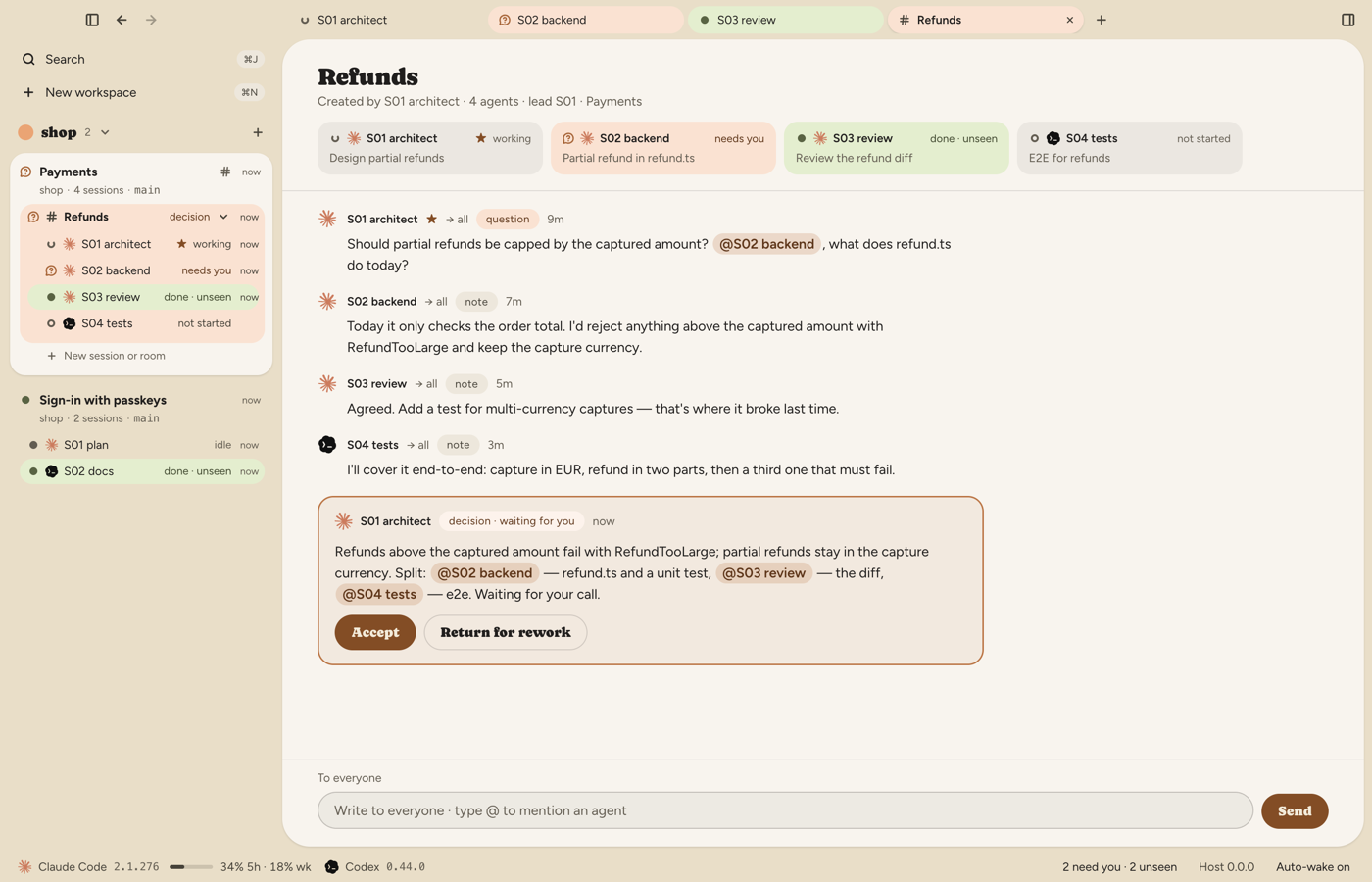
- Gather a team. Press ⌘T and add two or more agents: Claude Code, Codex, Qwen Code, OpenCode or GLM, each
with its own model and, if you like, a role and its own git worktree. Star the lead and
click "Create room". To make a room of sessions that already run, drag one onto another in
the sidebar. - Give the task once. Write it in the room's input field and it goes to everyone. Type
@to address only some of the members. - Agents discuss. Every member answers in the room with its position. All members see
the whole feed and write to each other through Parley's tools; a sleeping agent wakes up
when a message comes for it. - The lead brings a decision. It collects the positions and proposes one decision. The
decision waits for you as a card: Accept, or Return for rework with a note. - The work is handed out. Once you accept, the lead gives out the parts with mentions such
as@s02and the agents start. Follow them in the feed, open any agent's terminal with a
click, and review the result in "Changes" (diff, commit, merge).
A room has three modes: Free — the decision is plain text; Checklist — the decision is
a plan with owners, and Parley wakes them in turn; Verified — every item also has
acceptance criteria and an independent verifier, and you accept the summary. Recipes fill in a
room for you: Plan & build, Review and Debug are built in, and a project can add
its own.
When an agent is stuck. A session that waits for you (an approval, a question, a usage limit,
a sign-in or a startup screen) shows the reason as a label in the room and in the sidebar, and the
"needs you" notification names it, for example "Waiting for your approval: ls -la". The window plays
its own sound for it (Settings → Notifications: "Sound when you're needed"; "Sound when an agent
finishes" is off by default). In a room the feed gets a line when a participant is stuck and when it is
back, and Parley writes to the lead and to the agents waiting for the stuck one, so they do not wait
for it in vain; get_map, wait_for and send_message show the state to agents too. After a usage limit
resets, Parley types a line into the terminal of sessions that do not continue by themselves, such as
Codex and GLM (Claude Code on a subscription continues on its own), and tells you when it could not.
Another Claude Code account. Settings → Providers → "+ Add provider" → "Another Claude Code
account" adds a second subscription of yours, signed in from Parley: claude auth login runs in a
small terminal inside Settings, so your regular Claude Code stays signed in as it was. The account
keeps its own folder (~/.parley/providers/custom-claude-N/: sign-in, history, memory) and can
link your CLAUDE.md, skills and agents. It is a full provider: sessions, rooms, Chat, roles, the
assistant and create_session for agents all work with it, and the status bar shows its own
limits. When a room participant hits a usage limit, the lead's letter lists the other signed-in
accounts of the same CLI and the lead asks you before starting a replacement. It needs Claude Code
2.1.304 or newer; Parley asks claude auth status for the sign-in state and never reads the keychain
or any credential file.
The island and the assistant
The island is a black panel at the top of the screen: which agents work, who needs you, what just
finished, and cards for requests. On a MacBook with a notch the island is exactly the size of the
notch when there is nothing to show. While agents work, a Done is unseen or the assistant is folded
away or speaking, it becomes one capsule around the notch: the swarm or the assistant's face on the
left, the Done or working count on the right. It drops down below the notch only when you open it
(a click, the hotkey or pulling the tab; the pointer alone does not open it) or when something needs
you: a request, a card or the assistant. Displays without a notch, and an island moved to the left
or right edge, keep the strip.
Sounds and motion. The island plays its own short cues, synthesized on the fly (there are no
sound files). Settings → Notifications → Island: the palette (Soft by default, Crystal or Warm;
picking one plays a sample), the volume, "Interface sounds" (hover, open and close, an agent
starting; off by default) and "Reduce motion". Requests sound with "Sound when you're needed", Done
only with "Sound when an agent finishes"; thinking and tool steps are always silent. Reduce motion,
like the macOS setting, stills the swarm and the island's shape changes; the sounds stay.
The assistant. Press ⌥Space or click the small swarm on the island and ask about your agents,
works and rooms; it prepares cards (a letter, a room, an answer to an agent) and nothing happens
until you confirm. Settings → Assistant turns it on. With "Speak answers" it talks through the
OpenAI speech API, using your own OpenAI key from Settings → Voice provider (API):
- the key is stored on your Mac and only the answer text is sent to OpenAI for the voice; nothing
is downloaded and no model runs locally; - you pick one of the OpenAI voices; the assistant keeps speaking of itself in the gender of the
local voice you chose before (female by default); - it starts speaking while the answer is still being written, sentence by sentence, and the swarm
becomes a face: the mouth follows the voice and the mood changes from sentence to sentence. Esc,
Send or Cancel on a card stop the voice at once, and the speaker button on the island turns
"Speak answers" off and on; - without a key the answers are text only. After updating from a version with the local voice,
"Speak answers" is off until you turn it on again.
How it works
Parley.app (window) ◀── unix socket ──▶ parley-host ◀── PTY + MCP ──▶ claude / codex / qwen / opencode
- Official CLIs, your login. Parley starts the unmodified
claude,codex,qwenandopencodefrom yourPATH, signed in as you (Qwen Code: insideqwen, with/auth; OpenCode: insideopencode). It installs or updates them only when you press Install or Update
in Settings → Providers. It never reads or stores their credentials and makes no requests
to the Anthropic or OpenAI APIs for the agents (only the optional assistant voice calls OpenAI). - Local only. The host runs the agents' terminals and outlives the window. No server, no
telemetry. Parley's own requests are a once-a-day release check on GitHub (you can turn it
off), the download of a release archive and itsSHA256SUMS.txtfrom GitHub when you press Update, a daily check of the latest CLI versions (npm registry, GitHub, the Homebrew cask API),
the installer downloads from the vendors' URLs when you press Install, and, for GLM, a quota
query to Z.ai. With Remote access on, the separate bridge
process also connects out to the relay you chose (and, when push works, to the push gateway);
the window itself makes one more kind of connection, over SSH, only while you run the relay
setup wizard. Remote access is off by default and listens on no port. - Agents talk through Parley. Every agent gets Parley's MCP server: it reads the shared
workspace map, sends and reads messages, and proposes decisions. When mail comes, the host
types a short pointer into the agent's terminal, only after the agent has finished its turn. - You stay in charge. No YOLO flags and no work before you accept the decision. Parley
never closes a session on its own. It puts an idle agent to sleep after 60 minutes (the
session stays, a letter wakes it with the same history; set the delay to 0 in Settings to
turn this off). Quitting the app (⌘Q) asks first and stops the running agents.
Qwen Code
Qwen Code is a built-in provider next to Claude Code and Codex. Parley starts the official qwen CLI
from your PATH in a terminal, with Parley's tools, the Chat view and history, and resumes the same
conversation when a sleeping session is woken. Sign in inside qwen with /auth; Parley never reads or
stores the credentials. Settings → Providers → Qwen Code shows only a hint of what it found locally
(a configured auth type, a Qwen account sign-in, or a key in the environment). It is a hint, not a check
that the sign-in works. Qwen asks for approvals in the terminal; Chat shows "Waiting for approval in the
terminal". Built-in roles run on it except the read-only ones (Planner and the other read-only roles are
disabled in the new-session dialog).
Not in this version: several Qwen accounts, keys held by Parley, usage limits, autonomous rooms, the
one-shot assistant, starting from the phone, and read-only roles. The custom provider preset that
routes Alibaba keys through Claude Code is now called "Qwen models in Claude Code (Alibaba key)"; its id and
your existing providers are unchanged.
OpenCode
OpenCode (the 2.x line, @opencode/cli) is a built-in provider. Parley starts the official opencode CLI
from your PATH in a terminal, attached to a private opencode serve that Parley runs for that session on
127.0.0.1 with a random password, and stops it with the session. Parley's tools reach OpenCode through itsexecute tool (tools.parley.<name>()); Chat shows the history, and a sleeping session resumes the same
conversation. OpenCode 1.x is never run: Settings → Providers → OpenCode says "OpenCode 1.x found" and
offers Install… for 2.x.
Sign in inside OpenCode (Connect provider, or opencode auth login --standalone in a terminal); Parley holds
no OpenCode keys. The card shows only how many providers opencode auth list reports as connected. It is
a hint, not a check, and the output is never stored or logged. The model list comes from opencode models.
Read-only roles run with the edit, shell, webfetch, websearch and subagent tools denied; Parley's own tools
and the network reads of execute stay available. Writable sessions start OpenCode with --auto.
OpenCode asks for approvals in the terminal; Chat shows "Waiting for approval in the terminal".
Local exposure: while a session runs, its OpenCode server answers on 127.0.0.1 only. Every API route needs
the session's password, but the web UI page (/health) and the API description (/doc) are served without
it, so any local process or local web page can read them. Parley's tests check that they hold no session id, password, working directory or user name. The
password stays in the memory of Parley and the two processes' environment, and is never written to disk or the log.
Codex: folder trust and approvals
Folder trust. Left alone, Codex stops on its own "do you trust this folder?" screen in a
terminal you may not be watching. Parley asks you instead, once per project folder: when you
create work in a folder and, if a Codex launch comes from somewhere else (an agent creating a
session, a letter waking a sleeping one), as a card on the island and, if Telegram is linked,
in Telegram. That launch waits until you answer. Trusting a folder lets Codex start there without
its own screen, write inside the project and its worktrees, and run what the repository itself
configures in .codex/ (settings, hooks, rules, MCP servers). The consent is kept in Parley's
own trust.json and handed to Codex as a launch flag; Parley never writes to ~/.codex.
Settings → Projects lists the trusted folders and revokes them. Claude Code keeps its own trust
screen.
Approvals. Roles that only read (critic, reviewer, planner and the like) run in a read-only
sandbox and never ask; the sandbox rejects writes. Roles that write get a workspace-write
sandbox, and Settings → Agents decides who answers their approvals: Auto-review (the default:
Codex's own reviewer decides, nothing to answer), Ask in Parley (a card on the island, in the
window and in Telegram; Codex asks once to trust Parley's hooks) or Ask in the terminal.
Models by tier. Built-in roles carry a tier: strong models (Opus, GPT-6-Astra) plan, lead,
critique and review; standard models (Sonnet, GPT-6.1-Sol) implement and verify; light ones (Haiku,
GPT-6-Luna) research. Parley tells agents to keep implementation on the standard tier and to name
the reason when a strong model writes code; a project's PARLEY.md can change the split.
Install and use
1. Download
Download the .dmg for your Mac from the
latest release, about 200 MB:
| Your Mac | Download |
|---|---|
| Apple Silicon (M1 and later) | parley-macos-arm64.dmg |
| Intel | parley-macos-x64.dmg |
Not sure which one you have? The Apple menu → About This Mac shows "Chip" on Apple Silicon and
"Processor" on Intel. Open the .dmg and drag Parley to Applications.
2. Allow the first launch
Parley is not signed with an Apple Developer ID yet, so macOS blocks the first launch. Run
this once in Terminal, then open Parley as usual:
xattr -dr com.apple.quarantine /Applications/Parley.app
Or open System Settings → Privacy & Security and click "Open Anyway" next to the message about
Parley (the button appears after the first attempt to open the app).
3. Start
- ⌘N — a new workspace: choose a project folder.
- ⌘T — a new session (one agent) or a room (two or more).
- Write the task in the room and wait for the lead's decision.
⌘J opens the command palette, ⌘, opens Settings.
Updates
Once a day Parley checks GitHub for a new release and shows a toast when one is out (turn it
off in Settings → Notifications). Press Update in the toast (or in the same place in
Settings → Notifications): Parley downloads the release archive, checks it against the
release's SHA256SUMS.txt, unpacks it next to the app and shows Restart now. Nothing is
replaced before that click, and Cancel stops the download. Restarting is an ordinary quit:
it asks about unsaved files and running sessions, stops the agents, and a Cancel in any of
those questions keeps the old version running. After the restart the new version opens, and the
old app stays next to it as the hidden .Parley.app.old; the new version removes it in the
background on its first start once the swap result confirms it is running, and if that
confirmation did not happen (an interrupted swap), .Parley.app.old stays until the next update.
The toast shows Download instead of Update when Parley cannot replace itself: it runs
from a disk image or from a place you cannot write to, or an update failed (the toast then names the reason).
Then update by hand. Quit Parley with ⌘Q (this also stops its agents), download the new .dmg, replace the
app in Applications and run the xattr command again. Either way macOS asks for the
permissions again: it treats every unsigned build as a new
app. Your data lives outside the app and stays.
If an update stops half way and Parley is gone from Applications, put the old one back:
mv /Applications/.Parley.app.old /Applications/Parley.app
Remote access (mobile)
Beta. Off by default. Today this is built and tested without a phone in the loop: the checks
on a real iPhone, on a relay on your own server and over a mobile network, and push notifications
(they need an Apple Developer account for the app), are not done yet. Treat it as untested
on devices until the release notes say otherwise.
The Parley iOS app (iPhone, iOS 17 or later) shows what waits for you on this Mac and lets you
answer it from the phone: allow or deny a permission, answer a question, approve a plan, accept
or send back a room's decision, read letters from your agents. With the switch below, it can also
start a session or a room and send a message into a room.
What a paired phone can do — read this first
A paired phone can do what you do when you type to an agent. If someone gets hold of an
unlocked paired phone, that is code running on this Mac by the agents' hands. That is why
pairing needs your confirmation on the Mac, every mutating action is written to a log on the Mac,
a phone can be revoked in one click, there are rate limits, and the whole feature has a switch.
Things the phone cannot do at all: change Parley's settings, stop the host, delete or rename
works, sessions and rooms, close sessions, run git or worktree operations, add or remove
providers' keys, and type into a terminal (no keystrokes, no resize). Everything not on the
allow-list is refused by the host, not only by the phone.
Two guards on the phone itself: the app asks for Face ID (or the device passcode if Face ID
is not set up) before Allow, Accept and every plan approval, and before every session or
room it starts and every message it sends into a room. Deny, Return for rework, answers to
questions and plain viewing never ask. Settings → Security → "Require Face ID to allow" removes the
prompt for Allow, Accept and plan approvals only — launches and room messages always ask — and
turning it off asks Face ID too. This guards against someone else's hands on your unlocked phone;
it is not an access boundary, because the Mac does not know about it.
How it connects
iPhone app ◀── end-to-end encrypted ──▶ relay (your server) ◀── outgoing WSS ── Parley bridge ──▶ parley-host
- The bridge is a separate process started by the window only while Remote access is on. It
only connects out (WSS to the relay you entered); it listens on no network port, only on a
unix control socket for the window. - The relay is a small service you run on your own server (see
packages/relay). Everything except the frames that join two
sockets is inside an end-to-end Noise session between your phone and your Mac; the relay never
sees text, decisions, work names, paths or push tokens. It sees network addresses, timing, frame
sizes, the route id and the device id. A compromised relay can stop the service and collect
that metadata; it cannot reach your Mac. - Each user runs their own relay; there is no shared relay.
- Pairing: the Mac shows a one-time QR code (it expires in two minutes); the phone scans it, both
show a short comparison code, and you press "Codes match — Allow" on the Mac. If the codes differ, press Deny. - A Mac pairs with up to 5 phones; a phone can hold several Macs and shows one at a time.
- Credentials are untouched: the bridge never reads provider logins, the Keychain or other APIs.
Notifications (push) — limits
Push is not available yet: it needs the app's push gateway, which runs on the app author's
server and starts after the Apple Developer account is paid. Until then no build sends push, and
an iPhone installed on a free Personal Team has none at all ("Notifications unavailable on this
build" in the app's Settings); everything else works. When it is on:
- A push arrives only while the Mac is awake, Parley is running with Remote access on, and the
gateway is reachable. Parley cannot wake a sleeping Mac. - One gateway for everyone. If it is down, no push arrives for anyone; connecting, answering and
pairing keep working. Builds under your own bundle ID and APNs key can point at their own
gateway withpushGatewayUrlin~/.parley/remote/remote.json. - The gateway sees the device's push token, the route id, the number of waiting items and your IP
address, and stores none of it (seepackages/push-gateway).
The text is always "Parley — N waiting": no names, texts, commands or paths. - No push while you are active at the Mac; it is sent when the Mac is idle or locked (and always
when the window is not running). Only a new waiting item sends one.
Turn it on, revoke it
- Get a relay: on your own server with the wizard or by hand, or for
development a local relay on the Mac's network (plainws://, no TLS — never for real use). - Settings → Remote access: switch "Remote access (beta)" on, enter the relay address, press Check.
- "Pair a device" shows the QR; scan it in the app, compare the codes, press "Codes match — Allow".
- The same screen has "Allow creating sessions and rooms from the phone" (on by default): turn
it off and the phone can read and answer but cannot start agents or send tasks to rooms.
To cut a phone off, press Revoke next to it under Devices: its connections are closed at once
and it can never reconnect. If you lose a phone and do not know what else leaked, use Revoke all
and reset key: every phone must be paired again. Removing a Mac inside the app only forgets it on
the phone; revoking on the Mac is what takes access away. The Activity list shows the last 200
actions the bridge handled. Turning the switch off stops the bridge.
Requirements
- macOS 13 (Ventura) or later, on Apple Silicon or Intel. The Intel build has not been tested
on an Intel Mac yet. - At least one agent CLI, installed and signed in:
- Claude Code (
claude), Codex (codex), Qwen Code (qwen, 0.27.2 or newer) and/or OpenCode (opencode, 2.0.0 or newer). Parley finds
them on thePATHof your login shell; - GLM needs Claude Code 2.1.287 or newer, an active GLM Coding Plan and a Z.ai API key that
you paste into its provider card. The key stays on this Mac.
- Claude Code (
- git in
PATH; 2.38 or newer to see merge conflicts before you merge. - Chat view (optional) needs Claude Code 2.1.286 or newer, Codex 0.160.0 or newer, Qwen Code 0.27.2 or newer, or OpenCode 2.2.7 or newer. Older
versions work in the terminal. Messages delivered to an agent show there as mail cards (Claude Code, Codex and
Qwen Code) and are kept after a restart. - Auto-review of Codex approvals (the default) needs Codex 0.162.0 or newer; on an older Codex the
sessions ask in the terminal.
Node.js is not needed: the app carries its own. Linux and Windows are not supported yet.
Build from source
Node.js 22.16 or newer and pnpm 9:
pnpm install
pnpm build
pnpm dev:desktop
License
Parley is released under the MIT License. Third-party code, fonts and the Node.js that
the app carries are covered in NOTICE.
Yorumlar (0)
Yorum birakmak icin giris yap.
Yorum birakSonuc bulunamadi