product-playbook
Health Uyari
- License — License: MIT
- Description — Repository has a description
- Active repo — Last push 3 days ago
- Low visibility — Only 8 GitHub stars
Code Basarisiz
- rm -rf — Recursive force deletion command in install.sh
Permissions Gecti
- Permissions — No dangerous permissions requested
Bu listing icin henuz AI raporu yok.
World-class product planning AI skill for Claude Code — 22 PM frameworks, 6 modes, 6 languages. From idea to dev handoff.
English | 繁體中文 | 日本語 | 简体中文 | Español | 한국어
🎯 The Product Playbook
World-class product planning AI Skill — from idea to development, one framework to rule them all





Integrates the most impactful PM frameworks from Lenny's Podcast (Teresa Torres, Shreyas Doshi, Gibson Biddle, April Dunford, Todd Jackson, Marty Cagan, Richard Rumelt, and more) — turning AI into your senior product manager coach.
✨ What Is This?
The Product Playbook is a Claude AI Skill that systematically guides you through end-to-end product planning, from zero to one. It is not just a prompt — it is a complete interactive framework guidance system that includes:
- 🧭 6 execution modes — from 30-minute rapid validation to full-blown product plans (including a feature expansion fast track)
- 📐 22 product frameworks — covering the entire Discovery → Define → Develop → Deliver pipeline
- 🔄 Change propagation engine — modify any step and all downstream outputs update automatically
- 📎 Smart file integration — upload data, screenshots, or documents; the AI automatically integrates them into the relevant step
- 🔗 Dev handoff — generates CLAUDE.md + TASKS.md + TICKETS.md for seamless handoff to Claude Code development
- 📊 Multi-format output — PDF (with bookmarks), HTML reports, Word docs, PowerPoint decks, dev handoff packages
- 📄 Smart document import — three-layer PDF parsing (text extraction → Claude Vision → OCR fallback), DOCX/PPTX support
Trigger the entire flow with a single sentence:
I want to build a product
🎬 Demo
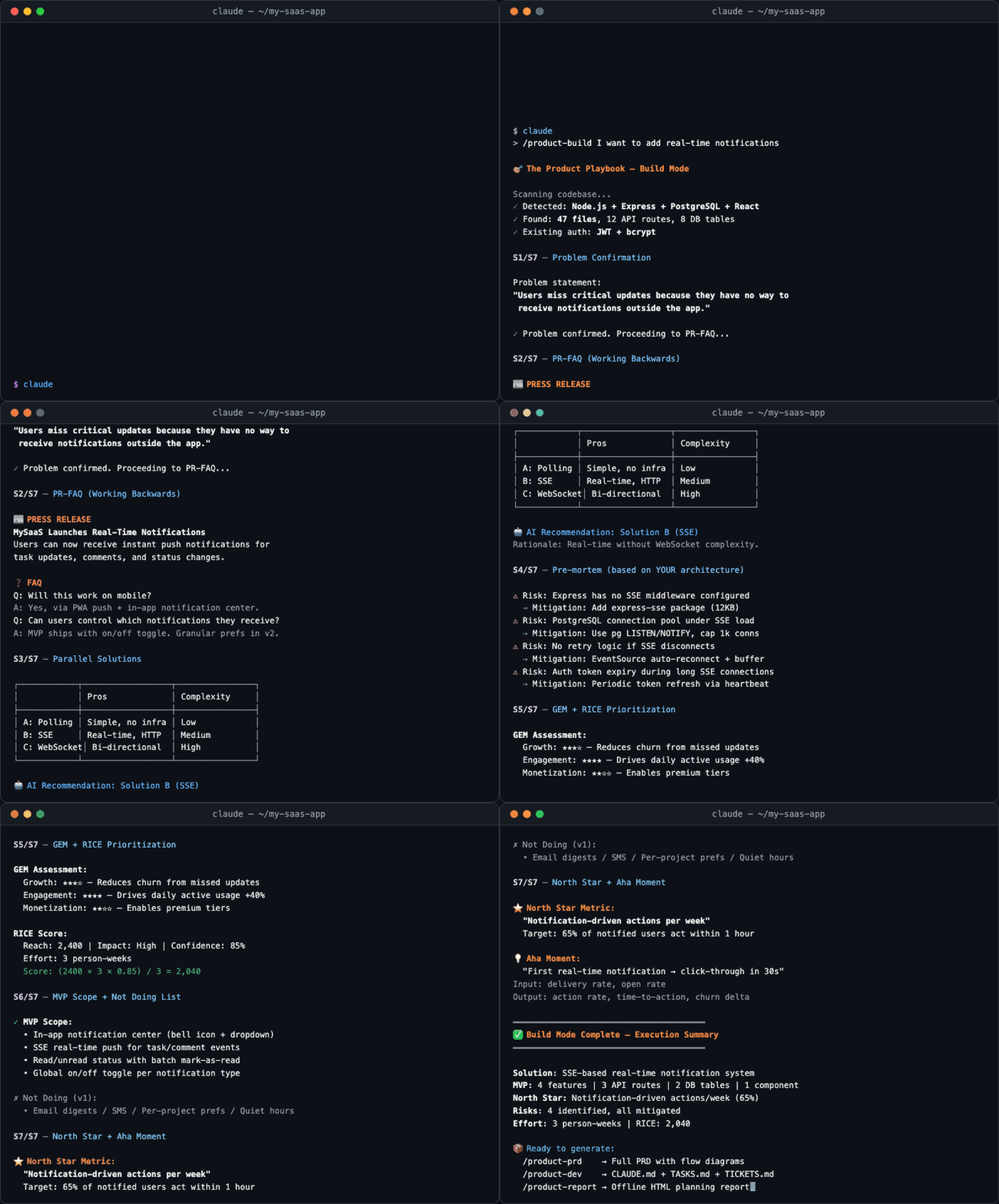
The demo above shows Build Mode: describe your requirements → scan codebase → detect tech stack → apply frameworks for problem clarification, then jump straight into solution design.
🚀 Quick Start
Option 1: Claude.ai Custom Skill
- Download this repo as a zip file
- Go to Claude.ai → Settings → Custom Skills
- Upload the entire
product-playbook/folder - Say "I want to build a product" in a conversation to trigger the skill
Option 2: Claude Code Plugin
In Claude Code, run:
/plugin marketplace add kaminoikari/product-playbook
/plugin install product-playbook@kaminoikari-product-playbook
The first command adds the marketplace (one-time setup). The second installs the plugin.
Option 3: Claude Code Skill (Recommended)
💡 To update: simply re-run the install command to overwrite with the latest version.
| Method | Best for | Requirements |
|---|---|---|
| ① Copy & Paste | Beginners | Just open Claude Code |
| ② One-line install | Developers | Terminal |
| ③ Manual install | Custom paths | Terminal + git |
① Copy & Paste Install (Easiest)
After launching Claude Code, paste the following and Claude will handle the installation automatically:
Please run the following commands to install (or update) product-playbook skill,
and tell me the result when done:

git clone https://github.com/kaminoikari/product-playbook.git /tmp/product-playbook
mkdir -p ~/.claude/skills ~/.claude/commands
cp -r /tmp/product-playbook ~/.claude/skills/product-playbook
cp /tmp/product-playbook/commands/* ~/.claude/commands/
rm -rf /tmp/product-playbook
② One-line Install (Terminal)
# curl
curl -fsSL https://raw.githubusercontent.com/kaminoikari/product-playbook/main/install.sh | bash

# npx (requires Node.js)
npx product-playbook
Uninstall:
curl -fsSL https://raw.githubusercontent.com/kaminoikari/product-playbook/main/install.sh | bash -s -- --uninstall
# or
npx product-playbook --uninstall
③ Manual Install
git clone https://github.com/kaminoikari/product-playbook.git
mkdir -p ~/.claude/skills ~/.claude/commands
cp -r product-playbook ~/.claude/skills/product-playbook
cp product-playbook/commands/* ~/.claude/commands/
Once installed, trigger in Claude Code:
# Main skill command
> /product-playbook

# Slash Commands (available after install)
> /product-quick I want to build an expense tracking app
> /product-full a pet social platform
> /product-revision redesign our e-commerce checkout flow

# Or natural language
> I want to plan a product
> Analyze my product using JTBD
> Help me plan an MVP
📦 File Structure
product-playbook/
├── SKILL.md                          # Core engine: mode definitions, step sequences, command system
├── LICENSE                           # MIT License
├── README.md                         # English README (this file)
├── README.zh-TW.md                   # Traditional Chinese README
├── assets/
│   └── demo.gif                      # README demo animation
├── commands/                         # Claude Code CLI Slash Commands (optional install)
│   ├── product-quick.md              # /product-quick — Quick mode
│   ├── product-full.md               # /product-full — Full mode
│   ├── product-revision.md           # /product-revision — Revision mode
│   ├── product-build.md              # /product-build — Build mode
│   ├── product-feature.md            # /product-feature — Feature Extension mode
│   ├── product-prd.md                # /product-prd — Generate PRD
│   ├── product-report.md             # /product-report — Generate HTML report
│   └── product-dev.md                # /product-dev — Generate dev handoff package
└── references/
    ├── 00-opportunity-check.md       # Opportunity assessment + DHM Model
    ├── 01-strategy.md                # Strategy Blocks + Rumelt + OKR
    ├── 02-discovery.md               # Persona + JTBD + OST + Journey Map
    ├── 03-define.md                  # Pain points + Positioning + HMW + Opportunity assessment
    ├── 04-develop.md                 # PR-FAQ + Pre-mortem + RICE + MVP + PRD
    ├── 05-deliver.md                 # North Star + PMF + GTM + Business model + Product spec
    ├── 06-html-report.md             # HTML planning report output spec
    ├── 07-dev-handoff.md             # Dev handoff: CLAUDE.md + TASKS.md + Architecture
    ├── 08-security-checklist.md      # OWASP Top 10 + CORS + CSP + Security architecture
    ├── rules-context.md              # Cross-session product context accumulation rules
    ├── rules-document-tools.md       # Document conversion tool dependency management
    ├── rules-import-document.md      # Three-layer PDF parsing + DOCX/PPTX import
    ├── rules-export-document.md      # Multi-format export (PDF/DOCX/PPTX)
    ├── rules-*.md                    # Mode step rules + progress/change/file integration rules
    └── templates/
        ├── prd-style.css             # Professional print-grade CSS for PDF export
        └── report-style.css          # Print optimization CSS for HTML report → PDF
🧭 Six Execution Modes
| Mode | Steps | Duration | Best for |
|---|---|---|---|
| 🚀 Quick Mode | 3 steps | ~30 min | Rapid idea validation, pitch prep |
| 📦 Full Mode | 20 steps | Several hours | New product planning, major revamps |
| 🔄 Revision Mode | 12 steps | 1-2 hours | Iterating on existing products |
| ✏️ Custom Mode | 4-16 steps | Varies | Filling specific gaps |
| ⚡ Build Mode | 7 steps | ~1 hour | Problem is known, jump to solutions |
| 🔧 Feature Expansion | 4 steps | ~30 min | Adding a single feature to an existing product |
📐 Frameworks Included
Understanding Users
| Framework | Creator | Purpose |
|---|---|---|
| JTBD (Jobs to Be Done) | Clayton Christensen | Uncover the real job users are trying to get done |
| Persona | — | Task/motivation-driven user archetypes |
| User Journey Map | — | End-to-end user experience mapping |
| Continuous Discovery | Teresa Torres | Weekly habit of talking to users |
| OST (Opportunity Solution Tree) | Teresa Torres | Systematically connect opportunities to solutions |
Defining the Problem
| Framework | Creator | Purpose |
|---|---|---|
| Positioning | April Dunford | Competitive context and differentiation |
| HMW (How Might We) | — | Transform pain points into design challenges |
Solution Design
| Framework | Creator | Purpose |
|---|---|---|
| Working Backwards / PR-FAQ | Amazon | Start from the customer outcome and work backwards |
| Pre-mortem | Shreyas Doshi | Predict and prevent failure before it happens |
| GEM Model | Gibson Biddle | Growth / Engagement / Monetization prioritization |
| RICE Scoring | Intercom | Quantitative feature prioritization |
| MVP Definition | — | Minimum viable product scoping |
Strategy
| Framework | Creator | Purpose |
|---|---|---|
| Strategy Blocks | Chandra Janakiraman | Mission → Vision → Strategy hierarchy |
| Good Strategy Kernel | Richard Rumelt | Diagnosis → Guiding policy → Coherent action |
| DHM Model | Gibson Biddle | Delight / Hard to copy / Margin-enhancing |
| Empowered Teams | Marty Cagan | Empowered teams vs. feature teams |
Measurement & Delivery
| Framework | Creator | Purpose |
|---|---|---|
| North Star Metric | Sean Ellis / Amplitude | Single metric representing core user value |
| Four-level PMF Framework | Todd Jackson | Assessing product-market fit |
| Sean Ellis Score | Sean Ellis | Quantifying PMF enthusiasm |
| GTM Strategy | — | Go-to-market launch and acquisition |
| Business Model & Pricing | — | Revenue model selection and value-based pricing |
🔑 Key Features
📎 Smart File Integration
Upload supplementary files at any step — the AI automatically identifies and integrates them:
| Upload | Auto-integrated into |
|---|---|
| Competitor screenshots | Positioning analysis |
| Interview transcripts | Persona + JTBD |
| User data CSV | Opportunity assessment + PMF evaluation |
| Market report PDF | Opportunity assessment + Strategy |
| Existing PRD | Revision mode + MVP |
🔄 Change Propagation Engine
Modify any upstream step and downstream outputs update automatically:
Modify JTBD → auto-updates HMW, Positioning, PR-FAQ, North Star, Product Spec Summary
Modify MVP  → auto-updates User Stories, DB Schema, Product Spec Summary
🔗 Dev Handoff
Generate a complete dev handoff package and kick off Claude Code development with a single command:
📦 Dev Handoff Package
├── CLAUDE.md          → Claude Code project memory
├── TASKS.md           → Feature breakdown + phased delivery
├── TICKETS.md         → Ticket list (ready for Jira/Asana/Linear)
├── docs/
│   ├── PRD.md         → Full PRD
│   ├── ARCHITECTURE.md → DB Schema + API + directory structure
│   └── PRODUCT-SPEC.md → Product spec summary
└── scripts/
    └── setup.sh       → One-click initialization script
# Start development in Claude Code with a single command
> Please read CLAUDE.md and TASKS.md, start executing Phase 0
📄 Document Import & Export
Import any existing document into the planning flow — no manual copy-paste:
PDF (digital)   → pymupdf text extraction (instant, free)
PDF (vector/scan) → Claude Vision semantic parsing (best quality)
PDF (fallback)  → Tesseract OCR (offline capable)
DOCX / PPTX     → Pandoc conversion
Export planning outputs to professional formats:
/export pdf   → Playwright rendering + pikepdf bookmarks (CJK-perfect)
/export docx  → Pandoc + reference template
/export pptx  → Pandoc slide generation
/export html  → Interactive HTML report (existing)
Why PDF via Playwright? WeasyPrint produces garbled CJK text. Playwright (Chromium) renders perfectly — verified in production with Traditional Chinese documents.
🔥 Plan Directly on Existing Systems (Build Mode Killer Feature)
Launch Build Mode inside an existing project directory — Claude Code reads your codebase while doing product planning, effectively merging product planning and technical feasibility assessment into a single flow:
Your Existing Project                 Product Playbook
┌─────────────────┐                ┌─────────────────────┐
│ src/             │  ← auto-scan → │ Pre-mortem risk      │
│ db/schema.sql    │  ← auto-scan → │ MVP scoping          │
│ api/routes/      │  ← auto-scan → │ RICE prioritization  │
│ package.json     │  ← auto-scan → │ User Story breakdown │
│ CLAUDE.md        │  ← auto-scan → │ Dev handoff (delta)  │
└─────────────────┘                └─────────────────────┘
Usage example:
# 1. Navigate to your existing project
cd /path/to/your-existing-project

# 2. Launch Claude Code
claude

# 3. Use Build Mode and describe the feature you want to add
> /product-feature I want to add real-time notifications to my existing system
Claude Code will automatically:
- Scan your directory structure, tech stack, and DB schema
- Run Pre-mortem based on your real architecture (not hypothetical risks)
- Generate MVP and User Stories that plug directly into existing modules
- Produce a dev handoff package as an incremental plan, not a greenfield build
💡 Why is this powerful? Traditional product planning and technical assessment are separate processes — PMs write specs, toss them to engineers, and engineers say "this can't be done." Build Mode grounds the planning process in real system constraints, eliminating the back-and-forth.
🔒 Security Built In
Dev handoff packages automatically include security architecture — no afterthought patching:
- OWASP Top 10 checklist — input validation, authentication/authorization, XSS/CSRF protection
- Security architecture section — CORS policies, CSP headers, rate limiting, API security middleware
- .gitignore template — auto-excludes
.env, credentials, progress files - Pre-mortem security scenarios — data breaches, account takeovers, API abuse as mandatory considerations
📦 Cross-Session Product Context Accumulation
Planning outputs are automatically saved to .product-context.md and loaded on the next session:
1st session (Full Mode) → saves Identity + Core Strategy + Architecture
2nd session (Feature Expansion) → auto-loads tech stack and modules, skipping redundant collection
3rd session (Revision Mode) → carries forward historical decisions and known pain points, focusing on deltas
🏢 Automatic B2B / B2C Adaptation
Once the product type is confirmed, frameworks auto-adapt:
| Aspect | B2C | B2B |
|---|---|---|
| Persona | Individual motivation segmentation | Buyer + User dual Persona |
| PMF | DAU / Retention / Sean Ellis | Paying customers / NRR / NPS |
| North Star | Core action completion count | ARR / Net Revenue Retention |
| Aha Moment | Within first use | Onboarding / Time-to-Value |
📊 Quality Benchmark Results
By comparing response quality between "with Skill guidance" and "without Skill guidance" using automated AI grading, we quantify the real impact of the Skill.
Four Iterations Compared
| Iteration | Test Items | With Skill Pass Rate | Without Skill Pass Rate | Delta |
|---|---|---|---|---|
| Iteration 1 (Baseline) | 6 | 100% | 57.4% | +42.6% |
| Iteration 2 | 6 | 100% | 63.3% | +36.7% |
| Iteration 3 | 6 | 94.1% | 38.2% | +55.9% |
| Iteration 4 (Latest) | 9 | 100% | 31% | +69% ✅ |
Iteration 4 Detailed Results (9 tests × 49 expectations)
| Test Item | With Skill | Without Skill | Delta |
|---|---|---|---|
| Mode Selection (3-step progressive) | 100% | 0% | +100% |
| Quick Mode JTBD Analysis | 100% | 43% | +57% |
| JTBD Depth (B2B org-level) | 100% | 57% | +43% |
| PR-FAQ Writing | 100% | 33% | +67% |
| Revision Mode | 100% | 67% | +33% |
| Quality Self-check Hard Gate | 100% | 0% | +100% |
| Feature Expansion Mode (New) | 100% | 17% | +83% |
| Security Integration (New) | 100% | 25% | +75% |
| Context Bootstrap (New) | 100% | 0% | +100% |
Key Findings
- Quality Self-check Hard Gate (+100%): Whether the AI proactively critiques its own output with strict standards, flags gaps, and demands improvement after completing a deliverable — 0% pass rate without the Skill
- Context Bootstrap (+100%): Whether the AI collects foundational product information before starting to plan, rather than jumping straight into technical implementation — completely skipped without the Skill
- Feature Expansion Mode (+83%): Whether the AI recognizes "adding a feature to an existing product" scenarios and activates a streamlined 4-step flow instead of the full 7-12 steps — without the Skill, it jumps straight to technical solutions
- Security Integration (+75%): Whether the dev handoff includes security architecture, .gitignore templates, and platform-specific security measures — without the Skill, security is reduced to a single summary table
See
evals/for detailed methodology and data.
💬 Available Commands
⌨️ Claude Code CLI Slash Commands
The main command available after installing the Skill:
| Command | Description |
|---|---|
/product-playbook |
Launch the full product planning guided flow |
For more granular shortcuts, install the pre-built slash commands from the commands/ folder:
# Install all slash commands
cp -r product-playbook/commands/* ~/.claude/commands/
| Command | Description |
|---|---|
/product-quick <description> |
Quick Mode — run through JTBD → PR-FAQ → North Star in under 30 min |
/product-full <description> |
Full Mode — complete 20-step product plan |
/product-revision <description> |
Revision Mode — iterate and optimize an existing product |
/product-build <description> |
Build Mode — skip Discovery, jump straight to solutions |
/product-feature <description> |
Feature Extension — add a single feature to an existing product (4 steps) |
/product-prd |
Generate PRD engineering handoff package |
/product-report |
Generate HTML planning report |
/product-dev |
Generate dev handoff package (CLAUDE.md + TASKS.md + TICKETS.md) |
💬 Natural Language Commands in Conversation
Flow Control
Switch to [framework]— immediately switch frameworksSkip this step— skip the current stepGo back to [step name]— return to any step to modify itSimplify this/Expand on this— adjust depth
Output Commands
Generate report— HTML planning reportGenerate PRD— engineering handoff (includes flowcharts + DB Schema + wireframes)Generate deck— PowerPoint presentationStart development— dev handoff package (CLAUDE.md + TASKS.md)/export pdf— export as PDF with professional typography, cover page, TOC, and bookmarks/export docx— export as Word document/export pptx— export as PowerPoint slides/parse [file]— parse a PDF/DOCX/PPTX into Markdown for planning use
Analysis Commands
Run a completeness check— assess planning coverageIdentify assumptions— list unvalidated assumptionsRun a Pre-mortem— pre-mortem analysisWhat PMF level is this product at?— PMF assessmentFind the bottleneck— Aha Moment obstacle analysis
🤝 Contributing
Contributions are welcome! Here are some areas where help is especially appreciated:
- 🌍 Multi-language support — translate frameworks into other languages
- 📐 New frameworks — add more product management frameworks
- 📝 Examples — add more worked examples to each framework
- 🐛 Bug reports — logic issues or gaps found during use
- 💡 UX improvements — suggestions for interaction flow and command design
How to Contribute
- Fork this repo
- Create your feature branch (
git checkout -b feature/amazing-framework) - Commit your changes (
git commit -m 'feat: add amazing framework') - Push to the branch (
git push origin feature/amazing-framework) - Open a Pull Request
Contribution Guidelines
- Framework content in reference files must cite sources
- New frameworks must include updates to SKILL.md's framework index and step sequences
- Quality self-check lists use ✅ / ❌ format
- Multi-language support: maintain both English and Traditional Chinese versions
📚 Framework Sources & Further Reading
The frameworks in this project are synthesized from the public work of these thought leaders:
| Thought Leader | Core Contribution | Recommended Reading |
|---|---|---|
| Teresa Torres | Continuous Discovery, OST | Continuous Discovery Habits |
| Shreyas Doshi | LNO, Pre-mortem, Three Levels of Product Work | Lenny's Podcast Ep.3 |
| Gibson Biddle | DHM Model, GEM | Lenny's Podcast |
| April Dunford | Positioning Framework | Obviously Awesome |
| Todd Jackson | Four-level PMF, Four P's | Lenny's Podcast |
| Richard Rumelt | Good Strategy / Bad Strategy | Good Strategy Bad Strategy |
| Marty Cagan | Empowered Teams | Inspired, Empowered |
| Clayton Christensen | Jobs to Be Done | Competing Against Luck |
| Amazon | Working Backwards / PR-FAQ | Working Backwards |
| Sean Ellis | Sean Ellis Score, Growth | Hacking Growth |
| Lenny Rachitsky | Shape / Ship / Synchronize | Lenny's Newsletter + Podcast |
📄 License
This project is licensed under the MIT License — free to use, modify, and distribute without restriction.
⭐ Star History
If this project helps you, give it a ⭐ so more people can find it!
Built with ❤️ for Product Managers who want to build things that matter.
Copyright (c) 2026 Charles Chen.
Yorumlar (0)
Yorum birakmak icin giris yap.
Yorum birakSonuc bulunamadi