claude-inspector
Health Gecti
- License — License: MIT
- Description — Repository has a description
- Active repo — Last push 0 days ago
- Community trust — 108 GitHub stars
Code Uyari
- process.env — Environment variable access in analytics.js
- fs module — File system access in analytics.js
- network request — Outbound network request in analytics.js
Permissions Gecti
- Permissions — No dangerous permissions requested
Bu listing icin henuz AI raporu yok.
Claude Code Prompt Mechanism Visualizer — Electron desktop app
Claude Inspector
See what Claude Code actually sends to the API.
MITM proxy that intercepts Claude Code CLI traffic in real-time
and visualizes all 5 prompt augmentation mechanisms.
Install · What You'll Learn · Proxy Mode · Tech Stack



English | 한국어
What You'll Learn
All discovered from real captured traffic. See what Claude Code hides from you.
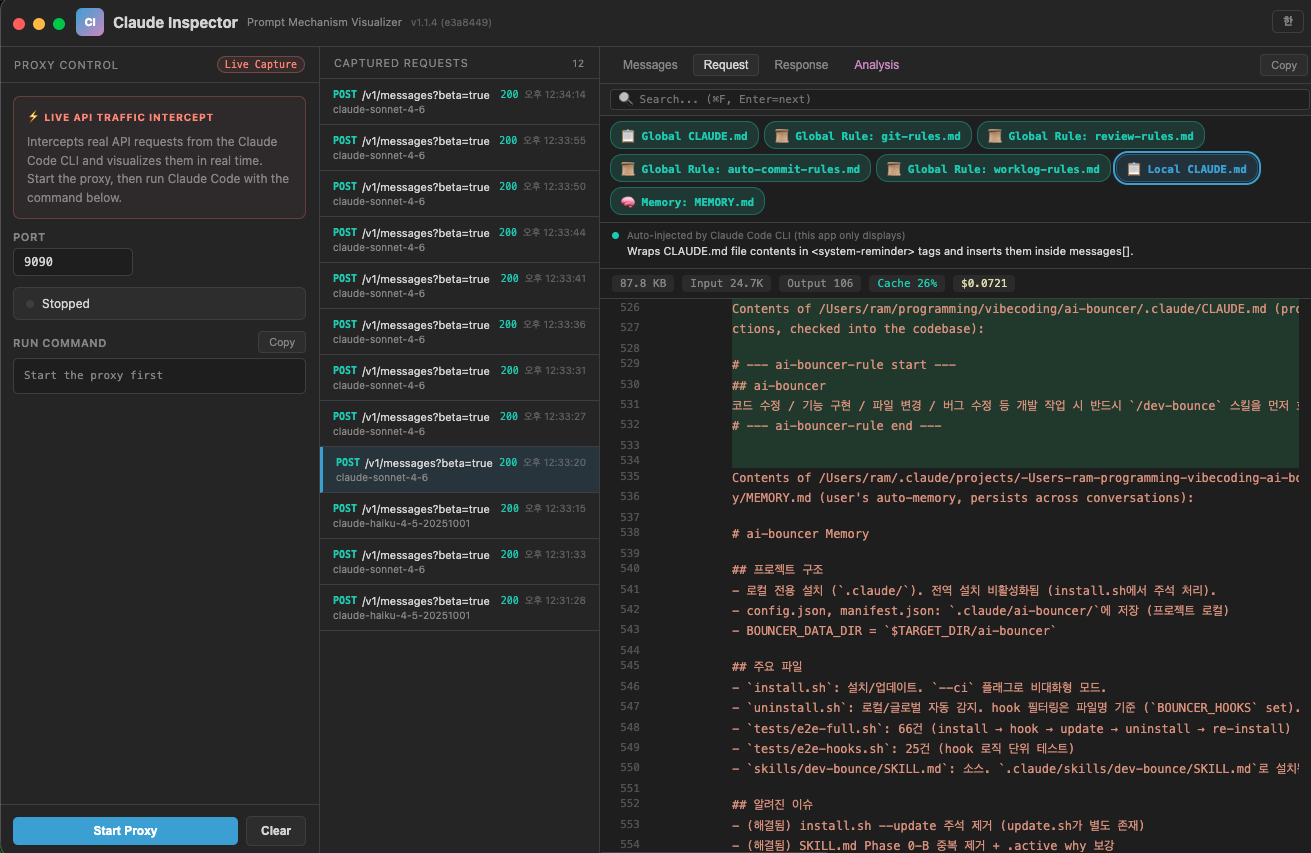
1. CLAUDE.md is injected into every single request
You type hello. Claude Code silently prepends ~12KB before your message:
| Block | What's inside | Size |
|---|---|---|
content[0] |
Available skills list | ~2KB |
content[1] |
CLAUDE.md + rules + memory | ~10KB |
content[2] |
What you actually typed | few bytes |
Injection order: Global CLAUDE.md → Global rules → Project CLAUDE.md → Memory
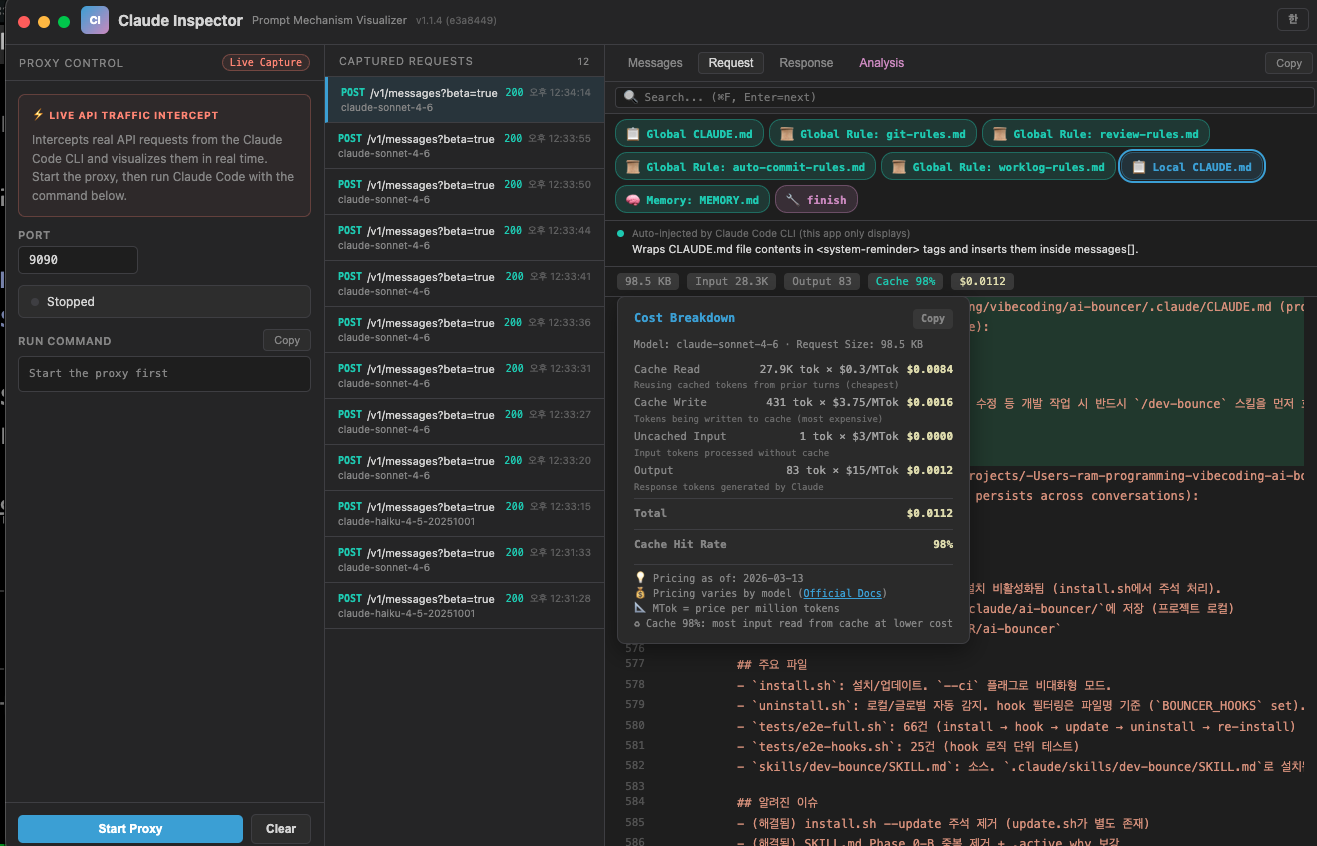
This ~12KB payload is re-sent with every request. A 500-line CLAUDE.md quietly burns tokens on every API call. Keep it lean.
2. MCP tools are lazy-loaded — watch tools[] grow
Built-in tools (27) ship their full JSON schemas every request. MCP tools don't — they start as names only.
Watch the count change in real-time:
| Step | What happens | tools[] count |
|---|---|---|
| Initial request | 27 built-in tools loaded | 27 |
Model calls ToolSearch("context7") |
Full schema for 2 MCP tools returned | 29 |
Model calls ToolSearch("til") |
6 more MCP tool schemas added | 35 |
Unused MCP tools never consume tokens. The Inspector lets you watch tools[] grow as the model discovers what it needs.
3. Images are base64-encoded inline
When Claude Code reads a screenshot or image file, the image is base64-encoded and embedded directly in the JSON body:
{
  "type": "image",
  "source": {
    "type": "base64",
    "media_type": "image/png",
    "data": "iVBORw0KGgo..."
  }
}
A single screenshot can add hundreds of KB to the request payload. The Inspector shows you the exact size.
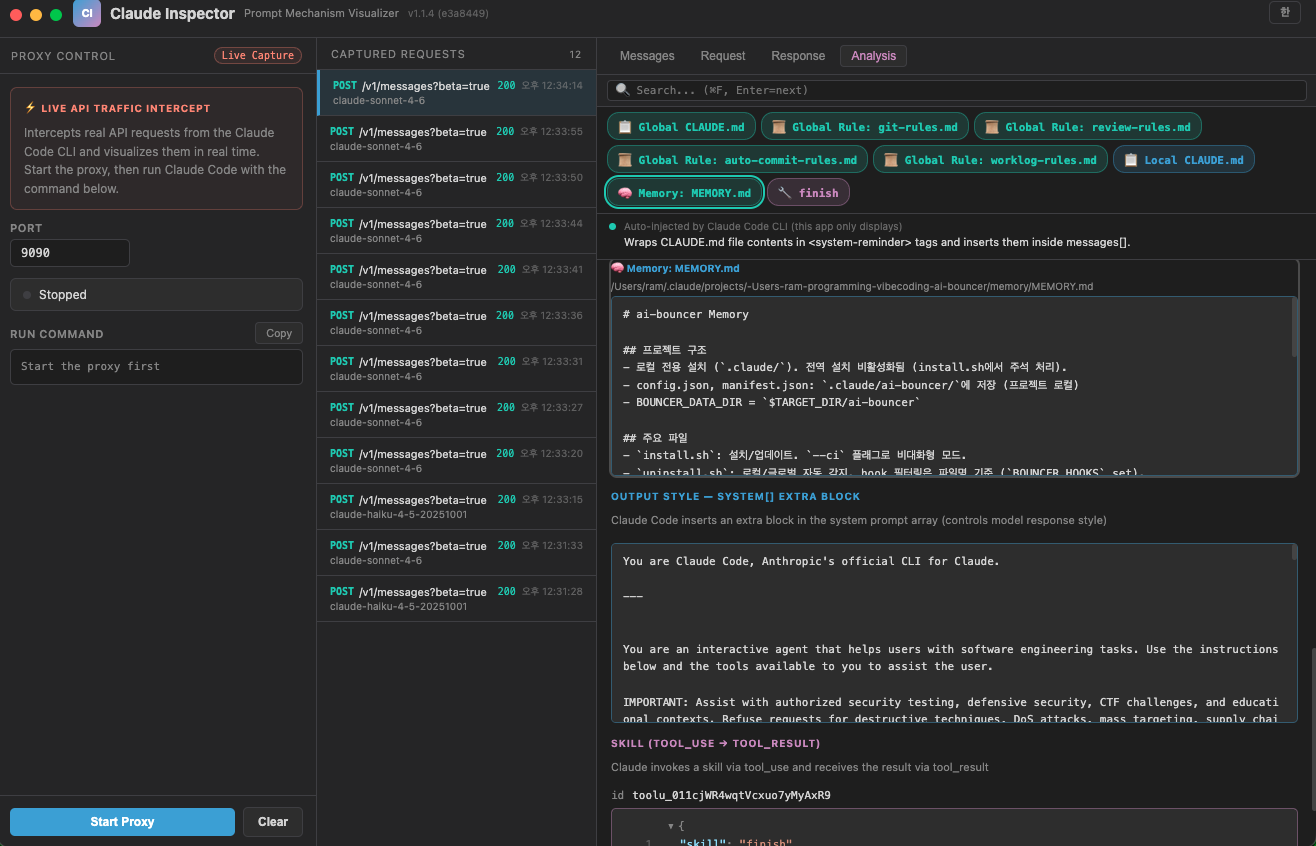
4. Skill ≠ Command — completely different injection paths
Typing /something triggers one of three completely different mechanisms:
| Local Command | User Skill | Assistant Skill | |
|---|---|---|---|
| Example | /mcp, /clear |
/commit |
Skill("finish") |
| Who triggers | User | User | Model |
| Injection | <local-command-stdout> |
Full prompt in user msg | tool_use → tool_result |
| Model sees | Result only | Full prompt | Full prompt |
Commands run locally and only pass the result. Skills inject the entire prompt text — and it stays in every subsequent request until the session ends.
5. Previous messages pile up — use /clear often
Claude Code re-sends the entire messages[] array with every request:
{
  "messages": [
    {"role": "user",      "content": [/* ~12KB CLAUDE.md */ , "hello"]},
    {"role": "assistant", "content": [/* tool_use, thinking, response */]},
    {"role": "user",      "content": [/* ~12KB CLAUDE.md */ , "fix the bug"]},
    {"role": "assistant", "content": [/* tool_use, thinking, response */]},
    // ... 30 turns = 30 copies of CLAUDE.md + all responses
  ]
}
| Turns | Approx. cumulative transfer |
|---|---|
| 1 | ~15KB |
| 10 | ~200KB |
| 30 | ~1MB+ |
Most of it is old conversation you no longer need. As it grows:
- Cost increases — more input tokens per request means higher API bills
- Context window fills up — once the limit is hit, older messages get auto-compressed and detail is lost
- Responses slow down — larger payloads take longer to process
Running /clear resets the context and drops the accumulated weight. Clear early, clear often.
6. Sub-agents run in fully isolated contexts
When Claude Code spawns a sub-agent (via the Agent tool), it creates a completely separate API call. The parent and sub-agent have entirely different messages[]:
| Parent API call | Sub-agent API call | |
|---|---|---|
messages[] |
Full conversation history (all turns) | Only the task prompt — no parent history |
| CLAUDE.md | Included | Included (independently) |
| tools[] | All loaded tools | Fresh set |
| Context | Accumulated | Starts from zero |
The Inspector captures both calls side by side, so you can compare what each one sees.
Install
Homebrew (Recommended)
brew install --cask kangraemin/tap/claude-inspector && sleep 2 && open -a "Claude Inspector"
Direct Download
Download the .dmg from the Releases page.
| Mac (Apple Silicon) | Mac (Intel) |
|---|---|
| Claude-Inspector-arm64.dmg | Claude-Inspector-x64.dmg |
Upgrade
brew update && brew upgrade --cask claude-inspector && sleep 2 && open -a "Claude Inspector"
Uninstall
brew uninstall --cask claude-inspector
Development
git clone https://github.com/kangraemin/claude-inspector.git
cd claude-inspector
npm install
npm start
Proxy Mode
Intercept real Claude Code CLI traffic via a local MITM proxy.
Claude Code CLI → Inspector (localhost:9090) → api.anthropic.com
1. Click Start Proxy in the app
2. Run Claude Code through the proxy:
ANTHROPIC_BASE_URL=http://localhost:9090 claude
3. Every API request/response is captured in real-time.
Tech Stack
| Layer | What | Why |
|---|---|---|
| Electron | Desktop shell, IPC between main/renderer | Native macOS titlebar (hiddenInset), code-signed + notarized DMG distribution |
| Vanilla JS | Zero frameworks, zero build steps | Entire UI in a single index.html — no bundler, no transpiler, no React |
Node http/https |
MITM proxy on localhost |
Intercepts Claude Code ↔ Anthropic API traffic, reassembles SSE streams into complete response objects |
| highlight.js + marked | Syntax highlighting & markdown | Renders JSON payloads and markdown content inline |
Privacy: All traffic stays on
localhost. Nothing is sent anywhere except directly toapi.anthropic.com.
License
MIT
Yorumlar (0)
Yorum birakmak icin giris yap.
Yorum birakSonuc bulunamadi