claude-status-bar
skill
Pass
Health Pass
- License — License: MIT
- Description — Repository has a description
- Active repo — Last push 0 days ago
- Community trust — 23 GitHub stars
Code Pass
- Code scan — Scanned 12 files during light audit, no dangerous patterns found
Permissions Pass
- Permissions — No dangerous permissions requested
No AI report is available for this listing yet.
Claude Code status line script
README.md


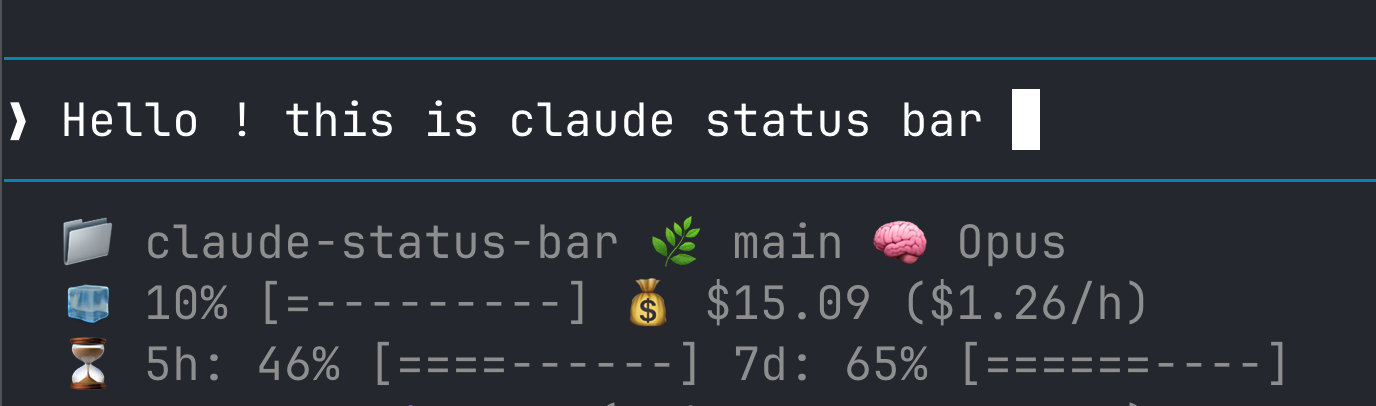
Directory, git branch, model, context usage, cost, and rate limits — always visible at the bottom.
Install
curl -fsSL https://raw.githubusercontent.com/kangraemin/claude-status-bar/main/install.sh | bash
Restart Claude Code. That's it.
What You See
| Line | Info | Example |
|---|---|---|
| 1 | Directory, branch, model | 📁 my-project 🌿 main 🧠 Opus |
| 2 | Context usage + session cost | 🧊 10% [=---------] 💰 $15.09 ($1.26/h) |
| 3 | Rate limit used (5h / 7d) | ⏳ 5h: 21% [==--------] 7d: 44% [====------] |
- Context bar fills up as you use more — know when to
/compactor start fresh. - Rate limits show used quota, matching the built-in
/statusdisplay. Appears only for Pro/Max subscribers.
Update
curl -fsSL https://raw.githubusercontent.com/kangraemin/claude-status-bar/main/install.sh | bash
Same command. Overwrites the script, keeps your other settings.
Uninstall
curl -fsSL https://raw.githubusercontent.com/kangraemin/claude-status-bar/main/uninstall.sh | bash
How It Works
The installer does two things:
- Copies
statusline.sh→~/.claude/statusline.sh - Adds
statusLineconfig to~/.claude/settings.json
{
  "statusLine": {
    "type": "command",
    "command": "~/.claude/statusline.sh"
  }
}
Claude Code pipes session data as JSON to stdin. The script parses it with jq (preferred) or python3 (fallback) and outputs three lines.
Requirements
- Claude Code CLI
jqorpython3
License
MIT
Reviews (0)
Sign in to leave a review.
Leave a reviewNo results found