binfera
Health Uyari
- License — License: Apache-2.0
- Description — Repository has a description
- Active repo — Last push 0 days ago
- Low visibility — Only 5 GitHub stars
Code Basarisiz
- rm -rf — Recursive force deletion command in .github/workflows/release.yml
Permissions Gecti
- Permissions — No dangerous permissions requested
Bu listing icin henuz AI raporu yok.
See what a binary does: decompiled C, capabilities mapped onto the code, and diffs for PE, ELF and Mach-O. Browser, desktop app, or your AI agent via MCP. Runs locally.




Try it in your browser · Documentation · Releases
See what a binary does. Decompiled C, capabilities mapped onto the code, and diffs for Windows, Linux and macOS executables. Use it in a browser, as a desktop app, or from your AI agent and the command line. Analysis runs on your machine.

binfera pairs a Rust analysis engine with an embedded native decompiler (Ghidra's C++ core and SLEIGH, no JVM). The browser build runs both as WebAssembly in Web Workers, so a sample never leaves the page and there is no backend. Capability matches come from a native Rust implementation of Mandiant capa that runs the unmodified capa rules.
Choose how to use it
| I want to… | Use | Start |
|---|---|---|
| Try it now, with nothing to install | Browser | 1 |
| Analyze files day to day and keep my notes | Desktop app | 2 |
| Let Claude Code or Codex do the analysis | Desktop app, or command line and MCP | 2, 3 |
| Check builds in a script or CI | Command line | 4 |
What it does
- Decompiled C for every function. x86, x86-64 and AArch64 in PE, ELF and supported Mach-O images, plus ARM32/Thumb (PE, ELF) and classic MIPS32 (ELF). See the supported scope.
- Capabilities on the code. capa rule matches, with ATT&CK ids, mapped onto the functions that triggered them.
- Compare two binaries. Which capabilities, functions and file contents changed, down to the instruction. See comparing binaries.
- Read it your way. Control-flow graph, assembly, strings, imports and sections; FLIRT signatures and Function ID packs name library code.
- Keep your work. The desktop app saves your renames and comments and remembers the files you opened.
- Bring your own AI agent. An MCP server lets Claude Code, Codex or any MCP client name functions, comment code and save reports with evidence. binfera runs no model, and every agent run can be undone.
- Local by design. Nothing is uploaded; the static site can be served from any host.
A closer look
Every picture is the WannaCry demo from binfera.io, so you can open it and follow along. The tour walks through each view.
 Overview. What the file is, how it was built and packed, and its capabilities by ATT&CK tactic. |
 Capabilities on the code. ATT&CK and MBC ids, and the functions behind each match. |
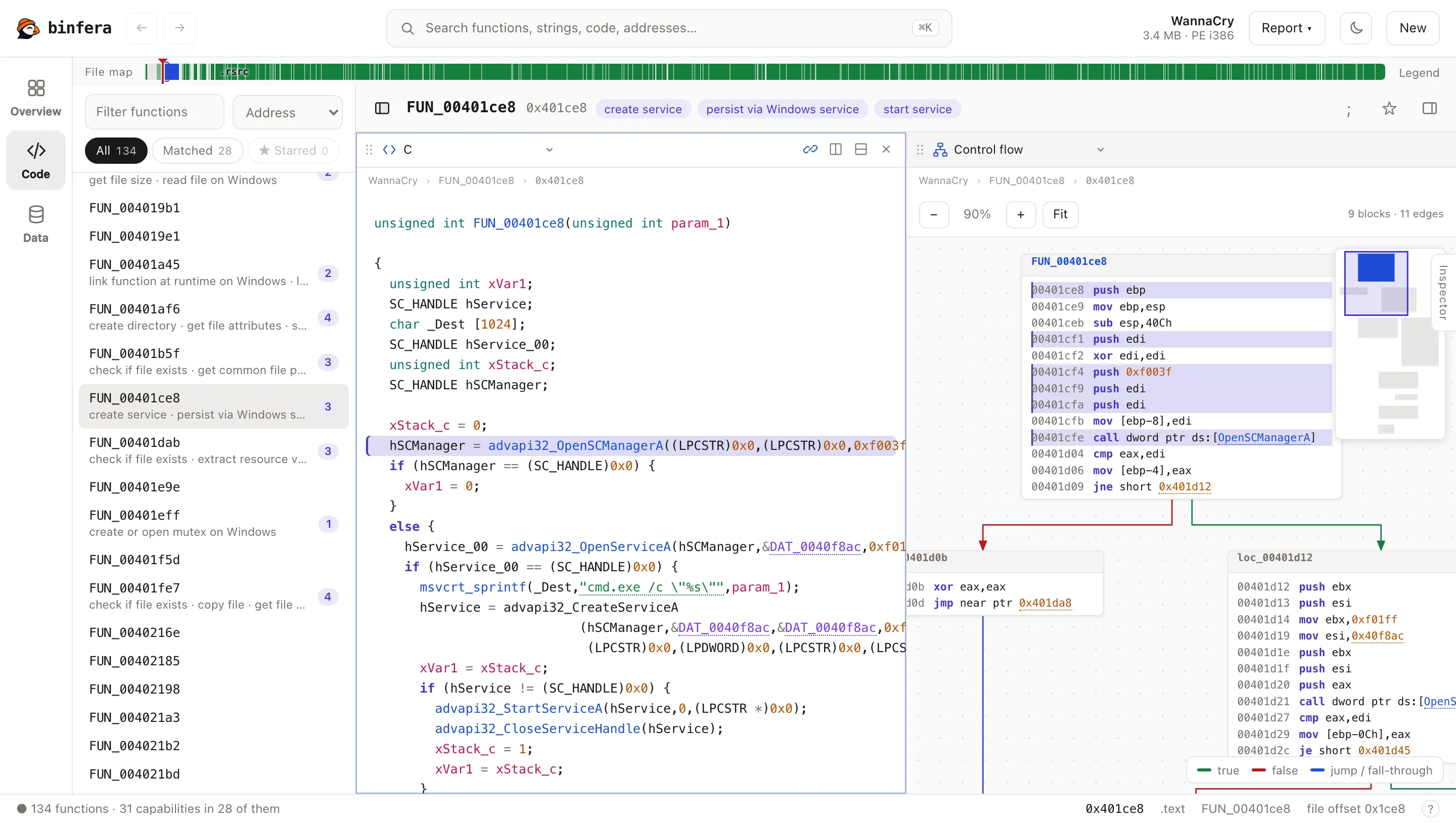 Decompiled C and the graph. C, assembly, listing, graphs, hex, strings and imports, side by side. |
 Call graph. Callers and callees, with the capabilities each one carries. |
 Code and bytes. The function that loads a resource, beside the ZIP it extracts. |
 Search everything. Functions, capabilities, imports, strings and code in one list. |
 Compare two builds. Every change ranked, down to the changed lines. |
 Archives. Zip and 7z open in place, with the usual passwords tried for you. |
With your own AI agent
In the desktop app, Agent runs your own Claude Code or Codex through Binfera's tools. This is a real Claude Code triage of the same sample, replayed: it reads the overview, the capabilities and the key functions, names and comments them as it goes, and answers with addresses that open the code.
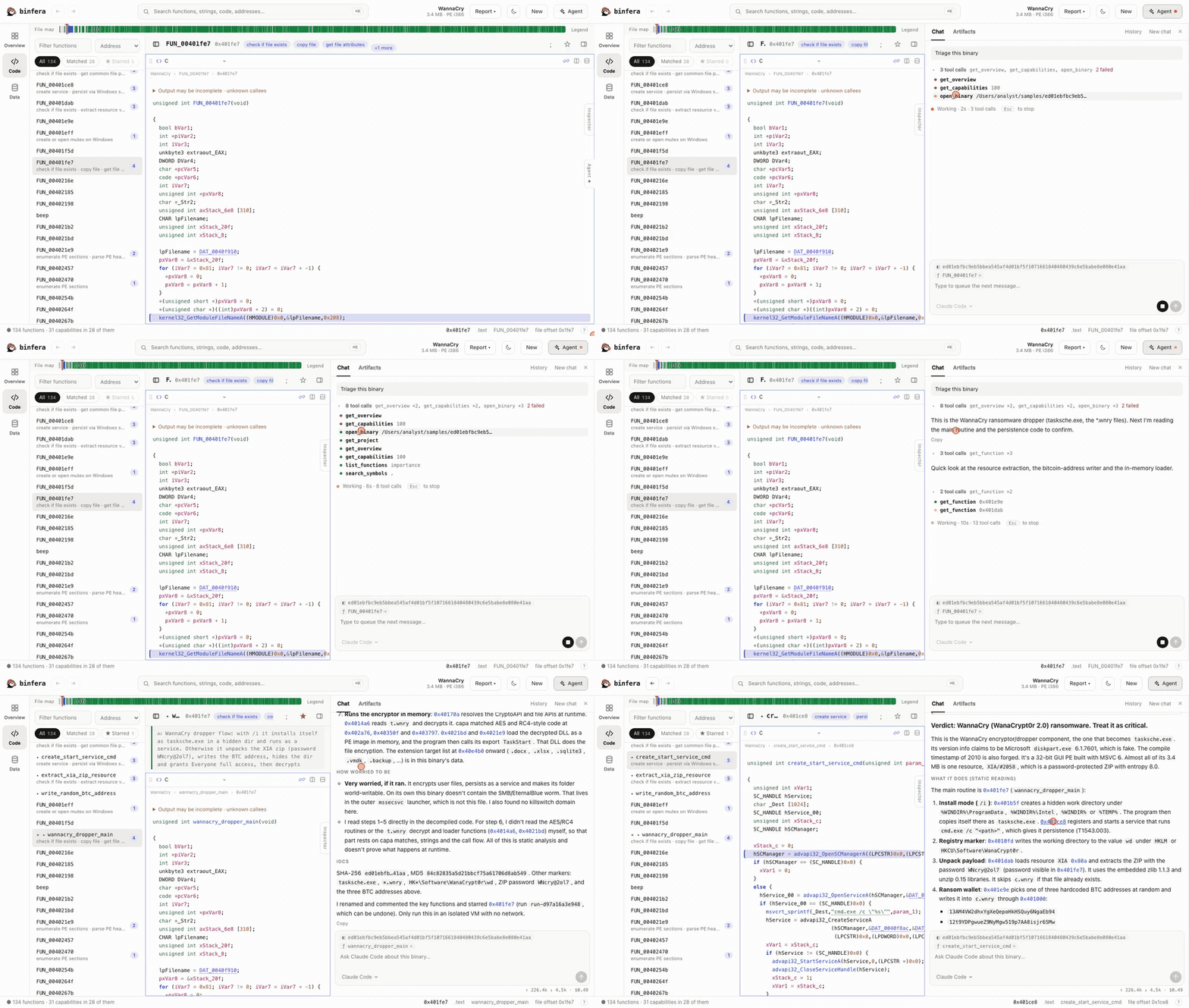
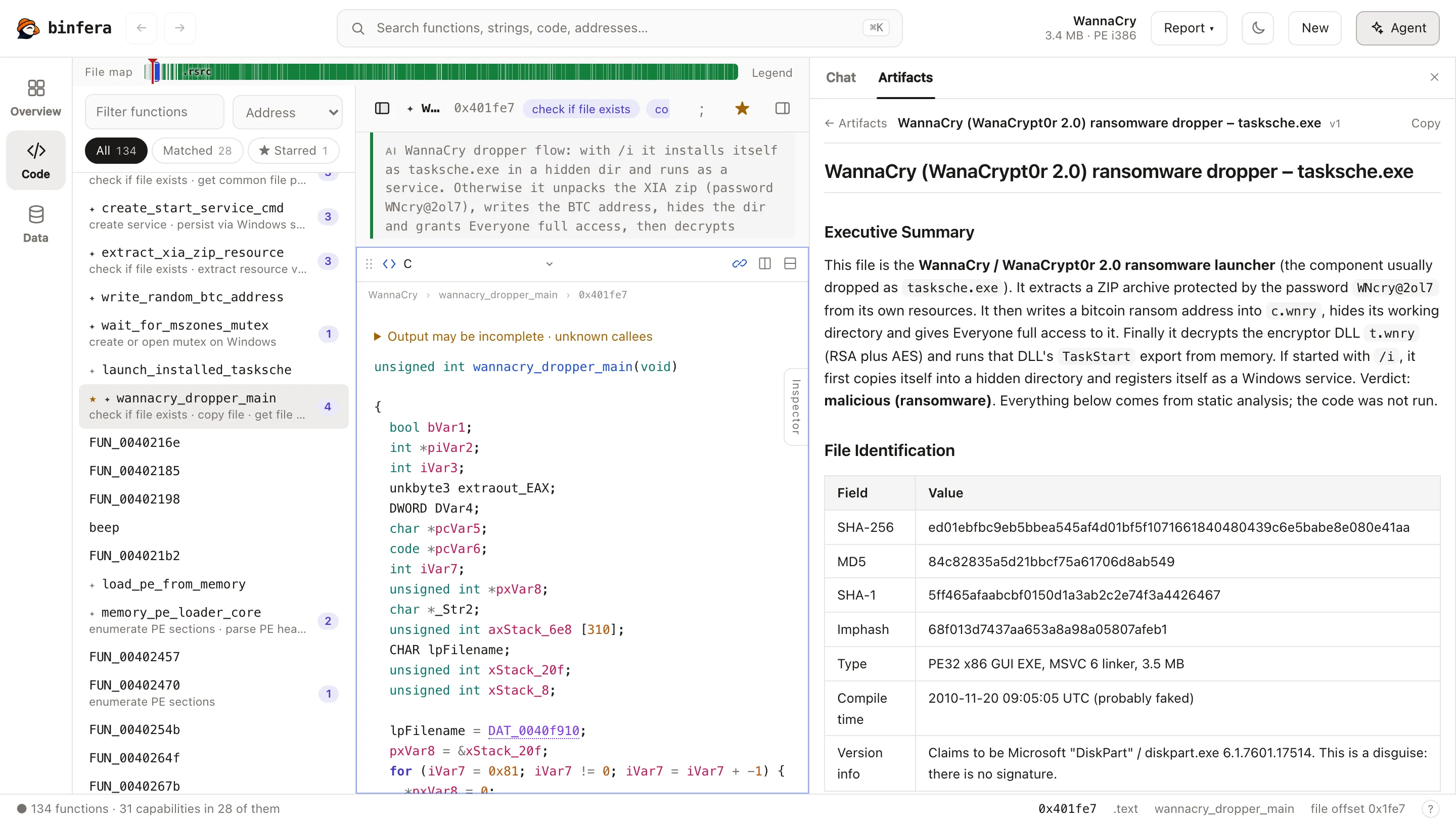
Asked for a report, it saves one with evidence, next to every run's names and comments. Every run can be undone.
How it compares
binfera is built for the first hours with an unknown file (what is it, what does it do, what changed), not as a replacement for a full reverse-engineering suite. Next to Ghidra and radare2:
- Fast discovery. It is written in Rust, and lists a file's functions a median of 23 times sooner than Ghidra's headless analyzer, across PE, ELF and Mach-O on x86, x64, ARM and MIPS (measurements and caveats). The decompiler core is Ghidra's own, so decompiled output is the same kind of work; the gain is in discovery.
- Capabilities on the code. Every function carries the behaviours it implements, with ATT&CK ids.
- Nothing to install, nothing uploaded. It runs in a browser tab, and the command-line tool is one file.
- Built for AI agents. An MCP server with saved notes, undoable runs and reports whose evidence is checked.
- Compare built in. Two builds, down to the instruction.
It has no debugger, no plugin or scripting ecosystem, fewer architectures and file formats than Ghidra or radare2, no type or prototype editing and no patching. Use it alongside them, not instead.
Getting started
Download from Releases. Pick the path that fits: they share the same engine, and the desktop app and an AI agent share the same notes.
1. In a browser
Open Binfera in your browser, pick a sample or drop a file. Nothing is uploaded.
2. Desktop app
Download the installer for your OS from the latest release and run it. The macOS app is signed and notarised; the Windows installer is not signed, so SmartScreen warns on first run (details).
- Choose a file or drop one on the window. Recent files and your renames and comments are kept.
- To bring in an AI agent, click Agent (Cmd/Ctrl+J). The app runs your own Claude Code or Codex against the open file; pick a request such as Triage this binary or ask your own.
3. AI agent without the desktop app
For Claude Code, Codex or any MCP client, with nothing but the command-line tool.
Install
binfera. It is one file and includes the capa rules:curl -fsSL https://binfera.io/install.sh | sh # macOS, Linux irm https://binfera.io/install.ps1 | iex # Windows, PowerShellOr download the archive for your platform from Releases and unpack it. The scripts check the download against the release's
SHA256SUMSand install to~/.binfera/bin(%LOCALAPPDATA%\binfera\binon Windows).Register it with your agent, using the full path to the binary:
claude mcp add --scope user binfera -- ~/.binfera/bin/binfera mcp
codex mcp add binfera -- ~/.binfera/bin/binfera mcp
Ask: "Open
sample.exewith Binfera and write a full analysis report."
Everything the agent saves is kept in a local project database, and the desktop app opens the same one, so you can review an agent's work there later. See Binfera MCP server for the tools and limits, and function emulation.
4. In a script or CI

binfera sample.exe -j -q | jq -r '.rules | keys[]'   # capabilities, one per line
binfera diff old.exe new.exe                         # exits 1 when the builds differ
JSON output, exit statuses, baselines and the rest are in the command-line guide.
Build from source
You need Rust, a C++ toolchain and git.
git clone https://github.com/Karib0u/binfera.git
cd binfera
git submodule update --init rules                # the capa rules (Ghidra's sources are vendored)
Command line (add --features decompiler for decompiled code; Rust 1.89+ and a C++ compiler: zlib on macOS and Linux, Visual Studio Build Tools on Windows):
cargo build --release -p binfera-cli --features decompiler
target/release/binfera sample.exe                 # capabilities
target/release/binfera sample.exe --decompile-all # every function as C, one JSON object per line
target/release/binfera sample.exe --emulate 0x140001000 --emulate-arg 42 # isolated function emulation
claude mcp add --scope user binfera -- "$PWD/target/release/binfera" mcp   # or: codex mcp add binfera -- ...
With the rules submodule present, the build embeds the rules in the binary, so it runs from any folder; to use your own, pass -r or set BINFERA_RULES_DIR. See Binfera MCP server and docs/decompiler.md for the decompiler's scope and limits (docs/decompiler-design.md for its API).
Web app. One-time toolchain setup (macOS):
brew install emscripten
rustup target add wasm32-unknown-emscripten
Then from web/:
npm install
npm run prepare-assets   # build the wasm module and bundle the rules
npm run dev              # http://localhost:5173
npm run build            # static site in dist/
Details in web/README.md.
Desktop app. From web/:
npm install
npm run prepare-desktop  # the native engine and the capa rules, bundled with the app
npx tauri build          # installers under src-tauri/target/release/bundle/
Contributing
| Path | What |
|---|---|
web/ |
The browser app (Vite + React + TypeScript), workers and wasm glue; web/src-tauri/ is the desktop app |
binfera/ |
Core Rust engine: loaders, recovery, feature extraction, rule matching, decompiler bindings |
binfera-cli/ |
CLI, also the entry point compiled to wasm |
binfera-mcp/, binfera-project/ |
The MCP server and the project database it shares with the desktop app |
third_party/ |
Vendored Ghidra decompiler and SLEIGH sources |
binfera-python/, binfera-ghidra/ |
Python bindings and the Ghidra decompiler bridge |
docs/ |
Architecture, decompiler, CLI, MCP and compatibility docs |
cargo test --workspace
docs/development.md covers setup, the parity test loops and the full checks.
License
Apache License 2.0, see LICENSE and NOTICE. Includes code derived from Ghidra (Apache 2.0) and runs Mandiant's capa rules. binfera is independent and not affiliated with or endorsed by Google LLC, Mandiant, Inc. or the NSA.
Yorumlar (0)
Yorum birakmak icin giris yap.
Yorum birakSonuc bulunamadi