user-behavior-personalization
Health Pass
- License — License: Apache-2.0
- Description — Repository has a description
- Active repo — Last push 0 days ago
- Community trust — 21 GitHub stars
Code Pass
- Code scan — Scanned 12 files during light audit, no dangerous patterns found
Permissions Pass
- Permissions — No dangerous permissions requested
No AI report is available for this listing yet.
A local workspace for reviewing preferences, previewing task changes, and recording feedback. 本地双语个性化工作台:偏好审核、任务预览与反馈记录。
User Behavior Personalization
You have asked for shorter answers three times. The next task needs a detailed explanation. Your assistant should handle both.
This local workspace turns recurring feedback into preferences you can review, shows exactly how those preferences change the next task's prompt, and lets you record whether the change helped. A one-time choice leaves your saved habits intact.
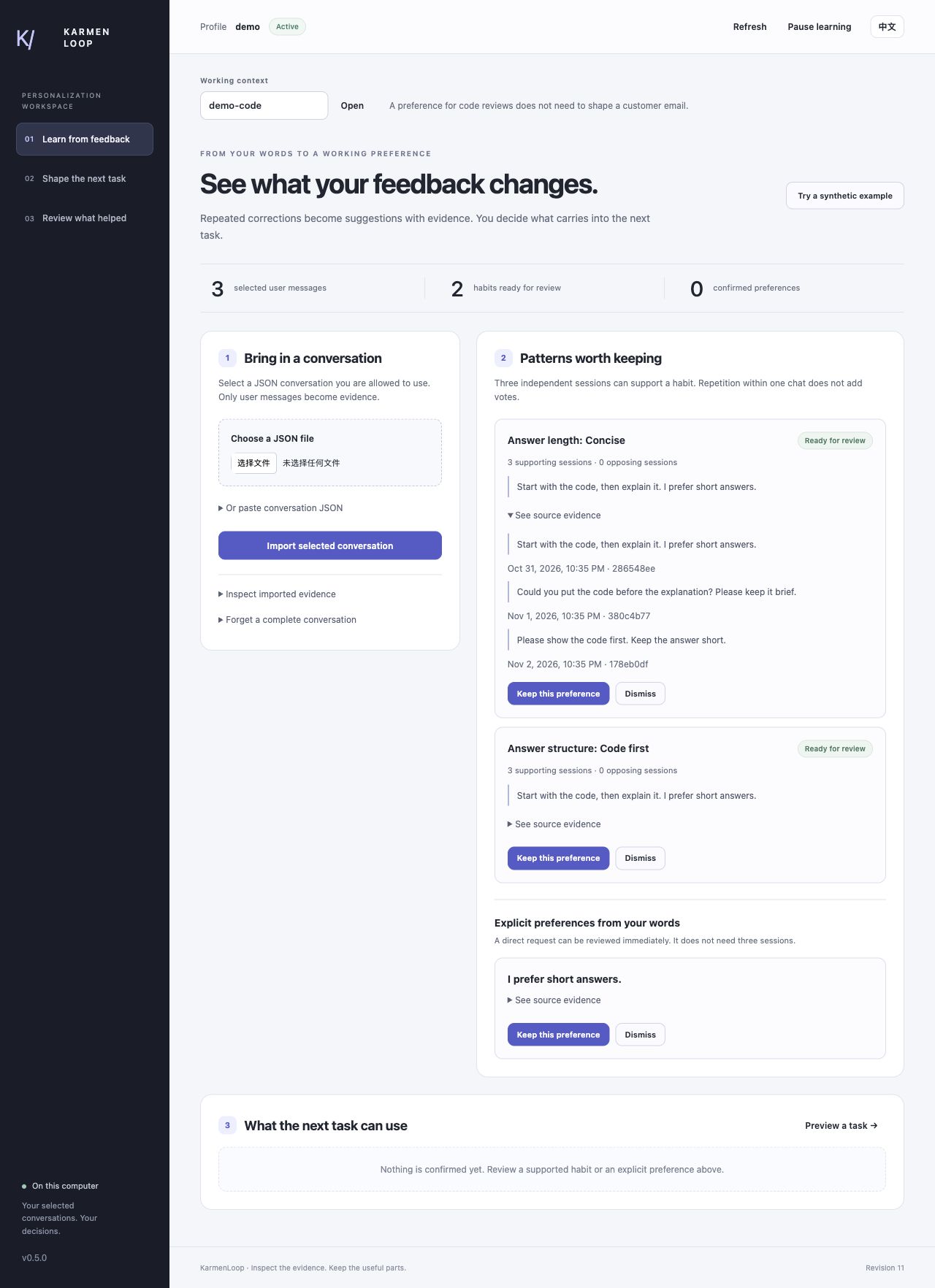
Actual workspace capture using synthetic feedback. Three selected conversations support two habits for review.
Download · Full walkthrough · Automatic learning · Current evaluation
Try the complete loop
Python 3.11+ is required. Download, verify, and extract the release, then run:
python3 -B scripts/workspace.py --root ../private-profile --subject demo --enable-conversations
Open the printed http://127.0.0.1:... URL. The workspace runs on your computer; no model account is needed.
- Select Try a synthetic example. Three separate conversations contain “Too long. Please keep it brief.”
- Open the evidence for the proposed concise-answer habit, then choose Keep this preference.
- Open Shape the next task, enter a task, and preview the saved preference in the actual prompt.
- Choose a detailed answer under Just for this task. Preview again: the temporary choice replaces the saved brevity rule for this task, without changing the profile.
- Save the plan, then record whether reviewing the prompt helped. After using a real response through your host, record that separately.
What makes the difference
Recurring corrections become usable habits. Import selected conversations or follow an append-only file. The learner finds supported English and Chinese feedback cues across independent sessions, with source quotes and counterevidence. A direct preference can be reviewed immediately; a recurring habit needs consistent support.
You can see the actual change. The workspace, context builder, and host wrapper use one preference resolver. The preview explains which rules were included or left out, and why. It does not fill the screen with an invented before/after answer.
Exceptions stay temporary. Current-task controls, omitted rules, context, expiry, and a preference budget determine what is sent. Your permanent profile remains unchanged by a preview.
Feedback belongs to the version you used. Helpful, mixed, not helpful, and unsure ratings refer to a prepared plan and exact preference versions. A rewritten rule does not inherit an old score. Silence and a successful command are never counted as approval.
Bring your own conversations
Import a JSON conversation in the workspace, or run:
python3 -B scripts/watch_conversations.py --root ../private-profile --subject owner \
  --enable-conversations --input /path/to/selected.jsonl
Each complete line is a full conversation snapshot, not a single message. The foreground watcher imports new lines from that one selected file, keeps a restart cursor, and stops at a rejected record. It does not search your accounts or install a background service. See the feed format and recovery guide.
Automatic recognition is experimental and can miss ordinary paraphrases. Review the evidence and correct preferences directly when needed; the published diagnostics report misses as well as successful suggestions.
Existing capabilities remain available: open-text preferences, project terminology, stated goals, writing observations, optional model-assisted proposals, and experimental historical next-request retrieval. The latter still has weak English paraphrase coverage; it is not the new habit learner.
Use the result with your host
Codex and Cursor can use the included MCP configuration helpers or pre-invocation wrapper. build_context.py produces scoped messages for your own model client, including DeepSeek-style APIs. The package sends no provider request on its own.
The browser preview is real local functionality. It is not a successful model-response test: the v0.5.0 Codex attempt timed out after 80 seconds. Read host acceptance and learning diagnostics before treating a feature or score as proven.
Go deeper
- Tutorial / 中文教程: download, workspace, review, temporary choices, feedback, and deletion.
- Automatic learning: selected feeds, evidence, conflicts, restart, and errors.
- Host integration: Codex, Cursor, model context, and the 25 tools.
- Conversation guide: JSON/JSONL imports, open-text proposals, portrait, and historical forecasts.
- Privacy, research, and 20 practical questions.
Profiles stay in a private SQLite store outside the package. Pause, inspect, correct, forget, and reset are available. The workspace is bilingual, and the local runtime uses the Python standard library and native browser assets.
Apache-2.0 · Built by KarmenLoop · Support · Security
Historical overviews: v0.2.0, v0.3.0 intermediate source, v0.4.0.
Reviews (0)
Sign in to leave a review.
Leave a reviewNo results found