fleet-mcp
Health Uyari
- No license — Repository has no license file
- Description — Repository has a description
- Active repo — Last push 0 days ago
- Low visibility — Only 5 GitHub stars
Code Gecti
- Code scan — Scanned 1 files during light audit, no dangerous patterns found
Permissions Gecti
- Permissions — No dangerous permissions requested
Bu listing icin henuz AI raporu yok.
🚀 An Model Context Protocol (MCP) server for Fleet. Query OSQuery data, check compliance, and investigate CVEs natively from Claude, Cursor, and any MCP-compatible AI agent.
Fleet MCP Server 🚀
A Model Context Protocol (MCP) server for the Fleet endpoint security platform.
Transform how you interact with your endpoint data. Query osquery, check compliance, drill into per-host policy results, and investigate CVEs natively from Claude, Cursor, and any MCP-compatible AI agent.
🔗 GitHub Repo: https://github.com/fleetdm/fleet/tree/main/cmd/fleet-mcp
🔗 Learn about MCP: https://modelcontextprotocol.io/
🔗 Learn about Fleet: https://fleetdm.com/
📺 See it in Action
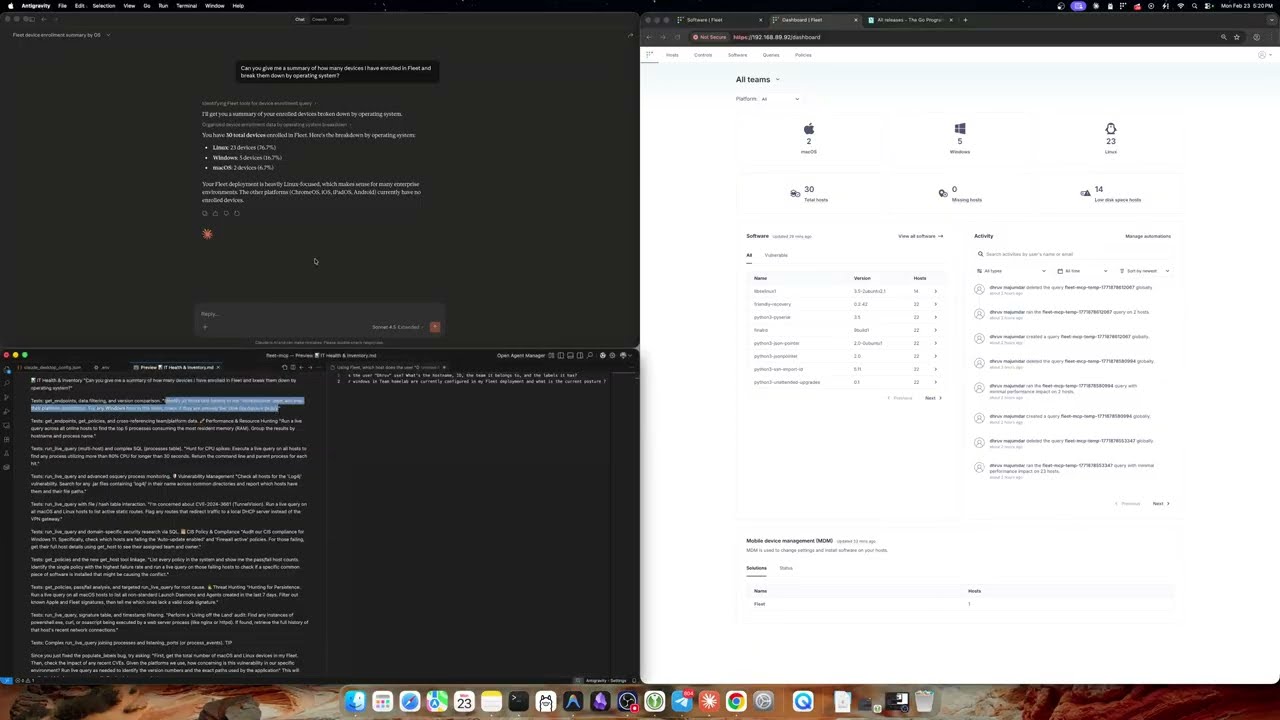
Watch the 1 hr walkthrough demonstrating how to use Claude Desktop to instantly write and run live OSQueries across your fleet.
Overview
This server provides an MCP interface to Fleet, enabling AI systems (Claude Desktop, Claude Code, Cursor, and any MCP-compatible client) to natively interact with your Fleet deployment. Instead of raw API endpoints, it exposes typed Tools that AI agents can call directly — listing hosts with rich server-side filters, drilling into per-host policy compliance, finding hosts impacted by a CVE, running live osquery, and more.
Both SSE (Server-Sent Events) and stdio transports are supported. The same tool surface is exposed identically on both.
Tools
The server exposes tools across four domains: hosts, queries, policies/vulnerabilities, and inventory. One of them (run_live_query) runs arbitrary osquery on devices, so scope the Fleet API token accordingly (see Security model).
Hosts
| Tool | Description |
|---|---|
get_endpoints |
List hosts/endpoints enrolled in Fleet with rich server-side filters (fleet, platform, status, query, label, policy_id, policy_response, per_page). All filters compose — narrow precisely instead of paginating client-side, and the returned total reflects the filtered scope, not the global inventory. The query parameter alone covers hostname / serial / primary IP / hardware model / user inventory (username, email, IdP group). |
get_host |
Get full details for a single host including labels, fleet, hardware serial, primary IP, and platform info. Accepts a numeric host_id (most precise — bypasses any hostname collisions) OR an identifier (exact hostname / UUID / serial / computer_name, OR a fuzzy substring). When the identifier matches multiple hosts (e.g. shared hostname), returns a candidate list with each host's id / hostname / display_name / serial / primary_ip / fleet for disambiguation. |
get_host_policies |
Get the compliance status of every policy applied to a single host (global + fleet-inherited). Returns each policy with its response field (pass / fail / "" for not-yet-run) plus a summary block (failing_count, passing_count, not_run_count, total). Mirrors the Fleet UI's per-host Policies tab. Accepts host_id (preferred) or identifier, with the same disambiguation behavior as get_host. Supports an optional response filter to narrow to passing or failing only. |
get_total_system_count |
Total count of active enrolled systems |
get_aggregate_platforms |
System count broken down by OS platform (macOS / Windows / Linux / etc.) |
get_fleets |
List all fleets with their IDs and names |
get_labels |
List all endpoint labels |
Queries
| Tool | Description |
|---|---|
get_queries |
List all saved Fleet queries (global + per-fleet) |
prepare_live_query |
Step 1 of 2: validate targets and return the osquery schema needed to author a valid SQL statement |
run_live_query |
Step 2 of 2: execute an osquery SQL statement against live Fleet devices. Schema-first contract: callers must call get_osquery_schema (or prepare_live_query) first; SQL is pre-validated against canonical column types — TEXT-vs-bare-integer comparisons are rejected. Targets resolve server-side via direct selectors like hostnames / host_ids and intersecting filters including fleet, platform, label, status, query, policy_id, policy_response, and cve_id. Fleet-scoped: when fleet is set, only hosts in that fleet are targeted. |
get_osquery_schema |
Returns the canonical, source-of-truth schema for Fleet/osquery tables. Sourced from the Fleet monorepo schema/osquery_fleet_schema.json (also rendered at https://fleetdm.com/tables) and refreshed in the background — column TYPES are always accurate. Defaults to a curated short list filtered by platform; pass tables (comma-separated) for full canonical coverage of any of the 360+ tables. |
refresh_osquery_schema |
Force-refresh the in-memory schema from https://raw.githubusercontent.com/fleetdm/fleet/main/schema/osquery_fleet_schema.json. Use when get_osquery_schema returns data that conflicts with the live Fleet docs. Background refresh handles routine drift; this tool is for the rare manual override. |
get_vetted_queries |
Get a library of 100% vetted, production-safe CIS-8.1 policy queries for macOS, Windows, and Linux |
Policies & Vulnerabilities
| Tool | Description |
|---|---|
get_policies |
List all policies (global + per-fleet) with their pass/fail host counts |
get_policy_compliance |
Get pass/fail counts for a specific policy. Defaults to global aggregate; pass fleet to scope to a single fleet (matches the per-fleet counts in the Fleet UI). |
get_policy_hosts |
List the hosts that pass or fail a given policy, optionally narrowed by fleet, platform, label, status, query. Use this to answer "which Linux hosts are failing policy 42?" — all filter dimensions compose server-side. |
get_vulnerability_impact |
Aggregate count of systems impacted by a CVE |
get_vulnerability_hosts |
List the specific hosts impacted by a CVE, optionally narrowed by fleet, platform, label, status, query. Composes a 3-step lookup (/software/titles?vulnerable=true&query=CVE → vulnerable version IDs → /hosts?software_version_id=N) and intersects client-side. Required because Fleet's /hosts?cve= and /hosts?platform= filters are silently ignored — see the Operational learnings section. |
Inventory
These read from Fleet's stored host inventory (refreshed on each host check-in), so they answer "what's installed / who has an account" without a live osquery query — they work even for currently-offline hosts.
| Tool | Description |
|---|---|
get_software |
List software/packages from Fleet's stored inventory. Two modes, auto-selected: per-host (pass host_id or host_identifier) returns every package on that host with version / source / installed paths / matching CVEs via /hosts/:id/software; cross-host (no host arg) returns software TITLES seen across hosts via /software/titles — the full inventory by default, optionally scoped by fleet / vulnerable (and platform, which requires fleet: Fleet's titles endpoint only filters by platform together with a team). The source arg (e.g. npm_packages, python_packages, apps, deb_packages, chrome_extensions) is a client-side case-insensitive filter against the osquery source table name. Use query for a substring match on software name or a CVE id. Prefer this over run_live_query for inventory lookups — cached, always-available, no host CPU. |
get_host_users |
List OS-local user accounts on a single host as inventoried by osquery (uid, username, type, groupname, shell). Accepts host_id (preferred) or host_identifier (same disambiguation as get_host). Optional query substring filters the returned users client-side across username / uid / groupname / shell. |
Filter dimensions at a glance
| Dimension | How to filter | Notes |
|---|---|---|
| User / IP / hostname | query= substring |
One field — Fleet's substring matcher covers all of these plus serial / model. |
| Display name | not searchable via query |
Use host_id directly (from a candidate list or prior call). The /hosts/identifier/:id endpoint also matches computer_name exactly, which often equals the display name. |
| Fleet | fleet=<name> |
Resolved server-side to fleet_id. |
| Label | label=<name> |
Resolved server-side to label_id. Single label only — Fleet's API doesn't accept multi-label intersection. |
| Policy result | policy_id=<id> + policy_response=passing|failing |
policy_response requires policy_id; otherwise rejected at the MCP layer. |
| Platform / Status | platform= / status= |
Standard Fleet host filters. |
Hostname collisions and host_id
Fleet allows multiple hosts to share a hostname (e.g. several Macs all reporting hostname=mac). Fleet's /hosts/identifier/:id endpoint silently returns one of them, which used to mean policy lookups could quietly target the wrong host. The current tools handle this with a query-first resolver:
- If you pass
host_id(numeric), it goes straight to/hosts/:host_id— exact, no collision possible. - Otherwise the tool does a substring search first. One match → fetch by ID. Multiple matches → return a candidate list with each host's
id,hostname,display_name,hardware_serial,primary_ip, andfleet_name. Zero matches → fall back to/hosts/identifier/:id(catches UUIDs andcomputer_name-only matches).
If your AI agent gets a candidate list back, it should pick the right id and re-call with host_id. Display-name-only hosts (where the user-friendly display name does not match any indexed string field) are best fetched with host_id from the start.
Configuration
Configure the server using environment variables or a .env file (in the same directory as the binary).
| Variable | Default | Description |
|---|---|---|
FLEET_BASE_URL |
(required) | Base URL of your Fleet instance, e.g. https://your-fleet.example.com |
FLEET_API_KEY |
(required) | Fleet API token — see Fleet docs. Use the least-privileged Fleet role that covers your tools: an observer / observer-plus token is enough for all tools - admin is not required |
MCP_AUTH_TOKEN |
(required) | Bearer token for authenticating MCP clients. Generate with openssl rand -hex 32 (min 32 chars — the server refuses a weaker one). Required on every transport (including stdio); the server refuses to start without it. In SSE mode the server validates it on every request; in stdio mode it must be set but is not checked at runtime (the client launches the binary as a local subprocess). |
PORT |
8080 |
HTTP port for SSE transport. Ignored in stdio mode. Render injects this automatically. |
LOG_LEVEL |
info |
Log verbosity: debug / info / warn / error. Note: debug logs the route shape of every Fleet API call (path before query string only — no PII identifiers). Avoid debug in production deployments where logs are shipped to a centralized aggregator. |
FLEET_TLS_SKIP_VERIFY |
false |
Skip TLS certificate verification. Hard-gated to localhost — the server refuses to start with this set and a non-loopback FLEET_BASE_URL. Conflicts with FLEET_CA_FILE. |
FLEET_CA_FILE |
(optional) | Path to a PEM CA certificate for self-signed Fleet instances |
FLEET_LIVE_QUERY_REST_PERIOD |
25s |
How long run_live_query waits for hosts to report before returning. Accepts any Go duration string (e.g. 25s, 1m). Multi-host runs stop early once every online host has responded; this is the upper bound for the wait. Mirrors the same variable on the Fleet server — keep this ≥ the server's value so the MCP doesn't give up before the server finishes the campaign. |
Copy the provided template:
cp .env.example .env
# Edit .env with your Fleet URL, Fleet API key, and a freshly generated MCP_AUTH_TOKEN
Note for Claude Desktop (stdio): Claude Desktop reads environment variables from the
envblock ofclaude_desktop_config.json, not from a.envfile. See the Stdio Transport section.
Installation
Prerequisites
- Go 1.25.7+
- A running Fleet instance
- A Fleet API token with appropriate read permissions
Build
git clone https://github.com/fleetdm/fleet
cd fleet/cmd/fleet-mcp
go mod tidy
go build -o fleet-mcp .
Generate an MCP auth token
openssl rand -hex 32
Use the output as MCP_AUTH_TOKEN in your .env (SSE) or your Claude Desktop config (stdio).
Usage
SSE Transport (Claude Code, Cursor, web clients)
Start the server — it will listen for SSE connections:
./fleet-mcp
# transport: SSE — listening on :8080
Configure your MCP client to connect to http://localhost:8080/sse and include the bearer token. For Claude Code, add to your project's .mcp.json or your global MCP config:
{
  "mcpServers": {
    "fleet": {
      "type": "sse",
      "url": "http://localhost:8080/sse",
      "headers": {
        "Authorization": "Bearer <your-MCP_AUTH_TOKEN>"
      }
    }
  }
}
For a remote deployment (e.g. Render):
{
  "mcpServers": {
    "fleet": {
      "type": "sse",
      "url": "https://your-fleet-mcp.onrender.com/sse",
      "headers": {
        "Authorization": "Bearer <your-MCP_AUTH_TOKEN>"
      }
    }
  }
}
Stdio Transport (Claude Desktop)
Stdio mode runs the binary directly as a subprocess — no network port, no TLS to worry about, all communication over stdin/stdout JSON-RPC.
Build the binary:
go build -o fleet-mcp .(macOS only) Adhoc-sign the binary so Gatekeeper doesn't kill it after replacement. Required after every rebuild on Apple Silicon — without this, copying a freshly built binary over an existing one at the same path can result in silent crashes or
exit 137:codesign --force --sign - ./fleet-mcpEdit
~/Library/Application Support/Claude/claude_desktop_config.json(macOS):{ "mcpServers": { "fleet-mcp": { "command": "/absolute/path/to/fleet-mcp", "args": ["-transport", "stdio"], "env": { "FLEET_BASE_URL": "https://your-fleet.example.com", "FLEET_API_KEY": "YOUR_FLEET_API_KEY", "MCP_AUTH_TOKEN": "YOUR_MCP_AUTH_TOKEN", "LOG_LEVEL": "info" } } } }Use an absolute path for
command. Relative paths and~are not expanded.Fully quit and relaunch Claude Desktop (
Cmd+Q, not just close-window). All the tools will appear in your context.
Smoke-test stdio mode without Claude Desktop
You can drive the binary directly via stdio JSON-RPC for debugging:
export FLEET_BASE_URL="https://your-fleet.example.com"
export FLEET_API_KEY="..."
export MCP_AUTH_TOKEN="..."

cat <<'EOF' | ./fleet-mcp -transport stdio
{"jsonrpc":"2.0","id":1,"method":"initialize","params":{"protocolVersion":"2024-11-05","capabilities":{},"clientInfo":{"name":"smoke","version":"1.0"}}}
{"jsonrpc":"2.0","method":"notifications/initialized"}
{"jsonrpc":"2.0","id":2,"method":"tools/call","params":{"name":"get_total_system_count","arguments":{}}}
EOF
Replace the tools/call line to exercise any tool, e.g. get_host_policies with host_id.
-seed flag
The binary also supports a one-shot seed mode that loads Fleet with the standard set of saved queries shipped with this repo, then exits:
./fleet-mcp -seed
This is a developer convenience — skip it for normal MCP server use.
Tool annotations and Claude Desktop
Every tool here ships with explicit MCP annotations:
readOnlyHint— does the tool only read, or can it write?destructiveHint— can it mutate or remove data?idempotentHint— does repeating the call have the same effect?openWorldHint— does it talk to a remote system, or only consult in-binary data?
Without these, Claude Desktop conservatively gates every tool behind destructive-action review and may collapse the surface to a single tool. The read-only tools are annotated readOnly=true, destructive=false, idempotent=true so the AI agent can use them freely. Note: these annotations are advisory hints honored by well-behaved clients (e.g. Claude Desktop prompts before the one destructive tool) — they are not a server-side control. The real control is the privilege of the FLEET_API_KEY role (use a least-privilege/observer token; see Security model).
One tool is explicitly destructive and requires user approval in MCP clients:
| Tool | Annotations | Why destructive |
|---|---|---|
run_live_query |
readOnly=false, destructive=true, idempotent=false |
Fires osquery against every targeted device via an ad-hoc campaign, consumes device CPU, and shows up in EDR telemetry. Even SELECT-only SQL is operationally destructive at fleet scale. |
This means Claude Desktop will surface a confirmation prompt before it fires — required for any production deployment where the operator's Fleet API token can run live queries (observer-plus or higher).
Security model
The MCP holds the operator's FLEET_API_KEY and acts with exactly that token's Fleet role — with a role that can run live queries (observer-plus or higher), compromise of the MCP gives an attacker full host inventory access plus arbitrary osquery against every enrolled device. Defenses:
- Terminate TLS in front (the SSE listener is plain HTTP). The server speaks HTTP on
PORT, so theMCP_AUTH_TOKENbearer and all traffic are cleartext on the wire. For any non-loopback deployment, run it behind a TLS-terminating layer: Render's edge already does this; for a self-hosted / private-network deployment, put a reverse proxy (nginx / Caddy / Cloudflare) in front and only expose the HTTPS endpoint. Thestdiotransport is unaffected (no network hop). - TLS skip-verify hard-gated to localhost.
FLEET_TLS_SKIP_VERIFY=truepaired with a non-loopbackFLEET_BASE_URLmakes the binary refuse to start (logrus.Fatalf) — copying a dev.envto a remote deploy can no longer expose the Fleet token to an on-path attacker. - Strong
MCP_AUTH_TOKENenforced. The server refuses to start ifMCP_AUTH_TOKENis shorter than 32 characters — a high-entropy token is the real defense against bearer brute force (openssl rand -hex 32satisfies it). - Rate limiting / DoS protection belongs upstream. The MCP runs no limiter of its own — Fleet typically runs behind a reverse proxy / edge that terminates TLS (above) and throttles requests, which is where per-client rate limiting belongs (Render's edge; or a reverse proxy / WAF such as nginx / Caddy / Cloudflare). The strong
MCP_AUTH_TOKENis the brute-force defense, and failed-auth requests are rejected by the MCP before they ever reach Fleet. - API-only token required. At startup the MCP calls
GET /api/v1/fleet/meand refuses to start unlessFLEET_API_KEYbelongs to an API-only Fleet user. An API-only user has no UI session, its own audit identity, and — via Fleet's per-user role/team scoping — can be locked down to exactly the endpoints (and teams/fleets) the MCP needs, adding a Fleet-side authorization boundary on top of the MCP's bearer auth. Fails closed: if/mecan't confirm the principal (Fleet unreachable or token invalid) the MCP won't start. To create one with the right access, see Fleet's docs: Create an API-only user, the endpoints an API-only user can reach, and Usingfleetctlwith an API-only user. - Read vs run = the token's Fleet role. The MCP acts with exactly the role of
FLEET_API_KEY(it has no mode of its own), and Fleet enforces it. The read-only tools work with an observer token; the one mutating tool,run_live_query, needs observer_plus (or admin / maintainer / technician) per Fleet's RBAC — an observer token gets a403. No maintainer or admin role is required. Recommended: an API-only user with the lowest role your tools need — observer for a read-only deployment, observer_plus if you userun_live_query. The MCP doesn't infer or log these rights — it only enforces the API-only requirement above. - Live queries run arbitrary osquery (scope the token).
run_live_querydispatches arbitrary osquery to devices — exactly like Fleet's own UI /fleetctl/ live-query REST API, which the MCP proxies. Tables such ascurl/curl_certificate/carvescan make outbound requests or exfiltrate file content from a managed device (e.g. cloud-metadata credentials). This is a Fleet/osquery capability, not specific to the MCP — the MCP does not (and should not) special-case it. The MCP-layer control is a least-privilegeFLEET_API_KEY(an observer token → Fleet rejects live queries entirely). To remove the capability everywhere (UI,fleetctl, scheduled, MCP), disable the tables on the osquery agent:--disable_tables=curl,curl_certificate,carves,yara,yara_eventsvia fleetd/orbit agent options. - Body size cap on SSE transport.
http.MaxBytesReadercaps every incoming request body at 1 MiB. Hostile clients cannot OOM the MCP via oversized JSON-RPC payloads. - HTTP server timeouts.
ReadHeaderTimeout=10s,ReadTimeout=30s,IdleTimeout=120sdefeat Slowloris-style header/body starvation. - Saved-query sweeper at startup. Any
fleet-mcp-temp-*saved queries left over from previous runs (whose deferred DELETE failed during a crash or 5xx) are deleted on the next MCP boot. Temp query names usecrypto/randsuffixes so concurrent invocations cannot collide. - PII-safe debug logs. The Fleet API call log was changed to log only the route shape (path before any
?query string) — host serials, user emails passed via?query=, and CVE IDs no longer leak to debug logs. - CVE / policy / per_page input validation at the MCP layer.
cve_idmust match^CVE-\d{4}-\d{4,}$,policy_idmust be a positive integer,per_pageis clamped to 200. Malformed inputs get a usable error message before any Fleet API call. - Context propagation end-to-end. Every FleetClient method takes
ctx context.Context; MCP handler cancellation propagates through to in-flight Fleet API calls, including between iterations of fan-out paths (CVE compose, label intersection). A cancelled MCP request stops the whole fan-out instead of running every remaining HTTP call to completion.
Deploying to Render
cmd/fleet-mcp/render.yaml is a standalone Render Blueprint, separate from the root render.yaml used by the main Fleet service.
- Push
cmd/fleet-mcp/render.yamlto your repo. - In the Render dashboard go to New → Blueprint.
- Connect your repo and set the Blueprint file path to
cmd/fleet-mcp/render.yaml. - During setup, fill in the following environment variables:
FLEET_BASE_URL— URL of your Fleet instanceFLEET_API_KEY— Fleet API tokenMCP_AUTH_TOKEN— generate withopenssl rand -hex 32
PORTis injected automatically by Render — no action needed.- Health check: point Render's (or any orchestrator's) probe at
GET /healthz— it returns200 okunauthenticated, so it stays green under load.
Development
Project layout
cmd/fleet-mcp/
  main.go                  # entrypoint, flag parsing, transport selection, http.Server timeouts, body-size cap
  config.go                # env-var loading
  auth.go                  # bearer-auth middleware (SSE)
  route_guard.go           # SSE route allow-list
  fleet_integration.go     # FleetClient — wraps Fleet REST API. Every method takes ctx context.Context as first param.
  mcp_server.go            # SetupMCPServer orchestrator
  mcp_helpers.go           # getOptionalString, parseCSVArg, parsePerPageArg, validateCVEID, parsePositiveUintString, jsonResult
  mcp_tools_hosts.go       # host-domain MCP tools
  mcp_tools_queries.go     # query-domain MCP tools
  mcp_tools_policies.go    # policy/vuln MCP tools
  mcp_tools_inventory.go   # inventory MCP tools
  schema.go                # canonical osquery schema (embedded fallback + live HTTP refresh from raw.githubusercontent.com/fleetdm/fleet/main/schema/osquery_fleet_schema.json) and ValidateSQLForPlatforms (table-vs-platform + TEXT-column type sniff)
  osquery_fleet_schema.json # vendored canonical snapshot (//go:embed source-of-truth fallback). Refresh via `go generate ./cmd/fleet-mcp/...`.
  vetted_queries.go        # vetted CIS-8.1 query library
  seed_fleet.go            # -seed mode
Tunables (env vars) for the schema layer:
FLEET_MCP_SCHEMA_REFRESH_INTERVAL— refresh cadence for the background goroutine, accepts anytime.Durationstring (e.g.6h,30m). Default24h.FLEET_MCP_SCHEMA_REFRESH_DISABLE— when set, the live refresh goroutine is not started and the binary uses the embedded snapshot only. Useful for air-gapped environments.
Adding a new tool
- Add a method to
FleetClientinfleet_integration.gothat wraps the Fleet API call. - Pick the right domain file (
mcp_tools_hosts.go,mcp_tools_queries.go,mcp_tools_policies.go, ormcp_tools_inventory.go) and add aregister<ToolName>function. - Wire the new register function into the matching
register<Domain>Toolsorchestrator at the top of the same file. - Always set
readOnly/destructive/idempotentannotations so Claude Desktop can advertise it. - Build and run the smoke test from the Smoke-test stdio mode section.
Operational learnings
A few non-obvious behaviors discovered while building this:
?query=substring matching covers hostname, serial, primary IP, hardware model, AND host_users (username/email/IdP groups) — but not display_name. Usehost_idfor display-name-only lookups./hosts/identifier/:idmatches more than the docs claim: in addition to hostname / UUID / serial, it also matchescomputer_nameexactly. That's why a user-set computer name resolves on the identifier endpoint even though?query=(which does not indexcomputer_name) does not match it.- Hostname collisions are real in any sizeable fleet. Always prefer
host_idwhen you have it. The substring resolver returns up to 50 candidates withdisplay_name/serial/primary_ipfor disambiguation. policy_responserequirespolicy_idat the API level. The MCP layer rejects the orphan combination upfront with a clean error rather than letting Fleet return a vague 400.- Fleet's
/hostsendpoint silently ignores several filter params we tested. As of Fleet 4.85, passingcve=CVE-X,platform=linux, orlabel_id=NtoGET /hostsis accepted without error but returns the unfiltered host list — the MCP cannot rely on these. Workarounds shipped in this repo:- Platform / label scoping routes through
GET /labels/:id/hosts(which DOES honorfleet_idandquery, but ALSO ignoressoftware_version_idandpolicy_id, so policy + label intersection is computed client-side by host ID). get_endpointstotalis scoped to the same filters as the listing, not the global inventory: it comes fromGET /hosts/countwith the same params (label_idfor label/platform), except the label +policy_idcombo where/hosts/countignorespolicy_id— there the count is the size of the same client-side label∩policy intersection.- CVE → hosts is a 3-step compose in
GetHostsForCVE:GET /software/titles?vulnerable=true&query=CVE-X→ per-titleGET /software/titles/:idto harvest vulnerable version IDs →GET /hosts?software_version_id=Nper ID → intersect with fleet / status / query / label-id client-side. - The single-call
GET /hosts?cve=path is deliberately NOT used because it returns wrong results (e.g. CVE-2025-12345 yields 50 hosts via?cve=, but the correct answer is 1). - Future Fleet versions may fix these — revisit
GetEndpointsWithFiltersandGetHostsForCVEif/when that happens.
- Platform / label scoping routes through
- Fleet-scoped policy compliance uses
/fleets/:fleet_id/policies/:policy_id, not the global path.get_policy_complianceroutes to whichever based on whetherfleetis set. /api/v1/fleet/host_summaryis the right endpoint for aggregate platform counts —GET /hostsdefaults to a 100-host page, so any client-side aggregation overGetEndpoints(0)is silently wrong on Fleets larger than 100 hosts.get_aggregate_platformsuseshost_summarydirectly so totals match the Fleet UI at any inventory size.fetchHostsFromPathpaginates internally with a hard cap (fetchHostsHardCap = 10000). Without this, a single call could buffer the full host inventory in memory (~2KB per Endpoint × 50k hosts ≈ 100MB) and OOM the MCP. When the cap fires a warning is logged so operators see truncation rather than silently getting a partial host set.- Per-fleet fan-out (
get_queries,get_policies) is bounded-concurrent. 8 in-flight goroutines, order-stable merge by fleet index. On enterprise Fleet instances with 50+ fleets the sequential path was the dominant latency source; the bounded concurrency amortizes round-trip count without flooding Fleet with thousands of simultaneous requests. - CSV args drop empty segments.
parseCSVArg("foo,,bar")returns["foo", "bar"]— the legacy split-and-trim behavior leaked zero-value strings into filter logic, and a leading empty segment could silently disable filters that readparts[0]. - macOS Gatekeeper caches adhoc signatures keyed to file identity. Replacing the binary at the same path silently invalidates the cached approval — re-run
codesign --force --sign -after every rebuild before Claude Desktop will launch it. - Claude Desktop reads
envfrom the JSON config, not from a.envfile. The.envtemplate in this repo is for SSE/local development only.
License
MIT
Yorumlar (0)
Yorum birakmak icin giris yap.
Yorum birakSonuc bulunamadi