flue
Health Uyari
- License — License: MIT
- Description — Repository has a description
- Active repo — Last push 0 days ago
- Low visibility — Only 7 GitHub stars
Code Uyari
- network request — Outbound network request in relay/src/directory.ts
Permissions Gecti
- Permissions — No dangerous permissions requested
Bu listing icin henuz AI raporu yok.
Continue your Claude Code, Codex or Pi sessions on any screen.
flue
Continue your Claude Code and Codex sessions on any screen.


flue.sh · setup · how it works · remote access · faq
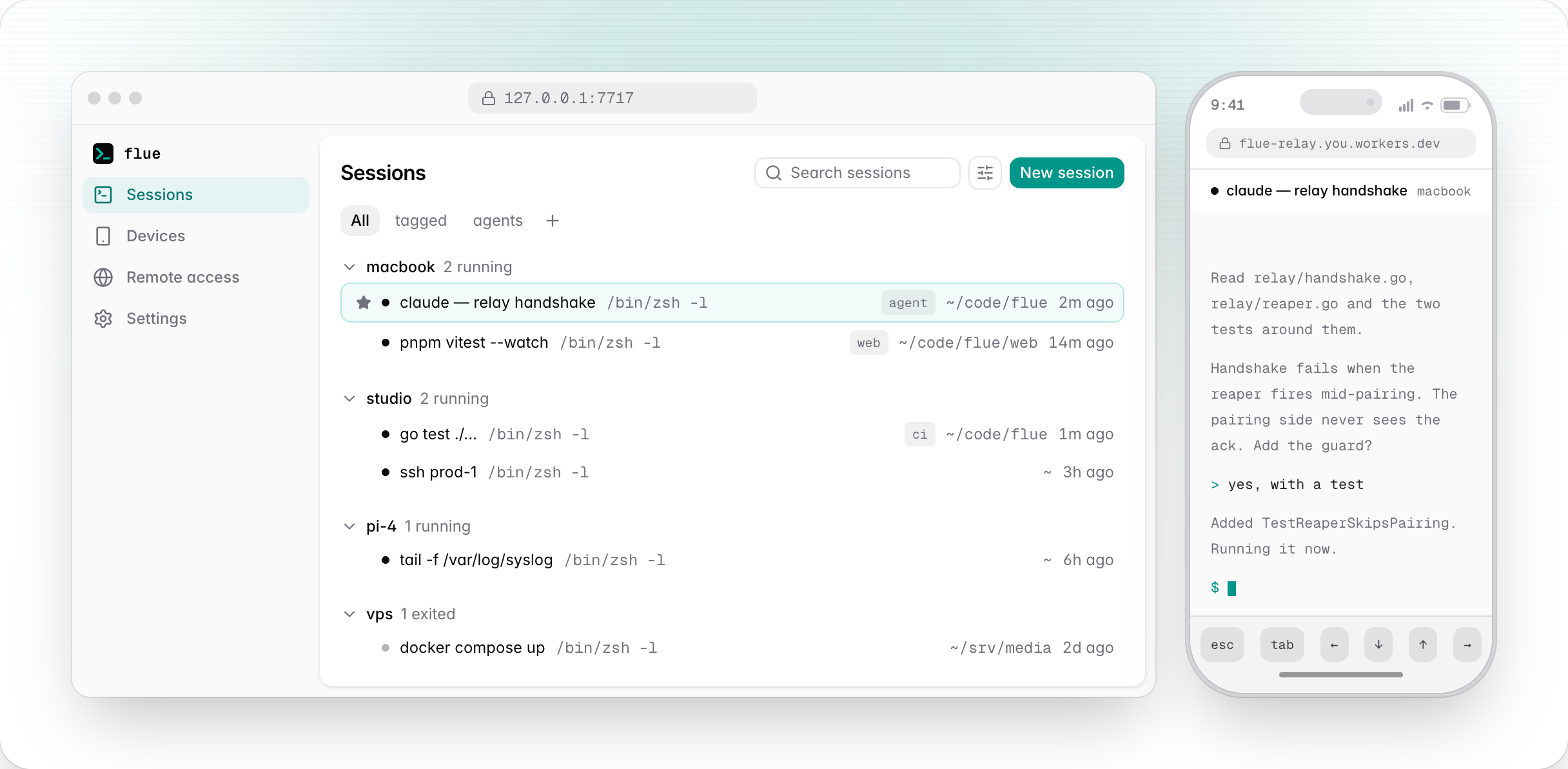
Start on your laptop. Check in from your phone or iPad. Pick up again at your
desk. The shell stays on the machine; flue moves the view.
A small Go daemon holds the shells and their scrollback, and a web app draws
them. Closing the tab does not kill a session. It only detaches it: the agent
keeps working, the build keeps running, the SSH session stays up, and
reattaching replays what you missed.
- Sessions outlive the tab. Close it and the build keeps running.
- One list, every machine. Name, tag, pin, group and search the whole
fleet from one place. Hover a session to see what it is doing. - One keystroke to any of them.
⌘K, orCtrl+Shift+Kanywhere, opens
every session on every machine. The highlighted row shows its own last
fourteen lines, so you can see which one is the build.Ctrl+Shift+1to9
jumps to a pinned session. - Reachable from anything you own. Pair a phone with a QR code, once for
the whole fleet. Two devices on one session mirror live, and the size follows
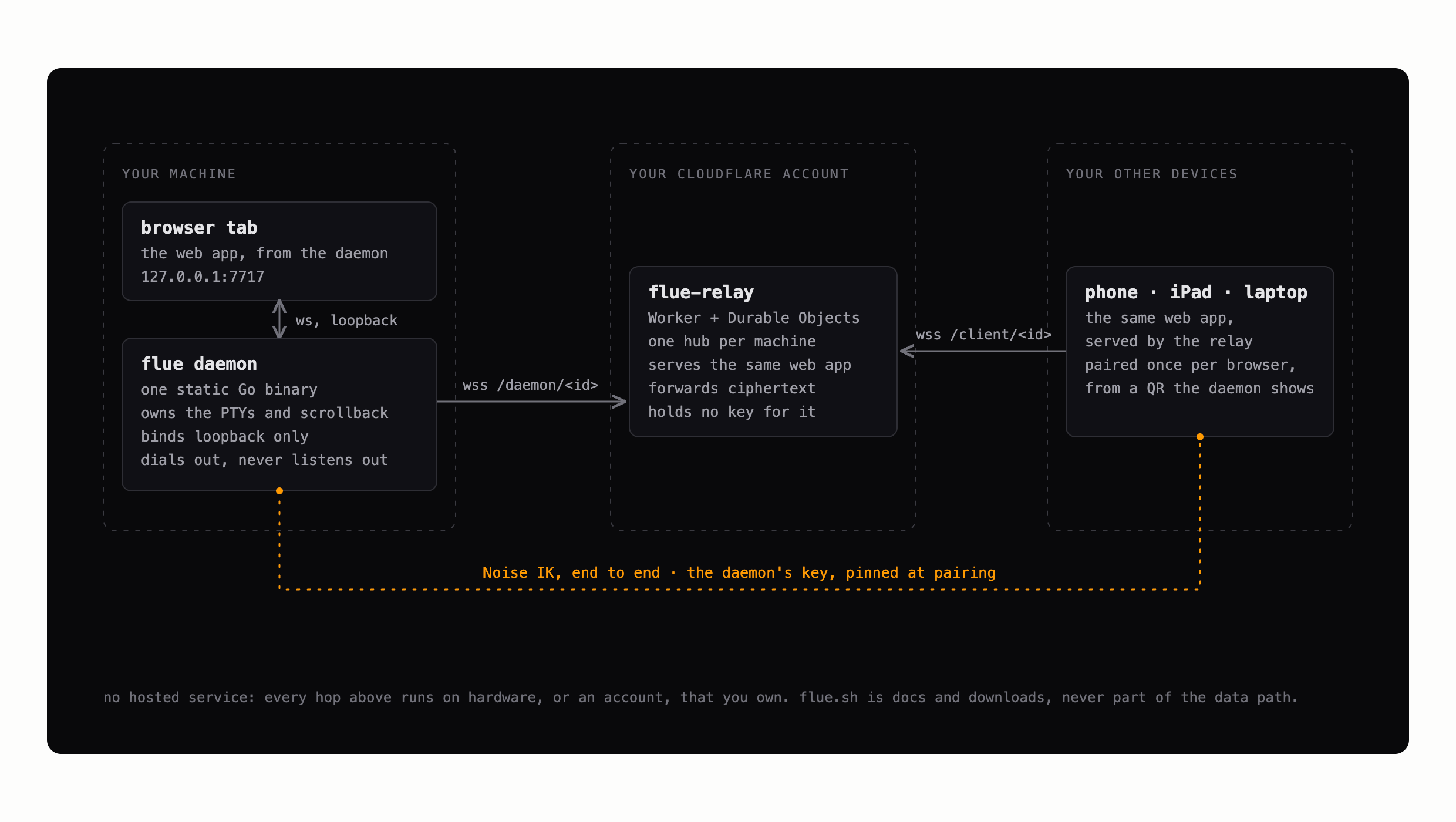
whichever view you are using. - No hosted service. Remote access runs through a relay you deploy into
your own Cloudflare account, end-to-end encrypted, with the daemon's key
pinned at pairing. flue.sh is a landing page and is never part of the data
path.
One static Go binary. macOS, Linux, WSL. No Node, no Python, no toolchain.
Install
brew install karnstack/tap/flue    # or: curl -fsSL https://flue.sh/install.sh | sh
flue enable
flue enable installs a login service, starts the daemon, and opens the UI.
On Linux it also runs loginctl enable-linger, so the daemon and your sessions
survive your last logout. If lingering cannot be turned on, which happens in
some containers, flue enable warns you and names the command to run.
Everything after that happens in the browser.
Recommended setup
One relay, every machine joined to it, every device paired once.
- Install flue and run
flue enableon every machine that runs work: the
laptop, the desktop, the Pi, the VPS. - Run
flue relay setuponce, on one machine. Running it again does not
add a relay, it replaces the one you have: every machine then has to re-join
with the newly printed line, and every device has to pair again. - Run the
flue relay joinline it prints on every other machine. - Pair each phone or tablet once, from a QR code. That pairing covers the
whole fleet, so there is no second ceremony per machine. It is per browser,
so Safari and Chrome on one iPad pair separately.
Long jobs belong on a machine that stays on. A sleeping laptop's sessions are
not lost, but nothing runs until it wakes.
The full version is at flue.sh/docs/setup.
The CLI
flue enable        # install the login service, start the daemon, open the UI
flue disable       # remove it
flue status        # daemon, login service, and session diagnostics
flue open [path]   # spawn a session here, handy from a shell prompt
flue relay setup   # deploy a relay to your own Cloudflare account
flue relay join    # point this machine at a relay another machine deployed
flue relay status  # show the configured relay
flue relay update  # redeploy this release's relay; secret and pairings kept
flue relay address # repoint this machine at a custom domain on the same relay
flue relay leave   # take this machine off its relay; the Worker stays deployed
flue serve         # run the daemon in the foreground, no login service
flue update        # download the newest release, swap this binary, restart the daemon
flue version       # print the version (also --version, -v)
Remote access
The daemon listens on loopback and nothing else, so reaching it from somewhere
else is opt-in and takes one command:
flue relay setup                                                 # machine 1: paste a Cloudflare token
flue relay join wss://<your-relay> --secret <...> --fleet <...>  # every other machine
That deploys a Worker and this web app into your own Cloudflare account,
on the free plan. The same deploy is a card on the UI's Remote screen. One
relay fronts every machine you own, and pairing a device covers the whole
fleet rather than one machine.
What it deploys and what it costs is at
flue.sh/docs/relay, with the operator-grade
version in docs/RELAY.md. What a hostile relay origin could do
despite the end-to-end encryption, which is the honest version because the
browser loads its JavaScript from that origin, is in the
FAQ and at length in docs/faq.md.
Status
Released and in daily use. v0.5.1 is the current release, brew install karnstack/tap/flue gets it, and the whole of it works: the local terminal, the
login service, the fleet-wide sessions list, pairing, and the Cloudflare relay.
The relay has been through its manual end-to-end gate
(docs/RELAY.md) against a real account, with a phone on a
different network paired to it and a second machine joined to the same relay.
There is a recording of that run at
flue.sh/docs/setup.
It is 0.x, which means what it usually means: commands, flags and the config
file can still change between releases, and an upgrade may ask something of
you. Known rough edges live in docs/FOLLOW-UPS.md.
flue is open source and always free.
Building and developing
mise install   # go, node, pnpm, pinned in mise.toml
make build     # web UI + relay Worker, embedded, into bin/flue
make test
The dev loop, the dev/prod split, and working on the relay are in
docs/DEVELOPMENT.md. The landing site is its own package
under site/, and make site-dev runs it.
License
Yorumlar (0)
Yorum birakmak icin giris yap.
Yorum birakSonuc bulunamadi