machine
Health Uyari
- License — License: MIT
- Description — Repository has a description
- Active repo — Last push 0 days ago
- Low visibility — Only 6 GitHub stars
Code Gecti
- Code scan — Scanned 12 files during light audit, no dangerous patterns found
Permissions Gecti
- Permissions — No dangerous permissions requested
Bu listing icin henuz AI raporu yok.
One isolated Lima VM per GitHub project — sandboxed Claude Code/Codex, Docker, Node, signed git
machine — one isolated Lima VM per project
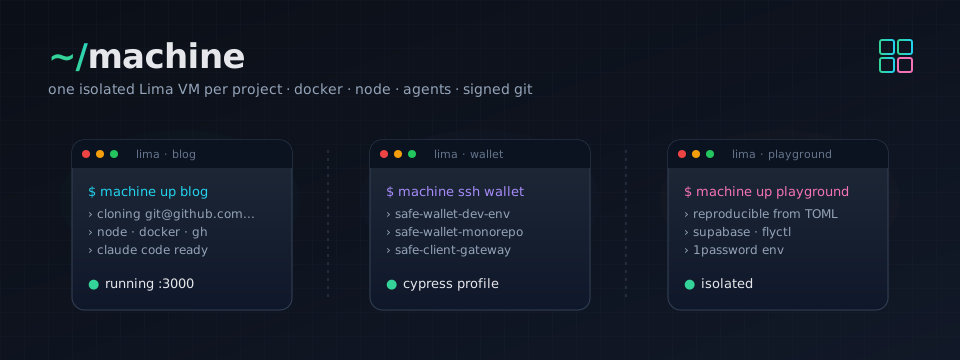
A reproducible Lima VM per GitHub project, with Docker, Node, agent CLIs (Claude Code, Codex), GitHub CLI (gh), signed git, and tool profiles (e.g. Cypress, Playwright, Supabase + flyctl, modern CLI tools) you opt into per project. Each project lives in its own VM so they can't see each other and the host filesystem isn't mounted.
Claude Code comes pre-installed with the official marketplace and these plugins enabled: frontend-design, superpowers, github, typescript-lsp, security-guidance, commit-commands, chrome-devtools-mcp, supabase. Permission defaultMode is set to auto.
Install
brew install katspaugh/machine/machine
The formula pulls in lima (2.0 or newer is required — template composition and mode: data provisioning don't exist in 1.x) and [email protected]. The tap repo is katspaugh/homebrew-machine; each release is pinned to a tagged tarball + SHA256. See docs/TAP.md for the release runbook.
Prefer to run from a clone (dev mode)? Skip the brew install and:
git clone [email protected]:katspaugh/machine.git ~/Sites/machine
~/Sites/machine/bin/machine doctor
In dev mode projects.toml lives at the repo root; under brew it lives at ~/.config/machine/projects.toml (override with MACHINE_CONFIG_DIR).
Nix
The repo is also a flake — no Homebrew needed:
nix profile install github:katspaugh/machine   # install
nix run github:katspaugh/machine -- doctor     # or run one-off
The flake pins its own Lima (≥ 2.0) and Python from nixpkgs-unstable. Pin a release with github:katspaugh/machine/v0.2.0.
Prerequisites
- An SSH key on the host, served by an agent the VM can forward. Either:
- macOS Keychain (default):
ssh-add --apple-use-keychain ~/.ssh/id_ed25519 - 1Password: enable 1Password → Settings → Developer → Use the SSH agent —
machinedetects the agent socket and forwards it automatically (see SSH agent below).
- macOS Keychain (default):
- That key registered as a signing key on GitHub (Settings → SSH and GPG keys → New SSH key → Key type: Signing).
- Host
git config --global user.nameanduser.emailset (or override viaGIT_NAME/GIT_EMAIL).
Run machine doctor to verify everything resolves.
Setup
No setup needed for a scratch VM — machine up launches a base VM nameddefault out of the box (and machine up <name> offers to create an empty
VM under any name). Add a config when you want repos cloned or profiles:
machine init                  # writes ~/.config/machine/projects.toml from the bundled example
$EDITOR ~/.config/machine/projects.toml
(In dev mode: cp projects.toml.example projects.toml && $EDITOR projects.toml from the repo root.)
Example projects.toml:
# Projects without `profiles` get the base VM only. To opt every project
# into a profile by default: default_profile = "cypress"

[blog]
repos = ["[email protected]:you/blog.git"]

# Multi-repo: sibling-clones in one VM. The first is the "primary" —
# `machine ssh wallet` opens at its directory.
[wallet]
profiles = ["cypress"]
repos = [
  "[email protected]:you/safe-wallet-dev-env.git",
  "[email protected]:you/safe-wallet-monorepo.git",
  "[email protected]:you/safe-client-gateway.git",
]

# Multiple profiles stack.
[playground]
profiles = ["cypress", "supabase-fly"]
repos = ["[email protected]:you/playground.git"]
How it works
machine up <project> generates a tiny Lima template in .build/<project>/lima.yaml:
base:
- <repo>/templates/cypress.yaml     # one entry per profile (reversed)
- <repo>/templates/base.yaml        # the whole base VM, declaratively — listed
                                    # last so its provisioning runs first
Lima merges the stack (base: composition), boots the VM, and runs the
provisioning declared in the templates: provision/*.sh scripts andmode: data dotfiles, applied by cloud-init on every boot — so
re-provisioning is just machine down && machine up. Your git identity and
signing key flow in as Lima params (--set) at create time and render into~/.gitconfig inside the VM. Ports: Lima auto-forwards any listening guest
port to 127.0.0.1 on the host.
To update the toolchain in place: machine down <p> && machine up <p>
(provision scripts re-run; apt picks up new versions). To start truly fresh:machine destroy <p> && machine up <p>. Changing your git identity or
signing key requires a recreate (params are fixed when the VM is created).
SSH config
Lima writes a per-VM SSH config at ~/.lima/<project>/ssh.config. Add one line to ~/.ssh/config:
Include ~/.lima/*/ssh.config
Then ssh lima-<project> works everywhere.
Quickstart
machine up                 # zero-config: creates + starts a base VM named "default"
machine up blog            # creates + starts + provisions VM "blog", clones the repo
machine ssh blog           # interactive shell, cwd = ~/code/blog
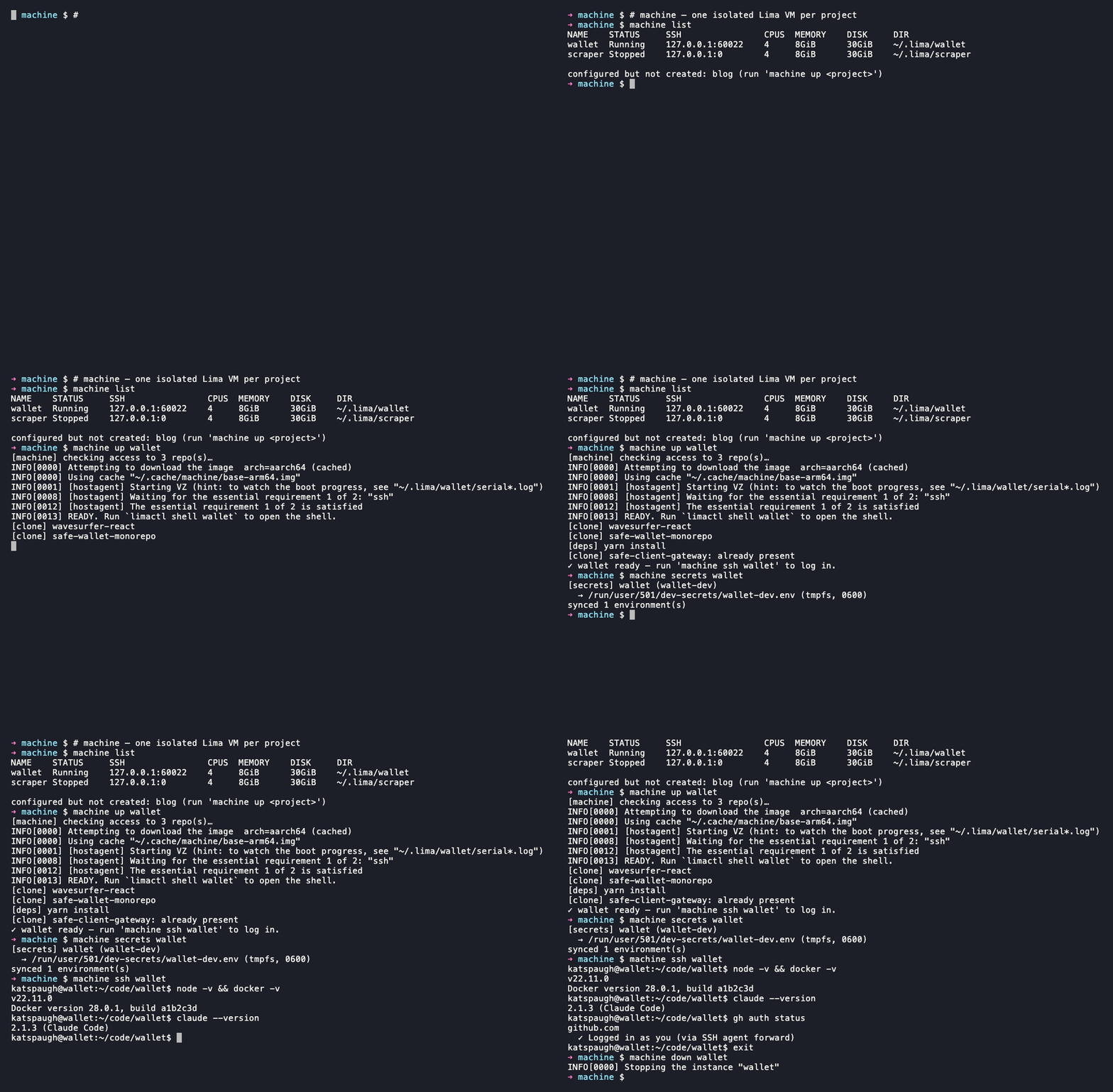
The first up bakes a provisioned base disk into ~/.cache/machine (one-time per
template/provision change); subsequent boots reuse it. limactl start blocks
until provisioning finishes — on failure it points you atlimactl shell <vm> sudo tail -100 /var/log/cloud-init-output.log.
Inside the VM, each repo is at ~/code/<repo-basename>/. JS deps are installed automatically on first clone (yarn / pnpm / npm, picked from packageManager in package.json). For env vars, drop a .env file in the project — Node's dotenv (or your framework) reads it directly. For secrets you'd rather not write to disk, see 1Password env injection.
Host browser → VM web app: Lima auto-forwards any listening guest port to 127.0.0.1 on the host.
IDE integration (VS Code, Cursor, JetBrains Gateway)
With the Include line from SSH config in place, any IDE that reads
SSH config sees every VM. The host alias for a project is lima-<project>. In VS
Code → Remote-SSH: open the host picker, pick lima-<project>, then open/home/<vm-user>.linux/code/<repo>. Same
flow in Cursor and JetBrains Gateway. Lima's config sets ForwardAgent yes, so commit
signing and gh work in the IDE's integrated terminal just like in machine ssh.
Because Lima owns the config file, it stays correct across up/down/destroy
automatically — there is no host ~/.ssh/config block for machine to manage.
Commands
| Command | What |
|---|---|
machine up [p] |
Create if needed, start, provision, clone the repo(s). Idempotent — re-running re-applies the provision scripts. No name → base VM default; unknown names offer an ad-hoc base VM. |
machine down <p> |
Stop the VM (preserves disk). Re-provision in place with machine up <p> afterwards. |
machine ssh <p> |
Interactive shell (cwd = ~/code/<primary-repo>). |
machine claude <p> |
Launch claude in a tmux session in the VM (cwd = ~/code/<primary-repo>). Detach with ctrl-b d — claude keeps running; re-run to reattach. Exiting claude ends the session. |
machine tab [p] |
macOS: open a new Terminal.app tab connected to the same machine as the current tab (detected from the tab's limactl shell process). Pass a project to skip detection. Bind to a hotkey via Shortcuts.app (below). |
machine run <p> <cmd>... |
Non-interactive command in the VM. |
machine list |
List VMs (limactl list) plus configured-but-not-yet-created projects. |
machine destroy <p> |
Delete the VM. -y skips confirmation. |
machine bake |
Build/refresh the cached base disk in ~/.cache/machine used by up. --force rebuilds even if the cache hash is fresh. |
machine secrets <p> [--repo <r>] |
Render 1Password Environment(s) into VM tmpfs (1Password env injection). --clear wipes them. |
machine init |
Write projects.toml to ~/.config/machine/ from the bundled example. |
machine doctor |
Preflight host checks: lima, SSH agent keys, git identity, signing-key resolution, op CLI note, projects.toml presence. |
Hotkey: new tab on the same machine (macOS)
machine tab looks at the frontmost Terminal.app tab, finds thelimactl shell <project> process on its tty, and opens a new tab
already connected to that machine. It works in tabs opened bymachine ssh and machine claude alike, and never guesses from
titles or state files — the running process is the source of truth.
To bind it to a hotkey:
Open Shortcuts.app → new shortcut → add a single Run Shell
Script action with:/opt/homebrew/bin/machine tab(Use the path from
which machineif you installed differently.)In the shortcut's details pane (ⓘ), add a keyboard shortcut,
e.g. ⌃⌘T. Shortcuts hotkeys are global — pick one that doesn't
collide with other apps.
The first run triggers two one-time macOS permission prompts for the
invoking app (Shortcuts, or Terminal when run by hand): Automation
control of Terminal (to read the tab's tty and run the command)
and System Events (to send ⌘T — Terminal's AppleScript dictionary
has no "new tab" command). Approve both.
Repository layout
machine/
├── bin/machine             # host CLI: renders the Lima stack, drives limactl
├── templates/              # Lima templates composed via `base:`
│   ├── base.yaml           #   the whole base VM (resources, params, dotfiles, base.sh)
│   ├── cypress.yaml        #   one file per profile — points at provision/<name>.sh
│   ├── supabase-fly.yaml
│   ├── files -> ../files   #   symlinks (Lima v2 forbids '../' in file: locators)
│   └── provision -> ../provision
├── provision/              # provision scripts run by cloud-init inside the VM
│   ├── base.sh             #   apt repos + packages, Docker, Node, Claude, npm globals
│   ├── base-user.sh        #   per-user setup (shell, claude plugins)
│   ├── cypress.sh          #   profile scripts, one per templates/<name>.yaml
│   └── supabase-fly.sh
├── files/                  # data placed into each VM via `mode: data`
│   ├── zsh/                #   ~/.zshrc
│   ├── fish/               #   ~/.config/fish/config.fish
│   ├── profile.d/          #   /etc/profile.d snippets (PATH, direnv)
│   ├── direnv/             #   `use op_env` helper for 1Password env injection
│   └── ssh/                #   pre-seeded known_hosts
├── projects.toml.example   # template for your projects.toml (the real one is gitignored)
├── completions/            # bash/zsh/fish completions for the `machine` CLI
├── tests/                  # tests/lint.sh, tests/unit.sh (host); tests/smoke-*.sh (in-VM)
├── assets/                 # README gif/banner + VHS recording script (not deployed)
└── .github/workflows/      # CI: lint + unit
flowchart TB
    user(["You (host)"]) --> projects["projects.toml"]
    user --> cli["bin/machine"]
    cli --> projects
    cli -->|render .build/<p>/lima.yaml| stack["base: profiles… + base.yaml"]
    stack --> tpls["templates/*.yaml"]
    cli -->|"--set .param.gitName/Email/signingKey/shell"| params["Lima params"]
    cli -->|limactl create / start| vm[("Lima VM")]
    tpls --> vm
    params -->|render ~/.gitconfig &<br/>allowed_signers| vm
    vm -->|cloud-init, every boot| prov["mode:data dotfiles<br/>+ provision/*.sh"]
Everything under files/ is data placed into the VM (mode: data entries in templates/base.yaml). provision/*.sh are the scripts cloud-init runs inside the VM on every boot. bin/machine, the templates/, projects.toml.example, completions/, and tests/ are host-side code/config. assets/ contains README media only; nothing under assets/ is pushed to a VM.
What happens on machine up <p>:
- If no fresh base disk is cached,
machinebakes one into~/.cache/machine(a provisioned base VM exported once per template/provision change). - Render
.build/<p>/lima.yaml: abase:stack of the project'stemplates/<profile>.yaml(reversed) plustemplates/base.yamllast, with the cached base disk prepended as the top-priority image. - If the VM doesn't exist,
limactl create --name=<p> --set '.param.gitName=…' …against that template (git identity + signing key arrive as params), thenlimactl start <p>— which blocks until the provisioning probe passes. - cloud-init applies the
mode: datadotfiles and runsprovision/base.shthen the profile scripts, on every boot, idempotently. - Clone the listed
reposinto~/code/<basename>/.
GitHub auth and commit signing both use the forwarded SSH agent — private keys never leave the host; the VM only sees signatures and ssh -A proxied auth.
Provisioning
A profile is a small templates/<name>.yaml + provision/<name>.sh pair. The template
lists the script as a provision: entry; the generated per-project stack composes the
base plus each profile via Lima's base: mechanism. Provisioning is just shell — there
is no separate config format to learn.
- base (
templates/base.yaml+provision/base.sh,base-user.sh) — always applied.
Third-party apt repos (Docker, GitHub CLI, NodeSource for Node), apt packages, Docker,
Node + corepack package managers, Claude Code + its marketplace/plugins, npm globals,
the dotfiles underfiles/, and git identity/signing rendered from params. cypress— Cypress runtime libs + Chrome (amd64) or Chromium (arm64), Xvfb.playwright— OS deps for Playwright's browsers (viaplaywright install-deps);
browser binaries stay per-repo (npx playwright install, no sudo needed).supabase-fly— Supabase CLI (GitHub.debrelease) + flyctl (vendor installer).
To add a profile: copy an existing templates/<name>.yaml, point it at a newprovision/<name>.sh, and reference the profile name in projects.toml. Scripts run as
root by default (mode: system); use mode: user for per-user steps. Keep them
idempotent — they re-run on every boot.
Verifying
bash tests/run-all.sh <project>     # full VM smokes (boot + docker + node + git-sign + …)
bash tests/unit.sh                  # host-side Python unit tests (no VM)
machine doctor                      # preflight host environment
tests/run-all.sh requires a provisioned VM (set MACHINE_NAME=<project> or pass the project as arg 1). tests/unit.sh runs offline.
Shell completion
Bash, zsh, and fish completions ship under completions/:
# bash
echo 'source /path/to/machine/completions/machine.bash' >> ~/.bashrc

# zsh (somewhere in $fpath)
ln -s "$PWD/completions/_machine" /usr/local/share/zsh/site-functions/_machine

# fish
ln -s "$PWD/completions/machine.fish" ~/.config/fish/completions/machine.fish
SSH agent
machine picks the agent to forward automatically: if 1Password's SSH agent socket exists (Settings → Developer → Use the SSH agent), it forwards that — keys never touch ~/.ssh, every signature prompts for Touch ID. Otherwise it forwards whatever the host's SSH_AUTH_SOCK points at — on macOS that's launchd's agent, which serves keys you loaded with ssh-add --apple-use-keychain (passphrase cached in Keychain).
To force the Keychain agent while 1Password's agent is enabled, point ONEPASS_SOCK at a non-socket path (e.g. ONEPASS_SOCK=/dev/null machine up <project>).
For the git signing pubkey, the resolution order is:
GIT_SIGNING_KEY=<literal pubkey string>OP_SIGNING_KEY_REF=op://Vault/Item/public_key— fetched viaop read(requiresopCLI; triggers Touch ID once atuptime)GIT_SIGNING_PUBKEY_FILE=<path>- Host
git config --global user.signingkey— literal pubkey or path to a.pubfile (default; whatever you sign host commits with)
1Password env injection
For project secrets you don't want to write to disk, drop a .envrc in the repo referencing a 1Password Environment ID:
echo 'use op_env <environment-id>' > .envrc
direnv allow
Then on the host:
machine secrets <project>               # syncs every .envrc using `use op_env` in that VM
machine secrets <project> --repo <repo> # narrow to one repo within a multi-repo project
machine secrets reads the Environment from 1Password (Touch ID), pipes the rendered KEY=value pairs into the VM, and writes them to $XDG_RUNTIME_DIR/dev-secrets/<env-id>.env (tmpfs, mode 600, gone on reboot). The op_env direnv helper loads that cache when you cd into the project. No host-side disk path is involved.
Create an Environment in 1Password desktop: Developer → Environments → New. Copy its ID via Manage environment → Copy ID.
Threat model
No host filesystem is mounted. Each project gets its own VM, so a compromise of one project can't reach another's code or env. The host exposes two narrow channels: the forwarded SSH agent (auth + signing — private keys stay on the host, the VM can only request signatures while it's running), and machine secrets pushing rendered 1Password Environments into tmpfs (no disk persistence). A fully compromised VM cannot read the 1Password vault — only the secrets a repo explicitly rendered, and only while that tmpfs lives.
Override knobs
| Env var | Default |
|---|---|
GIT_NAME / GIT_EMAIL |
from host git config --global |
GIT_SIGNING_PUBKEY_FILE |
path to a .pub file (overrides host user.signingkey) |
GIT_SIGNING_KEY |
literal pubkey string (overrides everything) |
OP_SIGNING_KEY_REF |
1Password secret reference for the signing pubkey (e.g. op://Personal/SSH/public key) |
ONEPASS_SOCK |
1Password agent socket path (default ~/Library/Group Containers/2BUA8C4S2C.com.1password/t/agent.sock); auto-forwarded when it exists |
PROJECTS_FILE |
<repo>/projects.toml in dev mode; ~/.config/machine/projects.toml under Homebrew |
MACHINE_CONFIG_DIR |
config-directory location (~/.config/machine by default) |
MACHINE_STATE_DIR |
generated-state location (<repo>/.build in dev mode; ~/.local/state/machine under Homebrew) |
Yorumlar (0)
Yorum birakmak icin giris yap.
Yorum birakSonuc bulunamadi