orchestrator
Health Uyari
- License — License: AGPL-3.0
- Description — Repository has a description
- Active repo — Last push 0 days ago
- Low visibility — Only 5 GitHub stars
Code Basarisiz
- rm -rf — Recursive force deletion command in .github/workflows/check.yml
Permissions Gecti
- Permissions — No dangerous permissions requested
Bu listing icin henuz AI raporu yok.
Orchestrate multiple coding sessions, manage your PRs, AI assisted review handling while you stay in control.
orchestrator




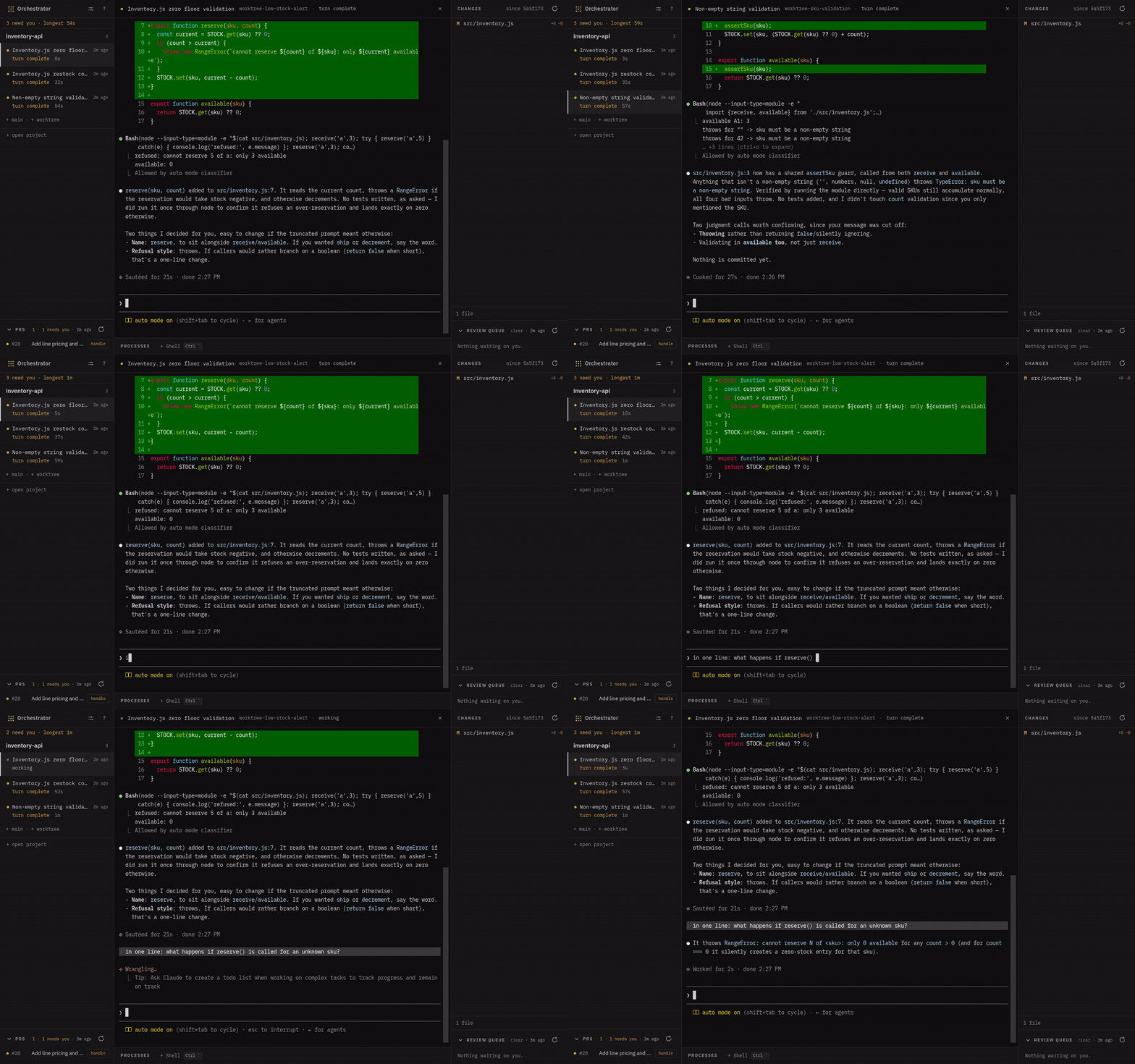
Run several Claude Code sessions over one repository, from a single window — and
see at a glance which ones are working, which are waiting on you, and which of
your PRs have review threads to answer.
Download — a.dmg for Apple Silicon, a .deb and an AppImage for x86-64 Linux, ormise use -g github:kbarendrecht/orchestrator. Install has the rest,
including the quarantine step macOS needs for an unsigned build.
Each session lives in its own git worktree with its own terminal. The daemon owns
every process, so closing the window kills nothing you did not mean to and losing
the browser tab loses nothing at all. Beside the sessions it polls your open PRs,
lists the reviews waiting on you, and drives a review-resolve flow that drafts
replies you approve before anything is posted.
Several repositories go in the same window, each with its own sessions, its own
changed files and its own PRs:
Both recordings are real, not mock-ups. The agents are Claude Code, the diffs are
what they wrote, and the second one is this repository beside a throwaway.mise run demo records them again — docs/demo.md says how.
What it is
A Rust daemon plus a small vanilla-JS web app, shipped as one desktop application
(the daemon runs in-process behind a webview) and also runnable headless in a
browser tab. It hosts Claude Code
sessions; it is not itself an agent.
The pieces:
- A pty host. Every session and managed process runs in a daemon-owned pty
with a replayable scrollback buffer. The web UI is a disposable view of it —
close it, reopen it, attach from a second window; nothing restarts. - A session board. Spawn a session in the main checkout or in a fresh
worktree. A state machine (driven by Claude Code's hooks) shows each as
working, waiting on you, or done, with the build status of any process beside
it folded in. - A PR pane. Your open PRs, polled from GitHub, with review-thread counts and
a one-click resolve flow. - A review queue. Optionally, the PRs where your review is requested, ranked
by a command you configure. - A diff viewer against the merge-base, with an editable pane that warns the
agent when you have changed a file under it. - A CLI.
orchdrives a running daemon from your shell, and from inside a
session, so an agent can open a helper session for a subtask, or ask you a
question and block until you answer. Install lists what it does.
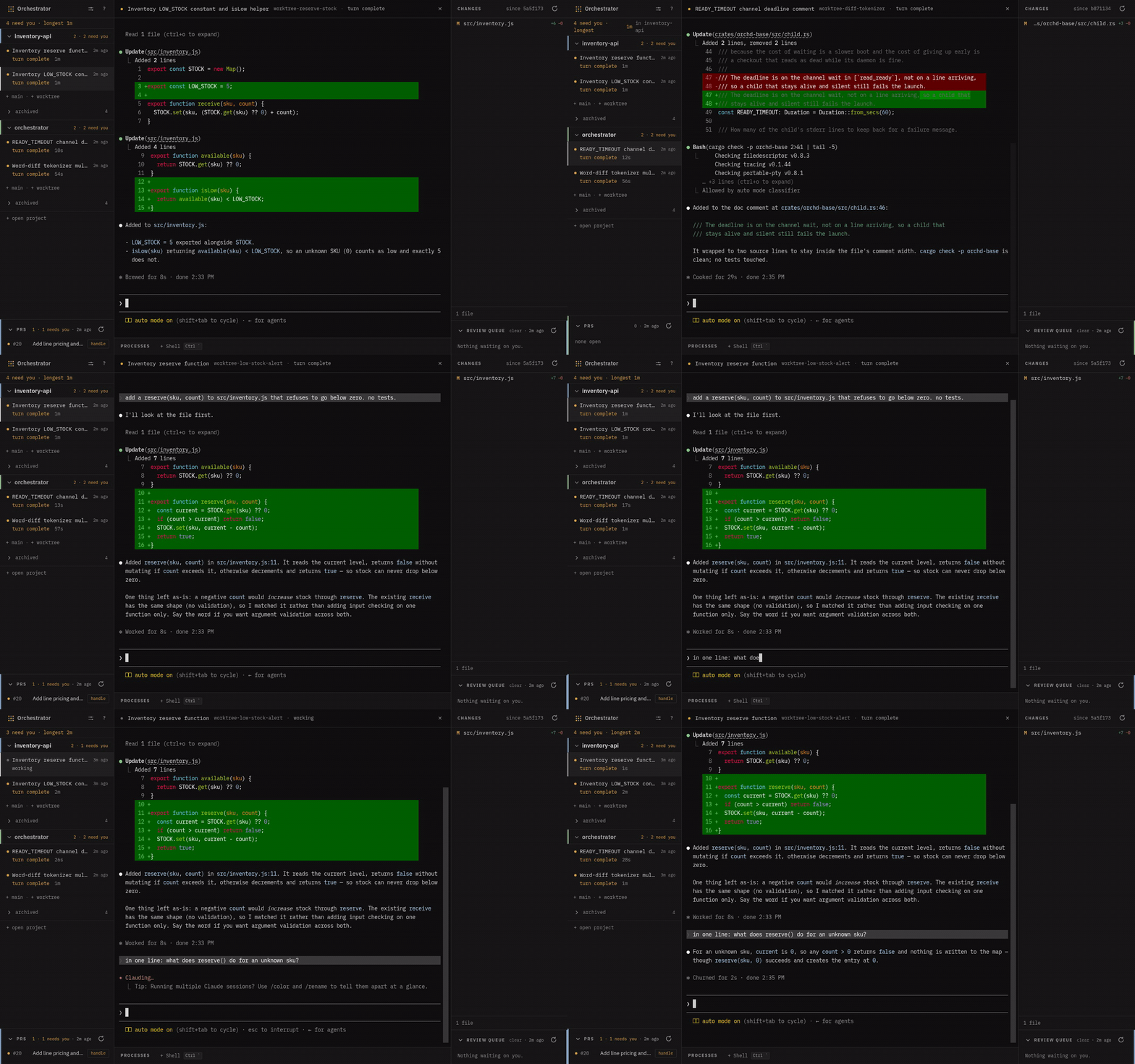
The PR pane and the review queue, which sit under the rail and the changed files:

Each PR row carries the threads still waiting on you and the button that hands
them to an agent. The queue ranks other people's PRs: red where you are the
stopper, amber where somebody asked for you by name, grey for a team request.
The rows in that recording are demo data — seedocs/demo.md for why they have to be.
And the claim that the daemon owns the work, not the window — a changed file
opened as a real diff, then the checkout's daemon killed outright:
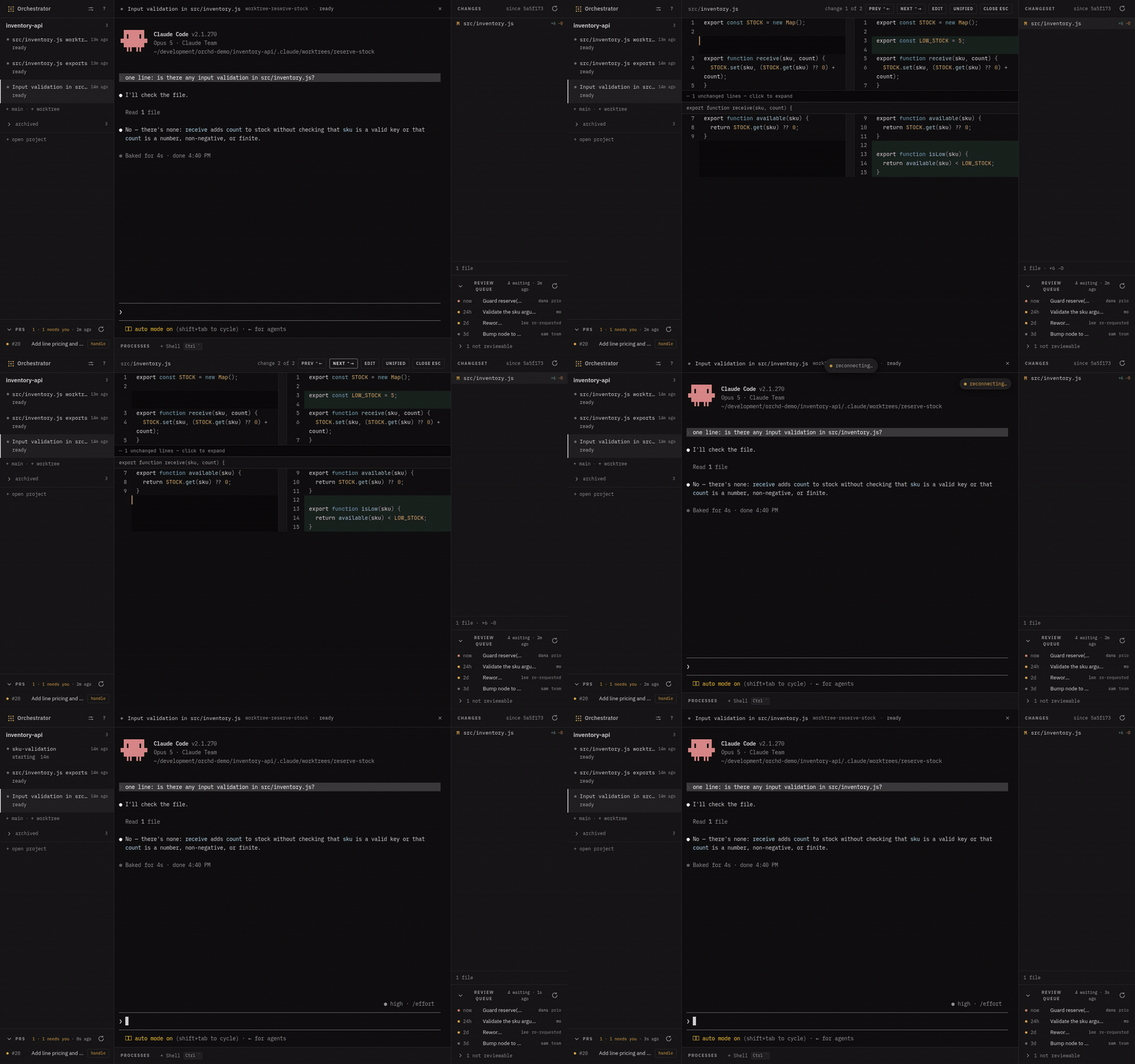
Nothing reloads. The host notices the daemon is gone, starts it again, and hands
the page the new port and token; auto_resume brings every session back with its
conversation where it was.
What you need
| What | Why |
|---|---|
Claude Code (claude on PATH, signed in) |
The daemon spawns it for every session. Without it a session exits the instant it starts, so the daemon says so at boot rather than letting you find out that way. |
| git | Worktrees, branch moves, diffs — all of it. |
| WebKitGTK 4.1 (Linux only) | The desktop window. Ubuntu 22.04 / Debian 12 or newer; 20.04 ships 4.0 and will not work. macOS uses the system WebView. |
gh, signed in |
Reads go out with curl, and for those github_token_file replaces it. Every write (a thread reply, a 👍, a re-requested review) shells gh and uses its credential, so the resolve flow wants it. |
A fresh checkout also needs Claude Code's workspace trust, accepted once in
its dialog. Until then sessions die on spawn.
Nothing here is checked at install time. The daemon checks at boot, names what
is missing and what stops working, and starts anyway.
Install
A release attaches an installer per platform and a tarball beside it. The
installers are the shortest path: a .deb or the .dmg gives you an app in your
launcher, with an icon, and puts orch where the shell can find it. The tarball
is what mise reads, and is still two binaries you place yourself.
orchestrator-desktopis the app. The daemon and the web UI are compiled
into it, so this one binary on its own is a complete install.orchis optional.orch newstarts another session with a prompt,orch killundoes one of its own spawns,orch teardownremoves a clean worktree
through the same checks as the button,orch askputs a question in front of
you and blocks until you answer,orch lslists what is running.orch new --worktreegives a helper session its own tree and branch, which is the
difference between two parallel jobs and two agents sharing one git index.orch <command> --helpdocuments the flags. Nothing requires it.
Every session is told it is there: the daemon hands each spawn a vendoredorchskill, so an agent reaches for the CLI without being told to in a prompt.
Apple Silicon and x86-64 Linux are built.
From an installer
sudo apt install ./Orchestrator_<version>_amd64.deb # Debian/Ubuntu
Puts the app at /usr/bin/orchestrator-desktop, orch on your PATH, and a
launcher entry with its icon. apt remove orchestrator takes all of it away.
The AppImage is the same app for everything that is not Debian: chmod +x
and run it. It carries its own GTK/WebKit, so it is an order of magnitude
larger than the deb, and orch rides inside it: the daemon puts its own directory
on each session's PATH, so an agent can still reach it.
On macOS, open the .dmg and drag the app to Applications. It is unsigned, so
the first launch is right-click → Open rather than a double-click.
Through mise (with the github backend)
mise use -g "github:kbarendrecht/orchestrator"
mise up          # upgrade to the newest release later
mise picks the right asset for your platform, verifies its checksum and release
provenance, and extracts both binaries — so orch lands besideorchestrator-desktop and no second entry is needed. (The older ubi: backend
still resolves these releases, but mise has deprecated it.)
Installed this way, the app upgrades itself: the release nudge carries an
Upgrade button that runs mise upgrade for you, then a Restart button, because the
new build is installed beside the running one and a restart is what picks it up.
Every other install keeps the link to the release instead — a .deb belongs to
apt, and an AppImage or a .dmg is a file you downloaded.
From a release tarball
tar -xzf orchestrator-<version>-<platform>.tar.gz   # → orchestrator-desktop, orch
# macOS: the binaries are unsigned, so clear the download quarantine first
xattr -dr com.apple.quarantine orchestrator-desktop orch
Put them on your PATH (orch only if you want it) and runorchestrator-desktop.
A tarball or a mise install carries no launcher entry, because there is no
installer to write one. The app writes its own on first launch: a .desktop
file under ~/.local/share/applications on Linux, and an~/Applications/Orchestrator.app on macOS, which is what puts it in Finder,
Spotlight and Launchpad. Force it, or write it again after moving the binary, with:
orchestrator-desktop --install-desktop-entry
It points at the binary that ran it and uses the same id the packages do, so
installing a .deb or the .dmg later replaces the entry instead of listing the
app twice. Two things it will not do: write anything for an install that carries
its own entry (the .deb, the AppImage, the .dmg), and write anything from a
build tree, where the shared id would let cargo run shadow a real install.
Because a mise install lives at a version-pinned path, the entry names thelatest symlink beside it where there is one, and is rewritten at the next launch
when the binary has moved. A bundle built this way is also unquarantined, so it
opens on a plain double-click, unlike the unsigned .dmg.
Linux needs WebKitGTK 4.1 at runtime (Ubuntu 22.04 / Debian 12 or newer;
20.04 ships only 4.0 and will not work). macOS uses the system WebView and
needs nothing extra.
After a mise or tarball install, run orchestrator-desktop once from a
terminal. That first launch writes the launcher entry: a Finder and Spotlight
entry on macOS, an application-menu entry on Linux. From then on you can start it
the way you start anything else, and an upgrade keeps the entry pointing at the
build you are running.
Then launch it and point it at a git checkout when it asks (it shows a folder
picker when it has no config, or when the one on record has moved). That checkout
is main; worktrees are cut inside it under .claude/worktrees/. State lives in~/.config/orchd/ on Linux and ~/Library/Application Support/orchd/ on macOS —
move it with ORCHD_CONFIG_DIR.
Configuring it for your repo
The defaults ask nothing of the repo you point at: no review-queue command, no
managed processes, no tracker. You get the session board, PR pane, diff viewer and
worktrees on a bare { "main_checkout": "…" }, and you turn the rest on as your
repo can support it. Everything here is editable in the settings panel and written
back to config.json; changes take effect on restart.
| Setting | Default | What it is |
|---|---|---|
upstream_ref / upstream_remote |
origin/HEAD, origin |
the base every diff and worktree is measured against. On a fork workflow — an upstream remote beside origin — a first run detects it and writes upstream/<default branch> instead, so there is nothing to set by hand. |
reviews_command |
(empty — the built-in queue) | argv printing the review queue as JSON. See below. Empty means the daemon builds the queue itself; set it to use your team's own ranking. |
main_processes |
(empty) | long-running processes shown in the drawer. See below. |
tracker |
none |
where an out-of-scope review point can be filed as a story. Three fields — mcp_server, host and an optional token_env — so pointing it at another tracker is a config edit rather than a release. Its token is not a config key — set ORCHD_TRACKER_TOKEN in the daemon's environment, or let env_source read the checkout's own. It also needs the repo to declare a matching MCP server — see below. |
env_source |
mise |
which tool is asked what a session's own directory exports — mise, direnv, or none. Config file only, not in the settings panel. See below. |
default_language |
English |
the language the agent writes replies and stories in. Prompts and code stay English regardless. |
shared_worktree_paths |
(empty) | directories inside a worktree that are allowed to be symlinks out of it, e.g. a plan dir shared back to main. The editable diff pane refuses every other path that resolves outside the workspace. |
worktree_init / worktree_setup |
(empty) | two commands run in every worktree the daemon cuts itself. See below. |
worktree_retention_days |
60 |
remove the worktree of a conversation not worked in for this many days, hourly, and one that no conversation points at at all. Age is the transcript's last write, not the session's start, so a conversation you kept open for weeks is not old the day after you stop; an orphaned tree is dated by its own directory. The tree, never the row: the session stays in the rail and a resume rebuilds the tree, so this reclaims disk rather than losing work, and it removes nothing the teardown preflight would refuse — a dirty tree, an unpushed commit, a live session or a running process all keep it. 0 turns it off. It exists because claude --worktree removes its own tree when its session ends and never gets to: the daemon owns the pty and kills it. |
The table above is the set most repos touch. The rest are operational, and most
repos leave them at the default:
| Setting | Default | What it is |
|---|---|---|
main_checkout |
(required) | the privileged checkout the daemon manages. The one key with no default; the folder picker writes it on first run. |
worktrees_subdir |
.claude/worktrees |
where worktrees live, relative to main_checkout. Point it at the same place a repo's own WorktreeCreate hook puts them, so the daemon recognises its own worktrees. Kept relative and inside main on purpose. |
port |
7777 |
the loopback port the daemon serves the SPA and API on. Never bound to anything but 127.0.0.1. |
repo |
(derived) | owner/name override, when it cannot be read off the upstream remote. |
github_token_file |
(none) | a 0600 file holding a read-only GitHub token, outside the repo. An alternative to ORCHD_GITHUB_TOKEN or gh auth token. Reads only: the writes go through gh. |
worktree_processes |
(empty) | managed processes for worktree workspaces, the counterpart to main_processes. Empty means a shell is opened on demand instead. |
poll_seconds |
300 |
how often the PR poll runs. One query per period, negligible against the API budget. |
review_timeout_seconds |
240 |
ceiling for a configured reviews_command before the poller gives up on it. The built-in queue is one bounded curl and does not read it. |
story_timeout_seconds |
300 |
ceiling for the borrowed story-filing agent — the one timeout in the daemon, because its caller is a blocking request rather than a rail entry someone is watching. |
allow_several_in_main |
false |
let main hold more than one live session. Off because one checkout is one working tree and one git index: two agents there share both, the changed-file pane merges their edits without saying who wrote what, and one agent's git add stages the other's work. Moving main's checkout still refuses while any session is live in it. Editable in the settings panel. |
auto_resume |
true |
relaunch sessions that were live when the daemon last went down, with --resume, so a crash costs the scrollback rather than the conversation. |
forge |
github |
which forge the repo lives on. Only GitHub is implemented, and the key is the seam a second one would be added behind — not a config switch that would turn one on. crates/orchd-repo/src/forge/mod.rs lists the four things that sit outside the trait and would have to move first. |
workspace_notes |
(empty) | what to tell an agent whose conversation was just moved into a workspace, keyed by the kind it landed in. The daemon states the factual half (which branch, which directory); this is the half only the repo knows. |
An unknown key is named and then ignored — a misspelling does not error, it
just leaves the default in force, and the daemon says which key it did not know
on the WARN line at start-up. Ignoring it is deliberate: a config this build
rejects costs you the daemon, and an old file with a stale key must still load.
Fork workflow, or not
Both are supported and neither needs configuring by hand.
Not a fork — one remote, branches pushed to it. This is the default:origin/HEAD is the base, so diffs and worktrees are measured against whatever
your remote's default branch is, whether that is main, master or something
else. Nothing to set.
A fork — origin is yours, upstream is the one PRs are opened against. A
first run sees the upstream remote and writes upstream/<its default branch>
into config.json itself. If you add the remote later, set the two keys in
settings; naming the remote in upstream_ref is enough, since the other is
inferred from it.
Either way the base ref is one setting and both halves of it agree, which is whatgit::detect_base and the reconciliation in Config::parse are for.
The review queue
The daemon builds one itself, so the pane works on a fresh install with nothing
configured. It asks GitHub for the open PRs in your repo where your review is
requested — the same token and the same curl the PR pane already uses, so a
checkout that can list its PRs can show its queue. No script, no node, no gh.
Four rules, and that is all of them. They are deliberately few, because the
ranking this replaced guessed at stopper and prio labels, and a label is a
convention one team agreed to: ranking on them ranks wrongly in every repository
that has never heard of them.
- What is in it: whatever GitHub answers for
review-requested:@me, which
includes a team you are in. - Age orders it, oldest first. How long somebody has waited is true regardless
of how their team labels work. - Amber means you were named. A request that went to a team you belong to
stays grey and saysteam— it is waiting on the team, not on you. - Draft, conflicting and failing rows sink below a "not reviewable" fold.
Those are waiting on their author.
Your team's real ranking wins if you have one. Set reviews_command to a
script, a mise task, anything that prints the JSON indocs/reviews-json.md, and the built-in never runs. That
contract is unchanged and carries more than the built-in fills — label ranks, a
changed-file count — so nothing that already works has to be rewritten.
A non-zero exit from such a command shows the pane as degraded with its own
stderr, deliberately distinct from "no reviews", because silently showing an empty
queue when the source is broken is the failure that would actually cost a
colleague a day. A checkout with no GitHub repository behind it reads off
instead: there is nothing to ask about.
Filing stories in a tracker
With tracker set, a review point that is fair but out of scope can be filed as a
story and answered with its id, instead of a promise nobody is holding.
The tracker is reached over MCP, by an agent the daemon borrows for the value.
So two things have to be true beyond the token, and both live in the repo you
pointed the daemon at, not in its config:
trackerinconfig.jsonis three fields, and one shape only:{"mcp_server": "shortcut", "host": "app.shortcut.com", "token_env": "SHORTCUT_API_TOKEN"}. Absent means no tracker, and a bare name is refused with
the object to write. It is not settable from the settings pane, which shows it
read-only: a per-site host is not a dropdown, and a partial write would replace
what you hand-edited..mcp.jsondeclares a server named for the tracker, andtracker.mcp_server
in the config is that name. The daemon approves that one server for the sessions
it spawns — never all of them, since a repo may declare a dozen and a
story-filing agent has business with none of the others. Remote or stdio makes no
difference: it is a name in that file either way.tracker.token_envis optional. Name it and the daemon resolves the variable
and pushes it into the agent's environment, so the token never reaches a prompt or
a transcript. Leave it out and the MCP server authenticates itself — which is what
the official Linear and Atlassian servers do, both being OAuth-first. Naming one
is a preference: it is fewer logins.- A tracker skill (
.claude/skills/*/SKILL.md) holds the team id, the workflow
state, the story type and the epic routing. Those are yours and they change
without this project changing, which is why they are not settings.
Get the first one wrong and Claude Code drops the server silently — the tool is
simply absent and the run burns its whole timeout mid-review. That is why the
daemon checks at boot and says so.
The environment a session gets
A session gets the daemon's environment plus whatever env_source says the
session's own directory exports. That second half exists because the first is not
what you think it is: the daemon's environment is whatever started it, and started
from a desktop launcher that is the systemd user manager's, which holds no
checkout's variables at all.
It stays hidden because typing claude in that checkout still works: mise activate exports at a shell prompt, and an app has no prompt. So anything that
expands a variable from the process environment — an .mcp.json header, a tool a
session shells — gets the empty string and fails in its own words rather than in
words about PATH.
So the daemon asks the tool directly, per spawn, in the session's own directory:mise env --json or direnv export json. Two things worth knowing:
- Every failure is silent by design. No tool, no config, no trust, unreadable
output: the session starts with what it had. A missing variable is a degraded
session; a refused spawn is a lost one. An untrusted config is the one case that
logs a warning, because the variables exist and the session is not getting them. - Trust is per config file. mise refuses a
mise.tomlit has not been told to
trust, and a worktree is a new path — so a fresh worktree can needmise trust
before its sessions see anything.worktree_setupis the place to put that.
Set env_source to none if the daemon is already started with everything the
checkouts need.
Worktree hooks
The daemon cuts and removes worktrees itself for PR worktrees, resumes and
relocated layouts. It runs your repo's own hooks around that.
Creating. Your repo's WorktreeCreate hook is asked first and the daemon
adopts the tree it printed, then puts that tree on the branch it needs; every way
that can decline falls through to the daemon cutting its own. Then these two run,
in order, with cwd set to the new worktree:
| Setting | For |
|---|---|
worktree_init |
the tree as a checkout: basing it on a fresh upstream, triangular push |
worktree_setup |
what it needs beside the code: symlinks back to main, generated config |
Both stand in for what your repo does at WorktreeCreate. Two rather than one so a
repo that splits that work points each setting straight at the script it already
has. Nothing here stands in for SessionStart, which fires for a daemon-cut tree by
itself, so whatever your repo hangs off that event still runs.
Both are non-fatal and the second runs even if the first failed: a tree that is
merely un-based is still worth linking. A relative script path resolves against the
main checkout, not the worktree, since the worktree may not carry it yet.
Removing. Teardown runs your repo's WorktreeRemove hooks, then git worktree remove and git worktree prune, which no-op when the hook already did the job. A
refusal is reported as it stands: never --force, never a recursive delete, since
a worktree can hold symlinks back into main and following them destroys the main
checkout.
Declaring a managed process
A managed process is a long-running command for the main checkout — a build
watcher, a container stack — with the output patterns that decide whether the rail
reads it as healthy or failing:
"main_processes": [{
  "name": "watch",
  "command": ["npx", "ng", "build", "--watch"],
  "failure_patterns": ["Error:", "ERROR in", "error TS"],
  "ok_patterns": ["bundle generation complete"],
  "autostart": false
}]
ok_patterns is the part worth getting right: it is what clears a failure. A
watcher whose success line is missing from the list leaves the rail stuck onbuild failing after you have already fixed the compile.
stop_command, when the command is a client rather than the process. Empty
for anything ordinary, where killing the pty kills the process. Set it where that
is not true:
"command": ["docker", "compose", "exec", "-T", "assets", "pnpm", "run", "build-watch"],
"stop_command": ["docker", "compose", "exec", "-T", "assets", "pkill", "-f", "build-watch"]
docker compose exec runs the watcher inside the container, and docker does
not signal it when the exec client goes away — so every start stacks another one
up in there, with nothing reaping them. The stop command runs in the workspace's
directory, bounded, immediately before the pty is killed, on every path that
means stop: the drawer's close, a restart, and the daemon shutting down. A failure
is logged and the pty is killed anyway.
Troubleshooting
- Every session dies the instant it starts. Claude Code's workspace trust has
not been accepted for that checkout, soclauderefuses. Accept it in the dialog
once, per checkout. - It will not start: "Orchestrator is already running". One instance at a time,
held by a pid file in the config dir, because a second one would spawn sessions
into the same worktrees and take over the hook settings. Close the running app. - The review pane reads degraded. A configured
reviews_commandexited non-zero and the
pane is showing its stderr. Deliberately distinct from an empty queue, which is
what "no reviews" looks like. - A setting does nothing. An unknown key is ignored. The daemon warns at
start-up with the key it did not know (orchd.log, or the terminal); check the
spelling against the tables above. - It is not in Finder, Spotlight or your launcher. A mise or tarball install
writes its entry on first launch, so start it once from a terminal. If it is
still missing, runorchestrator-desktop --install-desktop-entry, which says
where it wrote. - Started from the launcher, it cannot find
ghorclaude. The PR pane
reports no credential and a session dies on spawn. An app started by Finder or a
desktop entry does not inherit your
shell'sPATH: macOS hands it/usr/bin:/bin:/usr/sbin:/sbin, which holds
neither Homebrew nor mise. The app asks your login shell for itsPATHat
startup and adopts it, so this should heal itself. If it does not, yourPATHis
probably set somewhere an interactive login shell does not read. - A session cannot see a variable your shell has. The daemon's environment is
not your shell's.env_sourcebridges that per spawn, and an untrustedmise.tomlis the one case that logs a warning instead of degrading quietly. See
The environment a session gets.
How it works
- A host, and a daemon per checkout.
desktop/is a
Tauri v2 shell that runshost::serveon a loopback
port, spawns oneorchdchild per open checkout, and points the webview at the
host. The page comes from the host; every/api/*call goes to the checkout's
own child, which mints its own token. No sidecar, no fixed port, nothing left
running. The window is
frameless and the web UI draws its own titlebar (real traffic lights on macOS);
window controls go over the same authenticated HTTP as everything else, never
Tauri IPC. - Sessions are the daemon's. It spawns every one with
--session-id, so its
own id and Claude Code's are the same value and hook correlation needs no
mapping. It never adopts a shell-started session — that exactness is the point. - Hooks drive the state. Claude Code's hooks (
SessionStart,PostToolUse,Stop,SessionEnd, …) POST to the daemon, which is how a row knows whether it
is working or waiting. The daemon's hook settings merge with the repo's own,
so your project hooks keep firing. - Worktrees. The daemon makes the tree, at whatever layout your repo uses: it
asks your repo'sWorktreeCreatehook first and adopts what that hook made, cuts
its own withgit worktree addwhen the hook declines, then runsworktree_init
andworktree_setup, then starts a session in the tree. It used to hand the cut
toclaude --worktreeat Claude Code's own layout, which pinned that session into
worktree isolation — and that pin refuses writes as well as git, so a scratch dir
shared into the tree by symlink could not be written from either side of the link.
The isolation the daemon needs instead is its own, on the agent's Bash, and it is
git-only: see the push guard below. Teardown is a seven-check preflight, then your
repo'sWorktreeRemovehooks, thengit worktree remove. Neverrm -rf, because
a worktree is full of symlinks into main. - The review flow, and there are two. The rail's
handlebutton starts/orchd:handle-reviewin a pane: one agent in the PR's worktree, reading the
threads, applying what is right, asking you about the rest, and drafting replies
it posts only on an explicit go. That is the default because the other one is not
finished. The other one is the review session — the same agent, in the same
worktree, but it proposes a stance per thread and the overlay puts those on
cards; it then writes the code and drafts each reply, which the daemon posts on
its own credentials. It is the second review item in a PR row's menu. Resolving
a thread stays your button either way, by design. fix-pris hand-triggered, never automatic. The guards that protect the
machine and the repo remain (authorship, one run per PR, a busy branch, the push
guard below); the automatic trigger does not. It is a gate you read before starting, not one that trips
while you look elsewhere.
The web UI is compiled into the binary with include_str!, so it can never drift
from the daemon serving it — and a change under web/ needs a rebuild.
Security
Bound to 127.0.0.1 only, with Origin/Host validation and a per-start token
required on the WebSocket and every mutating route. Hook endpoints are exempt from
the token, because a hook Claude Code spawns cannot easily carry a per-start one.
They are confined to their own prefix and a schema that can only ever update state.
GitHub reads resolve ORCHD_GITHUB_TOKEN, then a 0600 github_token_file,
then gh auth token, and read scopes are all they need. Writes are the other
half: a thread reply, a 👍 and a re-requested review shell gh and use gh's own
credential, whatever you set here. So a read-only token does not make the daemon
read-only, and the resolve flow wants gh signed in.
The trust boundary is your user account, not the process. Loopback keeps the
network out and the Origin check keeps other web pages out. But GET / returns
the page with the token substituted into it and is deliberately not gated, so any
process running as you can read the token and then hold everything — including the
pty attach, which means typing into a live agent's terminal. Do not run this on a
machine you share with people you do not trust.
That is a trade rather than an oversight: on a single-user machine a hostile local
process can already ptrace the daemon, and gating the page would break the token
discovery the tooling depends on. It is written down because the alternative is a
sentence that earns trust it has not got.
Agents get narrower credentials than the SPA does, and that part is enforced: a
session asks with ORCH_ASK_TOKEN, good for its own session's routes, and a review
session posts with ORCH_POST_TOKEN, good for one route on one PR. Neither is the app
token — which matters because those are the runs that read other people's review
comments.
There is a PreToolUse guard on the agent's git (orch guard push) with three
rules: no lease-less --force, no push to the base branch, and no git aimed out of
the worktree the session works in. The third replaces the isolationclaude --worktree used to pin, and it is deliberately narrower — git only, never
your writes, because main's branch and its recorded occupant are what the daemon
needs protected and a shared scratch dir is not its business.
The third rule is a question rather than a wall: its refusal names orch outside <path>, which puts "may this session run git there?" to you through the same ask
box every other question uses. A yes is remembered for that folder and what is
under it, for the rest of that session, so the next checkout is a question of its
own. Nothing persists it, so a restart asks again. Read all three as a
mistake-catcher, not a control: it sees Bash tool calls only, so gh, an MCP
git server, or a script the agent writes and then runs all go around it. It is there
because a fix-pr run force-pushes with nobody watching, and that is the mistake
worth catching — not because an agent could be prevented from pushing.
Developing
mise install
mise run deps                            # tools/node_modules; every task that
                                         # needs it depends on this already
git config core.hooksPath .githooks      # once per clone
git config blame.ignoreRevsFile .git-blame-ignore-revs   # once per clone
cargo test --workspace                   # the four crates
mise run check-web                       # type-check and lint the SPA + its graph
cargo run -p orchestrator-desktop        # the app: it hosts the page and spawns
                                         # one orchd per checkout
mise run shot                            # screenshot the running app (drives Chrome)
mise run fixture                         # a throwaway PR to drive the review flow
cargo run -p orchd-serve --bin orchd -- --main /path/to/your/repo runs one daemon
headless and prints a tokened URL. The binaries live in orchd-serve since the
split, so --bin orchd from the root no longer resolves. mise run shot drives Chrome while the
app runs in WebKitGTK, so it is good for layout and not the last word.
CLAUDE.md has the traps as one line each anddocs/traps/ what each one cost, TODO.md what is open,docs/assumptions.md what the daemon assumes and what breaks
when each is false, and docs/spec.md the requirements the (§N)
comments point at.
Releases are CalVer (year.month.n), and mise run release cuts one: it bumps
the version, waits for check to go green on the commit you are on, then
commits, tags and pushes. The waiting is the point — check is the only thing
that runs the suite on macOS, and a tag pushed before it answers may publish
nothing. The version lives in [workspace.package], desktop/tauri.conf.json andCargo.lock; the crate manifests say version.workspace = true, so cargo refuses
a disagreement. The workflow refuses a tag that disagrees with the version.
Layout
Four crates, split so cargo enforces the layering rather than a script counting
it. Each depends only on the ones above it; docs/crate-split.md has why, what it
cost, and why the runtime core is still one crate.
crates/orchd-base/    the primitives. Nothing here may import anything below.
  git/            every git call, one file per seam: exec (the timed runner),
                  status, refs, unpushed, worktree, bank, review
  pty.rs          portable-pty host, and the scrollback ring every pty keeps
  proc.rs         run a child with a deadline, portably (no coreutils `timeout`)
  child.rs        the protocol for a checkout's daemon: launch, ready line, observer
  model.rs        the shared value types: ChangedFile, FileSet, DiffFile, Bank
  proposal.rs     what a review session proposes: Stance × Mode, positions, stories
  guard.rs        the git rules (push blast radius, reach), run by `orch guard push`
  edit.rs         file read/write with containment and conflict detection
  headroom.rs     the pre-spawn resource check every session goes through
  window.rs       Chrome, and the handle the desktop shell registers
  timing.rs       per-start phase lines: exec counts, share of the time, slow git
  secret.rs       one fresh token, and the leaf that broke a cycle to get here

crates/orchd-repo/    one checkout, described. No session state lives here.
  config.rs       config file, defaults, the tracker and its credential
  launch.rs       the environment and argv a session's process is built with
  forge/          the Forge seam: trait + dispatch (mod.rs), agnostic model
                  (model.rs), the GitHub impl (github.rs, github_write.rs)
  diff.rs         numstat, hunk parsing, word-level LCS
  patch.rs        what git says changed: the numstat parser and the dirty list
  skills.rs       the vendored skills in skills/, written out as the plugin dir
                  every spawn is handed with --plugin-dir
  reviews.rs      review queue: the built-in GitHub search, or reviews_command
  env_source.rs   where a session's own variables come from: mise or direnv, per spawn
  migrate.rs      repairs a config this build could not otherwise read
  instance.rs     the one-daemon-per-checkout flock
  machine.rs      what the daemon needs from the machine, warned about at boot
  logging.rs      the file log, since a launcher-started app has no stdout

crates/orchd/         the runtime core: the `orchd` library, what the daemon knows.
  api.rs          HTTP surface and the origin/token guards
  model.rs        Workspace / Session / Process, State, ArchiveState
  relocate.rs     the swap, the move out of main, and the conversation that travels
  review_api.rs   the review overlay's routes: the threads, the proposals, one
                  thread's reply, the hand-off
  state.rs        the daemon's owned state, snapshots, reconcile, durable writes
  store.rs        session record persistence, orphan reaping
  spawn.rs        session / worktree / process spawning, and worktree_setup
  worktree.rs     cutting a tree and the hooks that finish it; teardown preflight,
                  archive, revive, removal
  spare.rs        the pool of one: a worktree cut before anybody asks for one
  triage.rs       the review session's spawn, and the gates a worktree must pass
  post.rs         one thread's outward words: the story, the reply, the reaction
  fix_pr.rs       automation state, the fix-pr guard table, a run's verdict
  story.rs        filing a tracker story for a fair-but-out-of-scope point
  update.rs       both upgrade bars: is Claude Code behind, and which mise tool
                  installed *us*, so the app can upgrade itself
  health.rs       a managed process's output → health
  names.rs        the worktree names the rail offers

crates/orchd-serve/   the daemon: the server, and everything it starts.
  lib.rs          start, the router, the pollers, startup recovery
  host.rs         the page, the asset routes, the checkout list, the window commands
  hooks.rs        hook receiver and the generated settings file
  ws.rs           event stream + pty attach
  firstrun.rs     judging a folder, reading a repo, writing its config, the recents
  main.rs         the `orchd` binary; bin/orch.rs is the `orch` CLI a session gets

web/            the SPA (vanilla, xterm.js vendored) — one module graph under js/,
                booted by app.js; the *.d.ts files are generated from the Rust
                structs, one per crate that exports any
desktop/src/    the Tauri shell: main.rs (window, boot, splash), launcher.rs (the
                .desktop entry and the macOS .app bundle), login_path.rs (the
                login shell's PATH, adopted before the runtime exists)
Licence
Copyright © 2026 Kars Barendrecht.
AGPL-3.0-only. Use it, run it, change it. If you distribute it, or run
a modified version as a network service, the source has to go with it under the
same terms.
The network clause is not decoration here. In the desktop app it does nothing —
the daemon binds loopback and you are both the operator and the user, so the
obligation is to yourself. It has teeth in the headless mode, which binds a
port and prints a URL: point that at an interface your team can reach and it is a
network service, and this licence is what keeps a hosted variant open.
The vendored web assets are not ours: xterm.js, PrismJS and four font families,
all MIT or OFL-1.1. THIRD-PARTY.md lists each one with its
version and the notice its licence asks to travel with it.
Yorumlar (0)
Yorum birakmak icin giris yap.
Yorum birakSonuc bulunamadi